Hyperlink Injection in Friend Invitation Emails
A user could set their first name to a URL, and invitation emails sent through the referral feature would render that name as a clickable hyperlink. An attacker could therefore send phishing links to recipients from the company's own email domain.

- Triaged in 5 days
- Fixed in 7 days
- Paid in 8 days
- Disclosed after 32 days
Description
A user can change their name to a URL in order to send email invitations containing malicious hyperlinks.
Steps to Reproduce
- Create a new Instacart account with the first name
http://example.com - Navigate to https://www.instacart.com/store/referrals
- Send an email invitation to an email address that you control
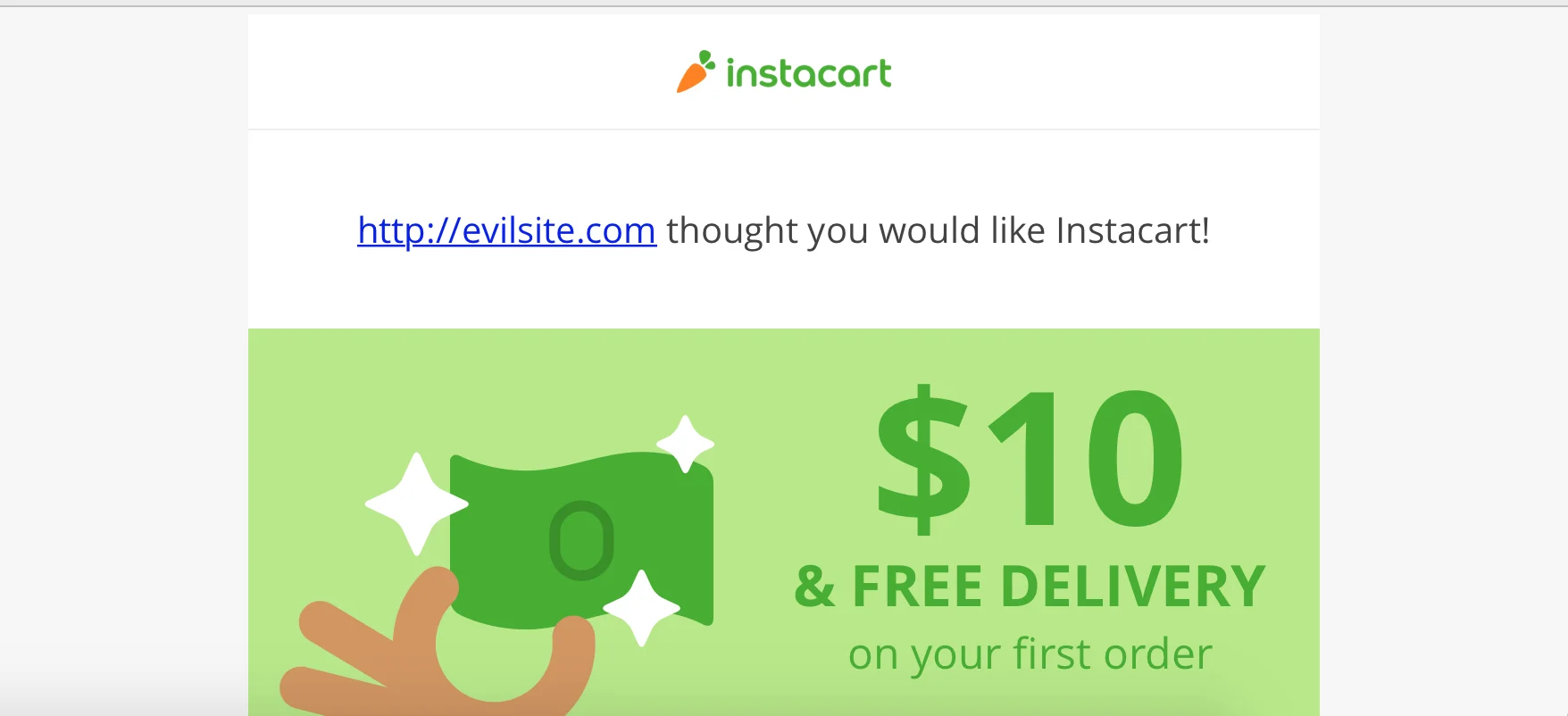
You will receive a new email with the first word being a link to a potentially malicious site.
Consequences
This permits users to send malicious/phishing links to potential clients. It could also have an effect on how spam filters treat instacart.com emails.
Attachments
What the report shows
The target is Instacart's friend referral feature, reachable at the referrals page of the store. The feature lets a signed-in user send an email invitation to an address of their choosing, and the invitation email is personalised with the sender's first name.
The researcher found that the first name is not validated as a name. It is placed into the outgoing email, and the email client renders it as a hyperlink. By setting the first name to a URL, the sender controls where that link points.
The reproduction steps are short:
- Create a new Instacart account with the first name
http://example.com - Navigate to https://www.instacart.com/store/referrals
- Send an email invitation to an email address that you control
The result, in the researcher's words, is a new email "with the first word being a link to a potentially malicious site". The report includes a screenshot as an attachment.
The report was disclosed on 12 September 2016 with a bounty of 100.00 USD. No severity rating or CVSS score is given, and the report does not describe a fix.
Root cause
The likely cause is that the first name is stored and then interpolated into the invitation email's HTML without being treated as text. Because the value is a URL, the mail template or the mail client's link detection turns it into an anchor, so the recipient sees a clickable link whose destination the sender chose. The report does not show the template or the exact rendering path, so whether the link is produced server-side or by the mail client's autolinking is not established.
Impact
The report's own framing is that users can send malicious or phishing links to potential clients, and that this could affect how spam filters treat instacart.com emails. The practical value to an attacker is trust: the message arrives from the service's own referral flow, addressed to a real recipient, and the link sits where the sender's name would normally be. The report does not claim that credentials or accounts were compromised, and it does not demonstrate a redirect on the Instacart site itself.
How this kind of bug works
User-controlled text that ends up in an email, a chat message, a notification or any other rendered surface can be interpreted as a link if the rendering layer autolinks URLs. Two mechanisms are common. In the first, the application builds HTML and inserts the value into an attribute such as href or into visible text without escaping, so the value can become markup. In the second, the value is escaped correctly but the mail client or chat client detects a URL in plain text and wraps it in an anchor. The second case is not cross-site scripting, but it still lets the sender choose a destination that appears inside a trusted message.
The same class appears wherever a profile field is echoed into outbound content: display names, company names, signatures, invitation subjects, share messages. The defence is to treat every such field as untrusted: escape it for the output context, avoid placing it in URL-bearing attributes, and consider restricting or normalising values that look like URLs or markup before they are stored.
How to test for it
- Identify features that send content to a third party on your behalf: invitations, referrals, share-by-email, notifications, calendar invites.
- Find every profile field that appears in that content: first name, last name, display name, company, job title, custom message.
- Set one field at a time to a benign URL you control, such as a page on a domain you own, and trigger the message to an address you control.
- Inspect the raw message source and the rendered message. A positive result is an anchor whose destination is your URL, or your URL rendered as clickable text in a position where a name should appear.
- Repeat with a value containing HTML markup to see whether it is escaped, and with a value containing a URL plus trailing text to see how much of the field becomes the link.
Common false positives: the value is escaped and shown as literal text with no link; the mail client autolinks any URL in any message, which is client behaviour rather than a server flaw; the link points to a domain the application controls; or the field is only visible to the sender. Distinguish carefully between a link the application created and one the recipient's client created, because the fix and the impact differ.
How it is fixed
Escape user-controlled values for the context in which they are emitted, and do not place them inside href attributes or other URL-bearing positions. Where a field is only meant to hold a name, validate it against a conservative character set and length, and reject or strip URL schemes and markup. If the product wants to keep free-form names, render them as plain text and ensure the mail template does not autolink them. Review other outbound templates that use the same field, since a fix in one email often leaves siblings untouched.
Hunting notes
This bug class hides in secondary surfaces: transactional email, referral and invitation flows, notification digests, PDF exports and support-ticket copies. Recon signals include any profile field that is echoed back in a message you receive, especially fields with weak validation such as display names and company names. To make the report land, show the received message with the injected link, state which field you controlled, and explain the trust context: the message came from the service's own domain and flow. Keep the payload benign and point it at a domain you own, and note any effect on deliverability or spam filtering only if you can show it.
What happened, in plain words
Instacart is an online grocery shopping service. Its website has a referral feature: a signed-in customer can invite a friend by email, and Instacart sends that friend a message on the customer's behalf. The invitation is personalised with the sender's first name.
The first name is not checked to make sure it really looks like a name. Whatever you type in that field is placed into the outgoing email, and the email shows it as a clickable link. So if you set your first name to a web address, the invitation email will contain a link to that address, sitting exactly where the sender's name should be.
That is the whole bug: the sender chooses where a link inside an Instacart email points.
What the report shows
The target is the friend referral feature, reachable at the referrals page of the store. The feature lets a signed-in user send an email invitation to an address of their choosing, and the invitation email is personalised with the sender's first name.
The researcher found that the first name is not validated as a name. It is placed into the outgoing email, and the email client renders it as a hyperlink. By setting the first name to a URL, the sender controls where that link points.
The reproduction steps are short:
- Create a new Instacart account with the first name
http://example.com - Navigate to https://www.instacart.com/store/referrals
- Send an email invitation to an email address that you control
Step 1 matters because the first name is what ends up in the email. http://example.com is a harmless placeholder web address, the kind of value you would use in a test rather than a real attack. Step 2 takes you to the page that offers the invitation feature, so you are using the product exactly as a normal customer would. Step 3 matters because you need to receive the message yourself to see the link.
The result, in the researcher's words, is a new email "with the first word being a link to a potentially malicious site". The report includes a screenshot as an attachment.
The report was disclosed on 12 September 2016 with a bounty of 100.00 USD. No severity rating or CVSS score is given, and the report does not describe a fix.
Root cause
The likely cause is that the first name is stored and then inserted into the invitation email's HTML without being treated as text. HTML is the language web pages and formatted emails are written in, and in HTML a piece of text can be marked up as a link. Because the stored value is a URL, the mail template or the mail client's link detection turns it into a clickable link, so the recipient sees an anchor whose destination the sender chose. The report does not show the template or the exact rendering path, so whether the link is produced on Instacart's servers or by the mail client spotting a URL in plain text is not established.
Impact
The report's own framing is that users can send malicious or phishing links to potential clients, and that this could affect how spam filters treat instacart.com emails. Phishing is the practice of sending a message that looks trustworthy so the recipient clicks a link or hands over information. The practical value to an attacker is trust: the message arrives from the service's own referral flow, addressed to a real recipient, and the link sits where the sender's name would normally be. The report does not claim that credentials or accounts were compromised, and it does not demonstrate a redirect on the Instacart site itself.
In general, how this kind of bug works
Any text a user controls that ends up in an email, a chat message, a notification or another rendered surface can be interpreted as a link if the layer doing the rendering turns URLs into links automatically. Two mechanisms are common. In the first, the application builds HTML and inserts the value into an attribute such as href or into visible text without escaping it, so the value can become markup. Escaping means converting special characters so they are shown as literal text instead of being treated as instructions. In the second, the value is escaped correctly but the mail client or chat client detects a URL in plain text and wraps it in a link. The second case is not cross-site scripting, a class of bug where an attacker gets their own code to run in someone else's browser, but it still lets the sender choose a destination that appears inside a trusted message.
The same class appears wherever a profile field is echoed into outbound content: display names, company names, signatures, invitation subjects, share messages. The defence is to treat every such field as untrusted: escape it for the output context, avoid placing it in URL-bearing attributes, and consider restricting or normalising values that look like URLs or markup before they are stored.
In general, how to test for it
- Identify features that send content to a third party on your behalf: invitations, referrals, share-by-email, notifications, calendar invites.
- Find every profile field that appears in that content: first name, last name, display name, company, job title, custom message.
- Set one field at a time to a benign URL you control, such as a page on a domain you own, and trigger the message to an address you control.
- Inspect the raw message source and the rendered message. A positive result is an anchor whose destination is your URL, or your URL rendered as clickable text in a position where a name should appear.
- Repeat with a value containing HTML markup to see whether it is escaped, and with a value containing a URL plus trailing text to see how much of the field becomes the link.
Common false positives: the value is escaped and shown as literal text with no link; the mail client autolinks any URL in any message, which is client behaviour rather than a server flaw; the link points to a domain the application controls; or the field is only visible to the sender. Distinguish carefully between a link the application created and one the recipient's client created, because the fix and the impact differ.
In general, how it is fixed
Escape user-controlled values for the context in which they are emitted, and do not place them inside href attributes or other URL-bearing positions. Where a field is only meant to hold a name, validate it against a conservative character set and length, and reject or strip URL schemes and markup. If the product wants to keep free-form names, render them as plain text and ensure the mail template does not autolink them. Review other outbound templates that use the same field, since a fix in one email often leaves siblings untouched.
In general, hunting notes
This bug class hides in secondary surfaces: transactional email, referral and invitation flows, notification digests, PDF exports and support-ticket copies. Recon signals include any profile field that is echoed back in a message you receive, especially fields with weak validation such as display names and company names. To make the report land, show the received message with the injected link, state which field you controlled, and explain the trust context: the message came from the service's own domain and flow. Keep the payload benign and point it at a domain you own, and note any effect on deliverability or spam filtering only if you can show it.
Glossary
- Referral feature: a product feature that lets a customer invite someone else by email, usually with a reward for both sides.
- First name field: the profile setting holding the name shown to others; here it is copied into the invitation email.
- URL: a web address, such as
http://example.com, that tells a browser where to go. - Hyperlink (link): text or an image that, when clicked, takes you to a web address.
- HTML: the markup language used to structure web pages and formatted emails, including links.
- Anchor: the HTML element that makes text clickable as a link, and the thing a recipient clicks.
- href: the HTML attribute that holds the destination address of a link.
- Escaping: converting special characters in a value so they display as plain text rather than being treated as markup.
- Autolinking: software automatically turning a URL found in plain text into a clickable link.
- Open redirect: a weakness where a trusted site or message can be made to send a user to an address chosen by someone else.
- Phishing: a message that pretends to be trustworthy in order to get the recipient to click a link or give up information.
- Spam filter: software that scores incoming email and decides whether it looks like unwanted or abusive mail.
- Cross-site scripting (XSS): a bug where an attacker gets their own code to run inside another user's browser session.
- False positive: a test result that looks like a bug but is not one, for example a link created by the mail client rather than the application.
- Payload: the test value an attacker or researcher supplies, here the text placed in the first name field.
- CVSS: a standard scoring system for rating the severity of a security flaw.