DOM XSS on www.omnipod.com/freedom/birthdate-confirmation and www.omnipod.com/pif/thanks-freedom
A DOM-based cross-site scripting flaw existed on two Omnipod pages because the page took the query string from the URL and wrote it into an iframe using document.write without sanitising it. An attacker could craft a link that, when opened, ran script in the victim's browser on the omnipod.com domain.
 Originally disclosed on HackerOne
- Triaged in 19 hours
- Fixed in 4.1 years
- Disclosed after 4.7 years
Summary:
DOM based XSS was found on multiple pages (and may exist on still more pages)
Steps To Reproduce:
- Navigate to the following URL:
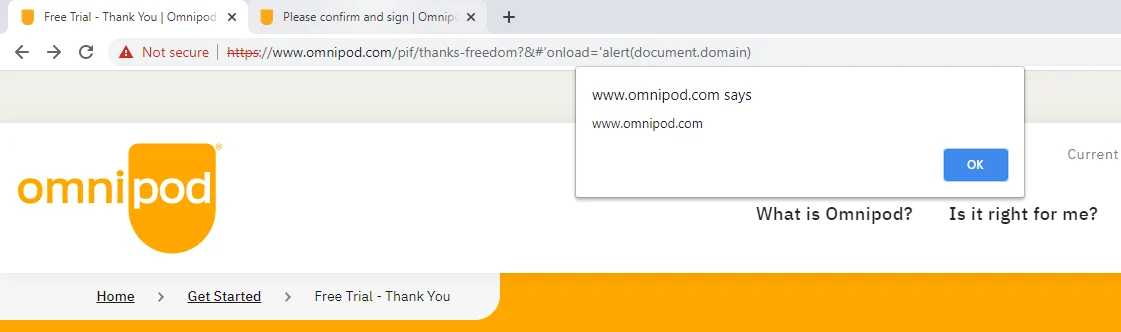
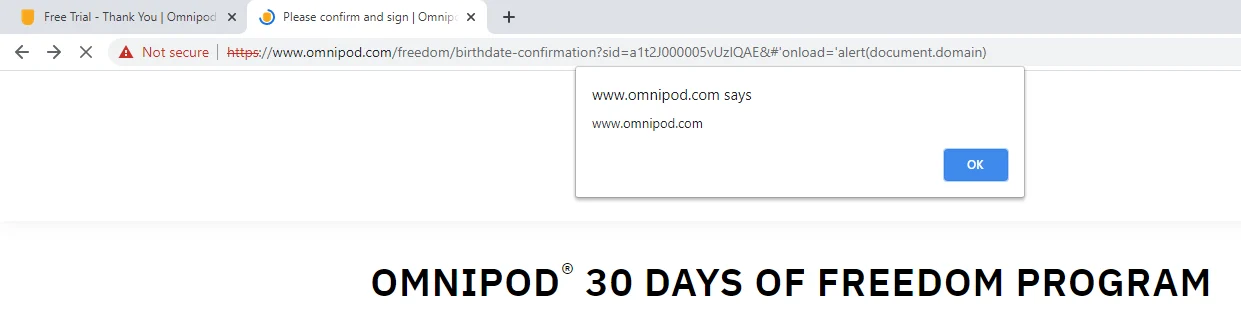
https://www.omnipod.com/freedom/birthdate-confirmation?sid=a1t2J000005vUzlQAE&#'onload='alert(document.domain) 2. Observe alert box appears containing the domain from which the injected script is executed.
NOTE: The value of the sid parameter does not seem to matter for this vulnerability
OR
- Navigate to the following URL:
https://www.omnipod.com/pif/thanks-freedom?&#'onload='alert(document.domain) 2. Observe alert box appears containing the domain from which the injected script is executed.
Supporting Material/References:
There are two screenshots attached that demonstrate these vulnerabilities
This appears to be the vulnerable script:
<script> var loc = window.location.toString(); var params = loc.split('?')[1]; //var srcstring = "https://na-sandbox.myomnipod.com/test-lic-p4-proc?" + params; var srcstring = "https://na.myomnipod.com/lic-p4-proc?" + params; document.write("<iframe id='frame' name='frame' src='" + srcstring + "' width='950'></iframe>"); </script>Impact
An attacker could use Cross-Site Scripting to modify the appearance of the site to deface it, to log user keystrokes, to create forms on your site which request confidential information that is then sent to the attacker, or even hijack user sessions.
Attachments
Context
The target is www.omnipod.com, the public website of Insulet Corporation, the maker of the Omnipod insulin management system. The report covers two pages on that site: /freedom/birthdate-confirmation and /pif/thanks-freedom. Both pages contain a script that builds an iframe pointing at na.myomnipod.com/lic-p4-proc from the query string. The script reads the current URL, takes everything after the first ?, and builds an iframe source from it.
The researcher found that this construction allows DOM-based cross-site scripting on both pages and notes that the same pattern may exist on other pages of the site.
Setup
No account, role or special tooling is described. The only precondition is the ability to get a victim to open a crafted URL on www.omnipod.com. The report does not mention a browser version or any other environment detail.
Finding it
The report quotes the vulnerable script as follows: The vulnerable script is quoted in the report as follows:
<script>
 var loc = window.location.toString();
 var params = loc.split('?')[1];
 //var srcstring = "https://na-sandbox.myomnipod.com/test-lic-p4-proc?" + params;
 var srcstring = "https://na.myomnipod.com/lic-p4-proc?" + params;

document.write("<iframe id='frame' name='frame' src='" + srcstring + "' width='950'></iframe>");
 </script>
The script takes the full URL, splits it on ? and keeps the second part, so params is everything after the first question mark. It then concatenates that value into an iframe src attribute and writes the result with document.write. Because the value is placed inside a single-quoted HTML attribute without encoding, a ' in the query string closes the attribute and lets the rest of the input become new attributes or markup on the iframe element.
Exploitation
Step 1: the birthdate confirmation page
The researcher navigated to the following URL:
https://www.omnipod.com/freedom/birthdate-confirmation?sid=a1t2J000005vUzlQAE&#'onload='alert(document.domain)
The sid parameter is present but, as the report notes, its value does not seem to matter for the vulnerability. The important part is the fragment after #: 'onload='alert(document.domain). When the page script runs, window.location.toString() includes the fragment, so params contains sid=a1t2J000005vUzlQAE&#'onload='alert(document.domain). That value is written into the iframe tag, the single quote closes the src attribute, and onload='alert(document.domain)' becomes an event handler on the iframe. The handler fires when the iframe loads and runs alert(document.domain).
Step 2: observe the alert
An alert box appears containing the domain from which the injected script is executed. The payload is designed to display document.domain, showing the domain from which the injected script executes.
Step 3: the thanks page
The same behaviour was reproduced on a second page with a shorter URL:
https://www.omnipod.com/pif/thanks-freedom?&#'onload='alert(document.domain)
Here there is no sid parameter at all; the query string is just &, followed by the fragment. The same script builds the iframe from everything after the first ?, so the fragment again closes the src attribute and injects the onload handler. The alert appears as in the first case.
The report includes two screenshots that demonstrate the two vulnerabilities.
Root cause
The page takes attacker-controlled input from the URL and writes it into an HTML attribute using document.write without any encoding or validation. The input is not limited to the query string: because the code uses window.location.toString() and splits on ?, the fragment is included in params as well. A single quote in that value terminates the src attribute, and the remainder is parsed as additional attributes on the iframe element. The onload handler then executes JavaScript in the page's origin.
No output encoding, no allow-list of parameter names or values, and no use of safe DOM APIs such as setAttribute are shown in the quoted script. The report does not describe any defence that was present and bypassed.
Impact
The report states that an attacker could use cross-site scripting to modify the appearance of the site to deface it, to log user keystrokes, to create forms on the site which request confidential information that is then sent to the attacker, or even to hijack user sessions. The report lists these as possible impacts of the cross-site scripting.
Fix
Variants to test
- Try the same fragment payload on other pages that embed an iframe from the query string, for example any page that uses
document.writewithlocationdata. A positive result is an alert showing the target origin. - Try breaking out with a double quote if the attribute is double-quoted, or with
>if the value is placed in the tag body. A positive result is a new element or handler executing. - Try payloads in other URL components that end up in the string, such as the path or the fragment alone, to see which parts the script includes. A positive result is execution from a component the developer did not expect.
- Try the same pattern on other subdomains or paths of the same site that share the template. A positive result is the same alert on a different page.
Hunting notes
This kind of bug tends to hide in pages that forward query strings to third-party or internal applications, especially where the forwarding is done with string concatenation and document.write. During recon, look for pages whose source contains window.location, document.write, iframe and split('?') in the same script block. The report shows that the fragment is part of the input, so test URLs with a # as well as a ?. The researcher demonstrated impact by showing an alert containing the domain from which the injected script is executed.
Difficulty: beginner Difficulty reason: The payload is a simple attribute break-out in a URL fragment, and the vulnerable pattern is visible in the page source.
What happened, in plain words
A security researcher found a way to make two pages on the Omnipod website run JavaScript code that the researcher supplied, simply by sending a specially crafted web address (URL) to someone. This kind of flaw is called cross-site scripting, or XSS for short. The particular variety here is DOM-based XSS, which means the problem lives in the JavaScript that runs inside the visitor's own browser rather than in the server's response.
The website belongs to Insulet Corporation, the company that makes the Omnipod insulin management system. The two affected pages are /freedom/birthdate-confirmation and /pif/thanks-freedom. Both pages contain a script that takes the part of the address after the first question mark and uses it to build an iframe pointing at na.myomnipod.com/lic-p4-proc. In simple terms, the page reads the current address, grabs everything after the first ?, and pastes it into the address of the embedded window.
The researcher showed that this pasting is done carelessly, so a visitor who opens a rigged link can end up running the attacker's code as if it came from www.omnipod.com itself. The report notes that the same pattern may exist on other pages of the site too.
Background ideas you need first
Before walking through the steps, here are the few ideas the report relies on. Each is explained from zero.
- URL (web address): the text you type in the browser bar, such as
https://www.omnipod.com/freedom/birthdate-confirmation. It has several parts. The part after a?is called the query string and usually carries small pieces of data, like?sid=abc. The part after a#is called the fragment (or hash). Browsers traditionally use the fragment to jump to a section of a page, and it is not normally sent to the server. - Parameter: a named value inside the query string. In
?sid=a1t2J000005vUzlQAE,sidis the parameter name anda1t2J000005vUzlQAEis its value. Think of it like a labelled box: the label is the name, the contents are the value. - JavaScript: the programming language that runs inside your browser and makes pages interactive. When a page loads, the browser runs the JavaScript that came with it.
- DOM (Document Object Model): the browser's in-memory model of the page, a tree of elements such as headings, paragraphs and iframes. JavaScript can read and change this tree. "DOM-based" XSS means the dangerous change happens in this in-memory model, driven by JavaScript, rather than in the HTML the server sent.
- iframe: an HTML element that embeds one web page inside another, like a small window showing a different site within the current page. The page that contains it is the parent; the embedded page is the child.
- Attribute: a setting written inside an HTML tag. For example, in
<iframe src="...">,srcis an attribute telling the browser which address to load. Attributes are usually wrapped in quotes. - Event handler: a piece of JavaScript that the browser runs when something happens, such as a page finishing loading.
onloadis one such handler: it fires when the element has finished loading. document.write: a JavaScript function that inserts text directly into the page while it is being built. It is a blunt tool: whatever string you give it is treated as HTML, so quotes and angle brackets inside that string can change the structure of the page.- Origin: the combination of scheme, host and port (roughly,
https://www.omnipod.com). Browsers use the origin as a security boundary: code from one origin should not be able to read or act on another. When we say code runs "in the origin ofwww.omnipod.com", we mean the browser treats it as belonging to that site, with all the trust that implies. document.domain: a JavaScript property that reports the domain of the page currently running the code. Showing it in an alert is a common way to prove which site's context the code is executing in.alert(): a JavaScript function that pops up a small dialog box with a message. Researchers use it as a harmless, visible proof that their code ran.
Setup
The report describes no account, no special role and no special tooling. The only precondition is that an attacker can get a victim to open a crafted URL on www.omnipod.com. The report does not mention a browser version or any other environment detail.
Finding it
The report quotes the vulnerable script as follows: The vulnerable script is quoted in the report as follows:
<script>
var loc = window.location.toString();
var params = loc.split('?')[1];
//var srcstring = "https://na-sandbox.myomnipod.com/test-lic-p4-proc?" + params;
var srcstring = "https://na.myomnipod.com/lic-p4-proc?" + params;
document.write("<iframe id='frame' name='frame' src='" + srcstring + "' width='950'></iframe>");
</script>
Line by line, in plain words:
var loc = window.location.toString();reads the full address currently shown in the browser bar and stores it as text in a variable calledloc. A variable is just a named box that holds a value.var params = loc.split('?')[1];cuts that address at the?character.split('?')produces a list of pieces;[1]picks the second piece (counting starts at zero), which is everything after the first question mark. Soparamsholds the query string, and, importantly, anything after a#as well, because the whole address was used.- The line beginning with
//is a comment: the browser ignores it. It shows a sandbox (test) address, suggesting the code was adapted from a test environment. The report does not say more about it. var srcstring = "https://na.myomnipod.com/lic-p4-proc?" + params;glues the fixed address of the embedded application together with whatever the visitor's URL contained. The+joins text end to end. The result is the address the iframe will load.document.write("<iframe id='frame' name='frame' src='" + srcstring + "' width='950'></iframe>");writes a whole iframe tag into the page. Notice that thesrcattribute is opened with a single quote (src=') and that the value is dropped in without any cleaning. If the value itself contains a single quote, that quote closes the attribute early, and whatever follows is read by the browser as more HTML.
The core problem: the page takes text that an attacker can control (the URL) and pastes it into HTML without encoding it. Encoding means turning special characters such as ' into harmless stand-ins so they cannot change the page's structure. Here nothing does that.
Exploitation
Step 1: the birthdate confirmation page
The researcher navigated to the following URL:
https://www.omnipod.com/freedom/birthdate-confirmation?sid=a1t2J000005vUzlQAE&#'onload='alert(document.domain)
Why this URL? The sid parameter is present, but as the report notes, its value does not seem to matter for the vulnerability. The important part is the fragment after #: 'onload='alert(document.domain). When the page's script runs, window.location.toString() includes the fragment, so params ends up containing sid=a1t2J000005vUzlQAE&#'onload='alert(document.domain). That text is pasted into the iframe tag. The single quote closes the src attribute, and onload='alert(document.domain)' becomes an event handler attached to the iframe. When the iframe finishes loading, the handler runs alert(document.domain).
Think of it like a form where someone writes their name on a line, and you write a name that includes the words "and also sign me up for everything". The form cannot tell the difference between your name and an extra instruction, because it never checked where the name ended.
Step 2: observe the alert
An alert box appears containing the domain from which the injected script is executed. The payload is designed to display document.domain, showing the domain from which the injected script executes.
Step 3: the thanks page
The same behaviour was reproduced on a second page with a shorter URL:
https://www.omnipod.com/pif/thanks-freedom?&#'onload='alert(document.domain)
Here there is no sid parameter at all; the query string is just &, followed by the fragment. The same script builds the iframe from everything after the first ?, so the fragment again closes the src attribute and injects the onload handler. The alert appears as in the first case.
The report includes two screenshots that demonstrate the two vulnerabilities.
Root cause
The page takes attacker-controlled input from the URL and writes it into an HTML attribute using document.write without any encoding or validation. The input is not limited to the query string: because the code uses window.location.toString() and splits on ?, the fragment is included in params as well. A single quote in that value terminates the src attribute, and the remainder is parsed as additional attributes on the iframe element. The onload handler then executes JavaScript in the page's origin.
No output encoding, no allow-list of parameter names or values, and no use of safe DOM APIs such as setAttribute are shown in the quoted script. (An allow-list is a list of things that are permitted, with everything else rejected.
Impact
The report states that an attacker could use cross-site scripting to modify the appearance of the site to deface it, to log user keystrokes, to create forms on the site which request confidential information that is then sent to the attacker, or even to hijack user sessions. A session is the period during which a site remembers who you are, usually via a cookie (a small piece of data the browser stores and sends back). Hijacking a session means taking over that logged-in state. The report lists these as possible impacts of the cross-site scripting.
Fix
Variants to test
- Try the same fragment payload on other pages that embed an iframe from the query string, for example any page that uses
document.writewithlocationdata. A positive result is an alert showing the target origin. - Try breaking out with a double quote if the attribute is double-quoted, or with
>if the value is placed in the tag body. A positive result is a new element or handler executing. - Try payloads in other URL components that end up in the string, such as the path or the fragment alone, to see which parts the script includes. A positive result is execution from a component the developer did not expect.
- Try the same pattern on other subdomains or paths of the same site that share the template. A positive result is the same alert on a different page.
Hunting notes
This kind of bug tends to hide in pages that forward query strings to third-party or internal applications, especially where the forwarding is done with string concatenation and document.write. During recon (the early phase of looking around a target to map what exists), look for pages whose source contains window.location, document.write, iframe and split('?') in the same script block. The report shows that the fragment is part of the input, so test URLs with a # as well as a ?. The researcher demonstrated impact by showing an alert containing the domain from which the injected script is executed.
Glossary
- URL (web address): the text identifying a page, made of parts such as scheme, host, path, query string and fragment.
- Query string: the part of a URL after the first
?, carrying small named values. - Fragment (hash): the part of a URL after
#, traditionally used to jump to a section of a page. - Parameter: a named value in a query string, like
sid=.... - JavaScript: the programming language that runs in the browser and makes pages interactive.
- DOM (Document Object Model): the browser's in-memory tree of the page's elements, which JavaScript can read and change.
- DOM-based XSS: cross-site scripting where the flaw is in browser-side JavaScript manipulating the DOM, rather than in the server's HTML.
- XSS (cross-site scripting): a flaw that lets an attacker's code run in a site's context in a victim's browser.
- iframe: an HTML element that embeds one page inside another.
- Attribute: a setting inside an HTML tag, such as
srcorwidth. - Event handler: JavaScript that runs when something happens, such as
onloadwhen an element finishes loading. document.write: a JavaScript function that inserts a string into the page as HTML.- Origin: the scheme, host and port combination that browsers use as a security boundary.
document.domain: a JavaScript property reporting the domain of the running page.alert(): a JavaScript function that shows a pop-up dialog with a message.- Encoding: converting special characters into harmless stand-ins so they cannot change page structure.
- Validation: checking that input meets expected rules before using it.
- Allow-list: a list of permitted values, with everything else rejected.
setAttribute: a DOM method that sets an attribute from JavaScript, treating the value as data rather than HTML.- Session: the period a site remembers who you are, usually tracked with a cookie.
- Cookie: a small piece of data the browser stores for a site and sends back with requests.
- Session hijacking: taking over a user's logged-in session.
- Recon: the early phase of exploring a target to map what exists.
- Sandbox: a test environment separate from the live system.
- Defacement: changing a site's appearance to something unauthorised.



