XSS because of wrong content type header
 Published on bugbaba.blogspot.com
The original lives on bugbaba.blogspot.com
We do not hold its text, so we link to it rather than copy it. The other two tabs are our own rewrites, checked against it.
What the report shows
The target is Internshala, an internship platform that helps students find internships with organisations in India. While looking around the site, the researcher found an endpoint that changed user details such as name and address, but not email. The endpoint had no CSRF protection, and it returned a JSON response while the Content-Type header was set to text/html rather than application/javascript.
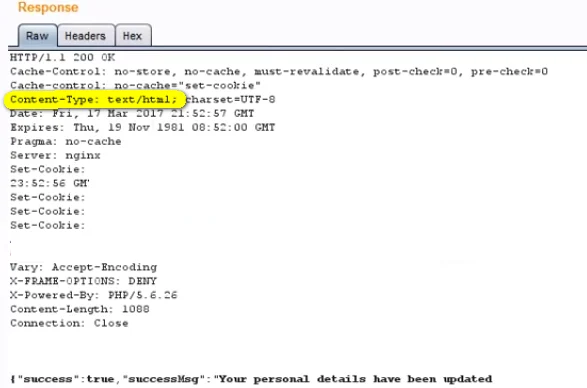
That mismatch caught the researcher's attention: if HTML could be injected into a response that the browser renders as HTML, script could run. The first attempts were stopped by filters, so the result was only HTML injection, which the researcher considered not worth reporting. A second parameter, [redacted], behaved differently: changing its value caused an error, and that error path became the injection point.

Building the payload took four rounds of filter bypass:
- Whitespace and the forward slash
/were not allowed between text, so the researcher used+instead. alertandpromptwere blocked, butconfirmwas not.- Parentheses were blocked, so backticks were used instead.
- The closing
>was blocked, so+%0awas used to end the tag.
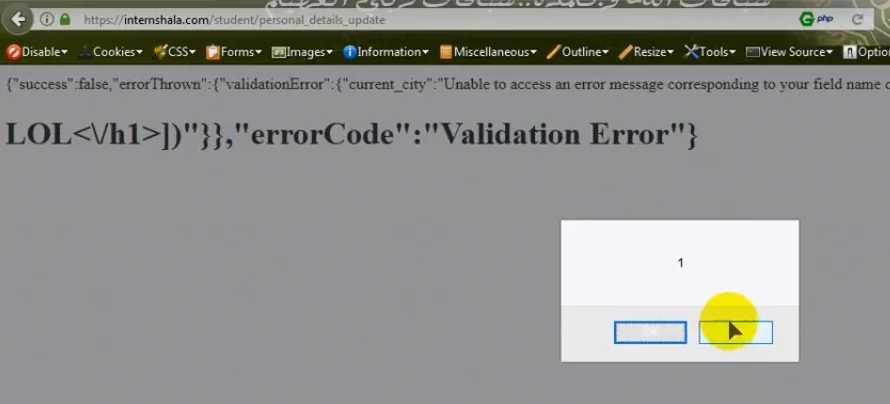

The report introduces each payload with 'Payload :' but the payload strings themselves appear only in the images above. The final payload worked and produced XSS. It gives no bounty amount, severity rating or CVSS score.
Root cause
The report does not analyse a root cause; the mismatch between the JSON body and the text/html header is what the researcher noticed. The endpoint returns JSON data, but the response is labelled text/html, so a browser treats the body as an HTML document. Any user-controlled value reflected into that body, here through the error triggered by [redacted], is then parsed as markup rather than as inert data. The filters in place blocked some characters and keywords but not the combination needed to build a working event handler, so the escaping was incomplete.
Impact
The report demonstrates that the final payload worked and produced XSS. It does not describe a victim scenario or session impact. The report does not work through a specific attack scenario beyond the proof of concept, and the endpoint it started from could change profile details but not email.
How this kind of bug works
Browsers decide how to parse a response from its Content-Type header, not from what the body looks like. A JSON API that declares text/html is telling the browser to build a document. If any part of that document contains attacker-influenced text, the browser will interpret <, >, quotes and event handler attributes as markup. The same body served as application/json would be displayed or downloaded, not executed.
This is why reflected XSS often hides in error pages, debug output and API responses that reuse a generic HTML template. The vulnerability is not the JSON itself but the combination of a wrong media type and missing context-aware encoding. Defences are layered: send the correct Content-Type with X-Content-Type-Options: nosniff, encode output for the context it lands in, and apply a restrictive Content Security Policy so that even a successful injection cannot easily execute script.
How to test for it
- Map endpoints that return structured data: profile updates, search suggestions, error handlers, and anything with a JSON-looking body.
- Inspect the response headers. A JSON body served as
text/htmlis the signal to investigate further. - Identify every parameter that is reflected into the body, including ones that only appear in error messages.
- Send a harmless marker such as a unique string and confirm it appears unencoded in the response.
- Escalate gradually: try HTML tags, then attributes, then event handlers. Note which characters and keywords are filtered and adapt, as the researcher did with
+, backticks and+%0a. - Confirm execution in a browser, not just reflection in the raw response.
A positive result is a response where your markup is parsed as markup and your handler runs. Common false positives are reflections inside JSON string values that are never rendered as HTML, reflections that are HTML-encoded, and payloads that appear in the body but are blocked by the browser because of nosniff or a CSP. Always check the rendered behaviour rather than the raw text.
How it is fixed
- Return the correct
Content-Typefor the data, for exampleapplication/json, and addX-Content-Type-Options: nosniff. - Encode all reflected values for the output context, including error messages.
- Avoid reflecting raw parameter values into error pages; use fixed messages or a generic error template.
- Add a Content Security Policy that disallows inline script and event handlers.
- Keep server-side validation on the parameters rather than relying on client-side filters.
Hunting notes
This class of bug tends to hide where developers assume the response is data and forget the browser's parsing rules: API endpoints that reuse HTML error templates, endpoints that echo a parameter back in a validation message, and older parts of an application with inconsistent headers. Recon signals worth watching are JSON-shaped responses with text/html, endpoints that behave differently when a parameter is malformed, and parameters whose names suggest location or address data, which often pass through geocoding or validation libraries that produce verbose errors.
To get a report accepted, show the full request and response headers, the exact payload, and a browser screenshot or recording of execution. Explain the filter bypasses clearly, since reviewers need to reproduce them, and state the realistic impact on a victim's session. If the only outcome is HTML injection without script execution, say so rather than overstating it.
What happened, in plain words
Internshala is an internship platform that helps students find internships with organisations in India. While exploring the site, the researcher found an endpoint that let a user change their own details, such as name and address, but not email. An endpoint is simply a specific address on a website that does one job, like a counter in a shop that only handles address changes. The request that changes details is a form of instruction the browser sends to the server, and the server replies with data.
Two things about that endpoint stood out. First, it had no CSRF protection. CSRF (cross-site request forgery) is when another website quietly makes your browser send a request to a site you are logged into, using your existing session. A session is the server remembering who you are, usually via a cookie, a small piece of data your browser stores and sends back with each request. Protection against CSRF is a check, often a token, that proves the request really came from the site's own page. Second, the endpoint returned a JSON response, which is a structured data format, but the Content-Type header said text/html instead of application/javascript. The Content-Type header is the label the server puts on its reply telling the browser what kind of content it is. A browser trusts that label when deciding how to display or run the content.
That mismatch is what drew the researcher in. If the browser is told the reply is HTML, it will treat the body as a web page, and if any part of that body comes from something the attacker controls, the browser may run it as code. The first attempts were blocked by filters, so the result was only HTML injection, meaning markup appeared on the page but no script ran. The researcher judged that not worth reporting. Then a second parameter, [redacted], behaved differently: changing its value caused an error, and that error message became the place where injected content appeared.
Building a working payload, the piece of text crafted to trigger the bug, took four rounds of getting around the filters:
- Whitespace and the forward slash
/were not allowed between text, so the researcher used+instead. alertandpromptwere blocked, butconfirmwas not.- Parentheses were blocked, so backticks were used instead.
- The closing
>was blocked, so+%0awas used to end the tag.
The report introduces each payload with 'Payload :' but the payload strings themselves appear only in the images above. The final payload worked and produced XSS, cross-site scripting. It gives no bounty amount, severity rating or CVSS score.
In general, how this kind of bug works
Browsers decide how to read a response from its Content-Type header, not from what the body looks like. A JSON API that declares text/html is telling the browser to build a document. If any part of that document contains text an attacker influenced, the browser will interpret <, >, quotes and event handler attributes as markup. The same body served as application/json would be shown or downloaded, not executed.
This is why reflected XSS often hides in error pages, debug output and API responses that reuse a generic HTML template. The problem is not the JSON itself but the combination of a wrong media type and missing encoding for the context the data lands in. Encoding means converting characters like < into harmless equivalents so the browser shows them as text rather than treating them as markup. Defences are layered: send the correct Content-Type with X-Content-Type-Options: nosniff, encode output for the context it lands in, and apply a restrictive Content Security Policy (CSP), a set of rules the browser follows about which scripts may run, so that even a successful injection cannot easily execute script.
In general, how to test for it
- Map endpoints that return structured data: profile updates, search suggestions, error handlers, and anything with a JSON-looking body.
- Inspect the response headers. A JSON body served as
text/htmlis the signal to investigate further. - Identify every parameter that is reflected into the body, including ones that only appear in error messages.
- Send a harmless marker such as a unique string and confirm it appears unencoded in the response.
- Escalate gradually: try HTML tags, then attributes, then event handlers. Note which characters and keywords are filtered and adapt, as the researcher did with
+, backticks and+%0a. - Confirm execution in a browser, not just reflection in the raw response.
A positive result is a response where your markup is parsed as markup and your handler runs. Common false positives are reflections inside JSON string values that are never rendered as HTML, reflections that are HTML-encoded, and payloads that appear in the body but are blocked by the browser because of nosniff or a CSP. Always check the rendered behaviour rather than the raw text.
In general, how it is fixed
- Return the correct
Content-Typefor the data, for exampleapplication/json, and addX-Content-Type-Options: nosniff. - Encode all reflected values for the output context, including error messages.
- Avoid reflecting raw parameter values into error pages; use fixed messages or a generic error template.
- Add a Content Security Policy that disallows inline script and event handlers.
- Keep server-side validation on the parameters rather than relying on client-side filters.
In general, where to look
This class of bug tends to hide where developers assume the response is data and forget the browser's parsing rules: API endpoints that reuse HTML error templates, endpoints that echo a parameter back in a validation message, and older parts of an application with inconsistent headers. Signals worth watching are JSON-shaped responses with text/html, endpoints that behave differently when a parameter is malformed, and parameters whose names suggest location or address data, which often pass through geocoding or validation libraries that produce verbose errors.
To get a report accepted, show the full request and response headers, the exact payload, and a browser screenshot or recording of execution. Explain the filter bypasses clearly, since reviewers need to reproduce them, and state the realistic impact on a victim's session. If the only outcome is HTML injection without script execution, say so rather than overstating it.
Glossary
- Endpoint: a specific address on a website that performs one job, such as updating a profile.
- Request: the message a browser sends to a server asking it to do something.
- Response: the server's reply to a request, including headers and a body.
- Header: extra information attached to a request or response, such as the content type.
- Content-Type: the header that tells the browser what kind of content the body is, for example HTML or JSON.
- JSON: a structured text format for data, made of names and values.
- CSRF: cross-site request forgery, where another site makes your browser send a request to a site you are logged into.
- Session: the server remembering who you are across requests, usually via a cookie.
- Cookie: a small piece of data stored by the browser and sent back to the site with each request.
- Token: a value used to prove a request came from the site's own page, often used against CSRF.
- Parameter: a named value sent with a request, such as a city name.
- XSS: cross-site scripting, where an attacker's script runs inside a page as if it were part of the site.
- HTML injection: getting markup into a page without running script.
- Payload: the crafted text used to trigger a bug.
- Filter: a check that blocks certain characters or words in input.
- Encoding: converting characters so they are shown as text rather than treated as markup.
- Event handler: an attribute on an HTML element that runs code when something happens, such as a click.
nosniff: a header instruction telling the browser not to guess the content type.- CSP: Content Security Policy, browser rules about which scripts may run on a page.
- CVSS: a scoring system for rating the severity of a vulnerability.
- False positive: a result that looks like a bug but is not exploitable.




