Host Header Injection - irccloud.com
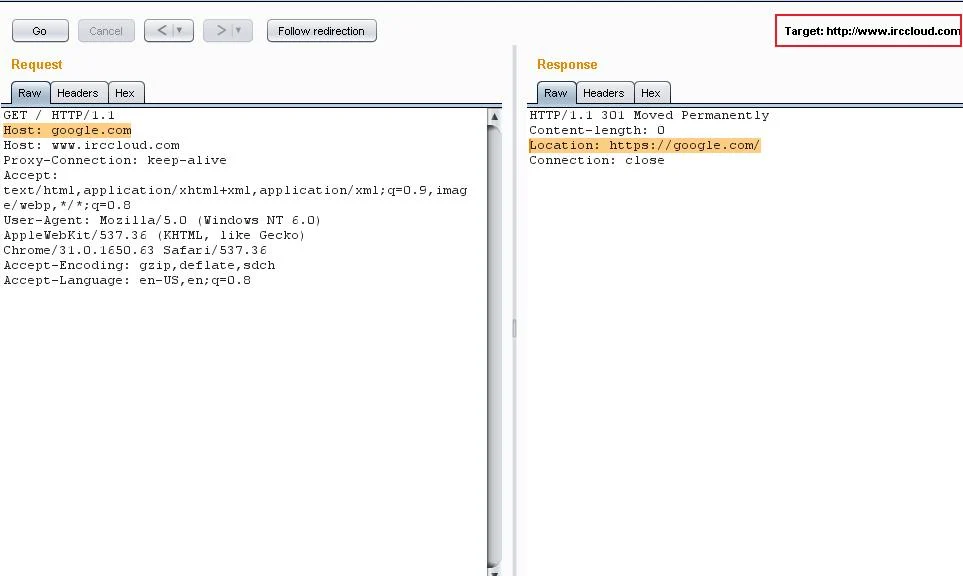
The server accepted a request with two Host headers and redirected to the first Host value, google.com; the text does not show arbitrary-domain redirect or its impact.
 Originally disclosed on HackerOne
- Fixed in 2 days
- Paid in 2 days
- Disclosed after 44 days
Host Header Injection Attack - irccloud.com
An attacker can manipulate the Host header as seen by the web application and cause the application to behave in unexpected ways.
Very often multiple websites are hosted on the same IP address. This is where the Host Header comes in. This header specifies which website should process the HTTP request. The web server uses the value of this header to dispatch the request to the specified website. Each website hosted on the same IP address is called a virtual host.
But what happens if we specify an invalid Host Header? If Apache receives an unrecognized Host Header, it passes it to the first virtual host defined in httpd.conf. Therefore, it's possible to send requests with arbitrary Host Headers to the first virtual host.
Another way to pass arbitrary Host headers is to use the X-Forwarded-Host Header. In some configurations this header will rewrite the value of the Host header. Therefore it's possible to make a request like:
#PoC Request - GET / HTTP/1.1 Host: google.com Host: www.irccloud.com Proxy-Connection: keep-alive Accept: text/html,application/xhtml+xml,application/xml;q=0.9,image/webp,/;q=0.8 User-Agent: Mozilla/5.0 (Windows NT 6.0) AppleWebKit/537.36 (KHTML, like Gecko) Chrome/31.0.1650.63 Safari/537.36 Accept-Encoding: gzip,deflate,sdch Accept-Language: en-US,en;q=0.8
#PoC Response - HTTP/1.1 301 Moved Permanently Content-length: 0 Location: https://google.com/ Connection: close
#PoC Payload - Host: google.com Host: anymalicioussite.com
#PoC pcap - Enclosed
#PoC Screenshot - Enclosed
Please verify and fix the same.
Attachments
Context
IRCCloud is a web-based IRC client, and the target of this report is irccloud.com. The finding is a Host header injection: the application can be made to act on a Host value that the client controls, rather than on the hostname the service actually expects.
The report opens with the general mechanism. Several websites are often served from the same IP address, and the Host header is what tells the web server which of them should process the request. Each site sharing that address is a virtual host. The question the researcher asks is what happens when the Host value is not one the server recognises.
Setup
No accounts, roles or special tooling are described. The researcher worked against the public site and captured the traffic; the report mentions an enclosed pcap and an enclosed screenshot as evidence, without further detail on how they were produced.
Finding it
The reasoning is about server behaviour rather than about a specific page or parameter. Two paths are described for getting an arbitrary host value in front of the application:
- Send a
Hostheader the server does not recognise. If Apache receives an unrecognisedHostheader, it passes the request to the first virtual host defined inhttpd.conf, so requests carrying arbitraryHostvalues can reach that first virtual host. - Use the
X-Forwarded-Hostheader. In some configurations this header rewrites the value of theHostheader, which gives another way to control what the application sees.
Either way, the application ends up processing a request whose notion of its own hostname was chosen by the client.
Exploitation
Step 1: Send a request with a duplicated Host header
The proof-of-concept request sends two Host headers, the first naming an unrelated site and the second naming the target:
GET / HTTP/1.1
Host: google.com
Host: www.irccloud.com
Proxy-Connection: keep-alive
Accept: text/html,application/xhtml+xml,application/xml;q=0.9,image/webp,*/*;q=0.8
User-Agent: Mozilla/5.0 (Windows NT 6.0) AppleWebKit/537.36 (KHTML, like Gecko) Chrome/31.0.1650.63 Safari/537.36
Accept-Encoding: gzip,deflate,sdch
Accept-Language: en-US,en;q=0.8
The two Host lines are the payload. The remaining headers are ordinary browser headers, including a Proxy-Connection: keep-alive line and a Chrome 31 user agent string. The point of the duplicate is that different components in the chain may pick different occurrences: one may honour the first, another the last.
Step 2: Observe the redirect
The response shows the server acting on the first Host value:
HTTP/1.1 301 Moved Permanently
Content-length: 0
Location: https://google.com/
Connection: close
The Location header points at https://google.com/, the host supplied in the first Host line, not at the target's own hostname. The server issued a permanent redirect to the host named in the first Host line.
Step 3: Generalise the payload
The researcher then shows the payload with a malicious destination in place of the benign one:
Host: google.com
Host: anymalicioussite.com
This is the same construction as the request above, with the second host replaced. It demonstrates that the redirect target is not fixed and can be any domain the attacker names.
Step 4: Evidence
The report refers to an enclosed pcap and an enclosed screenshot as proof of the behaviour. The screenshot is attached to the report:
Root cause
The response redirects to the host value supplied in the request rather than to the target's own hostname. The request carried two Host headers, and the Location value matched the first one. The report also notes that X-Forwarded-Host can rewrite the Host value in some configurations, which is a second route to the same outcome. The report does not identify which component chose the first header.
Impact
The concrete effect shown is a 301 redirect to a host chosen by the attacker. In practice this is the classic setup for phishing and for cache or password-reset poisoning, but the report itself only demonstrates the redirect and does not walk through those follow-on attacks. The conditions are the ones described: the server must accept a request with a duplicated Host header, or a proxy in front of it must honour X-Forwarded-Host.
Fix
The report ends with a request to verify and fix the issue. It does not describe a patch or a change that was made, so the remediation is not documented here.
Variants to test
- Duplicate
Hostheaders, first one attacker-controlled, as in the PoC. A positive result is aLocationheader pointing at the attacker's host. X-Forwarded-Hostset to an attacker domain. A positive result is the same: the application reflects that value into a redirect or a generated link.- An unrecognised single
Hostvalue, relying on the first-virtual-host behaviour described for Apache. A positive result is the request being served by the first virtual host.
Hunting notes
During recon, the signals are a front end that forwards or rewrites host headers, and responses that contain the hostname you sent rather than the one you connected to. The researcher made the case with a minimal request and its response, showing the attacker-chosen value in Location, and backed it with a pcap and a screenshot. The report was disclosed and paid a bounty of 100.00 USD.
What happened, in plain words
IRCCloud is a service that lets you connect to IRC (an old chat protocol) from your web browser instead of installing a separate chat program. The website is irccloud.com. The researcher found that the site could be tricked into believing it lives at a different address than it really does, and then acting on that false address.
The trick is called a Host header injection. When your browser asks a website for a page, it sends a small block of text along with the request. One line in that block is the Host line, which says which website you want. Normally you never see it and never think about it. The researcher showed that by putting two host lines in the request, the site could be made to redirect to the host named in the first one.
To see why that matters, imagine a large office building with one street address but many companies inside. The postman arrives with a letter addressed only to the building. Someone at the front desk has to decide which company the letter is for. The Host line is that decision. If the front desk can be confused about who the letter is for, the letter can end up in the wrong office. That is the shape of this bug.
Context
IRCCloud is a web-based IRC client. IRC is a chat system that predates modern messengers, and a client is simply the program you use to talk to it. Here the client runs in your browser, so you log in to a website and chat from there.
The target of the report is irccloud.com. The finding is a Host header injection: the application can be made to act on a Host value that the visitor controls, rather than on the hostname the service actually expects.
The report opens with the general mechanism. Several websites are often served from the same IP address. An IP address is the numeric address of a machine on the internet, something like a street address for a computer. Because addresses are limited, hosting providers put many websites on one machine and rely on the Host line to tell them apart. The Host header is what tells the web server which of those sites should process the request. Each site sharing that address is called a virtual host, in the same way several companies can share one building address and each has its own front door inside.
The question the researcher asks is simple: what happens when the Host value is not one the server recognises?
Setup
No accounts, roles or special tooling are described. The researcher worked against the public site and captured the traffic. Capturing traffic means recording the exact text that went over the network, both what was sent and what came back, so it can be inspected later. The report mentions an enclosed pcap and an enclosed screenshot as evidence, without further detail on how they were produced. A pcap is a file that holds a recording of network traffic.
Finding it
The reasoning is about server behaviour rather than about a specific page or parameter. A parameter is a value you pass to a website, for example the part of a web address after a question mark. Here there is no parameter involved at all: the whole issue lives in the request headers, which are the lines of text a browser sends before the actual request.
Two paths are described for getting an arbitrary host value in front of the application:
- Send a
Hostheader the server does not recognise. If Apache receives an unrecognisedHostheader, it passes the request to the first virtual host defined inhttpd.conf, so requests carrying arbitraryHostvalues can reach that first virtual host. Apache is a very common web server program, the software that hands out web pages.httpd.confis its main configuration file, the file where the administrator lists the sites the server knows about. The first site in that list becomes the default: anything the server cannot match gets handed to it, like a receptionist sending unaddressed mail to the first office on the corridor. - Use the
X-Forwarded-Hostheader. In some configurations this header rewrites the value of theHostheader, which gives another way to control what the application sees. A header starting withX-is a custom header, one that is not part of the official web standard but that people invented for their own needs.X-Forwarded-Hostwas invented so that a proxy, a machine sitting in front of the real server, can tell the server which hostname the visitor originally asked for. If the server trusts that header blindly, anyone can set it.
Either way, the application ends up processing a request whose notion of its own hostname was chosen by the client.
Exploitation
Step 1: Send a request with a duplicated Host header
The proof-of-concept request sends two Host headers, the first naming an unrelated site and the second naming the target:
GET / HTTP/1.1
Host: google.com
Host: www.irccloud.com
Proxy-Connection: keep-alive
Accept: text/html,application/xhtml+xml,application/xml;q=0.9,image/webp,*/*;q=0.8
User-Agent: Mozilla/5.0 (Windows NT 6.0) AppleWebKit/537.36 (KHTML, like Gecko) Chrome/31.0.1650.63 Safari/537.36
Accept-Encoding: gzip,deflate,sdch
Accept-Language: en-US,en;q=0.8
Line by line, in plain words:
GET / HTTP/1.1is the request line.GETmeans "give me this page"./means the front page of the site.HTTP/1.1is the version of the language browsers and servers speak to each other, called HTTP.Host: google.comis the first host line, naming a site that has nothing to do with the target. This is the value the researcher wants the server to believe.Host: www.irccloud.comis a second host line, naming the real target. Sending the same header twice is unusual: the standard expects one, and when two arrive, different pieces of software may pick different ones. One may take the first, another the last.Proxy-Connection: keep-aliveis an old header that asks any proxy in between to keep the connection open for reuse. It is a leftover from older browser behaviour rather than part of the attack.Accept: ...lists the kinds of content the browser is willing to receive: HTML pages, XHTML, XML, images and so on, with quality scores after the semicolons. This is what a normal browser sends.User-Agent: ...identifies the browser and operating system. Here it claims to be Chrome 31 on Windows. Servers often log this and sometimes change their behaviour based on it.Accept-Encoding: gzip,deflate,sdchsays the browser can accept the response compressed, to save bandwidth.Accept-Language: en-US,en;q=0.8says the browser prefers English, with a slight preference for US English.
The two Host lines are the payload. A payload is the part of the request that carries the attack, as opposed to the parts that are just normal plumbing. The remaining headers are ordinary browser headers. The point of the duplicate is that different components in the chain may pick different occurrences: one may honour the first, another the last. A chain here means every piece of software the request passes through on its way to the application, such as a load balancer, a proxy and the web server itself.
Step 2: Observe the redirect
The response shows the server acting on the first Host value:
HTTP/1.1 301 Moved Permanently
Content-length: 0
Location: https://google.com/
Connection: close
Line by line:
HTTP/1.1 301 Moved Permanentlyis the status line.301is the code for a permanent redirect, which tells the browser "this page now lives somewhere else, go there instead".Content-length: 0says the response body is empty. There is no page to show, only an instruction to move.Location: https://google.com/is the destination the browser is told to visit. This is the important line: it points athttps://google.com/, the host supplied in the firstHostline, not at the target's own hostname.Connection: closesays the connection will be closed after this response rather than kept open.
The server issued a permanent redirect to the host named in the first Host line. In everyday terms, the receptionist read the first name on the envelope and forwarded the letter there, without checking whether that name belonged to the building.
Step 3: Generalise the payload
The researcher then shows the payload with a malicious destination in place of the benign one:
Host: google.com
Host: anymalicioussite.com
These two lines are the same construction as the request above, with the second host replaced. The first line is still the unrelated site, and the second is now a domain the attacker would choose. It shows the same construction with a malicious domain in place of the benign one.
Step 4: Evidence
The report refers to an enclosed pcap and an enclosed screenshot as proof of the behaviour. The screenshot is attached to the report:
The screenshot is attached to the report as evidence.
Root cause
The response redirects to the host value supplied in the request rather than to the target's own hostname. A fixed hostname would be something the administrator sets once, such as "always send people to www.irccloud.com", and it cannot be changed by a visitor. The request carried two Host headers, and the Location value matched the first one.
The report also notes that X-Forwarded-Host can rewrite the Host value in some configurations, which is a second route to the same outcome. The report does not identify which component chose the first header. The front end here means the software that receives the connection first, before the application code runs.
Impact
The concrete effect shown is a 301 redirect to a host chosen by the attacker. In practice this is the classic setup for phishing and for cache or password-reset poisoning, but the report itself only demonstrates the redirect and does not walk through those follow-on attacks.
Phishing means sending someone to a lookalike site to steal their login details. Cache poisoning means tricking a shared cache, a store of pages kept to speed up delivery, into serving a wrong page to other visitors. Password-reset poisoning means influencing the link in a reset email so it points at the attacker. All three start from the same place: a link or redirect that the victim trusts because it began at the real site.
The conditions are the ones described: the server must accept a request with a duplicated Host header, or a proxy in front of it must honour X-Forwarded-Host.
Fix
The report ends with a request to verify and fix the issue. It does not describe a patch or a change that was made, so the remediation is not documented here. Normalise means to clean up and settle on one agreed value rather than passing the ambiguity along.
Variants to test
- Duplicate
Hostheaders, first one attacker-controlled, as in the PoC. A positive result is aLocationheader pointing at the attacker's host. X-Forwarded-Hostset to an attacker domain. A positive result is the same: the application reflects that value into a redirect or a generated link. Reflects means it copies the value back out into its own response.- An unrecognised single
Hostvalue, relying on the first-virtual-host behaviour described for Apache. A positive result is the request being served by the first virtual host.
Hunting notes
A canonical link is the tag a page uses to declare its own official address. During recon, the signals are a front end that forwards or rewrites host headers, and responses that contain the hostname you sent rather than the one you connected to. Recon means the early look-around phase, before any attack is attempted.
The researcher made the case with a minimal request and its response, showing the attacker-chosen value in Location, and backed it with a pcap and a screenshot. The report was disclosed and paid a bounty of 100.00 USD. A bounty is a reward a company pays for a valid security report.
Glossary
- Host header: the line in an HTTP request that names which website the visitor wants, used when many sites share one machine.
- HTTP: the language browsers and web servers use to exchange requests and responses.
- Request: the message a browser sends to ask a server for something.
- Response: the message a server sends back.
- Header: a line of extra information attached to a request or response, such as the host name or the browser type.
- Host header injection: making a site act on a host name supplied by the visitor instead of its own configured one.
- Virtual host: one of several websites served from the same IP address, told apart by the Host header.
- IP address: the numeric address of a machine on a network.
- Apache: a widely used web server program.
- httpd.conf: the main configuration file of an Apache web server, listing the sites it serves.
- First virtual host: the default site in an Apache configuration, which receives requests whose host name the server does not recognise.
- X-Forwarded-Host: a custom header used by proxies to pass along the original host name, which some servers trust and use to rewrite the Host value.
- Proxy: a machine that sits between the visitor and the real server and passes traffic along.
- Front end: the software that receives a connection first, before the application code runs.
- Payload: the part of a request that carries the attack.
- PoC (proof of concept): a minimal demonstration that a vulnerability is real.
- GET: the HTTP method meaning "give me this page".
- Status code: the three-digit number at the start of a response saying what happened, such as 301 for a redirect.
- 301 Moved Permanently: a status code telling the browser the page has moved for good and to go to the address in the Location header.
- Location header: the response header that gives the address a browser should go to after a redirect.
- Redirect: an instruction from a server sending the browser to a different address.
- User-Agent: the header that identifies the browser and operating system making the request.
- Accept, Accept-Encoding, Accept-Language: headers where the browser lists the content types, compression and languages it can handle.
- Proxy-Connection: an older header asking a proxy to keep the connection open.
- pcap: a file containing a recording of network traffic.
- Parameter: a value passed to a website, often in the address after a question mark.
- Endpoint: a specific address on a site that performs a particular job.
- Absolute URL: a full web address that includes the site name.
- Canonical link: a tag in a page declaring its own official address.
- Root cause: the underlying reason a vulnerability exists, as opposed to its visible symptom.
- Normalise: to clean up input and settle on one agreed value.
- Phishing: sending someone to a lookalike site to steal their details.
- Cache poisoning: tricking a shared store of pages into serving a wrong page to other visitors.
- Password-reset poisoning: influencing the link in a reset email so it points at the attacker.
- Recon: the early look-around phase of security testing, before any attack is attempted.
- Bounty: a reward a company pays for a valid security report.
- Disclosed: made public, as opposed to kept private between the company and the researcher.





