Exposing Millions of IRCTC Passengers' ticket details.
An IDOR vulnerability in IRCTC's ticket history endpoint allowed an attacker to access other users' ticket details by modifying the transaction ID. The attacker could view sensitive information such as passenger names, PNR numbers, and travel details, and potentially perform actions like cancelling tickets or changing boarding points.
 Published on infosecwriteups.com
While I was booking a ticket as a normal human I suddenly got an idea to test for vulnerabilities.
The full write-up lives on its author's site
It belongs to its author, so we link to it rather than copy it. The other two tabs are our own rewrites, checked against it.
Context
IRCTC is India's largest online ticketing operation, with around 30 million registered users and roughly 550,000 to 600,000 bookings every day, which the author describes as making it the world's second-busiest travel portal. The feature in question is the booked ticket history that a logged-in user sees under My account > My Transactions > Booked Ticket History. Each entry in that list can be expanded to show the full ticket record: train number, departure time, duration of the journey, PNR number, ticket status, boarding station, and passenger information including names, seat details, gender and age.
The author, Renganathan (@IamRenganathan), found the issue while booking a ticket as an ordinary user and deciding to test the site for vulnerabilities.
Setup
No special accounts or roles were needed beyond a normal IRCTC login. The only tool mentioned is Burp Suite, used with interception turned on to capture the request the front end sends when a ticket in the history list is expanded. The precondition is simply a logged-in session and at least one booking in the history.
Finding it
The first class of bug the author thought of was IDOR. The steps to reproduce are:
- Log in to your IRCTC account.
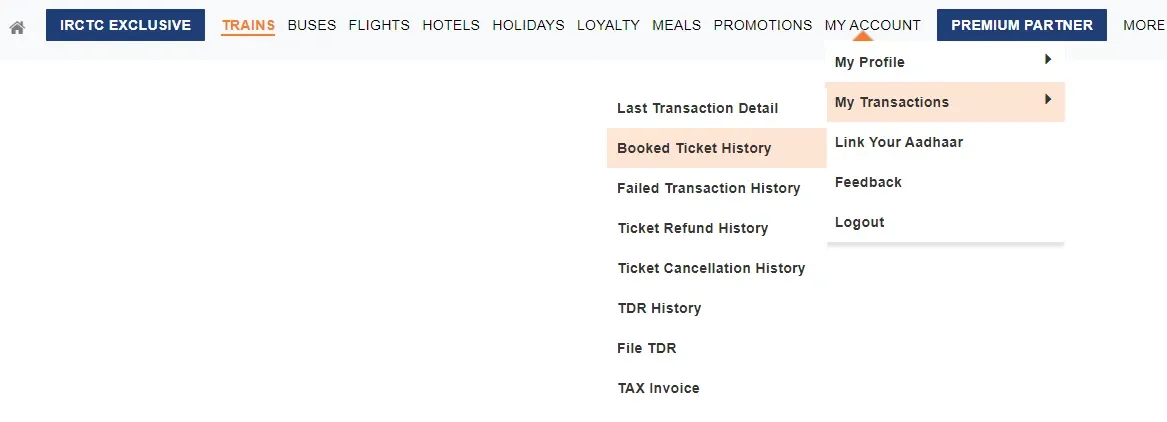
- Go to My account > My Transactions > Booked Ticket History.
- The listed tickets expand on click.
With interception on, expanding a ticket produced the following request:
GET /eticketing/protected/mapps1/historySearchByTxnId/XXXXXXXXXX48?currentStatus=N HTTP/1.1Host: www.irctc.co.inUser-Agent: Mozilla/5.0 (Windows NT 10.0; Win64; x64; rv:91.0) Gecko/20100101 Firefox/91.0Accept: application/json, text/plain, */*Accept-Language: en-US,en;q=0.5Accept-Encoding: gzip, deflateReferer: https://www.irctc.co.in/nget/txn/my-transactions?page=Booked%20Ticket%20History&eWallet=false
The transaction identifier sits directly in the path of the historySearchByTxnId endpoint, and the request asks for JSON. That is the shape that invites an IDOR test: the server is being asked for a record by identifier, and nothing in the visible request ties that identifier to the session.
Exploitation
Step 1: Capture the request
Expanding a ticket in the history list sends the GET request above to /eticketing/protected/mapps1/historySearchByTxnId/ with the transaction ID as the last path segment and currentStatus=N as a query parameter. The Referer shows the request originates from the my-transactions page with the Booked Ticket History tab selected.
Step 2: Decrement the transaction ID
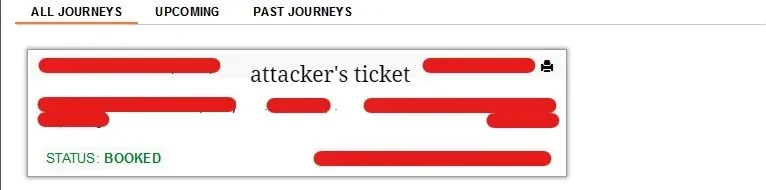
The author decreased the number in the transaction ID and forwarded the packet. The server returned another user's transaction and ticket details: train number, departure time, duration of the journey, PNR number, ticket status, boarding station, and passenger information such as names, seat details, gender and age.
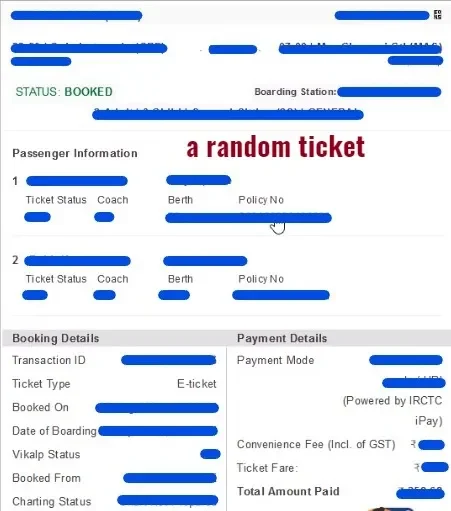
No ownership check stood between the identifier in the path and the record returned, so a decremented identifier was enough to reach another passenger's booking.
Step 3: Note the wider surface
Because the backend code is the same, the author states the same weakness applies to cancelling a ticket, changing the boarding point, ordering food, booking a hotel, a tourist package, and even booking a bus.

Root cause
The endpoint accepts a transaction identifier from the client and returns the matching record without verifying that the record belongs to the authenticated user. Decreasing the identifier returned another user's booking. The report does not describe any server-side authorisation check, and the fact that a decremented value returned another user's data indicates that object-level access control was missing on this path. The wider actions listed above share the same backend code, and the author states the same weakness applies to them.
Impact
An authenticated attacker could read other passengers' ticket records: train number, departure time, journey duration, PNR number, ticket status, boarding station, and passenger names, seat details, gender and age. Because the same backend code is used elsewhere, the author states the same weakness also applies to cancelling a ticket, changing the boarding point, ordering food, booking a hotel, a tourist package, and booking a bus. The report does not quantify how many records were reachable or whether the identifiers were fully sequential across all users.
Fix
The report does not describe the code change that resolved the issue. It records that the issue was resolved and retested on 4 September 2021, and acknowledged by IRCTC on 11 September 2021. The fix that addresses the root cause is a server-side ownership check on every request that takes a transaction or booking identifier: resolve the record, compare its owner against the authenticated session, and reject mismatches. Applying the same check to the cancel, boarding point, food, hotel, tourist package and bus endpoints is required because they share the backend code.
Variants to test
- Sequential identifiers in path segments. Take any endpoint of the form
/resource/{id}that returns JSON and decrement or increment the ID. A positive result is a response containing another user's data rather than an error or an empty body. - Identifiers in query strings and bodies. Repeat the same test where the ID is passed as
?id=or in a JSON body. A positive result is the same cross-user data leak. - Action endpoints, not just read endpoints. Test cancel, modify and booking endpoints with another user's identifier. A positive result is a state change on a record the session does not own.
- Mixed identifier types. Try UUIDs, hashed IDs and composite IDs; if the server accepts a raw numeric value where the UI sends an opaque one, that is a sign the check is client-side only.
- Response shape differences. Compare the response for your own record with the response for a neighbouring ID. A positive result is a full record with the same fields, which confirms the endpoint returns data rather than a generic error.
Timeline
- 30 August 2021, 12:45pm: reported to [redacted]
- 30 August 2021, 1:30pm: a ticket was assigned.
- 4 September 2021: the issue was resolved (retested).
- 11 September 2021: acknowledged by IRCTC.
A proof of concept was recorded and sent with the report.
What happened, in plain words
IRCTC is the website Indians use to book train tickets. It is a very large site: the author says it has around 30 million registered users and handles roughly 550,000 to 600,000 bookings every day, which he describes as making it the world's second-busiest travel portal. Every one of those bookings creates a record: which train, when it leaves, how long the trip takes, the PNR number (the code printed on your ticket that identifies the booking), whether the ticket is confirmed, where you board, and who is travelling, including names, seat numbers, gender and age.
When you are logged in, the site lets you look back at your own bookings under My account > My Transactions > Booked Ticket History. Click a booking and it expands to show the full record.
The author, Renganathan (@IamRenganathan), was booking a ticket like any normal customer when he decided to poke at the site and see whether it was secure. He found that the part of the site that fetches a booking's details did not check whose booking it was fetching. By changing one number in a request, he could read other passengers' ticket records. This kind of mistake is called an IDOR, short for Insecure Direct Object Reference: the site hands out records by a simple identifier (here, a transaction number) and trusts whatever identifier the browser sends, instead of checking that the record belongs to the person asking.
The image above is the author's "Hacker Mode!" moment: the point where an ordinary ticket-booking session turned into a security test.
The feature being tested
The booked ticket history is a list of your past bookings. Each row in the list can be clicked to expand it, and expanding it shows the full ticket record: train number, departure time, duration of the journey, PNR number, ticket status, boarding station, and passenger information such as names, seat details, gender and age.
To make that happen, your browser does not have all this information stored locally. When you click a booking, the page asks the IRCTC server for the details of that one booking, and the server replies with the data. That conversation between the page and the server is what we are going to watch.
What you need before you start
Nothing special: a normal IRCTC account, at least one booking in your history, and a tool that lets you see and pause the requests your browser sends. The author used Burp Suite, a program that sits between your browser and the website and lets you read, stop and change each request before it goes out. Think of it as a mail interception desk: the letter your browser wants to send passes through your hands first, and you can read it, rewrite it, and then send it on.
Step by step: finding the request
The first kind of bug the author thought of was IDOR. The steps to reproduce are:
- Log in to your IRCTC account.
- Go to My account > My Transactions > Booked Ticket History.
- The listed tickets expand on click.
The screenshot shows the booked ticket history page with the list of bookings. This is the normal, intended use of the feature: you see your own tickets.
Here the bookings are shown as rows that expand when clicked. Each click is what triggers the request we want to capture, so the plan is: turn on interception in Burp Suite, click a ticket, and freeze the request before it leaves the browser.
With interception on, expanding a ticket produced this request:
GET /eticketing/protected/mapps1/historySearchByTxnId/XXXXXXXXXX48?currentStatus=N HTTP/1.1Host: www.irctc.co.inUser-Agent: Mozilla/5.0 (Windows NT 10.0; Win64; x64; rv:91.0) Gecko/20100101 Firefox/91.0Accept: application/json, text/plain, */*Accept-Language: en-US,en;q=0.5Accept-Encoding: gzip, deflateReferer: https://www.irctc.co.in/nget/txn/my-transactions?page=Booked%20Ticket%20History&eWallet=false
Line by line, in plain words:
GETis the type of request. It means "give me something", as opposed to sending data to the server. It is the browser asking the server for a page or a piece of data./eticketing/protected/mapps1/historySearchByTxnId/XXXXXXXXXX48is the address on the server being asked. The wordprotectedsuggests the site expects you to be logged in. The last part,XXXXXXXXXX48, is the transaction identifier: the number that says which booking you want. TheXXXXXXXXXXstands for digits the author blanked out, and48is the end of the real number.?currentStatus=Nis a query parameter, a small extra instruction attached to the address after the question mark. Here it tells the server something about which status of booking to look for.HTTP/1.1is the version of the language the browser and server use to talk to each other.Host: www.irctc.co.insays which website the request is for. One server can host many sites, so the request names the one it wants.User-Agentdescribes the browser and operating system that sent the request. Here it says Firefox 91 on 64-bit Windows 10.Accept: application/json, text/plain, */*tells the server what kind of answer the browser can handle.application/jsonis a data format: plain text arranged in a strict structure of names and values, which programs can read easily. So the browser is saying "I would prefer structured data, but plain text or anything else is fine too".Accept-Language: en-US,en;q=0.5says the browser prefers English (US), with plain English as a fallback.Accept-Encoding: gzip, deflatesays the browser can accept the answer compressed, to save bandwidth.Referersays which page the request came from: themy-transactionspage with theBooked Ticket Historytab selected. It is like writing on an envelope which desk sent it.
What matters most is the identifier in the address. The server is being asked "give me the booking with this transaction number", and nothing visible in the request proves that this booking belongs to the person sending it. That is exactly the shape of an IDOR: the site uses a direct reference (the transaction number) to pick an object (the booking), and if the server does not check ownership, anyone can ask for any number.
Step by step: changing the number
The author tried for IDOR by decreasing the number in the transaction ID and forwarding the packet. Forwarding means letting the paused request continue to the server after editing it.
If transaction numbers are handed out one after another, then a nearby number may belong to somebody else. Decreasing the number by one is the smallest possible change, and it asks the server for a neighbour's booking.
The server answered with another user's transaction and ticket details: train number, departure time, duration of the journey, PNR number, ticket status, boarding station, and passenger information such as names, seat details, gender and age.
The screenshot shows the kind of ticket details that came back: the journey information and the passenger details. This is the proof. The request was made from the author's own logged-in session, but the record returned belonged to a different passenger. No ownership check stood between the number in the address and the record handed back, so a decremented identifier was enough to reach another passenger's booking.
The wider surface
Because the backend code is the same, the author states the same weakness applies to cancelling a ticket, changing the boarding point, ordering food, booking a hotel, a tourist package, and even booking a bus.
"Backend code" means the part of the site that runs on the server, invisible to you, which does the actual work: looking up records, saving changes, cancelling bookings. If several features are built on the same piece of server code, then a mistake in that code appears in all of them. Reading a booking is one thing; cancelling somebody else's ticket, changing where they board, or ordering food against their booking are actions that change things, and the author is saying those features share the same code and therefore the same missing check.
Why this matters
An attacker who is logged in as an ordinary user could read other passengers' ticket records: train number, departure time, journey duration, PNR number, ticket status, boarding station, and passenger names, seat details, gender and age. That is personal travel information about real people, obtained without their knowledge. And because the same backend code is used elsewhere, the author states the same weakness also applies to cancelling a ticket, changing the boarding point, ordering food, booking a hotel, a tourist package, and booking a bus. The report does not say how many records were reachable or whether the numbers were fully sequential for every user.
Reporting it and the fix
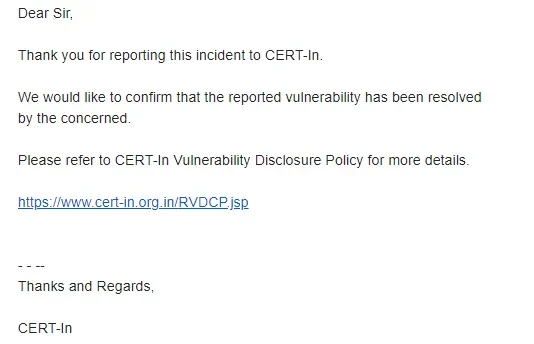
The author recorded a proof of concept, meaning a demonstration that shows the bug happening, and reported it to [redacted] CERT-In is India's national computer emergency response team: a government body that receives reports of security problems.
The proof of concept was the evidence sent with the report.
The report does not describe the code change that fixed the issue. It records that the issue was resolved and retested on 4 September 2021, and acknowledged by IRCTC on 11 September 2021. The fix that addresses the root cause is a server-side ownership check on every request that takes a transaction or booking identifier: look up the record, compare its owner against the logged-in session, and refuse if they do not match. The same check is needed on the cancel, boarding point, food, hotel, tourist package and bus features, because they share the backend code.
Timeline
- 30 August 2021, 12:45pm: reported to [redacted]
- 30 August 2021, 1:30pm: a ticket was assigned.
- 4 September 2021: the issue was resolved (retested).
- 11 September 2021: acknowledged by IRCTC.
The screenshot shows IRCTC's acknowledgment of the report.
How to look for the same kind of bug yourself
These are the general patterns the author's test fits into. They are things to try on sites you are allowed to test, such as bug bounty programmes that invite reports.
- Numbers in the address. Find any request whose address ends in something like
/resource/{id}and returns structured data. Change the number up or down by one. A positive result is a response containing another user's data rather than an error or an empty answer. - Numbers in query strings and request bodies. Repeat the same test where the identifier is passed as
?id=or inside the data the browser sends. A positive result is the same cross-user data leak. - Action requests, not just read requests. Test cancel, modify and booking requests with another user's identifier. A positive result is a change happening to a record your session does not own.
- Different kinds of identifier. Try long random-looking identifiers, scrambled identifiers and combined identifiers. If the server accepts a plain number where the page normally sends a scrambled value, that is a sign the check is only happening in the browser, which anyone can bypass.
- Compare the answers. Compare the response for your own record with the response for a neighbouring number. A positive result is a full record with the same fields, which confirms the server is returning data rather than a generic error.
Glossary
- API: the part of a website that answers requests for data rather than for web pages. Your browser asks it a question in a fixed format and it answers with data, often JSON.
- Backend: the code that runs on the server, out of sight of the visitor, which looks up records and performs actions.
- Burp Suite: a tool that sits between your browser and a website so you can read, pause and edit requests before they are sent.
- CERT-In: India's national computer emergency response team, which receives reports of security incidents.
- Cookie: a small piece of data a website stores in your browser so it can recognise you on later requests, for example to keep you logged in.
- GET: the type of request a browser sends to ask for something, such as a page or a piece of data.
- gzip / deflate: ways of compressing data so it travels faster over the network.
- Header: a line in a request or response that carries information about it, such as which site it is for or what kind of answer is wanted.
- Host: the header that names which website the request is addressed to.
- HTTP: the language browsers and web servers use to exchange requests and responses.
- IDOR (Insecure Direct Object Reference): a bug where a site picks a record using an identifier supplied by the browser and does not check that the record belongs to the person asking, so changing the identifier exposes someone else's data.
- Identifier: a value that names one specific record, such as a transaction number or booking number.
- JSON: a plain-text data format that arranges information as names and values, easy for programs to read.
- Ownership check: a check on the server that the record being requested or changed belongs to the logged-in user.
- Path: the part of a web address after the site name that points to a particular place on the server, such as
/eticketing/protected/mapps1/historySearchByTxnId/. - PNR number: the code on an Indian train ticket that identifies that particular booking.
- Proof of concept (POC): a demonstration, often a video or screenshots, that shows a bug actually happening.
- Query parameter: an extra instruction attached to a web address after a question mark, such as
?currentStatus=N. - Referer: a header that tells the server which page the request came from.
- Request: the message a browser sends to a server asking for something or asking it to do something.
- Response: the message a server sends back.
- Session: the period during which a site recognises you as logged in, usually kept track of with a cookie or token.
- Token: a value, similar in purpose to a cookie, that proves to the server who you are on each request.
- User-Agent: a header describing the browser and operating system that sent the request.