Exposing iCloud user’s Name, phone numbers, and email addresses.
Publicly shared iCloud notes links could be opened by anyone, and the verification page for such a link revealed the note owner's email address, phone number and name. An attacker who found these links, for example through search engine results, could learn personal details about the owner.
 Published on infosecwriteups.com
This write-up is about a misconfiguration that I found on iCloud and how I could have accessed the iCloud user’s name, phone number, and email address.
The full write-up lives on its author's site
It belongs to its author, so we link to it rather than copy it. The other two tabs are our own rewrites, checked against it.
Context
This write-up covers a misconfiguration the researcher found on iCloud, Apple's web portal for Apple ID services, and how it allowed access to the name, phone number and email address of iCloud users who had shared notes. The feature involved is iCloud Notes: when a user shares a note, iCloud generates a public link of the form https://www.icloud.com/notes/<identifier>. The researcher's example link was:
https://www.icloud.com/notes/neVeRgoNNagiVEyouuP
The report was shared publicly with the permission of the Apple Product Security Team. Before this, the researcher had submitted only one report to Apple, which was not valid.
Setup
The researcher is not an Apple user and did not know the features or functions of the product, so the approach was manual exploration of the iCloud dashboard rather than starting with apple.com and subdomain enumeration. No special tooling is described beyond a browser and Google search. The only precondition for the finding is that a note has been shared publicly, which is what makes its link crawlable.
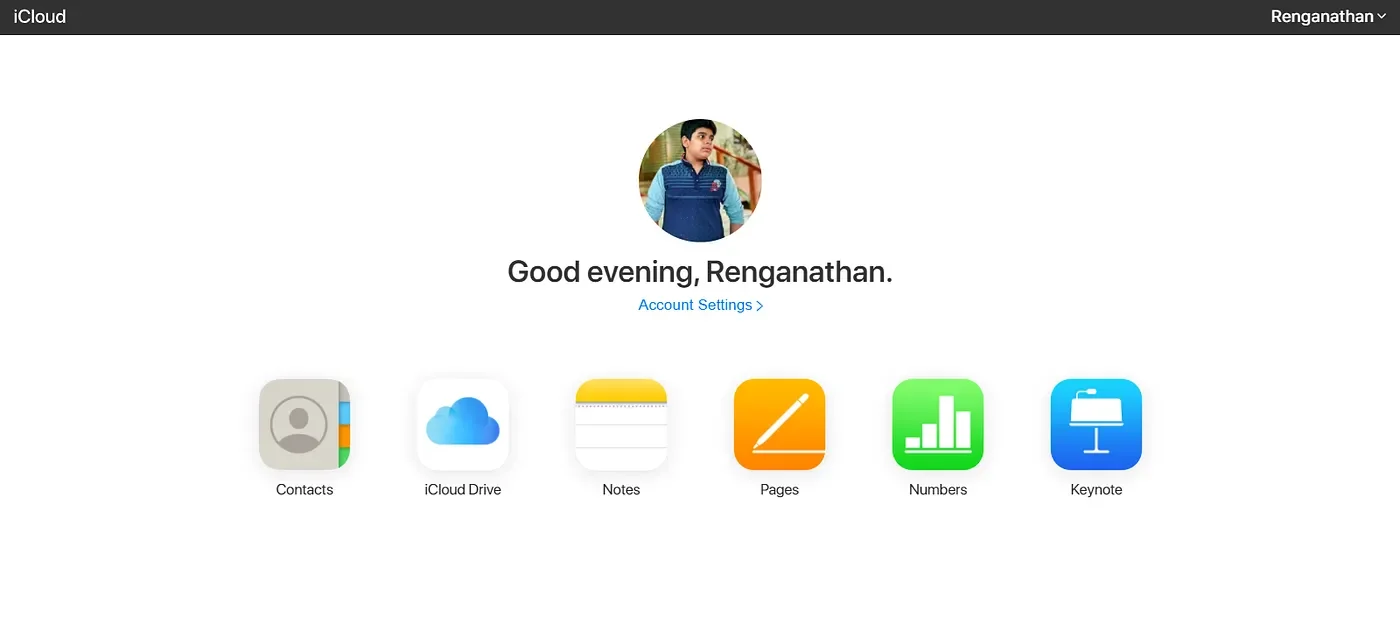
The iCloud dashboard, the starting point of the manual exploration.
Finding it
While exploring the dashboard, the researcher clicked on Notes and noticed that a note had a shareable link. The URL drew the researcher's attention.
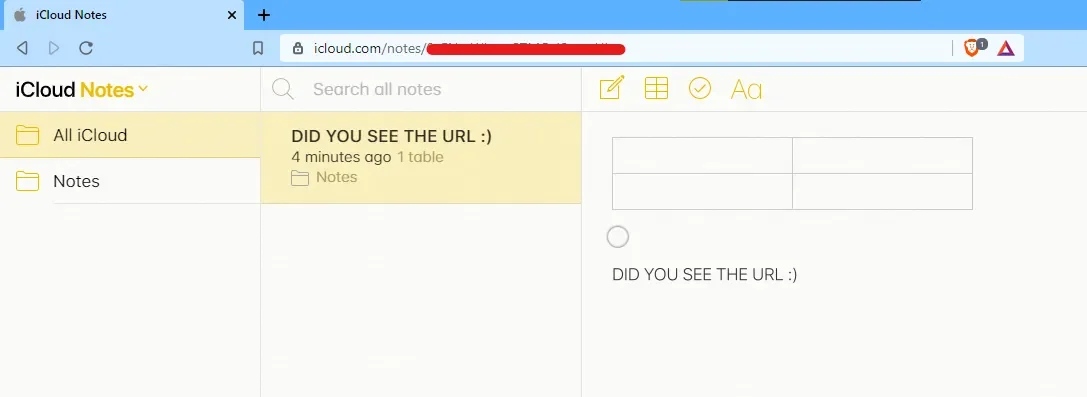
The notes page, with attention drawn to the URL.
Since the link can be shared with people, the next question was whether notes belonging to other users could be reached. The researcher used a Google dork to enumerate notes:
site:icloud.com/notes/*
This restricts results to URLs under icloud.com/notes/. The links were crawled only because they had been shared publicly; otherwise Google cannot crawl them. The dork returns notes whose links were crawled because they had been shared publicly.
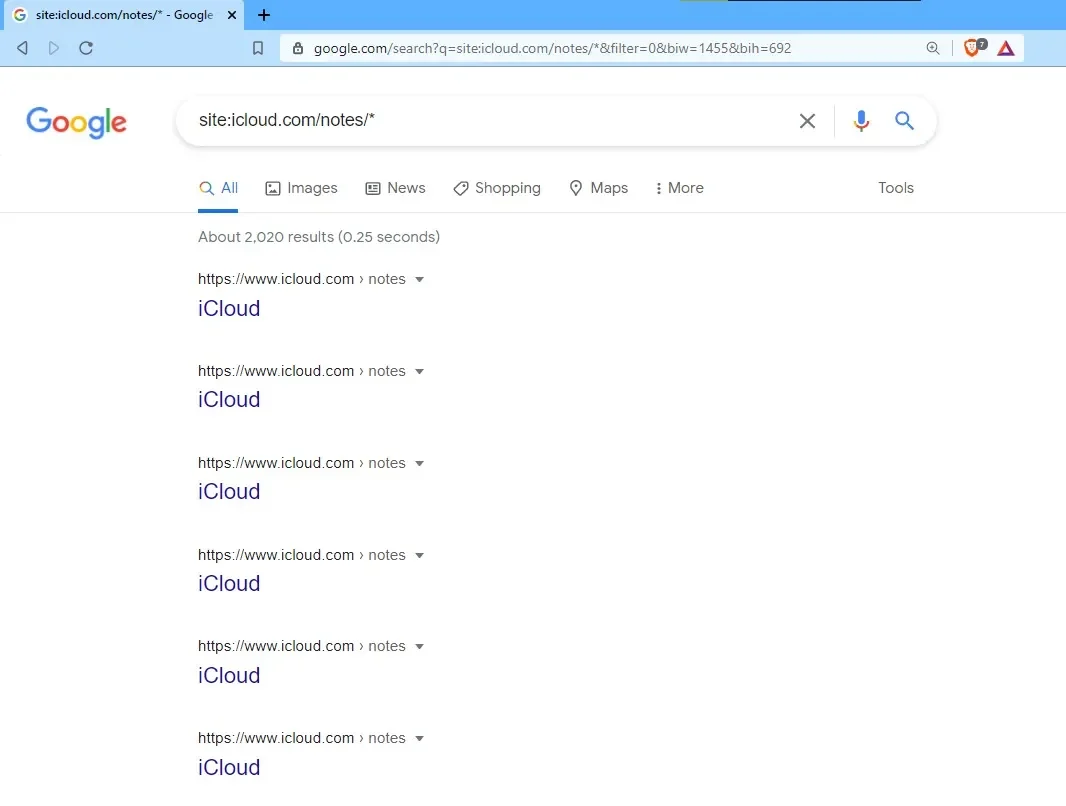
The enumerated note links returned by the dork.
Exploitation
Step 1: Enumerate shared note links
Run the dork above and collect the resulting icloud.com/notes/... URLs. Each one belongs to a note that its owner shared publicly.
Step 2: Open the links
A few of the enumerated links returned a 404 error.
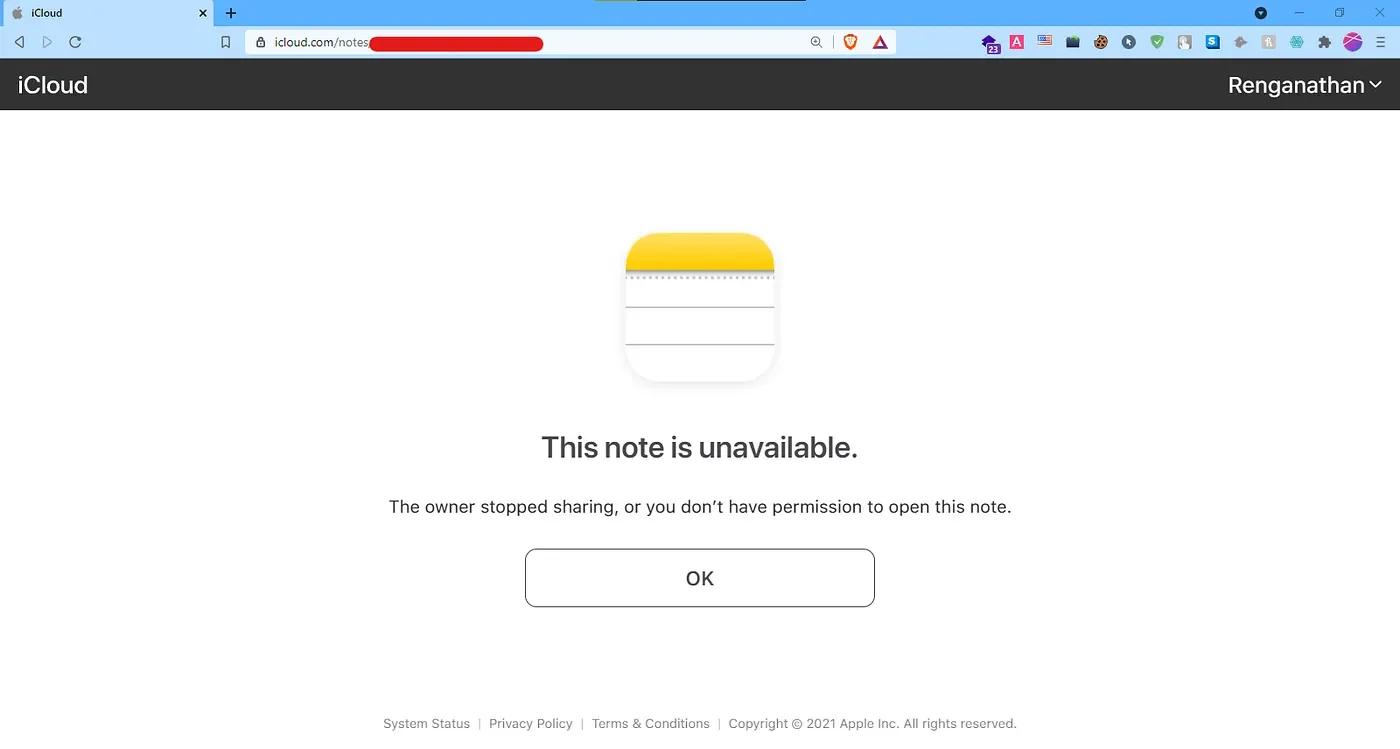
A note link returning a 404.
Step 3: Pass the verification requirement
Other links did not return the note directly but came back with a verification requirement.
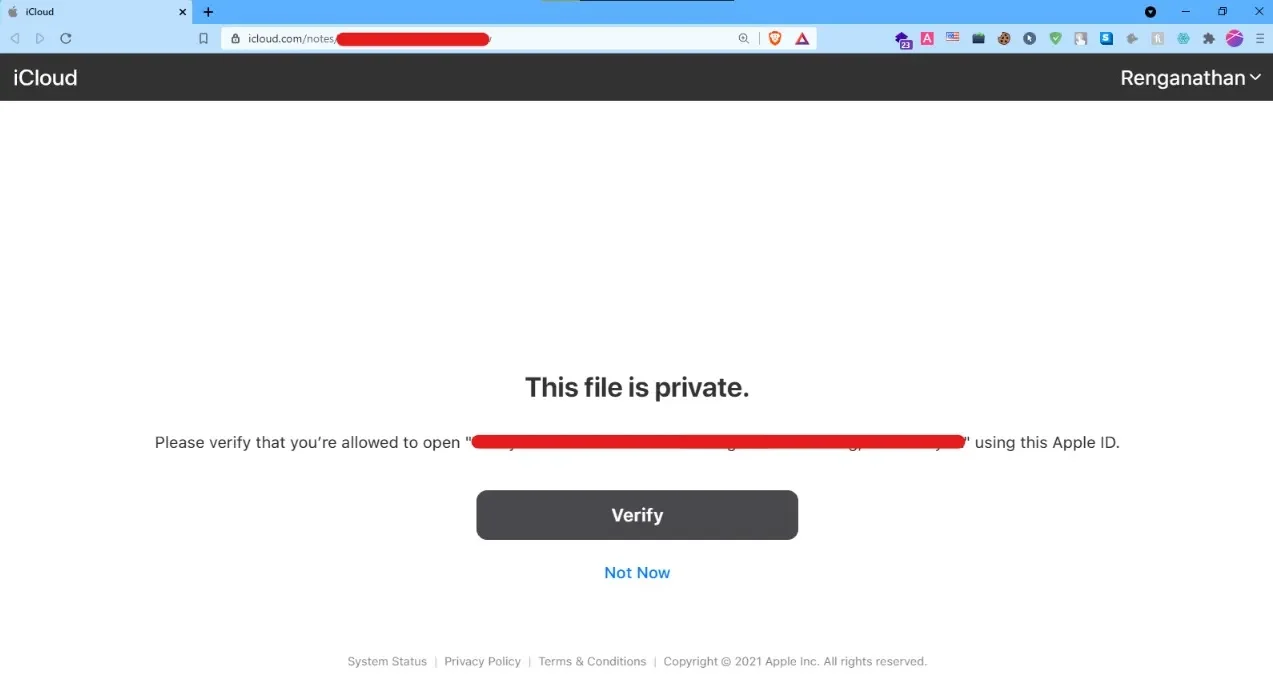
The verification prompt shown instead of the note.
Step 4: Click verify
Clicking verify exposed the owner's email address.
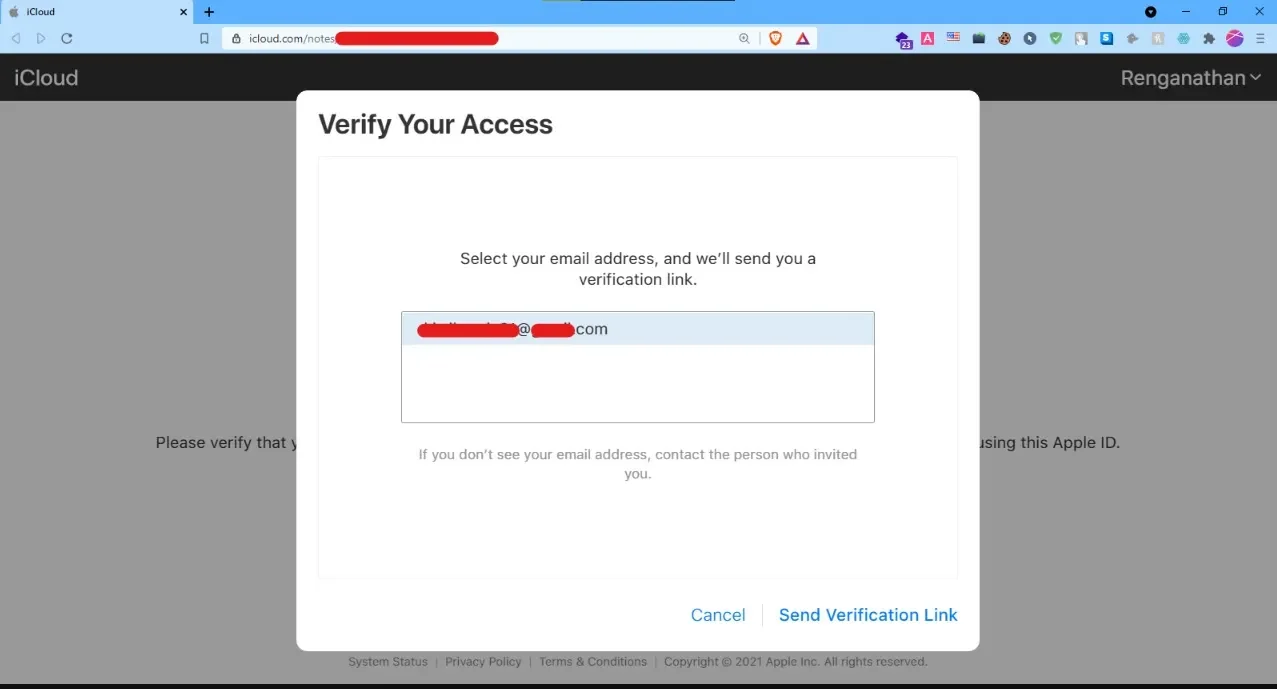
The note page after verification, exposing the owner's email address.
Step 5: Read the remaining owner details
A few of the notes also showed the owner's phone number.
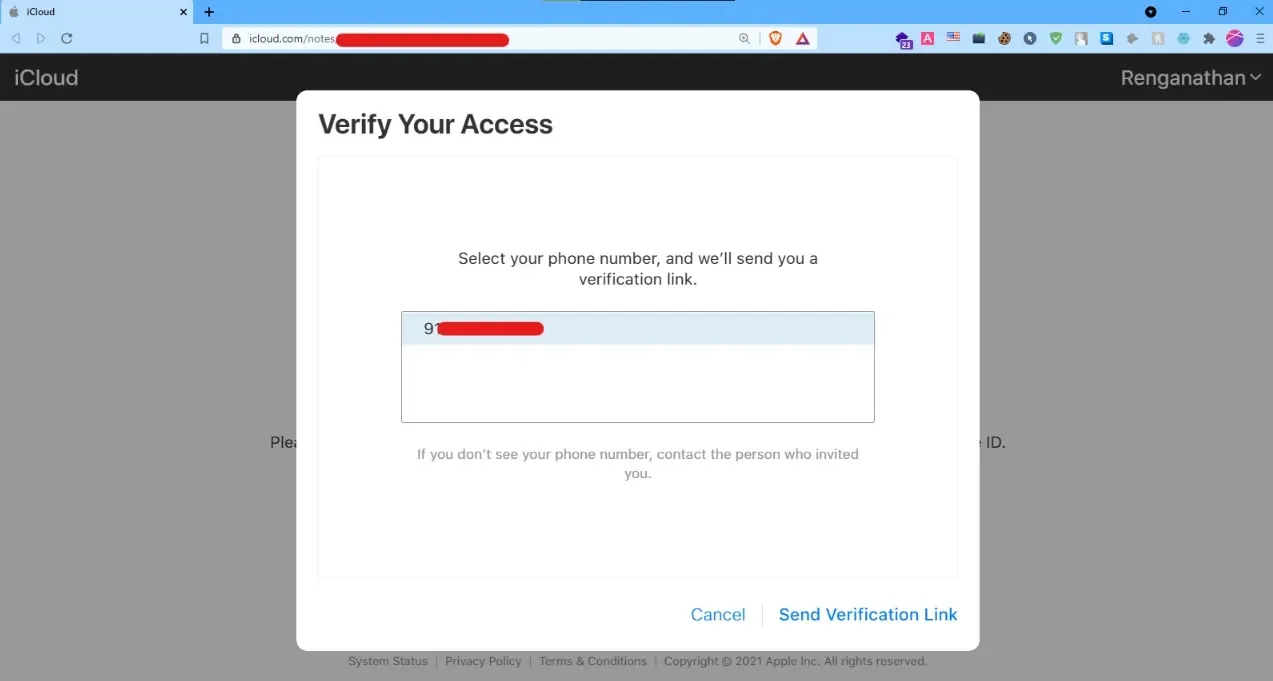
The note page exposing the owner's phone number.
Opening the link in a private window showed the owner's name.
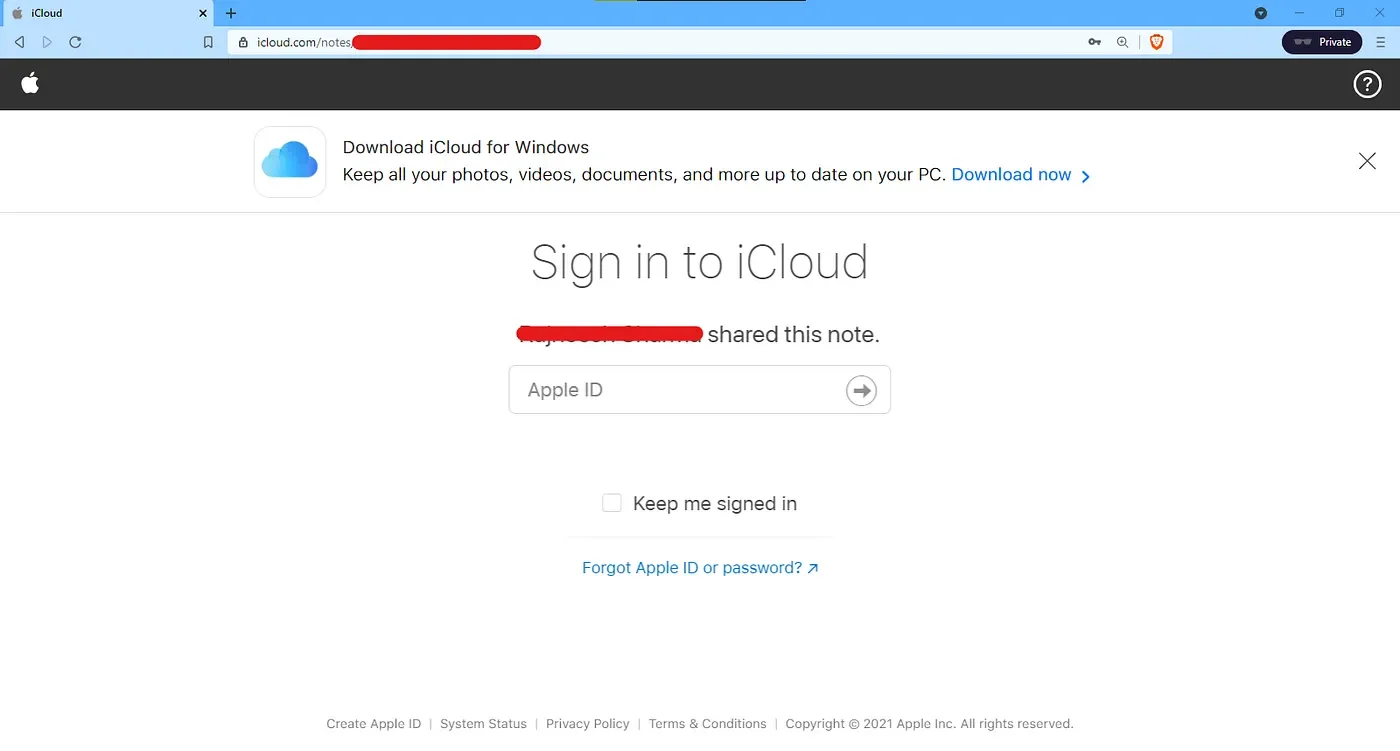
The note page exposing the owner's name.
Step 6: Attempt to obtain the verification link
The researcher tried to get a copy of the verification link by modifying the API request, but it was not vulnerable. The report does not describe the request or the modification.
Root cause
The report describes the issue as a misconfiguration: publicly shared note links are indexed by search engines, and opening such a link, after the verification step, discloses the owner's email address, and in some cases the phone number and name. Clicking verify led to the disclosure of the owner's details. The attempt to abuse the API request to obtain the verification link failed, so the disclosure is tied to the shared-link flow rather than to a flaw in the verification mechanism itself. The report does not go into the server-side implementation, so the precise cause is not stated.
Impact
An attacker who enumerates publicly shared note links can learn the owner's email address, and for some notes the owner's phone number and name. The enumerated links were crawled only because they had been shared publicly. The researcher reported it on that basis, the bug was accepted, and the researcher was credited in the Apple hall of fame.
Fix
According to the timeline in the report:
- June 2, 2021: reported.
- June 16, 2021: accepted, and a patch was implemented against crawling the links; completely fixed.
- February, 2022: listed in Apple's hall of fame.
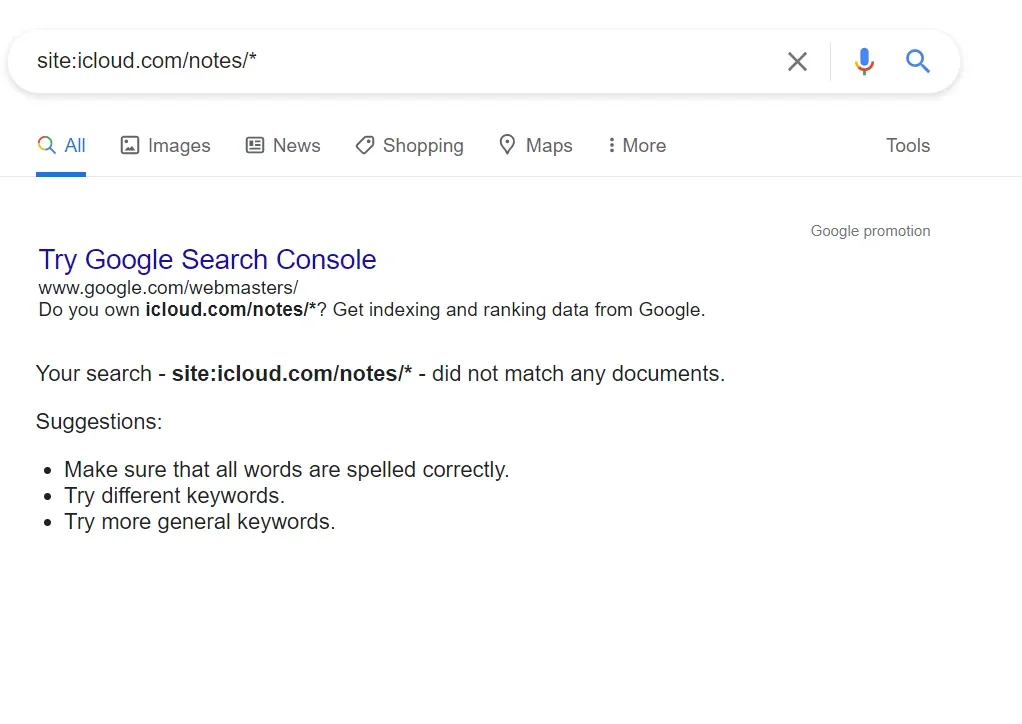
The patched state of the affected page.
Variants to test
- Search-engine enumeration of other share-link products: run a dork scoped to the share path (for example
site:example.com/share/*) and open the results. A positive result is a shared object whose page reveals owner identifiers such as an email address, phone number or display name. - Verification-gated share pages: open enumerated links and complete any verification prompt. A positive result is owner details appearing after verification rather than only the shared content.
- Private-window comparison: open the same link in a private window and compare what is rendered. A positive result is additional owner details appearing only in that context.
- API request manipulation around the verification step: modify the request that issues or validates the verification link and observe the response. A positive result is obtaining a verification link or owner details without completing the intended flow; in this report the equivalent attempt was not vulnerable.
- Identifier predictability: inspect the share identifier in the URL for patterns. A positive result is an identifier that can be guessed or enumerated to reach notes that were never shared publicly.
What happened, in plain words
A security researcher found that iCloud, Apple's website for Apple ID services, was leaking personal details about people who had shared a note. When you share an iCloud note, iCloud gives you a web link that anyone can open. The researcher used Google to find these shared links, opened them, and after clicking a verify button was shown the note owner's email address. Some of the links also showed the owner's phone number, and opening a link in a private window showed the owner's name.
That is the whole story in one paragraph. The rest of this article walks through it slowly, explains every term the first time it appears, and shows the exact search and links that were used. The researcher shared the write-up publicly with the permission of the Apple Product Security Team.
Before this finding, the researcher had sent Apple only one report, and it was not accepted as a valid bug. After seeing a mentor, Hemant Patidar, rewarded for a finding on Apple ID, the researcher decided to try Apple again.
The product and the feature
iCloud is Apple's online service. Your Apple ID is the account you use for it, and the iCloud website is a dashboard where you can reach things like mail, contacts, photos and notes from a browser.
Notes is one of those features. It works like an online notepad: you write text, and it is stored in your account. Notes can also be shared. When you share one, iCloud creates a public link that you can send to other people, and anyone with that link can open the note in a browser.
The link has a fixed shape. The researcher's example was:
https://www.icloud.com/notes/neVeRgoNNagiVEyouuP
Read it from left to right. https:// means the page is loaded over an encrypted connection. www.icloud.com is Apple's iCloud website. /notes/ says you are looking at a note. The last part, neVeRgoNNagiVEyouuP, is an identifier: a unique label for that one note, a bit like a locker number. The URL caught the researcher's eye.
How the researcher started
The researcher is not an Apple user and did not know the product's features, so the approach was to explore the iCloud dashboard by hand rather than starting with apple.com and hunting for subdomains. A subdomain is a section of a domain, such as mail.example.com under example.com; listing subdomains is a common first move when testing a company, but it was not used here. No special tools are described beyond a browser and Google search.
The iCloud dashboard, where the manual exploration began.
While clicking around, the researcher opened Notes and noticed that a note had a shareable link. The URL stood out because the identifier in the path is all that stands between a visitor and the note.
The notes page, with attention drawn to the URL.
Finding the shared notes
Since the link can be shared with people, the natural next question was whether notes belonging to other users could be reached. The researcher used a Google search trick, called a Google dork, to list notes:
site:icloud.com/notes/*
Line by line: site: tells Google to return results from one website only, here icloud.com. icloud.com/notes/* narrows that to pages whose address starts with icloud.com/notes/, and the * stands for anything that follows. So the search asks Google for every indexed page under the notes path.
Why does this work at all? Because Google can only list a page if it has crawled it, meaning a Google program visited the page and recorded it. A note that was never shared is private and cannot be crawled, so it never appears in search results. A note that was shared publicly has a link anyone can open, so Google can crawl it and list it. The dork returns notes whose links were crawled because they had been shared publicly.
The note links returned by the dork.
Opening the links
Step 1: Collect the shared links
Run the dork above and gather the resulting icloud.com/notes/... addresses. Each one belongs to a note that its owner shared publicly.
Step 2: Open each link
Some of the collected links returned a 404 error. A 404 is the standard web response for "this page does not exist": the server was asked for something and could not find it. In practice this means the link returned a 404 error.
A note link returning a 404.
Step 3: Meet the verification requirement
Other links did not show the note straight away. Instead they came back with a verification requirement: a prompt asking the visitor to confirm something before the note is shown.
The verification prompt shown instead of the note.
Step 4: Click verify
Clicking verify exposed the owner's email address.
The note page after verification, exposing the owner's email address.
Clicking verify showed who owned the note. An email address is personal data: it identifies a real person and is often the key to other accounts.
Step 5: Read the other owner details
A few of the notes also showed the owner's phone number.
The note page exposing the owner's phone number.
Opening the link in a private window showed the owner's name. A private window (sometimes called incognito) is a browser window that starts without your saved logins and history, so the site sees a fresh visitor rather than your usual signed-in self.
The note page exposing the owner's name.
Step 6: Try to get the verification link itself
The researcher then tried to obtain a copy of the verification link by modifying the API request, but it was not vulnerable. An API is the behind-the-scenes channel a web page uses to talk to a server: the page sends a request, the server sends back data, and the page draws it on screen. Modifying the request means changing what the browser sends, for example a value in the request, to see whether the server behaves differently. Here the server did not hand over the verification link, so that avenue was closed. The report does not describe the request or the modification.
Why it happened
The report calls the issue a misconfiguration: a setting or behaviour that is not wrong in code but is set up in a way that exposes more than it should. Publicly shared note links are indexed by search engines, and opening such a link, after the verification step, discloses the owner's email address, and in some cases the phone number and name. Clicking verify led to the disclosure of the owner's details. The attempt to abuse the API request to obtain the verification link failed, so the disclosure is tied to the shared-link flow rather than to a flaw in the verification mechanism itself. The report does not go into the server-side implementation, so the precise cause is not stated.
What it meant in practice
Anyone who enumerates publicly shared note links can learn the owner's email address, and for some notes the owner's phone number and name. The enumerated links were crawled only because they had been shared publicly. The researcher reported it on that basis, the bug was accepted, and the researcher was credited in the Apple hall of fame, a public list of people who have reported valid security issues to Apple.
The fix
According to the timeline in the report:
- June 2, 2021: reported.
- June 16, 2021: accepted, and a patch was implemented against crawling the links; completely fixed.
- February, 2022: listed in Apple's hall of fame.
The patched state of the affected page.
Similar things to look for
These are patterns worth checking on other products that offer share links. They are general ideas, not claims about what happened here.
- Search-engine enumeration of other share-link products: run a dork scoped to the share path (for example
site:example.com/share/*) and open the results. A positive result is a shared object whose page reveals owner identifiers such as an email address, phone number or display name. - Verification-gated share pages: open enumerated links and complete any verification prompt. A positive result is owner details appearing after verification rather than only the shared content.
- Private-window comparison: open the same link in a private window and compare what is rendered. A positive result is additional owner details appearing only in that context.
- API request manipulation around the verification step: modify the request that issues or validates the verification link and observe the response. A positive result is obtaining a verification link or owner details without completing the intended flow; in this report the equivalent attempt was not vulnerable.
- Identifier predictability: inspect the share identifier in the URL for patterns. A positive result is an identifier that can be guessed or enumerated to reach notes that were never shared publicly.
Glossary
- API: the channel a web page uses to exchange data with a server behind the scenes.
- Apple ID: the account you use for Apple services such as iCloud.
- Crawl: when a search engine's program visits a page and records it so it can appear in search results.
- Dork: a search query that uses special operators, such as
site:, to narrow results to a particular site or path. - Email address: a personal identifier for a person's mailbox, often usable to reach or identify them.
- Enumerate: to list items one by one, here the shared note links.
- Google dork: see dork.
- Hall of fame: a public list of people credited for reporting valid security issues.
- Identifier: a unique label for one object, here the last part of a note link.
- iCloud: Apple's online service and website for Apple ID features.
- Incognito / private window: a browser window that starts without your saved logins and history.
- Index: the search engine's stored record of crawled pages.
- Misconfiguration: a setting or behaviour that exposes more than intended without being a coding error.
- Notes: the iCloud feature for writing and sharing online notes.
- Patch: a fix applied by the vendor.
- Personal data: information that identifies a real person, such as an email address, phone number or name.
- Request: a message a browser sends to a server asking for a page or data.
- Response: the message a server sends back.
- Share link: a public web address that lets anyone who has it open a shared item.
- Subdomain: a section of a domain, such as
mail.example.comunderexample.com. - 404: the standard web response meaning the requested page does not exist.
- URL: the address of a page on the web.
- Verification: a step asking a visitor to confirm something before content is shown.
- Vulnerability: a weakness that lets someone do something the product did not intend.