Crypto bounty program got me $500 — Rate Limit Bypass
The forgot-password endpoint locked an account for three minutes after five reset requests, but appending a trailing space to the email address was treated as a different value, so the lockout counter reset. An attacker could keep requesting password reset emails indefinitely, flooding the victim's inbox.

For a small bug on web3, you could got 2x comparing a medium or high severity bug on web.
The full write-up lives on its author's site
It belongs to its author, so we link to it rather than copy it. The other two tabs are our own rewrites, checked against it.
Context
Kraken is a cryptocurrency exchange, and the feature in scope here is the account password reset flow: the "forgot password" form that emails a reset link to the address on file. The researcher's interest was in the abuse controls around that flow, specifically whether the endpoint that triggers reset emails enforces a rate limit.
The write-up opens with the author's view that web3 work pays better than web work, and notes that the vulnerability is now fixed, which is why the target can be named. The first contact from Kraken was an automatic reply.
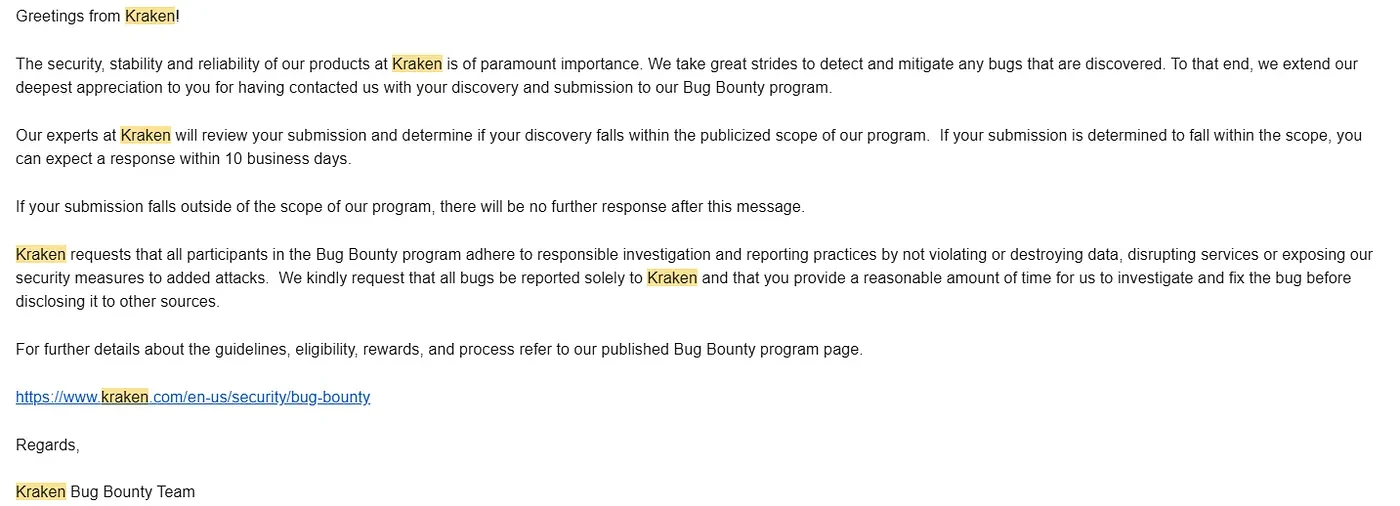
Automatic Reply from The Company
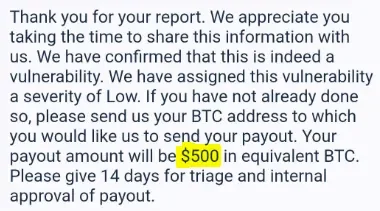
The result was a $500 bounty for a rate limit bypass.
Setup
At the time the researcher was working as a web pentester intern, and the target was assigned by their boss. The program was a public crypto program. No specific tooling is described beyond an intercepting proxy: the steps refer to intercepting a request and sending it to Repeater, which is Burp Suite terminology. The author explicitly says Intruder was not used for the proof of concept; the requests were sent by hand.
No account roles, versions or special preconditions are given in the report.
Finding it
Before reaching the rate limit issue, the researcher tried other angles on the same program. One earlier report, a password reset token that did not expire after a new one was issued, was closed as N/A. On the forgot password functionality itself, password reset poisoning was tested and the functionality was found to be safe from it.
The interesting behaviour appeared when testing email triggering: whether there is a rate limit on requesting password reset links. There is one, but it is coarse. After every 5 attempts the account is locked for 3 minutes. That lockout is what made the control look potentially bypassable: it keys on something about the request, and if that something can be varied while the request still reaches the same account, the counter resets.
The researcher first tried the usual identity-confusion tricks on the email value, appending null characters in several encodings:
\n \0 \x00 %0
None of these worked. The bypass that did work was a single space appended after the email address.
Exploitation
Step 1: Intercept the forgot password request
Submit the forgot password form for the target account and intercept the request in the proxy. The report does not include the raw HTTP request, only the email parameter as it appears in the body.
Step 2: Confirm the limit
Send the request to Repeater and forward it. The response says a reset link has been sent. Forward it four more times: everything is fine up to this point, and five password reset links arrive in the inbox. Send one more time and the account is blocked for 3 minutes.
So the baseline is five accepted requests per window, then a three minute lockout.
Step 3: Add a space after the email
Modify the email parameter so that a space sits between the address and the closing quote:
email='[redacted] '
The space before the last quote is the whole payload. The address is still the same mailbox as far as delivery is concerned, but the value sent to the server is a different string from the one used in the previous five requests.
Step 4: Send five more
Send the modified request five times. Five more reset links arrive in the email, and after that the account is blocked again. The counter has restarted because the input changed.
Step 5: Repeat with another space
Add another space and repeat. Each time a single space is appended after every five attempts, the limit is reset and another five reset emails are delivered. In the author's words, adding a single space after every 5 attempts successfully bypassed the rate limit.
Root cause
The behaviour suggests the rate limit is keyed on the email value rather than the account, though the report does not describe the implementation. The server appears to treat [redacted] and [redacted] as separate values for counting, while the reset email still reached the same inbox. The lockout therefore counts five requests for any one spelling of the address, and appending another space after each lockout allowed another five.
The null character variants did not work; the report does not explain why.
Impact
An attacker who knows a victim's email address can trigger more reset emails than the five-per-window limit allows, by adding a space after each lockout. Kraken rated it low severity because a user can block these emails.
Kraken assigned the report low severity for exactly this reason: a user can block these emails.
Fix
The report states that the vulnerability is fixed but does not describe the change that was made. The report states the vulnerability is fixed but does not describe the change that was made.
Variants to test
On other targets with a per-value rate limit on an email-triggering endpoint, the same idea applies wherever the counted string and the delivered string can diverge:
- Trailing whitespace: append a space, a tab, or multiple spaces to the email parameter. A positive result is that the lockout resets and another batch of reset emails is delivered to the same inbox.
- Case variation: change the case of the local part or domain. A positive result is delivery to the same mailbox with a fresh counter.
- Plus addressing and dots: add a
+tagsuffix or extra dots in the local part where the mail provider treats them as the same mailbox. A positive result is the same as above. - Encoding differences: send the address percent-encoded or with different but equivalent encodings of the same characters. A positive result is that the server accepts the request and the counter does not carry over.
- Other parameters in the same request: vary any secondary field (a hidden token, a locale, a redirect parameter) and see whether the limit is keyed on the whole request rather than the account. A positive result is a reset of the lockout without changing the recipient.
- Parallel requests: send the batch concurrently rather than sequentially to see whether the counter is checked before or after the send. A positive result is more than five deliveries inside one window.
For each variant, the confirmation is the same: more reset emails than the stated limit arrive at one mailbox, and the lockout either does not trigger or triggers later than it should.
What happened, in plain words
A security researcher was given a target to test: Kraken, a cryptocurrency exchange. A cryptocurrency exchange is a website where people buy, sell and hold digital money. The researcher found a small flaw in the "forgot password" feature. That feature is the form you fill in when you cannot remember your password: you type your email address, the site sends you a link by email, and you click the link to set a new password.
Most sites put a limit on how many times you can ask for that link, so that nobody can flood your inbox with reset emails. Kraken had such a limit: after 5 requests the account was locked for 3 minutes. The researcher found that adding a single space after the email address allowed another five requests before the lockout returned. Repeating this meant more reset emails could be sent to one inbox than the five-request limit allowed.
Kraken paid $500 for the report and rated it low severity, because a user can block these emails. The flaw is now fixed, which is why the researcher is allowed to name the target. The first reply from Kraken was an automatic message.
Automatic Reply from The Company
So: $500 for a rate limit bypass.
How it started
At the time, the researcher was working as an intern doing web penetration testing, which means being paid to try to break websites on purpose so the owners can fix them. Their boss gave them a target to hunt. It was a public crypto program, meaning anyone could take part and report bugs in it.
The researcher's opening point is about money: in their view, a small bug in web3 (crypto) work could get twice as much as a medium or high severity bug in ordinary web work. Severity is a label for how serious a bug is.
The first phase
The researcher's expectation was low. Crypto targets are, in their words, very secure, and the chance of finding a bug is tiny. Still, they tried every way they could think of to find at least one bug, and nothing worked.
One earlier report they submitted was about a password reset token that did not expire after a new one was issued. A token here is the secret code inside the reset link that proves the link is genuine. If an old link keeps working after a new one is created, an attacker who got hold of the old link could still use it. That report was closed as N/A, meaning not applicable: the program decided it was not a valid bug.
The bug
After several attempts, the researcher reached the forgot password feature to test for password reset poisoning. That is an attack where the attacker manipulates the request so the reset link points somewhere the attacker controls, or is delivered to the attacker. The feature was safe from it.
The researcher then checked email triggering: whether there is a limit on how many reset links you can ask for. There was one, but it was coarse. After every 5 attempts the account was locked for 3 minutes. That lockout is what made the control look breakable: it counts something about the request, and if that something can be changed while the request still reaches the same account, the counter starts over.
The first idea was to confuse the site about the email address by adding null characters in several encodings:
\n \0 \x00 %0
Line by line, these are different ways of writing characters that are meant to be invisible or to mark the end of a piece of text:
\nis a newline, the character produced when you press Enter.\0is a null character, a character with no value at all.\x00is another way of writing that same null character.%0is a percent-encoded fragment, the style used in URLs to represent special characters.
The idea was that the site might count the request under one spelling of the address but still deliver the email to the real mailbox. None of these worked.
The bypass that did work was a single space appended after the email address.
Exploitation
Step 1: Intercept the forgot password request
Submit the forgot password form for the target account and intercept the request in a proxy. A proxy is a tool that sits between your browser and the website: instead of the browser talking to the site directly, the request goes through the proxy, which lets you read it and change it before passing it on. The report does not include the raw HTTP request, only the email parameter as it appears in the body.
Step 2: Confirm the limit
Send the request to Repeater and forward it. Repeater is a feature of the Burp Suite proxy tool that lets you send the same request again and again, editing it each time. The response says a reset link has been sent. Forward it four more times: everything is fine up to this point, and five password reset links arrive in the inbox. Send one more time and the account is blocked for 3 minutes.
So the baseline is five accepted requests, then a three minute lockout. Knowing the baseline matters: you cannot show a bypass until you know exactly where the normal limit sits.
Step 3: Add a space after the email
Modify the email parameter so that a space sits between the address and the closing quote:
email='[redacted] '
Line by line: email= is the name of the field in the request, the part the site reads to know which address to send to. '[redacted] ' is the value, wrapped in quotes. The space before the last quote is the whole payload. To a human, and to the mail system, the address is still the same mailbox. But the string sent to the server is different from the one used in the previous five requests, and that difference is what the counter keys on.
Step 4: Send five more
Send the modified request five times. Five more reset links arrive in the email, and after that the account is blocked again. The counter has restarted because the input changed.
Step 5: Repeat with another space
Add another space and repeat. Each time a single space is appended after every five attempts, the limit resets and another five reset emails are delivered. In the author's words, adding a single space after every 5 attempts successfully bypassed the rate limit.
The report
The researcher wrote up the finding and did not use Intruder for the proof of concept. Intruder is the Burp Suite tool that automates sending many requests with varying values; here the requests were sent by hand, following the steps above. Three days later the email arrived saying $500 had been awarded. Kraken assigned low severity because a user can block these emails.
Why it works
The behaviour suggests the rate limit is keyed on the email value rather than the account, though the report does not describe the implementation. The server appears to treat [redacted] and [redacted] as separate values for counting, while the reset email still reached the same inbox. The lockout therefore counts five requests for any one spelling of the address, and appending another space after each lockout allowed another five.
The null character variants did not work; the report does not explain why.
Impact
An attacker who knows a victim's email address can trigger more reset emails than the five-per-window limit allows, by adding a space after each lockout. Kraken rated it low severity because a user can block these emails.
Kraken rated it low severity for exactly this reason: a user can block these emails.
Fix
The report states that the vulnerability is fixed but does not describe the change that was made. The report states the vulnerability is fixed but does not describe the change that was made. Normalising means cleaning the input into one standard form before comparing or counting it.
Variants to test
On other targets with a per-value rate limit on an email-triggering endpoint, the same idea applies wherever the counted string and the delivered string can diverge:
- Trailing whitespace: append a space, a tab, or multiple spaces to the email parameter. A positive result is that the lockout resets and another batch of reset emails is delivered to the same inbox.
- Case variation: change the case of the local part or domain. A positive result is delivery to the same mailbox with a fresh counter.
- Plus addressing and dots: add a
+tagsuffix or extra dots in the local part where the mail provider treats them as the same mailbox. A positive result is the same as above. - Encoding differences: send the address percent-encoded or with different but equivalent encodings of the same characters. A positive result is that the server accepts the request and the counter does not carry over.
- Other parameters in the same request: vary any secondary field (a hidden token, a locale, a redirect parameter) and see whether the limit is keyed on the whole request rather than the account. A positive result is a reset of the lockout without changing the recipient.
- Parallel requests: send the batch concurrently rather than sequentially to see whether the counter is checked before or after the send. A positive result is more than five deliveries inside one window.
For each variant, the confirmation is the same: more reset emails than the stated limit arrive at one mailbox, and the lockout either does not trigger or triggers later than it should.
Glossary
- API: the set of addresses and rules a website uses to let programs talk to it; here, the endpoint that handles the forgot password form.
- Bounty: a reward paid by a company for a valid security report.
- Burp Suite: a tool used by security testers to intercept, inspect and resend web requests.
- Canonicalising: converting input into one standard form so that different spellings of the same thing compare as equal.
- Cryptocurrency exchange: a website where people buy, sell and hold digital money.
- Endpoint: a specific address on a server that performs one action, such as sending a reset email.
- Forgot password flow: the feature where you enter your email and receive a link to set a new password.
- HTTP request: the message your browser sends to a website asking it to do something.
- Impact: what an attacker could actually do with a bug, and how bad it is.
- Intruder: the Burp Suite tool that sends many requests automatically with varying values.
- Lockout: a temporary block applied after too many attempts.
- Low severity: a rating meaning the bug is real but causes limited harm.
- N/A: not applicable; a report closed as not a valid bug.
- Normalising: cleaning input into a standard form before using it.
- Null character: a character with no value, often used to try to confuse input handling.
- Password reset poisoning: an attack that manipulates the reset request so the link goes somewhere the attacker controls.
- Payload: the specific value an attacker sends to try to trigger a bug.
- Percent-encoding: a way of writing special characters in URLs using a percent sign and codes.
- Proof of concept (POC): a demonstration that a bug can actually be triggered.
- Proxy: a tool that sits between your browser and a website so you can read and change requests.
- Rate limit: a cap on how many requests can be made in a period of time.
- Rate limit bypass: getting past that cap without being blocked.
- Repeater: the Burp Suite feature for resending and editing one request by hand.
- Severity: a label for how serious a bug is.
- Token: a secret code inside a link or cookie that proves it is genuine.
- Web3: applications built on cryptocurrency and blockchain technology.
- Web pentester: someone paid to try to break websites on purpose so the owners can fix them.
- Whitespace: characters such as spaces, tabs and newlines that take up room but show nothing.




