CVE-2023-50916: Authentication Coercion Vulnerability in Kyocera Device Manager
The backup path parameter in Kyocera Device Manager was not properly validated, allowing an attacker to set a UNC path to a malicious SMB share. This could coerce the application to authenticate to the attacker's share, potentially capturing or relaying NTLM hashed credentials.
 Published on trustwave.com
Change theme to light
The full write-up lives on its author's site
It belongs to its author, so we link to it rather than copy it. The other two tabs are our own rewrites, checked against it.
Context
Kyocera Device Manager is a web-based application that lets network administrators monitor and manage large fleets of Kyocera printers and multi-function devices. It runs as a dedicated server with a unified interface for discovering, organising and managing devices, installing applications, programming alerts and scheduling reports. The latest versions support installation on Windows Server 2012/2016/2019/2022 and on Windows 10 and 11.
One of the administrative features is the configuration of the database backup location. The UI sends requests to the /backup-restore-service/config/backup-path endpoint to set where the database backup is written. When the location is updated, the application tries to confirm that it can access the new path, which means it makes an outbound connection to whatever location has been configured.

That confirmation step is the interesting part: if the configured location can be pointed at a host the attacker controls, the application will authenticate to it. This is the basis of the authentication coercion issue tracked as CVE-2023-50916.
Setup
The finding came out of a penetration test by Trustwave SpiderLabs Senior Technical Specialist Jordan Hedges. The versions evaluated were 1.4.0327 and 3.0.1625 of Kyocera Device Manager.
The precondition for the attack is an authenticated session: the researcher authenticates to Kyocera Device Manager before touching the backup configuration. A web interception proxy such as Burp Suite is used to capture and modify the request after the client-side form has accepted it.
The impact depends on the environment. If the Windows security policy "Restrict NTLM: Outgoing NTLM traffic to remote servers" is not enabled, the authentication attempt can carry NTLM hashed credentials to the attacker's resource.
Finding it
The backup location can be set through the GUI, but the application rejects a UNC path entered there because backslashes (\) are treated as a disallowed character. That check lives in the client-side form.
Hedges bypassed the restriction by submitting a backup path that would pass the UI validation, then intercepting the client request after validation and altering the path parameter value to a UNC path under his control. Intercepting and modifying the request, or sending it directly to the endpoint, allows UNC paths to be set for the backup location. This is an improper input validation issue on the path parameter accepted by /backup-restore-service/config/backup-path: the restriction exists only in the browser, so anything that reaches the endpoint directly, or a request edited in flight, is not subject to it.
Exploitation
Step 1: Authenticate
Log in to Kyocera Device Manager. The backup configuration feature is administrative, so a session is required before the request can be made.
Step 2: Intercept the backup location request
Attempt to modify the backup location and intercept the request to /backup-restore-service/config/backup-path using a web interception proxy such as Burp Suite.
Step 3: Replace the path with an attacker-controlled UNC path
Modify the path URL parameter to the attacker-controlled UNC path. The screenshot shows the intercepted request with the parameter changed.
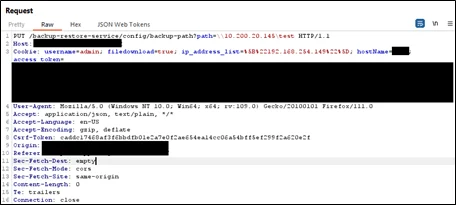
Because the request is edited after the client-side validation has run, the backslashes in the UNC path are no longer rejected. The endpoint receives a value the GUI would never have produced.
Step 4: Submit and observe the connection attempt
Submit the request. The application responds with an error message indicating that Kyocera Device Manager attempted to connect to the supplied location.
The error message indicates that Kyocera Device Manager attempted to connect to the supplied location.
Step 5: Confirm the inbound authentication on the attacker host
On the attacker-controlled host that holds the target UNC path, note that a connection has been made by the Kyocera Device Manager application. Depending on configuration, this may include Windows NTLM hashes.
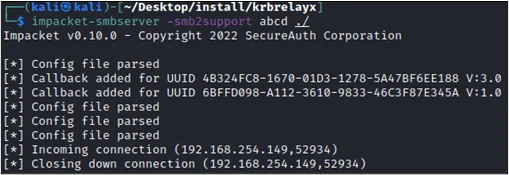
Depending on configuration, the connection may include Windows NTLM hashes, which could allow NTLM credential relaying or cracking attacks.
Root cause
The path parameter of /backup-restore-service/config/backup-path suffers from improper input validation. The only check against backslashes, and therefore against UNC paths, is implemented in the client-side form, so it can be bypassed by editing the request or sending it directly to the endpoint. The application then treats the supplied location as a legitimate backup destination and tries to authenticate to it to confirm access.
The client-side form rejects backslashes, but a request edited in flight or sent directly is not subject to that check. The environment-level control that would limit the exposure is the "Restrict NTLM: Outgoing NTLM traffic to remote servers" security policy; where it is not enabled, the outgoing authentication can carry NTLM hashes.
Impact
An authenticated attacker can coerce authentication attempts from the Kyocera Device Manager server to resources they control, such as a malicious SMB share. If the "Restrict NTLM: Outgoing NTLM traffic to remote servers" policy is not enabled, the coerced authentication can expose Active Directory hashed credentials, which may then be used for NTLM credential relaying or cracking attacks.
Fix
Kyocera fixed the vulnerability in version 3.1.1213.0. Trustwave advises updating to the latest release. It does not describe the code change itself.
Variants to test
- Other endpoints that accept a filesystem or network path. Look for parameters that name a backup, export, log, import or restore location. Send a UNC path such as
\\attacker-host\sharedirectly to the endpoint, bypassing the UI. A positive result is an error or success response showing the server tried to reach the path, plus an inbound SMB connection with NTLM authentication on the listener. - Client-side-only validation elsewhere in the same product. Try values the form rejects (backslashes, other special characters) by editing the request in a proxy. A positive result is the server accepting a value the UI would never submit.
- Direct requests without the proxy. Send the request straight to the endpoint with the modified
pathvalue. A positive result is the same connection attempt on the attacker host, confirming the check is not tied to the UI flow. - Coercion through other confirmation features. Any feature that verifies access to a configured location (share, printer, repository) may authenticate outbound. Point it at a listener you control and watch for NTLM negotiation. A positive result is an authentication attempt arriving at your host.
- Policy check on the target environment. Where you have visibility, check whether "Restrict NTLM: Outgoing NTLM traffic to remote servers" is enabled. If it is not, a successful coercion is more likely to yield usable NTLM hashes for relaying or cracking.
What happened, in plain words
Kyocera Device Manager is a web application that network administrators use to look after large numbers of Kyocera printers and multi-function devices from one place. It runs on a dedicated server and gives administrators a single screen for finding devices, organising them, installing applications, setting up alerts and scheduling reports. The latest versions can be installed on Windows Server 2012/2016/2019/2022 and on Windows 10 and 11.
One of the settings in that application is where the database backup should be saved. When an administrator changes that location, the application does not just write the setting down: it also tries to reach the new location to check that it is usable. That check is an outgoing connection from the Kyocera server to whatever address was entered.
The problem is that the address can be pointed at a machine the attacker controls. When the Kyocera server tries to check the location, it authenticates to the attacker's machine, and depending on how the environment is configured, that authentication can carry Windows NTLM hashed credentials. This kind of trick is called authentication coercion: the attacker does not steal a password directly, they make the victim's server walk over and offer its credentials to a place the attacker is listening.
The issue is tracked as CVE-2023-50916. It was found during a penetration test by Jordan Hedges, a Senior Technical Specialist at Trustwave SpiderLabs. The versions evaluated were 1.4.0327 and 3.0.1625 of Kyocera Device Manager.
The pieces you need to understand first
Before walking through the steps, here are the ideas the rest of the article relies on, explained from scratch.
- Web application: a program you use through a browser. The browser shows pages and forms; the real work happens on a server somewhere else. Kyocera Device Manager is one of these.
- Endpoint: a specific address inside a web application that does one job. If the application were a building, endpoints would be the individual service windows, each with its own label. The one in this story is
/backup-restore-service/config/backup-path, the window that handles changes to the backup location. - Request: the message your browser sends to the server when you click a button or submit a form. It contains the address being called and the values you typed in.
- Parameter: a named value inside a request. In this story the parameter is called
path, and it holds the backup location. Think of it as a labelled box on a form: the label ispath, the contents are the address. - Session: a way for the server to remember that you logged in. After you sign in, the server gives your browser a small piece of data (often called a cookie or token) that it checks on every later request. Without a valid session, administrative features refuse to work. That is why the researcher logs in first.
- Client-side validation: checks that run inside your browser before a form is sent. They are convenient, but they are not a security control, because the browser is under the user's control. Anything the browser checks can be skipped by editing the request or sending it directly.
- Server-side validation: the same kind of check, but performed on the server after the request arrives. This is the one that actually protects the application, because the user cannot reach around it.
- UNC path: a Windows way of writing the address of a shared folder on the network, rather than on the local disk. It starts with two backslashes, for example
\\server\share. When Windows sees a UNC path, it knows to talk to another machine over the network, which is exactly what the attacker wants. - SMB share: the Windows file-sharing service. A shared folder on a network is served over SMB. If you can make a victim connect to your SMB share, you can watch the authentication that arrives.
- NTLM: a Windows authentication scheme. Instead of sending a plain password, the client proves who it is using a value derived from the password, called a hash. Hashes are not passwords, but they can sometimes be reused or attacked offline, which is why leaking one matters.
- NTLM relaying: taking an authentication attempt meant for one server and passing it to another server that accepts it, so the attacker gets in without ever knowing the password.
- NTLM cracking: trying to recover the original password from a captured hash by guessing at high speed.
- Web interception proxy: a tool, such as Burp Suite, that sits between your browser and the server. It lets you pause a request, read it, change it, and then send it on. It is the standard way to see and edit what a browser is really sending.
- Penetration test: an authorised exercise in which security specialists try to break into a system, with permission, so the problems can be fixed before real attackers find them.
The setup
The finding came out of a penetration test. Two things had to be in place before the researcher could try anything.
First, an authenticated session. The backup configuration feature is administrative, so the researcher logs in to Kyocera Device Manager before touching it.
Second, a web interception proxy such as Burp Suite, used to capture the request after the browser's own checks have accepted it, and then change it before it reaches the server.
The impact depends on the environment. If the Windows security policy "Restrict NTLM: Outgoing NTLM traffic to remote servers" is not enabled, the authentication attempt can carry NTLM hashed credentials to the attacker's resource. That policy is a switch that tells Windows not to send NTLM authentication to machines outside its own boundary; when it is off, the outgoing authentication is allowed to leave.
Finding it
The backup location can be set through the graphical interface, but the application rejects a UNC path typed there, because backslashes (\) are treated as a disallowed character. That check lives in the client-side form, meaning it runs in the browser.
Hedges bypassed the restriction in two moves. He first submitted a backup path that would pass the UI validation, so the form was happy. Then he intercepted the client request after validation and altered the path parameter value to a UNC path under his control. Intercepting and modifying the request, or sending it directly to the endpoint, allows UNC paths to be set for the backup location.
This is an improper input validation issue on the path parameter accepted by /backup-restore-service/config/backup-path. The restriction exists only in the browser, so anything that reaches the endpoint directly, or a request edited in flight, is not subject to it. The everyday comparison is a form at a reception desk that asks you to write your name in block capitals: the receptionist never checks, so whatever you write is accepted.
Exploitation
Step 1: Authenticate
Log in to Kyocera Device Manager. The backup configuration feature is administrative, so a session is required before the request can be made.
Step 2: Intercept the backup location request
Attempt to modify the backup location and intercept the request to /backup-restore-service/config/backup-path using a web interception proxy such as Burp Suite.
Why this step: the browser will not let you type a UNC path into the form, so the request has to be caught after the form has accepted a harmless value and before it reaches the server. The proxy is the tool that holds the request in that gap.
Step 3: Replace the path with an attacker-controlled UNC path
Modify the path URL parameter to the attacker-controlled UNC path. The screenshot shows the intercepted request with the parameter changed.
Because the request is edited after the client-side validation has run, the backslashes in the UNC path are no longer rejected. The endpoint receives a value the GUI would never have produced.
In plain words: the form checked the value while it was still in the browser, and the proxy changed the value after that check was over. The form checked the value in the browser, and the proxy changed it after that check; the endpoint then accepted the UNC path.
Step 4: Submit and observe the connection attempt
Submit the request. The application responds with an error message indicating that Kyocera Device Manager attempted to connect to the supplied location.
The error message indicates that Kyocera Device Manager attempted to connect to the supplied location. In other words, the error is good news for the researcher: it proves the server acted on the attacker's address.
Step 5: Confirm the inbound authentication on the attacker host
On the attacker-controlled host that holds the target UNC path, note that a connection has been made by the Kyocera Device Manager application. Depending on configuration, this may include Windows NTLM hashes.
Depending on configuration, the connection may include Windows NTLM hashes, which could allow NTLM credential relaying or cracking attacks. Relaying means passing the authentication on to another system that trusts it; cracking means trying to recover the password from the hash by brute force.
Root cause
The path parameter of /backup-restore-service/config/backup-path suffers from improper input validation. The only check against backslashes, and therefore against UNC paths, is implemented in the client-side form, so it can be bypassed by editing the request or sending it directly to the endpoint. The application then treats the supplied location as a legitimate backup destination and tries to authenticate to it to confirm access.
The client-side form rejects backslashes, but a request edited in flight or sent directly is not subject to that check. The environment-level control that would limit the exposure is the "Restrict NTLM: Outgoing NTLM traffic to remote servers" security policy; where it is not enabled, the outgoing authentication can carry NTLM hashes.
A simple way to picture it: the building has a sign on the front door saying "no visitors after 6pm", but the back door has no lock. Anyone who walks around the building gets in.
Impact
An authenticated attacker can coerce authentication attempts from the Kyocera Device Manager server to resources they control, such as a malicious SMB share. If the "Restrict NTLM: Outgoing NTLM traffic to remote servers" policy is not enabled, the coerced authentication can expose Active Directory hashed credentials, which may then be used for NTLM credential relaying or cracking attacks.
Fix
Kyocera fixed the vulnerability in version 3.1.1213.0. Trustwave advises updating to the latest release. It does not describe the code change itself.
Variants to test
These are the same ideas applied elsewhere, useful if you are testing a similar product or the same product in a different area.
- Other endpoints that accept a filesystem or network path. Look for parameters that name a backup, export, log, import or restore location. Send a UNC path such as
\\attacker-host\sharedirectly to the endpoint, bypassing the UI. A positive result is an error or success response showing the server tried to reach the path, plus an inbound SMB connection with NTLM authentication on the listener. - Client-side-only validation elsewhere in the same product. Try values the form rejects (backslashes, other special characters) by editing the request in a proxy. A positive result is the server accepting a value the UI would never submit.
- Direct requests without the proxy. Send the request straight to the endpoint with the modified
pathvalue. A positive result is the same connection attempt on the attacker host, confirming the check is not tied to the UI flow. - Coercion through other confirmation features. Any feature that verifies access to a configured location (share, printer, repository) may authenticate outbound. Point it at a listener you control and watch for NTLM negotiation. A positive result is an authentication attempt arriving at your host.
- Policy check on the target environment. Where you have visibility, check whether "Restrict NTLM: Outgoing NTLM traffic to remote servers" is enabled. If it is not, a successful coercion is more likely to yield usable NTLM hashes for relaying or cracking.
Glossary
- Authentication coercion: making a victim system send its authentication to a destination the attacker controls, rather than stealing credentials directly.
- Active Directory: Microsoft's directory service that stores users, computers and their credentials across a Windows network.
- Client-side validation: checks performed in the browser before a request is sent; convenient but bypassable.
- Cookie / token: a small piece of data a server gives your browser after login so it can recognise you on later requests.
- CVE-2023-50916: the public identifier assigned to this vulnerability.
- Endpoint: a specific address inside a web application that performs one function.
- Hash: a value derived from a password or other secret; it is not the password itself but can sometimes be reused or attacked.
- Improper input validation: accepting input that should have been rejected, because the check is missing or in the wrong place.
- NTLM: a Windows authentication scheme that proves identity using a hash derived from the password.
- NTLM cracking: recovering a password from a captured NTLM hash by guessing at high speed.
- NTLM relaying: forwarding a captured authentication attempt to another system that accepts it, without knowing the password.
- Parameter: a named value inside a request, such as
path. - Penetration test: an authorised attempt to break into a system so that weaknesses can be found and fixed.
- Request: the message a browser sends to a server when you use a web application.
- Server-side validation: checks performed on the server after a request arrives; these are the ones that actually protect the application.
- Session: the server's record that you have logged in, kept alive by a cookie or token.
- SMB share: a folder shared over the Windows file-sharing protocol.
- UNC path: a Windows network address for a shared folder, starting with two backslashes.
- Web application: a program used through a browser, with the real work done on a server.
- Web interception proxy: a tool such as Burp Suite that sits between browser and server so requests can be paused, read and edited.




