GET based Open redirect on [streamlabs.com/content-hub/streamlabs-obs/search?query=]
The search parameter on a Streamlabs content-hub page was reflected inside a meta tag's content attribute, and the reporter could break out of that attribute to inject a refresh directive. This produced an open redirect to an arbitrary external site, with a null byte used to evade a Cloudflare filter on the http-equiv attribute.

- Triaged in under an hour
- Fixed in 2 hours
- Paid in under an hour
- Disclosed after 29 days
Summary:
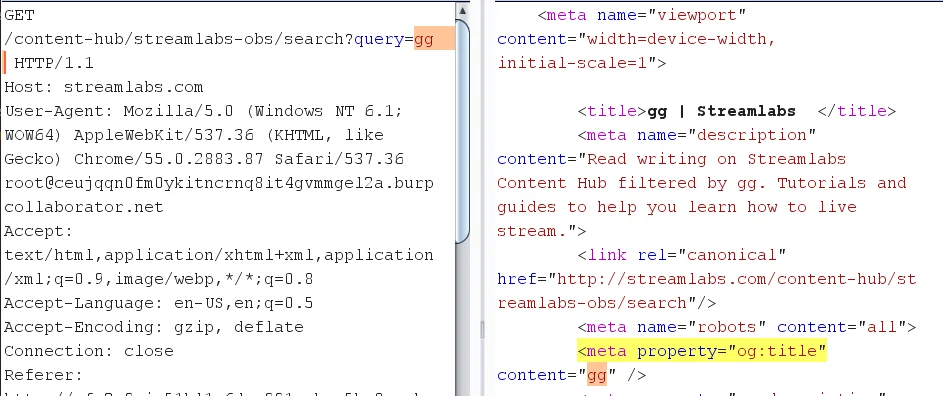
Description: in the following link, the parameter query is reflecting in multiple places, one of them is in the <meta> tag in the head section of the HTML source, the reflection is in the content attribute to be precise (check the below image)
And i was able to break out of the content attribute and was able to bypass the Cloudflare protection that wouldnt let me to add http-equiv attribute by using %00 char to finally achieve the following redirect using a crafted payload
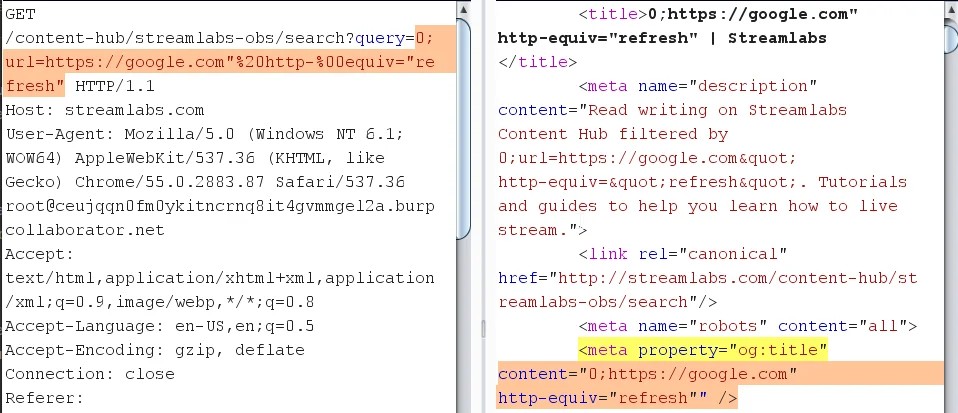
PoC: https://streamlabs.com/content-hub/streamlabs-obs/search?query=0;url=https://google.com"%20http-%00equiv="refresh"
Payload: 0;url=https://google.com/document.cookie"%20http-%00equiv="refresh"
Readable payload: 0;url=https://google.com/" http-equiv="refresh"
Impact
Open redirect
What the report shows
The target is the Streamlabs content hub, specifically the OBS search page under *.streamlabs.com. The researcher found that the query parameter on this page is reflected in several places in the response, and one of those reflections lands inside a <meta> tag in the head section of the HTML, in the content attribute.
The screenshot shows the reflection of the query value inside the content attribute of a meta tag in the page source.
The interesting part is what the researcher did next. The page sits behind Cloudflare, and Cloudflare would not let the researcher add an http-equiv attribute directly. The researcher bypassed that filter by inserting a %00 (null byte) character into the attribute name, which let the crafted markup through and produced a redirect.
The second screenshot shows the resulting redirect in the browser after the crafted payload was submitted.
The proof of concept URL given in the report is:
https://streamlabs.com/content-hub/streamlabs-obs/search?query=0;url=https://google.com"%20http-%00equiv="refresh"
The payload itself:
0;url=https://google.com/document.cookie"%20http-%00equiv="refresh"
And the readable form of the payload, with the null byte removed from the attribute name:
0;url=https://google.com/" http-equiv="refresh"
The outcome recorded for the report is an open redirect, rated low severity, with a bounty of 100.00 USD. The report was disclosed on 2020-10-09.
Root cause
The report points to a reflected value being written into an HTML attribute without adequate encoding. Because the query parameter is echoed into the content attribute of a <meta> tag, a double quote in the input can close the attribute, and the rest of the input is then parsed as new attributes on the same tag. The report does not analyse why the quote character survives into the attribute.
The %00 trick is a filter evasion detail rather than the underlying flaw: Cloudflare would not let the http-equiv attribute be added, and inserting a null byte into the attribute name got it through while the browser still interpreted it. The report does not explain how the browser handled the null byte, only that the redirect worked.
Impact
The impact stated in the report is an open redirect. An attacker can craft a link on the trusted streamlabs.com domain that redirects the victim to an external site. Because the link starts on a legitimate domain, it is more convincing in phishing. The report does not describe any further impact such as script execution, and the low severity rating is consistent with a redirect-only finding.
How this kind of bug works
An open redirect happens when an application takes a destination from user-controlled input and issues a redirect to it without restricting where the destination may point. The redirect can come from server-side logic (a Location header built from a parameter) or, as here, from the client side: HTML that the browser itself acts on, such as a <meta http-equiv="refresh"> tag whose content attribute carries a URL.
The meta refresh variant is really a markup injection problem. If user input is placed inside an attribute value and the quote character is not encoded, the attacker can terminate the attribute and add new ones. Adding http-equiv="refresh" together with a content value of 0;url=... turns the tag into an immediate redirect. The same primitive can sometimes be pushed further, for example by injecting event handler attributes, but that depends entirely on how the page is built and what the browser allows.
Defences work at two levels. At the output level, context-aware encoding must encode quotes and angle brackets for HTML attribute context, and templating engines that do this by default remove the primitive. At the input level, a web application firewall can block obvious payloads, but as this report shows, string matching on attribute names is fragile and should never be the only control. A Content Security Policy does not stop a meta refresh redirect, so it is not a mitigation for this class.
How to test for it
- Find parameters whose values appear in the response body. Search pages, error pages, language selectors and anything that echoes input back are good candidates.
- Submit a benign marker value and inspect the raw HTML, not the rendered page, to see exactly where the value lands: inside a tag body, inside an attribute, inside a script block, or in a header.
- If the value lands inside an attribute, send a double quote followed by a marker attribute and check whether the marker appears as a real attribute in the parsed DOM. A positive result is the attribute being created, not just the characters appearing in the source.
- If a WAF blocks the obvious payload, try encoding variations of the attribute name and the quote, such as URL encoding, double encoding, or inserting characters the filter does not expect. Confirm the result in a browser, since only the browser's parser tells you whether the bypass actually works.
- For the redirect itself, use a harmless external domain you control or a well-known site, and confirm the browser navigates there.
Common false positives: the value appearing in the source but being HTML-encoded so the quote becomes "; the value landing in a JavaScript string where a meta tag cannot be formed; a redirect that only accepts relative paths or a fixed allowlist of hosts; and reflected content inside an HTML comment or a <textarea>, where markup is not parsed.
How it is fixed
- Apply context-aware output encoding so that quotes, angle brackets and ampersands are encoded when the value is written into an HTML attribute.
- Where a value is only ever meant to be a search term, validate it against an expected pattern and reject characters that have no place in it.
- If the application performs redirects, resolve the destination against an allowlist of hosts or restrict it to relative paths.
- Treat WAF rules as defence in depth only, and fix the encoding rather than relying on blocking specific strings.
Hunting notes
Reflections into meta tags are easy to miss because testers often look only at the visible page. Grep the raw response for the marker and look at the head section, where meta tags for description, keywords, canonical links and social sharing cards are common. Parameters that feed SEO or sharing metadata are prime candidates, as are search pages and any feature that builds a preview.
Recon signals: pages that reflect input into <meta property="og:..."> tags, canonical link tags, or refresh tags; sites behind a WAF that returns a block page for quote characters, which suggests the developers know about the reflection but have not fixed it; and any parameter whose value appears verbatim in the HTML source.
To make the report land, show the full chain: the request, the exact reflection point in the source, the parsed DOM after injection, and the browser actually navigating to an external domain.
What happened, in plain words
Streamlabs is a set of tools for people who stream live video, and its content hub holds help and search pages. One of those pages, the OBS search page on *.streamlabs.com, takes what you type into the search box and puts it back into the page you get in return. The researcher found that the value of the query parameter is echoed in several places, and one of those places is inside a <meta> tag in the head section of the HTML, in its content attribute.
A <meta> tag is a small instruction in the invisible part of a web page (the head) that tells the browser something about the page, such as its description or keywords. Some meta tags can also tell the browser to jump to another address after a set time. That is called a meta refresh, and it is written as http-equiv="refresh" with a content value holding the destination.
The screenshot shows the search value appearing inside the content attribute of a meta tag in the page source.
The page sits behind Cloudflare, a service that filters incoming requests before they reach the site. Cloudflare would not let the researcher add the http-equiv attribute, so the refresh instruction could not simply be added. The workaround was to slip a %00 character into the middle of the attribute name. %00 is a null byte, a character with the numeric value zero that is normally used to mark the end of a piece of text. Written as http-%00equiv, the attribute got past Cloudflare, and the browser still read it as the attribute name it was meant to be. The report does not explain how the browser handled the null byte, only that the redirect worked.
The second screenshot shows the browser after the crafted link was opened, having been sent to the external site.
The proof of concept URL from the report is:
https://streamlabs.com/content-hub/streamlabs-obs/search?query=0;url=https://google.com"%20http-%00equiv="refresh"
Line by line: the address is the normal search page; query= starts the search value; 0;url=https://google.com is the meta refresh instruction, meaning wait zero seconds and then go to that address; " closes the content attribute early; %20 is a URL-encoded space; http-%00equiv is the attribute name with the null byte in it; and ="refresh" gives that attribute its value. The browser ends up with a meta tag that redirects the visitor.
The payload as the report gives it:
0;url=https://google.com/document.cookie"%20http-%00equiv="refresh"
And the readable form, with the null byte taken out of the attribute name:
0;url=https://google.com/" http-equiv="refresh"
Why each step matters: the quote is what breaks out of the attribute, because HTML attributes are wrapped in quotes and an unencoded quote inside the value ends the value early. Everything after it is read as new attributes on the same tag, which is how the refresh instruction gets added. The null byte matters only because it defeats the filter; it is not the flaw itself.
The report records an open redirect, rated low severity, with a bounty of 100.00 USD, disclosed on 2020-10-09. It does not describe a fix.
In general, how this kind of bug works
An open redirect happens when a site takes a destination from something a user can control and sends the visitor there without checking where it points. The redirect can come from the server, which builds a Location header from a parameter, or from the page itself, as here, where the browser follows a meta refresh tag. The danger is trust: a link that starts with streamlabs.com looks legitimate.
The meta refresh version is really a markup injection problem. If user input is placed inside an attribute and the quote character is not encoded, the attacker can close the attribute and add new ones. The same trick can sometimes go further, for example by adding event handler attributes that run code, but that depends entirely on how the page is built and what the browser allows.
Defences work at two levels. At the output level, the site should encode quotes and angle brackets whenever it writes a value into an HTML attribute, and templating engines that do this by default remove the problem. At the input level, a web application firewall can block obvious payloads, but as this report shows, matching on a literal string is fragile and should never be the only control. A Content Security Policy, a browser rule about which scripts may run, does not stop a meta refresh redirect, so it is not a mitigation here.
To test for it yourself:
- Find parameters whose values appear in the page you get back. Search pages, error pages and language selectors are good candidates.
- Send a harmless marker value and look at the raw HTML, not the rendered page, to see exactly where the value lands: in text, in an attribute, in a script block or in a header.
- If it lands in an attribute, send a double quote followed by a marker attribute and check whether the marker becomes a real attribute in the page as the browser parses it. The characters merely appearing in the source is not enough.
- If a firewall blocks the obvious payload, try encoding variations of the attribute name and the quote, and confirm the result in a browser, because only the browser's parser tells you whether the bypass works.
- For the redirect, use a harmless external domain and confirm the browser actually navigates there.
Common false positives: the value appears but is encoded so the quote becomes "; the value lands in a JavaScript string where a meta tag cannot be formed; the redirect only accepts relative paths or a fixed list of hosts; and the value sits inside an HTML comment or a <textarea>, where markup is not parsed.
How it is fixed: encode quotes, angle brackets and ampersands for the attribute context; validate search terms against an expected pattern and reject characters that have no place in them; restrict any redirect to a list of allowed hosts or to relative paths; and treat firewall rules as an extra layer only, fixing the encoding rather than blocking specific strings.
Hunting notes: reflections into meta tags are easy to miss because testers look only at the visible page. Search the raw response for your marker and check the head section, where description, keywords, canonical and social sharing tags are common. Parameters that feed SEO or sharing metadata are prime candidates. Signals worth watching: pages that reflect input into og: tags or canonical links, sites whose firewall returns a block page for quote characters, and any parameter whose value appears verbatim in the source.
Glossary
- Parameter: a named value in a URL, here
query, that the page reads and acts on. - Reflection: when a site puts user input back into the page it returns.
- HTML: the language that describes the structure of a web page.
- Tag: a labelled element in HTML, such as
<meta>. - Attribute: a setting on a tag, written as a name and a value, such as
content="...". - Head section: the part of an HTML page holding information about the page rather than visible content.
- Meta tag: a tag in the head that gives the browser instructions or information about the page.
- Meta refresh: a meta tag that tells the browser to navigate to another address, optionally after a delay.
- Open redirect: a redirect to a destination the user can control, without restriction.
- Markup injection: getting your own HTML into a page by breaking out of where your input was meant to stay.
- Null byte: a character with value zero, written
%00in a URL, often used to confuse filters. - URL encoding: writing special characters as
%plus a code, such as%20for a space. - Web application firewall (WAF): a filter in front of a site that blocks requests matching known bad patterns.
- Cloudflare: a service that sits in front of websites and filters traffic.
- Content Security Policy: a browser rule that limits what a page may load or run.
- False positive: a result that looks like a bug but is not exploitable.
- Proof of concept (PoC): a concrete example showing a bug works.
- Severity: a rating of how serious a bug is.
- Bounty: a payment made for a valid security report.





