Open Redirect vulnerability found using link parameter
The login page's redirect parameter only checked that the URL ended with the target domain, so an attacker could supply a URL on an out-of-scope subdomain that itself had an open redirect, chaining them to send a logged-in user to any site. This could be used to take users to a phishing page.
 Published on muhammad-aamir.medium.com
I am Muhammad Aamir, a cybersecurity professional from Pakistan. Here I share with you a recent & interesting find of Open Redirect vulnerability on a program at Bugcrowd.
The full write-up lives on its author's site
It belongs to its author, so we link to it rather than copy it. The other two tabs are our own rewrites, checked against it.
Context
This is a write-up of an open redirect found on a Bugcrowd program. The researcher, Muhammad Aamir, was rewarded $100 under the program's P4 allocation. The target's real domain is replaced with redact.com throughout, and the attacker-controlled destination is shown as mysite.com.
The feature involved is the login page's redirect parameter. On the target, the login page accepts a URL such as:
https://redact.com/login?redirect=https://anysubdomain.redact.com
The intent is that once a user logs in, they are taken to https://anysubdomain.redact.com, where anysubdomain is a subdomain of redact.com. The application checks that redact.com appears at the end of the redirect URL and then tries to load that website. If the subdomain is valid and working, the respective website is loaded. If it is an invalid subdomain such as https://mysite.redact.com, the application still tries to load it and then an error message appears.
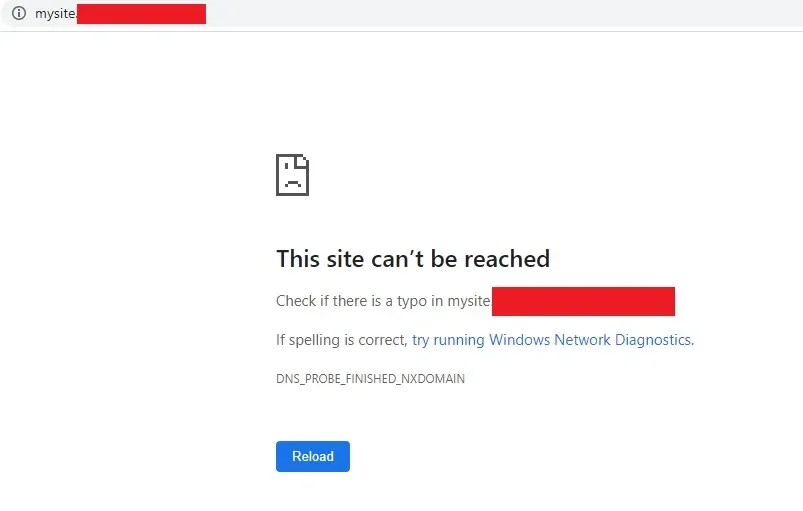
The screenshot shows the redirection to the target's invalid subdomain, with the error message that follows.
Setup
No accounts, roles, tools or versions are described in the report. The only precondition that matters is a logged-in user: the redirect fires after authentication. If the crafted URL is presented to a user who is not yet logged in, the user first sees the application's login screen and is then taken to the destination once logged in.
Finding it
The redirect parameter on the login page was already constrained: it checked that redact.com appeared at the end of the redirect URL, and invalid subdomains produced an error. That check is what the researcher set out to work around.
The approach was to hunt for different subdomains of https://redact.com. After some time the researcher found a link pointing to an address of the form https://link.redact.com. That link was invalid in the environment of https://redact.com, so it became the focus of further research. A parameter attached to it, also named link, was found to redirect to a website of the researcher's choice.
That gave an open redirect on https://link.redact.com:
https://link.redact.com?link=https://mysite.com
However, https://link.redact.com was out of scope. The solution was to use it from an in-scope item, https://redact.com/login.
Exploitation
Step 1: Confirm the open redirect on the subdomain
The link parameter on https://link.redact.com redirected to a website of the researcher's choice, such as https://mysite.com. This host was out of scope, so it could not be reported on its own, but it could serve as a building block.
Step 2: Chain it through the in-scope login page
The final URL with the payload for the open redirect is:
https://redact.com/login?redirect=https://link.redact.com?link=https://mysite.com
The outer redirect parameter carries a value pointing at link.redact.com, which the login page accepted. That value is itself a URL on link.redact.com with its own link parameter pointing at https://mysite.com. When the login page loads the redirect target, the second redirect fires and the user lands on https://mysite.com.
Step 3: Observe the behaviour for logged-in and logged-out users
The URL took an already logged-in user to https://mysite.com. If it is presented to a user who is not yet logged in, the user first sees the application's login screen and is then taken to https://mysite.com after logging in.
Root cause
The login page validated the redirect value by checking that redact.com appeared at the end of the URL. That check treats any URL ending in the trusted string as trusted, without considering that the trusted host itself can redirect onwards. Here the value https://link.redact.com?link=https://mysite.com was accepted by the login page, and the link parameter on that host then performs the actual redirect to an arbitrary site. The validation is therefore only a string check on the outer URL, and the second hop is not constrained at all. The report does not describe the server-side implementation.
Impact
A logged-in user can be taken to a phishing webpage for stealing sensitive information, including credentials. The attacker needs the victim to follow the crafted https://redact.com/login?redirect=... URL; a user who is not yet logged in sees the genuine login screen first and is redirected after authenticating, which lends the flow credibility. The program acknowledged the finding and how a vulnerability of an out-of-scope item could be utilised from the in-scope domain.

The screenshot shows the program's comments on the finding.
Fix
The report does not state what was changed. The check on redirect should not rely on the URL ending in the trusted string. It should parse the URL, compare the host against an allowlist of exact hosts, and reject values that point at hosts outside that allowlist, including hosts that themselves perform redirects. The link parameter on link.redact.com should likewise restrict its destination to trusted hosts rather than accepting any URL.
Variants to test
- Suffix tricks on the redirect parameter: try values where the trusted string appears at the end but the host is different, for example a URL whose host is an attacker domain ending in the trusted string. A positive result is a redirect to the attacker host after login.
- Chaining through any in-scope host that has its own redirect parameter: look for subdomains with parameters such as
link,url,nextorreturnthat accept arbitrary destinations, then nest one inside the login page'sredirect. A positive result is the login page accepting the nested URL and the browser ending up off-site. - Invalid or unclaimed subdomains: check whether subdomains of the target that do not resolve or are not in use still pass the redirect check, as
https://mysite.redact.comdid here. A positive result is the application attempting to load the invalid subdomain and showing an error, which confirms the check is purely string-based. - Logged-out flow: open the crafted URL in a fresh session and complete login. A positive result is landing on the attacker destination immediately after authentication.
What happened, in plain words
A security researcher named Muhammad Aamir found a way to make a company's login page send people to a website of his choosing after they logged in. This kind of flaw is called an open redirect: a website feature that is supposed to forward you to a page you asked for, but which can be tricked into forwarding you anywhere, including to a fake site built to steal your password.
The company ran its bug bounty programme on Bugcrowd. A bug bounty programme is an arrangement where a company invites outside researchers to look for security problems and pays them for good findings, instead of punishing them. The researcher was paid $100, which the report places in the programme's P4 allocation.
Throughout the public write-up the real company domain is replaced with redact.com, and the attacker's destination is shown as mysite.com. Those are stand-ins, not real addresses.
The interesting part is that the redirect feature on the login page was already protected: it only allowed addresses ending in redact.com. The researcher got around that protection by finding a second, weaker redirect on a different part of the company's infrastructure and chaining the two together.
The feature that was abused
The login page accepts a parameter called redirect. A parameter is the part of a web address after a question mark that carries extra information, like the options you tick on a form. When you see ?redirect=... in a URL, the site is being told "after I log in, please send me here".
The login page accepts a URL such as:
https://redact.com/login?redirect=https://anysubdomain.redact.com
Line by line, in plain words:
https://redact.com/loginis the address of the login page itself.- The
?marks the start of the parameters. redirect=is the name of the parameter, and everything after the=is its value.- The value
https://anysubdomain.redact.comis the page the site should send you to after you log in.
The intent is that once a user logs in, they are taken to https://anysubdomain.redact.com, where anysubdomain is a subdomain of redact.com. A subdomain is a smaller address that belongs to the main domain, the way shop.example.com belongs to example.com; companies use them to split different services onto different addresses.
The application checks that redact.com appears at the end of the redirect URL and then tries to load that website. If the subdomain is valid and working, the respective website is loaded. If it is an invalid subdomain such as https://mysite.redact.com, the application still tries to load it and then an error message appears.
The screenshot shows the redirection to the target's invalid subdomain, with the error message that follows. The report describes the error message that appears after the application tries to load the invalid subdomain.
What you need before you start
No accounts, roles, tools or versions are described in the report. The only precondition that matters is a logged-in user: the redirect fires after authentication. Authentication is simply proving who you are, normally by typing a username and password. If the crafted URL is presented to a user who is not yet logged in, the user first sees the application's login screen and is then taken to the destination once logged in.
Finding it
The redirect parameter on the login page was already constrained: it checked that redact.com appeared at the end of the redirect URL, and invalid subdomains produced an error. That check is what the researcher set out to work around. Think of it like a bouncer who only checks that your ticket has the right logo on it, without checking whether the ticket is real.
The approach was to hunt for different subdomains of https://redact.com. After some time the researcher found a link pointing to an address of the form https://link.redact.com. That link was invalid in the environment of https://redact.com, so it became the focus of further research. A parameter attached to it, also named link, was found to redirect to a website of the researcher's choice.
That gave an open redirect on https://link.redact.com:
https://link.redact.com?link=https://mysite.com
Line by line, in plain words:
https://link.redact.comis the address of the weaker redirect service.?link=is its parameter, namedlink.https://mysite.comis the destination the researcher chose, standing in for any site an attacker might want to send people to.
However, https://link.redact.com was out of scope. Scope is the list of systems a programme allows researchers to test and pay for; testing outside it is not allowed, and a finding on an out-of-scope system cannot be reported on its own. The solution was to use it from an in-scope item, https://redact.com/login.
Exploitation
Step 1: Confirm the open redirect on the subdomain
The link parameter on https://link.redact.com redirected to a website of the researcher's choice, such as https://mysite.com. This host was out of scope, so it could not be reported on its own, but it could serve as a building block. The researcher was checking that the weak redirect really worked before trying to combine it with anything else.
Step 2: Chain it through the in-scope login page
The final URL with the payload for the open redirect is:
https://redact.com/login?redirect=https://link.redact.com?link=https://mysite.com
Line by line, in plain words:
https://redact.com/loginis the in-scope login page, the one the programme allows testing on.?redirect=is the login page's parameter, the one that is supposed to be limited toredact.comaddresses.- Its value is
https://link.redact.com?link=https://mysite.com, which is itself a full web address on the trusted domain, with its ownlinkparameter pointing athttps://mysite.com.
The outer redirect parameter carries a value pointing at link.redact.com, which the login page accepted. That value is itself a URL on link.redact.com with its own link parameter pointing at https://mysite.com. When the login page loads the redirect target, the second redirect fires and the user lands on https://mysite.com. In everyday terms, the login page checks the first envelope, sees the right name on it, and passes it on; inside that envelope is a second note that sends you somewhere else entirely.
Step 3: Observe the behaviour for logged-in and logged-out users
The URL took an already logged-in user to https://mysite.com. If it is presented to a user who is not yet logged in, the user first sees the application's login screen and is then taken to https://mysite.com after logging in. That second case matters for an attacker: the victim sees the genuine login page, types real credentials into it, and only afterwards is carried away to the fake site, which makes the whole flow look trustworthy.
Why it worked
The login page validated the redirect value by checking that redact.com appeared at the end of the URL. That check treats any URL ending in the trusted string as trusted, without considering that the trusted host itself can redirect onwards. Here the value https://link.redact.com?link=https://mysite.com was accepted by the login page, and the link parameter on that host then performs the actual redirect to an arbitrary site. The validation is therefore only a string check on the outer URL, and the second hop is not constrained at all. The report does not describe the server-side implementation.
A useful comparison is a guard who reads only the last word of a delivery address. If the last word is the name of the building, the parcel goes through, even if the rest of the address points somewhere else.
Impact
A logged-in user can be taken to a phishing webpage for stealing sensitive information, including credentials. Phishing is a fake page that looks like the real one and captures whatever you type into it. The attacker needs the victim to follow the crafted https://redact.com/login?redirect=... URL; a user who is not yet logged in sees the genuine login screen first and is redirected after authenticating, which lends the flow credibility. The program acknowledged the finding and how a vulnerability of an out-of-scope item could be utilised from the in-scope domain.
The screenshot shows the program's comments on the finding.
Fix
The report does not state what was changed. The check on redirect should not rely on the URL ending in the trusted string. It should parse the URL, compare the host against an allowlist of exact hosts, and reject values that point at hosts outside that allowlist, including hosts that themselves perform redirects. An allowlist is a list of things that are explicitly permitted, with everything else refused by default. The link parameter on link.redact.com should likewise restrict its destination to trusted hosts rather than accepting any URL.
Variants to test
- Suffix tricks on the redirect parameter: try values where the trusted string appears at the end but the host is different, for example a URL whose host is an attacker domain ending in the trusted string. A positive result is a redirect to the attacker host after login.
- Chaining through any in-scope host that has its own redirect parameter: look for subdomains with parameters such as
link,url,nextorreturnthat accept arbitrary destinations, then nest one inside the login page'sredirect. A positive result is the login page accepting the nested URL and the browser ending up off-site. - Invalid or unclaimed subdomains: check whether subdomains of the target that do not resolve or are not in use still pass the redirect check, as
https://mysite.redact.comdid here. A positive result is the application attempting to load the invalid subdomain and showing an error, which confirms the check is purely string-based. - Logged-out flow: open the crafted URL in a fresh session and complete login. A positive result is landing on the attacker destination immediately after authentication.
Glossary
- Open redirect: a feature that forwards a visitor to an address supplied in the URL, without properly limiting where that address can point.
- Bug bounty programme: a scheme where a company pays outside researchers for reporting security problems in its systems.
- Bugcrowd: the platform that hosted the programme in this report.
- P4 allocation: the payout category the report says the $100 reward was made under.
- Parameter: the part of a web address after the question mark that carries extra information, such as
redirectorlink. - Subdomain: a smaller address belonging to a main domain, such as
link.redact.comunderredact.com. - Domain: the main name of a website, such as
redact.com. - Host: the machine or service a URL points at, usually written as the domain or subdomain part of the address.
- URL: the full address of a page or resource on the web.
- Authentication: the process of proving who you are, typically with a username and password.
- Logged-in user: someone who has already authenticated and has an active session.
- Session: the period during which a site remembers that you are logged in.
- Scope: the list of systems a programme allows researchers to test and pay for.
- Out of scope: a system that is not on that list, so findings there cannot be reported on their own.
- In scope: a system that is on the list and can be tested and reported.
- Payload: the crafted value placed in a parameter to trigger the behaviour being tested.
- Chain: combining two or more weaknesses so that one leads into the next.
- Phishing: a fake page that imitates a real one in order to capture credentials or other sensitive information.
- Credentials: the username and password (or similar) used to log in.
- Allowlist: a list of things explicitly permitted, with everything else refused by default.
- Suffix check: a validation that only looks at the end of a string, such as whether a URL ends in a trusted domain name.
- Server-side implementation: the code running on the company's servers that performs the check, as opposed to code running in your browser.