Exploitation of file’s download parameters to create potential risk of malware delivery: $200 bug!
The invoice download feature accepted a filename parameter that allowed bypassing the .csv extension filter to create executable files, and the data parameter allowed injecting arbitrary content. An attacker could craft a malicious executable file and deliver it to a victim via a CSRF attack, potentially leading to malware execution.
 Published on muhammad-aamir.medium.com
I am Muhammad Aamir, a cybersecurity professional from Pakistan. Here I share with you a vulnerability caught for exploitation of file’s download parameters to create potential risk of malware delivery.
The full write-up lives on its author's site
It belongs to its author, so we link to it rather than copy it. The other two tabs are our own rewrites, checked against it.
Context
The target was a Bugcrowd program with a subdomain in scope used to manage the network formed by the vendor's commercial devices. An owner can register on the domain as administrator and add other users with the roles of administrator and employee to manage the network. The domain offers several management functions, including inventory management, billing management and user management.
One of those pages has a download option that produces the list of invoices as an .xlsx (Excel) file. That download is the feature under test here.
Setup
The report describes the owner registering on the domain as an administrator, which is the normal entry point for an owner of the commercial devices. The only tool mentioned is Burp proxy, used to inspect the download request. No versions are given.
Finding it
Intercepting the invoice download in Burp showed that it is not a simple GET for a generated file. It is a POST request whose main parameters are csrf_token, filename and data.
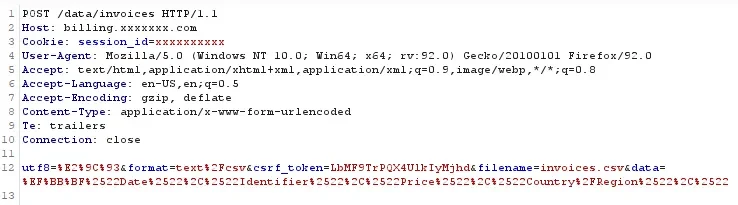
The screenshot shows the POST request for downloading the list of invoices.
That shape is the first warning sign: the client tells the server what the file should be called and what it should contain. A download endpoint that accepts a filename and file data from the request is effectively a file-writing primitive, so each parameter deserves its own test.
Exploitation
After some testing, the researcher found that all three main parameters were vulnerable.
csrf_token: the request is vulnerable to CSRF. The token could be removed and the file was still downloadable.filename: the request is vulnerable to an extension filter bypass. An extension under the attacker's control could be injected to change the nature of the file, converting it into an executable (.exefor Windows targets,.shfor Linux targets).data: the request is vulnerable to file data overwrite. Changing the data meant the downloaded file contained the attacker's injected content.
Chaining the three gives the full attack: control the content through data, turn the file into an executable through filename, and deliver it to a victim by abusing the missing CSRF protection.
Step 1: bypass the extension filter
The application only allowed filenames with a .csv extension, so a trick was needed to keep the file executable. The researcher used this value for the filename parameter:
invoices.sh%22.csv
The double quote after .sh closes the filename before .csv, so the effective name ends in .sh. Because the value is encoded in the filename parameter, the quote is sent as %22.
Step 2: control the file content
For the proof of concept the researcher simulated a Linux victim and set the data value to:
#!/bin/bash%0a#PoC%20script%0atouch%20File.Attack
Decoded, %0a is a newline and %20 is a space, so the downloaded file is a bash script: a shebang line, a comment marking it as the PoC script, and a touch File.Attack command.
Step 3: deliver and execute
The result was a bash script downloaded to the victim's device with a .sh extension. When it was executed, a file called File.Attack was created, which is the observable result of the PoC script.
Because the CSRF token could be dropped, the request that produces this file can be triggered from another site against a logged-in user, which is how the file reaches the victim.
Root cause
The download endpoint trusts client-supplied values for both the name and the content of the file it serves. The extension check on filename is a filter that can be escaped by closing the name early with an encoded double quote, so the check is bypassed and the effective name ends in .sh. The data parameter lets the caller write content into the file, and the request still worked with the CSRF token removed, so the operation can be driven cross-site. The report does not describe the server-side implementation, so the exact parsing and validation logic is not shown.
Impact
By chaining the three weaknesses, an attacker can insert malware through the data parameter, convert the file into an executable through the filename parameter, and deliver it to a victim by taking advantage of the CSRF vulnerability. The researcher describes this as a potential risk of malware delivery, with .exe for Windows targets and .sh for Linux targets. The victim still has to execute the downloaded file for the payload to run, as in the simulated Linux case where the script created File.Attack only when executed.
Fix
The report does not say what the program changed. Based on the three findings, the fixes would be to validate the CSRF token on the download request, to generate the filename server-side instead of accepting it from the client (or to normalise and strictly allow only the intended extension), and to stop accepting file content from the request for a download of existing invoice data.
Variants to test
- Remove the CSRF token from any state-changing POST and replay it: a positive result is that the action still succeeds.
- Send a filename with an encoded quote before the allowed extension, as in
invoices.sh%22.csv: a positive result is a file served with the injected extension. - Send a filename with other encoded separators or terminators before the allowed extension: a positive result is the same extension escape.
- Change the
dataparameter to content of your own and download the file: a positive result is that the downloaded file contains your content. - Repeat the filename test with
.exefor a Windows target: a positive result is an executable file delivered to the victim.
Reward
The program accepted the finding and rewarded the researcher within a week after triage, with a $200 bounty.
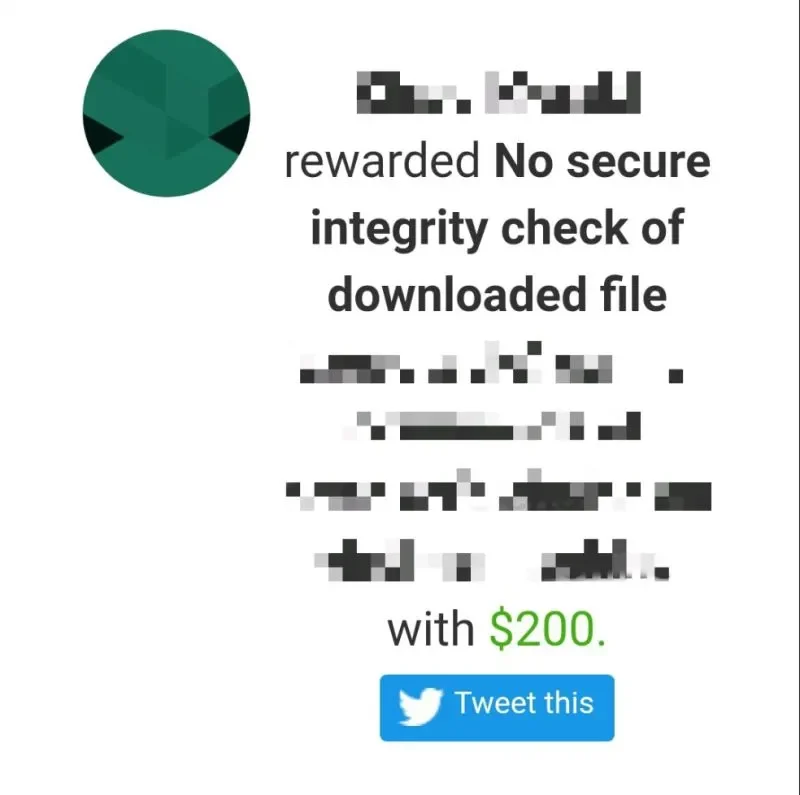
The screenshot shows the reward on Bugcrowd.
What happened, in plain words
A security researcher found a page on a company's website that lets you download a list of invoices as an Excel file. The page was built in a way that let him decide both the name of the file and what was inside it. He could also make the request without the security token that is supposed to prove the request came from the site itself. By combining those three weaknesses, he could make a victim's browser download a file that looked like a harmless spreadsheet but was really a script that runs commands on the victim's computer. The company accepted the finding and paid him $200.
This article walks through the whole thing from zero. You only need to know how to use a browser and a computer. Every technical word is explained the first time it appears, and there is a glossary at the end.
The target and the feature
The finding was made on a program run through Bugcrowd. Bugcrowd is a platform where companies publish the rules for testing their systems and pay researchers who report security problems. A program is simply one company's listing on that platform.
The company makes commercial devices, and the program had one subdomain in scope. A subdomain is a part of a website address that sits in front of the main domain, for example shop.example.com instead of example.com. "In scope" means the company explicitly allowed testing on that part of its systems.
The subdomain is used to manage the network formed by the company's commercial devices. Think of it as a control panel for a fleet of devices: the owner registers on the domain as an administrator, and can then add other users with the roles of administrator and employee so several people can help manage the network. The domain offers several management functions, including inventory management, billing management and user management.
One of those pages has a download option that produces the list of invoices as an .xlsx file. .xlsx is the standard file format for Excel spreadsheets. That download button is the feature under test here: everything in this article happens around that one button.
Setting up
The report describes the owner registering on the domain as an administrator, which is the normal entry point for an owner of the commercial devices.
The only tool mentioned in the report is Burp proxy. A proxy is a program that sits between your browser and the website and lets you look at, and change, every message that passes in both directions. Think of it as a mail interception service: the letter still reaches the recipient, but you get to read it first and even rewrite it. Security testers use a proxy because a browser normally hides the technical details of what it sends. The report gives no software versions.
Finding it
When the researcher intercepted the invoice download in Burp, he saw that it was not a simple request for an already-made file. It was a POST request whose main parameters are csrf_token, filename and data.
A few of those words need unpacking.
- A request is the message your browser sends to a website when you click something or load a page. The website answers with a response.
- GET and POST are two types of request. A GET is normally used just to ask for something, like "give me this page". A POST is normally used to send data along with the request, for example when you submit a form.
- A parameter is a named value sent with a request. If a request were a form you fill in, each parameter would be one field with a label and a value.
- A CSRF token is a secret, random value that a website puts into forms and requests so it can check that the request really came from its own pages and not from somewhere else. CSRF stands for Cross-Site Request Forgery, explained below.
The screenshot shows the POST request for downloading the list of invoices.
That shape is the first warning sign. In a normal download, the server already has the file and just hands it over. Here, the browser is telling the server what the file should be called and what it should contain. A download endpoint that accepts a filename and file data from the request is effectively a file-writing tool: whatever the browser sends is what gets written. So each of the three parameters deserves its own test.
Exploitation
After some testing, the researcher found that all three main parameters were vulnerable.
csrf_token: the request is vulnerable to CSRF. The token could be removed and the file was still downloadable.filename: the request is vulnerable to an extension filter bypass. An extension under the attacker's control could be injected to change the nature of the file, converting it into an executable (.exefor Windows targets and.shfor Linux targets).data: the request is vulnerable to file data overwrite. Changing the data meant the downloaded file contained the attacker's injected content.
Before going further, three terms from that list:
- CSRF (Cross-Site Request Forgery) is a trick where an attacker's website makes your browser send a request to another site where you are already logged in. Your browser automatically attaches your login information, so the other site thinks the request came from you. It is like someone writing a letter in your name and posting it for you: the recipient sees your signature and believes you wrote it.
- A file extension is the part of a filename after the last dot, such as
.csvor.exe. Operating systems use it to decide what kind of file something is and what program should open it. - An executable is a file the computer can run as a program, or in the case of a script, a file the system will run commands from.
Chaining the three gives the full attack: control the content through data, turn the file into an executable through filename, and deliver it to a victim by abusing the missing CSRF protection.
Step 1: bypass the extension filter
The application only allowed filenames with a .csv extension. .csv is a plain text file where values are separated by commas, commonly used for tables of data. The application only allowed filenames with a .csv extension, so a trick was needed to keep the file executable. The researcher used this value for the filename parameter:
invoices.sh%22.csv
Line by line, in plain words:
invoicesis just the start of the name, chosen to look like the normal invoice download..shis the extension for a shell script, a file of commands for a Linux or Unix system. This is the extension the attacker actually wants the file to end up with.%22is the encoded form of a double quote character ("). Some characters cannot travel safely inside a request value, so they are written in a percent-encoded form: a percent sign followed by a two-digit code.%22means "a double quote"..csvis the extension the filter is looking for.
The double quote after .sh closes the filename before .csv, so the effective name ends in .sh. Because the value is encoded in the filename parameter, the quote is sent as %22. In other words, the double quote closes the filename before .csv, so the effective name ends in .sh. This is what "extension filter bypass" means: getting past a check that only looks at the end of a name.
Step 2: control the file content
For the proof of concept the researcher simulated a Linux victim and set the data value to:
#!/bin/bash%0a#PoC%20script%0atouch%20File.Attack
A proof of concept, often shortened to PoC, is a small demonstration that proves a problem is real without doing any actual harm.
Line by line, in plain words:
#!/bin/bashis a shebang. It is the first line of a script and tells the system which program should run the rest of the file. Here it says: use the bash shell, the standard command interpreter on Linux.%0ais the encoded form of a newline character, the equivalent of pressing Enter. It separates one line of the script from the next.#PoC%20scriptis a comment line. In a shell script, a line starting with#is ignored when the script runs; it is there for humans to read.%20is the encoded form of a space, so this decodes to#PoC script.%0aagain is another newline.touch%20File.Attackdecodes totouch File.Attack.touchis a standard Linux command that creates an empty file if it does not already exist. So this line creates a file calledFile.Attack.
Decoded, the whole value is a bash script: a shebang line, a comment marking it as the PoC script, and a touch File.Attack command. The point of the touch command is that it leaves a visible trace. If the file File.Attack appears, the script definitely ran.
Step 3: deliver and execute
The result was a bash script downloaded to the victim's device with a .sh extension. When it was executed, a file called File.Attack was created, which is the observable result of the PoC script.
Because the CSRF token could be dropped, the request that produces this file can be triggered from another site against a logged-in user. That is how the file reaches the victim: the request can be triggered from another site against a logged-in user. The victim still has to run the downloaded file for the commands inside it to do anything.
Root cause
The download endpoint trusts values supplied by the client for both the name and the content of the file it serves. The extension check on filename is a filter that can be escaped by closing the name early with an encoded double quote, so the check sees a .csv name while the stored or served name ends in .sh. The data parameter lets the caller write content into the file, and the request still worked with the CSRF token removed, so the operation can be driven from another site. The report does not describe the server-side implementation, so the exact parsing and validation logic is not shown.
Impact
By chaining the three weaknesses, an attacker can insert malware through the data parameter, convert the file into an executable through the filename parameter, and deliver it to a victim by taking advantage of the CSRF vulnerability. The researcher describes this as a potential risk of malware delivery, with .exe for Windows targets and .sh for Linux targets. Malware is simply software written to do something harmful or unwanted on the victim's machine.
The victim still has to execute the downloaded file for the payload to run, as in the simulated Linux case where the script created File.Attack only when executed. A payload is the part of an attack that actually does the work once it runs.
Fix
The report does not say what the program changed. Based on the three findings, the fixes would be:
- Validate the CSRF token on the download request, so a request coming from another site is rejected.
- Generate the filename on the server instead of accepting it from the client, or normalise it and strictly allow only the intended extension.
- Stop accepting file content from the request when the job is to download existing invoice data.
Variants to test
If you want to look for the same pattern elsewhere, these are the checks to try. Each one states what a positive result looks like.
- Remove the CSRF token from any state-changing POST and replay it: a positive result is that the action still succeeds.
- Send a filename with an encoded quote before the allowed extension, as in
invoices.sh%22.csv: a positive result is a file served with the injected extension. - Send a filename with other encoded separators or terminators before the allowed extension: a positive result is the same extension escape.
- Change the
dataparameter to content of your own and download the file: a positive result is that the downloaded file contains your content. - Repeat the filename test with
.exefor a Windows target: a positive result is an executable file delivered to the victim.
Reward
The program accepted the finding and rewarded the researcher within a week after triage. Triage is the first stage where the program reviews a report and decides whether it is valid. The bounty was $200.
The screenshot shows the reward on Bugcrowd.
Glossary
- API: a defined way for one piece of software to talk to another, usually by sending requests with named values and getting structured answers back.
- Bash: the standard command interpreter on Linux and similar systems; it reads and runs shell scripts.
- Bounty: the money a program pays a researcher for a valid security report.
- Bugcrowd: a platform where companies publish testing rules and pay researchers for security findings.
- Burp proxy: a tool that sits between your browser and a website so you can read and modify the requests and responses.
- CSRF (Cross-Site Request Forgery): an attack where another website makes your browser send a request to a site where you are logged in, so the site treats it as your own action.
- CSRF token: a secret random value included in requests so the site can confirm the request came from its own pages.
- CSV: a plain text file format where values are separated by commas, often used for tables.
- Executable: a file the computer can run as a program, or a script the system will run commands from.
- Extension: the part of a filename after the last dot, such as
.csvor.sh, used to tell file types apart. - GET: a request type normally used just to ask a server for something.
- Malware: software written to do something harmful or unwanted on a victim's machine.
- Parameter: a named value sent with a request, like one field in a form.
- Payload: the part of an attack that does the actual work once it runs.
- Percent-encoding: a way of writing characters that cannot travel safely in a request, using a percent sign and a two-digit code, such as
%22for a double quote or%20for a space. - POST: a request type normally used to send data to a server, for example when submitting a form.
- Proof of concept (PoC): a small, harmless demonstration that proves a security problem is real.
- Proxy: a program that sits between two parties and passes messages between them, optionally letting you inspect or change them.
- Request: the message your browser sends to a website; the website's answer is the response.
- Scope: the parts of a company's systems that a program explicitly allows researchers to test.
- Shebang: the first line of a script, starting with
#!, that names the program which should run the rest of the file. - Shell script: a file of commands for a Linux or Unix system, usually with a
.shextension. - Subdomain: a part of a website address in front of the main domain, such as
shopinshop.example.com. - Triage: the first review stage where a program decides whether a report is valid.
- XLSX: the standard file format for Excel spreadsheets.

