OAuth Misconfiguration found in small time-window of attack
The application reused the same OAuth access code for a login ID within a 5-minute window, even after the user logged out of Facebook or changed their password. An attacker who obtained a valid access code could replay it to gain unauthorised access to the account during that window.
 Published on muhammad-aamir.medium.com
I am Muhammad Aamir, a cybersecurity professional from Pakistan. Here I share with you an OAuth misconfiguration vulnerability found in small time-window of attack.
The full write-up lives on its author's site
It belongs to its author, so we link to it rather than copy it. The other two tabs are our own rewrites, checked against it.
Context
The target was a bug bounty program on Bugcrowd with a domain in scope that offered two ways to log in: an email based account management flow after a sign up process, or Facebook credentials. The Facebook path is a standard OAuth authentication flow: the application redirects the user to Facebook, Facebook returns an access code once the credentials are correct, and the application server exchanges or uses that code to log the user in.
The behaviour under examination is what the application server does with that access code after it has been received. Normally you would expect a fresh login attempt to go back to Facebook and obtain a new code. The report shows that, for a short period, it did not.
Setup
No special tooling is described. The researcher used:
- A normal account on the application, created through the Facebook login option.
- A browser session on the application and a separate Facebook session in the same browser.
- The ability to capture the HTTP request that carries the access code, so it can be replayed in a fresh browser.
The precondition for the whole finding is that the attacker has obtained a valid access code that was recently used for a particular login id, and that the replay happens inside the server's short time-window.
Finding it
After logging in through Facebook, the researcher observed the request that the application server receives on the way back from Facebook. It takes this form:
https://redacted.com/login?id=xxx&code=x-xxxxxx-xxxxxxxxx-xxxxxxxxxxxxxx
The code parameter carries the access code returned by Facebook.
Some behaviour was expected. If you log out of the application but stay logged in to Facebook, a single click on the login button gets you back in, because the browser still holds the Facebook session. If you log out of both the application and Facebook, the application should ask for Facebook credentials again and go through the OAuth flow to obtain a new access code.
What the researcher noticed was that this second expectation did not hold. After logging out of both the application and Facebook, clicking "Login with Facebook" on the application's interface still logged the researcher into the account, even though there was no active Facebook session. That was suspicious enough to investigate further.
Exploitation
Step 1: log out of both services
Log out of the application and log out of the Facebook account in the same browser. At this point a fresh login should require Facebook credentials.
Step 2: log in again without Facebook credentials
On the application's interface, click "Login with Facebook". The researcher was logged into the application even though not currently logged in to Facebook.
Step 3: rule out a cached password or session
To make sure the previous Facebook password was not lingering somewhere in the application's or the browser's memory, the researcher logged out of the application again and quickly changed the Facebook account password. Clicking "Login with Facebook" once more still produced a successful login.
Step 4: replay the captured request in a fresh browser
The researcher took the HTTP request that contained the access code and applied it in a fresh browser. The login succeeded there as well. This is the replay: the same code, presented again, was accepted.
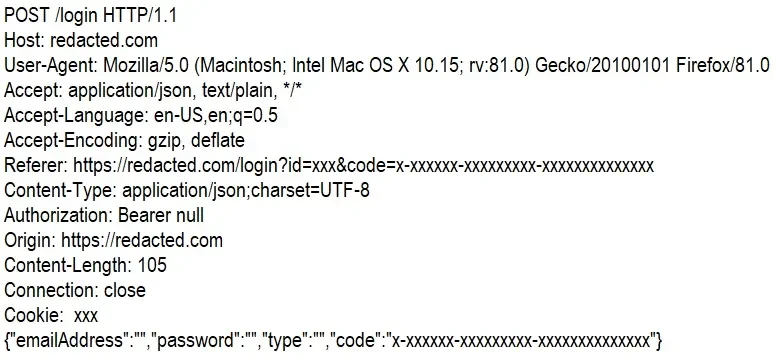
The image shows the request that is prone to the replay attack, that is, the login request carrying the access code that could be reused.
What the program confirmed
Discussions with the program established the mechanism. Within a time-window of 5 minutes after receiving a valid code, the server does not go back to Facebook if access is requested again. For a particular login id, it reuses the access code that had been received earlier.
So once a valid access code had been obtained, the server kept using that same code for the next five minutes, even for fresh login requests through Facebook. It did not contact Facebook for a new code, regardless of what had happened on the Facebook side, including logging out of Facebook or changing the Facebook password. Within that window, the account could be accessed with expired Facebook credentials, provided the access code that had recently been used to obtain it was known.
Root cause
For a particular login id, the server reused the access code it had received earlier for a 5 minute window instead of going back to Facebook. Because the code was accepted again after it had already been used, and because its validity was not tied to the current state of the Facebook account, the code behaved as a reusable credential for the duration of the window. Logging out of Facebook or changing the Facebook password had no effect on the application's decision, since the application never asked Facebook again during that period.
Impact
An attacker who knows a recently used access code can replay it to obtain unauthorised access to the account within the short window of attack. The program rated this low severity (P4 in Bugcrowd) because the window was only 5 minutes and some conditions also had to hold for a successful replay. The reward was $300, which the researcher notes is a bit higher than the program's usual range for P4 findings.
Fix
The report does not describe a specific code change. The report does not describe a specific code change or the fix the program applied.
Variants to test
- Replay a captured OAuth callback request in a fresh browser after logging out of the identity provider. A positive result is a successful login with no active identity provider session.
- Replay the same callback request a second time, and again a few minutes later, to map the acceptance window. A positive result is more than one successful use of the same code, and a measurable period during which it still works.
- Change the identity provider account password between the first use and the replay. A positive result is that the replay still logs in, showing the application is not re-checking the provider.
- Log out of the identity provider between the first use and the replay. A positive result is the same: the application accepts the code without a live provider session.
What happened, in plain words
A security researcher found a flaw in how a website handled logins made through Facebook. Normally, when you click "Login with Facebook", the website sends you to Facebook, Facebook checks your password, and then sends you back with a special one-time code. The website uses that code to let you in. The problem was that the website kept reusing the same code for up to 5 minutes, even after you had logged out of Facebook or changed your Facebook password. So if someone got hold of that code, they could use it again to log into your account within that short window. The program that ran the bug bounty paid the researcher $300 and rated the issue as low severity (P4 on Bugcrowd) because the window was short and some conditions had to be met.
Background: what is OAuth and why does it matter?
Many websites let you log in with an account you already have elsewhere, like Facebook or Google. This is convenient because you don't need to create a new password. The technical name for this is OAuth (Open Authorization). It works like a temporary pass: you prove who you are to Facebook, and Facebook gives the website a short-lived code that says "this person is legit". The website then uses that code to log you in.
Think of it like a concert: you show your ID at the box office (Facebook), they give you a wristband (the code), and you show the wristband at the gate (the website) to get in. Normally the wristband is only good for one entry, and it expires quickly. In this case, the website was letting people reuse the same wristband for 5 minutes, even if the box office had closed or you had changed your ID.
The setup
The researcher, Muhammad Aamir, was testing a bug bounty program on Bugcrowd. The program had a website (domain) in scope that offered two ways to log in: either by creating an account with an email and password, or by using Facebook. The Facebook login used the standard OAuth flow described above.
To test this, the researcher needed:
- A normal account on the website, created by signing up with Facebook.
- A browser where they could be logged into both the website and Facebook at the same time.
- A way to capture the HTTP request that carries the access code, so they could try using it again in a different browser.
The key condition for the attack is that the attacker must already have a valid access code that was recently used for a particular login. And the replay must happen within the server's short time window.
Finding the issue
After logging in with Facebook, the researcher looked at the request that the website receives when Facebook sends you back. It looked like this:
https://redacted.com/login?id=xxx&code=x-xxxxxx-xxxxxxxxx-xxxxxxxxxxxxxx
This is a URL. The part before the question mark (https://redacted.com/login) is the address of the login page. After the question mark come two pieces of data, called parameters, separated by an ampersand (&). The first parameter is id=xxx. The id parameter is present in the request, but the report does not explain what it means. The second parameter is code=x-xxxxxx-xxxxxxxxx-xxxxxxxxxxxxxx. The code is the access code that Facebook generated for this login. The website uses this code to log the user in.
Some behaviour was expected. If you log out of the website but stay logged into Facebook, clicking the login button logs you back in immediately, because your browser still has an active Facebook session (you're still logged into Facebook). That's normal. But if you log out of both the website and Facebook, the website should ask you for your Facebook credentials again and go through the OAuth flow to get a new code.
What the researcher noticed was that this second expectation did not hold. After logging out of both the website and Facebook, clicking "Login with Facebook" still logged them into the account, even though there was no active Facebook session. That was suspicious.
Exploitation steps
Step 1: log out of both services
Log out of the website and log out of Facebook in the same browser. At this point, a fresh login should require Facebook credentials.
Step 2: log in again without Facebook credentials
On the website's interface, click "Login with Facebook". The researcher was logged into the website even though they were not currently logged into Facebook. This was unexpected.
Step 3: rule out a cached password or session
To make sure the previous Facebook password was not lingering somewhere in the application's or the browser's memory, the researcher logged out of the website again and quickly changed the Facebook account password. Clicking "Login with Facebook" once more still produced a successful login.
Step 4: replay the captured request in a fresh browser
The researcher took the HTTP request that contained the access code and used it in a fresh browser (a different browser or a private window). The login succeeded there as well. This is called a replay attack: the same code, presented again, was accepted.
The image shows the request that is prone to the replay attack, that is, the login request carrying the access code that could be reused.
What the program confirmed
After discussions with the program, the mechanism became clear. Within a time window of 5 minutes after receiving a valid code, the server does not go back to Facebook if access is requested again. For a particular login id, it reuses the access code that had been received earlier.
So once a valid access code had been obtained, the server kept using that same code for the next five minutes, even for fresh login requests through Facebook. It did not contact Facebook for a new code, regardless of what had happened on the Facebook side, including logging out of Facebook or changing the Facebook password. Within that window, the account could be accessed with expired Facebook credentials, provided the access code that had recently been used to obtain it was known.
Root cause
For a particular login id, the server reused the access code it had received earlier for a 5 minute window instead of going back to Facebook. Because the code was accepted again after it had already been used, and because its validity was not tied to the current state of the Facebook account, the code behaved as a reusable credential for the duration of the window. Logging out of Facebook or changing the Facebook password had no effect on the application's decision, since the application never asked Facebook again during that period.
Impact
An attacker who knows a recently used access code can replay it to obtain unauthorised access to the account within the short window of attack. The program rated this low severity (P4 in Bugcrowd) because the window was only 5 minutes and some conditions also had to hold for a successful replay. The reward was $300, which the researcher notes is a bit higher than the program's usual range for P4 findings.
Fix
The report does not describe a specific code change.
Variants to test
- Replay a captured OAuth callback request in a fresh browser after logging out of the identity provider. A positive result is a successful login with no active identity provider session.
- Replay the same callback request a second time, and again a few minutes later, to map the acceptance window. A positive result is more than one successful use of the same code, and a measurable period during which it still works.
- Change the identity provider account password between the first use and the replay. A positive result is that the replay still logs in, showing the application is not re-checking the provider.
- Log out of the identity provider between the first use and the replay. A positive result is the same: the application accepts the code without a live provider session.
Glossary
- OAuth: An open standard for access delegation, commonly used to let users log in to a website using their account from another service (like Facebook) without sharing their password.
- Access code: A short-lived token issued by an identity provider (like Facebook) after a user authenticates, which the application uses to verify the user's identity.
- Replay attack: A type of attack where an attacker captures a valid piece of data (like an access code) and reuses it to gain unauthorised access.
- HTTP request: A message sent by a browser to a server to request a resource or perform an action.
- Parameter: A piece of data included in a URL or request, typically in the form
name=value. - Bug bounty program: A program where organisations reward security researchers for finding and reporting vulnerabilities in their systems.
- Bugcrowd: A platform that hosts bug bounty programs.
- P4: A severity rating on Bugcrowd, typically indicating a low-severity issue.
- Identity provider: A service that manages user identities and authenticates users, such as Facebook.
- Session: A period of interaction between a user and a system, often maintained by cookies or tokens.
- Cookie: A small piece of data stored by a browser that can be used to maintain state, such as keeping a user logged in.
- Token: A piece of data that represents something, like an access code or a session identifier.
- Cache: A temporary storage area that allows faster access to data; in this context, the server stored the access code for reuse.
- Time window: A period during which a certain condition is valid; here, the 5 minutes during which the access code was reused.
- Severity: A measure of how serious a vulnerability is, often rated from low to critical.
- CVSS: Common Vulnerability Scoring System, a standard for rating the severity of security vulnerabilities (not used in this report).
- Domain: A website address, like
example.com. - In scope: Included in the list of targets that a bug bounty program allows to be tested.
- Credentials: Information used to authenticate, such as a username and password.
- Log out: To end a session and require authentication again for future access.
- Browser session: The state of being logged in to a website within a browser, often maintained by cookies.
- Fresh browser: A browser instance with no prior cookies or session data, such as a private browsing window or a different browser.
- Expired credentials: Login information that is no longer valid, such as an old password after a change.
- Unauthorised access: Gaining access to an account or system without permission.
- Low severity: A rating indicating that the vulnerability has limited impact or requires specific conditions to exploit.
- Bounty: The reward paid to a researcher for reporting a valid vulnerability.



