GitHub’s OAuth Flow
The report concerns a bypass of GitHub's OAuth flow, but the source text provided does not describe the technical details or impact.
 Published on blog.teddykatz.com
For the past few years, security research has been something I’ve done in my spare time. I know there are people that make a living off of bug bounty programs, but I’ve personally just spent a few hours here and there whenever I feel like it.
The full write-up lives on its author's site
It belongs to its author, so we link to it rather than copy it. The other two tabs are our own rewrites, checked against it.
Context
GitHub's OAuth flow lets a third-party application (the report calls it "Foo App") request access to a user's GitHub data. The flow has three parts:
- Foo App sends the user to
https://github.com/login/oauth/authorizewith a bunch of information in the querystring. - GitHub displays an authorization page to the user, like the one below.
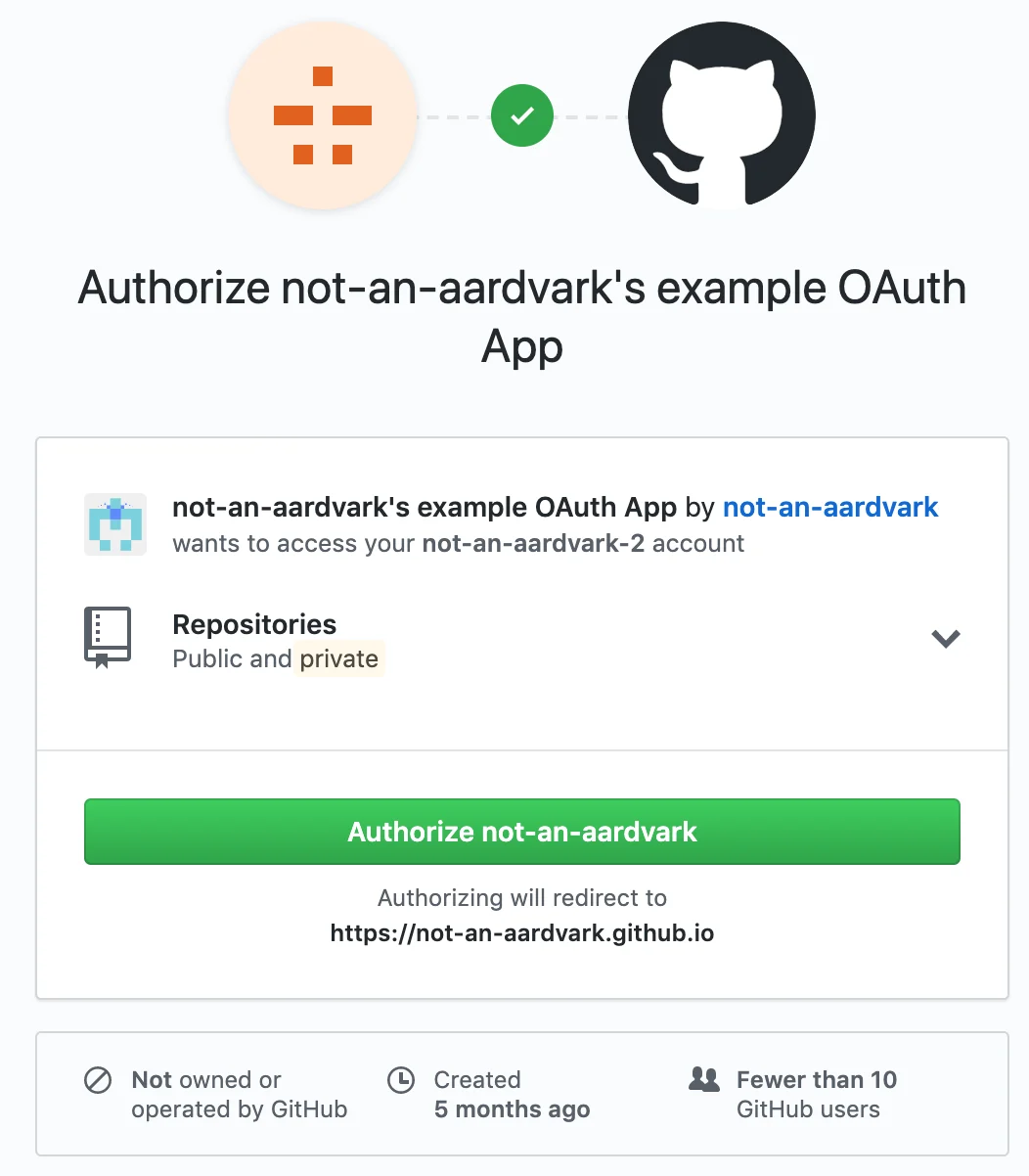
- If the user chooses to grant access, they click the "Authorize" button and are redirected to Foo App with an authorization code in the querystring. That code can then be used to access the requested data. The user can also decline.
The bug described here is a complete OAuth authorization bypass: an attacker could grant an OAuth app access to a victim's account without the victim ever seeing the authorization page.
Setup
The researcher spent a couple of months working on GitHub's bug bounty program full time, a few hours a day, to see whether it could be a living. The main workflow was:
- Download a trial version of GitHub Enterprise.
- Deobfuscate it using a modified version of a public script.
- Read GitHub's Rails code looking for anything weird or exploitable.
The researcher notes that GitHub's code seems very well-architected from a security perspective: bugs caused by unhandled cases in application logic would often turn out not to be security issues, for example because the code was running a query with reduced privileges anyway. The general point made is that a big challenge of security engineering is making bugs unexploitable without knowing where they are, and that GitHub does this well. The OAuth bypass was found in June, while looking at the code implementing the OAuth flow.
Finding it
The starting point was the implementation of the "Authorize" button. It is a self-contained HTML form that sends a POST request with some hidden form fields, including a CSRF token. When that POST is sent and the CSRF token is validated, the user is considered to have granted permissions to the app.
The interesting detail is the endpoint URL: the button posts to /login/oauth/authorize, the same URL as the authorization page itself. GitHub decides which response to send based on the HTTP request method: GET returns the HTML authorization page, POST grants permissions to the app.
The switch happens in application code. The router forwards both GET and POST requests to the same controller:
# In the router

match "/login/oauth/authorize", # For every request with this path...
  :to => "[the controller]", # ...send it to the controller...
  :via => [:get, :post] # ... as long as it's a GET or a POST request.
# In the controller

if request.get?
  # serve authorization page HTML
else
  # grant permissions to app
end
At first glance this looks fine. The problem is that the router is not telling the truth about which requests it routes where.
The Rails HEAD handling
The HTTP HEAD method has been around since HTTP was originally created. Its expected semantics are: pretend this is a GET request, but only send back response headers without a response body. It has niche uses, such as checking the size of a large file via Content-Length before deciding whether to download it.
Web app developers usually do not implement behaviour for HEAD requests, and Rails (along with some other frameworks) implements a clever hack: it tries to route HEAD requests to the same place it would route GET requests, runs the controller code, and just omits the response body.
This is a leaky abstraction. If a controller calls request.get? on such a request, it returns false, because the request is still a HEAD request, not a GET request.
Exploitation
Step 1: send an authenticated HEAD request to the authorize endpoint
The router treats the HEAD request like a GET, so it reaches the controller. In the controller, request.get? is false, so the request is handled as if it were an authenticated POST: GitHub finds the OAuth app specified in the request and grants it access to the authenticated user's data.
Step 2: skip the CSRF token
GitHub's CSRF protection requires all authenticated POST requests to include a CSRF token. HEAD requests do not need one, since they are not supposed to have side effects. So a cross-site authenticated HEAD request can be sent that grants arbitrary OAuth permissions, without showing the user a confirmation page at all.
Step 3: trigger it from an attacker's site
If a user visited an attacker's website, the attacker could send that cross-site HEAD request and arbitrarily read or modify private data in the user's GitHub account. The researcher published a proof-of-concept, which no longer works because the issue has been patched.
Root cause
The router and the controller disagree about what kind of request is being handled. The router maps HEAD onto the GET route, but the controller's if request.get? check does not consider a HEAD request to be a GET, so it falls into the else branch that grants permissions. The CSRF protection did not stop this because it only applies to authenticated POST requests, and a HEAD request is not a POST. The combination of the two behaviours, a method-based branch in the controller and a method-rewriting router, produced a state-changing action reachable with a method that is exempt from CSRF checks and can be issued cross-site.
Impact
An attacker who got a logged-in GitHub user to visit a malicious website could grant an OAuth app access to that user's account without any confirmation page. Through that app, the attacker could arbitrarily read or modify private data in the user's GitHub account. If a user visited an attacker's website, the attacker could arbitrarily read or modify private data in the user's GitHub account.
Fix
GitHub shipped a fix to production in about three hours. The report does not describe the code change itself. The timeline records the following:
- 2019-06-19 23:28:56 UTC Issue reported to GitHub on HackerOne
- 2019-06-19 23:36:50 UTC Issue confirmed by GitHub security team
- 2019-06-20 02:44:29 UTC Issue patched on github.com, GitHub replies on HackerOne to double-check that the patch fully resolves the issue
- 2019-06-26 16:19:20 UTC GitHub Enterprise 2.17.3, 2.16.12, 2.15.17, and 2.14.24 released with the patch
- 2019-06-26 22:30:45 UTC GitHub awards $25000 bounty
The $25000 bounty was, at the time, the highest bounty ever from GitHub's program.
- Look for endpoints where the router maps several HTTP methods to one controller and the controller branches on the method. A positive result is a state-changing branch reachable with a method the framework rewrites (such as
HEADmapped ontoGET) that the CSRF check does not cover. - Check whether the framework's
request.get?-style helpers return false forHEADwhile the router still dispatchesHEADto theGETroute. A positive result is a controller that takes the non-GETbranch on aHEADrequest. - Test CSRF exemptions for methods assumed to be safe. A positive result is a request with no CSRF token that still changes state.
- Apply the same reasoning to other OAuth authorization endpoints that accept both
GETandPOSTon one URL. A positive result is a permission grant triggered by a request the user never confirmed.
What happened, in plain words
GitHub lets other websites and apps connect to your GitHub account. For example, a code editor might want to read your repositories, or a chat tool might want to see your profile. To make that safe, GitHub uses a system called OAuth. When an app wants access, GitHub shows you a page that says "Foo App wants to access your account" and gives you an Authorize button. You click it, and the app gets a special code that lets it read or change the data you agreed to share.
The researcher Teddy Katz found a way to skip that page entirely. If a logged-in GitHub user visited a malicious website, that website could quietly tell GitHub to grant an app access to the user's account, without the user ever seeing the Authorize button or agreeing to anything. That is called an authorization bypass: the check that is supposed to happen (the user saying yes) is bypassed.
GitHub fixed it in about three hours and paid a $25000 bounty, which at the time was the highest bounty ever from GitHub's program.
Background: how the researcher worked
Before the bug itself, some context on how it was found. The researcher had done security research in his spare time for a few years and wanted to know whether he could make a living from bug bounties. A bug bounty is a program where a company pays people for reporting security problems in its products instead of attacking them. So he spent a couple of months working on GitHub's program full time, a few hours a day.
His main workflow was:
- Download a trial version of GitHub Enterprise. GitHub Enterprise is the version of GitHub that companies run on their own servers. It is a copy of GitHub's code that the researcher downloaded to study.
- Deobfuscate it using a modified version of a public script. Software is often shipped in a form that is hard for humans to read (obfuscated), and deobfuscating means turning it back into readable source code.
- Read GitHub's Rails code looking for anything weird or exploitable. Rails is a framework, a set of ready-made building blocks, for writing web applications in the Ruby programming language.
He notes that GitHub's code seems very well-architected from a security perspective. He would sometimes find a bug caused by an unhandled case in the application logic, only to find it was not a security issue, for example because the code was running a database query with reduced privileges anyway. The general point: every app has bugs, and a big challenge of security engineering is to make bugs unexploitable without knowing where they are. GitHub does that well. The OAuth bypass was found in June, while looking at the code that implements the OAuth flow.
The OAuth flow, step by step
OAuth is the system that lets one website ask another for permission to use your account, without giving it your password. The report describes the flow in three parts:
- A third-party application (the report calls it "Foo App") wants to access a user's GitHub data. It sends the user to
https://github.com/login/oauth/authorizewith a bunch of information in the querystring. The querystring is the part of a web address after the question mark, used to carry small pieces of information such as which app is asking and what it wants. - GitHub displays an authorization page to the user, like the one below.
The screenshot shows GitHub's authorization page: it tells the user that an OAuth app would like to access their GitHub account, and it has an Authorize button.
- If the user chooses to grant access, they click the Authorize button and are redirected to Foo App with an authorization code in the querystring. That code can then be used to access the requested data. The user can also decline.
So the whole safety of the system rests on that page and that button: the app only gets its code after the user has seen the request and said yes.
Finding the flaw in the Authorize button
The researcher started by looking at how the Authorize button is implemented. It turns out the button is a self-contained HTML form. HTML is the language web pages are written in, and a form is the part of a page that collects information and sends it to the server when you press a button. The form sends a POST request with some hidden form fields, including a CSRF token.
Two terms need explaining here.
- A POST request is one of the ways a browser can talk to a server. A GET request is what happens when you type an address or click a normal link: you are asking to see something. A POST request is used to send data and usually to make something happen, such as submitting a form.
- A CSRF token is a secret value that the server puts into the form and checks when the form is submitted. CSRF stands for cross-site request forgery: an attack where a malicious website makes your browser send a request to another site where you are logged in, without your knowledge. The token proves the request really came from a page the server itself handed to you, not from some other website. Think of it as a numbered ticket the server gives you with the form: it only accepts the form back if the ticket number matches.
When that POST is sent and the CSRF token is validated, the user is considered to have granted permissions to the app.
The interesting detail is the address the button posts to: /login/oauth/authorize. That is the same URL as the authorization page itself. GitHub decides which response to send based on the HTTP request method: a GET returns the HTML authorization page, and a POST grants permissions to the app. The HTTP request method is simply the label on the request that says what kind of action it is, such as GET (show me something) or POST (here is some data, do something).
The switch happens in the application code. The router forwards both GET and POST requests to the same controller. The router is the part of a web application that looks at the incoming address and decides which piece of code should handle it; the controller is that piece of code.
# In the router

match "/login/oauth/authorize", # For every request with this path...
  :to => "[the controller]", # ...send it to the controller...
  :via => [:get, :post] # ... as long as it's a GET or a POST request.
Line by line:
match "/login/oauth/authorize"says: for every request whose path is this address, do the following.:to => "[the controller]"says: send it to this controller, the code that handles the request.:via => [:get, :post]says: accept it as long as it is a GET or a POST request.
# In the controller

if request.get?
  # serve authorization page HTML
else
  # grant permissions to app
end
Line by line:
if request.get?asks: is this request a GET request?- If yes, the controller serves the authorization page HTML, the page with the Authorize button.
elsecovers every other case.- In that other case, the controller grants permissions to the app.
At first glance this looks fine. The problem is that the router is not telling the truth about which requests it routes where.
The HEAD method and the Rails trick
The HTTP HEAD method has been around since HTTP was originally created. HTTP is the protocol, the common language, that browsers and web servers use to talk to each other. When a server receives a HEAD request, the expected behaviour is: pretend this is a GET request, but only send back the response headers without a response body. Headers are the small pieces of information that come with a response, such as its size or type; the body is the actual content, such as the page itself.
HEAD has niche uses. For example, a client can send a HEAD request to check the size of a large file, via the Content-Length response header, before deciding whether it wants to start downloading the file. It is like asking a shop assistant how heavy a parcel is before deciding whether to carry it home.
Web app developers usually do not want to take the time to implement behaviour for HEAD requests. Getting a product that works is understandably considered more important than compliance with niche parts of the HTTP spec. But it is nice if HEAD requests can be processed correctly without app developers having to deal with them manually. So Rails, along with some other web frameworks, implements a clever hack: it tries to route HEAD requests to the same place it would route GET requests, runs the controller code, and just omits the response body.
This is a leaky abstraction. An abstraction is when a system hides complexity behind a simple idea; it leaks when the hidden detail still shows through. Here the hidden detail is that the request is still a HEAD request. If a controller calls request.get? on such a request, it returns false, because the request is a HEAD request, not a GET request. So the router treats it as a GET, but the controller does not.
Exploiting it
Step 1: send an authenticated HEAD request to the authorize endpoint
This is a HEAD request to the address that both shows the authorization page and grants permissions. "Authenticated" means it carries the user's login, the same way your browser is logged in when you have signed in to GitHub.
The router treats the HEAD request like a GET, so it reaches the controller. In the controller, request.get? is false, so the request is handled as if it were an authenticated POST: GitHub finds the OAuth app specified in the request and grants it access to the authenticated user's data. In other words, the router and the controller disagree about what kind of request this is, and the controller ends up doing the dangerous thing.
Step 2: skip the CSRF token
GitHub's CSRF protection requires all authenticated POST requests to include a CSRF token. HEAD requests do not need one, since they are not supposed to have side effects. A side effect means changing something on the server, such as granting access, rather than just reading it. So a cross-site authenticated HEAD request can be sent that grants arbitrary OAuth permissions, without showing the user a confirmation page at all. The token check, which exists precisely to stop other websites from making your browser do things, never applies, because the request is not a POST.
Step 3: trigger it from an attacker's site
If a user visited an attacker's website, the attacker could send that cross-site HEAD request and arbitrarily read or modify private data in the user's GitHub account. The researcher published a proof-of-concept, a small demonstration that the attack works, which no longer works because the issue has been patched.
Root cause
The router and the controller disagree about what kind of request is being handled. The router maps HEAD onto the GET route, but the controller's if request.get? check does not consider a HEAD request to be a GET, so it falls into the else branch that grants permissions. The CSRF protection did not stop this because it only applies to authenticated POST requests, and a HEAD request is not a POST. The combination of the two behaviours, a method-based branch in the controller and a method-rewriting router, produced a state-changing action reachable with a method that is exempt from CSRF checks and can be issued cross-site.
Impact
An attacker who got a logged-in GitHub user to visit a malicious website could grant an OAuth app access to that user's account without any confirmation page. Through that app, the attacker could arbitrarily read or modify private data in the user's GitHub account. If a user visited an attacker's website, the attacker could arbitrarily read or modify private data in the user's GitHub account.
Fix
GitHub shipped a fix to production in about three hours. The report does not describe the code change itself. The timeline records the following:
- 2019-06-19 23:28:56 UTC Issue reported to GitHub on HackerOne
- 2019-06-19 23:36:50 UTC Issue confirmed by GitHub security team
- 2019-06-20 02:44:29 UTC Issue patched on github.com, GitHub replies on HackerOne to double-check that the patch fully resolves the issue
- 2019-06-26 16:19:20 UTC GitHub Enterprise 2.17.3, 2.16.12, 2.15.17, and 2.14.24 released with the patch
- 2019-06-26 22:30:45 UTC GitHub awards $25000 bounty
The issue was reported to GitHub on HackerOne. The $25000 bounty was, at the time, the highest bounty ever from GitHub's program.
Variants to test
- Look for endpoints where the router maps several HTTP methods to one controller and the controller branches on the method. A positive result is a state-changing branch reachable with a method the framework rewrites (such as
HEADmapped ontoGET) that the CSRF check does not cover. - Check whether the framework's
request.get?-style helpers return false forHEADwhile the router still dispatchesHEADto theGETroute. A positive result is a controller that takes the non-GETbranch on aHEADrequest. - Test CSRF exemptions for methods assumed to be safe. A positive result is a request with no CSRF token that still changes state.
- Apply the same reasoning to other OAuth authorization endpoints that accept both
GETandPOSTon one URL. A positive result is a permission grant triggered by a request the user never confirmed.
Glossary
- API: a defined way for one piece of software to ask another for data or actions, like a menu of requests a service accepts.
- Authentication: proving who you are, usually by logging in.
- Authorization: deciding what a logged-in user or app is allowed to do.
- Authorization bypass: getting past a permission check without satisfying it, for example granting an app access without the user's confirmation.
- Bug bounty: a program that pays people for reporting security problems instead of exploiting them.
- Controller: the part of a web application that handles a request and decides what to do with it.
- CSRF (cross-site request forgery): an attack where a malicious website makes your browser send a request to another site where you are logged in.
- CSRF token: a secret value placed in a form and checked by the server, proving the request came from a page the server itself provided.
- Deobfuscate: turn hard-to-read shipped code back into readable source code.
- Endpoint: a specific address on a server that accepts requests, such as
/login/oauth/authorize. - Framework: a set of ready-made building blocks for writing software, such as Rails for Ruby web applications.
- GET request: a request that asks to see something, like clicking a link.
- HEAD request: a request that asks for the same information as a GET but only the headers, without the body.
- Headers: small pieces of information sent with a request or response, such as the size or type of the content.
- HTML: the language web pages are written in.
- HTTP: the protocol browsers and web servers use to talk to each other.
- HTTP method: the label on a request saying what kind of action it is, such as GET, POST or HEAD.
- OAuth: a system that lets one app access your account on another site without giving it your password.
- OAuth app: a third-party application that has been granted access to a user's account through OAuth.
- POST request: a request that sends data to the server and usually makes something happen, such as submitting a form.
- Proof-of-concept: a small demonstration showing that an attack works.
- Querystring: the part of a web address after the question mark, carrying small pieces of information.
- Rails: a framework for writing web applications in the Ruby programming language.
- Router: the part of a web application that looks at the incoming address and decides which code handles it.
- Side effect: a change made on the server, such as granting access, rather than just reading data.
- Source code: the human-readable instructions a program is written in.
- State-changing action: an action that changes something on the server, as opposed to only reading it.
- URL: the address of a page or resource on the web.