Git, GitHub, and weird branch names
GitHub allowed a pull request's base branch to be a commit shorthash, so after the real branch was deleted, the shorthash resolved to an attacker's commit. An attacker could then reopen the pull request and trigger a pull_request_target workflow from their malicious commit, gaining repository secrets and write access.
 Published on blog.teddykatz.com
In a previous blogpost, I wrote about a security bug I found in GitHub, which would have allowed an attacker to get write access to almost any public repository. As a quick recap:
The full write-up lives on its author's site
It belongs to its author, so we link to it rather than copy it. The other two tabs are our own rewrites, checked against it.
Context
GitHub pull requests each have a base branch: a git branch in the same repository as the pull request. GitHub Actions can execute code from that base branch, and when it does, the code can access the repository's secrets. This happens in particular when the base branch contains a pull_request_target workflow. That design is normally safe, because anyone able to push to the base branch could already write to the repository directly.
A previous bug, described in an earlier post, abused an oversight: a user could set the base branch of their pull request to a commit hash rather than a real branch. An attacker could open a pull request from a fork, point the base at a commit hash for a malicious commit on their own fork, and because commit hashes are shared among forks, GitHub Actions would run code from that commit with access to the parent repository and its secrets. That path was closed in February 2021 by adding validation to the edit base branch endpoint, which stopped that endpoint from producing nonsensical pull requests. The Actions backend, however, was not given branch existence checks at the time.
The bug in this write-up reaches the same nonsensical pull request state by a different route, using unusual branch names.
Setup
The work is done against GitHub repositories and the git CLI. The only special tool is the author's project lucky-commit, used to generate a commit whose shorthash matches a chosen value. The attack requires a repository where someone with write access creates a branch whose name can be parsed as a commit hash, and the attacker pushes a malicious pull_request_target workflow to their fork. No accounts beyond a normal GitHub user and a fork of the target repository are described.
Finding it
The starting point is how git and GitHub treat names that could be either a branch or a commit hash. The git CLI accepts either form. To switch to a branch called my-branch:
$ git checkout my-branch
To switch to a specific commit, a commit hash works as the argument:
$ git checkout [redacted]
GitHub mirrors this: github.com/someone/some-repo/tree/my-branch shows a branch, and github.com/someone/some-repo/tree/[redacted] shows a commit.
Since branch names are chosen by users, the question is what happens when a branch is named after a commit hash. Creating one locally works, with a warning:
$ git branch [redacted]
$ git checkout [redacted]
warning: refname '[redacted]' is ambiguous.
...

$ git branch
* [redacted]
  main
Git then interprets the name as a branch rather than a commit hash in checkout and similar commands. GitHub, by contrast, rejects the push outright:
$ git push
remote: error: GH002: Sorry, branch or tag names consisting of 40 hex characters are not allowed.
remote: error: Invalid branch or tag name "[redacted]"
The author's explanation for this restriction is the integrity of permalinks and commit hash checkouts: users expect a URL such as github.com/someone/some-repo/blob/[redacted]/foo/bar.sh to resolve to an immutable version of that file at that commit. A branch with the same 40 hex characters would change what the URL returns. A 2019 report by the same author showed the protection could be bypassed with a branch named [redacted]/foo containing a file bar.sh at the repository root, and GitHub now also blocks names starting with 40 hex characters followed by a slash.
A shorthash is a different matter. Naming a branch after a shorthash is accepted:
$ git branch a047be8
$ git checkout a047be8
$ # ...
$ git push
* [new branch]          a047be8 -> a047be8
branch 'a047be8' set up to track 'a047be8'
This creates an ambiguous branch. With a commit whose shorthash is a047be8 in the repository and a branch of the same name, visiting github.com/someone/some-repo/tree/a047be8 shows the branch, not the commit. The author considers this reasonable: resolving to the commit would make the branch unreachable by name, and relying on a shorthash in a URL is inadvisable anyway because it also fails on a shorthash collision. The branch effectively shadows the commit. The commit still exists, though, and if the branch is deleted the name starts resolving to the commit again, even for someone who only wanted the deleted branch. That edge case is where the author went looking for bugs.
Exploitation
Step 1: create a branch and a pull request to it
The experiment reverses the order: instead of naming a branch after an existing commit, arrange for a commit to appear whose shorthash matches an existing branch name.
- Push a branch called
deadbeefto a GitHub repository. - Create a pull request from some other branch to
deadbeef. - Delete the
deadbeefbranch, which causes the pull request to be closed automatically. - Use lucky-commit to generate a new commit with the shorthash
deadbeef, and push that commit to the repository as well.
The author expected any misbehaviour to appear in the pull request diff, perhaps showing the new commit instead of the old branch. GitHub instead kept showing the historical diff against the deleted branch, which is correct: pull request diffs only update while a pull request is open.
Step 2: reopen the closed pull request
The surprise came when the author found the pull request could be reopened in the GitHub UI.
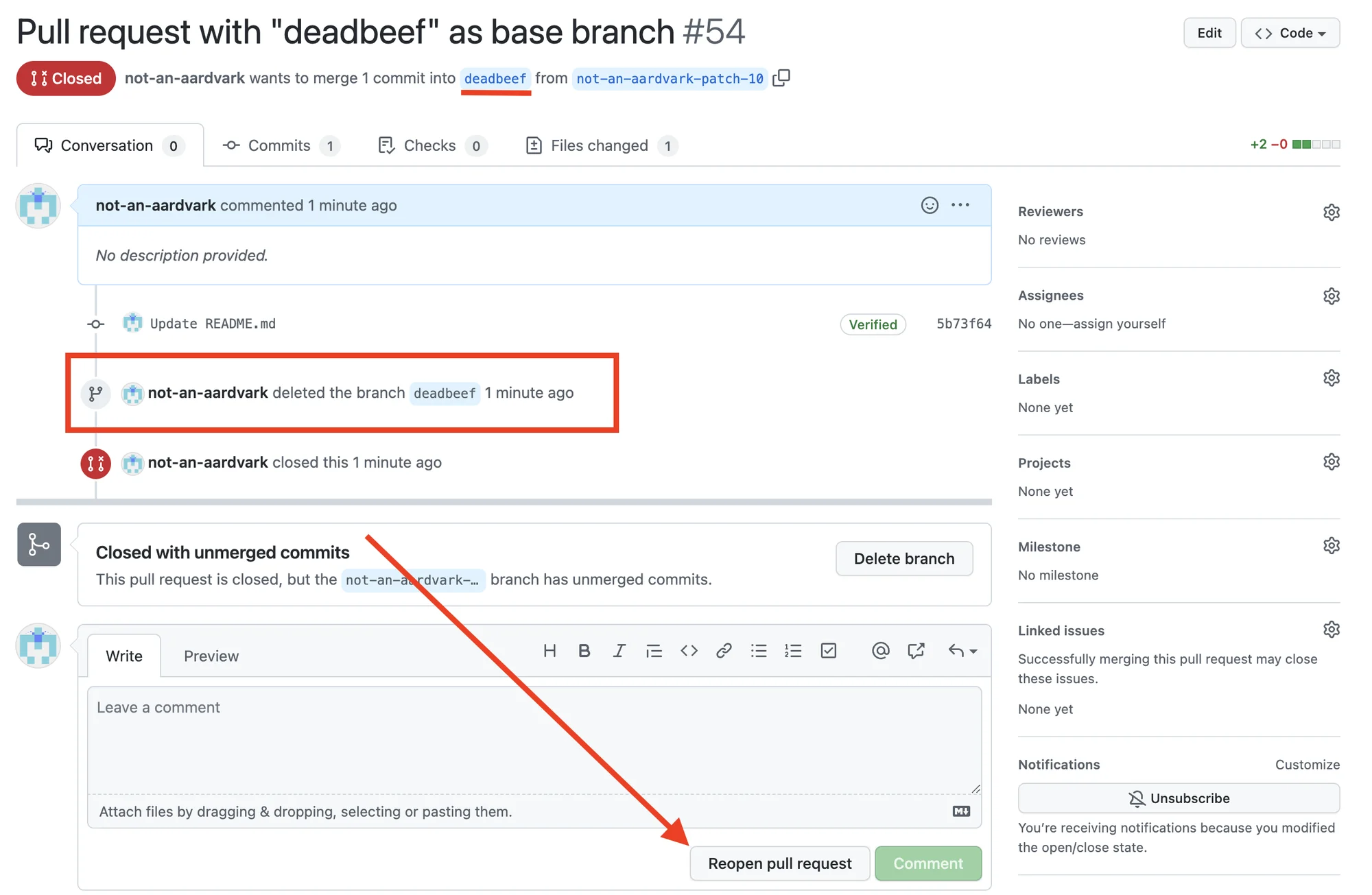
The screenshot shows the pull request titled Pull request with "deadbeef" as base branch, closed, with the text not-an-aardvark wants to merge 1 commit into deadbeef from not-an-aardvark-patch-10.
Normally both the head and base branches of an open pull request must exist, and deleting either closes the pull request immediately. Here GitHub allowed reopening after the base branch was deleted, because when it looks for code at the deadbeef branch it finds the commit with the shorthash deadbeef instead of nothing. GitHub therefore believes the base branch still exists.
Step 3: reach the Actions backend
The result is an open pull request whose base branch points at a commit with the shorthash deadbeef rather than a real branch. This is almost identical to the nonsensical pull request from the earlier post. The edit base branch endpoint had been fixed to reject such pull requests, but the Actions backend had no branch existence checks, so it was still vulnerable to them; it was simply believed impossible to create one. Testing this new creation method against GitHub Actions confirmed that secrets could still be stolen through pull_request_target workflows.
Step 4: the full attack chain
- Someone with write access to a repository unwittingly creates a branch called
deadbeef(orAAAAAAA, or12345, or any name meeting the constraints below) during normal development. - The attacker opens a pull request from a fork to the
deadbeefbranch, then immediately closes it, for example claiming it was created by mistake. - Later, someone deletes the
deadbeefbranch, say after its changes are merged intomain. - The attacker pushes a malicious GitHub Actions workflow to their fork, in a specially crafted commit whose shorthash is
deadbeef. - The attacker reopens the pull request. This event makes GitHub look for a
pull_request_targetworkflow at the base branch,deadbeef. - Because the
deadbeefbranch no longer exists, GitHub resolvesdeadbeefto the attacker's commit, finds the malicious workflow there, and gives it the repository secrets plus aGITHUB_TOKENgranting write access to the repository.
The branch name only needs to be parseable by git rev-parse as a commit hash. That can be a hex string such as deadbeef, or a string in the git describe format such as anything-123-gdeadbeef, which still resolves to the deadbeef commit.
The author notes that the attack needs significant user interaction, since the attacker must wait for someone to push an unusually named branch by chance, so it is much less severe than the earlier attack. Since the earlier post, GitHub has also introduced a number of opt-in security features, such as Actions environments, that reduce the blast radius of this kind of attack.
Root cause
Two behaviours combine. First, GitHub resolves a name that is not an existing branch to a commit shorthash, so a deleted branch name can silently start pointing at a commit. Second, GitHub's lookup of the base branch resolved the deleted name to a commit, so the pull request could be reopened and the Actions backend found a workflow there. The edit base branch endpoint had been hardened against nonsensical pull requests, but the Actions backend was not given the corresponding branch existence check, so the earlier class of attack remained reachable through a new creation path.
Impact
An attacker can obtain a repository's secrets and a GITHUB_TOKEN with write access to the repository, by triggering a pull_request_target workflow from a commit they control. The conditions are strict: a user with write access must have created a branch whose name parses as a commit hash, that branch must later be deleted, and the attacker must have opened and closed a pull request to it beforehand. The attacker must also be able to produce a commit with the matching shorthash and push it to their fork. The author rates the severity well below the earlier bug because of the required user interaction.
Fix
GitHub added a fix ensuring that pull_request_target events can only trigger from branches and not from stray commits, which prevents the attack. At the time of writing, it is still possible to reopen a pull request whose base branch was deleted if the branch name matches a commit shorthash in the repository; the author does not believe this has any security impact now.
Timeline:
| Date | Event |
|---|---|
| 2021-09-05 10:04:36 UTC | Reported to GitHub via HackerOne |
| 2021-09-08 12:10:03 UTC | Initial response from GitHub |
| 2021-09-10 22:24:12 UTC | Issue confirmed by GitHub |
| Sometime between 2021-10-07 and 2021-10-13 | Issue fixed on github.com |
| 2021-11-18 | GitHub awarded a $7500 bug bounty |
The bounty was donated to the GiveWell Maximum Impact Fund, and GitHub matched the donation.
Variants to test
- Other name resolution paths. Look for features that accept a branch name and fall back to a commit hash, such as tree views, archive downloads or workflow triggers. A positive result is a deleted branch name that still resolves to a commit in a context where existence is assumed.
git describestyle names. Try names likeanything-123-gdeadbeefwherever a hex shorthash is accepted. A positive result is the same shadowing behaviour with a name that does not look like a hash.- Reopening after deletion. On other platforms or in other GitHub features, delete the base of a pull request or merge request and attempt to reopen it. A positive result is a reopened request whose base no longer exists as a branch.
- Workflow triggers from commits. Test whether
pull_request_targetor similar trusted triggers can be made to run from a commit rather than a branch. A positive result is a workflow run whose code comes from a commit the attacker controls. - Shorthash collisions. Generate commits with chosen shorthashes against branch names that already exist in target repositories. A positive result is a name that switches from branch to commit after deletion.
What happened, in plain words
GitHub is a website where people store and share computer code. A repository (often shortened to repo) is a project folder on GitHub that holds code and its full history of changes. People can copy a repository into their own account; that copy is called a fork. A pull request is a proposal to take changes from one place and merge them into another, and it is how people suggest edits on GitHub.
GitHub also has a feature called GitHub Actions. It lets a repository run code automatically in response to events, for example when someone opens a pull request. That automatic code is called a workflow. Workflows often need passwords and keys to do their job, and GitHub stores those as secrets: private values that the workflow can read but that are not shown to the public.
This article is about a bug that let an attacker make GitHub Actions run code the attacker wrote, and give that code the repository's secrets. The attacker did not need to break any password. The trick was to make GitHub confused about whether a certain name referred to a branch or to a commit.
A branch is a named line of development, like a bookmark that moves as new changes are added. A commit is one saved snapshot of the code, and each commit has a long fingerprint called a hash. A short piece of that hash, called a shorthash, is often enough to identify a commit. The bug came from names that can mean either a branch or a commit, depending on context.
Background: the earlier bug
A previous post by the same author described an earlier security bug in GitHub. It is worth understanding because this new bug reuses the same idea.
- Every pull request on GitHub has a base branch: a branch in the same repository that the pull request proposes to merge into.
- GitHub Actions sometimes runs code taken from that base branch, and that code can read the repository's secrets. This happens in particular when the base branch contains a workflow triggered by an event called
pull_request_target. - That design is normally safe, because anyone who is allowed to push changes to the base branch could already change the repository directly. In other words, the people who can influence that code are already trusted with the repository.
- At the time, there was an oversight: a user could set the base branch of their pull request to a commit hash instead of a real branch name.
- Because of that, an attacker could open a pull request from a fork and then change the base to a commit hash pointing at a malicious commit on the attacker's own fork. Commit hashes are shared between forks, so GitHub Actions would run code from that malicious commit and hand it access to the parent repository and its secrets.
That path was closed in February 2021. GitHub added validation to the endpoint used to edit a pull request's base branch. An endpoint is a specific address on a website or service that a program can send a request to; think of it as a particular counter at a service desk that handles one kind of request. The validation stopped that endpoint from producing nonsensical pull requests, meaning pull requests whose base is not a real branch.
The Actions backend, however, was not given checks that the base branch actually exists. The backend is the part of GitHub's systems that does the work behind the scenes, as opposed to the web pages you see. So the earlier class of attack was still possible in principle, but it was believed impossible to create the nonsensical pull request needed to trigger it.
The bug in this article reaches that same nonsensical pull request state by a different route, using unusual branch names.
Setting the scene
The work is done against GitHub repositories using the git command-line tool. Git is the program that tracks changes to code; GitHub is a website built around git. The only special tool involved is the author's own project, lucky-commit, which generates a commit whose shorthash matches a value you choose. Generating a commit with a chosen shorthash normally takes a lot of trial and error, and lucky-commit automates that search.
The attack needs a repository where someone with write access creates a branch whose name can be read as a commit hash, and the attacker pushes a malicious pull_request_target workflow to their fork. No accounts beyond a normal GitHub user and a fork of the target repository are described.
Finding it
The starting point is how git and GitHub treat names that could be either a branch or a commit hash. The git command-line tool accepts either form. To switch to a branch called my-branch:
$ git checkout my-branch
Line by line: git checkout is the command that switches your working copy to a different branch or commit. my-branch is the name of the branch to switch to. The $ at the start is just the shell prompt, showing that this is a command typed into a terminal.
To switch to a specific commit, a commit hash works as the argument:
$ git checkout [redacted]
Here the long string of letters and digits is a commit hash: the fingerprint of one particular saved snapshot. Git recognises it as a commit and switches your working copy to that snapshot.
GitHub mirrors this behaviour. The address github.com/someone/some-repo/tree/my-branch shows the files at a branch, and github.com/someone/some-repo/tree/[redacted] shows the files at a commit. The part after /tree/ is the name being looked up.
Since branch names are chosen by users, the question is what happens when a branch is named after a commit hash. Creating one locally works, with a warning:
$ git branch [redacted]
$ git checkout [redacted]
warning: refname '[redacted]' is ambiguous.
...

$ git branch
* [redacted]
  main
Line by line: git branch followed by a name creates a new branch with that name. git checkout then switches to it. Git prints a warning that the name is ambiguous, meaning it could refer to more than one thing. The ... stands for output that was left out. Finally, git branch with no name lists the branches, and the asterisk marks the one currently in use; here it is the oddly named branch, alongside main.
Git then interprets the name as a branch rather than a commit hash in checkout and similar commands. GitHub, by contrast, rejects the push outright:
$ git push
remote: error: GH002: Sorry, branch or tag names consisting of 40 hex characters are not allowed.
remote: error: Invalid branch or tag name "[redacted]"
Line by line: git push sends your local branches up to GitHub. The lines starting with remote: are messages sent back by GitHub's server. The first says that branch or tag names made of exactly 40 hexadecimal characters are not allowed. Hexadecimal means digits 0 to 9 plus letters a to f, which is how hashes are written. The second line repeats that the specific name is invalid.
The author's explanation for this restriction is the integrity of permalinks and commit hash checkouts. A permalink is a link meant to keep pointing at the same thing forever. Users expect a URL such as github.com/someone/some-repo/blob/[redacted]/foo/bar.sh to resolve to an immutable version of that file at that commit. Immutable means it never changes. A branch with the same 40 hex characters would change what the URL returns, because the name would now point at the branch instead of the commit.
A 2019 report by the same author showed the protection could be bypassed with a branch named [redacted]/foo containing a file bar.sh at the repository root. GitHub now also blocks names starting with 40 hex characters followed by a slash.
A shorthash is a different matter. A shorthash is a shortened form of a commit hash, just the first few characters, which is usually enough to identify a commit uniquely. Naming a branch after a shorthash is accepted:
$ git branch a047be8
$ git checkout a047be8
$ # ...
$ git push
* [new branch]          a047be8 -> a047be8
branch 'a047be8' set up to track 'a047be8'
Line by line: the first two commands create and switch to a branch called a047be8, which is a shorthash. The line starting with # is a comment, standing in for work that was done in between. git push sends the branch to GitHub. The * [new branch] line reports that GitHub received a new branch, and the arrow shows it went from the local name to the remote name. The last line says the local branch is set up to track the remote one, meaning git will remember which remote branch it corresponds to.
This creates an ambiguous branch. With a commit whose shorthash is a047be8 in the repository and a branch of the same name, visiting github.com/someone/some-repo/tree/a047be8 shows the branch, not the commit. The author considers this reasonable: resolving to the commit would make the branch unreachable by name, and relying on a shorthash in a URL is inadvisable anyway because it also fails on a shorthash collision. A collision is when two different commits happen to share the same short prefix.
The branch effectively shadows the commit. Shadowing means the branch name hides the commit from view, the way a sign in front of a shop hides the shop behind it. The commit still exists, though, and if the branch is deleted the name starts resolving to the commit again, even for someone who only wanted the deleted branch. That edge case is where the author went looking for bugs.
Exploitation
Step 1: create a branch and a pull request to it
The experiment reverses the order: instead of naming a branch after an existing commit, arrange for a commit to appear whose shorthash matches an existing branch name.
- Push a branch called
deadbeefto a GitHub repository. - Create a pull request from some other branch to
deadbeef. - Delete the
deadbeefbranch, which causes the pull request to be closed automatically. - Use lucky-commit to generate a new commit with the shorthash
deadbeef, and push that commit to the repository as well.
The author expected any misbehaviour to appear in the pull request diff. A diff is the view showing what changed between two versions of the code. Perhaps the page would show the new commit instead of the old branch. GitHub instead kept showing the historical diff against the deleted branch, which is correct: pull request diffs only update while a pull request is open.
Step 2: reopen the closed pull request
The surprise came when the author found the pull request could be reopened in the GitHub UI. UI means user interface, the buttons and pages you click in a browser.
The screenshot shows the pull request titled Pull request with "deadbeef" as base branch, closed, with the text not-an-aardvark wants to merge 1 commit into deadbeef from not-an-aardvark-patch-10.
Normally both the head and base branches of an open pull request must exist. The head branch is the one containing the proposed changes; the base is the one they would be merged into. Deleting either closes the pull request immediately. Here GitHub allowed reopening after the base branch was deleted, because when it looks for code at the deadbeef branch it finds the commit with the shorthash deadbeef instead of finding nothing. GitHub therefore believes the base branch still exists.
Step 3: reach the Actions backend
The result is an open pull request whose base branch points at a commit with the shorthash deadbeef rather than a real branch. This is almost identical to the nonsensical pull request from the earlier post. The edit base branch endpoint had been fixed to reject such pull requests, but the Actions backend had no branch existence checks, so it was still vulnerable to them; it was simply believed impossible to create one. Testing this new creation method against GitHub Actions confirmed that secrets could still be stolen through pull_request_target workflows.
Step 4: the full attack chain
- Someone with write access to a repository unwittingly creates a branch called
deadbeef(orAAAAAAA, or12345, or any name meeting the constraints below) during normal development. - The attacker opens a pull request from a fork to the
deadbeefbranch, then immediately closes it, for example claiming it was created by mistake. - Later, someone deletes the
deadbeefbranch, say after its changes are merged intomain. - The attacker pushes a malicious GitHub Actions workflow to their fork, in a specially crafted commit whose shorthash is
deadbeef. - The attacker reopens the pull request. This event makes GitHub look for a
pull_request_targetworkflow at the base branch,deadbeef. - Because the
deadbeefbranch no longer exists, GitHub resolvesdeadbeefto the attacker's commit, finds the malicious workflow there, and gives it the repository secrets plus aGITHUB_TOKENgranting write access to the repository. A token is a short-lived credential, like a temporary key card, that a program presents to prove it is allowed to do something.
The branch name only needs to be parseable by git rev-parse as a commit hash. git rev-parse is a git command that turns a name into the underlying commit it refers to. That can be a hex string such as deadbeef, or a string in the git describe format such as anything-123-gdeadbeef, which still resolves to the deadbeef commit. git describe is a way of naming a commit by describing its position relative to a tag, a human-friendly label on a commit.
The author notes that the attack needs significant user interaction, since the attacker must wait for someone to push an unusually named branch by chance, so it is much less severe than the earlier attack. Since the earlier post, GitHub has also introduced a number of opt-in security features, such as Actions environments, that reduce the blast radius of this kind of attack. Blast radius means how much damage an attacker can do once they get in.
Root cause
Two behaviours combine. First, GitHub resolves a name that is not an existing branch to a commit shorthash, so a deleted branch name can silently start pointing at a commit. Second, GitHub's lookup of the base branch resolved the deleted name to a commit, so the pull request could be reopened and the Actions backend found a workflow there. The edit base branch endpoint had been hardened against nonsensical pull requests, but the Actions backend was not given the corresponding branch existence check, so the earlier class of attack remained reachable through a new creation path.
Impact
An attacker can obtain a repository's secrets and a GITHUB_TOKEN with write access to the repository, by triggering a pull_request_target workflow from a commit they control. The conditions are strict: a user with write access must have created a branch whose name parses as a commit hash, that branch must later be deleted, and the attacker must have opened and closed a pull request to it beforehand. The attacker must also be able to produce a commit with the matching shorthash and push it to their fork. The author rates the severity well below the earlier bug because of the required user interaction.
Fix
GitHub added a fix ensuring that pull_request_target events can only trigger from branches and not from stray commits, which prevents the attack. At the time of writing, it is still possible to reopen a pull request whose base branch was deleted if the branch name matches a commit shorthash in the repository; the author does not believe this has any security impact now.
Timeline:
| Date | Event |
|---|---|
| 2021-09-05 10:04:36 UTC | Reported to GitHub via HackerOne |
| 2021-09-08 12:10:03 UTC | Initial response from GitHub |
| 2021-09-10 22:24:12 UTC | Issue confirmed by GitHub |
| Sometime between 2021-10-07 and 2021-10-13 | Issue fixed on github.com |
| 2021-11-18 | GitHub awarded a $7500 bug bounty |
HackerOne is a platform where security researchers report bugs to companies. A bug bounty is a reward paid for finding and reporting a security problem. The bounty was donated to the GiveWell Maximum Impact Fund, and GitHub matched the donation.
Variants to test
- Other name resolution paths. Look for features that accept a branch name and fall back to a commit hash, such as tree views, archive downloads or workflow triggers. A positive result is a deleted branch name that still resolves to a commit in a context where existence is assumed.
git describestyle names. Try names likeanything-123-gdeadbeefwherever a hex shorthash is accepted. A positive result is the same shadowing behaviour with a name that does not look like a hash.- Reopening after deletion. On other platforms or in other GitHub features, delete the base of a pull request or merge request and attempt to reopen it. A positive result is a reopened request whose base no longer exists as a branch.
- Workflow triggers from commits. Test whether
pull_request_targetor similar trusted triggers can be made to run from a commit rather than a branch. A positive result is a workflow run whose code comes from a commit the attacker controls. - Shorthash collisions. Generate commits with chosen shorthashes against branch names that already exist in target repositories. A positive result is a name that switches from branch to commit after deletion.
Glossary
- Repository (repo): a project folder on GitHub that holds code and its full history of changes.
- Fork: a copy of someone else's repository in your own account.
- Pull request: a proposal to merge changes from one branch or fork into another.
- Base branch: the branch a pull request proposes to merge into.
- Head branch: the branch containing the changes a pull request proposes.
- Branch: a named line of development that moves as new changes are added.
- Commit: one saved snapshot of the code, identified by a hash.
- Hash: a long fingerprint of a commit, written in hexadecimal characters.
- Shorthash: a shortened prefix of a commit hash, usually enough to identify a commit.
- Hexadecimal: a number system using digits 0 to 9 and letters a to f, used to write hashes.
- Git: the program that tracks changes to code.
- GitHub: a website built around git for hosting and sharing code.
- GitHub Actions: a GitHub feature that runs code automatically in response to events.
- Workflow: the automatic code that GitHub Actions runs.
pull_request_target: an event that can trigger a workflow using code from the base branch, with access to repository secrets.- Secret: a private value such as a password or key that a workflow can read but the public cannot.
- Token: a short-lived credential a program presents to prove it is allowed to do something.
GITHUB_TOKEN: a token that grants a workflow access to the repository.- Endpoint: a specific address on a service that handles one kind of request.
- Backend: the systems doing the work behind the scenes, as opposed to the pages you see.
- UI (user interface): the buttons and pages you click in a browser.
- Diff: the view showing what changed between two versions of code.
- Permalink: a link meant to keep pointing at the same thing forever.
- Immutable: never changing.
- Ambiguous: able to mean more than one thing.
- Shadowing: one name hiding another from view.
- Collision: two different commits sharing the same short prefix.
git rev-parse: a git command that turns a name into the commit it refers to.git describe: a way of naming a commit by its position relative to a tag.- Tag: a human-friendly label on a commit.
- lucky-commit: the author's tool that generates a commit with a chosen shorthash.
- Blast radius: how much damage an attacker can do once they get in.
- HackerOne: a platform where researchers report bugs to companies.
- Bug bounty: a reward paid for finding and reporting a security problem.
- Validation: checking that input meets expected rules before acting on it.


