Diving down Linode’s Authentication
The researcher found that Linode's wildcard cookie scope allowed an attacker-controlled subdomain to read and set cookies for .linode.com, enabling bypass of OAuth CSRF protections. This let an attacker force a victim to log into the community portal with wildcard scope and steal their access token, and also perform CSRF on the OAuth authorization server by fixing the CSRF token.
 Published on medium.com
In mid-2018, Linode private Hackerone program got me engaged because of how well the program was getting managed. I found quite of issues there which are privately disclosed on Hackerone, These two issues were particularly interesting so I wanted to do a public disclosure.
The full write-up lives on its author's site
It belongs to its author, so we link to it rather than copy it. The other two tabs are our own rewrites, checked against it.
Context
Linode is a VPS provider. Its product gives every customer a VPS that resolves to <id>.members.linode.com, which means a customer fully controls a subdomain of linode.com that even executes a server-side scripting language. That position, controlling a host under the parent domain, is the starting point for both bugs described here.
Linode has four web applications for users:
- https://manager.linode.com, the classic/old Linode Manager
- https://linode.com/community, the community portal
- https://login.linode.com, the OAuth issuing server
- https://cloud.linode.com, the new Linode manager
The community portal performs a lot of OAuth work through login.linode.com. The first bug abuses that login flow together with cookies scoped to .linode.com. The second bug abuses CSRF on the OAuth authorisation endpoint of login.linode.com itself.
Setup
Because the researcher controls a *.members.linode.com host, he can read any cookie set to .linode.com, that is, any cookie set to the wildcard domain. The attack pages are hosted on that controlled VPS and written in PHP.
Finding it
The first thing checked was https://manager.linode.com for a session or CSRF cookie. All cookies there were set properly to only manager.linode.com, so the wildcard read gave nothing. Attention moved to https://linode.com/community, which does a lot of OAuth things via login.linode.com.
How the community login works
On clicking Login, a GET request is made to https://www.linode.com/community/questions/login?next=/community/. The response is:
HTTP/1.1 302 FoundServer: nginxDate: Sat, 29 Sep 2018 23:36:51 GMTContent-Type: text/html; charset=utf-8Content-Length: 0Connection: closeVary: CookieLocation: https://login.linode.com/oauth/authorize?scopes=events%3Amodify&state=bce45f7c-6a37-46c7-9ede-c9979c152081&client_id=a38f156de7fa9819c110&redirect_uri=https%3A%2F%2Fwww.linode.com%2Fcommunity%2F&response_type=codeSet-Cookie: sessionid=[redacted]; Domain=.linode.com; expires=Sat, 13-Oct-2018 23:36:51 GMT; HttpOnly; Max-Age=1209600; Path=/; Secure.....

The response does three things:
- It sets the cookie
sessionid=[redacted], which is linked to the state tokenstate=bce45f7c-6a37-46c7-9ede-c9979c152081. The cookie is set to.linode.com. - It redirects to the OAuth page
https://login.linode.com/oauth/authorize?scopes=events%3Amodify&state=bce45f7c-6a37-46c7-9ede-c9979c152081&client_id=a38f156de7fa9819c110&redirect_uri=https%3A%2F%2Fwww.linode.com%2Fcommunity%2F&response_type=code. - If the user is logged in on
https://login.linode.com/, the user is redirected tohttps://www.linode.com/community/?state=bce45f7c-6a37-46c7-9ede-c9979c152081&code=6f422a104f5bf039f9dc.
The state parameter is cross-checked against the earlier set sessionid. If verification succeeds, the response is:
HTTP/1.1 302 FoundServer: nginxDate: Sat, 29 Sep 2018 23:04:02 GMTContent-Type: text/html; charset=utf-8Content-Length: 0Connection: closeVary: CookieLocation: /community/Set-Cookie: sessionid=[redacted]; Domain=.linode.com; expires=Sat, 13-Oct-2018 23:04:02 GMT; HttpOnly; Max-Age=1209600; Path=/; Secure....
Here sessionid is reset, again to .linode.com, and this is the actual session for the community portal. The user is now logged in to the community portal.
Exploitation
The goal is to obtain a wildcard (*) scope access token from the community portal. To make the user log in to the community portal with a * scope access token, the CSRF mechanism has to be bypassed. The login mechanism looks for sessionid and cross-verifies it against the given state token. Since the attacker can also set .linode.com cookies, that check can be satisfied with attacker-chosen values.
The exploit page iframes setcookie.php and then, after 6 seconds, iframes stc.php (stealcookie.php).
Step 1: set the cookies and start the login flow with * scope
setcookie.php does the following:
- Makes a request from the server side to the login endpoint to get valid cookies.
- Extracts all headers from the response.
- Modifies the
Locationheader. The location header containsscopes=events%3amodify; this is simply changed toscopes=*. - Extracts the
Set-Cookieheader, which contains thesessionidlinked to the state token in theLocationheader. - Sets the extracted session into the user's session and continues with the redirection to the location header, but with the modified scope parameter.
Because sessionid and state now verify successfully, the user is logged into the community portal with a * scope access token.
Step 2: steal the session and extract the token
Linode sets the legitimate session to .linode.com using sessionid. Because it is set to .linode.com, the attacker's page can fetch the legitimate session and log in with it. The access token is in the source of the page, so it can be extracted from there. stc.php (stealcookies.php) automates this: it takes sessionid from the user session, makes a curl request from the server side, and uses a regex to get the access token. That token can then be used to make an API call, read or write, to any resource.
Timeline for the first issue
| Date | Event |
|---|---|
| Sep 30th, 2018 | Initial discovery and report |
| Oct 1st, 2018 | Triaged |
| Oct 3rd, 2018 | Rewarded as critical, $2000 |
| Oct 4th, 2018 | Resolved |
Can it be exploited somewhere else?
CSRF was then reviewed across the applications. All applications' CSRF looked safe from this attack except https://login.linode.com.
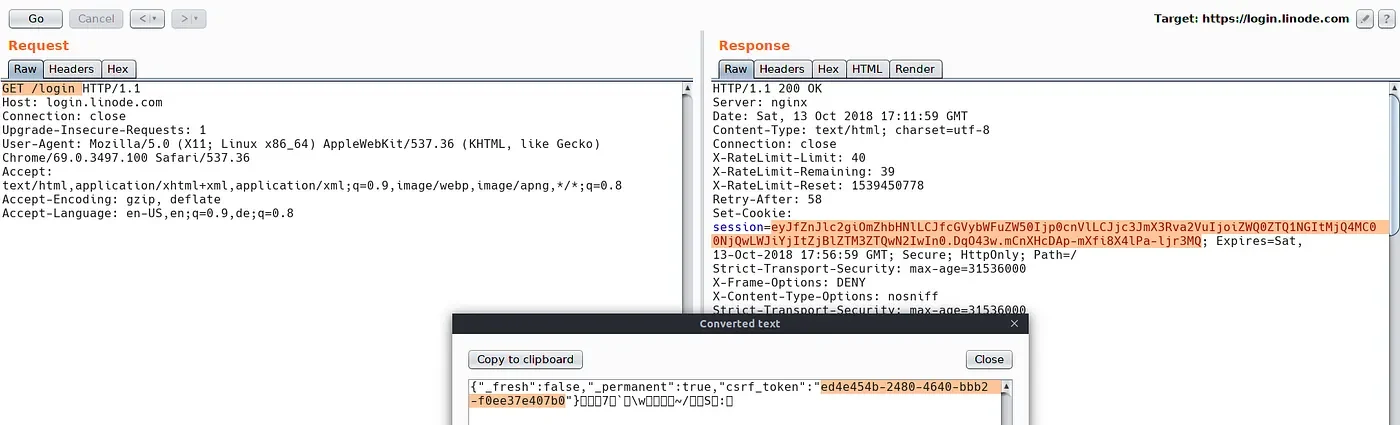
How CSRF is implemented on login.linode.com:
- A JWT is set within the
sessioncookie. This cookie contains a CSRF token. The cookie is not scoped to any domain, so the browser automatically scopes it tologin.linode.com, and the attacker cannot read it. - Once the user logs in, the user session is tied to the new session cookie, but the CSRF token remains unchanged (CSRF fixation).
- The cookie can be set from the attacker's controlled VPS with the HttpOnly flag (a cookie preference). Which cookie gets preference likely depends on the browser and server.
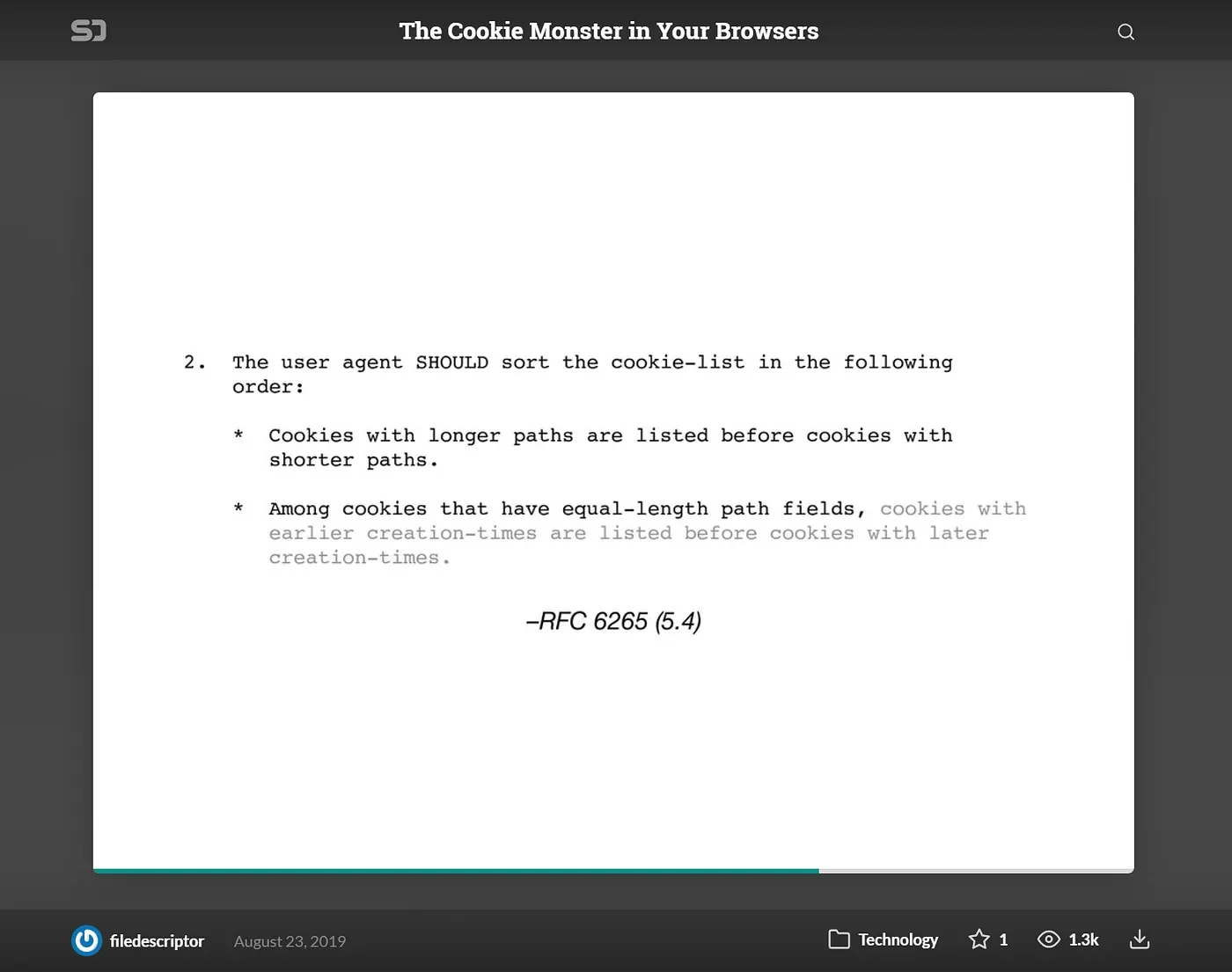
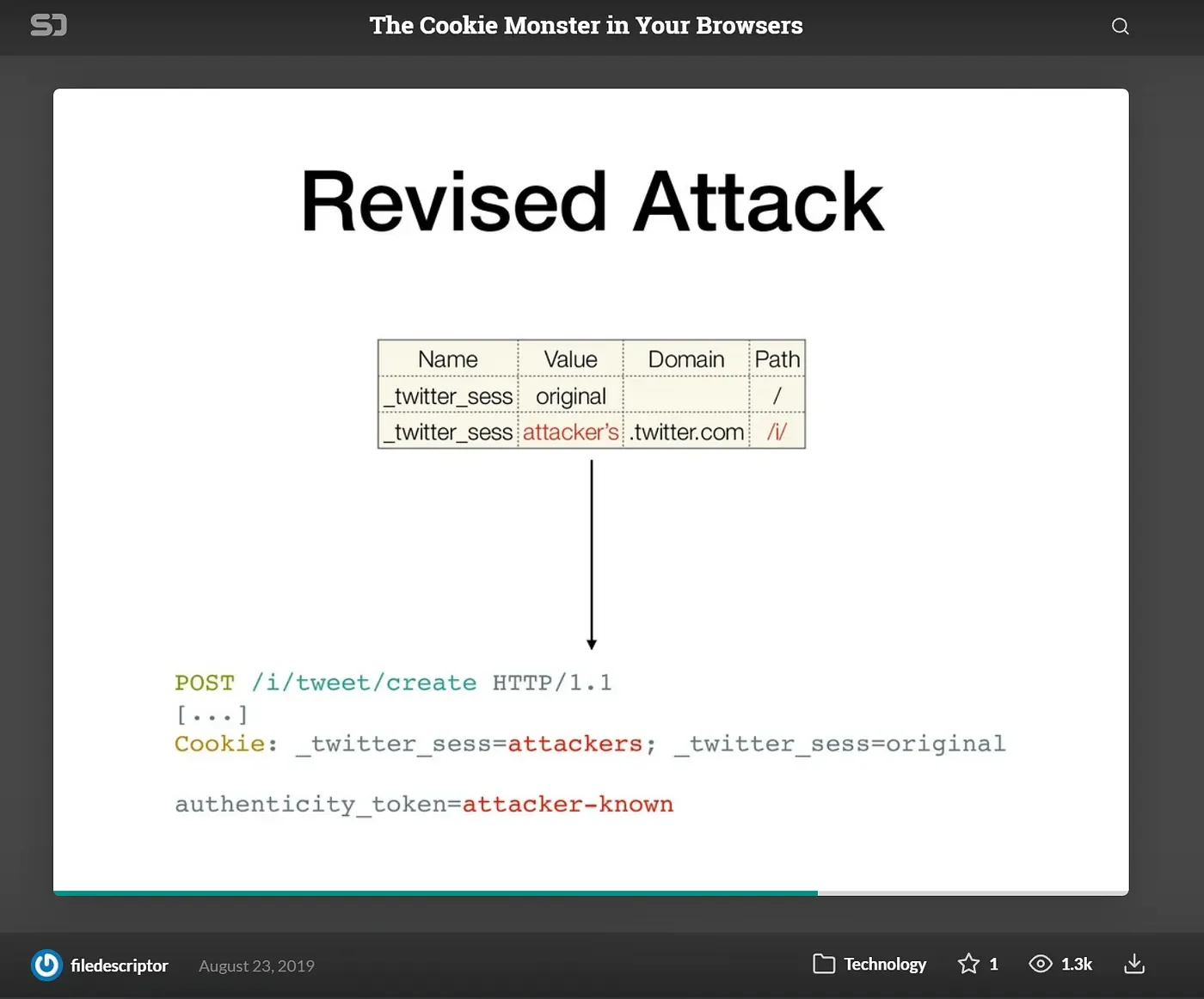
In the researcher's case, the cookie he set was read by the server first, so the user's working session was discarded and the user was asked to log in again. Even if that did not happen, the cookie set by Linode is at Path=/, so adding Path=/login could give the attacker's cookie preference; any path under /login/* would then get the attacker's cookie as preference on the required endpoints. The researcher was not sure about this. The slides from filedescriptor's HITCON 2019 talk explain this kind of attack in detail.
Exploiting the OAuth CSRF
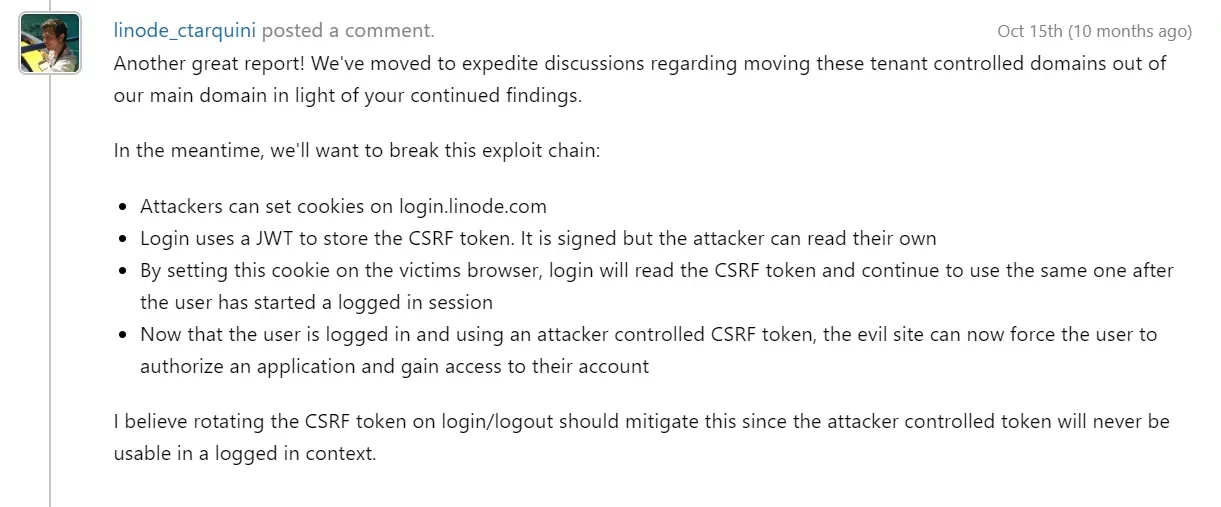
Linode is an OAuth provider and all authorisation is done on login.linode.com, the OAuth issuing server. The idea is to force the user to authorise the attacker's client application with wildcard scope. The exploit does the following:
- Make a request from the server side and get a session JWT.
- Decode it and extract the CSRF token.
- Set the session cookie with the acquired JWT.
- Make a POST request to authorise the attacker's OAuth application with the earlier decoded CSRF token.
Timeline for the second issue
| Date | Event |
|---|---|
| 13th Oct 2018 | Initial discovery and report |
| 15th Oct 2018 | Triaged |
| 18th Oct 2018 | Rewarded as High, $750 because of interaction, plus a $1000 bonus for a creative attack |
| 14th Nov 2018 | Resolved by rotating the CSRF token after login |
Root cause
The first bug comes from cookies scoped to .linode.com being writable by any host under linode.com, including a customer-controlled *.members.linode.com VPS. The second comes from the CSRF token not being rotated at login. In the community flow, the sessionid that binds the OAuth state is set to .linode.com, so an attacker can supply both the sessionid and the matching state and pass the CSRF check, while also rewriting the scopes parameter in the Location header to *. The resulting legitimate session is again set to .linode.com, so the attacker can read it and fetch the access token from the page source.
On login.linode.com, the CSRF token lives in a JWT inside the session cookie, which is host-scoped and therefore not readable by the attacker. The weakness is that the token is not rotated when the user logs in: the session is tied to the new cookie but the CSRF token stays the same, so a token obtained before login remains valid afterwards (CSRF fixation). The attacker can set the session cookie from the controlled VPS, though which cookie gets preference likely depends on the browser and server. In the researcher's case, his cookie was read first, discarding the user's session and forcing a re-login. A Path=/login variant might have given the attacker's cookie preference on the relevant endpoints, though this was not confirmed.
Impact
In the first issue, an attacker who gets a victim to load the exploit page can log the victim in to the community portal with a * scope access token, steal that token, and use it to make API calls, read or write, to any resource. In the second issue, the aim is to force the victim to authorise the attacker's OAuth client application with wildcard scope. The second issue was rated High and rewarded $750 because of interaction, with a $1000 bonus for creativity; the first was rated critical and rewarded $2000.
Fix
The first issue was resolved on Oct 4th, 2018. The second issue was resolved on 14th Nov 2018 by rotating the CSRF token after login.
Variants to test
- Look for OAuth flows where the
statebinding cookie is set to a parent domain that also hosts user-controlled subdomains. A positive result is being able to set both the state cookie and the matchingstatevalue from your own host and complete the flow. - Check whether the
scopesparameter in the authorisation redirect can be modified by the party that initiates the flow. A positive result is a token issued with broader scope than the application requested. - Check whether the access token appears in the source of a page served on a domain whose cookies you can read. A positive result is extracting a usable token from that page.
- Test CSRF tokens that are not rotated on login. A positive result is a token obtained before authentication still being accepted for a state-changing request after the victim logs in.
- Test cookie preference with
Pathvalues such asPath=/loginagainst host-scoped session cookies. A positive result is your cookie being used on the target endpoints instead of the legitimate one. - Review other applications in the same estate for CSRF implementations that look safe only because the cookie is host-scoped; check whether any flow sets that cookie to a wildcard domain.
Reference
What happened, in plain words
Linode is a company that rents out virtual servers (VPS, short for virtual private server). When you buy one, it gets a hostname that looks like <id>.members.linode.com. That hostname sits underneath linode.com, the company's own domain. In practice this means a customer controls a small piece of Linode's own website address space, and can even run server-side code (programs that run on the server, not in your browser) on it.
That position turned out to be enough to break two things. The first bug was about making a victim log in to Linode's community portal with a wildcard scope access token and then stealing that token. The second bug was about forcing a victim to approve the attacker's own application on Linode's login server with wildcard scope. Both were reported privately in 2018 and later disclosed publicly.
To follow along you only need to know what a browser does: it sends requests to websites, stores small pieces of data called cookies, and follows redirects (automatic forwards from one address to another). Everything else is explained as it comes up.
The pieces involved
Linode has four web applications for users:
- https://manager.linode.com, the classic/old Linode Manager
- https://linode.com/community, the community portal
- https://login.linode.com, the OAuth issuing server
- https://cloud.linode.com, the new Linode manager
A few words before we go further.
Cookie. A small label that a website asks your browser to keep and send back on every later request to that site. It is how a site remembers that you are logged in. A cookie can be limited to one exact hostname, or to a whole domain and all its subdomains. The latter is written with a leading dot, like .linode.com.
Token. A string of characters that acts like a key. An access token is a key that lets a program call the site's API (its machine-facing interface, the set of addresses programs use to read and change data) on your behalf. Whoever holds the token can act as you, within the permissions (scopes) the token carries.
OAuth. A standard way for one website to ask another website for permission to act on your behalf, without giving away your password. You are sent to the login server, you approve, and you come back with a code that is exchanged for a token. The state parameter is a random value the first site makes up and checks again when you return, so it can tell that the reply really belongs to the request it started. That check is a defence against CSRF.
CSRF (Cross-Site Request Forgery). An attack where a malicious page makes your browser send a request to another site where you are logged in, so the request carries your session and the site thinks you asked for it. The usual defence is a secret value (a CSRF token) that only the real site's pages know, which the attacker cannot guess.
Scope. The list of permissions a token has. A narrow scope might allow only one action; a wildcard scope, written *, allows everything.
JWT. A JSON Web Token, a signed bundle of data often stored inside a cookie. The server can read it and trust it because it is signed.
Subdomain takeover-style abuse. Here it is not a takeover: the customer legitimately owns the subdomain. The point is that anything the customer's server does is treated by browsers as coming from linode.com's family of sites, so cookies set for .linode.com are within reach.
Setup
Because the researcher controls a *.members.linode.com host, he can read any cookie set to .linode.com, that is, any cookie set to the wildcard domain. The attack pages are hosted on that controlled VPS and written in PHP (a programming language commonly used for web pages that run on the server).
In plain terms: the attacker's page lives on a hostname that browsers consider part of linode.com. So when the attacker's page asks the browser for cookies belonging to .linode.com, the browser hands them over. That is the whole trick behind the first bug.
Finding it
The first thing checked was https://manager.linode.com for a session or CSRF cookie. All cookies there were set properly to only manager.linode.com, so the wildcard read gave nothing. Attention moved to https://linode.com/community, which does a lot of OAuth things via login.linode.com.
Why this order? If the old manager had stored its login cookie on .linode.com, the attacker could have read it and been done. It did not, so the researcher looked for an application that did store something broad, and found the community portal, which leans on the central login server.
How the community login works
On clicking Login, a GET request is made to https://www.linode.com/community/questions/login?next=/community/. The response is:
HTTP/1.1 302 FoundServer: nginxDate: Sat, 29 Sep 2018 23:36:51 GMTContent-Type: text/html; charset=utf-8Content-Length: 0Connection: closeVary: CookieLocation: https://login.linode.com/oauth/authorize?scopes=events%3Amodify&state=bce45f7c-6a37-46c7-9ede-c9979c152081&client_id=a38f156de7fa9819c110&redirect_uri=https%3A%2F%2Fwww.linode.com%2Fcommunity%2F&response_type=codeSet-Cookie: sessionid=[redacted]; Domain=.linode.com; expires=Sat, 13-Oct-2018 23:36:51 GMT; HttpOnly; Max-Age=1209600; Path=/; Secure.....
Line by line, in plain words:
HTTP/1.1 302 Foundis the server's answer. A 302 means "look somewhere else", a redirect.Server: nginxsays which web server software answered.Date: Sat, 29 Sep 2018 23:36:51 GMTis when the answer was produced.Content-Type: text/html; charset=utf-8andContent-Length: 0describe the body, which here is empty.Connection: closetells the browser the connection will be closed after this answer.Vary: Cookietells caches that the answer depends on which cookies were sent.Location: https://login.linode.com/oauth/authorize?...is the address the browser is being sent to. Inside it,scopes=events%3Amodifyis the permission being requested (%3Ais just a colon, so it readsevents:modify),state=bce45f7c-6a37-46c7-9ede-c9979c152081is the random value used to check the reply later,client_id=a38f156de7fa9819c110identifies which application is asking,redirect_uri=https%3A%2F%2Fwww.linode.com%2Fcommunity%2Fis where to send the user back (the%3Aand%2Fare encoded:and/), andresponse_type=codesays the OAuth flow will return a code.Set-Cookie: sessionid=[redacted]; Domain=.linode.com; ...is the important one. It plants a cookie namedsessionidwith that value, andDomain=.linode.commeans it applies to the whole domain and every subdomain.HttpOnlymeans page scripts cannot read it,Securemeans it is only sent over HTTPS,Path=/means it applies to every path, andMax-Age=1209600is how long it lives in seconds.
The response does three things:
- It sets the cookie
sessionid=[redacted], which is linked to the state tokenstate=bce45f7c-6a37-46c7-9ede-c9979c152081. The cookie is set to.linode.com. - It redirects to the OAuth page
https://login.linode.com/oauth/authorize?scopes=events%3Amodify&state=bce45f7c-6a37-46c7-9ede-c9979c152081&client_id=a38f156de7fa9819c110&redirect_uri=https%3A%2F%2Fwww.linode.com%2Fcommunity%2F&response_type=code. - If the user is logged in on
https://login.linode.com/, the user is redirected tohttps://www.linode.com/community/?state=bce45f7c-6a37-46c7-9ede-c9979c152081&code=6f422a104f5bf039f9dc.
The state parameter is cross-checked against the earlier set sessionid. If verification succeeds, the response is:
HTTP/1.1 302 FoundServer: nginxDate: Sat, 29 Sep 2018 23:04:02 GMTContent-Type: text/html; charset=utf-8Content-Length: 0Connection: closeVary: CookieLocation: /community/Set-Cookie: sessionid=[redacted]; Domain=.linode.com; expires=Sat, 13-Oct-2018 23:04:02 GMT; HttpOnly; Max-Age=1209600; Path=/; Secure....
Again line by line:
302 Foundis another redirect.Location: /community/sends the browser back to the community portal's home page.Set-Cookie: sessionid=[redacted]; Domain=.linode.com; ...replaces the earliersessionidwith a new value, again on.linode.com, againHttpOnly,Secure,Path=/.
Here sessionid is reset, again to .linode.com, and this is the actual session for the community portal. The user is now logged in to the community portal.
Why does this matter? The value that proves the OAuth reply is genuine (the state) is tied to a cookie that lives on the whole domain. Anyone who can write that cookie can also write the matching state. That is the crack the first exploit goes through.
Exploitation
The goal is to obtain a wildcard (*) scope access token from the community portal. To make the user log in to the community portal with a * scope access token, the CSRF mechanism has to be bypassed. The login mechanism looks for sessionid and cross-verifies it against the given state token. Since the attacker can also set .linode.com cookies, that check can be satisfied with attacker-chosen values.
Think of it like a cloakroom that gives you a ticket and later checks the ticket against a list. If you can write to the list as well as hold a ticket, the check proves nothing.
The exploit page iframes setcookie.php and then, after 6 seconds, iframes stc.php (stealcookie.php). An iframe is a page embedded inside another page; the delay gives the first step time to finish before the second starts.
Step 1: set the cookies and start the login flow with * scope
setcookie.php does the following:
- Makes a request from the server side to the login endpoint to get valid cookies.
- Extracts all headers from the response.
- Modifies the
Locationheader. The location header containsscopes=events%3amodify; this is simply changed toscopes=*. - Extracts the
Set-Cookieheader, which contains thesessionidlinked to the state token in theLocationheader. - Sets the extracted session into the user's session and continues with the redirection to the location header, but with the modified scope parameter.
Why each step:
- The attacker's server asks Linode for a fresh login start, so it gets a real, valid pair of cookie and state. It does this from the server, not the browser, so it can read and edit the raw answer.
- Reading the headers is how the attacker gets at the two values that must match: the cookie and the state.
- The scope is the permission list. Linode's own page asked for
events:modify; the attacker swaps it for*, meaning everything. This is the escalation. - The
sessionidand thestatein theLocationheader belong together. Keeping both means the later check will pass. - The victim's browser is then sent along that edited redirect, carrying the attacker's cookie and state. The check passes, and the victim ends up logged in to the community portal with a
*scope token.
Because sessionid and state now verify successfully, the user is logged into the community portal with a * scope access token.
Step 2: steal the session and extract the token
Linode sets the legitimate session to .linode.com using sessionid. Because it is set to .linode.com, the attacker's page can fetch the legitimate session and log in with it. The access token is in the source of the page, so it can be extracted from there. stc.php (stealcookies.php) automates this: it takes sessionid from the user session, makes a curl request from the server side, and uses a regex to get the access token. That token can then be used to make an API call, read or write, to any resource.
In plain words: the browser now holds a real Linode session cookie on .linode.com. The attacker's page, being on a .linode.com subdomain, can read it. It sends that cookie to Linode from its own server (curl is a command-line tool for making web requests), receives the page that the logged-in user would see, and picks the token out of the page's text with a regex (a pattern-matching expression). With that token, the attacker can call Linode's API as the victim, reading or changing anything the token allows.
Timeline for the first issue
| Date | Event |
|---|---|
| Sep 30th, 2018 | Initial discovery and report |
| Oct 1st, 2018 | Triaged |
| Oct 3rd, 2018 | Rewarded as critical, $2000 |
| Oct 4th, 2018 | Resolved |
"Triaged" means the company's security team looked at the report, confirmed it was real, and started handling it.
Can it be exploited somewhere else?
CSRF was then reviewed across the applications. All applications' CSRF looked safe from this attack except https://login.linode.com.
How CSRF is implemented on login.linode.com:
- A JWT is set within the
sessioncookie. This cookie contains a CSRF token. The cookie is not scoped to any domain, so the browser automatically scopes it tologin.linode.com, and the attacker cannot read it. - Once the user logs in, the user session is tied to the new session cookie, but the CSRF token remains unchanged (CSRF fixation).
- The cookie can be set from the attacker's controlled VPS with the HttpOnly flag (a cookie preference). Which cookie gets preference likely depends on the browser and server.
Why this is different: here the cookie is tied to one exact hostname, so the attacker's subdomain cannot read it. That closes the first trick. But the CSRF token inside it never changes when the user logs in. If the attacker can plant a cookie of their own with a known token, and the server later accepts that token, the attacker knows the secret in advance. That is what "fixation" means: the value is fixed by the attacker rather than freshly generated by the server.
In the researcher's case, the cookie he set was read by the server first, so the user's working session was discarded and the user was asked to log in again. Even if that did not happen, the cookie set by Linode is at Path=/, so adding Path=/login could give the attacker's cookie preference; any path under /login/* would then get the attacker's cookie as preference on the required endpoints. The researcher was not sure about this. The slides from filedescriptor's HITCON 2019 talk explain this kind of attack in detail.
Path is the part of the address a cookie applies to. When two cookies have the same name, browsers and servers have rules about which one wins; a more specific path can win over a broader one. That is the idea being explored here, and the researcher says plainly that he was not certain it would work.
Exploiting the OAuth CSRF
Linode is an OAuth provider and all authorisation is done on login.linode.com, the OAuth issuing server. The idea is to force the user to authorise the attacker's client application with wildcard scope. The exploit does the following:
- Make a request from the server side and get a session JWT.
- Decode it and extract the CSRF token.
- Set the session cookie with the acquired JWT.
- Make a POST request to authorise the attacker's OAuth application with the earlier decoded CSRF token.
Why each step:
- The attacker's server starts a session with the login server and receives a JWT, a signed bundle of data inside a cookie.
- The CSRF token is inside that JWT. Decoding it (reading the data out of the token) gives the attacker the secret value the server will expect.
- The attacker puts that JWT into the victim's browser as the
sessioncookie, so the victim's browser and the attacker's server share the same session. - A POST request is the kind a browser sends when submitting a form, and it is what changes state on the server. Sending it with the known CSRF token makes the server accept it, and the victim's account approves the attacker's application with wildcard scope.
Timeline for the second issue
| Date | Event |
|---|---|
| 13th Oct 2018 | Initial discovery and report |
| 15th Oct 2018 | Triaged |
| 18th Oct 2018 | Rewarded as High, $750 because of interaction, plus a $1000 bonus for a creative attack |
| 14th Nov 2018 | Resolved by rotating the CSRF token after login |
"Interaction" means the attack needed the victim to do something, such as visit a page or log in, rather than working with no involvement from the victim at all.
Root cause
The first bug comes from cookies scoped to .linode.com being writable by any host under linode.com, including a customer-controlled *.members.linode.com VPS. The second comes from the CSRF token not being rotated at login. In the community flow, the sessionid that binds the OAuth state is set to .linode.com, so an attacker can supply both the sessionid and the matching state and pass the CSRF check, while also rewriting the scopes parameter in the Location header to *. The resulting legitimate session is again set to .linode.com, so the attacker can read it and fetch the access token from the page source.
On login.linode.com, the CSRF token lives in a JWT inside the session cookie, which is host-scoped and therefore not readable by the attacker. The weakness is that the token is not rotated when the user logs in: the session is tied to the new cookie but the CSRF token stays the same, so a token obtained before login remains valid afterwards (CSRF fixation). The attacker can set the session cookie from the controlled VPS, though which cookie gets preference likely depends on the browser and server. In the researcher's case, his cookie was read first, discarding the user's session and forcing a re-login. A Path=/login variant might have given the attacker's cookie preference on the relevant endpoints, though this was not confirmed.
Impact
In the first issue, the aim is to log the victim in to the community portal with a * scope access token, steal that token, and use it to make API calls, read or write, to any resource. In the second issue, the aim is to force the victim to authorise the attacker's OAuth client application with wildcard scope. The second issue was rated High and rewarded $750 because of interaction, with a $1000 bonus for creativity; the first was rated critical and rewarded $2000.
Fix
The first issue was resolved on Oct 4th, 2018. The second issue was resolved on 14th Nov 2018 by rotating the CSRF token after login.
"Rotating" means replacing the token with a fresh one at that moment, so any value the attacker knew beforehand becomes useless.
Variants to test
- Look for OAuth flows where the
statebinding cookie is set to a parent domain that also hosts user-controlled subdomains. A positive result is being able to set both the state cookie and the matchingstatevalue from your own host and complete the flow. - Check whether the
scopesparameter in the authorisation redirect can be modified by the party that initiates the flow. A positive result is a token issued with broader scope than the application requested. - Check whether the access token appears in the source of a page served on a domain whose cookies you can read. A positive result is extracting a usable token from that page.
- Test CSRF tokens that are not rotated on login. A positive result is a token obtained before authentication still being accepted for a state-changing request after the victim logs in.
- Test cookie preference with
Pathvalues such asPath=/loginagainst host-scoped session cookies. A positive result is your cookie being used on the target endpoints instead of the legitimate one. - Review other applications in the same estate for CSRF implementations that look safe only because the cookie is host-scoped; check whether any flow sets that cookie to a wildcard domain.
Reference
- https://speakerdeck.com/filedescriptor/the-cookie-monster-in-your-browsers
- https://github.blog/2013-04-09-yummy-cookies-across-domains/
Glossary
- API: the set of addresses and rules a program uses to talk to a service, as opposed to the pages a person clicks through in a browser.
- Access token: a string that acts as a key, letting whoever holds it act on a user's behalf within the token's permissions.
- Client application: in OAuth, the application that asks the login server for permission to act for the user.
- Cookie: a small piece of data a site asks the browser to store and send back on later requests, used to remember who you are.
- Cookie preference: the rules a browser and server use to decide which of two cookies with the same name is used.
- CSRF (Cross-Site Request Forgery): tricking a logged-in user's browser into sending a request the user did not intend.
- CSRF token: a secret value a site includes in forms and checks on submission, so requests from other sites are rejected.
- CSRF fixation: a weakness where the CSRF token is not replaced at login, so a value known before login stays valid after it.
- curl: a command-line tool for making web requests.
- Domain: the part of an address after the name, such as
linode.com; a leading dot means the whole domain and its subdomains. - Header: a line of extra information sent with a web request or response, such as
LocationorSet-Cookie. - Hostname: one exact name, such as
login.linode.com. - HttpOnly: a cookie setting that stops page scripts from reading the cookie.
- iframe: a page embedded inside another page.
- JWT (JSON Web Token): a signed bundle of data, often stored in a cookie, that the server can read and trust.
- Location header: the response header that tells the browser where to go next in a redirect.
- OAuth: a standard for letting one site act for you on another site with your approval, without sharing your password.
- Path: the part of a web address after the hostname, and the part of an address a cookie is limited to.
- PHP: a programming language commonly used for web pages that run on the server.
- POST request: a request that submits data and typically changes something on the server.
- Regex: a pattern used to find text inside a larger piece of text.
- Scope: the list of permissions a token carries;
*means all of them. - Server-side: running on the server rather than in the visitor's browser.
- Session: the server's record of a logged-in user, referenced by a cookie.
- State parameter: a random value an OAuth flow sends out and checks on return, to confirm the reply belongs to the request it started.
- Subdomain: a name underneath a domain, such as
members.linode.comunderlinode.com. - Triaged: reviewed and confirmed by the company's security team.
- VPS (virtual private server): a rented virtual machine that a customer controls.
- Wildcard scope: a permission value of
*that allows every action. - 302: an HTTP status meaning the browser should go to another address.