Reset password link sent over unsecured http protocol
The password reset link emailed to users was generated with an unsecured http scheme rather than https. An attacker positioned on the network could sniff the link and use it to reset the victim's password if the victim did not complete the reset.
 Originally disclosed on HackerOne
- Triaged in 13 days
- Fixed in 2 months
- Paid in 17 days
- Disclosed after 2 months
Summary:
After creating the workspace, if victim clicks on forgot password then reset password link has been generated and sent over mail and that password link is unsecured http protocol.
Steps To Reproduce:
- Signup to a workspace
- Navigate to https://h1-*your-own-instance*.cloud.mattermost.com/reset_password and enter signup email
- Check email, you will get reset passwork link.
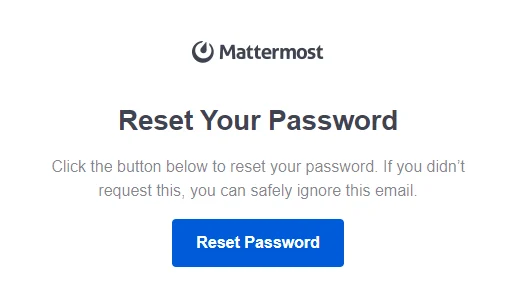
chrome_iQDUTN9H1J.png From the original on HackerOne - Copy that link paste in notepad and observe the protocol.

sublime_text_opnUofVDz2.png From the original on HackerOne
Mitigation:
Generate reset password link with secured https protocol.
Impact
If the victim opens the reset password link and forgot to update the password, anyone from intermediate computers through network or sniffer can reset the password.
What the report shows
The target is a Mattermost cloud workspace, reached at https://h1-*your-own-instance*.cloud.mattermost.com. The feature under test is the account recovery flow: the reset password page and the email it triggers. The researcher reports that the reset link generated by that flow is delivered over plain HTTP rather than HTTPS.
The reproduction is short and direct:
- Sign up to a workspace.
- Navigate to
https://h1-*your-own-instance*.cloud.mattermost.com/reset_passwordand enter the signup email address. - Check the email; a reset password link arrives.
- Copy that link, paste it into Notepad and observe the protocol.
The first screenshot shows the reset password email as received, the message that carries the link the researcher is about to inspect.
The second screenshot shows the copied link pasted into a plain text editor, where the scheme at the start of the URL is visible. That observation, the scheme being http rather than https, is the whole finding.
The report's own mitigation is to generate the reset password link with the secured HTTPS protocol.
Root cause
The report does not identify why the link is built with an http scheme. Whatever component composes the email, whether the application itself or a mail template, takes a host value and prefixes it with a scheme that is not TLS.
Impact
The report's impact statement is conditional and worth keeping that way. If the victim opens the reset password link and does not complete the password change, anyone positioned on the network path, an intermediate computer or a sniffer, can reset the password. In other words, the exposure comes from the link travelling in cleartext: an observer who captures the URL captures the reset token, and the token is what authorises the reset. The report does not demonstrate a capture; it identifies the insecure transport that would make one possible.
How this kind of bug works
Password reset is a bearer-token flow. The server generates a high-entropy token, stores it against the account, and emails a URL containing it. Whoever presents that URL can set a new password. The security of the flow therefore depends on the token reaching only the legitimate mailbox owner.
When the link uses http, every hop between the mail client and the server can read the full URL: the local network, any proxy, and any device that logs plaintext traffic. Because the token sits in the path or query string, it is also recorded in server access logs, proxy logs and browser history in cleartext. An attacker who sees the URL once can use it before the victim does, or after the victim abandons the flow, which is exactly the window the report describes.
Two related mistakes often accompany this one: tokens that never expire or are not invalidated after use, and tokens with too little entropy. Neither is claimed here, but both make a leaked link more dangerous.
How to test for it
- Identify every flow that emails a link containing a secret: password reset, email verification, invitation acceptance, magic-link login, account deletion confirmation.
- Trigger the flow against a test account you control, using an address you can read.
- Inspect the raw message source, not the rendered email. Mail clients rewrite and hide URLs, so look at the
text/plainandtext/htmlparts and at any redirect wrappers. - Record the scheme of every link. A positive result is a link whose scheme is
httpwhile carrying a live token, or a link that starts withhttpsbut redirects through a plaintext hop before reaching the token-bearing URL. - Check the same flow from different entry points: the web app, a mobile client, an API call, and any regional or branded domain. Link generation often reads a per-request host header or a per-tenant setting, so one entry point can produce
httpsand anotherhttp. - Confirm the token is actually usable over plain HTTP: follow the link and see whether the reset form loads and accepts a new password. A link that is downgraded but rejected by the server is a much weaker finding.
Common false positives: a link that is http but immediately 301s to https before any token is transmitted in the clear; a link to a marketing or help page that carries no secret; a token that has already expired or been consumed by your own test; and a scheme that only appears wrong because the mail client rewrote the URL for display. Also separate this from HSTS behaviour: if the host is HSTS-preloaded, a browser will upgrade the request, but the link is still sent in cleartext inside the email and can be read before the browser is involved.
How it is fixed
Generate every secret-bearing link with an explicit https scheme, taken from a trusted server-side configuration rather than from the incoming request's host or scheme headers. Enforce HTTPS at the edge with a redirect and HSTS so that any stray http URL cannot be followed in cleartext. Reduce the value of a leaked link by making reset tokens single-use, short-lived, and bound to the account, and invalidate them when a new one is issued or the password changes. Logging should avoid recording full token-bearing URLs.
Hunting notes
This bug class hides in the plumbing rather than in the application logic: mail templates, notification services, tenant settings, and code that builds absolute URLs from request data. Recon signals worth watching are password reset and verification endpoints, any per-tenant or white-label domain configuration, and applications that support both a canonical domain and aliases. Reading the raw email source is the single highest-value step, because rendered views hide the scheme.
State the exposure window plainly, as this report does, rather than claiming a capture you did not perform.
What happened, in plain words
Mattermost is a chat and collaboration tool that teams can run as a cloud workspace. Each workspace has its own web address, and in this report the address was https://h1-*your-own-instance*.cloud.mattermost.com. The feature involved is the "forgot password" flow: the page a user visits when they cannot log in, where they type their email address and ask the service to send them a way back into their account.
When you ask to reset a password, the service does not email you the password itself. It emails you a link containing a long random string called a token. Clicking that link proves you can read the mailbox, and the service then lets you choose a new password. The token is effectively a temporary key: whoever holds the link can use it. That is why the way the link travels matters.
In this report, the researcher found that the reset link was built with http at the start instead of https. The difference is not cosmetic. https encrypts the traffic between your browser and the server, so nobody in between can read it. http sends everything as plain text, so anyone who can watch the network can read it too, including the full link and therefore the token inside it.
The steps, and why each one matters
The reproduction is short:
- Sign up to a workspace. Sign up to a workspace.
- Navigate to
https://h1-*your-own-instance*.cloud.mattermost.com/reset_passwordand enter the signup email address. This is the normal, legitimate way to start the flow; nothing unusual is being done to the application. - Check the email; a reset password link arrives. The email is the artefact under examination, because it is where the link is delivered.
- Copy that link, paste it into Notepad and observe the protocol. A plain text editor shows the raw characters of the link, without a browser hiding or rewriting anything.
The first screenshot shows the reset password email as it arrived, the message carrying the link the researcher is about to inspect.
The second screenshot shows the copied link pasted into a text editor, where the beginning of the address is visible. That beginning, the scheme, reads http rather than https. That single observation is the whole finding.
The report's suggested fix is equally short: generate the reset password link with the secured HTTPS protocol.
What the impact means
The report's impact statement is careful and conditional. If the victim opens the reset password link and forgets to update the password, anyone on the network path, an intermediate computer or a sniffer, can reset the password. A sniffer is simply a program or device that records traffic passing through a network. Because the link is sent in cleartext, such an observer who captures the address also captures the token, and the token is what authorises the reset.
The report does not show a capture happening. It identifies the insecure transport that would make a capture possible. That distinction is worth keeping: the weakness is real, but the demonstrated evidence is the scheme of the link, not a stolen account.
In general, how this kind of bug works
Password reset is what security people call a bearer-token flow. The server creates a long random value, stores it against your account, and emails a link containing it. Whoever presents that link can set a new password. Think of it like a cloakroom ticket: the person holding the ticket gets the coat, regardless of who they are. The whole security of the flow therefore rests on the ticket reaching only the right person.
When the link uses http, every hop between the mail and the server can read the full address: the local network, any proxy, and any device that logs plaintext traffic. Because the token sits inside the address, it can also end up in server logs, proxy logs and browser history in readable form. An attacker who sees the address once can use it before the victim does, or after the victim abandons the flow. That is exactly the window the report describes.
Two related mistakes often make a leaked link worse: tokens that never expire or are not invalidated after use, and tokens that are too short to guess. Neither is claimed in this report.
In general, how to test for it
- List every flow that emails a link containing a secret: password reset, email verification, invitation acceptance, magic-link login, account deletion confirmation.
- Trigger the flow against a test account you control, using a mailbox you can read.
- Inspect the raw message source, not the rendered email. Mail clients rewrite and hide addresses, so look at the plain text and HTML parts of the message.
- Record the scheme of every link. A positive result is a link whose scheme is
httpwhile carrying a live token, or a link that starts withhttpsbut passes through a plaintext hop before reaching the token-bearing address. - Check the same flow from different entry points: the web app, a mobile client, an API call, and any regional or branded domain. Link generation often reads a per-request host value or a per-tenant setting, so one entry point can produce
httpsand anotherhttp. - Confirm the token is actually usable over plain HTTP: follow the link and see whether the reset form loads and accepts a new password. A link that is downgraded but rejected by the server is a much weaker finding.
Common false positives: a link that is http but immediately redirects to https before any token is sent in the clear; a link to a marketing or help page that carries no secret; a token that has already expired or been consumed by your own test; and a scheme that only looks wrong because the mail client rewrote the address for display. Also separate this from HSTS, a browser mechanism that forces https for a known site: even with HSTS, the link is still sent in cleartext inside the email and can be read before the browser is involved.
In general, how it is fixed
Generate every secret-bearing link with an explicit https scheme, taken from trusted server-side configuration rather than from the incoming request's host or scheme headers. Enforce HTTPS at the edge with a redirect and HSTS so that any stray http address cannot be followed in cleartext. Reduce the value of a leaked link by making reset tokens single-use, short-lived, and bound to the account, and invalidate them when a new one is issued or the password changes. Logging should avoid recording full token-bearing addresses.
In general, where this bug hides
This class of bug lives in the plumbing rather than in the application logic: mail templates, notification services, tenant settings, and code that builds absolute addresses from request data. Signals worth watching are password reset and verification endpoints, any per-tenant or white-label domain configuration, and applications that support both a main domain and aliases. Reading the raw email source is the single highest-value step, because rendered views hide the scheme.
State the exposure window plainly, as this report does, rather than claiming a capture you did not perform.
Glossary
- Workspace: a separate instance of a collaboration product, here a Mattermost cloud instance with its own web address.
- Password reset flow: the sequence where a user asks for a new password and receives a link by email to set one.
- Token: a long random string that acts as a temporary key, here embedded in the reset link.
- Bearer token: a token where possession alone grants access, like a cloakroom ticket.
- Protocol / scheme: the first part of a web address, such as
httporhttps, that tells the browser how to communicate. - HTTP: the plain, unencrypted protocol for web traffic; anyone on the path can read it.
- HTTPS: HTTP wrapped in encryption (TLS), so traffic cannot be read by observers in between.
- TLS: the encryption layer that secures HTTPS connections.
- Cleartext: data sent without encryption, readable by anyone who can observe it.
- Sniffer: a program or device that records network traffic passing through a network.
- Proxy: an intermediary computer that forwards traffic between a client and a server.
- CVSS: a standard scoring system for the severity of a security issue; 7.3 is in the high range.
- Improper access control: a weakness class where something that should be restricted can be reached or used by the wrong party.
- HSTS: a browser mechanism that forces HTTPS for a site that has declared it, upgrading stray
httprequests. - False positive: a finding that looks like a vulnerability but is not, or is not exploitable as described.
- Entropy: the amount of randomness in a value; higher entropy makes a token harder to guess.
- Single-use token: a token that stops working after it has been used once.
- Host header: a field in a web request that names the site being requested, sometimes used to build links.
- Tenant: a separate customer or organisation sharing a platform, often with its own settings and domains.



