Participation of expired account holders in Projects can occure financial loss to Mavenlink
An expired trial account holder could still post comments to a project by replying to notification emails, even though the web application blocked all access until a paid plan was chosen. This let the user participate in project conversations without paying, contrary to the business policy.
 Originally disclosed on HackerOne
- Triaged in 28 days
- Fixed in 41 days
- Paid in 41 days
- Disclosed after 13 months
I think I have found a security issue .
Summery:
Inviting a person to Project who has an expired account can participate in project activity via email address , Which is against Mavenlink's business policy , As after an account has been expired after trial period they need to buy a plan to access all the features .
Issue Background:
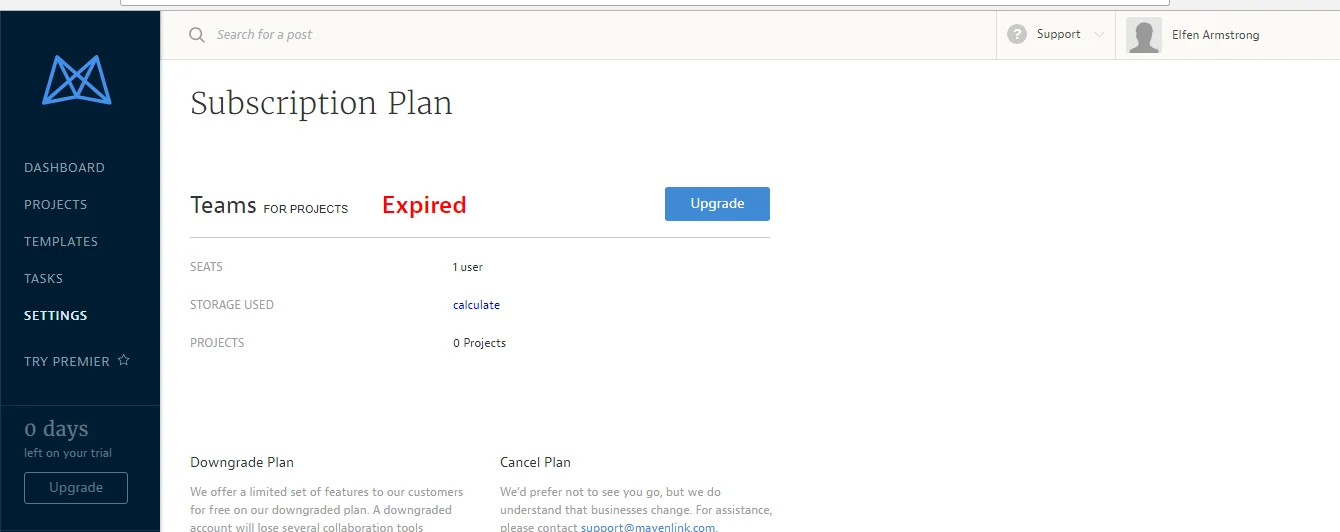
As we know on signing up , Mavenlink Offers a Trial account of a limited period , where users can check out all the features and gets a basic understanding how Mavenlink works . However after the trial period is over for a free account , Upon logging in to the actors account he gets a message like this and it's not possible to access anything at all as this comes every time .
F213824
So , If user does not chooses a plan he actually can not access this account now , Trying to navigate to any section brings to
https://app.mavenlink.com/settings/account/subscription?showPlansPricing=true
Where Mavenlink prompts user to select a plan to continue using the features of the application . However If someone creates a project and invites the expired account holder , he receives and email that he has been invited to the project . when he tries to open it he can not access this as I have mentioned the application lands to the same page and prompts to buy a plan . however if the expired account owner replies the email , a comment is placed at the project . particularly when any post is made on the project timeline that expired account holder receives an email , and replying that email he can participate in the conversation without any problem . wheres if the expired account holder tries to access the project with direct link he can not and land on the same page again where he needs to choose a plan to move forward with Mavenlink .
So , an actor can post comment/ participate in conversations via email when he actually does not have access to that due to Mavenlink's business policy via the application . Which seems the actor is getting more access / privilege more than he should get , and that is why I belief this is a security issue .
Proof Of Concept:
- Create a project with your Mavenlink Account .
- Invite the person whose account status is expired .
- Add him as a consultant
- He will receive an email which is associated to his Mavenlink account .
- He will try to navigate for the link received via email to see the project .
- The attempt would be unsuccessful due to Mavenlink's policy .
- As the application will not let the actor to access before he selects a paid plan .
- Now create a post from your account
- An email will go to that expired users address .
- he replies the email
- and comment gets posted on behalf of him .
- But he actually cannot get access .
How can it affect Mavenlink :
The user is getting the privilege to participate in a project what he could have after selecting a paid plan , he can make comments by simply replying the email he received , unethical actors may take advantage of this current behavior which will eventually affect Mavenlink financially . As the user can perform this action without selecting a paid plan .
I am attaching a video demonstration . Hope you will investigate this and get back with an update ,
Sincerely , Rashed
Attachments
Context
Mavenlink is a project management and collaboration platform. New users get a trial account for a limited period, during which they can explore the features. Once the trial expires, the account holder is expected to buy a plan before continuing to use the application. The report looks at what happens when an expired account holder is invited to a project: the invitation and the project's email notifications still reach them, and replying to those emails places content into the project even though the web application refuses them access.
The researcher frames this as a business-policy bypass: the expired user gains a form of participation that should only be available after choosing a paid plan.: the expired user gains a form of participation that should only be available after choosing a paid plan.
Setup
- A Mavenlink account in good standing, used to create a project and send invitations.
- A second Mavenlink account whose trial period has expired. The report refers to this person as the actor.
- The expired account is invited to the project and added as a consultant.
- The expired user's email address, the one associated with their Mavenlink account, is the channel used throughout.
No specific browser, tooling or version information is given in the report.
Finding it
The researcher started from the trial-expiry behaviour. After the trial ends, logging in to the expired account shows a message and the user cannot access anything at all, because the message appears every time. The report includes a screenshot of that state, labelled F213824.
If the user does not choose a plan, the account is effectively locked. Navigating to any section redirects to:
https://app.mavenlink.com/settings/account/subscription?showPlansPricing=true
At that page Mavenlink prompts the user to select a plan before continuing to use the application's features.
The observation that made this look wrong was the contrast between two paths into the same project. When the expired account holder follows the invitation link from the email, the application lands on the subscription page and asks for a plan, so the project cannot be opened in the browser. But when a post is made on the project timeline, the expired account holder receives an email about it, and replying to that email places a comment on the project. The reply is accepted and attributed to the expired user, even though the same user cannot reach the project through the application.
In the researcher's words, the actor can post comments and participate in conversations via email when the business policy says they should not have that access, which means the actor is getting more access or privilege than they should.
Exploitation
Step 1: Create a project
Create a project with a Mavenlink account in good standing.
Step 2: Invite the expired account holder
Invite the person whose account status is expired, and add them as a consultant on the project.
Step 3: The invitation email arrives
The expired user receives an email associated with their Mavenlink account, telling them they have been invited to the project.
Step 4: The link does not work
The expired user follows the link in the email to view the project. The attempt is unsuccessful: the application lands on the subscription page and will not let the actor in before a paid plan is selected.
Step 5: A post is made on the project
From the account in good standing, create a post on the project. An email notification goes to the expired user's address.
Step 6: Replying to the email posts a comment
The expired user replies to that email. The reply is processed and the comment is posted on the project on behalf of the expired user, even though that user still cannot access the project through the application.
The report includes a video demonstration of the flow.
Root cause
The report does not describe the implementation. What it shows is that replying to a project notification email places a comment even though the web application blocks the expired account. The web front end gates every section behind the subscription page once the trial has expired,
Impact
An expired account holder can comment on and take part in project conversations by replying to notification emails, which the business policy says should require a paid plan. The researcher notes that unethical actors could take advantage of this behaviour and that it could eventually affect Mavenlink financially, since the action is performed without selecting a paid plan. The impact is limited to what the email channel accepts: the actor still cannot open the project in the application.
Fix
The report does not state what was changed.
Variants to test
- Invite an expired account to other object types that send email notifications, such as tasks or discussions, and reply to the notification. A positive result is content appearing on the object while the web application still blocks the account.
- Reply from an address that is not the one associated with the Mavenlink account. A positive result is the comment being accepted and attributed to the account anyway.
- Reply after the account has been removed from the project. A positive result is the comment still landing on the project.
- Reply to a notification for a project the account was never invited to, if such an email can be obtained. A positive result is a comment appearing on a project the account has no membership in.
- Check whether other account states, such as suspended or deactivated accounts, are treated the same way on the email path. A positive result is participation continuing after the state change.
What happened, in plain words
Mavenlink is a website where teams manage projects together. When you sign up, you get a free trial for a limited time. During the trial you can use all the features. When the trial ends, Mavenlink expects you to buy a paid plan. If you do not buy one, the website locks you out: every page you try to open sends you to a page asking you to pick a plan.
The researcher found that this lock has a gap. If an expired account holder is invited to someone else's project, they still receive the project's emails. And if they simply reply to one of those emails, their reply appears as a comment on the project. So they take part in the project through email, even though the website itself refuses to let them in.
The researcher frames this as a business-policy bypass. In plain terms, an IDOR is when a program lets someone reach a thing (here, a project's comment area) without properly checking whether that person is allowed to reach it. The website path blocks the user, while the email path still lets the reply through.
The researcher also frames it as a business-policy bypass. A business policy is a rule the company sets, not a technical one: here, "you must pay to keep using the product". The expired user gets a piece of the product (posting comments) without paying, which the researcher says could cost Mavenlink money.
Background you need first
A few everyday ideas will make the rest easy to follow.
- Trial account: a free, time-limited version of a paid product. Think of a gym that gives you a free week; after the week, the door card stops working until you pay.
- Expired account: an account whose trial has run out. The person still exists in the system, but the product is supposed to be closed to them.
- Email notification: an automatic email a website sends when something happens, for example "someone posted on your project". Many products let you reply to that email and have your reply appear on the website. This is convenient, but it is also a second door into the product, separate from the website itself.
- Redirect: when a website sends your browser to a different page than the one you asked for. Here, any page you try to open sends you to the subscription page.
- Privilege: what a user is allowed to do. "More privilege than they should have" means the user can do something the rules say they should not be able to do.
The setup
To reproduce the issue you need two accounts:
- A normal Mavenlink account in good standing. This one creates the project and sends the invitation.
- A second Mavenlink account whose trial has expired. The report calls this person the actor.
The expired account is invited to the project and added as a consultant. A consultant is a role on a project, a bit like a guest helper: they are not the owner but they can take part.
The whole trick runs through one channel: the email address linked to the expired Mavenlink account. The report gives no browser, tool or version details, so none are needed to follow it.
Finding it
The researcher began by looking at what happens when a trial ends. After the trial period, logging in to the expired account shows a message, and the user cannot access anything at all, because the message appears every time. The report includes a screenshot of that state, labelled F213824.
If the user does not choose a plan, the account is effectively locked. Trying to open any section of the site sends the browser to this address:
https://app.mavenlink.com/settings/account/subscription?showPlansPricing=true
Line by line, in plain words:
https://means this is a normal web page, fetched securely.app.mavenlink.comis the part of Mavenlink's site where logged-in users work./settings/account/subscriptionis the page about the account's subscription, that is, its paid plan.?showPlansPricing=trueis a small instruction added to the address. The part after the?is called a query string; it tells the page to show the plans and their prices. It is like ticking a box before the page loads.
At that page Mavenlink asks the user to pick a plan before they can keep using the product's features.
What made the researcher suspicious was the contrast between two ways into the same project. When the expired account holder clicks the invitation link in the email, the site sends them to the subscription page and asks for a plan, so the project cannot be opened in the browser. But when someone posts on the project timeline, the expired account holder gets an email about it, and replying to that email puts a comment on the project. The reply is accepted and shown as coming from the expired user, even though that same user cannot open the project on the website.
In the researcher's words, the actor can post comments and join conversations by email when the business policy says they should not have that access, which means the actor is getting more access, or privilege, than they should.
Reproducing it, step by step
Step 1: Create a project
Create a project with a Mavenlink account in good standing. This is the "host" account: it owns the project and will send the invitations.
Step 2: Invite the expired account holder
Invite the person whose account status is expired, and add them as a consultant on the project. This step matters because it is what makes the project's emails start arriving at the expired user's address. Without the invitation, there would be no email to reply to.
Step 3: The invitation email arrives
The expired user receives an email linked to their Mavenlink account, telling them they have been invited to the project. Notice that the email still arrives: the lock on the website does not stop mail from being sent.
Step 4: The link does not work
The expired user clicks the link in the email to view the project. The attempt fails: the site sends them to the subscription page and will not let the actor in until a paid plan is chosen. This is the expected behaviour, and it is the control the researcher is comparing against.
Step 5: A post is made on the project
From the account in good standing, create a post on the project. An email notification goes to the expired user's address. A post here is a message on the project's timeline, the shared feed where the team writes updates.
Step 6: Replying to the email posts a comment
The expired user replies to that email. The reply is processed and the comment is posted on the project on behalf of the expired user, even though that user still cannot open the project on the website.
The report includes a video demonstration of the flow.
Why this happens
The report does not describe how Mavenlink is built inside. What it shows is that replying to a project notification email places a comment even though the website blocks the expired account. The website puts every section behind the subscription page once the trial has expired,
A simple comparison: a nightclub checks ID at the front door, but there is a side door where the bouncer only asks "are you on the guest list?" and never checks your age. The front door is the website; the side door is the email reply handler.
Impact
An expired account holder can comment on and take part in project conversations by replying to notification emails, which the business policy says should require a paid plan. The researcher notes that unethical actors could take advantage of this behaviour and that it could eventually affect Mavenlink financially, since the action is performed without selecting a paid plan. The impact is limited to what the email channel accepts: the actor still cannot open the project on the website.
Fix
The report does not state what was changed. An entitlement check simply means asking "is this account currently allowed to use this feature?" before doing the action.
Variants to test
These are follow-up ideas: other ways the same gap might show up. Each one describes what a positive result would look like.
- Invite an expired account to other kinds of objects that send email notifications, such as tasks or discussions, and reply to the notification. A positive result is content appearing on the object while the website still blocks the account.
- Reply from an address that is not the one linked to the Mavenlink account. A positive result is the comment being accepted and credited to the account anyway.
- Reply after the account has been removed from the project. A positive result is the comment still landing on the project.
- Reply to a notification for a project the account was never invited to, if such an email can be obtained. A positive result is a comment appearing on a project the account is not a member of.
- Check whether other account states, such as suspended or deactivated accounts, are treated the same way on the email path. A positive result is participation continuing after the state change.
Glossary
- Trial account: a free, time-limited version of a paid product, used to try it out.
- Expired account: an account whose trial has ended and which is supposed to be blocked until a plan is bought.
- Business policy: a rule set by the company about how the product should be used, for example "pay to keep using it after the trial".
- Business-policy bypass: getting around such a rule without technically breaking the website's login.
- IDOR (Insecure Direct Object Reference): a flaw where a program lets someone reach a thing (a project, a comment area, a file) without properly checking that they are allowed to reach it.
- Privilege: what a user is permitted to do.
- Actor: the report's name for the expired account holder who takes part in the project.
- Consultant: a project role for a helper who is not the owner but can take part.
- Query string: the part of a web address after the
?, carrying small instructions to the page. - Email notification: an automatic email a website sends when something happens, which in some products you can reply to.
- Email reply handler: the part of a website that reads replies to its notification emails and turns them into content on the site.
- Entitlement check: asking "is this account currently allowed to use this feature?" before performing an action.
- Severity: a rating of how serious a security issue is.