Near universal XSS in mcafee web gateway
The McAfee Web Gateway proxy reflected the requested URL into its error page inside a JavaScript string and then wrote it into the page, applying only HTML encoding. An attacker could craft a URL that used JavaScript escape sequences to bypass that encoding and run arbitrary script in the context of a non-resolving subdomain of any domain.
 Published on blog.ettic.ca
JavaScript
The full write-up lives on its author's site
It belongs to its author, so we link to it rather than copy it. The other two tabs are our own rewrites, checked against it.
Context
McAfee Web Gateway is an enterprise proxy server that filters content based on rules, letting a company control what people can visit from inside its network. To work on HTTPS traffic, the gateway generates a root certificate that can be installed on company devices, which lets the proxy rewrite the response of HTTPS traffic. The main use case for that rewriting is to show a custom HTTP error page when a domain is blocked or does not exist. When that happens, a page like the one below is returned to the user.
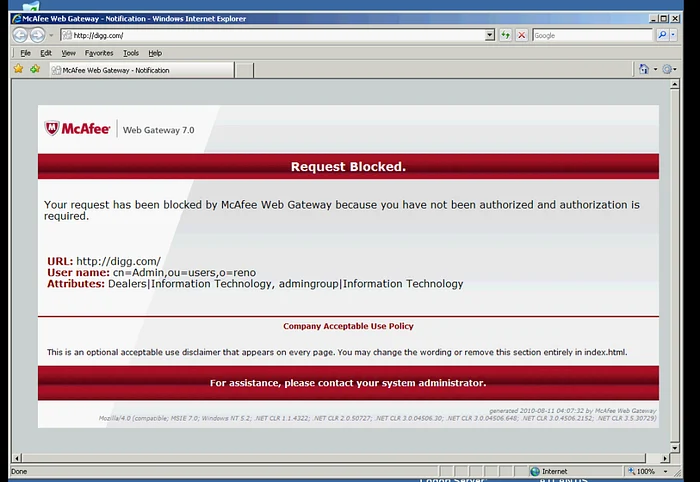
The entire requested URL is visible in the response, and that is where the vulnerability lives.
Setup
The vulnerability was disclosed to McAfee on 15 September 2016 and fixed on 12 October 2016 with the release of Web Gateway 7.6.2.5.
Finding it
What drew the researcher's attention was that the entire requested URL was visible in the response. Looking at the HTML of the page gave the following.
<!-- Info --><table class=”infoTable”><tr><td class="infoData"><b>URL : </b><script type="text/javascript">break_line("http://digg.com");</script><br /></td></tr></table><!-- /Info -->
The URL is placed inside a JavaScript string passed to break_line. At the time, that function had the following definition. It inserts a <wbr /> tag every 20 characters and writes the content directly into the page.
function break_line(lineToBreak) { if (lineToBreak != '') { var len = lineToBreak.length; var splitStr = '<wbr />'; for (var i = 0; i < len;) { lineToBreak = lineToBreak.substring(0, i) + splitStr + lineToBreak.substring(i); i += 20 + splitStr.length; len += splitStr.length; } document.write(lineToBreak); }}
The next question was which encoding was applied to the reflected URL. With minimal fuzzing, the researcher found that the gateway takes the received URL and HTML-encodes the key HTML characters (<, > and "). The question is whether that is the correct way to encode it.
Exploitation
Step 1: understand the two contexts
The reflected URL passes through two contexts. The first is a JavaScript string, and then it reaches an HTML context through break_line. The correct approach is to apply a context-specific encoding for each context it will pass through, from the last context back to the first. Here that means an HTML encoding followed by a JavaScript encoding (result = javascript_encode(html_encode(data))). The gateway only does the HTML encoding, so the JavaScript encoding is missing.
Step 2: use alternate character encoding to bypass the HTML encoding
When one of the context-specific encodings is missing, alternate character encoding becomes useful. In HTML, a can also be written as a; in JavaScript, a can also be written as \x61 and \u0061. Since the HTML encoding does not encode the backslash character, characters that would normally be encoded by the HTML encoding can be rewritten using an alternate JavaScript encoding (< becomes \x3c). This allows any character to be output and bypasses the HTML encoding.
Step 3: deal with the <wbr /> insertion
The break_line function inserts a <wbr /> every 20 characters, which gets in the way of a standard XSS payload. A way is needed to write longer payloads or to bootstrap them. The easiest approach the researcher found is to start each 20-character segment with */ and end it with /*, which places the <wbr /> tag inside a JavaScript comment. That leaves 16 characters per segment.
The first segment used was:
\x3cscript\x3e/*AAAAAAAAAA*/a=String;b=/*AAAAA*/a.fromCharCode(/*A*/
The last segment used was:
*/);eval(b);/*AAAAAA*/\x3c/script\x3e
The other segments provide the ASCII value for each character of the JavaScript payload. With this, a first functional proof of concept was built:
http://aaaa.perdu.com/favicon.ico?AAAAAA\x3cscript\x3e/*AAAAAAAAAA*/a=String;b=/*AAAAA*/a.fromCharCode(/*A*/97,108,101,114,/*A*/116,40,119,105,/*A*/110,100,111,119,/**/46,108,111,99,/*AA*/97,116,105,111,/*A*/110,41/*AAAAAAAAAA*/);eval(b);/*AAAAAA*/\x3c/script\x3e
For longer payloads, the researcher notes that an intermediate payload along the lines of eval(unescape(location.hash.substr(1))), with the full JavaScript payload placed after the # in the URL, is a lot more practical.
Step 4: trigger the error page
Arbitrary JavaScript now executes, but the error page has to be triggered for it to be useful. The most reliable way is to visit a URL whose domain does not resolve to anything. Most domain names do not catch all subdomains, so for most domains an XSS can be obtained on doesnotexists.maindomain.com. That does not give direct access to other subdomains or the main domain, but browsers give special privileges to subdomains, such as setting cookies for **.maindomain.com. Also, since any request is performed from a subdomain of maindomain.com, if the server trusts its subdomains for CORS requests, it can lead to data stealing.
Another way to trigger the error page for an arbitrary domain is when the proxy is flooded and can no longer respond to requests. This is hard to obtain reliably in practice, but it would allow an XSS on any domain. The payload simply has to wait for the flood to end and then make any request with XHR.
The researcher notes there are probably other ways to trigger the error pages, but that the product was not known well enough and the proof of concept was already interesting enough to warrant a fix.
Root cause
The reflected URL is placed in a JavaScript string and then written into an HTML context by break_line, but only HTML encoding is applied. The missing JavaScript encoding means the backslash is not encoded, so JavaScript escape sequences such as \x3c can be used to produce characters the HTML encoding would otherwise neutralise. The <wbr /> insertion every 20 characters is a further obstacle, but it can be neutralised by wrapping each segment in JavaScript comments.
Impact
An attacker can execute arbitrary JavaScript in the context of the error page. The most reliable trigger is a non-resolving subdomain of a target domain, which gives an XSS on doesnotexists.maindomain.com. That does not give direct access to other subdomains or the main domain, but it allows cookies to be set for **.maindomain.com, and if the server trusts its subdomains for CORS requests, it can lead to data stealing. If the proxy is flooded, the error page can be triggered for any domain, though this is hard to obtain reliably.
Fix
McAfee fixed the vulnerability on 12 October 2016 with the release of Web Gateway 7.6.2.5. The report does not describe the code change.
Variants to test
- Look for reflected URLs inside JavaScript strings that are later written into the page with
document.write. A positive result is that a backslash survives the encoding and\x3c/\u003ccan be used to produce a<character. - Look for output that inserts markup every fixed number of characters, such as
<wbr />. A positive result is that the inserted markup can be placed inside a JavaScript comment with*/and/*. - Look for error pages that reflect the full requested URL. A positive result is that a non-resolving subdomain of the target domain returns the reflected URL in the page.
Hunting notes
What happened, in plain words
A security researcher found a way to make a company's web proxy server show a page that runs code chosen by an attacker. The product is McAfee Web Gateway, a piece of software that companies put between their employees and the internet. It decides which websites people are allowed to visit. When someone tries to open a blocked site, or a site that does not exist, the gateway shows a custom error page. That page includes the address the person was trying to visit. The researcher noticed that the address is put into the page in a way that lets an attacker slip in JavaScript, the language browsers use to make pages interactive. The result is a cross-site scripting (XSS) bug: the error page runs code that the attacker controls. The bug was reported to McAfee on 15 September 2016 and fixed on 12 October 2016 in Web Gateway 7.6.2.5.
The product and why it rewrites pages
McAfee Web Gateway is an enterprise proxy server. A proxy is a middleman: instead of your browser talking directly to a website, it talks to the proxy, and the proxy talks to the website. Companies use it to filter content based on rules, so they can control what people can visit from inside the company network.
To filter HTTPS traffic (the encrypted kind, used by most sites), the gateway generates a root certificate that can be installed on company devices. A certificate is a digital identity document. Installing the gateway's root certificate on company devices lets the proxy change the response of HTTPS traffic to something else. The main use case for rewriting is to show a custom HTTP error page when a domain is blocked or does not exist. When that happens, a page like the one below is returned to the user.
The entire requested URL is visible in the response. That reflection is where the vulnerability lives.
Finding it
What drew the researcher's attention was that the entire requested URL was visible in the response. Looking at the HTML of the page gave the following.
<!-- Info --><table class=”infoTable”><tr><td class="infoData"><b>URL : </b><script type="text/javascript">break_line("http://digg.com");</script><br /></td></tr></table><!-- /Info -->
Line by line:
<!-- Info -->and<!-- /Info -->are HTML comments. They are notes for humans and are ignored by the browser.<table class=”infoTable”>starts a table. Theclassattribute is a label used for styling.<tr><td class="infoData">starts a table row and a table cell.<b>URL : </b>prints the label "URL :" in bold.<script type="text/javascript">starts a block of JavaScript. Everything until</script>is code the browser runs.break_line("http://digg.com");calls a function namedbreak_lineand passes it the URL as text. The URL is inside double quotes, so it is a JavaScript string.</script>ends the script block.<br />is a line break, and the closing tags end the cell, row and table.
The URL is placed inside a JavaScript string passed to break_line. At the time, that function had the following definition. It inserts a <wbr /> tag every 20 characters and writes the content directly into the page.
function break_line(lineToBreak) { if (lineToBreak != '') { var len = lineToBreak.length; var splitStr = '<wbr />'; for (var i = 0; i < len;) { lineToBreak = lineToBreak.substring(0, i) + splitStr + lineToBreak.substring(i); i += 20 + splitStr.length; len += splitStr.length; } document.write(lineToBreak); }}
Line by line:
function break_line(lineToBreak) {defines a function that takes one input, the text to break.if (lineToBreak != '') {checks that the input is not empty.var len = lineToBreak.length;stores the current length of the text.var splitStr = '<wbr />';stores the tag to insert.<wbr />means "word break opportunity": the browser may wrap a long word at that point.for (var i = 0; i < len;) {starts a loop that walks through the text.lineToBreak = lineToBreak.substring(0, i) + splitStr + lineToBreak.substring(i);cuts the text at positioniand glues the<wbr />tag in between the two halves.i += 20 + splitStr.length;moves the position forward by 20 characters plus the length of the inserted tag.len += splitStr.length;updates the remembered length because the text just got longer.document.write(lineToBreak);writes the result into the page.document.writeis a browser function that inserts text into the HTML at the point where the script runs.
The next question was which encoding was applied to the reflected URL. Encoding means turning special characters into a safe form so they are treated as text, not as instructions. With minimal fuzzing (trying small variations of input to see how the page reacts), the researcher found that the gateway takes the received URL and HTML-encodes the key HTML characters (<, > and "). The question is whether that is the correct way to encode it.
Exploitation
Step 1: understand the two contexts
The reflected URL passes through two contexts. The first is a JavaScript string, and then it reaches an HTML context through break_line. A context is the place where the data lands: inside a string in a script, inside HTML text, inside an attribute, and so on. Each context has its own rules for what characters mean.
The correct approach is to apply a context-specific encoding for each context it will pass through, from the last context back to the first. Here that means an HTML encoding followed by a JavaScript encoding (result = javascript_encode(html_encode(data))). Think of it like packing a parcel: you wrap the item for the inner box, then wrap the inner box for the outer box. If you only wrap the outer box, the inner item is still loose. The gateway only does the HTML encoding, so the JavaScript encoding is missing.
Step 2: use alternate character encoding to bypass the HTML encoding
When one of the context-specific encodings is missing, alternate character encoding becomes useful. In HTML, a can also be written as a; in JavaScript, a can also be written as \x61 and \u0061. These are different spellings of the same character. Since the HTML encoding does not encode the backslash character, characters that would normally be encoded by the HTML encoding can be rewritten using an alternate JavaScript encoding (< becomes \x3c). This allows any character to be output and bypasses the HTML encoding.
Step 3: deal with the <wbr /> insertion
The break_line function inserts a <wbr /> every 20 characters, which gets in the way of a standard XSS payload. A payload is the piece of input an attacker sends to trigger the bug. A way is needed to write longer payloads or to bootstrap them. The easiest approach the researcher found is to start each 20-character segment with */ and end it with /*, which places the <wbr /> tag inside a JavaScript comment. A comment is text the JavaScript engine ignores. /* opens a comment and */ closes it. That leaves 16 characters per segment.
The first segment used was:
\x3cscript\x3e/*AAAAAAAAAA*/a=String;b=/*AAAAA*/a.fromCharCode(/*A*/
Line by line:
\x3cis the JavaScript escape for<, and\x3eis the escape for>. Together they spell<script>without using the literal characters the HTML encoder would catch./*AAAAAAAAAA*/is a comment filled with padding letters. It absorbs the<wbr />that the function will insert.a=String;stores the built-inStringobject in a short variablea.b=starts assigning to a variableb./*AAAAA*/is more padding to absorb another<wbr />.a.fromCharCode(starts building a string from character codes.fromCharCodeturns numbers into characters./*A*/is padding again.
The last segment used was:
*/);eval(b);/*AAAAAA*/\x3c/script\x3e
Line by line:
*/closes the comment that was opened in the previous segment.);closes thefromCharCodecall and the assignment tob.eval(b);runs the string stored inbas JavaScript.evaltakes text and executes it as code./*AAAAAA*/is padding to absorb the next<wbr />.\x3c/script\x3espells</script>using escapes, closing the script block.
The other segments provide the ASCII value for each character of the JavaScript payload. ASCII values are numbers that stand for characters: 97 is a, 108 is l, and so on. With this, a first functional proof of concept was built:
http://aaaa.perdu.com/favicon.ico?AAAAAA\x3cscript\x3e/*AAAAAAAAAA*/a=String;b=/*AAAAA*/a.fromCharCode(/*A*/97,108,101,114,/*A*/116,40,119,105,/*A*/110,100,111,119,/**/46,108,111,99,/*AA*/97,116,105,111,/*A*/110,41/*AAAAAAAAAA*/);eval(b);/*AAAAAA*/\x3c/script\x3e
Line by line:
http://aaaa.perdu.com/favicon.ico?is the URL, with a query string starting after the?. The query string is the part of a URL that carries data to the server.AAAAAAis padding before the payload.\x3cscript\x3ebecomes<script>once JavaScript interprets the escapes.- The comment blocks and
a=String;b=set up the variables as in the first segment. - The numbers
97,108,101,114,...are the ASCII codes of the characters of the final JavaScript. Read together they spell the JavaScript payload. );eval(b);closes the call and runs the built string.\x3c/script\x3ecloses the script tag.
For longer payloads, the researcher notes that an intermediate payload along the lines of eval(unescape(location.hash.substr(1))), with the full JavaScript payload placed after the # in the URL, is a lot more practical. The # part of a URL is the fragment: browsers keep it on the client side and do not send it to the server. location.hash reads it, substr(1) drops the leading #, unescape turns percent-encoded text back into normal characters, and eval runs the result. This way the long code lives in the fragment and the short bootstrap in the page just fetches and runs it.
Step 4: trigger the error page
Arbitrary JavaScript now executes, but the error page has to be triggered for it to be useful. The most reliable way is to visit a URL whose domain does not resolve to anything. Resolving means turning a name like example.com into a network address; if it fails, the browser cannot reach the site, and the proxy shows its error page. Most domain names do not catch all subdomains, so for most domains an XSS can be obtained on doesnotexists.maindomain.com. A subdomain is a name in front of the main domain, like blog in blog.example.com.
That does not give direct access to other subdomains or the main domain, but browsers give special privileges to subdomains, such as setting cookies for **.maindomain.com. A cookie is a small piece of data a site stores in the browser, often used to remember who is logged in. The **.maindomain.com pattern means the cookie is valid for the main domain and all its subdomains. Also, since any request is performed from a subdomain of maindomain.com, if the server trusts its subdomains for CORS requests, it can lead to data stealing. CORS is a browser rule that lets a server say which other origins may read its responses; if a server trusts all its subdomains, a page on a malicious subdomain can read data it should not.
Another way to trigger the error page for an arbitrary domain is when the proxy is flooded and can no longer respond to requests. Flooding means sending so much traffic that the service cannot keep up. This is hard to obtain reliably in practice, but it would allow an XSS on any domain. The payload simply has to wait for the flood to end and then make any request with XHR. XHR (XMLHttpRequest) is the browser feature scripts use to fetch data from a server without reloading the page.
The researcher notes there are probably other ways to trigger the error pages, but that the product was not known well enough and the proof of concept was already interesting enough to warrant a fix.
Root cause
The reflected URL is placed in a JavaScript string and then written into an HTML context by break_line, but only HTML encoding is applied. The missing JavaScript encoding means the backslash is not encoded, so JavaScript escape sequences such as \x3c can be used to produce characters the HTML encoding would otherwise neutralise. The <wbr /> insertion every 20 characters is a further obstacle, but it can be neutralised by wrapping each segment in JavaScript comments.
Impact
An attacker can execute arbitrary JavaScript in the context of the error page. The most reliable trigger is a non-resolving subdomain of a target domain, which gives an XSS on doesnotexists.maindomain.com. That does not give direct access to other subdomains or the main domain, but it allows cookies to be set for **.maindomain.com, and if the server trusts its subdomains for CORS requests, it can lead to data stealing. If the proxy is flooded, the error page can be triggered for any domain, though this is hard to obtain reliably.
Fix
McAfee fixed the vulnerability on 12 October 2016 with the release of Web Gateway 7.6.2.5. The report does not describe the code change.
Variants to test
- Look for reflected URLs inside JavaScript strings that are later written into the page with
document.write. A positive result is that a backslash survives the encoding and\x3c/\u003ccan be used to produce a<character. - Look for output that inserts markup every fixed number of characters, such as
<wbr />. A positive result is that the inserted markup can be placed inside a JavaScript comment with*/and/*. - Look for error pages that reflect the full requested URL. A positive result is that a non-resolving subdomain of the target domain returns the reflected URL in the page.
Hunting notes
This kind of bug tends to hide in proxy and gateway error pages that reflect the requested URL, especially where the URL is passed through more than one context. During recon, a signal is an error page that shows the full URL and whose HTML contains a script that processes that URL. To show impact, the researcher built a working payload that executes JavaScript despite the HTML encoding and the <wbr /> insertion, and identified a reliable trigger through a non-resolving subdomain.
Glossary
- Proxy server: a middleman server that sits between a user's browser and the internet, forwarding requests and responses.
- HTTPS: the encrypted version of HTTP, the protocol browsers use to load web pages.
- Root certificate: a digital identity document that a device trusts; installing one lets a proxy decrypt and rewrite traffic for sites the device visits.
- HTTP error page: a page a server or proxy shows when a request cannot be completed, such as a blocked or non-existent site.
- Reflection: when a site repeats back input it received, such as the URL in an error page.
- HTML: the language that describes the structure of a web page.
- JavaScript: the programming language browsers run to make pages interactive.
- XSS (cross-site scripting): a bug where an attacker's code runs in a page from another site, in the browser of a victim.
- Encoding: turning special characters into a safe form so they are treated as text rather than instructions.
- HTML encoding: replacing characters such as
<,>and"with safe equivalents. - JavaScript encoding: representing characters with JavaScript escape sequences such as
\x3c. - Context: the place where data lands in a page (inside a script string, inside HTML text, inside an attribute), each with its own rules.
- Fuzzing: trying many small variations of input to see how a system reacts.
- Payload: the input an attacker sends to trigger a vulnerability.
<wbr />: an HTML tag that marks a place where a long word may be wrapped.document.write: a browser function that inserts text into the page at the point where the script runs.- Comment (JavaScript): text between
/*and*/that the JavaScript engine ignores. eval: a JavaScript function that runs a string as code.fromCharCode: a JavaScript function that turns character codes into a string.- ASCII value: a number that stands for a character, such as 97 for
a. - Query string: the part of a URL after
?that carries data to the server. - Fragment: the part of a URL after
#, kept on the client side and not sent to the server. location.hash: a browser property that reads the fragment of the current URL.unescape: a JavaScript function that turns percent-encoded text back into normal characters.- Domain: a name such as
example.comthat identifies a site on the internet. - Subdomain: a name in front of a domain, such as
bloginblog.example.com. - Resolve: to turn a domain name into a network address; if it fails, the site cannot be reached.
- Cookie: a small piece of data a site stores in the browser, often used to remember a logged-in user.
- CORS: a browser rule that lets a server say which other origins may read its responses.
- XHR (XMLHttpRequest): a browser feature scripts use to fetch data from a server without reloading the page.
- Flooding: sending so much traffic that a service cannot keep up and stops responding.



