Hi Meta, WhatsApp with privacy?
WhatsApp's end-to-end encryption design requires senders to know all of a recipient's device identity keys, and this information is exposed to any user who knows the victim's phone number, even if blocked. An attacker could monitor these keys over time to learn when a victim changes devices or adds companion devices, aiding targeted attacks.
 Published on medium.com
Meta’s WhatsApp is the most popular messaging app in the world, with over five billion downloads and 2.4 billion active users. WhatsApp’s End-to-End Encryption (E2EE) protocol is the cornerstone of protecting its users’ messages’ confidentiality.
The full write-up lives on its author's site
It belongs to its author, so we link to it rather than copy it. The other two tabs are our own rewrites, checked against it.
Context
WhatsApp is Meta's messaging application, with over five billion downloads and 2.4 billion active users according to the figures cited in the write-up. Its End-to-End Encryption (E2EE) protocol is the cornerstone of protecting the confidentiality of users' messages. The write-up argues that the protocol design itself leaks some information about the devices a user has, to any other user of the platform, and that no setting, control or configuration exists to stop that exposure. Blocking a user does not solve it either.
To understand the leak you need the two design decisions behind WhatsApp's E2EE:
- Per-installation keys. To support E2EE, the user app must generate a unique crypto key so that senders can encrypt messages that only the receiving user can decrypt. The key is generated on the device and cannot be known to the server. It may need to be regenerated when the app is reinstalled on another device, so as a by-product the key is also a sort of ID for the specific app installation or device. When a user reinstalls WhatsApp on a new device, other users may infer that the change happened because the encryption key changed.
- Multi-device with client-fanout. In 2021 WhatsApp switched to a Multi-Device architecture that lets users add companion devices (desktop and web apps) to their primary mobile device. Companion devices need keys too. Theoretically those keys could be the primary device's key, securely distributed to the companions, or freshly generated by the companions. WhatsApp chose the latter: companion devices generate their own keys.
According to the WhatsApp Encryption Overview Technical white paper, every user device, whether the mobile Primary device that registered the account or a Companion device linked to it, has an Identity Key. The Identity Key is created at installation and remains valid until the app is uninstalled from the device.
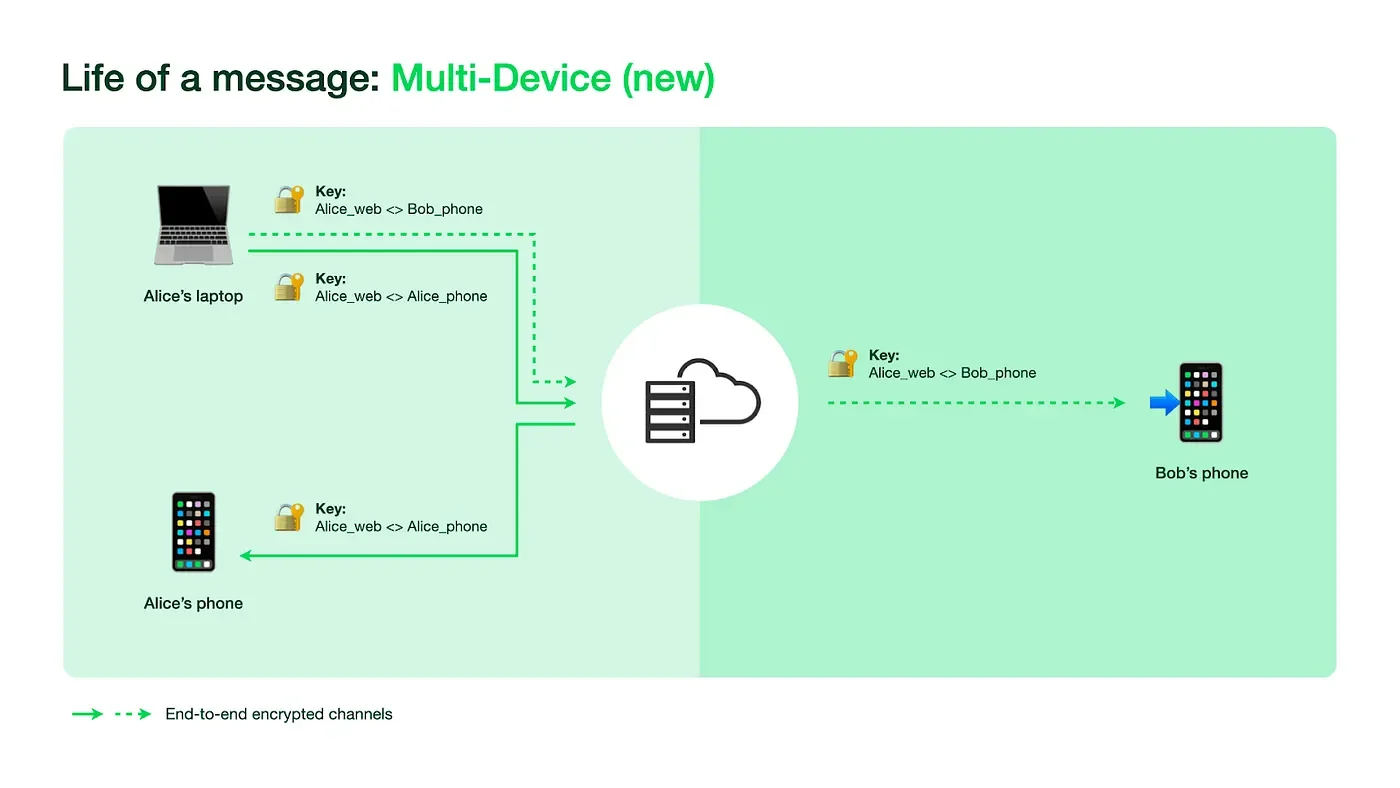
When a sender wants to send a message to a multi-device recipient, it creates a session key for each of the recipient's devices, derived from that device's Identity Key. The sender uses client-fanout for all exchanged messages: each message is encrypted for each device with the corresponding pairwise session. Because of client-fanout, rather than server-fanout, the sender must be aware of all of the receiver's devices. Since the key exchange protocol is slightly different for primary and companion devices, the sender also knows which device is the primary one.
Before the multi-device architecture, the sender was exposed only to the identity of the receiver's primary account. After the change, the sender must be aware of all receiver devices' identities.
Setup
The observation is made from an ordinary WhatsApp user's position, using the WhatsApp web client and the browser's developer tools. The attack requires knowing the victim's phone number, adding them as a contact and monitoring the identity store. No message needs to be sent, and the victim does not need to have the attacker in their contacts.
Finding it
The sender's client necessarily holds the identity keys of every device belonging to every recipient it may talk to, and this data is reachable from the client side. The WhatsApp web client uses the browser's local storage to store the devices' identity keys. The browser's developer tools provide an easy way to view the contents of the table named Signal-storage.identity-store.
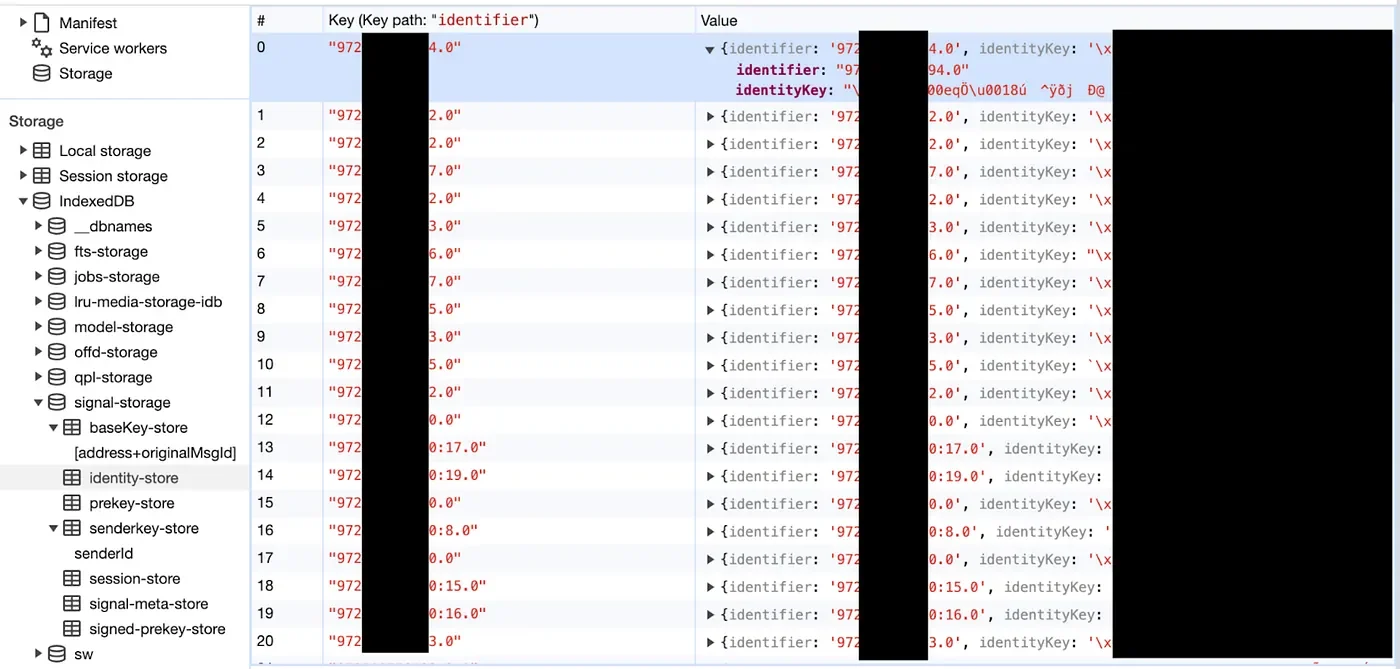
The identity store table holds all of the user's contacts and their corresponding identity keys. Primary devices are identified by the phone number and the .0 suffix, while companion devices have a :<n>.0 suffix (for example :16.0).
By sampling a few instances, the researcher verified that the table's data corresponds to the actual user devices. For one user, "User X", the WhatsApp linked devices screen showed 1 primary device and 3 companion devices.
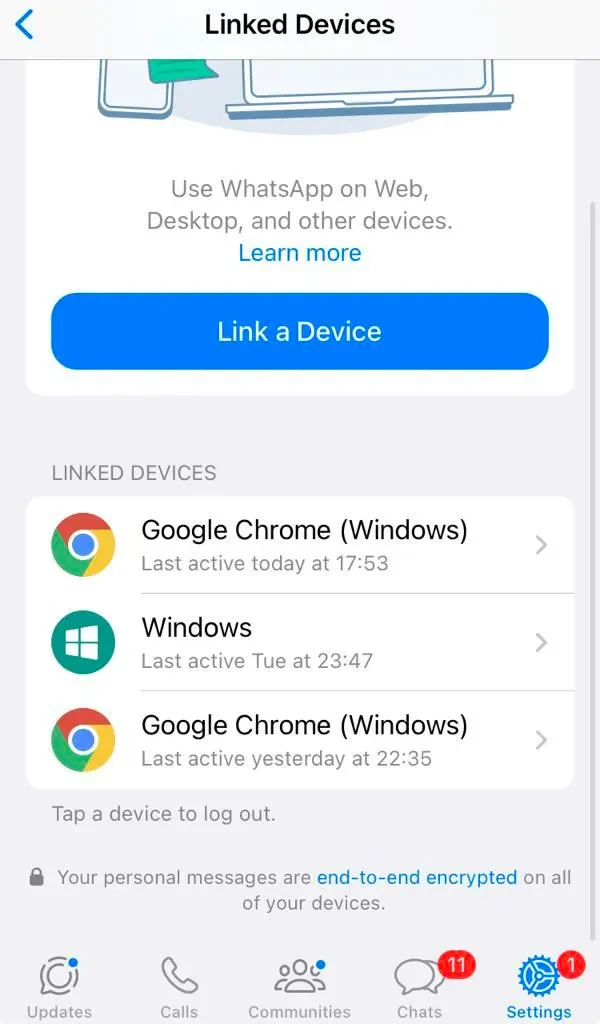
User X's corresponding entries in the identity store table matched this information perfectly.

The researcher also verified that this information is present even when the sender is not part of the receiver's contact list and without actually sending messages to the receiver. Blocking the sender on the receiver side does not prevent the sender from getting device identity information.
Exploitation
Step 1: Know the victim's phone number
The attacker needs the victim's phone number. Nothing else is required from the victim's side.
Step 2: Add the victim as a contact
The attacker adds the victim as a contact. There is no need to actually send a message to them.
Step 3: Monitor the identity store in the web client
The attacker uses the WhatsApp web client and monitors the Signal-storage.identity-store table for information and for changes. The table is visible through the browser's developer tools, as shown above. Entries for the victim's primary device carry the phone number with the .0 suffix; companion devices appear with the :<n>.0 suffix, so the number of companion devices and their identities can be read directly from the table.
The write-up stresses that this table is just one possible way to obtain the information, because the information is required by the protocol for the sender. A solution that eliminates the table would only deal with the symptom, not the core issue.
Disclosure
The researcher responsibly disclosed the findings to Meta's bug-bounty program on 9 January 2024 and received a polite rejection two days later, mainly because this is not an implementation bug but the way the protocol works by design.
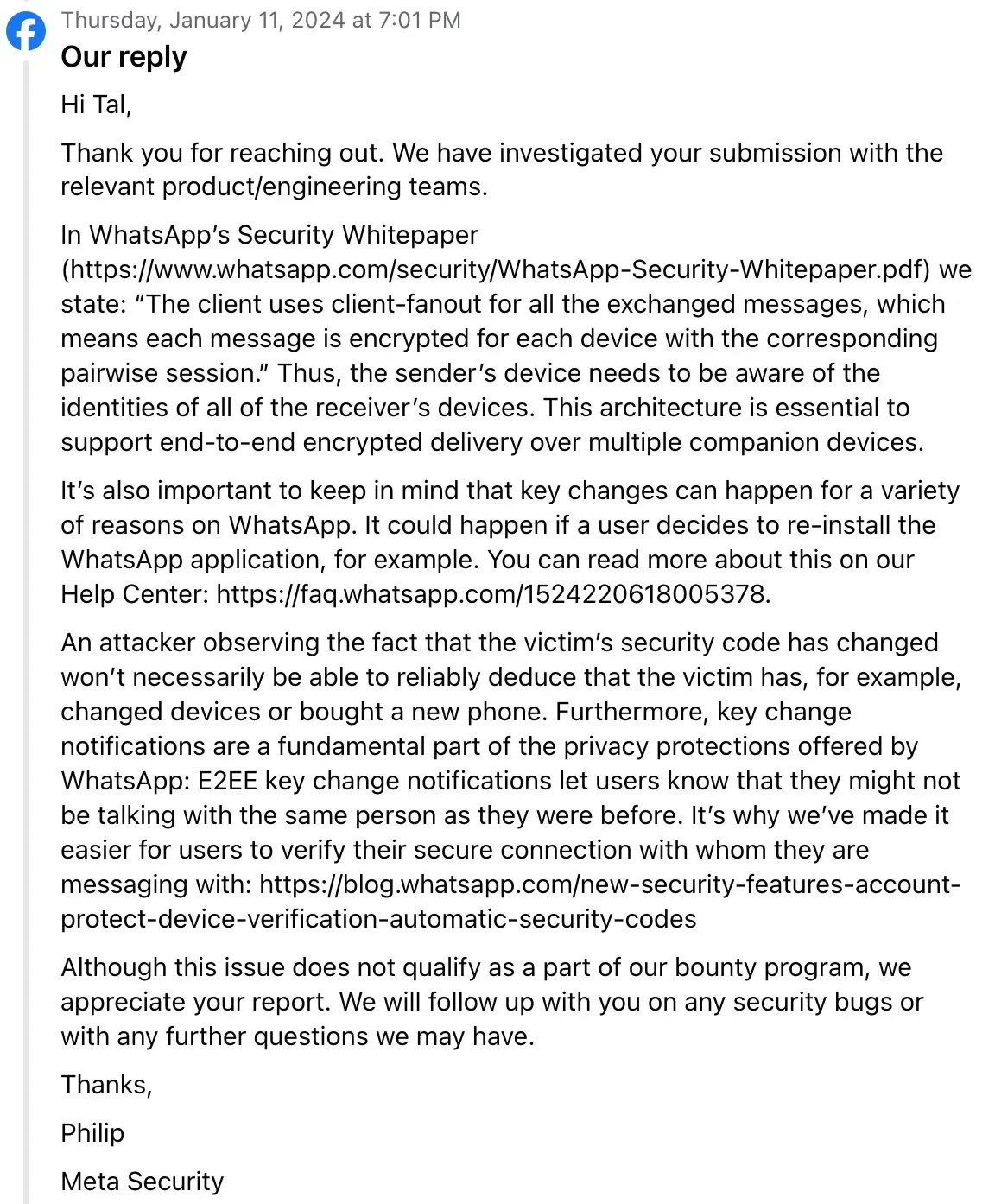
Meta's response states that "This architecture is essential". The researcher therefore felt free to share the findings publicly.
Root cause
The root cause is the protocol design, not an implementation mistake. Client-fanout requires the sender to know every device of the receiver, and companion devices generate their own keys, so each device's Identity Key is exposed to any sender. Because the Identity Key is created at installation and stays valid until the app is uninstalled, it acts as a stable identifier for the device, and changes to it reveal device replacement, addition or removal.
Existing defences do not stop this. Blocking the sender does not prevent them from getting device identity information, and the write-up states that no controls, settings or configuration exist to let users limit the exposure. According to WhatsApp support, if a newly installed app is restored from backup it maintains the same key, which prevents this particular information leak in that case.
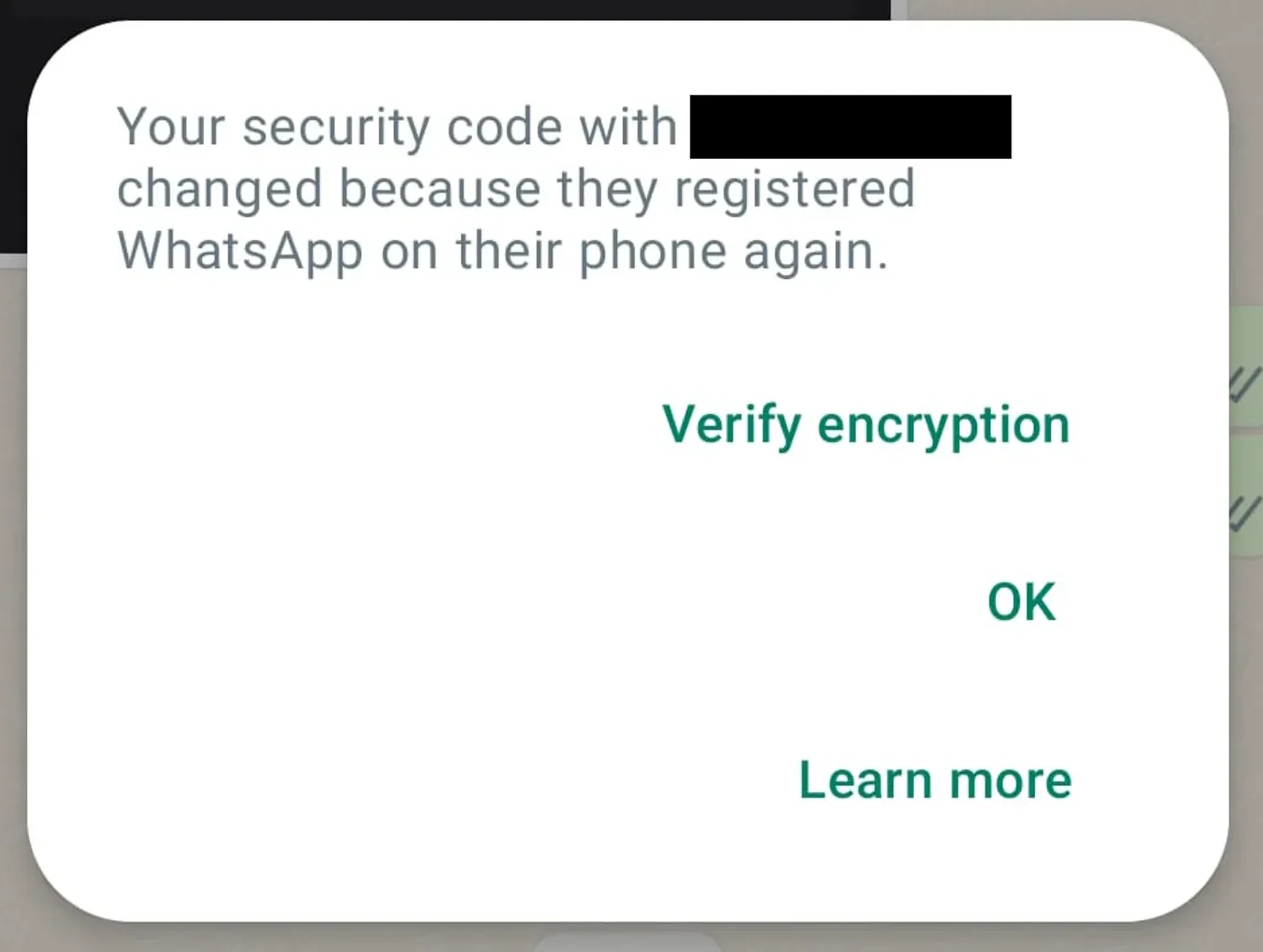
This message is shown to a WhatsApp user when the security code with another user has changed.
Impact
Using the method above, attackers can passively query device information of any WhatsApp user. By continuously monitoring the device information they can determine whether users have companion devices and detect changes in the identity of those devices.
As a result, such attackers may:
- Use the information to determine the "path of least resistance" and attack the companion device instead of the primary device, or vice versa. Companion devices are usually considered a softer target. The write-up cites a recent example in which the IDF instructed its reserve duty personnel to remove WhatsApp from their companion devices.
- Pinpoint their attacks and send tailored exploits to the primary mobile devices and benign or invisible messages to the browser and PC based companion devices, or vice versa. Since messages are E2EE, the server will not be able to know that the content sent to the different devices is actually different.
- Learn that their victims changed mobile devices or computers, triggering them to re-attack the victim or seize the opportunity to attack the newly added platform.
The write-up notes that even non-sophisticated attackers, such as a jealous spouse, can abuse the information leakage in itself (a new device was bought) or leverage it (WhatsApp is now accessible on the computer) to get access to WhatsApp content.
A follow-up blogpost, "Hi Meta, WhatsApp with Integrity?", published on 22 May 2024, demonstrates a more thorough attack based on this.
Fix
The write-up says the privacy issues must be fixed in the WhatsApp E2EE protocol itself. As a mitigation, it proposes adding a simple security control that lets users control the exposure of their identity keys and limit them only to their contacts, which would greatly reduce the impact of the leak. A follow-up blogpost on possible solutions, "Unnecessary Evil: Multi-Device Instant Messaging can be private", was published on 21 January 2024. Meta rejected the report as working by design.
Variants to test
- Other multi-device E2EE messengers. Check whether the client stores per-device identity keys for contacts in local storage or an equivalent client-side store, and whether adding a contact without messaging is enough to populate it. A positive result is an entry per device, with a stable identifier that changes when the device is reinstalled.
- Blocked and non-contact senders. Repeat the observation with the victim blocking the attacker and with the attacker absent from the victim's contacts. A positive result is that the device entries are still present and still update.
- Device change detection over time. Snapshot the identity store, then reinstall the app on a new device or add and remove a companion device. A positive result is a corresponding change in the stored identifiers.
- Backup restore behaviour. Reinstall and restore from backup, then compare the identifier. A positive result, in the sense of no leak, is that the key is unchanged, as WhatsApp support describes.
- Client-side stores in web clients generally. Inspect local storage, IndexedDB and similar stores in other web messaging clients for tables of contact device keys. A positive result is a readable table mapping contacts to device identities, with suffixes or fields that distinguish primary from companion devices.
What happened, in plain words
WhatsApp is a messaging app made by Meta. The write-up cites figures of over five billion downloads and 2.4 billion active users. Like most modern messengers, WhatsApp uses something called End-to-End Encryption, usually shortened to E2EE. That means a message is scrambled on the sender's phone and only unscrambled on the receiver's device, so nobody in between, including WhatsApp's own servers, can read it.
The researcher behind this write-up found that the way WhatsApp's encryption is designed leaks a small but useful piece of information to anyone who knows your phone number: which devices you use WhatsApp on. That includes your main mobile phone and any "companion" devices you have linked, such as WhatsApp Web in a browser or the desktop app. The leak happens by design, not because of a coding mistake, and there is no setting that turns it off. Even blocking someone does not stop them from seeing it.
On its own, knowing that someone has a laptop linked to their phone sounds harmless. The problem is what an attacker can do with it over time. If the list of devices changes, the attacker learns that the victim bought a new phone, added a computer, or removed one. That kind of detail is useful for planning an attack, or for someone with less technical skill, such as a jealous spouse, to learn that a new device was bought or that WhatsApp is now accessible on the computer.
The researcher reported this to Meta's bug-bounty programme on 9 January 2024. A bug-bounty programme is a scheme where companies pay people for reporting security problems. Meta replied two days later and politely declined, saying the behaviour is how the protocol is meant to work. The researcher then published the findings.
The two design choices behind the leak
To understand the leak you need to understand two decisions WhatsApp made when building its encryption. Both are reasonable on their own; together they create the privacy problem.
Choice 1: every installation gets its own key
Encryption works with keys. A key is a long string of characters, a bit like a very complicated password, that a computer uses to scramble and unscramble data. In End-to-End Encryption, the receiving app has to create its own key so that senders can scramble messages in a way that only that app can unscramble. The key is generated on the device itself and is never sent to WhatsApp's servers, which is exactly why the servers cannot read your messages.
Because the key lives on the device and is created when the app is installed, it also acts a bit like a name tag for that particular installation. If you reinstall WhatsApp on a new phone, a new key is created. Anyone who was talking to you can notice that your key changed. WhatsApp shows a warning message when this happens, so that users are aware the security code with a contact has changed.
This message is shown to a WhatsApp user when the security code with another user has changed.
There is one exception. According to WhatsApp support, if you reinstall the app and restore it from a backup, the app keeps the same key, so in that case the change is not visible to others.
Choice 2: companion devices get their own keys too
In 2021 WhatsApp introduced a Multi-Device architecture. This lets you link extra devices to your main phone: WhatsApp Web in a browser, the desktop app, and so on. These extra devices are called companion devices, and the main phone is called the primary device.
Companion devices also need keys to take part in encrypted conversations. There were two ways to do this. One option was to reuse the primary phone's key and copy it securely to each companion. The other was to let each companion generate its own fresh key. WhatsApp chose the second option.
According to the WhatsApp Encryption Overview Technical white paper, every device, whether it is the primary phone that registered the account or a companion linked to it, has something called an Identity Key. The Identity Key is created when the app is installed and stays the same until the app is uninstalled from that device.
How messages reach all your devices
When someone sends you a message and you have several devices, the sender's app has to prepare the message separately for each of your devices. It creates a session key for each device, derived from that device's Identity Key. This approach is called client-fanout: the sender's own app does the work of making one copy per device, rather than the server doing it (which would be called server-fanout).
Because of client-fanout, the sender's app must know about every device you have. And because the key exchange works slightly differently for primary and companion devices, the sender's app also knows which one is the primary phone.
Before the multi-device change, a sender only learned about the receiver's main account. After the change, a sender learns about every device the receiver uses.
Finding the leak
The researcher's starting observation was simple: if the sender's app has to know every recipient device's Identity Key, then that data must be sitting somewhere on the sender's side, where the sender can reach it. The question was where.
The WhatsApp web client, the version that runs in a browser, keeps this data in the browser's local storage. Local storage is a small storage area that websites use to keep data on your computer between visits, a bit like a browser's own notebook. The browser's developer tools, a set of built-in inspection panels that come with browsers such as Chrome, let you look inside that notebook.
The identity store table: All contacts' devices and their Identity Keys.
The table is called Signal-storage.identity-store. It holds every contact and their corresponding Identity Keys. The naming pattern tells you what each entry is:
- A primary device appears as the phone number followed by
.0. - A companion device appears with a
:<n>.0suffix, for example:16.0.
To check that the table really reflects real devices, the researcher sampled a few instances. One user, called "User X" in the write-up, had 1 primary device and 3 companion devices according to the WhatsApp linked devices screen.
WhatsApp's linked devices screen of User X.
User X's entries in the identity store table matched that screen perfectly.
User X's corresponding entries in the identity store table.
The researcher also checked two conditions that make the leak more serious. First, the information is present even when the sender is not in the receiver's contact list. Second, it is present without the sender ever sending a message. And blocking the sender on the receiver's side does not stop the sender from getting the device identity information.
How an attacker would use it
The write-up describes the attack as three steps. None of them require any special tools beyond a browser.
Step 1: Know the victim's phone number
The attacker needs the victim's phone number. Nothing else is required from the victim's side: no message, no reply, no contact approval.
Step 2: Add the victim as a contact
The attacker adds the victim's number as a contact in WhatsApp. There is no need to actually send a message.
Step 3: Monitor the identity store in the web client
The attacker opens WhatsApp Web and watches the Signal-storage.identity-store table through the browser's developer tools. Entries for the victim's primary device carry the phone number with the .0 suffix. Companion devices appear with the :<n>.0 suffix. So the number of companion devices, and their identities, can be read straight from the table. Watching it over time shows when devices are added, removed or replaced.
The write-up stresses that this table is only one way to get the information. The information has to reach the sender because the protocol requires it. Removing the table would only hide the symptom, not fix the underlying issue.
Disclosure
The researcher reported the findings to Meta's bug-bounty programme on 9 January 2024. Two days later the report was politely rejected, mainly because this is not an implementation bug but the way the protocol works by design.
Meta's response: "This architecture is essential".
Because Meta declined the report, the researcher felt free to share the findings publicly.
Root cause
The root cause is the protocol design, not a coding mistake. Client-fanout requires the sender to know every device of the receiver. Companion devices generate their own keys. Together, that means each device's Identity Key is exposed to any sender. And because the Identity Key is created at installation and stays valid until the app is uninstalled, it works as a stable identifier for the device. Changes to it reveal device replacement, addition or removal.
The existing defences do not help. Blocking the sender does not prevent them from getting device identity information, and the write-up states that no controls, settings or configuration exist to let users limit the exposure. According to WhatsApp support, a reinstall restored from backup keeps the same key, preventing this information leak in that case.
Impact
Using the method above, attackers can passively query device information of any WhatsApp user. Passively here means they only read what the app already holds; they do not have to interact with the victim. By continuously monitoring the device information, they can determine whether users have companion devices and detect changes in the identity of those devices.
As a result, such attackers may:
- Use the information to work out the "path of least resistance" and attack the companion device instead of the primary device, or vice versa. Companion devices are usually considered a softer target. The write-up cites a recent example in which the IDF instructed its reserve duty personnel to remove WhatsApp from their companion devices.
- Pinpoint their attacks and send tailored exploits to the primary mobile devices and benign or invisible messages to the browser and PC based companion devices, or vice versa. Since messages are E2EE, the server will not be able to know that the content sent to the different devices is actually different.
- Learn that their victims changed mobile devices or computers, triggering them to re-attack the victim or seize the opportunity to attack the newly added platform.
The write-up notes that even non-sophisticated attackers, such as a jealous spouse, can abuse the information leakage in itself (a new device was bought) or leverage it (WhatsApp is now accessible on the computer) to get access to WhatsApp content.
A follow-up blogpost, "Hi Meta, WhatsApp with Integrity?", published on 22 May 2024, demonstrates a more thorough attack based on this.
Fix
The write-up says the privacy issues must be fixed in the WhatsApp E2EE protocol itself. As a mitigation, it proposes adding a simple security control that lets users control the exposure of their identity keys and limit them only to their contacts, which would greatly reduce the impact of the leak. A follow-up blogpost on possible solutions, "Unnecessary Evil: Multi-Device Instant Messaging can be private", was published on 21 January 2024. Meta rejected the report as working by design.
Variants to test
- Other multi-device E2EE messengers. Check whether the client stores per-device identity keys for contacts in local storage or an equivalent client-side store, and whether adding a contact without messaging is enough to populate it. A positive result is an entry per device, with a stable identifier that changes when the device is reinstalled.
- Blocked and non-contact senders. Repeat the observation with the victim blocking the attacker and with the attacker absent from the victim's contacts. A positive result is that the device entries are still present and still update.
- Device change detection over time. Snapshot the identity store, then reinstall the app on a new device or add and remove a companion device. A positive result is a corresponding change in the stored identifiers.
- Backup restore behaviour. Reinstall and restore from backup, then compare the identifier. A positive result, in the sense of no leak, is that the key is unchanged, as WhatsApp support describes.
- Client-side stores in web clients generally. Inspect local storage, IndexedDB and similar stores in other web messaging clients for tables of contact device keys. A positive result is a readable table mapping contacts to device identities, with suffixes or fields that distinguish primary from companion devices.
Glossary
- Bug-bounty programme: a scheme run by a company that rewards people for reporting security problems to it.
- Client-fanout: an approach where the sender's own app prepares a separate encrypted copy of a message for each of the receiver's devices, instead of the server doing it.
- Companion device: an extra device linked to a WhatsApp account, such as WhatsApp Web in a browser or the desktop app, alongside the main phone.
- Developer tools: built-in inspection panels in a browser, such as Chrome's, that let you look at a page's data and code.
- End-to-End Encryption (E2EE): encryption where only the sender's and receiver's devices can read the message; servers in between cannot.
- Identity Key: a key created when WhatsApp is installed on a device and kept until the app is uninstalled; it identifies that device to senders.
- Key: a long string of characters used by a computer to scramble and unscramble data.
- Local storage: a small storage area a website can use to keep data in your browser between visits.
- Multi-Device architecture: WhatsApp's 2021 design that lets one account run on a primary phone plus several companion devices.
- Passive: reading information that is already available, without interacting with the victim.
- Primary device: the mobile phone that registered the WhatsApp account.
- Protocol: the agreed set of rules two programs follow to talk to each other securely.
- Session key: a key created for a specific pair of devices, derived from the receiver device's Identity Key, used to encrypt messages between them.
- Signal-storage.identity-store: the name of the table in the WhatsApp web client's local storage that holds contacts' devices and their Identity Keys.
- White paper: a technical document published by a company describing how its system works.



