Autodiscovering the Great Leak
The Autodiscover protocol's back-off algorithm constructs URLs like Autodiscover.com when the original domain fails, causing clients to send pre-authenticated requests with Windows domain credentials to domains controlled by the researchers. Attackers who own such domains could capture valid credentials in plain text.
 Published on akamai.com
Client-Side Protection & Compliance
The full write-up lives on its author's site
It belongs to its author, so we link to it rather than copy it. The other two tabs are our own rewrites, checked against it.
Context
Microsoft Exchange uses a protocol called Autodiscover to configure mail clients such as Microsoft Outlook automatically. The idea is that a user only supplies a username and password, and the protocol works out the rest of the configuration: the mail and Exchange server hostnames or IP addresses, and in some cases additional settings such as miscellaneous LDAP settings and WebDAV calendars. Because Exchange is part of Microsoft's domain suite, the credentials used to log in to an Exchange-based inbox are in most cases the user's Windows domain credentials.
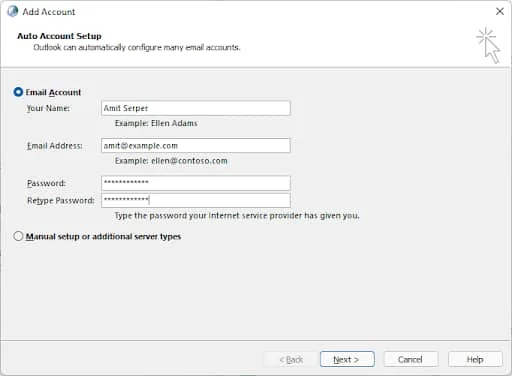
The protocol has several iterations, versions and modes. The write-up focuses on the implementation based on the POX XML protocol. When a user adds a new Exchange account to Outlook, they are prompted for a username and password:
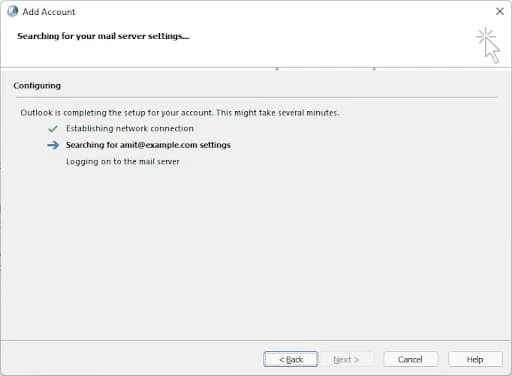
After the details are filled in, Outlook tries to use Autodiscover to configure the client:
The design flaw described here is in the protocol's back-off algorithm, which causes requests to leak to Autodiscover domains outside the user's own domain but in the same top-level domain, for example Autodiscover.com. The report also describes a second issue: poor implementation of the protocol in some applications, which send credentials pre-authenticated without first checking whether the resource exists or is protected.
This is not a new class of problem. In 2017 researchers from Shape Security published a paper on how Autodiscover implementations in mobile email clients, such as Samsung's mail client on Android and Apple Mail on iOS, could cause such leaks (CVE-2016-9940, CVE-2017-2414). Those vulnerabilities were patched, but in 2021 the same problem existed across a much larger threat landscape, with more third-party applications outside email clients exposing their users to the same risks.
Setup
No accounts, roles or special tooling were needed on the victim side. The researcher's precondition was simply to own Autodiscover domains with a TLD suffix and point them at a web server under his control. The following domains were purchased:
- Autodiscover.com.br, Brazil
- Autodiscover.com.cn, China
- Autodiscover.com.co, Columbia
- Autodiscover.es, Spain
- Autodiscover.fr, France
- Autodiscover.in, India
- Autodiscover.it, Italy
- Autodiscover.sg, Singapore
- Autodiscover.uk, United Kingdom
- Autodiscover.xyz
- Autodiscover.online
- Autodiscover.cc
- Autodiscover.studio
- autodiscover.capital
- autodiscover.club
- autodiscover.company
- autodiscover.jp
- autodiscover.me
- autodiscover.mx
- autodiscover.ventures
These domains were assigned to a web server in the researcher's control, and the team waited for requests to various Autodiscover endpoints to arrive. The collection window ran from 16 April 2021 to 25 August 2021.
Finding it
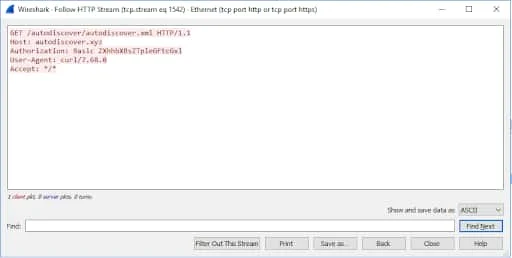
Requests started arriving in significant amounts from various domains, IP addresses and clients. The notable thing about them was that they requested the relative path /Autodiscover/Autodiscover.xml with the Authorization header already populated with credentials in HTTP basic authentication:
Normally a client should not send credentials blindly. The expected HTTP authentication flow is:
- A client requests access to a protected resource.
- The web server returns a dialog box that requests the username and password (in accordance with the supported authentication methods, in our case, basic authentication).
- The client submits the username and password to the server.
- The server authenticates the user and returns the requested resource.
The hostnames in the log, scrubbed for privacy reasons, are the domains from which the Autodiscover clients were trying to authenticate, along with their respective usernames and passwords:
Because Autodiscover runs over HTTP and HTTPS, the user agent in each request shows which clients are reaching out with pre-authenticated requests. The captured Microsoft Outlook and Office user agents include various versions of Outlook, including Outlook for Mac. Among them was an interesting one, microsoft.windowscommunicationsapps, which according to official Microsoft documentation belongs to Outlook as well, specifically "Outlook Mail and Calendar":
Many requests showed no attempt on the client side to check whether the resource was available or even existed before sending an authenticated request. A correct implementation would first check whether the resource is valid, since it could be non-existent (HTTP 404) or password protected (HTTP 401), as in the diagram above. After close inspection and manual testing of various programs, the team concluded that this user agent is also emitted by Mail, the email client built into Windows:
The following user agents, belonging to clients on Apple's macOS, also connected to the servers. The team believes these are various mail clients that implemented the Autodiscover protocol themselves in a vulnerable way:
AppleExchangeWebServices/807+accountsd/113
Business/[redacted]+CFNetwork/1128.0.1+Darwin/19.6.0
Business/[redacted]+CFNetwork/1220.1+Darwin/20.3.0
Business/[redacted]+CFNetwork/1240.0.4+Darwin/20.5.0
CFNetworkAgent+(unknown+version)+CFNetwork/1121.2.2+Darwin/19.3.0
CFNetworkAgent+(unknown+version)+CFNetwork/1240.0.4+Darwin/20.6.0
CFNetworkAgent+(unknown+version)+CFNetwork/978.0.7+Darwin/18.7.0
iTunes+(unknown+version)+CFNetwork/520.51.3
networkd+(unknown+version)+CFNetwork/758.5.3+Darwin/15.6.0
Enterprise/[redacted]+CFNetwork/1220.1+Darwin/20.3.0
Enterprise/[redacted]+CFNetwork/1240.0.4+Darwin/20.5.0
Because of how macOS implements account synchronisation mechanisms and APIs, it is not possible to know exactly which application was using the Autodiscover API; the user agents above appear to be related to operating system components such as accountsd.
User agents belonging to various Samsung phones were also observed, apparently representing the built-in mail reader app on those phones:
SAMSUNG-GT-I9060/101.40202
SAMSUNG-GT-I9195L/101.40402
SAMSUNG-GT-I9508/101.40402
SAMSUNG-GT-N5100/101.40402
SAMSUNG-GT-N5110/101.40402
SAMSUNG-SM-G355M/101.40402
SAMSUNG-SM-G357M/101.40402
SAMSUNG-SM-G386F/101.40202
SAMSUNG-SM-G530M/101.40404
SAMSUNG-SM-G7102/101.40402
SAMSUNG-SM-T110/101.40202
SAMSUNG-SM-T210/101.40402
SAMSUNG-SM-T211/101.40402
SAMSUNG-SM-T230/101.40402
SAMSUNG-SM-T320/101.40402
SAMSUNG-SM-T331C/101.40402
SAMSUNG-SM-T531/101.40402
SAMSUNG-SM-T700/101.40402
These devices are very old, running very old versions of Android and Samsung's underlying software packages. The team believes the reason only these old Samsung devices were seen is that the vulnerabilities were disclosed to Samsung in 2017 by Shape Security, after that report and Black Hat talk about the Autodiscover issues.
Exploitation
Step 1: Understand the URL construction and the back-off
When a user supplies an email address such as [redacted], the client parses it and builds Autodiscover URLs in the following format:
https://Autodiscover.example.com/Autodiscover/Autodiscover.xml
http://Autodiscover.example.com/Autodiscover/Autodiscover.xml
https://example.com/Autodiscover/Autodiscover.xml
http://example.com/Autodiscover/Autodiscover.xml
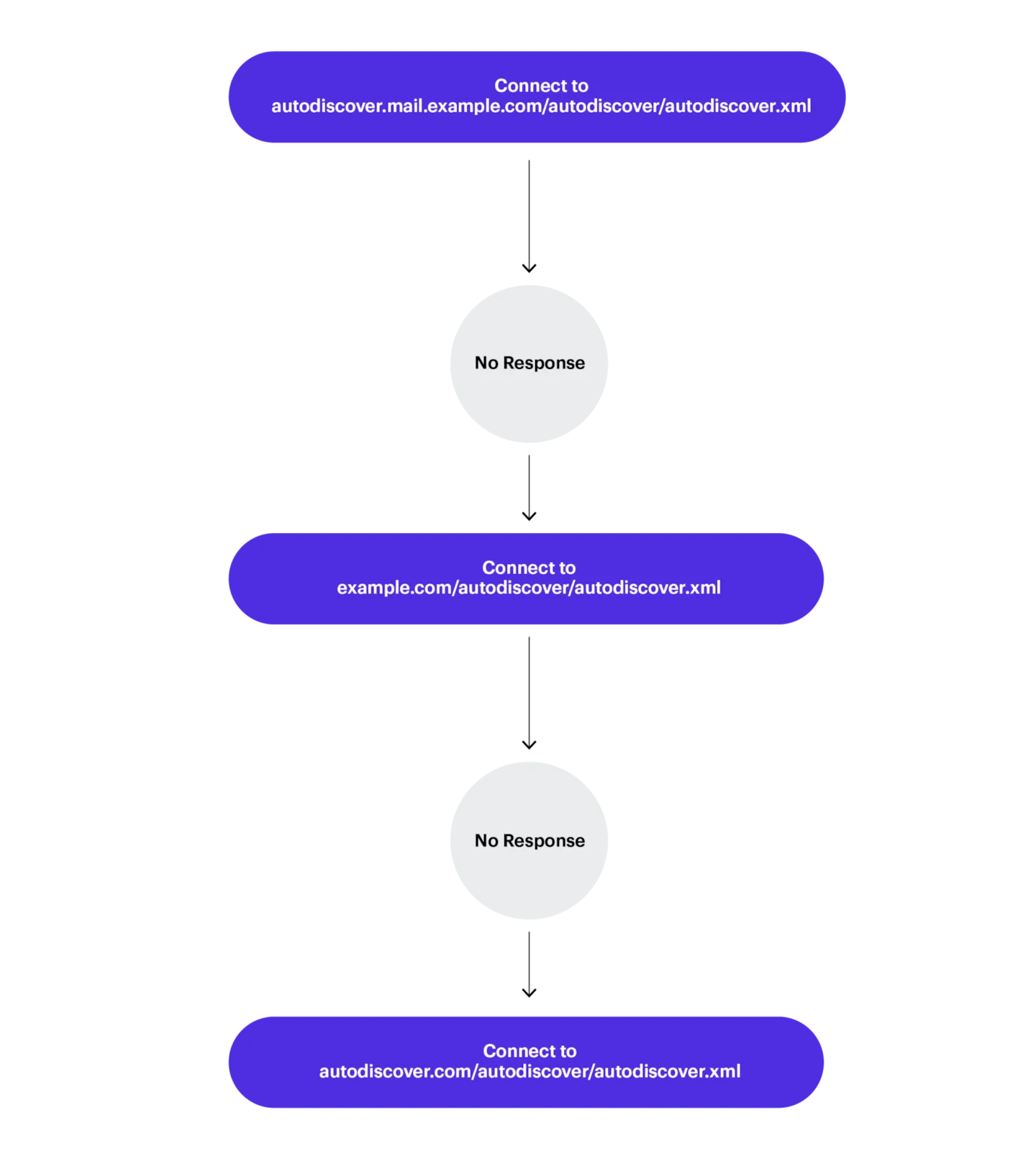
If none of these URLs respond, Autodiscover starts its back-off procedure. The mechanism always tries to resolve the Autodiscover portion of the domain and always tries to "fail up", so the next attempt is:
http://Autodiscover.com/Autodiscover/Autodiscover.xml
Whoever owns Autodiscover.com therefore receives all requests that cannot reach the original domain. The back-off process is illustrated here:
Step 2: Receive pre-authenticated requests
With the purchased domains pointed at the controlled web server, requests arrived for /Autodiscover/Autodiscover.xml carrying an Authorization header already populated with credentials in HTTP basic authentication, as shown in the captured request above. No packet was sent by the researcher other than what was required to establish an HTTP or HTTPS session between the server and the clients.
Step 3: Collect and analyse the credentials
The following data was collected between 20 April 2021 and 25 August 2021:
Between 16 April 2021 and 25 August 2021 the team captured 372,072 Windows domain credentials in total, of which 96,671 were unique, leaking from applications such as Microsoft Outlook, mobile email clients and other applications interfacing with Microsoft's Exchange server.
While examining the domains from the leaked credentials, the team found credentials from various companies across multiple verticals:
Step 4: The ol' switcheroo
The team also developed an attack called "The ol' switcheroo", which downgrades a client's authentication scheme from a secure one (OAuth, NTLM) to HTTP Basic Authentication, where credentials are sent in clear text:
When observing the HTTP server logs, the client is clearly downgraded after receiving the HTTP 401 response from the server telling it to use HTTP Basic Authentication. The empty bearer token is sent as part of the realm Autodiscovery process, which is discussed in Microsoft's documentation. On the victim's side it is difficult to realise that any sort of attack is happening. When the victim is redirected to the Autodiscover server because of the leak, a security alert pops up:
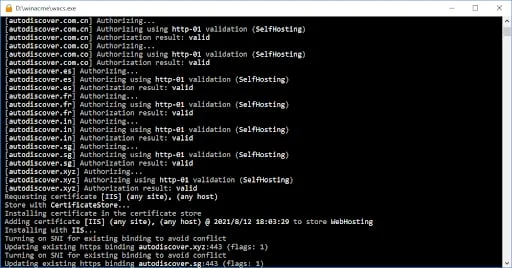
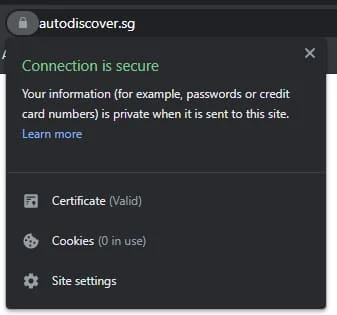
The warning indicates that while the certificate is valid, it is self-signed and should not be trusted. This can easily be avoided by deploying an actual SSL certificate. In this case a LetsEncrypt certificate was deployed within seconds, which remediated the SSL warning:
Once a secure session has been established, the victim sees a legitimate authentication prompt displayed by Microsoft Outlook:
This is the last stage of the attack: the victim enters their credentials into the dialog box, which sends them to the web server, where they appear in the logs.
Root cause
Two issues combine. The first is the design of the Autodiscover protocol, specifically the back-off algorithm: it always tries to resolve the Autodiscover portion of the domain and always tries to fail up, so a request for a domain that cannot be reached ends up at Autodiscover.<TLD>. The second is poor implementation in some applications, which send credentials pre-authenticated in HTTP basic authentication without first checking whether the resource exists or is protected, contrary to the normal HTTP authentication flow.
Existing defences did not stop this. The Shape Security vulnerabilities from 2017 were patched, but the same problem persisted in 2021 across a larger set of third-party applications. The leaked credentials are valid Windows domain credentials, and basic authentication sends them in clear text over the wire. The report notes that if an attacker controls such domains, or can sniff traffic in the same network, they can capture domain credentials in plain text. If the attacker has DNS-poisoning capabilities on a large scale, such as a nation-state attacker, they could systematically syphon out leaky passwords through a large-scale DNS poisoning campaign based on these Autodiscover TLDs.
Impact
The credentials being leaked are valid Windows domain credentials used to authenticate to Microsoft Exchange servers. The implications of a domain credential leak at this scale are described as massive, and can put organisations in peril, especially given that the easiest way for an attacker to gain entry into an organisation is to use legitimate and valid credentials. The team received tens of thousands of valid Windows domain credentials without sending a single packet. The attack conditions are: control of the relevant Autodiscover domains, or the ability to sniff traffic in the same network, or large-scale DNS-poisoning capability. The ol' switcheroo additionally downgrades a client from OAuth or NTLM to HTTP Basic Authentication, after which the victim enters credentials into a legitimate-looking Outlook prompt.
Fix
Two separate approaches are required: one for the general public using Exchange-based technologies such as Outlook or ActiveSync, and one for software developers and vendors implementing the Autodiscover protocol.
For the general public:
-
Actively block Autodiscover domains such as
Autodiscover.com,Autodiscover.com.cnand so on in your firewall. -
When deploying or configuring Exchange setups, make sure support for basic authentication is disabled, since using HTTP basic authentication is the same as sending a password in clear text over the wire.
-
A comprehensive textual list of all top-level domains can be found at
https://data.iana.org/TLD/tlds-alpha-by-domain.txt. A txt file with all possibleAutodiscover.TLDdomains was prepared, to be added to a local hosts file or firewall configuration to mitigate the risk of such Autodiscover domains resolving, in the GitHub repository athttps://github.com/guardicore/labs_campaigns/tree/master/Autodiscover.
For software vendors and developers: when implementing the Autodiscover protocol, do not let it fail upwards, meaning that domains such as Autodiscover. should never be constructed by the back-off algorithm.
Variants to test
- Other TLD-suffixed Autodiscover domains. Register or control
Autodiscover.<TLD>names for TLDs not in the list above and point them at a logging server. A positive result is pre-authenticated requests to/Autodiscover/Autodiscover.xmlcarrying anAuthorizationheader with basic authentication credentials. - Clients that skip the availability check. Test mail clients and third-party applications that implement Autodiscover, and watch whether they send credentials before receiving a 401. A positive result is a request with credentials on the first attempt, without a preceding challenge.
- Authentication downgrade. Present a 401 response asking for basic authentication to a client that started with OAuth or NTLM. A positive result is the client falling back to basic authentication and sending credentials in clear text.
- Certificate handling. Observe whether a self-signed certificate triggers a warning the user must accept, and whether a valid certificate removes it. A positive result is a client that proceeds to a credential prompt once the certificate is trusted.
- Old mobile clients. Check built-in mail readers on old Android and Samsung devices against controlled Autodiscover domains. A positive result is pre-authenticated requests from those user agents.
- macOS system components. Watch for connections from
accountsd-related user agents to controlled Autodiscover domains. A positive result is pre-authenticated requests from those components.
What happened, in plain words
Imagine you move house and tell a friend your new address, but you forget to mention the street name. Your friend knows the house number and the town, so they try every street in town until they find you. Now imagine that instead of a friend, it is your email program, and instead of your address, it is your username and password. That is roughly what happened here.
Microsoft Exchange is the software many organisations use to run their email. It comes with a helper feature called Autodiscover, whose whole job is to save people from typing lots of settings when they set up their email program. You type your email address and password, and Autodiscover works out the rest: which server holds your mail, and how to talk to it.
The problem is what Autodiscover does when it cannot find the right server. It keeps trying, and one of the things it tries is a guess based on the last part of your domain name. If your company is example.com, it will eventually try a domain called Autodiscover.com. Whoever owns that domain receives the request. And because of a second problem, the email program often puts your username and password into that request before it even knocks on the door.
A security researcher, Amit Serper of Guardicore Labs, bought a set of domains with names like Autodiscover.com.br and Autodiscover.fr, pointed them at a web server he controlled, and waited. Requests poured in, each one carrying real Windows domain credentials. Over a period of months he collected 372,072 Windows domain credentials, of which 96,671 were unique. He did this without sending a single packet of his own: the victims' own software did all the work.
He also built a second attack, which he called "The ol' switcheroo", that talks a client into using a weaker, clear-text way of sending the password instead of a stronger one.
This article walks through the whole story from the beginning, explaining every term as it comes up.
Some background you will need
Before the details make sense, a few ideas need to be clear.
A protocol is simply an agreed way for two computers to talk. Just as two people need to share a language before they can have a conversation, two computers need a protocol: a set of rules about what each side says and in what order. Autodiscover is one such protocol.
A domain name is the part of a web address you type, like example.com. The last piece, .com, is called the top-level domain, or TLD. Other TLDs include .fr for France, .jp for Japan and .xyz. A domain like Autodiscover.example.com has a subdomain in front: Autodiscover. Think of the domain as a building and the subdomain as a named office inside it.
A server is a computer whose job is to answer requests from other computers. When you visit a website, your browser asks a server for a page and the server sends it back.
HTTP is the protocol browsers and servers use to exchange web pages. HTTPS is the same thing with encryption added, so that nobody sitting between you and the server can read the conversation. The little padlock in your browser's address bar means HTTPS is in use.
A header is a small labelled piece of information attached to a web request, a bit like the fields on the outside of an envelope: who it is from, what it is about, and so on. One particular header, Authorization, is where a client puts proof of who it is.
Credentials is the general word for the things that prove your identity: usually a username and a password.
Windows domain credentials are the username and password an employee uses to log in to the organisation's central Windows network. Because Exchange is part of Microsoft's family of workplace products, the password you use for your work email is usually the same one you use to log in to your work computer. That is what makes a leak of these credentials so serious: it is not just an email password, it is the key to the building.
Basic authentication is one of the simplest ways for a program to prove who it is. It takes the username and password, joins them together, encodes them in a standard format called Base64, and puts the result in the Authorization header. Base64 is not encryption: anyone who intercepts it can decode it in a second. Sending basic authentication over plain HTTP is therefore the same as writing your password on a postcard.
OAuth and NTLM are two stronger alternatives. OAuth lets a program prove who you are using a temporary token rather than your actual password, and NTLM proves identity through a mathematical exchange that does not put the password on the wire. Both are preferable to basic authentication.
A user agent is a line in every web request in which the program identifies itself, for example "I am Firefox version 100 on Windows". It is how a server can tell which programs are talking to it.
A top-level domain collision, the class of problem here, happens when a name that software builds internally accidentally matches a real domain that somebody else can register. The software expects the name to be meaningless; in reality it belongs to a stranger.
DNS is the internet's address book: it translates names like example.com into the numeric addresses computers actually use. DNS poisoning is an attack in which someone corrupts those answers so that a name points to a machine the attacker controls.
A firewall is a filter that decides which network traffic is allowed in and out of a machine or network.
A hosts file is a small file on your computer that lets you override DNS by hand: you can write "this name goes to this address" and the computer will believe you before it asks the internet.
A certificate is a digital document that proves a server is who it claims to be. Browsers check it and show a warning if it is missing or untrusted. A self-signed certificate is one the server made for itself, without a trusted authority vouching for it, so browsers warn about it.
A packet is a small chunk of data travelling across a network. Saying the researcher received credentials "without sending a single packet" means his server only answered connections that the victims' software started; he never went looking for anyone.
The context: what Autodiscover is for
Microsoft Exchange uses Autodiscover to configure mail clients such as Microsoft Outlook automatically. The idea is that a user only supplies a username and password, and the protocol works out the rest of the configuration: the mail and Exchange server hostnames or IP addresses, and in some cases additional settings such as miscellaneous LDAP settings and WebDAV calendars. LDAP is a directory service, a kind of phone book for an organisation's users and resources; WebDAV is a way of sharing calendars and files over the web. Most users never see any of this.
Because Exchange is part of Microsoft's domain suite, the credentials used to log in to an Exchange-based inbox are in most cases the user's Windows domain credentials. That single fact is what turns a configuration convenience into a security problem.
The protocol has several iterations, versions and modes. This write-up focuses on the implementation based on the POX XML protocol. POX stands for Plain Old XML: the two computers exchange ordinary text documents written in XML, a format for structured data that both humans and machines can read. When a user adds a new Exchange account to Outlook, they are prompted for a username and password:
The screenshot shows the Outlook prompt that asks for a username and password when adding an Exchange account.
After the details are filled in, Outlook tries to use Autodiscover to configure the client:
The screenshot shows the Outlook auto account setup process.
The design flaw described here is in the protocol's back-off algorithm, which causes requests to leak to Autodiscover domains outside the user's own domain but in the same top-level domain, for example Autodiscover.com. "Back-off" means the series of fallback attempts a program makes when the first attempt fails: try this, then that, then something simpler. The report also describes a second issue: poor implementation of the protocol in some applications, which send credentials pre-authenticated without first checking whether the resource exists or is protected. "Pre-authenticated" means the password is attached to the very first request, before the server has even asked for it.
This is not a new class of problem. In 2017 researchers from Shape Security published a paper on how Autodiscover implementations in mobile email clients, such as Samsung's mail client on Android and Apple Mail on iOS, could cause such leaks (CVE-2016-9940, CVE-2017-2414). A CVE number is a public catalogue entry for a known vulnerability, so that everyone can refer to the same issue. Those vulnerabilities were patched, but in 2021 the same problem existed across a much larger threat landscape, with more third-party applications outside email clients exposing their users to the same risks.
The setup: buying the trap
No accounts, roles or special tooling were needed on the victim side. The researcher's precondition was simply to own Autodiscover domains with a TLD suffix and point them at a web server under his control. In other words, he did not break into anything. He registered names that were sitting unclaimed, the way anyone can register a name, and set up a website to receive whatever arrived.
The following domains were purchased:
- Autodiscover.com.br, Brazil
- Autodiscover.com.cn, China
- Autodiscover.com.co, Columbia
- Autodiscover.es, Spain
- Autodiscover.fr, France
- Autodiscover.in, India
- Autodiscover.it, Italy
- Autodiscover.sg, Singapore
- Autodiscover.uk, United Kingdom
- Autodiscover.xyz
- Autodiscover.online
- Autodiscover.cc
- Autodiscover.studio
- autodiscover.capital
- autodiscover.club
- autodiscover.company
- autodiscover.jp
- autodiscover.me
- autodiscover.mx
- autodiscover.ventures
Each of these is the word "Autodiscover" followed by a country code or a newer generic ending. The list matters because it shows the scale of the guesswork: the researcher was betting that software all over the world would eventually construct exactly these names.
These domains were assigned to a web server in the researcher's control, and the team waited for requests to various Autodiscover endpoints to arrive. An endpoint is a specific address on a server that accepts a particular kind of request, like a particular counter in a large office. The collection window ran from 16 April 2021 to 25 August 2021.
Finding it: the requests arrive
Requests started arriving in significant amounts from various domains, IP addresses and clients. The notable thing about them was that they requested the relative path /Autodiscover/Autodiscover.xml with the Authorization header already populated with credentials in HTTP basic authentication:
The screenshot shows a simple HTTP GET request with the Authorization header already populated with credentials in HTTP basic authentication.
Normally a client should not send credentials blindly. The expected HTTP authentication flow is:
- A client requests access to a protected resource.
- The web server returns a dialog box that requests the username and password (in accordance with the supported authentication methods, in our case, basic authentication).
- The client submits the username and password to the server.
- The server authenticates the user and returns the requested resource.
The diagram illustrates that four-step conversation. The key point is the order: first the client asks, then the server challenges, and only then does the client hand over the password. It is the difference between a bouncer asking for your ID and you taping your ID to your forehead before you reach the door.
The hostnames in the log, scrubbed for privacy reasons, are the domains from which the Autodiscover clients were trying to authenticate, along with their respective usernames and passwords:
The log excerpt shows the hostnames, scrubbed for privacy reasons, along with their respective usernames and passwords.
Because Autodiscover runs over HTTP and HTTPS, the user agent in each request shows which clients are reaching out with pre-authenticated requests. The captured Microsoft Outlook and Office user agents include various versions of Outlook, including Outlook for Mac. Among them was an interesting one, microsoft.windowscommunicationsapps, which according to official Microsoft documentation belongs to Outlook as well, specifically "Outlook Mail and Calendar":
The screenshot shows Microsoft documentation stating that this user agent belongs to Outlook Mail and Calendar.
Many requests showed no attempt on the client side to check whether the resource was available or even existed before sending an authenticated request. A correct implementation would first check whether the resource is valid, since it could be non-existent (HTTP 404) or password protected (HTTP 401), as in the diagram above. HTTP 404 is the familiar "page not found"; HTTP 401 means "you need to identify yourself first". After close inspection and manual testing of various programs, the team concluded that this user agent is also emitted by Mail, the email client built into Windows:
The screenshot relates to the built-in Windows Mail app, which the team concluded also emits this user agent.
The following user agents, belonging to clients on Apple's macOS, also connected to the servers. The team believes these are various mail clients that implemented the Autodiscover protocol themselves in a vulnerable way:
AppleExchangeWebServices/807+accountsd/113
Business/[redacted]+CFNetwork/1128.0.1+Darwin/19.6.0
Business/[redacted]+CFNetwork/1220.1+Darwin/20.3.0
Business/[redacted]+CFNetwork/1240.0.4+Darwin/20.5.0
CFNetworkAgent+(unknown+version)+CFNetwork/1121.2.2+Darwin/19.3.0
CFNetworkAgent+(unknown+version)+CFNetwork/1240.0.4+Darwin/20.6.0
CFNetworkAgent+(unknown+version)+CFNetwork/978.0.7+Darwin/18.7.0
iTunes+(unknown+version)+CFNetwork/520.51.3
networkd+(unknown+version)+CFNetwork/758.5.3+Darwin/15.6.0
Enterprise/[redacted]+CFNetwork/1220.1+Darwin/20.3.0
Enterprise/[redacted]+CFNetwork/1240.0.4+Darwin/20.5.0
Each line is one program's self-introduction. AppleExchangeWebServices is Apple's own Exchange connector. accountsd is a background service in macOS that manages accounts. CFNetwork is Apple's networking library, and Darwin is the underlying operating system core, with the number after it being its version. Business and Enterprise are names used by mail clients built on Apple's frameworks. iTunes and networkd are other Apple components that apparently also made Autodiscover requests. The plus signs are simply how spaces are encoded in this kind of text.
Because of how macOS implements account synchronisation mechanisms and APIs, it is not possible to know exactly which application was using the Autodiscover API; the user agents above appear to be related to operating system components such as accountsd. An API is a defined way for one piece of software to ask another piece of software to do something, like a service counter with a fixed set of forms. Here, the operating system itself was making the requests on behalf of whichever app needed an account.
User agents belonging to various Samsung phones were also observed, apparently representing the built-in mail reader app on those phones:
SAMSUNG-GT-I9060/101.40202
SAMSUNG-GT-I9195L/101.40402
SAMSUNG-GT-I9508/101.40402
SAMSUNG-GT-N5100/101.40402
SAMSUNG-GT-N5110/101.40402
SAMSUNG-SM-G355M/101.40402
SAMSUNG-SM-G357M/101.40402
SAMSUNG-SM-G386F/101.40202
SAMSUNG-SM-G530M/101.40404
SAMSUNG-SM-G7102/101.40402
SAMSUNG-SM-T110/101.40202
SAMSUNG-SM-T210/101.40402
SAMSUNG-SM-T211/101.40402
SAMSUNG-SM-T230/101.40402
SAMSUNG-SM-T320/101.40402
SAMSUNG-SM-T331C/101.40402
SAMSUNG-SM-T531/101.40402
SAMSUNG-SM-T700/101.40402
Each line names a Samsung device model followed by a version number of the mail software. The model codes are the kind printed on the box or found in the phone's settings.
These devices are very old, running very old versions of Android and Samsung's underlying software packages. The team believes the reason only these old Samsung devices were seen is that the vulnerabilities were disclosed to Samsung in 2017 by Shape Security, after that report and Black Hat talk about the Autodiscover issues. A Black Hat talk is a presentation at one of the large security conferences, where researchers explain their findings publicly. Once a problem is described publicly, vendors fix it, which is why only unpatched, ageing devices still showed up four years later.
Exploitation, step by step
Step 1: Understand the URL construction and the back-off
When a user supplies an email address such as [redacted], the client parses it and builds Autodiscover URLs in the following format:
https://Autodiscover.example.com/Autodiscover/Autodiscover.xml
http://Autodiscover.example.com/Autodiscover/Autodiscover.xml
https://example.com/Autodiscover/Autodiscover.xml
http://example.com/Autodiscover/Autodiscover.xml
Line by line: the first line tries the secure version of the server named Autodiscover inside the company's own domain. The second tries the same server without encryption. The third tries the company's main domain directly, securely. The fourth tries it without encryption. In each case the client is asking for the same file, Autodiscover.xml, in the same folder, Autodiscover. The order shows a sensible preference for encryption first, but also a willingness to fall back to plain HTTP.
If none of these URLs respond, Autodiscover starts its back-off procedure. The mechanism always tries to resolve the Autodiscover portion of the domain and always tries to "fail up", so the next attempt is:
http://Autodiscover.com/Autodiscover/Autodiscover.xml
This single line is the heart of the bug. The client has stripped the company name out of the address and kept only the word Autodiscover plus the top-level domain .com. It is now asking a completely unrelated domain, owned by whoever got there first, for the same file. "Fail up" means that when the specific attempt fails, the software moves to a broader, less specific name instead of giving up.
Whoever owns Autodiscover.com therefore receives all requests that cannot reach the original domain. The back-off process is illustrated here:
The diagram illustrates the Autodiscover back-off process.
Step 2: Receive pre-authenticated requests
With the purchased domains pointed at the controlled web server, requests arrived for /Autodiscover/Autodiscover.xml carrying an Authorization header already populated with credentials in HTTP basic authentication, as shown in the captured request above. No packet was sent by the researcher other than what was required to establish an HTTP or HTTPS session between the server and the clients. In plain terms: he set up a mailbox and the letters arrived by themselves.
Step 3: Collect and analyse the credentials
The following data was collected between 20 April 2021 and 25 August 2021:
Between 16 April 2021 and 25 August 2021 the team captured 372,072 Windows domain credentials in total, of which 96,671 were unique, leaking from applications such as Microsoft Outlook, mobile email clients and other applications interfacing with Microsoft's Exchange server. The difference between the two numbers matters: the larger figure counts every request, including the same person's software trying again and again, while the smaller figure counts distinct username and password pairs.
While examining the domains from the leaked credentials, the team found credentials from various companies across multiple verticals:
Step 4: The ol' switcheroo
The team also developed an attack called "The ol' switcheroo", which downgrades a client's authentication scheme from a secure one (OAuth, NTLM) to HTTP Basic Authentication, where credentials are sent in clear text:
The illustration shows the ol' switcheroo attack. "Downgrade" is the general name for this trick, and it works because protocols are usually designed to let the two sides negotiate, and negotiation can be steered.
When observing the HTTP server logs, the client is clearly downgraded after receiving the HTTP 401 response from the server telling it to use HTTP Basic Authentication. The empty bearer token is sent as part of the realm Autodiscovery process, which is discussed in Microsoft's documentation. A bearer token is a temporary pass, like a cloakroom ticket, that a client presents instead of a password; an empty one is a placeholder sent during the initial negotiation. A realm is the name of the protected area the server is describing when it issues its challenge. On the victim's side it is difficult to realise that any sort of attack is happening. When the victim is redirected to the Autodiscover server because of the leak, a security alert pops up:
The screenshot shows the security alert prompted by Microsoft Outlook. The warning indicates that while the certificate is valid, it is self-signed and should not be trusted. This can easily be avoided by deploying an actual SSL certificate. In this case a LetsEncrypt certificate was deployed within seconds, which remediated the SSL warning:
The screenshot shows the tool used to install the LetsEncrypt certificate.
The screenshot shows that autodiscover.sg is now secured with a valid certificate.
Once a secure session has been established, the victim sees a legitimate authentication prompt displayed by Microsoft Outlook:
The screenshot shows the basic authentication dialog displayed in Outlook. This is the last stage of the attack: the victim enters their credentials into the dialog box, which sends them to the web server, where they appear in the logs. From the victim's point of view, they simply typed their password into their email program, exactly as they have done a hundred times before.
Root cause: why it works
Two issues combine. The first is the design of the Autodiscover protocol, specifically the back-off algorithm: it always tries to resolve the Autodiscover portion of the domain and always tries to fail up, so a request for a domain that cannot be reached ends up at Autodiscover.<TLD>. The second is poor implementation in some applications, which send credentials pre-authenticated in HTTP basic authentication without first checking whether the resource exists or is protected, contrary to the normal HTTP authentication flow.
Existing defences did not stop this. The Shape Security vulnerabilities from 2017 were patched, but the same problem persisted in 2021 across a larger set of third-party applications. The leaked credentials are valid Windows domain credentials, and basic authentication sends them in clear text over the wire. The report notes that if an attacker controls such domains, or can sniff traffic in the same network, they can capture domain credentials in plain text. If the attacker has DNS-poisoning capabilities on a large scale, such as a nation-state attacker, they could systematically syphon out leaky passwords through a large-scale DNS poisoning campaign based on these Autodiscover TLDs. "Sniffing" means quietly reading traffic that passes through a network you have access to, for example on a shared office or cafe Wi-Fi.
Impact: what it means in practice
The credentials being leaked are valid Windows domain credentials used to authenticate to Microsoft Exchange servers. The implications of a domain credential leak at this scale are described as massive, and can put organisations in peril, especially given that the easiest way for an attacker to gain entry into an organisation is to use legitimate and valid credentials. The team received tens of thousands of valid Windows domain credentials without sending a single packet. The attack conditions are: control of the relevant Autodiscover domains, or the ability to sniff traffic in the same network, or large-scale DNS-poisoning capability. The ol' switcheroo additionally downgrades a client from OAuth or NTLM to HTTP Basic Authentication, after which the victim enters credentials into a legitimate-looking Outlook prompt.
Fix: what to do about it
Two separate approaches are required: one for the general public using Exchange-based technologies such as Outlook or ActiveSync, and one for software developers and vendors implementing the Autodiscover protocol. ActiveSync is Microsoft's protocol for keeping mobile devices in sync with an Exchange mailbox.
For the general public:
- Actively block Autodiscover domains such as
Autodiscover.com,Autodiscover.com.cnand so on in your firewall.
The screenshot shows Guardicore Centra's DNS Security, which allows creating block rules for Autodiscover domain names.
- When deploying or configuring Exchange setups, make sure support for basic authentication is disabled, since using HTTP basic authentication is the same as sending a password in clear text over the wire.
- A comprehensive textual list of all top-level domains can be found at
https://data.iana.org/TLD/tlds-alpha-by-domain.txt. A txt file with all possibleAutodiscover.TLDdomains was prepared, to be added to a local hosts file or firewall configuration to mitigate the risk of such Autodiscover domains resolving, in the GitHub repository athttps://github.com/guardicore/labs_campaigns/tree/master/Autodiscover.
For software vendors and developers: when implementing the Autodiscover protocol, do not let it fail upwards, meaning that domains such as Autodiscover. should never be constructed by the back-off algorithm.
Responsible disclosure is the practice of telling a vendor about a problem privately and giving them time to fix it before the details are published.
Variants to test
If you want to check whether a piece of software has the same weakness, these are the angles the report suggests.
- Other TLD-suffixed Autodiscover domains. Register or control
Autodiscover.<TLD>names for TLDs not in the list above and point them at a logging server. A positive result is pre-authenticated requests to/Autodiscover/Autodiscover.xmlcarrying anAuthorizationheader with basic authentication credentials. - Clients that skip the availability check. Test mail clients and third-party applications that implement Autodiscover, and watch whether they send credentials before receiving a 401. A positive result is a request with credentials on the first attempt, without a preceding challenge.
- Authentication downgrade. Present a 401 response asking for basic authentication to a client that started with OAuth or NTLM. A positive result is the client falling back to basic authentication and sending credentials in clear text.
- Certificate handling. Observe whether a self-signed certificate triggers a warning the user must accept, and whether a valid certificate removes it. A positive result is a client that proceeds to a credential prompt once the certificate is trusted.
- Old mobile clients. Check built-in mail readers on old Android and Samsung devices against controlled Autodiscover domains. A positive result is pre-authenticated requests from those user agents.
- macOS system components. Watch for connections from
accountsd-related user agents to controlled Autodiscover domains. A positive result is pre-authenticated requests from those components.
Glossary
- API: a defined way for one piece of software to ask another to do something, like a service counter with a fixed set of forms.
- Autodiscover: a Microsoft protocol that configures email clients automatically from just a username and password.
- Back-off: the series of fallback attempts a program makes when the first attempt fails.
- Basic authentication: a simple login method that sends the username and password encoded in Base64, which is not encryption.
- Base64: a standard way of encoding data as text so it can travel safely through text-based systems; it hides nothing.
- Bearer token: a temporary pass a client presents instead of a password.
- Black Hat: a large security conference where researchers present findings publicly.
- Certificate: a digital document proving a server is who it claims to be.
- Credentials: the things that prove your identity, usually a username and password.
- CVE: a public catalogue number for a known vulnerability.
- DNS: the internet's address book, translating names into numeric addresses.
- DNS poisoning: corrupting DNS answers so a name points to a machine the attacker controls.
- Domain name: the part of a web address you type, such as
example.com. - Downgrade: persuading two parties to use a weaker method than they could have used.
- Endpoint: a specific address on a server that accepts a particular kind of request.
- Firewall: a filter that decides which network traffic is allowed in and out.
- Header: a small labelled piece of information attached to a web request, like fields on an envelope.
- Hosts file: a local file that overrides DNS by hand.
- HTTP: the protocol browsers and servers use to exchange web pages.
- HTTPS: HTTP with encryption added.
- LDAP: a directory service, a kind of phone book for an organisation's users and resources.
- NTLM: a Microsoft authentication method that proves identity without putting the password on the wire.
- OAuth: an authentication method that uses temporary tokens rather than your actual password.
- Packet: a small chunk of data travelling across a network.
- POX XML: Plain Old XML, a simple format for structured text exchanged between computers.
- Pre-authenticated: a request that carries the password on the very first attempt, before the server asks.
- Protocol: an agreed way for two computers to talk.
- Realm: the name of the protected area a server describes when it issues an authentication challenge.
- Responsible disclosure: telling a vendor about a problem privately and giving them time to fix it before publishing.
- Self-signed certificate: a certificate a server made for itself, without a trusted authority vouching for it.
- Server: a computer whose job is to answer requests from other computers.
- Sniffing: quietly reading traffic that passes through a network you have access to.
- Subdomain: a named part in front of a domain, like an office inside a building.
- Top-level domain (TLD): the last piece of a domain name, such as
.comor.fr. - Top-level domain collision: when a name software builds internally accidentally matches a real domain someone else can register.
- User agent: the line in a web request in which the program identifies itself.
- WebDAV: a way of sharing calendars and files over the web.
- Windows domain credentials: the username and password an employee uses to log in to the organisation's central Windows network.




