Microsoft bug bounty writeup
An exposed Plesk-stat/awstats log directory on an Xbox domain was publicly accessible, revealing visitor IP addresses, user agents and referer websites. An attacker could read this information to learn about site visitors and internal referrers.

Hello folks! I’m back again with my another writeup.
The full write-up lives on its author's site
It belongs to its author, so we link to it rather than copy it. The other two tabs are our own rewrites, checked against it.
Context
This write-up covers an information disclosure issue found in a Microsoft domain, which earned the researcher a place in the Microsoft Hall of fame. The researcher had previously been hunting on Microsoft domains and on the Xbox program, and the finding came out of basic reconnaissance rather than a deep application-specific attack.
The exposed feature is a Plesk-stat directory: a log analyser that generates web, streaming, FTP or mail server statistics in graphical form. As the researcher describes it, Plesk-stat can analyse log files from major server tools such as Apache (NCSA combined/XLF/ELF or common/CLF log format), WebStar, IIS (W3C log format) and many other web, proxy, WAP, streaming, mail and FTP servers. The two references given are awstats and webalizer. When such a directory is left publicly reachable, the generated statistics pages are readable by anyone who finds them.
Setup
No accounts, roles or special tooling were required. The work was done with a browser and Google search. The only precondition was that the target exposed a directory listing or a statistics directory that could be found through a search engine. The report does not name the specific host that was affected.
Finding it
The researcher performed initial recon on Microsoft domains, gathered subdomains and started hunting on them. Along the way they found cache poisoning, broken authentication, Jira (CVE-2020-14181) and anonymous FTP, but all of these were marked Not Applicable.

They then moved on to the Xbox program and started recon from the basics, using Google Dork. The dork used was:
site:target.com intitle:index.of
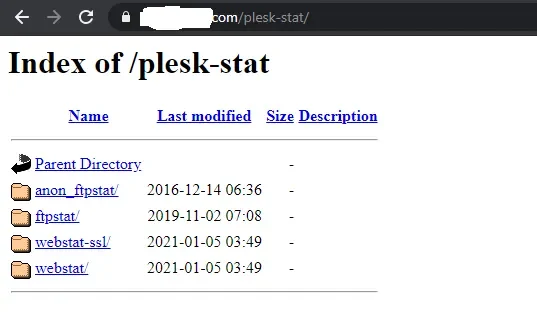
This asks the search engine for indexed pages on the target domain whose title contains "index.of", which is the typical title of an open directory listing. The search returned 2 results. The first was a blank directory. The second was a Plesk-stat directory, which the researcher was not familiar with at the time.
Exploitation
Step 1: Open the discovered directories
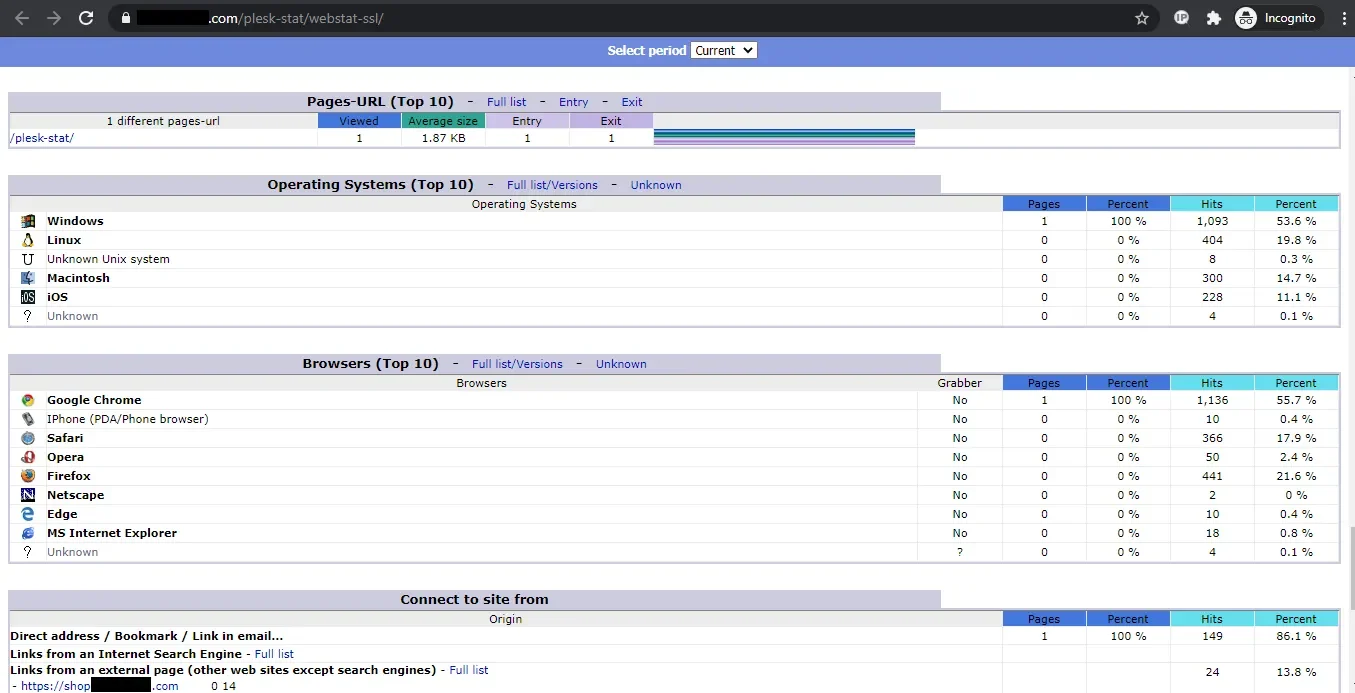
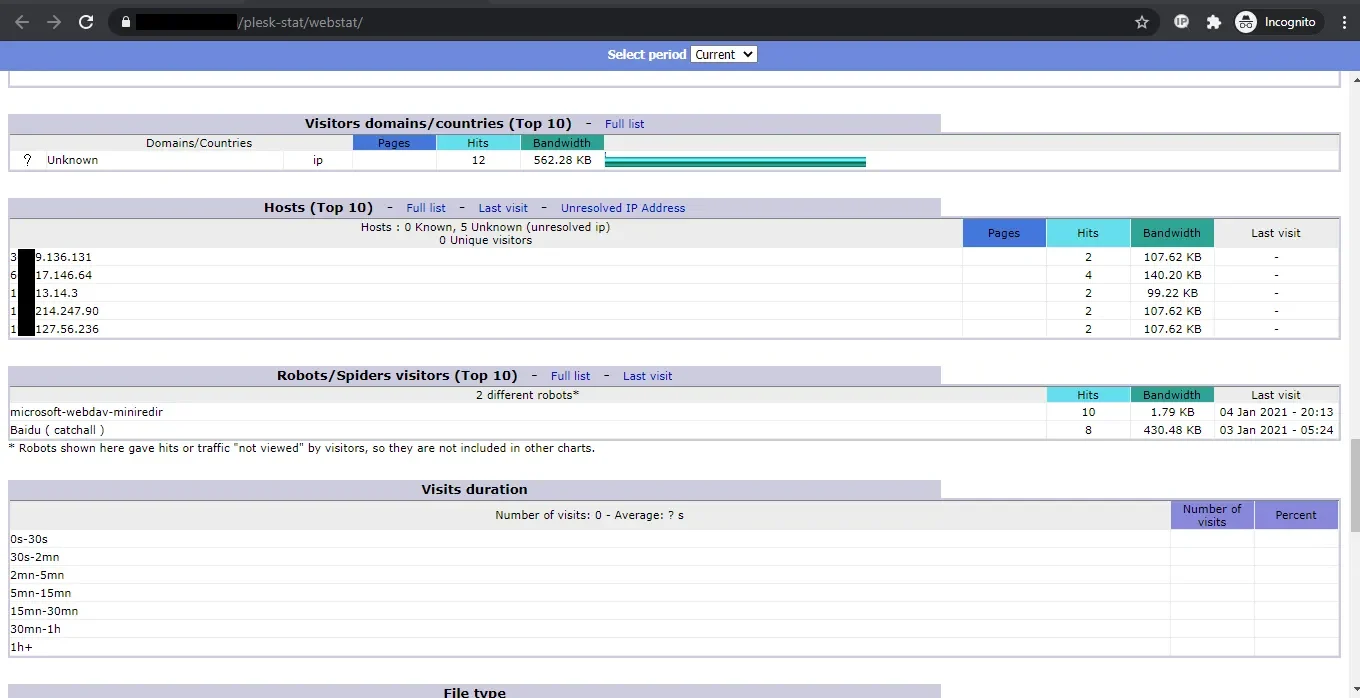
The researcher opened all the directories one by one. Inside, there were visitors' IP addresses, user agents, referer websites and many more things. In other words, the statistics pages exposed the raw request metadata of the site's visitors.
Step 2: Identify the generator
While browsing the exposed pages, the footer caught the researcher's attention: it read "Generated by awstats.org". That footer is what identified the software behind the directory. The researcher then did some research on awstat and plesk-stat to understand what the pages were and what they contained.
Step 3: Report it
The researcher took screenshots, wrote a report and sent it to the Microsoft Portal. Four months later the acknowledgement appeared in the Microsoft Hall of fame.
Root cause
The report does not analyse the server configuration, so the exact cause is not stated. What the evidence shows is that a statistics directory generated by Plesk-stat/awstats was reachable from the public internet and could be found through a Google search. Statistics output of this kind is meant for the site operator, not for anonymous visitors, because it contains per-visitor request data. Leaving the directory publicly accessible is what exposed it. The report does not say whether authentication, IP restriction or a robots rule was missing or misconfigured.
Impact
Anyone who found the directory could read the statistics pages, which included visitors' IP addresses, user agents and referer websites, plus other request details. The researcher does not quantify how many records or visitors were affected, and does not describe any further use of the data. The exposure is limited to whatever the statistics pages contained; the report does not claim access to logs beyond what those pages displayed, nor any ability to modify them.
Fix
Based on the nature of the exposure, the directory should not be publicly reachable: it should be protected by authentication or network restriction, or removed from the public web root.
Variants to test
The same dork generalises to any target that leaves directory listings or generated statistics online:
site:target.com intitle:index.of
Concrete things to try:
- Run the dork against each scope you are authorised to test and open every result. A positive result is a directory listing whose contents are browsable without authentication.
- Look at the footer of any statistics page you reach. A footer such as "Generated by awstats.org" identifies the generator and tells you what kind of data the page holds.
- Check whether the statistics pages show per-visitor data such as IP addresses, user agents and referers. A positive result is visitor-level request metadata rendered for anonymous users.
- Try the same search with other index title patterns and on subdomains gathered during recon, since the researcher's path was subdomain collection followed by basic dorking.
To help others reproduce and check the pattern, the researcher released a nuclei template the day before publishing, linked from the write-up, and advised readers to update their templates.
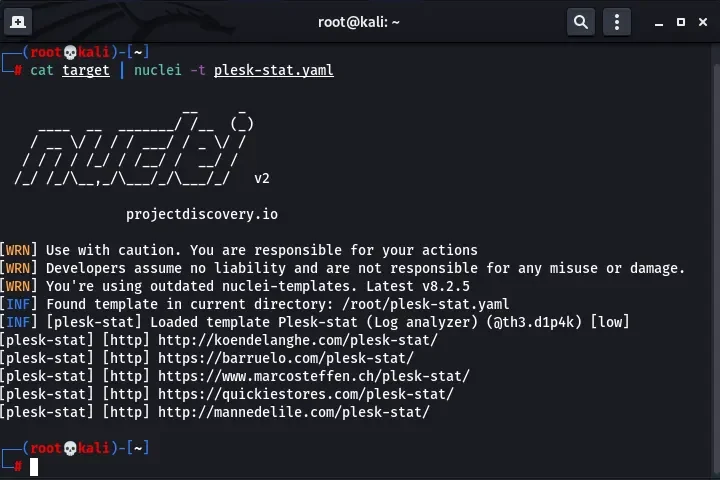
This screenshot is educational purpose only don't misuse it
What happened, in plain words
A security researcher was looking for bugs in Microsoft's online services. Before trying anything clever, he did something very simple: he asked Google to show him pages on Microsoft's domains that look like open folders. One of the results was a folder full of website statistics, and those statistics were readable by anyone on the internet. They contained information about the people who had visited the site, such as their IP addresses, the browsers they used and the websites they came from.
That kind of leak is called information disclosure: private or internal data that should stay behind a login or inside a company is instead visible to the public. It is like leaving the receptionist's visitor book on a bench outside the office. Nobody broke a lock; the book was simply lying in the open.
The researcher reported it to Microsoft, and four months later his name appeared in the Microsoft Hall of fame, a public list of people who have reported valid security issues. This article walks through exactly how he found it, in the same order he did, and explains every term along the way.
The background you need
Before the steps, a few ideas that come up again and again.
- Recon (reconnaissance): the information-gathering phase of security testing. Before attacking anything, you first learn what exists: which websites, which subdomains, which services. It is like walking around a building and noting the doors and windows before trying any of them.
- Subdomain: a smaller name under a main domain. If
example.comis the main building,shop.example.comandmail.example.comare separate entrances with their own names. Companies often have many, and some are forgotten or less protected. - Google Dork: a search query that uses special operators to find very specific things on the web. Instead of searching for words, you search for patterns, such as pages whose title looks like a folder listing. It is a normal Google search, just phrased precisely.
- Directory listing: when a web server is asked for a folder and has no web page to show, it may instead print a plain list of the files inside, with links to each one. It is like opening a filing cabinet and finding an index card listing every folder in it.
- IP address: the numeric address of a device on the internet, roughly like a postal address for a computer. It can often be traced to a city or an internet provider.
- User agent: the text a browser sends to identify itself, for example which browser and operating system it is. It is like a visitor writing "arrived by car, wearing a blue coat" in a guest book.
- Referer: the address of the page a visitor came from before reaching this one. It tells the site owner which links or search results bring people in.
- Log file: a running record that a server writes about every request it receives. Think of a shop's till roll: every transaction, in order, with time and details.
- Log analyser: software that reads those log files and turns them into charts and tables, so a human can see how many visitors came, from where, and with what.
- Plesk-stat: the statistics component that comes with Plesk. It reads the server's log files and produces graphical reports about web, streaming, FTP or mail traffic.
- awstats: a free log analyser, one of the two references the researcher gives for Plesk-stat.
- webalizer: another free log analyser, similar in purpose to awstats.
- Nuclei: a free tool that runs ready-made checks (called templates) against a website to see whether a known issue is present. A template is a small recipe for one check.
- Hall of fame: a public acknowledgement page where a company lists researchers who reported valid issues. It is recognition, not necessarily payment.
Step 1: Looking around Microsoft's domains
The researcher started by gathering subdomains of Microsoft and poking at them. Along the way he found several other kinds of problems:
- Cache poisoning: a flaw where an attacker can make a shared cache (a copy of a page kept to serve it faster) store a tampered version, which is then handed to other visitors.
- Broken authentication: weaknesses in how a site handles logging in and out, for example a logout that does not really end the session.
- Jira (CVE-2020-14181): a known vulnerability in Jira, a popular issue-tracking product made by Atlassian. The identifier
CVE-2020-14181is a public catalogue number for that specific flaw. - Anonymous FTP: an FTP server (a service for transferring files) that lets anyone log in without a username or password.
All of these were marked Not Applicable. The report does not explain why. This is common and is not a judgement on the researcher's skill; it just means those findings did not count.
Step 2: Moving to Xbox and starting from the basics
After those rejections, the researcher switched to Microsoft's Xbox program and went back to fundamentals. Instead of probing applications, he used a Google Dork:
site:target.com intitle:index.of
Line by line, in plain words:
site:target.comtells Google to return only results from that one domain. Replacetarget.comwith the domain you are allowed to test. It is the equivalent of telling a librarian "only books from this shelf".intitle:index.oftells Google to return only pages whose title contains the textindex.of. Web servers that show a folder listing usually give that page a title like "Index of /something". So this half of the query looks for open folder listings.- Together, the query means: "show me open folder listings on this domain."
The researcher got 2 results. The first was an empty directory, nothing useful. The second was a Plesk-stat directory, which he had not seen before. That unfamiliarity is exactly why it was worth opening: a folder you do not recognise is a folder whose contents you cannot predict.
Step 3: Opening the folders and seeing what is inside
He opened the directories one by one. Inside, the pages showed visitors' IP addresses, user agents, referer websites and many more things. In other words, the statistics pages were publishing the raw details of who visited the site and how. That is the information disclosure: data about real visitors, visible to any anonymous person who found the folder.
Step 4: Noticing the footer
While browsing, the footer of the page caught his attention. It read:
Generated by awstats.org
A footer is the strip of text at the bottom of a page. This one named the software that produced the page. That single line told him what he was looking at: an awstats report, served through Plesk-stat. Knowing the product matters because it tells you what kind of data the page holds and why it should not be public. He then read up on awstats and Plesk-stat to understand them properly.
As he describes it, Plesk-stat is a log analyser that generates advanced web, streaming, FTP or mail server statistics in graphical form. It can analyse log files from major server tools such as Apache (in NCSA combined/XLF/ELF or common/CLF log format), WebStar, IIS (W3C log format) and many other web, proxy, WAP, streaming, mail and FTP servers. The two references he gives are awstats and webalizer.
In everyday terms: the server writes a diary of every request it receives, and Plesk-stat turns that diary into charts. Those charts are meant for the site operator, the person who runs the site. They are not meant for strangers, because the diary entries include details about individual visitors.
Step 5: Reporting it
He took screenshots, wrote a clear report and submitted it through the Microsoft Portal, the official channel for reporting security issues to Microsoft. Four months later, the acknowledgement appeared in the Microsoft Hall of fame.
He closes with a line he attributes to himself:
"If you are gaining something from infosec community, then it's your duty to contribute/share your findings with community." -th3.d1p4k
Because he thought the technique would be new and useful to beginners, he also built a nuclei template and released it the day before publishing the write-up, advising readers to update their templates. A nuclei template is a reusable check, so others can test the same pattern on systems they are authorised to test.
This screenshot is educational purpose only don't misuse it
Why this worked
A statistics folder is supposed to be for the site operator. Here it was reachable from the public internet, which is how a plain Google query surfaced it. The report does not analyse the server configuration, so it does not say whether a login, an IP restriction or a search-engine exclusion rule was missing or misconfigured. What is clear is the result: visitor-level request data was rendered for anonymous users.
What someone could learn from it
Anyone who found the folder could read the statistics pages, including visitors' IP addresses, user agents and referer websites, plus other request details. The exposure is limited to what those pages displayed; the report does not claim access to the underlying log files beyond that, nor any ability to change them.
How it should be fixed
Given the nature of the exposure, the sensible fix is to keep such a directory off the public internet: protect it with a login or a network restriction, or remove it from the public web root.
Trying the same idea yourself
The same search pattern applies to any site that leaves folder listings or generated statistics online:
site:target.com intitle:index.of
A simple routine, only on systems you are authorised to test:
- Run the search against each domain in scope and open every result. A hit is a folder whose contents you can browse without logging in.
- Look at the footer of any statistics page you reach. A line such as
Generated by awstats.orgtells you which software produced it and therefore what kind of data the page holds. - Check whether the pages show per-visitor details such as IP addresses, user agents and referers. A hit is visitor-level data shown to anonymous users.
- Repeat the search with other folder-title patterns and on the subdomains you collected during recon, since the researcher's path was subdomain collection followed by basic searching.
Glossary
- Recon (reconnaissance): the information-gathering phase of security testing, learning what exists before testing it.
- Subdomain: a named part of a larger domain, such as
shop.example.comunderexample.com. - Google Dork: a search query using special operators to find specific patterns on the web.
- Directory listing: a web page that lists the files in a folder, shown when no normal page exists for that folder.
- Information disclosure: a flaw where data that should be private is visible to people who should not see it.
- IP address: the numeric address of a device on the internet.
- User agent: the text a browser sends to identify itself, such as browser and operating system.
- Referer: the address of the page a visitor came from before the current one.
- Log file: a record a server writes of every request it receives.
- Log analyser: software that reads log files and turns them into charts and tables.
- Plesk: a control panel used to manage websites and servers.
- Plesk-stat: the statistics component of Plesk that builds graphical reports from server logs.
- awstats: a free log analyser used to produce website statistics.
- webalizer: another free log analyser with a similar purpose.
- Apache: a widely used web server, which writes logs in formats such as NCSA combined/XLF/ELF or common/CLF.
- IIS: Microsoft's web server, which writes logs in the W3C format.
- WebStar: a web server whose logs Plesk-stat can also analyse.
- Cache poisoning: a flaw where an attacker makes a shared cache store a tampered page that is then served to others.
- Broken authentication: weaknesses in how a site handles logging in and out.
- Jira: an issue-tracking product by Atlassian.
- CVE-2020-14181: a public catalogue number for a specific known vulnerability in Jira.
- Anonymous FTP: a file-transfer service that allows login without a username or password.
- Not Applicable: a program's decision that a reported issue does not qualify for the bounty.
- Nuclei: a free tool that runs ready-made checks, called templates, against a target.
- Template: a small reusable recipe for one security check.
- Hall of fame: a public page where a company acknowledges researchers who reported valid issues.
- Microsoft Portal: Microsoft's official channel for submitting security reports.