15 Jan 2021 Insertion of Malicious Links for Execution in Profile Picture - Unvalidated User Input in MS SharePoint 2019 (CVE-2020-1456)
An authenticated user could change the profile picture URL parameter in a save request to an arbitrary external link, which was then embedded as the profile picture. Anyone viewing a page with that picture would automatically request the attacker's link, enabling tracking, denial of service, or relaying of other attacks.

Today I am publishing a Finding discovered by my good friend userx73x76x6E - have fun reading his writeup!
The full write-up lives on its author's site
It belongs to its author, so we link to it rather than copy it. The other two tabs are our own rewrites, checked against it.
Context
This write-up covers a finding in Microsoft SharePoint Server 2019 for on-premises deployments with the User Profile Service Application enabled. In that configuration every user has a profile, and the profile can carry a picture. The picture is uploaded through the profile editor, previewed, and then saved together with the rest of the profile changes. Because the profile picture is rendered on many pages across a SharePoint farm, whatever ends up in the picture field is loaded by every browser that views a page containing that user's profile.
The researcher describes the issue as not a typical JavaScript XSS, although Microsoft categorised it as cross-site scripting and assigned CVE-2020-1456. The point of the write-up is that even where no script execution is possible, an attacker can still use the feature against users and infrastructure.
Setup
The test environment was built from scratch:
Windows Server
- Windows Server 2019 Evaluation, version 1809, OS build 17763.379
- Windows Updates until 09/09/2019 12:13PM
- Active Directory Domain Service added: the server was promoted to a domain controller and a new forest was created
SQL Server
- MS SQL Server 2017 Evaluation Edition, installation type Basic
- Installer version 14.1805.40.72.1, database version 14.0.1000.169
- Microsoft SQL Server Management Studio Release 18.2
SharePoint 2019
- SharePoint Server 2019, setup version 16.0.10337.12109
- The IMG file was saved as an ISO with Passmark OSFMount v3.0.1005.0
- SharePoint was set up as a Single-Server Farm
- The User Profile Service Application was added
The precondition for the attack is an authenticated user account on a farm where user profiles are enabled. The researcher was testing a SharePoint application and also partly tested SharePoint itself.
Finding it
In the profile editor, a user uploads a picture, reviews it in the profile, and then saves the changes, including all other entries.
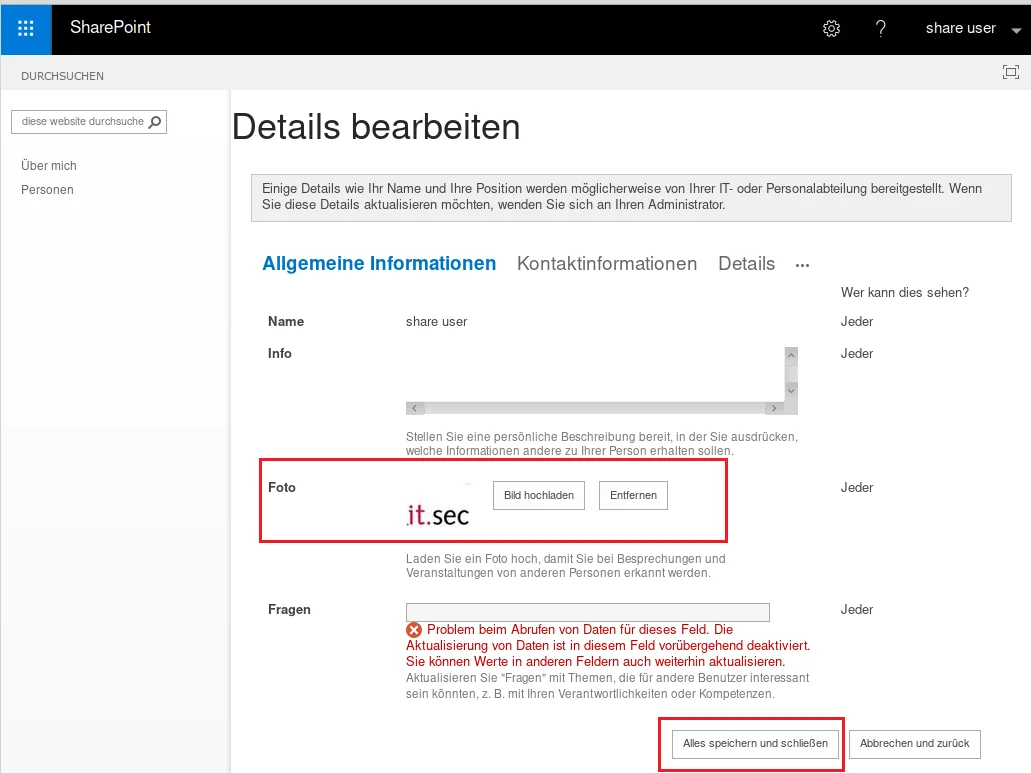
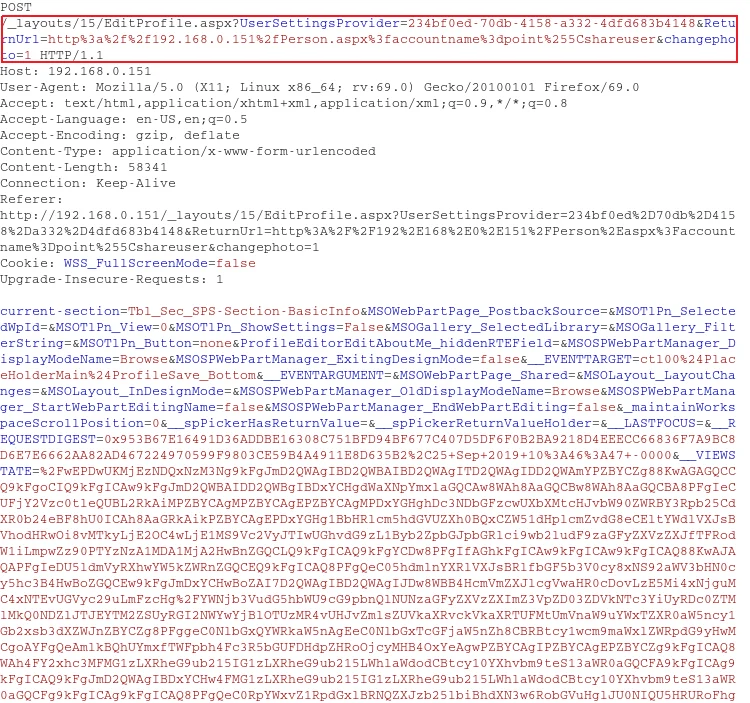
Saving the profile produces a POST request. For the user shareuser in the domain point, the request went to this URL:
http://[redacted]/_layouts/15/EditProfile.aspx?UserSettingsProvider=234bf0ed-70db-4158-a332-4dfd683b4148&ReturnUrl=http%3a%2f%2f192.168.0.151%2fPerson.aspx%3faccountname%3d%3Cspan%20style=%22background-color:%20#fcbd00%22%3Epoint%3C/span%3E%255C%3Cspan%20style=%22background-color:%20#fcbd00%22%3Eshareuser%3C/span%3E&changephoto=1
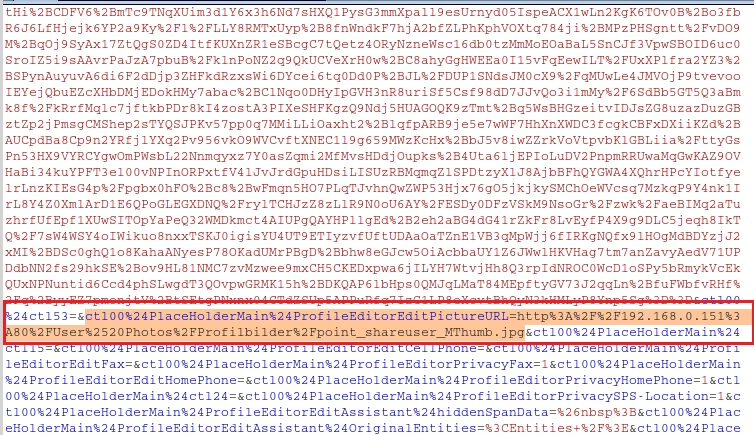
Among the POST parameters is ctl00$PlaceHolderMain$ProfileEditorEditPictureURL, which holds the path to the uploaded picture. In the captured request it appeared URL encoded:
ctl00%24PlaceHolderMain%24ProfileEditorEditPictureURL=http%3A%2F
%2F192.168.0.151%3A80%2FUser%2520Photos%2FProfilbilder%2Fpoint_shareuser_Mthumb.jpg
and in plain text:
ctl00$PlaceHolderMain$ProfileEditorEditPictureURL=
http://[redacted]:80/User%20Photos/Profilbilder/point_shareuser_Mthumb.jpg
The value is a URL, and the server accepted it as given. That is what made it interesting: the client supplies a full URL, and the server appears to take it as given.
Exploitation
Step 1: intercept the save request
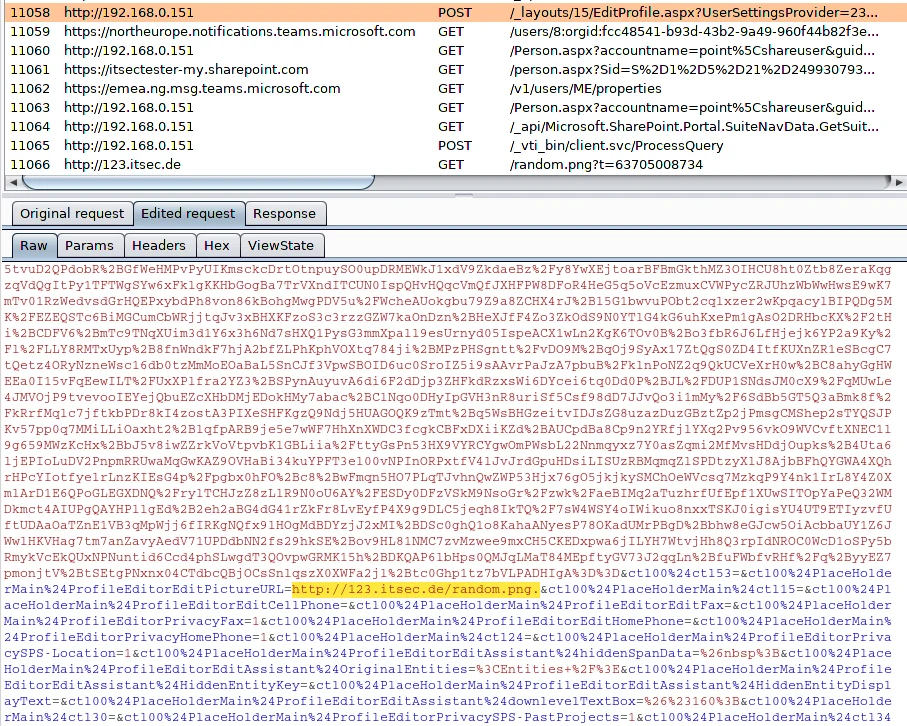
The researcher intercepted the POST request that saves the profile and changed the value of ctl00$PlaceHolderMain$ProfileEditorEditPictureURL to an external URL:
ctl00$PlaceHolderMain$ProfileEditorEditPictureURL=http://123.itsec.de/random.png
Step 2: observe that the server accepts it
The server accepted the user-provided input, and the URL was embedded instead of the URL to the locally stored picture. In this test a 1GB "image file" was placed behind the link, and the browser requested it.
Step 3: confirm in the page source
The embedded link could also be identified in the source code of the web page by analysing the src parameter of the HTML img tag.
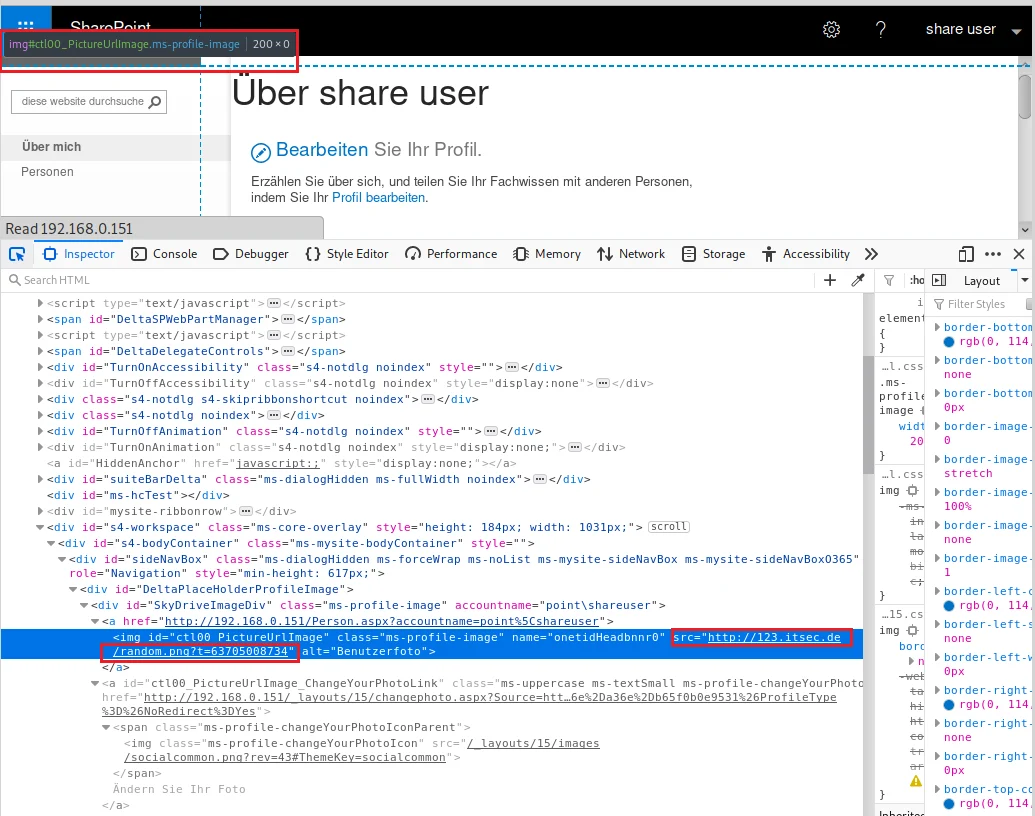
No script is needed. The stored value is simply a URL that every visitor's browser fetches when the profile picture is rendered.
Root cause
The vulnerability class is improper neutralisation of user-supplied input, CWE-79. The picture URL is taken from the client in the save request, and the server accepted the changed value instead of the path to the locally stored picture. When the profile is rendered, the stored value is placed into the src of the img tag, so the browser loads whatever host the attacker chose.
Microsoft scored it as XSS even though no JavaScript executes. The report does not describe any server-side allow-list, same-origin check or re-derivation of the picture path on save. Intercepting the request removes that.
Scoring as given in the report:
| Metric | Value |
|---|---|
| CVSS 2 | 6.5 (Medium), AV:N/AC:L/Au:S/C:P/I:P/A:P |
| CVSS 3.1 | 6.5 (Medium), AV:N/AC:L/PR:L/UI:R/S:C/C:L/I:L/A:L |
Impact
Every user who visits a site where the corresponding profile picture is embedded opens the link in the background. The report lists the following scenarios.
Denial of service. Links to large files can produce a DoS or DDoS. A single user downloads a large amount of data with each request; across many users this can exhaust bandwidth or take down a firewall or company proxy. Crafted requests to cloud resources can also get the company's IP address banned, denying access to other resources hosted at the same provider.
Tracking and GDPR. The default IIS configuration sends a complete referrer, so the embedded link can be used to track users and store all transmitted information, depending on the SharePoint application in use. This may constitute a breach under GDPR.
Internal path disclosure. With the default configuration of IIS 10.0, internal paths are sent with each request, which improves tracking and discloses internal paths.
Obfuscating other attacks. DoS, stored XSS, CSRF via GET and similar attacks can be relayed by giving other users a link to execute. Each visitor to a page with the "profile picture" embedded performs the attack automatically.
Reputation damage. Links to inappropriate or blocked sites are logged and blocked by the company proxy, which can lead to employees being approached and possibly given notice.
The report also tested the Office 365 integration for on-premises SharePoint because the impact would be higher if all MS Office products were affected. Valid profile pictures in on-premises SharePoint were not synced to Office 365. Had they been, malicious links could have reached Outlook, Teams, OneDrive and SharePoint Online.
Fix
The report does not describe the vendor fix or a patch diff. What the finding implies is that the server should not trust the picture URL supplied in the save request: it should accept only the path of the picture the user actually uploaded, or otherwise validate the value against an allow-list of local locations before storing it, and re-derive it server-side rather than echoing client input into the img src.
Variants to test
- Other profile fields rendered as URLs. Change any parameter that ends up in an
href,srcor similar attribute in the save request. A positive result is the page source containing your external host in that attribute. - Different schemes and hosts. Try
http,httpsand protocol-relative values pointing at a host you control. A positive result is a request arriving at your host from a browsing victim. - Large-file link. Point the field at a large file and load a page containing the profile. A positive result is the browser pulling the full file, which is the DoS primitive described above.
- Referrer and path leakage. Inspect what the victim's browser sends to your host when it fetches the embedded URL. A positive result is a full referrer or internal path information in the request, as the report describes for default IIS.
- Sync paths to other products. If a deployment syncs profile data to another service, check whether the manipulated value propagates. A positive result is the external URL appearing in the other product's rendering of the profile.
What happened, in plain words
A company can run Microsoft SharePoint Server 2019 on its own computers (this is called "on-premises", meaning the company hosts it rather than renting it from Microsoft's cloud). SharePoint is a product for sharing documents and building internal websites. One of its optional features is the User Profile Service Application, which gives every employee a profile page, much like a social network profile. A profile can carry a picture.
The researcher found that when a user saves their profile picture, the web page sends the picture's address to the server, and the server accepted a changed address. By changing that address before it reaches the server, a logged-in user can make their "profile picture" point at any file on any website in the world. Because the profile picture appears on many pages across SharePoint, every colleague who opens one of those pages makes their own browser download that file in the background, without clicking anything.
Microsoft classified this as cross-site scripting (XSS) and gave it the identifier CVE-2020-1456. A CVE is a public catalogue number for a known security flaw, so people can look it up and track fixes. The researcher notes that this is not a typical JavaScript XSS: no script runs. The point of the write-up is that even without script execution, a feature like this can be turned against users and against the company's network.
Context
This finding is in SharePoint Server 2019 for on-premises deployments where the User Profile Service Application is enabled. In that setup every user has a profile, and the profile can carry a picture. The picture is uploaded through the profile editor, previewed, and then saved together with the rest of the profile changes.
Why does that matter? Because the profile picture is shown on many pages across a SharePoint farm. A farm is simply a group of SharePoint servers working together as one installation. Whatever ends up in the picture field is loaded by every browser that views a page containing that user's profile. So one small field, trusted too much, becomes something that reaches many people.
The researcher describes the issue as not a typical JavaScript XSS, although Microsoft categorised it as cross-site scripting and assigned CVE-2020-1456. The point of the write-up is that even where no script execution is possible, an attacker can still use the feature against users and infrastructure.
Setup
The test environment was built from scratch. This matters for a beginner because it shows the researcher did not guess: they built a realistic small company setup, with a directory of users, a database, and SharePoint itself.
Windows Server
- Windows Server 2019 Evaluation, version 1809, OS build 17763.379
- Windows Updates until 09/09/2019 12:13PM
- Active Directory Domain Service added: the server was promoted to a domain controller and a new forest was created
SQL Server
- MS SQL Server 2017 Evaluation Edition, installation type Basic
- Installer version 14.1805.40.72.1, database version 14.0.1000.169
- Microsoft SQL Server Management Studio Release 18.2
SharePoint 2019
- SharePoint Server 2019, setup version 16.0.10337.12109
- The IMG file was saved as an ISO with Passmark OSFMount v3.0.1005.0
- SharePoint was set up as a Single-Server Farm
- The User Profile Service Application was added
A few of those terms in plain words. Active Directory is Microsoft's directory of user accounts and computers; a domain controller is the server that keeps that directory; a forest is the top-level container of such a directory. SQL Server is Microsoft's database product, where SharePoint stores its data. An ISO is a single file that holds the contents of a CD or DVD, and OSFMount is a tool that makes such a file look like a mounted disc. A Single-Server Farm means everything runs on one machine.
The precondition for the attack is an authenticated user account on a farm where user profiles are enabled. In other words, the attacker needs a normal login, nothing more. The researcher was testing a SharePoint application and also partly tested SharePoint itself.
Finding it
In the profile editor, a user uploads a picture, reviews it in the profile, and then saves the changes, including all other entries.
The screenshot shows the profile editor with the uploaded picture being reviewed before the changes are saved. This is the ordinary, intended use: pick a file, look at it, press save.
Saving the profile produces a POST request. A request is a message your browser sends to a server; POST is the type of request used when you submit data, as opposed to GET, which is used when you simply ask for a page. For the user shareuser in the domain point, the request went to this URL:
http://[redacted]/_layouts/15/EditProfile.aspx?UserSettingsProvider=234bf0ed-70db-4158-a332-4dfd683b4148&ReturnUrl=http%3a%2f%2f192.168.0.151%2fPerson.aspx%3faccountname%3d%3Cspan%20style=%22background-color:%20#fcbd00%22%3Epoint%3C/span%3E%255C%3Cspan%20style=%22background-color:%20#fcbd00%22%3Eshareuser%3C/span%3E&changephoto=1
Line by line, in plain words:
http://[redacted]/is the address of the SharePoint server on the local network. An address starting with 192.168 is a private address, only reachable inside a local network._layouts/15/EditProfile.aspxis the page that edits a profile. The.aspxending means it is a page built with Microsoft's web technology.UserSettingsProvider=234bf0ed-70db-4158-a332-4dfd683b4148is an identifier telling SharePoint which settings provider to use. A long string of letters and digits like this is usually an internal ID.ReturnUrl=...is where the browser should go afterwards. Its value is itself a URL, so it is encoded:%3ais a colon,%2fis a slash,%3dis an equals sign,%20is a space,%22is a double quote,%3Cand%3Eare the angle brackets<and>. Decoded, it points atPerson.aspx?accountname=...with the account namepoint\shareuser, wherepointis the domain andshareuserthe user.changephoto=1is a flag saying a photo change is included.
The screenshot shows the captured POST request that saves the uploaded profile picture. Capturing a request means pausing it in a tool between the browser and the server, so you can read it and change it before it is sent. That is the whole trick of this finding.
Among the POST parameters is ctl00$PlaceHolderMain$ProfileEditorEditPictureURL, which holds the path to the uploaded picture. A parameter is a named piece of data in a request, like a field in a form: a name, an equals sign, and a value. The name here is long and machine-generated, which is typical of Microsoft web pages. In the captured request it appeared URL encoded:
ctl00%24PlaceHolderMain%24ProfileEditorEditPictureURL=http%3A%2F
%2F192.168.0.151%3A80%2FUser%2520Photos%2FProfilbilder%2Fpoint_shareuser_Mthumb.jpg
and in plain text:
ctl00$PlaceHolderMain$ProfileEditorEditPictureURL=
http://[redacted]:80/User%20Photos/Profilbilder/point_shareuser_Mthumb.jpg
What the two blocks say, in plain words:
- The first block is the same data with special characters replaced by percent codes, because URLs cannot contain spaces and some symbols directly.
%24is$,%3Ais:,%2Fis/,%2520is a double-encoded space (the%25is a percent sign, so%2520decodes to%20, which itself decodes to a space). - The second block is the readable version: the parameter name
ctl00$PlaceHolderMain$ProfileEditorEditPictureURLfollowed by a value that is a full web address. - That address points at port 80 on the same server, into a folder
User Photos/Profilbilder/, to a file namedpoint_shareuser_Mthumb.jpg. TheMthumbpart suggests a small thumbnail version of the picture.
The screenshot highlights the parameter in the captured request, showing where the picture address sits among the other form fields.
The value is a URL, and the server accepted it as given. That is what made it interesting: the client supplies a full URL, and the server appears to take it as given. In everyday terms, imagine a form where you write the address of your photo, and the clerk files it without checking that the photo is really yours or even on the premises.
Exploitation
Step 1: intercept the save request
The researcher intercepted the POST request that saves the profile and changed the value of ctl00$PlaceHolderMain$ProfileEditorEditPictureURL to an external URL:
ctl00$PlaceHolderMain$ProfileEditorEditPictureURL=http://123.itsec.de/random.png
In plain words: the parameter name stays the same, but the value is now a web address on a completely different server, 123.itsec.de, pointing at a file called random.png. The browser's own form would never produce this, because the form only offers the picture you uploaded. Intercepting the request and editing it removes that restriction. This step was taken to answer one question: does the server check the value, or does it believe whatever arrives?
Step 2: observe that the server accepts it
The server accepted the user-provided input, and the URL was embedded instead of the URL to the locally stored picture. In this test a 1GB "image file" was placed behind the link, and the browser requested it. A gigabyte is a thousand million bytes, a large download for something that is supposed to be a small profile thumbnail.
The screenshot shows the manipulated parameter in the request and the browser fetching the external "image file". This is the proof: the server stored the attacker's address, and a browser followed it.
Step 3: confirm in the page source
The embedded link could also be identified in the source code of the web page by analysing the src parameter of the HTML img tag.
The screenshot shows the page source with the external address in the image tag. Page source is the raw text a browser receives before drawing the page; you can view it in any browser. An HTML img tag is the instruction that places a picture on a page, and its src attribute is the address of the picture. If that address is the attacker's, the visitor's browser goes to the attacker's server to fetch it.
No script is needed. The stored value is simply a URL that every visitor's browser fetches when the profile picture is rendered. Rendering means turning the page's text into what you see on screen; while doing that, the browser quietly downloads every image the page refers to.
Root cause
The vulnerability class is improper neutralisation of user-supplied input, CWE-79. A vulnerability class is a category of mistake, and CWE is a public catalogue of such categories, just as CVE is a catalogue of individual flaws. Neutralisation means making user input safe before using it, for example by checking it or encoding it. Here the input was not made safe.
The picture URL is taken from the client in the save request, and the server accepted the changed value instead of the path to the locally stored picture. When the profile is rendered, the stored value is placed into the src of the img tag, so the browser loads whatever host the attacker chose. A simple comparison: a receptionist who writes down any delivery address a caller gives, without checking it belongs to the company, will soon be sending parcels to strangers.
Microsoft scored it as XSS even though no JavaScript executes. The report does not describe any server-side allow-list, same-origin check or re-derivation of the picture path on save. Intercepting the request removes that. An allow-list is a list of permitted values; a same-origin check is a rule that only allows addresses on the same site. Client-side means it happens in your browser, where you are in control; server-side means it happens on the server, where you are not.
Scoring as given in the report:
| Metric | Value |
|---|---|
| CVSS 2 | 6.5 (Medium), AV:N/AC:L/Au:S/C:P/I:P/A:P |
| CVSS 3.1 | 6.5 (Medium), AV:N/AC:L/PR:L/UI:R/S:C/C:L/I:L/A:L |
CVSS is a standard way of scoring how serious a flaw is, from 0 to 10. The letters are shorthand for the conditions: whether the attacker can work over the network, how hard it is, whether they need an account, whether a victim must do something, and what is affected. You do not need to memorise them to follow this article; the score of 6.5 means medium.
Impact
Every user who visits a site where the corresponding profile picture is embedded opens the link in the background. The report lists the following scenarios.
Denial of service. Links to large files can produce a DoS or DDoS. A denial of service means making a service unusable, usually by overwhelming it; the distributed version, DDoS, comes from many sources at once. A single user downloads a large amount of data with each request; across many users this can exhaust bandwidth or take down a firewall or company proxy. A proxy is a server that sits between employees and the internet and forwards their traffic. Crafted requests to cloud resources can also get the company's IP address banned, denying access to other resources hosted at the same provider. An IP address is the numeric address of a machine on a network; if a cloud provider bans it, everything behind it loses access.
Tracking and GDPR. The default IIS configuration sends a complete referrer, so the embedded link can be used to track users and store all transmitted information, depending on the SharePoint application in use. This may constitute a breach under GDPR. IIS is Microsoft's web server software. The referrer is information a browser sends saying which page you came from; if it is complete, the attacker's server learns exactly which internal page you were viewing. GDPR is the European data protection regulation.
Internal path disclosure. With the default configuration of IIS 10.0, internal paths are sent with each request, which improves tracking and discloses internal paths. An internal path is the folder structure inside the company's servers, which outsiders normally should not learn.
Obfuscating other attacks. DoS, stored XSS, CSRF via GET and similar attacks can be relayed by giving other users a link to execute. Each visitor to a page with the "profile picture" embedded performs the attack automatically. Stored XSS is a script saved on a server that runs in other people's browsers; CSRF (cross-site request forgery) is tricking a logged-in user's browser into sending a request the user did not intend. Relaying here means using the profile picture as a delivery mechanism so the victim's own browser carries out the request.
Reputation damage. Links to inappropriate or blocked sites are logged and blocked by the company proxy, which can lead to employees being approached and possibly given notice. In other words, the victim looks like the one visiting the bad site, because the request comes from their browser.
The report also tested the Office 365 integration for on-premises SharePoint because the impact would be higher if all MS Office products were affected. Valid profile pictures in on-premises SharePoint were not synced to Office 365. Had they been, malicious links could have reached Outlook, Teams, OneDrive and SharePoint Online. Syncing means copying data automatically from one system to another.
Fix
The report does not describe the vendor fix or a patch diff. What the finding implies is that the server should not trust the picture URL supplied in the save request: it should accept only the path of the picture the user actually uploaded, or otherwise validate the value against an allow-list of local locations before storing it, and re-derive it server-side rather than echoing client input into the img src. In everyday terms: the clerk should not file the address the caller gives, but look up the photo that was actually handed in.
Variants to test
These are follow-up checks in the same spirit, useful if you ever test a similar feature.
- Other profile fields rendered as URLs. Change any parameter that ends up in an
href,srcor similar attribute in the save request. A positive result is the page source containing your external host in that attribute. Anhrefis the address a link points to. - Different schemes and hosts. Try
http,httpsand protocol-relative values pointing at a host you control. A positive result is a request arriving at your host from a browsing victim. A scheme is thehttporhttpspart of an address; a protocol-relative value starts with//and takes the scheme from the page. - Large-file link. Point the field at a large file and load a page containing the profile. A positive result is the browser pulling the full file, which is the DoS primitive described above.
- Referrer and path leakage. Inspect what the victim's browser sends to your host when it fetches the embedded URL. A positive result is a full referrer or internal path information in the request, as the report describes for default IIS.
- Sync paths to other products. If a deployment syncs profile data to another service, check whether the manipulated value propagates. A positive result is the external URL appearing in the other product's rendering of the profile.
Glossary
- Active Directory: Microsoft's directory service that stores user accounts and computers for a Windows network.
- Allow-list: a list of values that are explicitly permitted; anything not on the list is rejected.
- CVE: a public catalogue number for a known security vulnerability.
- CWE: a public catalogue of categories of software weaknesses.
- CVSS: a standard scoring system for the severity of a vulnerability, from 0 to 10.
- CSRF: cross-site request forgery, tricking a logged-in user's browser into sending a request the user did not intend.
- Client-side: happening in the user's browser, under the user's control.
- Denial of service (DoS/DDoS): making a service unusable, often by overwhelming it with traffic; DDoS uses many sources at once.
- Domain controller: the server that holds and manages an Active Directory domain.
- Farm: a group of SharePoint servers working together as one installation.
- Forest: the top-level container of an Active Directory setup, holding one or more domains.
- GDPR: the European data protection regulation.
- href: the attribute of an HTML link that holds the address it points to.
- HTML img tag: the instruction in a web page that places a picture, with its address in the
srcattribute. - IIS: Microsoft's web server software.
- Internal path: the folder structure inside a company's servers, normally not visible to outsiders.
- IP address: the numeric address of a machine on a network.
- ISO: a single file holding the contents of a CD or DVD.
- Neutralisation: making user input safe before using it, for example by checking or encoding it.
- On-premises: software run on the company's own computers rather than rented from a cloud provider.
- Parameter: a named piece of data in a request, like a field in a form.
- POST request: a request that submits data to a server, as opposed to GET, which asks for a page.
- Protocol-relative: an address starting with
//that takes its scheme from the page it appears on. - Proxy: a server between employees and the internet that forwards their traffic.
- Referrer: information a browser sends saying which page the request came from.
- Rendering: turning a page's text into what you see on screen, including downloading its images.
- Same-origin check: a rule that only allows addresses on the same site.
- Scheme: the
httporhttpspart of a web address. - Server-side: happening on the server, outside the user's control.
- Single-Server Farm: a SharePoint farm where everything runs on one machine.
- SQL Server: Microsoft's database product.
- src: the attribute of an HTML image tag that holds the picture's address.
- Stored XSS: a script saved on a server that later runs in other people's browsers.
- Syncing: copying data automatically from one system to another.
- URL encoding: replacing characters that are not allowed in a URL with percent codes, such as
%20for a space. - User Profile Service Application: the SharePoint feature that gives each user a profile page, which can carry a picture.
- Vulnerability class: a category of software mistake, such as cross-site scripting.
- XSS: cross-site scripting, a class of flaw where attacker-controlled content ends up in a page viewed by others.




