Inside the Black Box | How We Fuzzed Microsoft Defender for IoT and Found Multiple Vulnerabilities
The researchers built a custom fuzzing harness around the horizon-parser component of Microsoft Azure Defender for IoT, using binary instrumentation and an injected library to feed test cases directly into the network protocol dissectors. This methodology led to the discovery of multiple vulnerabilities, including remote code execution flaws, as detailed in their earlier post.
 Published on sentinelone.com
Following on from our post into multiple vulnerabilities in Microsoft Azure Defender for IoT, this post discusses the techniques and infrastructure we used in our vulnerability research. In particular, we focus on the fuzzing infrastructure we developed in order to fuzz the DPI mechanism.
The full write-up lives on its author's site
It belongs to its author, so we link to it rather than copy it. The other two tabs are our own rewrites, checked against it.
Context
Microsoft Azure Defender for IoT performs deep packet inspection (DPI) through the horizon component, which analyses network traffic. Horizon loads built-in dissectors and can be extended with custom network protocol dissectors. The DPI infrastructure runs as two Docker images on the sensor machine, Traffic-Monitor and Horizon-Parser.
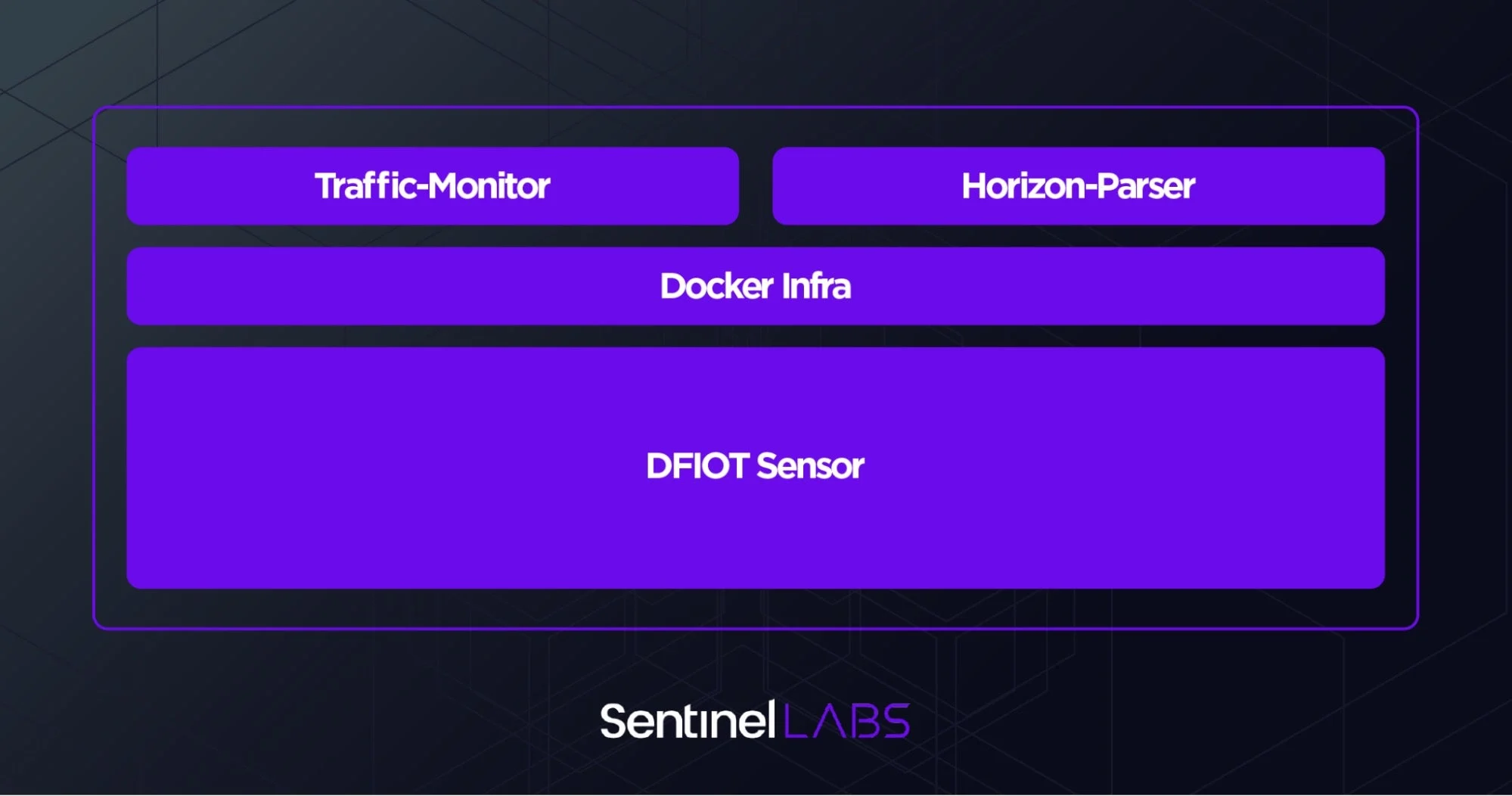
The horizon-parser container analyses traffic, extracts the appropriate fields and raises alerts when anomalies occur. That is where the DPI lives, so it is the focus of this research. The main binary the container executes is the horizon daemon, which drives the whole DPI process. During initialisation it loads dissectors: shared libraries that implement network protocol parsers.
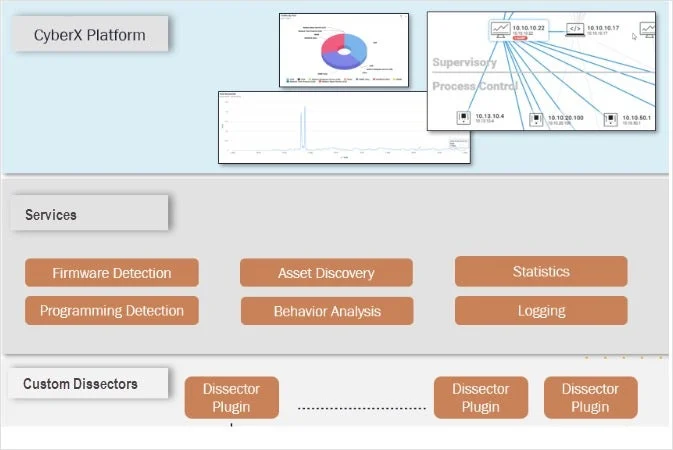
Microsoft published limited information on implementing a custom dissector. According to that information, a dissector implements the following C++ interface:
#include “plugin/plugin.h”
namespace {
 class CyberxHorizonSDK: public horizon::protocol::BaseParser
  public:
   std::vector processDissectAs(const std::map> &filters) const override {
     return std::vector();
   }
   horizon::protocol::ParserResult processLayer(horizon::protocol::management::IProcessingUtils &ctx,
                                                horizon::general::IDataBuffer &data) override {
     return horizon::protocol::ParserResult();
   }
 };
}

extern "C" {
  std::shared_ptr create_parser() {
    return std::make_shared();
  }
}
processDissectAsis called when a new plugin is loaded with a map containing the structure ofdissect_as, as defined in a JSON configuration file.processLayeris the main function of the dissector. Everything related to packet processing happens here, and it is called each time a new packet is routed to the dissector.create_parseris called when the dissector is loaded, used by the horizon binary to recognise and register the dissector, and is responsible for early bootstrapping.
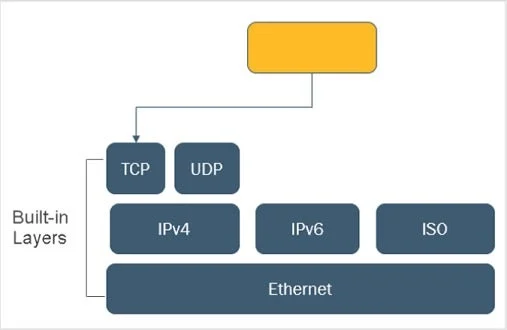
Dissectors are layered: each one handles a single layer, and horizon passes the outcome to the next layer in the chain.
A dissector consists of a JSON configuration file, the binary itself and other metadata. The JSON configuration is not required to follow the research, but it shows how the system is put together. Below is the example configuration for the FTP dissector.
{
  "id": "FTP",
  "override_id": 38,
  "library": "ftp",
  "endianess": "big",
  "backward_compatability": true,
  "metadata": {
    "is_distributed_control_system": false,
    "has_protocol_address": false,
    "is_scada_protocol": false,
    "is_router_potenial": false
  },
  "sanity_failure_codes": {
    "Not enough data": 1,
    "no result identified": 2
  },
  "malformed_codes": {
    "End of line not found": 2,
    "Wrong ports": 3,
    "No token found": 4,
<redacted>
  },
  "exports_dissect_as": {},
  "dissect_as": {
    "TCP": {
      "port": ["21"]
    }
  },
  "fields": [
    {
      "id": "response_code",
      "type": "numeric"
    },
<redacted>
    {
      "id": "firmware",
      "type": "array:complex",
      "fields": [
        {
          "id": "fwid",
          "type": "string"
        },
        {
          "id": "device_id",
          "type": "string"
        }
      ]
    }
  ]
}
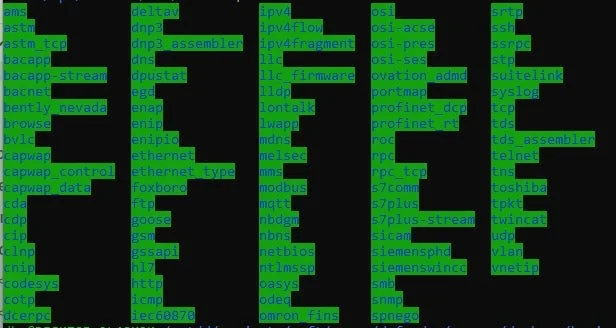
The sensor machine ships with a set of pre-installed dissectors.
The target of the fuzzing is processLayer, the routine that actually parses packet data. Fuzzing stateful network services is never simple, and doing it against a black box target only adds complexity.
Setup
Microsoft left some partially unstripped binaries containing only function names, but the vast majority of the research had to be performed black box. The team also had to compile a lot of dependency libraries and load their symbols into IDA to make the work easier.
For fuzzing they chose AFL, but had to give it coverage feedback to fuzz the targets efficiently. Because there were no sources, they used e9afl with minor changes to fit their goals. E9AFL is an open source binary-level instrumentation project built on e9patch, a static binary rewriting tool for x86_64 Linux ELF binaries.
Instrumentation starts with E9AFL using the following commands:
./e9afl readelf
mkdir -p input
mkdir -p output
head -n 1 `which ls` > input/exe
afl-fuzz -m none -i input/ -o output/ -- ./readelf.afl -a @@
For the horizon target, adjustments were needed. For speed and for the reasons explained below, the team wanted to control the fork server initialisation phase and to choose an accurate initialisation point for fuzzing to start. They therefore modified the init function in the inserted instrumentation by commenting out the fork server initialisation, and implemented that initialisation manually later.
AFL's fork server is what makes fuzzing fast: the fuzzed process goes through execve(), linking and libc initialisation only once, and is then cloned from a stopped process image using copy-on-write.
The chosen point to start the fork server is a little before the entry point of processLayer on the invoked target dissector. To support generic fuzzing for every dissector, the internal structures passed between these routines had to be understood, which meant reverse engineering the horizon binary.
Finding it
Reversing the structures turned out to be tedious: the code is very large, highly complex and written in modern C++. The horizon binary also implements a framework for handling network traffic data.
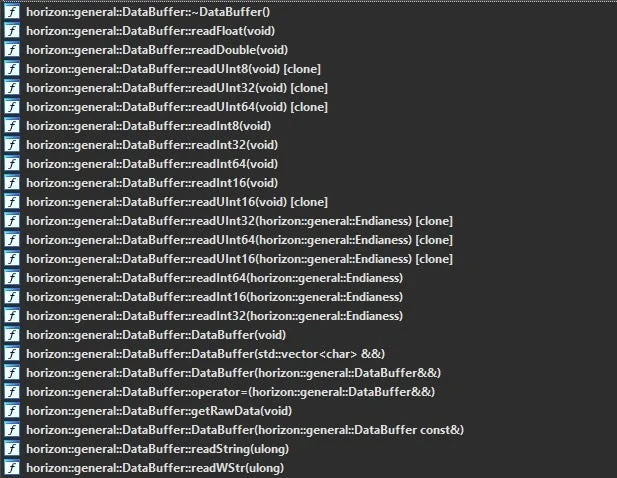
Rather than reversing all the structures and relevant code, the team built a special harness. They let the horizon binary run, stopped it at a strategic location where all the structures had been populated and were ready to use, modified the appropriate fields to insert a test case, and continued execution with the fork server.
This meant the entire structures passed to processLayer did not need to be understood; some can be left untyped because only the pointers are relayed (for example, the Dissection Context).
typedef void* (*process_layer_t)(void* parser_result, void* base_parser, void* dissection_context, data_buffer_t* data_buffer);
The data_buffer_t struct, which contains the packet data, has to be modified for each execution of the fuzzee to feed new test cases to the fuzzer.
typedef struct __attribute__((packed)) __attribute__((aligned(4))) data_buffer
{
    void* _vftbl;
<redacted>
    unsigned long long cursor;
    unsigned long long data_len;
    unsigned long long total_data_len;
    void* data_ptr;
    void* data_ptr_end;
    void* curr_data_ptr;
    int field_80;
} data_buffer_t;
The fuzzing process works as follows.
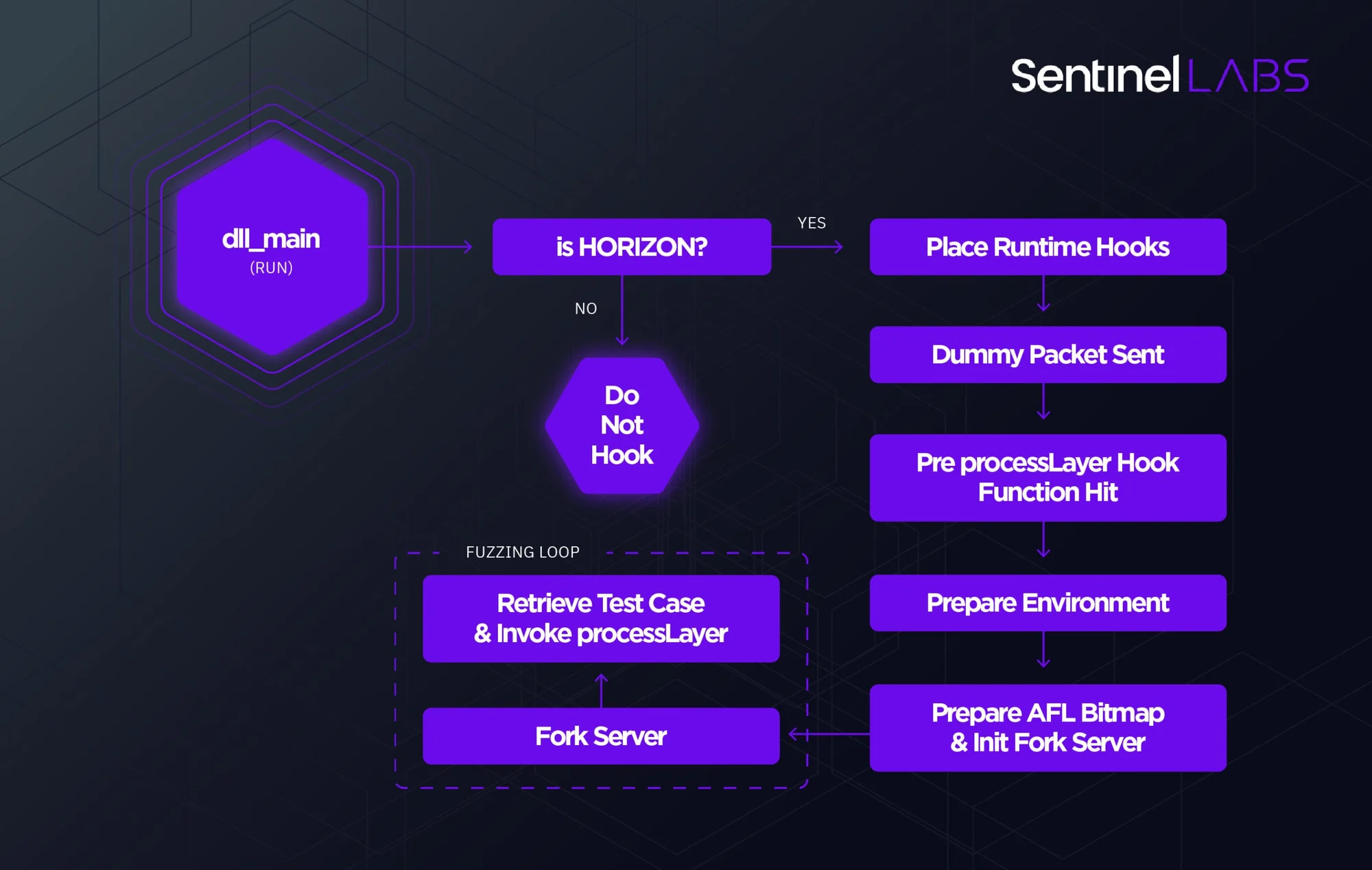
AFL_PRELOAD or LD_PRELOAD (depending on the execution) injects the fuzzer helper library into the fuzzee to create a fuzzing-ready environment. The first code that runs in the library is the run() function, a shared library entry point:
__attribute__((constructor)) int run() {
    char* current_path = realpath("/proc/self/exe", NULL);

    if (strstr(current_path, HORIZON_PATH) == 0) {
        return -1;
    }

    should_hook = 1;
    return 0;
}
It checks whether the main module is horizon and, if so, enables the hooks by setting should_hook to true.
Because the library is injected in the early stages of process creation, a temporary hook is set on a function that will in turn set the hook on the real target function. The following function was chosen by reverse engineering: horizon calls it in later stages of execution but before packet processing starts.
	int (*setsockopt_orig)(int sockfd, int level, int optname, const void* optval, socklen_t optlen);
int setsockopt(int sockfd, int level, int optname, const void* optval, socklen_t optlen) {
    if (!setsockopt_orig) setsockopt_orig = dlsym(RTLD_NEXT, "setsockopt");
    if (done_hooking || !should_hook) {
        return setsockopt_orig(sockfd, level, optname, optval, optlen);
    }
    done_hooking = 1;
    hooker();

    return setsockopt_orig(sockfd, level, optname, optval, optlen);
}
This is necessary because the library is loaded when the process is not fully mapped yet. The function calls hooker:
int hooker() {
    horizon_baseaddr = get_lib_addr("horizon") + INSTRUMENTED_OFFSET;

    printf("horizon_baseaddress %p aligned: %p offset: %x\n", horizon_baseaddr, horizon_baseaddr + (CALL_PROCESS_HOOK_OFFSET & 0xff000), (CALL_PROCESS_HOOK_OFFSET & 0xff000));
    int ret_val = mprotect(horizon_baseaddr + (CALL_PROCESS_HOOK_OFFSET & 0xff000), 0x1000, PROT_READ | PROT_WRITE | PROT_EXEC);

    <redacted>

    addr_to_returnto = (unsigned long long)(((char*)horizon_baseaddr) + (CALL_PROCESS_HOOK_OFFSET + 13));
    void* dest = horizon_baseaddr + CALL_PROCESS_HOOK_OFFSET;

    jump_struct_t jump_struct;
    jump_struct.moveopcode[0] = 0x49;
    jump_struct.moveopcode[1] = 0xbb;
    jump_struct.address = (unsigned long long) trampoline;
    jump_struct.pushorjump[0] = 0x41;
    jump_struct.pushorjump[1] = 0xff;
    jump_struct.pushorjump[2] = 0xe3;

    memcpy(dest, &jump_struct, sizeof(jump_struct_t));
}
INSTRUMENTED_OFFSET is an offset added to the main module by E9AFL. CALL_PROCESS_HOOK_OFFSET is the target code to be hooked by the trampoline code, right before processLayer is invoked.
The code above only executes when a packet arrives, so a dummy packet is sent to the target fuzzee.
The dissectionContext structure holds the state of the layered packet. An HTTP packet, for example, is composed of several layers including ETHERNET, IPV4, TCP and HTTP, so the dissectionContext contains information about each layer in the chain. Reconstructing all relevant structures is tedious, so an already populated dissectionContext is used, since only one layer is fuzzed at a time.
The trampoline() code:
__attribute__((naked)) void trampoline() {
    __asm__(
        ".intel_syntax;"
        "push %%rax;" //backup rax
        "mov %%eax, [%%rsi+0x10];"
#ifdef IS_UDP
        "cmp %%eax, 0xe23ff64c;" // DNS CONST, for UDP
#else
        "cmp %%eax, 0x3d829631;" // HTTP CONST, for TCP
#endif
        "pop %%rax;" //restore rax
        "jz prepare_fuzzer;"
        "push %%rbp;"
        "push %%rbx;"
        "sub %%rsp, 0x1b8;"
        "mov [%%rsp], %%rdi;"
        "mov %%rdi, %0;"
        "jmp %%rdi;"
        ".att_syntax;"
        :: "p" (addr_to_returnto)
    );
}
The trampoline redirects execution to prepare_fuzzer when the proper conditions are met. When the dummy packet is received, it compares the current layer ID to the HTTP constant. HTTP was chosen arbitrarily; it could be any Layer7 protocol on top of TCP. The same applies to UDP, where the DNS Layer ID is used instead. If the ID does not match, the correct program state is restored by manually executing the overwritten instructions and jumping back to the continuation of the hooked function.
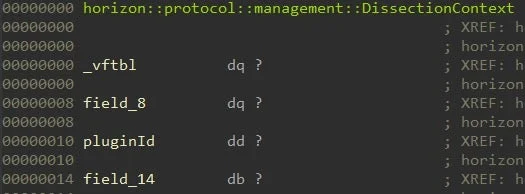
The goal is a state where the dissectionContext points to a TCP or UDP previousLayer, depending on the target, so that only the data buffer needs to change to the test case. In this scenario rsi holds a pointer to dissectionContext, which contains the layer ID at offset 0x10 (pluginId in the picture).
When the conditions are met, the fuzzee reaches prepare_fuzzer. This function must only execute once per fuzzing instance:
int prepare_fuzzer(void* res, void* dissection_context) {
    if (did_hook_happened) {
        while (true) {
            sleep(1000);
        }
    }
    did_hook_happened = 1;
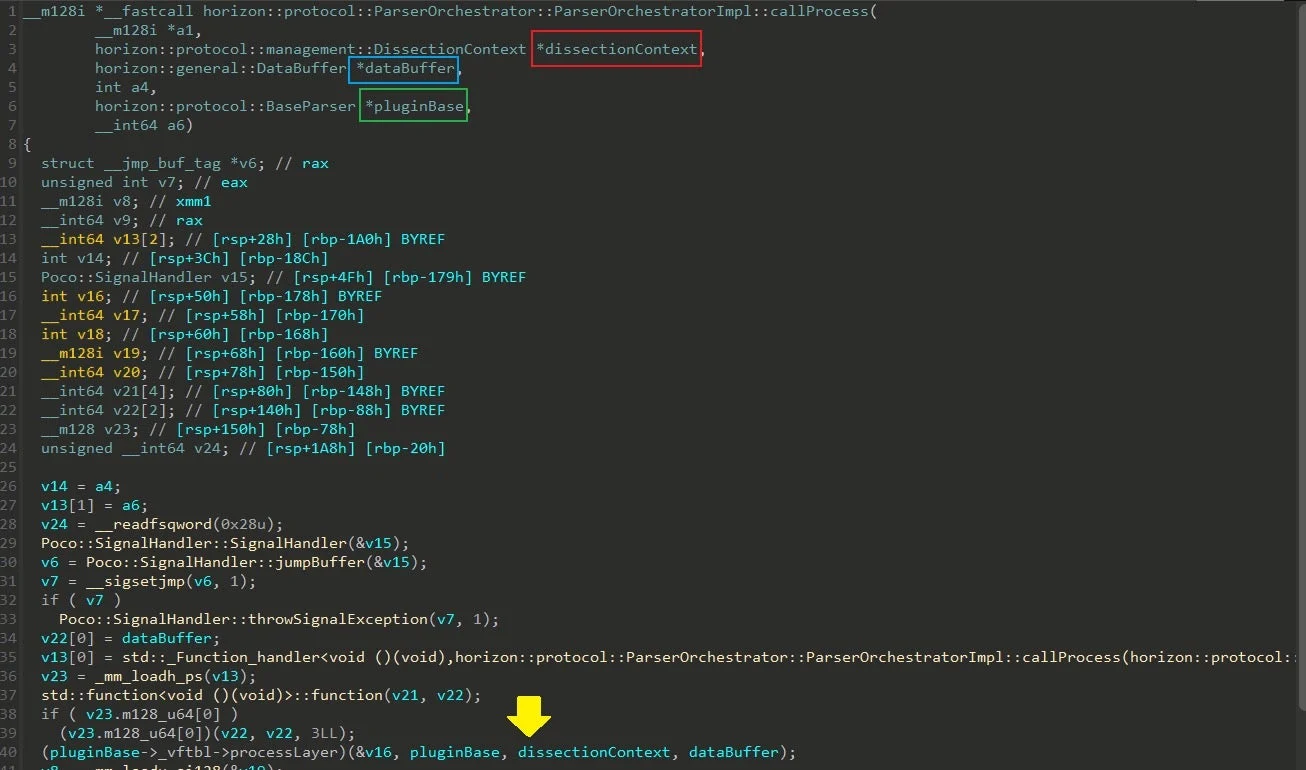
Its signature matches, partly, the horizon::protocol::ParserOrchestrator::ParserOrchestratorImpl::callProcess function.

The rest of the parameters are not needed because they can be created by the harness itself.
Exploitation
Step 1: parameterise the target from the command line
There are about 100 builtin dissectors to fuzz. To make the process easier, generic environment variables were added so the fuzzing target can be changed directly from the command line.
const char* target_fuzzee = getenv("__TARGET_FUZZEE");
    const char* target_path = getenv("__TARGET_FUZZEE_PATH");
    const char* target_symbol = getenv("__TARGET_SYMBOL");
    const char* fuzzfile = getenv("__FUZZFILE");

    if (!target_fuzzee || !target_symbol || !target_path || !fuzzfile) {
        printf("Failed to get environment variables target_fuzzee: %s, target_symbol: %s target_path: %s fuzzfile: %s\n", target_fuzzee, target_symbol, target_path, fuzzfile);
        ret_val = -1;
        exit(ret_val);
    }
-
target_fuzzeefinds the target dissector base address for later symbol lookup (for example, "libhttp"). -
target_pathis used for symbol lookup (for example, "/opt/horizon/lib/horizon/http/libhttp.so"). -
target_symbolis the symbol of theprocessLayerroutine in the target dissector, for example:Text [redacted] -
fuzzfileis the file AFL uses to feed the fork server with new test cases.
Step 2: load the dissector and obtain its parser object
The lookup for create_parser is done next:
void* real_lib_handle = dlopen(target_path, RTLD_NOW);

    if (real_lib_handle == NULL) {
        printf("Failed to get library handle\n");
        ret_val = -1;
        exit(ret_val);
    }

    printf("lib handle pointer %p\n", real_lib_handle);
    create_parser_addr = dlsym(real_lib_handle, "create_parser");

    if (create_parser_addr == NULL) {
        printf("Failed to get create_parser address\n");
        ret_val = -1;
        exit(ret_val);
    }
create_parser is then called to obtain a pluginBase object of the target dissector, which is later passed to processLayer:
    printf("create_parser address %p\n", create_parser_addr);

    unsigned long long out = 0;
    void** create_parser_obj = create_parser_addr(&out);

    printf("create_parser obj  %p\n", *create_parser_obj);
Step 3: resolve symbols and the DataBuffer constructor
A number of function pointers are obtained:
  handle_t* horizon_handle = create_module_handle(horizon_baseaddr, HORIZON_PATH);

    if (horizon_handle == NULL) {
        printf("horizon_handle is NULL \n");
        ret_val = -1;
        exit(ret_val);
    }

    lib_baseaddr = get_lib_addr((char*)target_fuzzee);
    printf("lib_baseaddress %p\n", lib_baseaddr);
    handle_t* lib_handle = create_module_handle(lib_baseaddr, (char*)target_path);

    if (lib_handle == NULL) {
        printf("lib_handle is NULL \n");
        ret_val = -1;
        exit(ret_val);
    }

    data_buffer_construct_ptr = lookup_symbol(horizon_handle, "[redacted]");
    printf("data_buffer_addr: %p\n", data_buffer_construct_ptr);

    process_layer_t process_layer_ptr = (process_layer_t)lookup_symbol(lib_handle, target_symbol);
create_module_handle maps the specified path into memory and is used to search for a function address by symbol name. This is required because dlopen does not load the symbol table.
A pointer to the horizon::general::DataBuffer::DataBuffer constructor is looked up to initialise the data buffer object, and then the appropriate fields are populated with the test case. This is done by create_data_buffer, used later in the code:
data_buffer_t* create_data_buffer(unsigned char* buffer, unsigned int len) {
    printf("data buffer size: %ld\n", sizeof(data_buffer_t));
    data_buffer_t* data_buffer = malloc(sizeof(data_buffer_t));

    if (data_buffer == NULL) {
        printf("Failed to allocate data buffer\n");
        return NULL;
    }

    data_buffer_construct_ptr(data_buffer);

    data_buffer->cursor = 0;
    data_buffer->data_len = len;
    data_buffer->total_data_len = len;
    data_buffer->data_ptr = buffer;
    data_buffer->data_ptr_end = &buffer[len];
    data_buffer->curr_data_ptr = buffer;

    return data_buffer;
}
Step 4: start the fork server and call processLayer
The fork server is started and AFL's coverage bitmap is initialised. The test case data is read from the specified file, the data buffer is created with the test case, and processLayer is called.
	    __afl_map_shm();
    __afl_start_forkserver();
    //special point
    FILE* f = fopen(fuzzfile, "rb");
    if (f) {
        fseek(f, 0, SEEK_END);
        length = ftell(f);
        fseek(f, 0, SEEK_SET);
        fuzzbuffer = malloc(length);
        if (fuzzbuffer) {
            fread(fuzzbuffer, 1, length, f);
        }
        fclose(f);
    }

    if (fuzzbuffer) {
        data_buffer_t* buffer = create_data_buffer((unsigned char*)fuzzbuffer, length);
        process_layer_ptr(parser_result, *create_parser_obj, dissection_context, buffer);
    }

    _exit(0); // we only fuzz one dissector at a time
Every time the fuzzer executes a new test case, execution continues from the "special point" marked above.
Step 5: run the fuzzer
The fuzzer was executed with the following command:
AFL_PRELOAD=/tmp/fuzzer/libloader.so __TARGET_FUZZEE=libsnmp __TARGET_FUZZEE_PATH=/opt/horizon/lib/horizon/snmp/libsnmp.so __TARGET_SYMBOL=[redacted] __FUZZFILE=/tmp/fuzzer/dissectors/libsnmp/fuzzfile.txt afl-fuzz -i /tmp/fuzzer/dissectors/libsnmp/in -o /tmp/fuzzer/dissectors/libsnmp/out -f /tmp/fuzzer/dissectors/libsnmp/fuzzfile.txt -m 100000 -M libsnmpmaster /opt/horizon/bin/horizon.instrumented
Step 6: fix stability by blocking polling
Testing the fuzzer revealed several stability issues.
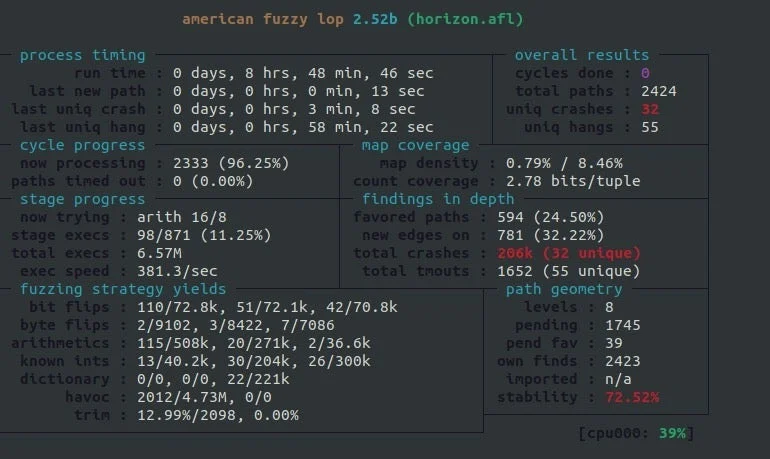
The fuzzer reported non-reproducible crashes and stability sometimes dropped to 0.1%. Horizon had several threads doing polling, which generated non-deterministic behaviour. The fix was to block polling before the fork server started, using the following hook:
int (*poll_orig)(struct pollfd* fds, nfds_t nfds, int timeout);
int poll(struct pollfd* fds, nfds_t nfds, int timeout) {
    if (!poll_orig)
        poll_orig = dlsym(RTLD_NEXT, "poll");
    if (should_end_poll) {
        pause();
    }

    return poll_orig(fds, nfds, timeout);
}
Right before starting the fork server, should_end_poll is set to true, which blocks this API:
   should_end_poll = 1;
    sleep(1);

    __afl_map_shm();
    __afl_start_forkserver();
This fixed the stability issue and raised stability to above 99.5%. The latest version of the loader is published in the new_loader repository.
Step 7: run multiple instances on one machine
Two fuzzing instances could not run simultaneously on the same machine because horizon listens on some sockets, which prevents other instances from running. Two solutions were used. The first simply closes all relevant sockets before starting the fork server:
void closesockets() {
    int i = 0;
    for(i=0; i<1000; i++) {
            char tmp[50];
            char real[256] = {0};
            sprintf(tmp, "/proc/self/fd/%d", i);
            readlink(tmp, real, sizeof(real));
            if(!strstr(real, "socket")) {
                    continue;
            }
            close(i);
    }
}
The second approach removes the need to send a packet to horizon at all. Horizon can be used in two modes:
- Live packet capture: horizon captures packets from a port mirror. This is the default configuration mode, rcdcap.
- Offline mode (PCAP): horizon loads a PCAP file from disk and replays the traffic.
Reverse engineering the horizon binary showed that the processor type could be changed to "file" so that it loads a PCAP file as described above.
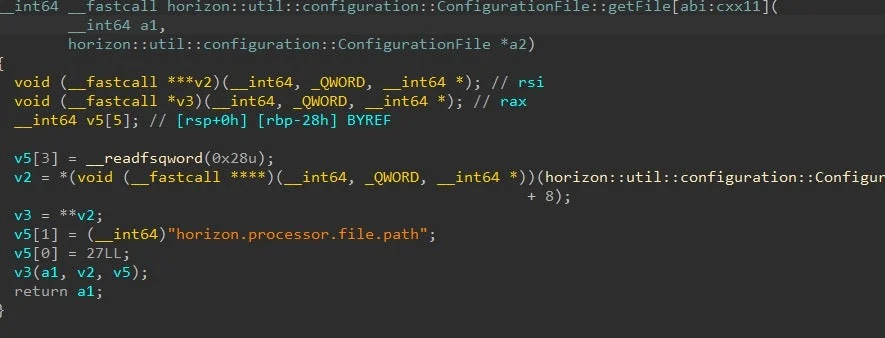
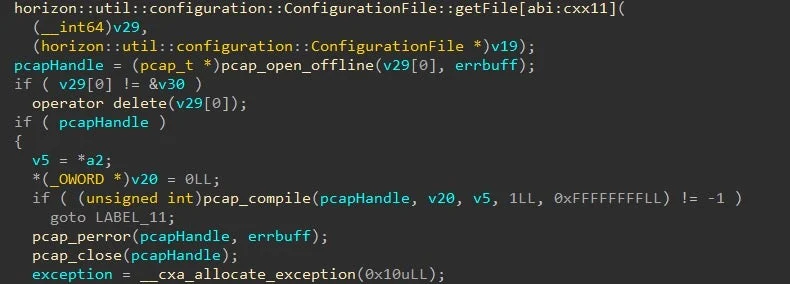
The configuration file then looked like this:
horizon.stats.interval=5
horizon.logger.stats=/var/cyberx/logs/horizon.stats.log
horizon.logger.default=/var/cyberx/logs/horizon.log
horizon.logger.format=%Y-%m-%d %H:%M:%S,%i %p [%P - %I] - %t
horizon.processor.type=file
horizon.processor.filter=
horizon.processor.workers=1
horizon.processor.file.path=/tmp/fuzzer/traffic.pcap
horizon.processor.afpacket.caplen=4096
horizon.processor.afpacket.blocks=5

<redacted>
These enhancements enabled numerous fuzzing instances to run.

A Telegram bot was created to report fuzzing progress, control coverage collection per test case, and retrieve files from the fuzzer.
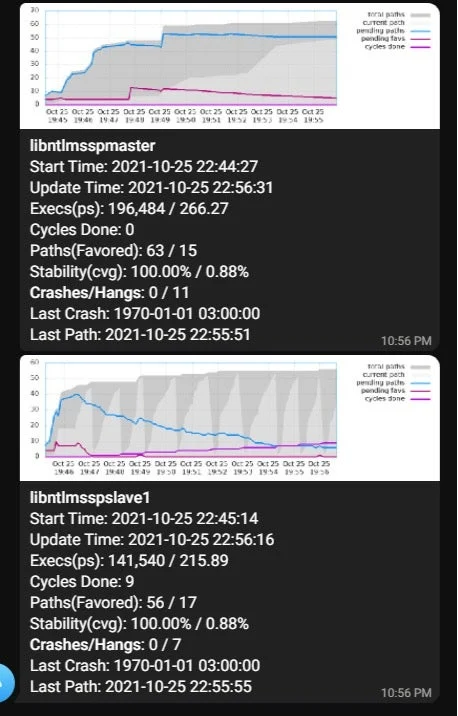
Step 8: check coverage and triage results
To check the fuzzer's progress, a Python script takes every new test case from each fuzzing instance and runs it with Intel PIN and the lighthouse library, which makes coverage easier to see in IDA Pro.
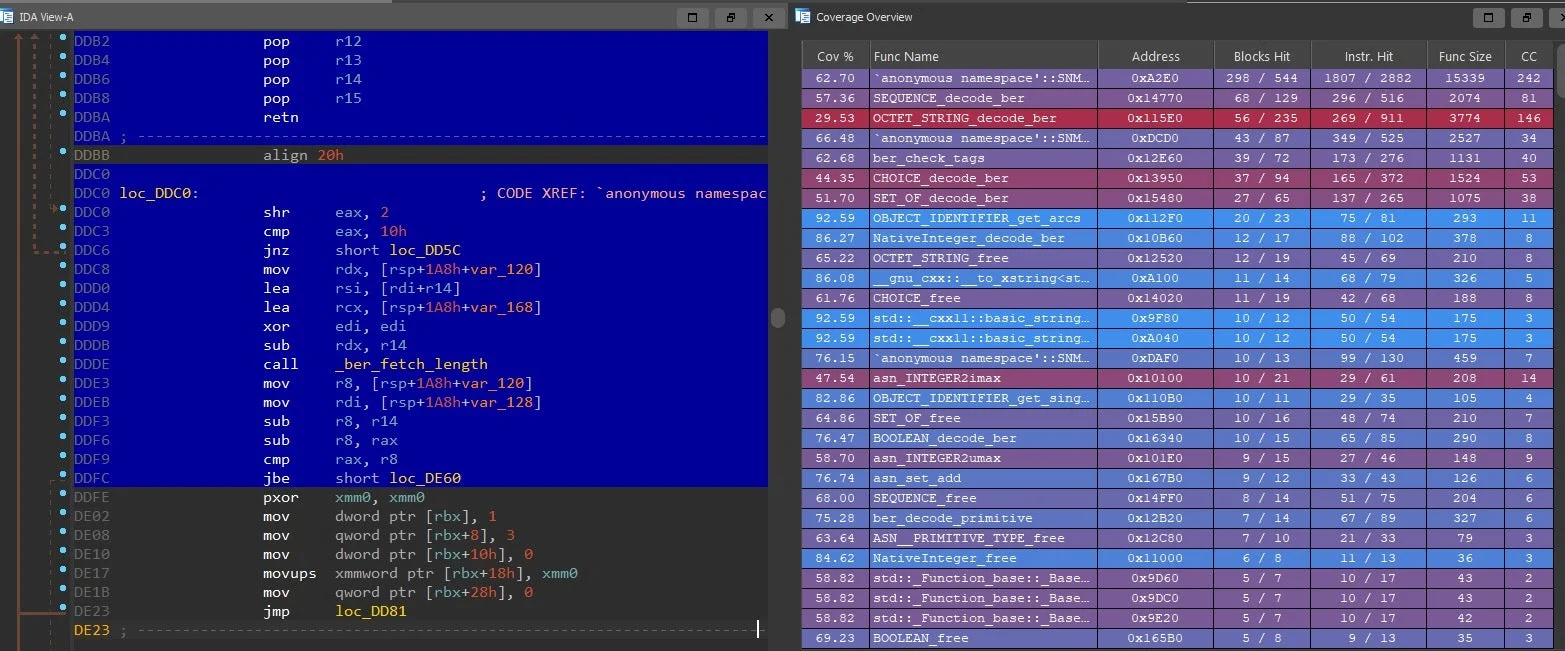
A lot of DoS vulnerabilities were found, which thanks to the Data buffer framework turned out to be pretty safe. Most of the DoS bugs were due to infinite recursion stack overflows. Not all possible dissectors were fuzzed, but a buffer overflow vulnerability was found in libsnmp.so.
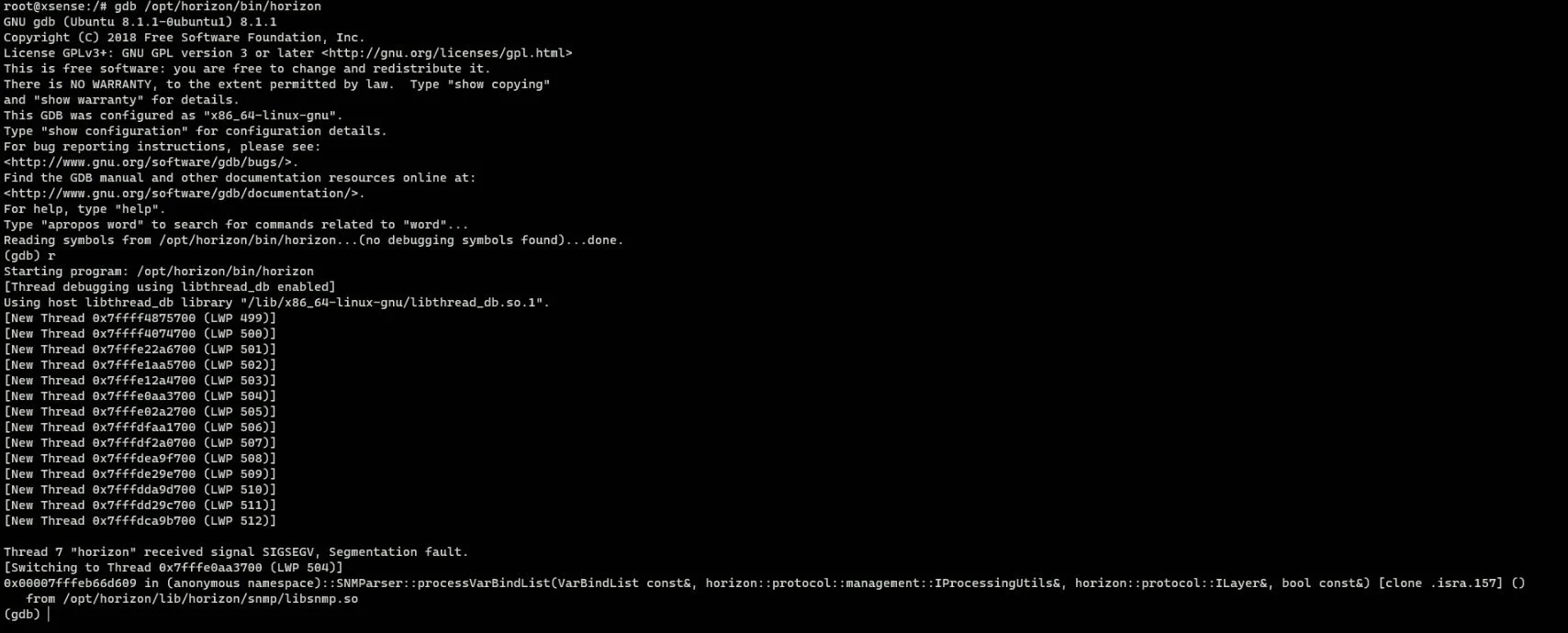
The vulnerability occurs in the processVarBindList function. When calling the OBJECT_IDENTIFIER_get_arcs function, the code does not check the return value correctly and uses it as a loop stop condition. The loop copies controlled data to a stack buffer.
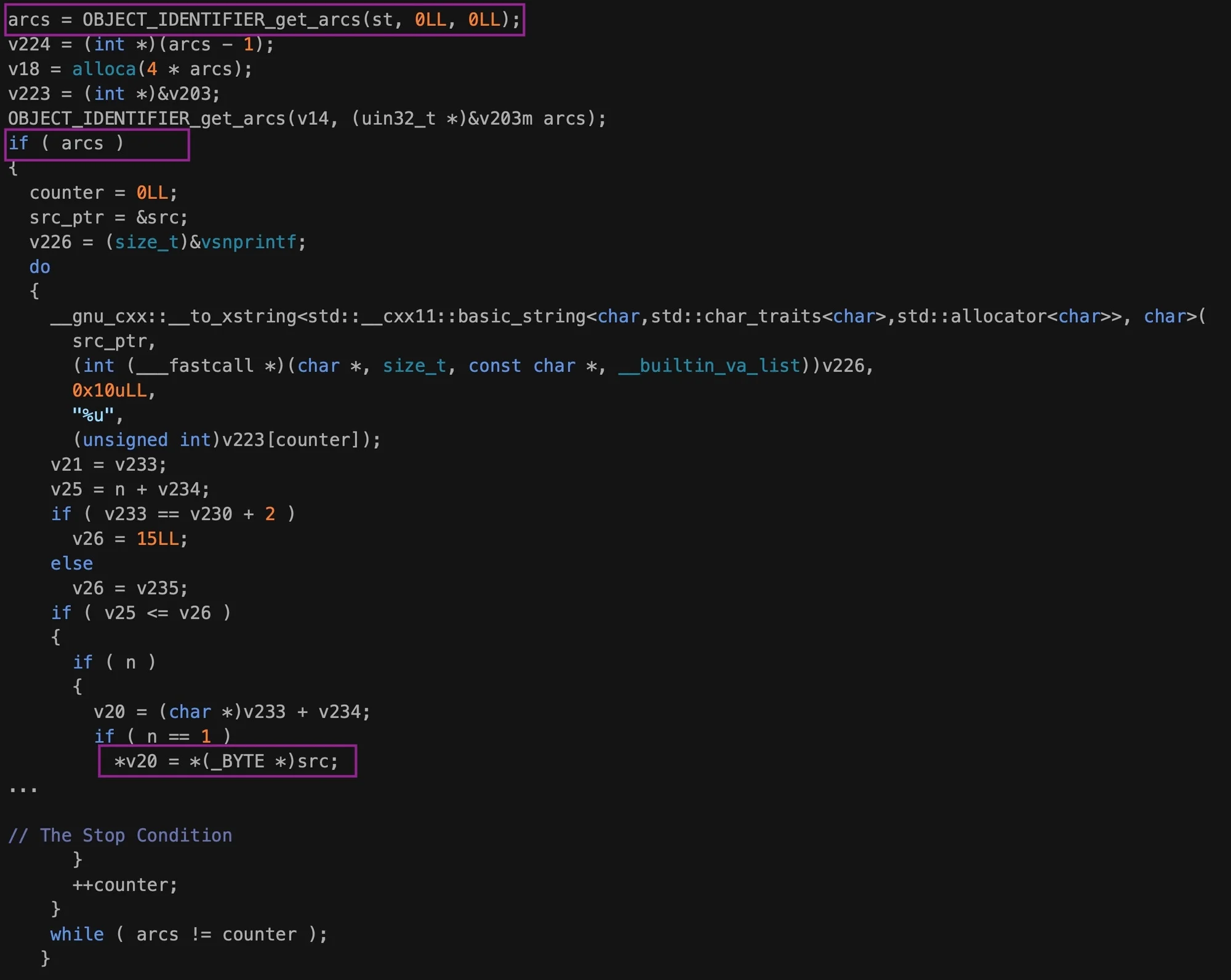
Sending a specially crafted packet causes OBJECT_IDENTIFIER_get_arcs to fail and return a -1 value. The conditional statement does not check the value properly, resulting in a buffer overflow with controlled data.
Root cause
In the SNMP dissector, processVarBindList calls OBJECT_IDENTIFIER_get_arcs and uses its return value as the loop stop condition without checking it correctly. When a crafted packet makes the call fail and return -1, the loop continues and copies controlled data into a stack buffer, overflowing it. The Data buffer framework limited the practical effect of most of the DoS findings, but it did not prevent this stack overflow in libsnmp.so.
Impact
The research found multiple vulnerabilities in Microsoft Azure Defender for IoT. The results showed that vulnerabilities in the DPI infrastructure could be triggered by simply sending a packet within the monitored network. The exploit could be directed at any device, because the DPI infrastructure monitors network traffic and an attacker does not need direct access to the sensor itself, which makes these kinds of vulnerabilities more dangerous. The findings discussed here include DoS issues, mostly infinite recursion stack overflows, and a buffer overflow in libsnmp.so with controlled data.
Fix
The report does not describe the vendor's fix or the patched code. The general lesson it draws is that the techniques described can help others build their own advanced fuzzers, find unknown vulnerabilities and improve the security of closed-source products.
Variants to test
- Fuzz other dissectors with the same harness. Point
__TARGET_FUZZEE,__TARGET_FUZZEE_PATHand__TARGET_SYMBOLat another dissector'sprocessLayersymbol and run AFL. A positive result is a reproducible crash in a dissector other than SNMP. - Look for unchecked return values used as loop bounds. In any parser that calls a helper returning a length or count, craft input that makes the helper fail (for example, returning -1) and observe whether the loop still copies data. A positive result is a stack or heap overflow with attacker-controlled bytes.
- Try infinite recursion through nested protocol layers. Feed deeply nested or self-referential structures to a dissector and watch for stack exhaustion. A positive result is a crash from stack overflow rather than a clean parse error.
- Switch horizon to offline PCAP mode on a test sensor and replay crafted captures. A positive result is a crash triggered without sending live traffic, confirming the parser path is reachable from a file.
- Run multiple fuzzing instances by closing sockets or using PCAP mode, and check whether stability stays above 99.5% with the poll hook. A positive result is reproducible crashes across instances rather than non-deterministic ones.
What happened, in plain words
Microsoft Azure Defender for IoT is a security product that watches the network traffic of industrial and IoT devices. It reads the packets flowing across a network and tries to understand what protocol each one speaks, so it can spot unusual behaviour. The part that reads packets is called the horizon component, and it does that reading with small plug-in modules called dissectors. Each dissector understands one network protocol, such as FTP or SNMP.
A team of researchers at SentinelOne wanted to know whether those dissectors could be broken by malicious packets. They could not read the source code, so they treated the product as a black box: they could run it, but not see how it was written. To find bugs at scale they built an automated testing machine, a fuzzer, that throws huge numbers of slightly mutated packets at the dissectors and watches for crashes. Building that machine was hard work, and this article walks through how they did it, step by step, and what they found: a lot of denial-of-service bugs and one buffer overflow in the SNMP dissector.
If you have never done security work, do not worry. Every term is explained as it appears, and there is a glossary at the end.
Context
What deep packet inspection is
When data travels over a network it is chopped into small pieces called packets. A packet is like an envelope: it has an address on the outside and a payload inside. Ordinary network equipment only looks at the address on the envelope to decide where to send it. Deep packet inspection (DPI) goes further: it opens the envelope and reads the payload, trying to work out which protocol is being spoken and what the message means. A security product uses DPI to notice, for example, that a device is sending commands it should not send.
In Azure Defender for IoT, DPI is done by the horizon component. Horizon loads built-in dissectors and can be extended with custom ones for new protocols. A dissector is a small program, shipped as a shared library (a file ending in .so on Linux, similar in spirit to a .dll on Windows), whose only job is to read one protocol.
The DPI infrastructure runs as two Docker images on the sensor machine, Traffic-Monitor and Horizon-Parser. Docker is a way of packaging software into isolated containers so it runs the same way everywhere; an image is the packaged bundle, and a container is a running copy of it.
The horizon-parser container analyses traffic, extracts the appropriate fields and raises alerts when anomalies occur. That is where the DPI lives, so it is the focus of this research. The main binary the container executes is the horizon daemon. A daemon is a program that runs in the background without a user interface. It drives the whole DPI process, and during initialisation it loads the dissectors.
The interface a dissector must implement
Microsoft published limited information on how to write a custom dissector. According to that information, a dissector implements the following C++ interface. C++ is a programming language; an interface here means the set of functions the horizon program expects to find in the dissector and will call.
#include “plugin/plugin.h”
namespace {
 class CyberxHorizonSDK: public horizon::protocol::BaseParser
  public:
   std::vector processDissectAs(const std::map> &filters) const override {
     return std::vector();
   }
   horizon::protocol::ParserResult processLayer(horizon::protocol::management::IProcessingUtils &ctx,
                                                horizon::general::IDataBuffer &data) override {
     return horizon::protocol::ParserResult();
   }
 };
}

extern "C" {
  std::shared_ptr create_parser() {
    return std::make_shared();
  }
}
Line by line, in plain words:
#include “plugin/plugin.h”pulls in a header file, which is a file that declares the names and types the code is allowed to use. Think of it as the table of contents the compiler needs before reading the rest.namespace { ... }groups the code so its names stay private to this file.class CyberxHorizonSDK: public horizon::protocol::BaseParserdeclares a class, a blueprint for an object. The: public ...BaseParserpart says this class is a kind of base parser, so it inherits the standard behaviour and promises to provide the functions the base expects.processDissectAs(...)is a function that receives a map of filters and returns a list. It is called when a new plugin is loaded with a map containing the structure ofdissect_as, as defined in a JSON configuration file. JSON is a simple text format for structured data, made of keys and values.processLayer(...)is the main function of the dissector. Everything related to packet processing happens here, and it is called each time a new packet is routed to the dissector. It receives a context object and a data buffer, which is a chunk of memory holding the packet bytes.create_parser()is called when the dissector is loaded. Horizon uses it to recognise and register the dissector, and it is responsible for early bootstrapping, meaning it sets the object up before any packet arrives.
Dissectors are layered: each one handles a single layer, and horizon passes the outcome to the next layer in the chain. Network protocols really are built in layers, like nested envelopes. An HTTP request, for example, sits inside a TCP segment, which sits inside an IP packet, which sits inside an Ethernet frame. Each layer has its own dissector.
The configuration file of a dissector
A dissector consists of a JSON configuration file, the binary itself and other metadata. Metadata is data about the data, such as a label or a flag. The JSON configuration is not required to follow the research, but it shows how the system is put together. Below is the example configuration for the FTP dissector. FTP is an old protocol for transferring files.
{
  "id": "FTP",
  "override_id": 38,
  "library": "ftp",
  "endianess": "big",
  "backward_compatability": true,
  "metadata": {
    "is_distributed_control_system": false,
    "has_protocol_address": false,
    "is_scada_protocol": false,
    "is_router_potenial": false
  },
  "sanity_failure_codes": {
    "Not enough data": 1,
    "no result identified": 2
  },
  "malformed_codes": {
    "End of line not found": 2,
    "Wrong ports": 3,
    "No token found": 4,
<redacted>
  },
  "exports_dissect_as": {},
  "dissect_as": {
    "TCP": {
      "port": ["21"]
    }
  },
  "fields": [
    {
      "id": "response_code",
      "type": "numeric"
    },
<redacted>
    {
      "id": "firmware",
      "type": "array:complex",
      "fields": [
        {
          "id": "fwid",
          "type": "string"
        },
        {
          "id": "device_id",
          "type": "string"
        }
      ]
    }
  ]
}
What the important keys mean:
idis the name of the dissector, hereFTP.override_idis a numeric identifier the system uses internally.librarynames the shared library file to load.endianesssays how multi-byte numbers are stored in this protocol. Big-endian means the most significant byte comes first, like writing a number from its largest digit down.metadataholds flags describing the protocol, for example whether it is a SCADA protocol. SCADA is the family of systems that control industrial equipment.sanity_failure_codesandmalformed_codesmap human-readable error names to numbers the parser returns when something is wrong.dissect_assays which lower layer this dissector attaches to. Here it attaches to TCP on port 21, the well-known port for FTP. A port is a numbered door on a machine; different services listen on different doors.fieldslists the pieces of information the dissector should extract from each packet, such as a response code or firmware details.
The sensor machine ships with a set of pre-installed dissectors.
The target: processLayer
The target of the fuzzing is processLayer, the routine that actually parses packet data. Parsing means taking raw bytes and turning them into meaningful values. Fuzzing stateful network services is never simple, and doing it against a black box target only adds complexity. Stateful means the service remembers things between packets, so the order of packets matters, much like a conversation where the answer depends on the question.
Setup
What fuzzing is
A fuzzer is a program that generates large numbers of inputs, feeds them to a target program, and watches for crashes. It is like a robot that keeps pressing every button in every order to see which combination breaks the machine. Modern fuzzers are smart: they watch which parts of the target's code each input reaches, a property called coverage, and keep inputs that reach new code. That feedback makes them far more effective than random guessing.
Microsoft left some partially unstripped binaries containing only function names, but the vast majority of the research had to be performed black box. A binary is a compiled program. Stripping removes the names of functions and variables from it, which makes reverse engineering harder; a partially unstripped binary still leaks some names. Reverse engineering means working out how a program works by examining it rather than reading its source. The team also had to compile a lot of dependency libraries and load their symbols into IDA to make the work easier. IDA is a popular tool for inspecting binaries, and a symbol is a name attached to a location in the code.
Choosing and instrumenting a fuzzer
For fuzzing they chose AFL, a well-known open-source fuzzer. AFL stands for American Fuzzy Lop, and it is the tool that popularised coverage-guided fuzzing. But AFL needs to know which code each input reaches, and without source code it cannot add that instrumentation itself. So the team used e9afl with minor changes to fit their goals. E9AFL is an open source binary-level instrumentation project built on e9patch, a static binary rewriting tool for x86_64 Linux ELF binaries. In plain words: e9patch edits a compiled program on disk, inserting extra instructions, and e9afl uses that to add AFL's coverage tracking to a program that was never built for it. x86_64 is the common processor family in PCs and servers, and ELF is the standard executable file format on Linux.
Instrumentation starts with E9AFL using the following commands:
./e9afl readelf
mkdir -p input
mkdir -p output
head -n 1 `which ls` > input/exe
afl-fuzz -m none -i input/ -o output/ -- ./readelf.afl -a @@
Line by line:
./e9afl readelfruns e9afl onreadelf, a small standard Linux program that prints information about executable files.mkdir -p inputcreates a folder calledinput, which will hold the starting sample inputs, called the seed corpus.-pmeans do not complain if it already exists.mkdir -p outputcreates the folder where AFL will write its findings.- ```head -n 1
which ls> input/exetakes the first line of the output ofwhich lsand saves it as a seed input. The backticks runwhich ls, which prints the path of thels` command. This is a crude but valid starting sample. afl-fuzz -m none -i input/ -o output/ -- ./readelf.afl -a @@starts AFL.-m noneremoves the memory limit AFL normally applies,-iand-opoint at the input and output folders,--separates AFL's own options from the target command,./readelf.aflis the instrumented copy ofreadelf, and@@is a placeholder AFL replaces with the path of the current test file.
The fork server, and why they changed it
For the horizon target, adjustments were needed. For speed and for the reasons explained below, the team wanted to control the fork server initialisation phase and to choose an accurate initialisation point for fuzzing to start. They therefore modified the init function in the inserted instrumentation by commenting out the fork server initialisation, and implemented that initialisation manually later.
AFL's fork server is what makes fuzzing fast: the fuzzed process goes through execve(), linking and libc initialisation only once, and is then cloned from a stopped process image using copy-on-write. To unpack that: starting a program from scratch is slow, because the operating system must load the file, connect it to its libraries and set up the C standard library (libc). The fork server starts the program once, pauses it, and then makes cheap copies of that paused process for every test case. Copy-on-write means the copies share memory until one of them writes to it, so copying is nearly free.
The chosen point to start the fork server is a little before the entry point of processLayer on the invoked target dissector. To support generic fuzzing for every dissector, the internal structures passed between these routines had to be understood, which meant reverse engineering the horizon binary.
Finding it
Why they stopped reversing and built a harness
Reversing the structures turned out to be tedious: the code is very large, highly complex and written in modern C++. The horizon binary also implements a framework for handling network traffic data.
Rather than reversing all the structures and relevant code, the team built a special harness. A harness is a piece of code wrapped around the target that feeds it inputs and catches the results, like a test rig holding a machine in place. They let the horizon binary run, stopped it at a strategic location where all the structures had been populated and were ready to use, modified the appropriate fields to insert a test case, and continued execution with the fork server. In other words, instead of building the packet-processing state from scratch, they borrowed the state horizon had already built for itself.
This meant the entire structures passed to processLayer did not need to be understood; some can be left untyped because only the pointers are relayed (for example, the Dissection Context). A pointer is a number that says where in memory something lives; relaying a pointer means passing it along without looking inside.
typedef void* (*process_layer_t)(void* parser_result, void* base_parser, void* dissection_context, data_buffer_t* data_buffer);
This line defines a type for a function pointer, which is a variable that holds the address of a function so it can be called later. typedef gives the type a name, here process_layer_t. The function it describes takes four arguments: parser_result, base_parser, dissection_context and data_buffer, and returns a void*, meaning a pointer to something whose type is not specified. The team only cares about the last argument, the buffer holding the packet.
The data_buffer_t struct, which contains the packet data, has to be modified for each execution of the fuzzee to feed new test cases to the fuzzer. A struct is a bundle of related fields stored together in memory, like a form with several boxes.
typedef struct __attribute__((packed)) __attribute__((aligned(4))) data_buffer
{
    void* _vftbl;
<redacted>
    unsigned long long cursor;
    unsigned long long data_len;
    unsigned long long total_data_len;
    void* data_ptr;
    void* data_ptr_end;
    void* curr_data_ptr;
    int field_80;
} data_buffer_t;
What the visible fields mean:
_vftblis a pointer to a table of function pointers, used by C++ to decide at runtime which implementation of a method to call.cursoris the current read position inside the buffer.data_lenis how much data this buffer holds.total_data_lenis the total length of the underlying data.data_ptrpoints at the start of the bytes.data_ptr_endpoints just past the last byte.curr_data_ptrpoints at the current position.field_80is an integer field whose purpose the report does not explain.__attribute__((packed))tells the compiler not to insert padding between fields, andaligned(4)asks for four-byte alignment, so the layout matches what horizon expects.
The fuzzing process works as follows.
Injecting a helper library
AFL_PRELOAD or LD_PRELOAD (depending on the execution) injects the fuzzer helper library into the fuzzee to create a fuzzing-ready environment. LD_PRELOAD is a Linux feature: it tells the system to load an extra shared library into a program before its normal libraries, so the extra library can intercept calls. The fuzzee is the program being fuzzed. The first code that runs in the library is the run() function, a shared library entry point:
__attribute__((constructor)) int run() {
    char* current_path = realpath("/proc/self/exe", NULL);

    if (strstr(current_path, HORIZON_PATH) == 0) {
        return -1;
    }

    should_hook = 1;
    return 0;
}
Line by line:
__attribute__((constructor))marks this function so it runs automatically when the library is loaded, before the program's own code.realpath("/proc/self/exe", NULL)asks the operating system for the full path of the running program./proc/self/exeis a special file that always points at the current executable.strstr(current_path, HORIZON_PATH) == 0checks whether the path does not contain the horizon path.strstrsearches for one string inside another and returns zero when it finds nothing.return -1;means: this is not horizon, do nothing.should_hook = 1;means: this is horizon, so enable the hooks. A hook is a piece of code that intercepts a function call and runs its own logic first.
Hooking a function that runs at the right moment
Because the library is injected in the early stages of process creation, a temporary hook is set on a function that will in turn set the hook on the real target function. The following function was chosen by reverse engineering: horizon calls it in later stages of execution but before packet processing starts.
	int (*setsockopt_orig)(int sockfd, int level, int optname, const void* optval, socklen_t optlen);
int setsockopt(int sockfd, int level, int optname, const void* optval, socklen_t optlen) {
    if (!setsockopt_orig) setsockopt_orig = dlsym(RTLD_NEXT, "setsockopt");
    if (done_hooking || !should_hook) {
        return setsockopt_orig(sockfd, level, optname, optval, optlen);
    }
    done_hooking = 1;
    hooker();

    return setsockopt_orig(sockfd, level, optname, optval, optlen);
}
Line by line:
- The first line declares a function pointer called
setsockopt_orig, which will hold the address of the realsetsockopt.setsockoptis a standard system call that configures a network socket, a handle for a network connection. - The function
setsockoptdefined here has the same name and signature as the real one, so the injected library's version is called instead. dlsym(RTLD_NEXT, "setsockopt")looks up the next definition ofsetsockoptin the library chain, which is the real one, and saves it. This is the standard trick for wrapping a function without losing the original.if (done_hooking || !should_hook)checks whether the hook has already run or whether this is not horizon. If either is true, it simply calls the original and returns.done_hooking = 1;records that the hook is about to run, so it only happens once.hooker();performs the real work.- The final line calls the original function so the program behaves normally.
This is necessary because the library is loaded when the process is not fully mapped yet. Mapped means the program's code and data have been placed into memory; before that, the target function's address may not be usable. The function calls hooker:
int hooker() {
    horizon_baseaddr = get_lib_addr("horizon") + INSTRUMENTED_OFFSET;

    printf("horizon_baseaddress %p aligned: %p offset: %x\n", horizon_baseaddr, horizon_baseaddr + (CALL_PROCESS_HOOK_OFFSET & 0xff000), (CALL_PROCESS_HOOK_OFFSET & 0xff000));
    int ret_val = mprotect(horizon_baseaddr + (CALL_PROCESS_HOOK_OFFSET & 0xff000), 0x1000, PROT_READ | PROT_WRITE | PROT_EXEC);

    <redacted>

    addr_to_returnto = (unsigned long long)(((char*)horizon_baseaddr) + (CALL_PROCESS_HOOK_OFFSET + 13));
    void* dest = horizon_baseaddr + CALL_PROCESS_HOOK_OFFSET;

    jump_struct_t jump_struct;
    jump_struct.moveopcode[0] = 0x49;
    jump_struct.moveopcode[1] = 0xbb;
    jump_struct.address = (unsigned long long) trampoline;
    jump_struct.pushorjump[0] = 0x41;
    jump_struct.pushorjump[1] = 0xff;
    jump_struct.pushorjump[2] = 0xe3;

    memcpy(dest, &jump_struct, sizeof(jump_struct_t));
}
Line by line:
get_lib_addr("horizon")finds where the horizon library was loaded in memory, andINSTRUMENTED_OFFSETis an offset added to the main module by E9AFL. Adding it gives the address of the instrumented copy.- The
printfprints the base address and some aligned values, purely for debugging. mprotect(..., 0x1000, PROT_READ | PROT_WRITE | PROT_EXEC)changes the permissions of one memory page (4096 bytes,0x1000) so it can be read, written and executed. Normally code pages are not writable; this call makes the patch possible.addr_to_returntocomputes where execution should continue after the hook, which isCALL_PROCESS_HOOK_OFFSET + 13bytes into the code. The 13 is the length of the instructions being overwritten.destis the address to patch.- The
jump_structis filled with machine-code bytes:0x49 0xbbfollowed by an address is the encoding of an instruction that loads a 64-bit address into a register, and0x41 0xff 0xe3is the encoding of a jump to that register. Together they make the processor jump totrampoline. memcpy(dest, &jump_struct, sizeof(jump_struct_t))writes those bytes over the original code.
INSTRUMENTED_OFFSET is an offset added to the main module by E9AFL. CALL_PROCESS_HOOK_OFFSET is the target code to be hooked by the trampoline code, right before processLayer is invoked.
The code above only executes when a packet arrives, so a dummy packet is sent to the target fuzzee. A dummy packet is a harmless placeholder sent just to trigger the code path.
The dissection context and the trampoline
The dissectionContext structure holds the state of the layered packet. An HTTP packet, for example, is composed of several layers including ETHERNET, IPV4, TCP and HTTP, so the dissectionContext contains information about each layer in the chain. Reconstructing all relevant structures is tedious, so an already populated dissectionContext is used, since only one layer is fuzzed at a time.
The trampoline() code:
__attribute__((naked)) void trampoline() {
    __asm__(
        ".intel_syntax;"
        "push %%rax;" //backup rax
        "mov %%eax, [%%rsi+0x10];"
#ifdef IS_UDP
        "cmp %%eax, 0xe23ff64c;" // DNS CONST, for UDP
#else
        "cmp %%eax, 0x3d829631;" // HTTP CONST, for TCP
#endif
        "pop %%rax;" //restore rax
        "jz prepare_fuzzer;"
        "push %%rbp;"
        "push %%rbx;"
        "sub %%rsp, 0x1b8;"
        "mov [%%rsp], %%rdi;"
        "mov %%rdi, %0;"
        "jmp %%rdi;"
        ".att_syntax;"
        :: "p" (addr_to_returnto)
    );
}
Line by line:
__attribute__((naked))tells the compiler not to add its usual function prologue and epilogue, because this function is written entirely in assembly, the low-level language of the processor..intel_syntax;switches the assembler to Intel notation, one of two common ways of writing assembly.push %%rax;saves theraxregister on the stack. A register is a tiny, very fast storage slot inside the processor; the stack is a region of memory used for temporary values. The double%%is how the compiler escapes a percent sign inside inline assembly.mov %%eax, [%%rsi+0x10];reads a 32-bit value from memory at the address inrsiplus 16 bytes (0x10), and stores it ineax. Herersiholds the pointer to the dissection context, and offset 16 holds the layer ID.- The
#ifdef IS_UDPblock chooses which constant to compare against:0xe23ff64cfor DNS when building the UDP variant, or0x3d829631for HTTP in the TCP variant. These are the internal layer identifiers. cmp %%eax, ...compares the layer ID with the chosen constant.pop %%rax;restores the saved register.jz prepare_fuzzer;jumps toprepare_fuzzerif the comparison was equal, meaning this is the layer we want to fuzz.- The next lines restore the state the original code expected: push
rbpandrbx, subtract0x1b8from the stack pointer to reserve space, storerdiat the top of the stack, loadaddr_to_returntointordi, and jump there. This replays the instructions that were overwritten by the hook. .att_syntax;switches back to the other common assembly notation.:: "p" (addr_to_returnto)passes the address of the continuation into the assembly as an input operand.
The trampoline redirects execution to prepare_fuzzer when the proper conditions are met. When the dummy packet is received, it compares the current layer ID to the HTTP constant. HTTP was chosen arbitrarily; it could be any Layer7 protocol on top of TCP. Layer7 is the application layer, the top of the network stack where protocols like HTTP and DNS live. The same applies to UDP, where the DNS Layer ID is used instead. If the ID does not match, the correct program state is restored by manually executing the overwritten instructions and jumping back to the continuation of the hooked function.
The goal is a state where the dissectionContext points to a TCP or UDP previousLayer, depending on the target, so that only the data buffer needs to change to the test case. In this scenario rsi holds a pointer to dissectionContext, which contains the layer ID at offset 0x10 (pluginId in the picture).
When the conditions are met, the fuzzee reaches prepare_fuzzer. This function must only execute once per fuzzing instance:
int prepare_fuzzer(void* res, void* dissection_context) {
    if (did_hook_happened) {
        while (true) {
            sleep(1000);
        }
    }
    did_hook_happened = 1;
Line by line:
int prepare_fuzzer(void* res, void* dissection_context)defines the function that takes the result pointer and the dissection context.if (did_hook_happened)checks whether this has already run.while (true) { sleep(1000); }is an infinite loop that sleeps, which parks the process forever. This is deliberate: the first run sets everything up and starts the fork server, and later runs must not repeat that setup.did_hook_happened = 1;records that the setup has now happened.
Its signature matches, partly, the horizon::protocol::ParserOrchestrator::ParserOrchestratorImpl::callProcess function. A signature is the list of a function's parameters and its return type.
The rest of the parameters are not needed because they can be created by the harness itself.
Exploitation
Step 1: parameterise the target from the command line
There are about 100 builtin dissectors to fuzz. To make the process easier, generic environment variables were added so the fuzzing target can be changed directly from the command line. An environment variable is a named value the operating system passes to a program when it starts, like a note stuck to the program's door.
const char* target_fuzzee = getenv("__TARGET_FUZZEE");
    const char* target_path = getenv("__TARGET_FUZZEE_PATH");
    const char* target_symbol = getenv("__TARGET_SYMBOL");
    const char* fuzzfile = getenv("__FUZZFILE");

    if (!target_fuzzee || !target_symbol || !target_path || !fuzzfile) {
        printf("Failed to get environment variables target_fuzzee: %s, target_symbol: %s target_path: %s fuzzfile: %s\n", target_fuzzee, target_symbol, target_path, fuzzfile);
        ret_val = -1;
        exit(ret_val);
    }
Line by line:
getenv("__TARGET_FUZZEE")reads the value of that environment variable and stores it as a string. The same happens for the other three.- The
ifchecks whether any of them is missing. In C, a null pointer means missing, and!turns a non-null pointer into false and a null pointer into true. - If something is missing,
printfprints which values were received,ret_val = -1records failure, andexit(ret_val)stops the program.
What each variable is for:
-
target_fuzzeefinds the target dissector base address for later symbol lookup (for example, "libhttp"). -
target_pathis used for symbol lookup (for example, "/opt/horizon/lib/horizon/http/libhttp.so"). -
target_symbolis the symbol of theprocessLayerroutine in the target dissector, for example:Text [redacted]This long string is a mangled name. C++ allows several functions with the same name but different parameters, so the compiler encodes the parameter types into the symbol name to keep them apart. This one belongs to the HTTP parser's
processLayer. -
fuzzfileis the file AFL uses to feed the fork server with new test cases.
Step 2: load the dissector and obtain its parser object
The lookup for create_parser is done next:
void* real_lib_handle = dlopen(target_path, RTLD_NOW);

    if (real_lib_handle == NULL) {
        printf("Failed to get library handle\n");
        ret_val = -1;
        exit(ret_val);
    }

    printf("lib handle pointer %p\n", real_lib_handle);
    create_parser_addr = dlsym(real_lib_handle, "create_parser");

    if (create_parser_addr == NULL) {
        printf("Failed to get create_parser address\n");
        ret_val = -1;
        exit(ret_val);
    }
Line by line:
dlopen(target_path, RTLD_NOW)loads the shared library at the given path into memory and returns a handle to it.RTLD_NOWmeans resolve all its symbols immediately rather than lazily.- If the handle is null, the library could not be loaded, so the program prints an error and exits.
dlsym(real_lib_handle, "create_parser")looks up the address of thecreate_parserfunction inside that library.- If that address is null, the function is missing, so the program exits.
create_parser is then called to obtain a pluginBase object of the target dissector, which is later passed to processLayer:
    printf("create_parser address %p\n", create_parser_addr);

    unsigned long long out = 0;
    void** create_parser_obj = create_parser_addr(&out);

    printf("create_parser obj  %p\n", *create_parser_obj);
Line by line:
- The first
printfprints the address ofcreate_parser, for debugging. unsigned long long out = 0;prepares a variable to receive an output value from the call.create_parser_addr(&out)calls the function through its address, passing the address ofout. The result is treated as a pointer to a pointer, because the function returns a shared pointer object.- The last
printfprints the object the pointer points to.
Step 3: resolve symbols and the DataBuffer constructor
A number of function pointers are obtained:
  handle_t* horizon_handle = create_module_handle(horizon_baseaddr, HORIZON_PATH);

    if (horizon_handle == NULL) {
        printf("horizon_handle is NULL \n");
        ret_val = -1;
        exit(ret_val);
    }

    lib_baseaddr = get_lib_addr((char*)target_fuzzee);
    printf("lib_baseaddress %p\n", lib_baseaddr);
    handle_t* lib_handle = create_module_handle(lib_baseaddr, (char*)target_path);

    if (lib_handle == NULL) {
        printf("lib_handle is NULL \n");
        ret_val = -1;
        exit(ret_val);
    }

    data_buffer_construct_ptr = lookup_symbol(horizon_handle, "[redacted]");
    printf("data_buffer_addr: %p\n", data_buffer_construct_ptr);

    process_layer_t process_layer_ptr = (process_layer_t)lookup_symbol(lib_handle, target_symbol);
Line by line:
create_module_handle(horizon_baseaddr, HORIZON_PATH)builds a handle for the horizon module at its base address, so its symbols can be looked up.- If that handle is null, the program exits.
get_lib_addr((char*)target_fuzzee)finds the base address of the target dissector library.create_module_handle(lib_baseaddr, (char*)target_path)builds a handle for the dissector library.lookup_symbol(horizon_handle, "[redacted]")finds the address of thehorizon::general::DataBuffer::DataBufferconstructor, the function that initialises a data buffer object. The mangled name encodes the class and the constructor.lookup_symbol(lib_handle, target_symbol)finds the address of the target'sprocessLayer, and the result is cast to theprocess_layer_ttype defined earlier so it can be called.
create_module_handle maps the specified path into memory and is used to search for a function address by symbol name. This is required because dlopen does not load the symbol table. The symbol table is the index that maps names to addresses; without it, dlsym cannot find internal functions.
A pointer to the horizon::general::DataBuffer::DataBuffer constructor is looked up to initialise the data buffer object, and then the appropriate fields are populated with the test case. This is done by create_data_buffer, used later in the code:
data_buffer_t* create_data_buffer(unsigned char* buffer, unsigned int len) {
    printf("data buffer size: %ld\n", sizeof(data_buffer_t));
    data_buffer_t* data_buffer = malloc(sizeof(data_buffer_t));

    if (data_buffer == NULL) {
        printf("Failed to allocate data buffer\n");
        return NULL;
    }

    data_buffer_construct_ptr(data_buffer);

    data_buffer->cursor = 0;
    data_buffer->data_len = len;
    data_buffer->total_data_len = len;
    data_buffer->data_ptr = buffer;
    data_buffer->data_ptr_end = &buffer[len];
    data_buffer->curr_data_ptr = buffer;

    return data_buffer;
}
Line by line:
- The function takes a byte buffer and its length, and returns a pointer to a
data_buffer_t. sizeof(data_buffer_t)prints how many bytes the struct occupies.malloc(sizeof(data_buffer_t))reserves that many bytes on the heap, the area of memory used for objects created while the program runs.- If the allocation failed, it prints an error and returns null.
data_buffer_construct_ptr(data_buffer)calls the real C++ constructor on the freshly allocated memory, so the object is properly initialised.- The following assignments fill in the fields: the read cursor starts at zero, the length fields are set to the test case length, the data pointer points at the test case bytes, the end pointer points just past the last byte, and the current pointer starts at the beginning.
return data_buffer;hands the ready object back to the caller.
Step 4: start the fork server and call processLayer
The fork server is started and AFL's coverage bitmap is initialised. A bitmap here is a block of memory where each bit records whether a particular piece of code was reached. The test case data is read from the specified file, the data buffer is created with the test case, and processLayer is called.
	    __afl_map_shm();
    __afl_start_forkserver();
    //special point
    FILE* f = fopen(fuzzfile, "rb");
    if (f) {
        fseek(f, 0, SEEK_END);
        length = ftell(f);
        fseek(f, 0, SEEK_SET);
        fuzzbuffer = malloc(length);
        if (fuzzbuffer) {
            fread(fuzzbuffer, 1, length, f);
        }
        fclose(f);
    }

    if (fuzzbuffer) {
        data_buffer_t* buffer = create_data_buffer((unsigned char*)fuzzbuffer, length);
        process_layer_ptr(parser_result, *create_parser_obj, dissection_context, buffer);
    }

    _exit(0); // we only fuzz one dissector at a time
Line by line:
__afl_map_shm()connects the process to the shared memory region AFL uses for coverage. Shared memory is memory two processes can both see.__afl_start_forkserver()starts the fork server, so every later test case is a cheap copy of this paused process.- The comment
//special pointmarks where each new test case resumes execution. fopen(fuzzfile, "rb")opens the test case file for reading in binary mode.fseek(f, 0, SEEK_END)moves to the end of the file,ftell(f)reports the position, which is the file size, andfseek(f, 0, SEEK_SET)moves back to the start.malloc(length)reserves memory for the file contents, andfread(fuzzbuffer, 1, length, f)reads them in.fclose(f)closes the file.- If the buffer was filled,
create_data_bufferwraps it in a data buffer object, andprocess_layer_ptr(...)calls the target'sprocessLayerwith the parser object, the dissection context and the buffer. _exit(0)ends the process immediately, because only one dissector is fuzzed at a time and there is nothing else to do.
Every time the fuzzer executes a new test case, execution continues from the "special point" marked above.
Step 5: run the fuzzer
The fuzzer was executed with the following command:
AFL_PRELOAD=/tmp/fuzzer/libloader.so __TARGET_FUZZEE=libsnmp __TARGET_FUZZEE_PATH=/opt/horizon/lib/horizon/snmp/libsnmp.so __TARGET_SYMBOL=[redacted] __FUZZFILE=/tmp/fuzzer/dissectors/libsnmp/fuzzfile.txt afl-fuzz -i /tmp/fuzzer/dissectors/libsnmp/in -o /tmp/fuzzer/dissectors/libsnmp/out -f /tmp/fuzzer/dissectors/libsnmp/fuzzfile.txt -m 100000 -M libsnmpmaster /opt/horizon/bin/horizon.instrumented
Line by line:
AFL_PRELOAD=/tmp/fuzzer/libloader.sotells AFL to inject the helper library into the target.__TARGET_FUZZEE=libsnmpselects the SNMP dissector. SNMP is the Simple Network Management Protocol, used to monitor and configure network devices.__TARGET_FUZZEE_PATH=/opt/horizon/lib/horizon/snmp/libsnmp.sogives the path of that dissector's shared library.__TARGET_SYMBOL=[redacted]gives the mangled name of the SNMP parser'sprocessLayer.__FUZZFILE=/tmp/fuzzer/dissectors/libsnmp/fuzzfile.txtis the file where each test case is written for the target to read.afl-fuzzstarts the fuzzer.-i /tmp/fuzzer/dissectors/libsnmp/inis the folder of seed inputs.-o /tmp/fuzzer/dissectors/libsnmp/outis the folder for results.-f /tmp/fuzzer/dissectors/libsnmp/fuzzfile.txttells AFL to write the current test case to that exact file, which is the same file the harness reads.-m 100000sets the memory limit for the target.-M libsnmpmasternames this fuzzing instance./opt/horizon/bin/horizon.instrumentedis the instrumented horizon binary to run.
Step 6: fix stability by blocking polling
Testing the fuzzer revealed several stability issues.
The fuzzer reported non-reproducible crashes and stability sometimes dropped to 0.1%. Stability here is the share of test cases that behave the same way every time; a low value means crashes cannot be trusted. Horizon had several threads doing polling, which generated non-deterministic behaviour. A thread is an independent line of execution inside one program, and polling means repeatedly asking the operating system whether any network activity is waiting. The fix was to block polling before the fork server started, using the following hook:
int (*poll_orig)(struct pollfd* fds, nfds_t nfds, int timeout);
int poll(struct pollfd* fds, nfds_t nfds, int timeout) {
    if (!poll_orig)
        poll_orig = dlsym(RTLD_NEXT, "poll");
    if (should_end_poll) {
        pause();
    }

    return poll_orig(fds, nfds, timeout);
}
Line by line:
- The first line declares a pointer to the real
pollfunction. - The function
polldefined here replaces it, with the same parameters: a list of file descriptors to watch, how many there are, and a timeout. dlsym(RTLD_NEXT, "poll")finds the realpollthe first time it is called.if (should_end_poll)checks whether polling should be stopped.pause()suspends the calling thread indefinitely, so the polling thread never proceeds.- Otherwise, the real
pollis called as normal.
Right before starting the fork server, should_end_poll is set to true, which blocks this API:
   should_end_poll = 1;
    sleep(1);

    __afl_map_shm();
    __afl_start_forkserver();
Line by line:
should_end_poll = 1;turns on the blocking behaviour.sleep(1);waits one second so any thread already insidepollhas time to hit the block.- The last two lines then start the fork server as before.
This fixed the stability issue and raised stability to above 99.5%. The latest version of the loader is published in the new_loader repository.
Step 7: run multiple instances on one machine
Two fuzzing instances could not run simultaneously on the same machine because horizon listens on some sockets, which prevents other instances from running. A socket is one end of a network connection; only one program can listen on a given address and port at a time. Two solutions were used. The first simply closes all relevant sockets before starting the fork server:
void closesockets() {
    int i = 0;
    for(i=0; i<1000; i++) {
            char tmp[50];
            char real[256] = {0};
            sprintf(tmp, "/proc/self/fd/%d", i);
            readlink(tmp, real, sizeof(real));
            if(!strstr(real, "socket")) {
                    continue;
            }
            close(i);
    }
}
Line by line:
- The function loops over the numbers 0 to 999, which are possible file descriptor numbers. A file descriptor is a small integer the operating system uses to refer to an open file or socket.
sprintf(tmp, "/proc/self/fd/%d", i)builds a path like/proc/self/fd/3. The/proc/self/fdfolder lists every open descriptor of the current process.readlink(tmp, real, sizeof(real))reads what that descriptor points to, such as a file path or the wordsocket.if(!strstr(real, "socket"))skips anything that is not a socket.close(i)closes the socket, freeing the address so another instance can use it.
The second approach removes the need to send a packet to horizon at all. Horizon can be used in two modes:
- Live packet capture: horizon captures packets from a port mirror. This is the default configuration mode, rcdcap. A port mirror is a switch setting that sends a copy of all traffic to one port so a monitoring tool can see it.
- Offline mode (PCAP): horizon loads a PCAP file from disk and replays the traffic. PCAP is the standard file format for saved network traffic, like a recording of packets.
What the visible settings mean:
horizon.logger.statsandhorizon.logger.defaultset where the statistics log and the main log are written.horizon.logger.formatdefines the layout of each log line, with placeholders for date, time, process and thread identifiers.horizon.processor.type=liveselects live capture.
Reverse engineering the horizon binary showed that the processor type could be changed to "file" so that it loads a PCAP file as described above.
The configuration file then looked like this:
horizon.stats.interval=5
horizon.logger.stats=/var/cyberx/logs/horizon.stats.log
horizon.logger.default=/var/cyberx/logs/horizon.log
horizon.logger.format=%Y-%m-%d %H:%M:%S,%i %p [%P - %I] - %t
horizon.processor.type=file
horizon.processor.filter=
horizon.processor.workers=1
horizon.processor.file.path=/tmp/fuzzer/traffic.pcap
horizon.processor.afpacket.caplen=4096
horizon.processor.afpacket.blocks=5

<redacted>
What changed and what was added:
horizon.processor.type=fileswitches from live capture to reading a file.horizon.processor.file.path=/tmp/fuzzer/traffic.pcapis the PCAP file to replay.
These enhancements enabled numerous fuzzing instances to run.
A Telegram bot was created to report fuzzing progress, control coverage collection per test case, and retrieve files from the fuzzer. Telegram is a messaging app, and a bot is an automated account that sends and receives messages through it.
Step 8: check coverage and triage results
To check the fuzzer's progress, a Python script takes every new test case from each fuzzing instance and runs it with Intel PIN and the lighthouse library, which makes coverage easier to see in IDA Pro. Intel PIN is a tool that runs a program and records which instructions it executes. Lighthouse is a plug-in that turns that recording into a colour-coded map inside IDA Pro, so a human can see at a glance which code was reached. Triage means sorting the crashes to decide which ones matter.
A lot of DoS vulnerabilities were found, which thanks to the Data buffer framework turned out to be pretty safe. DoS stands for denial of service: a bug that makes a program crash or hang, so it stops doing its job. Most of the DoS bugs were due to infinite recursion stack overflows. Recursion is when a function calls itself; if it never stops, the stack, the region of memory that holds nested calls, fills up and the program crashes. Not all possible dissectors were fuzzed, but a buffer overflow vulnerability was found in libsnmp.so. A buffer overflow happens when a program writes more data into a fixed-size memory area than it can hold, so the extra bytes spill into neighbouring memory.
The vulnerability occurs in the processVarBindList function. When calling the OBJECT_IDENTIFIER_get_arcs function, the code does not check the return value correctly and uses it as a loop stop condition. The loop copies controlled data to a stack buffer. A stack buffer is a fixed-size area on the stack, and controlled data means bytes the attacker chooses.
Sending a specially crafted packet causes OBJECT_IDENTIFIER_get_arcs to fail and return a -1 value. The conditional statement does not check the value properly, resulting in a buffer overflow with controlled data.
Root cause
In the SNMP dissector, processVarBindList calls OBJECT_IDENTIFIER_get_arcs and uses its return value as the loop stop condition without checking it correctly. When a crafted packet makes the call fail and return -1, the loop continues and copies controlled data into a stack buffer, overflowing it. The Data buffer framework limited the practical effect of most of the DoS findings, but it did not prevent this stack overflow in libsnmp.so.
Impact
The research found multiple vulnerabilities in Microsoft Azure Defender for IoT. The results showed that vulnerabilities in the DPI infrastructure could be triggered by simply sending a packet within the monitored network. The exploit could be directed at any device, because the DPI infrastructure monitors network traffic and an attacker does not need direct access to the sensor itself, which makes these kinds of vulnerabilities more dangerous. The findings discussed here include DoS issues, mostly infinite recursion stack overflows, and a buffer overflow in libsnmp.so with controlled data.
Fix
The report does not describe the vendor's fix or the patched code. The general lesson it draws is that the techniques described can help others build their own advanced fuzzers, find unknown vulnerabilities and improve the security of closed-source products.
Variants to test
- Fuzz other dissectors with the same harness. Point
__TARGET_FUZZEE,__TARGET_FUZZEE_PATHand__TARGET_SYMBOLat another dissector'sprocessLayersymbol and run AFL. A positive result is a reproducible crash in a dissector other than SNMP. - Look for unchecked return values used as loop bounds. In any parser that calls a helper returning a length or count, craft input that makes the helper fail (for example, returning -1) and observe whether the loop still copies data. A positive result is a stack or heap overflow with attacker-controlled bytes.
- Try infinite recursion through nested protocol layers. Feed deeply nested or self-referential structures to a dissector and watch for stack exhaustion. A positive result is a crash from stack overflow rather than a clean parse error.
- Switch horizon to offline PCAP mode on a test sensor and replay crafted captures. A positive result is a crash triggered without sending live traffic, confirming the parser path is reachable from a file.
- Run multiple fuzzing instances by closing sockets or using PCAP mode, and check whether stability stays above 99.5% with the poll hook. A positive result is reproducible crashes across instances rather than non-deterministic ones.
Glossary
- AFL (American Fuzzy Lop): an open-source fuzzer that uses coverage feedback to generate inputs that reach new code.
- Assembly: the low-level language of a processor, written as short instructions such as
movandjmp. - Binary: a compiled program file that the computer executes.
- Bitmap: a block of memory where each bit records a fact, here whether a piece of code was reached.
- Black box: a target you can run but cannot read the source code of.
- Buffer: a region of memory holding data, such as the bytes of a packet.
- Buffer overflow: writing more data into a fixed-size memory area than it can hold, so the extra bytes spill into neighbouring memory.
- Container: a running copy of a packaged software image, isolated from the rest of the system.
- Coverage: the set of code locations a fuzzer's inputs have reached.
- Daemon: a program that runs in the background without a user interface.
- Data buffer: a structure holding packet bytes plus bookkeeping fields such as length and read position.
- Denial of service (DoS): a bug that makes a program crash or hang so it stops serving its purpose.
- Dissector: a plug-in module that parses one network protocol.
- Docker: a tool for packaging and running software in isolated containers.
- DPI (deep packet inspection): reading the contents of network packets, not just their addresses, to understand and monitor traffic.
- ELF: the standard executable file format on Linux.
- Environment variable: a named value the operating system passes to a program at start-up.
- File descriptor: a small integer the operating system uses to refer to an open file or socket.
- Fork server: an AFL mechanism that starts the target once and clones it cheaply for each test case.
- Fuzzer: a program that generates many inputs and watches for crashes in a target.
- Fuzzee: the program being fuzzed.
- Harness: code wrapped around a target that feeds it inputs and catches results.
- Hook: code that intercepts a function call and runs its own logic first.
- IDA (Pro): a tool for inspecting and reverse engineering binaries.
- Image (Docker): a packaged software bundle from which containers are started.
- Instrumentation: adding extra instructions to a program so its behaviour, such as coverage, can be observed.
- JSON: a simple text format for structured data made of keys and values.
- Layer (network): one level of the network stack, such as Ethernet, IP, TCP or HTTP, each wrapped inside the one below.
- LD_PRELOAD: a Linux feature that loads an extra shared library into a program before its normal libraries.
- libc: the standard C library that every C program relies on.
- Mangled name: a symbol name that encodes a C++ function's parameter types so overloaded functions stay distinct.
- Metadata: data about data, such as a label or flag.
- PCAP: the standard file format for saved network traffic.
- Pointer: a value that says where in memory something lives.
- Polling: repeatedly asking the operating system whether network activity is waiting.
- Port: a numbered door on a machine that a service listens on.
- Port mirror: a switch setting that sends a copy of all traffic to one port for monitoring.
- Register: a tiny, very fast storage slot inside the processor.
- Reverse engineering: working out how a program works by examining it rather than reading its source.
- SCADA: the family of systems that control industrial equipment.
- Seed corpus: the starting set of sample inputs given to a fuzzer.
- Shared library: a file of reusable code loaded by programs at runtime,
.soon Linux. - Shared memory: memory that two processes can both see.
- Signature (function): the list of a function's parameters and its return type.
- SNMP: the Simple Network Management Protocol, used to monitor and configure network devices.
- Socket: one end of a network connection.
- Stack: the region of memory that holds nested function calls and their local variables.
- Stability (fuzzing): the share of test cases that behave the same way every time.
- Stateful: a service that remembers things between packets, so order matters.
- Stripped binary: a compiled program with function and variable names removed.
- Struct: a bundle of related fields stored together in memory.
- Symbol: a name attached to a location in a compiled program.
- Symbol table: the index that maps names to addresses inside a binary.
- Thread: an independent line of execution inside one program.
- Triage: sorting crashes to decide which ones matter.
- x86_64: the common 64-bit processor family used in PCs and servers.



