Reflected XSS on Microsoft
A reflected cross-site scripting vulnerability was found on a Microsoft guest registration page. An attacker could inject a script payload through a URL parameter to execute arbitrary JavaScript in a victim's browser.

Bahasa Indonesia | English
The full write-up lives on its author's site
It belongs to its author, so we link to it rather than copy it. The other two tabs are our own rewrites, checked against it.
What the report shows
The target is a guest registration page on the Microsoft extranet, reached through the host msftguestus.partners.extranet.microsoft.com. The researcher started with a Google Dork aimed at PHP files on Microsoft subdomains:
site:*.*.microsoft.com ext:php
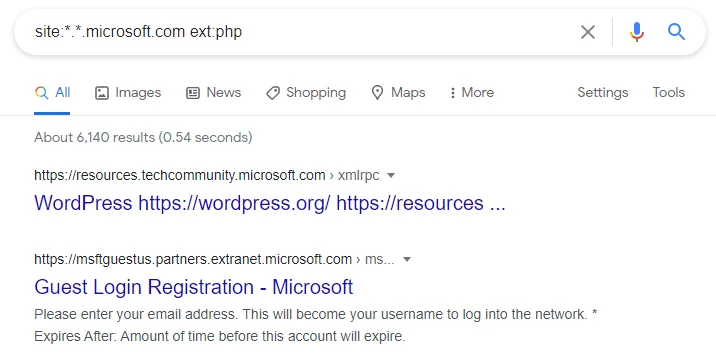
That search surfaced a registration page, which the report gives as:
https://msftguestus.partners.extranet.microsoft.com/guest/msft_a_guest_register.php?_browser=1

With the page identified, the researcher ran Arjun to enumerate parameters the page accepts. The report does not list the parameters Arjun returned, only that they were used in the next step.
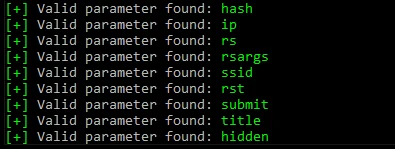
Each parameter was then tested by hand with an XSS payload until the script executed. The payload used was:
"><svg/onload=alert(1)>
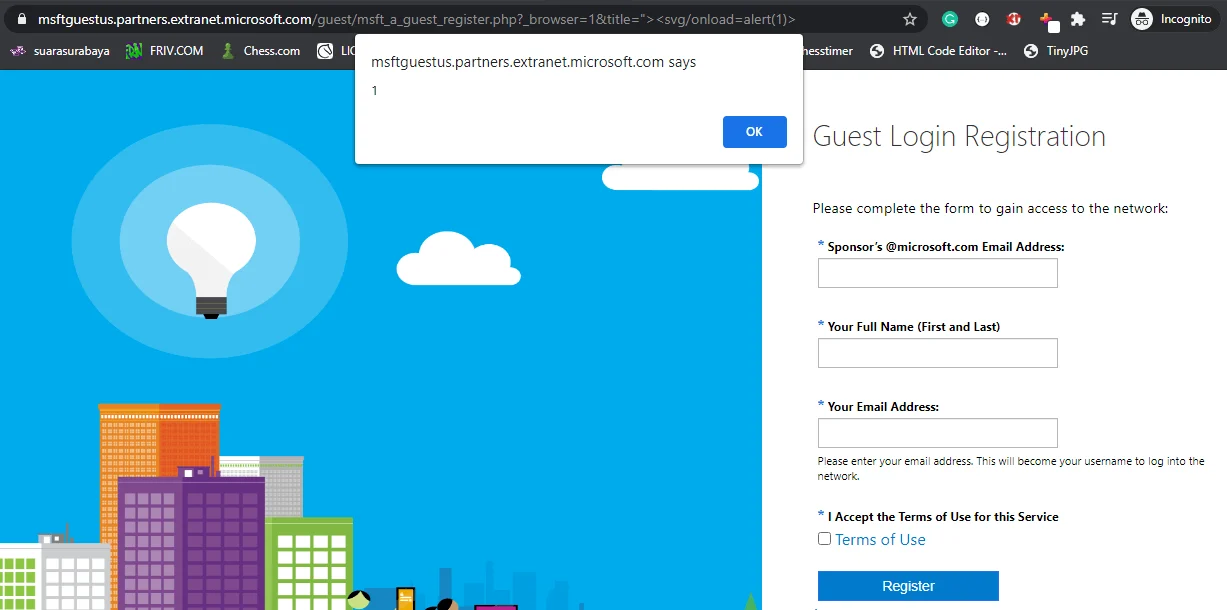
The report ends at the point where the payload fired. It gives no bounty amount, no severity rating, no CVSS score, no disclosure date and no confirmation that the issue was fixed. The write-up is a short walkthrough of discovery and confirmation, not a full advisory.
Root cause
The report does not analyse the server-side code, so the exact mistake is not stated. The behaviour it demonstrates is a reflected cross-site scripting flaw: a value supplied in a request parameter is written back into the HTML response without adequate encoding, so the browser parses the injected markup as part of the page. The payload begins with ">, which suggests the value is placed inside an HTML attribute and the quote closes it before the <svg> element is introduced. That is an inference from the payload shape, not something the report confirms.
Impact
The report shows script execution in the context of the affected page, demonstrated with alert(1). It does not describe what an attacker could reach from there: no session theft, no account action, no data exposure is claimed. In general terms, reflected XSS lets an attacker who can get a victim to open a crafted link run script in the victim's browser session on that origin, which can read page content, act as the user, or redirect them. Whether any of that is meaningful here depends on what the page and its session allow, and the report does not say.
How this kind of bug works
Reflected XSS arises when an application takes input from the request, such as a query string parameter, and embeds it into the response body without context-aware output encoding. The browser cannot tell developer-written markup from injected markup, so any tags or event handlers in the value are parsed and executed.
The context matters. Inside an HTML attribute, a value that can break out with a quote can introduce new attributes or elements. Inside a script block, string terminators and closing tags matter. Inside a URL or CSS context, other syntax applies. The defence is to encode output for the exact context it lands in, and to treat all request data as untrusted. A Content Security Policy that blocks inline script reduces the damage but does not fix the underlying flaw. HttpOnly cookies limit what script can steal but do not stop script from acting in the page.
How to test for it
- Map the application's input surface: query parameters, path segments, form fields, and headers that get echoed into pages such as error messages, search results and redirect notices.
- Send a benign marker value in each parameter and search the response body for it. Note exactly where it appears: attribute, text node, script, URL.
- Based on that context, send a payload that would break out of it, and check whether the response contains your markup unencoded.
- Confirm execution in a browser rather than relying on the response alone. A payload that appears in the HTML but is neutralised by the parser is not a finding.
- Record the full request and the response snippet that shows the unencoded reflection, plus a screenshot of execution.
A positive result is your markup surviving into the response in an executable position and running in the browser. Common false positives include reflections that are HTML-encoded, values that land inside a JavaScript string that is itself escaped, payloads blocked by a CSP that the tester did not notice, and self-XSS where the input only affects the sender's own view with no way to deliver it to another user.
How it is fixed
Apply context-aware output encoding to every value written into a response, using the framework's escaping helpers rather than hand-rolled replacements. Validate input against an allowlist where the expected format is narrow. Set a restrictive Content Security Policy as defence in depth. Mark session cookies HttpOnly and Secure. For values reflected into attributes, quote attributes properly and encode quotes and angle brackets.
Hunting notes
Reflected XSS tends to hide in older or less-maintained parts of large estates: registration and login flows, search pages, error and debug pages, language and redirect parameters, and anything still written in raw PHP. File-extension dorks are a cheap way to surface such pages, as this report shows. Signals worth following are parameters that change page content, _browser-style flags, and pages that echo a value back in a message. Parameter discovery tools help enumerate names, but manual testing per context is what confirms the bug. To make a report land, show the exact request, the unencoded reflection, and browser execution, and state clearly what an attacker gains beyond an alert box.
What happened, in plain words
This report describes a security researcher finding a bug on a Microsoft website. The bug is called reflected cross-site scripting, usually shortened to XSS. Before the details, here is the idea in everyday terms.
A website page is a set of instructions the browser reads and turns into what you see. Some pages take a piece of text from the address you typed (for example, a search term) and paste it into the page. If the site pastes that text without cleaning it first, someone can put instructions in the address that the browser then follows as if the website itself had written them. That is XSS: the browser is tricked into running code that came from the attacker, not the site.
The researcher began by searching for Microsoft pages using a Google Dork. A Google Dork is simply a search query built with special operators to find very specific pages. Here it was:
site:*.*.microsoft.com ext:php
Line by line: site: limits results to a particular site, and *.*.microsoft.com means any subdomain of microsoft.com. ext:php asks for pages whose file name ends in .php, which is a common file type for pages that build their content on the server. The point of this step is to narrow a huge estate down to a manageable list of candidate pages, especially older ones that may not have been reviewed recently.
That search turned up a guest registration page. The report gives its address as:
https://msftguestus.partners.extranet.microsoft.com/guest/msft_a_guest_register.php?_browser=1
Reading it: https:// is the secure web protocol. msftguestus.partners.extranet.microsoft.com is the host, a subdomain of microsoft.com. /guest/msft_a_guest_register.php is the page itself. The part after the question mark, _browser=1, is a parameter: a small piece of information passed to the page in the address. Parameters are the usual place where a page takes input from the visitor.
Next, the researcher used a tool called Arjun to find which parameters the page accepts. Arjun tries many common parameter names and compares the responses, so you do not have to guess them by hand. The report does not list the parameter names Arjun returned; it only says they were used in the next step.
With candidate parameters in hand, the researcher placed an XSS payload into them one at a time until the script ran. A payload here means the text crafted to make the browser execute something. The payload was:
"><svg/onload=alert(1)>
Line by line: the leading "> is a double quote followed by a closing angle bracket. If the page had placed the value inside an HTML attribute (a setting written inside a tag, such as value="..."), that quote would end the attribute early and the > would close the tag. Then <svg starts a new element, and onload=alert(1) is an event handler: code the browser runs when that element loads. alert(1) makes the browser show a small pop-up box containing the number 1. Seeing that box is the proof that the browser treated the attacker's text as real instructions. The report does not confirm which parameter triggered it.
That is where the report stops. It gives no bounty amount, no severity rating, no score, no disclosure date and no confirmation that the issue was fixed. It is a short walkthrough of finding and confirming the bug, not a full advisory.
In general, how this kind of bug works
Reflected XSS happens when a site takes a value from the request (usually a parameter in the address) and writes it into the page it sends back without encoding it. Encoding means converting characters that have special meaning in HTML, such as <, > and quotes, into harmless stand-ins so the browser shows them as text instead of acting on them. Without that step, the browser cannot tell the site's own markup from text an attacker supplied, so it runs both.
The surrounding context decides what a working payload looks like. Inside an attribute, breaking out with a quote can add new attributes or elements. Inside a script block, different characters matter. The defence is to encode output for the exact place it lands, and to treat everything arriving in a request as untrusted. A Content Security Policy (a rule set telling the browser which scripts may run) can reduce the damage but does not repair the flaw. Marking cookies HttpOnly (so page scripts cannot read them) limits what can be stolen but does not stop script from acting on the page.
In general, how to test for it
- List the places the site takes input: parameters in the address, form fields, and anything echoed back into pages such as search results or error messages.
- Send an ordinary marker value in each one and look for it in the returned page. Note exactly where it appears: in text, in an attribute, in a script.
- Based on that position, send a payload that would break out of it, and check whether your markup comes back unencoded.
- Confirm it actually runs in a browser. Text that appears in the page but is neutralised is not a finding.
- Keep the full request, the response snippet showing the unencoded reflection, and a screenshot of execution.
Common false positives: reflections that are properly encoded, values trapped inside an escaped script string, payloads blocked by a policy the tester missed, and self-XSS, where input only affects the sender's own view and cannot be delivered to anyone else.
In general, how it is fixed
Apply context-aware output encoding to every value written into a page, using the framework's escaping helpers rather than hand-made replacements. Validate input against an allowlist where the expected format is narrow. Add a restrictive Content Security Policy as an extra layer. Mark session cookies HttpOnly and Secure. For values placed in attributes, quote the attributes properly and encode quotes and angle brackets.
Glossary
- Reflected XSS: the injected text comes back in the same response, usually from a parameter in the address.
- Payload: the crafted text used to trigger a bug.
- Parameter: a small value passed to a page in the address, after the question mark.
- Google Dork: a search query using special operators to find specific pages.
- Subdomain: a part of a domain name in front of the main one, such as
partners.extranet.microsoft.com. - Host: the server name in an address, the part after
https://. - Arjun: a tool that guesses which parameters a page accepts.
- HTML attribute: a setting written inside an HTML tag, such as
value="...". - Event handler: code attached to an element that runs when something happens, such as
onload. - Encoding: converting special characters into harmless stand-ins so they display as text.
- Content Security Policy (CSP): browser rules limiting which scripts a page may run.
- HttpOnly: a cookie flag that stops page scripts from reading the cookie.
- Cookie: a small piece of data a site stores in your browser, often to keep you logged in.
- Self-XSS: a bug where the input only affects the person who typed it, so it cannot be used against others.
- False positive: a result that looks like a bug but is not one.