Second Order Subdomain Takeovers – They DO Exist!
A JavaScript file referenced by the Office 365 setup page was hosted on an Azure subdomain that no longer existed, allowing anyone to register it and serve their own script. The attacker could then execute arbitrary JavaScript in the context of the Microsoft login page, with access to user data and actions.
 Published on blogs.msmvps.com
For a few days from July 19th to July 23rd 2021, a short, and unwanted, piece of JavaScript became a required part of the flow of every Office 365 setup, impacting over a quarter of a million Office users.
The full write-up lives on its author's site
It belongs to its author, so we link to it rather than copy it. The other two tabs are our own rewrites, checked against it.
Context
For a few days, from 19 July to 23 July 2021, a short piece of JavaScript became a required part of the flow of every Office 365 setup, affecting over a quarter of a million Office users. The script had immediate access to the first and last name and the email address of anyone who started their Office setup during that window, and much more besides.
The script was deliberately harmless: it did not keep or use any of the information or power available to it. It was written and hosted by the researcher, Alun Jones (@ftp_alun), as a proof of concept for a second order subdomain takeover on setup.office.com.
The researcher uses the shorthand "SDTO" for subdomain takeover throughout. The target here is the Office 365 setup page, where a user enters a PIN during setup. The page loaded a file named developer.intercept.js from the host uxmicrosoft-uat.azurewebsites.net.
Setup
For the previous three and a bit years the researcher had been working on ways to find and protect against subdomain takeovers of various kinds. In the weeks before pandemic shutdowns struck the US, he flew to San Francisco to give a talk at the RSA Security Conference on tried-and-tested methods for detecting and automatically preventing subdomain takeovers.
One slide in that deck talked briefly about other kinds of subdomain takeovers:
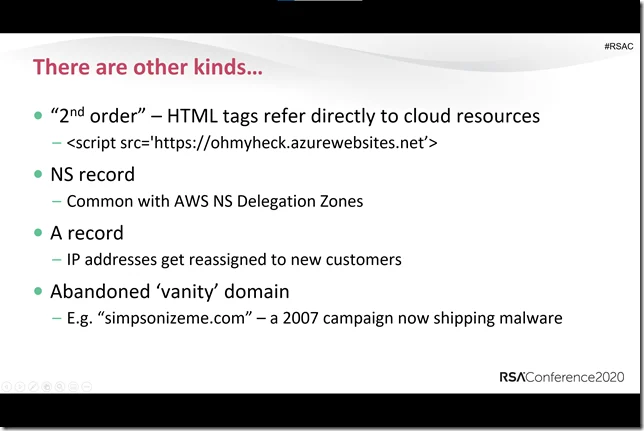
He went through all the source code he had access to at work and did not find a single second order SDTO, but was told by others in the InfoSec community that they exist. Being sceptical of things he cannot directly see or experience, he took those stories with a grain of salt.
In January 2021 he engaged in personal research outside of work to try to find second order SDTOs. He learned (actually, re-learned) how to create a Chrome extension: not hard, just JavaScript. He wrote an extension that looks for second order SDTOs in every page he visits. It produced loads of false positives, which are good because they let you know your code is running, but irritating because they interrupt everyday life.
The tooling precondition is therefore a browser extension that inspects pages for references to hosts that do not resolve. The account precondition is simply a logged-in Microsoft account on setup.office.com.
Finding it
In July 2021, instead of going out looking for sites that might be vulnerable, the researcher was checking whether he had registered enough copies of Office for his family that year. He went to setup.office.com, logged in, and the plugin popped up.
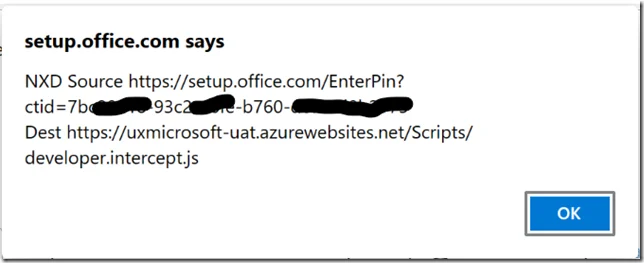
The dialog is a slightly faked-up version of the real one, and not a pretty plugin. What it said was that the part of the Office 365 Setup page where you enter your PIN tries to call a file named developer.intercept.js, and that the host on which that file sits, uxmicrosoft-uat.azurewebsites.net, does not actually exist.
An NXDOMAIN error is only the start of the possibility of a useful SDTO. Many of the false positives had the same NXDOMAIN error but could not be turned into an SDTO because their targets were at cloud sites where it is impossible to retake a name previously used by another owner. This one was different: the researcher says any idiot could have registered uxmicrosoft-uat.azurewebsites.net, and so he did.
Exploitation
Step 1: register the dangling host
The researcher registered uxmicrosoft-uat.azurewebsites.net himself. It was free, and, as he puts it, any idiot could have done it.
Step 2: create the referenced JavaScript file
He created the JavaScript file that the setup page expected, and added a command to log a simple fixed string to the console log.

Step 3: load the setup page
He loaded the page.
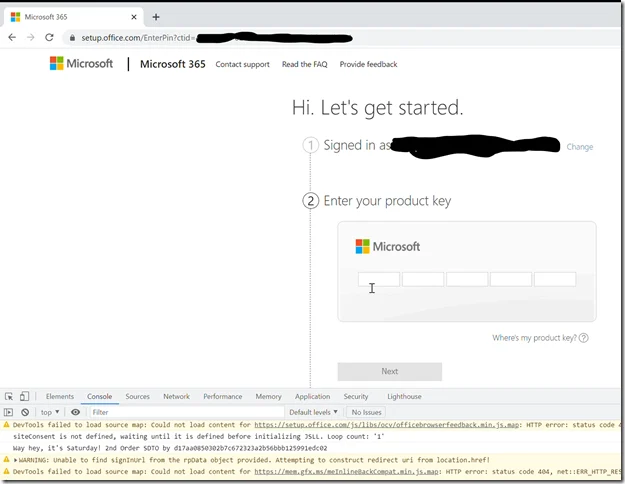
As the log says, "Way hey": the script executed. It executed not because there was anything special about his account.
Because the script is loaded with a simple <script> tag in the main document, it executes with exactly the same privileges as the Office web site and the Microsoft Account user who has logged in.
Step 4: observe other users fetching the script
With the code executing in his own browser, he wanted to know whether other people were fetching it. He enabled logging and streamed the logs. A lot of people were accessing the page and fetching the script, presumably executing it too.
Following his report, he watched the number of requests: not a very big flow, but certainly as many as a dozen or a score per second. By the time Microsoft appears to have fixed the web site, sometime around 23 July, he had around 250,000 requests for that script. As of the time of writing, 271,194 fetches (and presumably executions) had occurred. They kept occurring in dribs and drabs, from a different referrer, which he suggests might be requests from spiders. He kept the page up, just in case: it is free, and it keeps the host from being exploited by someone else.
Reporting
With the web site under his belt and the script in place, he had the elements needed to submit a bug report to Microsoft, which has a bug bounty page listing all covered services.
He filled out the first page of the form, which asks for a short description and a proof of concept. To his irritation, there was no second page, so the version of the report he submitted is the version the team would see. He describes it as really inadequate:
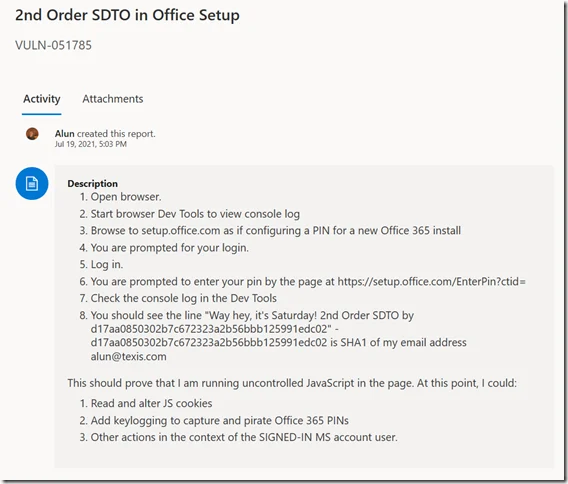
He could not edit the report or its metadata afterwards, and could not change the Security Impact or the Reported products (noting the plural, when only one can be selected). He could upload additional files, so he uploaded a screenshot of a page of logs of people from all over the world executing his script, and a video showing how to spot his code executing in the browser. He also sent follow-up emails with a more detailed description of what he had done, how he had found the bug, what kinds of behaviour it let him perform, and so on.
Impact
The script ran in the context of the Office setup page for every user who went through setup while it was in place, with the privileges of the page and of the logged-in Microsoft Account. The researcher lists what he resisted the temptation to do:
- Log the first and last name, and email address, of everyone registering Office that week
- Log the PINs as users entered them, then tell the users the PINs failed, while selling the PINs for valid Office licences on the black market
- Use the fact that he was logged in as the user to their Microsoft account to buy stuff and send it to himself
- Prompt users to re-enter their password as confirmation, to obtain a list of usernames and passwords for Microsoft accounts
- Deface the page with political messages, or porn
All of this took only a very few short minutes. Around a quarter of a million Office users ran his script.
Root cause
The setup page referenced a script on a hostname, uxmicrosoft-uat.azurewebsites.net, that had been abandoned: the name no longer resolved, but the page still loaded it. Because the host could be registered by anyone, he claimed it and served the file. The page then loaded the attacker's file with a plain <script> tag, giving it the same privileges as the page and the logged-in user.
The researcher's broader point is that where the platform does not help prevent subdomain takeovers, developers will cause the vulnerability to happen. He notes that instead of a single focus on preventing subdomain takeovers in Azure, Microsoft has put together any number of different approaches, sometimes separately inventing the same solution inside a company that needs to spend more time talking internally. He argues it should be possible for Azure to completely prevent subdomain takeovers using resources in Azure.
Fix
Microsoft appears to have fixed the web site sometime around 23 July 2021. The report does not describe the change. The researcher kept his registration of the host up so that nobody else could exploit it.
No bounty was paid. Subdomain takeovers are specifically ruled out of scope, even though this one was used to inject code, which is in scope, into the web site. setup.office.com is also not in the list of in-scope domains, and so is specifically out of scope. His lesson: always read the scope document to the end. You might still submit the bug, but at least you will not get needlessly excited about a non-existent bounty.
Variants to test
- Second order references in page source. Look for script, stylesheet, image and other resource references to hosts that return NXDOMAIN, especially on cloud platforms where a name can be re-registered. A positive result is a host you can register and then observe your own content being fetched by the page.
- Cloud platform check. For each dangling host, determine whether the provider allows re-registration of a previously used name. A positive result is a successful registration of the exact hostname followed by a request from the target page.
- Privilege check. Once your file is fetched, confirm it executes in the page context, for example by logging a fixed string to the console. A positive result is your string appearing in the console of the real page while logged in.
- Traffic confirmation. Enable logging on the claimed host and watch requests arrive from other users. A positive result is fetches from referrers you do not control.
- Scope check before reporting. Confirm the affected host and the vulnerability class are both in scope. A positive result is the asset and the class appearing in the programme's scope document, which avoids the outcome described here.
What happened, in plain words
For a few days in July 2021, from 19 July to 23 July, a short piece of JavaScript became a required part of the flow of every Office 365 setup. Over a quarter of a million Office users were affected. That script had immediate access to the first and last name and the email address of anyone who started their Office setup during that window, and much more besides.
The script was deliberately harmless. It did not keep or use any of the information or power available to it. It was written and hosted by the researcher, Alun Jones (@ftp_alun), as a proof of concept for a second order subdomain takeover on setup.office.com.
Before going further, three ideas need explaining, because the whole story rests on them.
A web page is a document your browser downloads and draws. Modern pages are rarely a single file: the main document pulls in extra files, such as images, stylesheets and scripts. A script is a small program written in a language called JavaScript that the browser runs on your computer. When a page includes a script, that script runs with the same trust as the page itself: it can read what the page shows, talk to the site on your behalf, and see things the page knows about you.
A subdomain is the part of a web address in front of the main domain. In setup.office.com, the subdomain is setup and the domain is office.com. A hostname is the full name of a machine on the internet, such as uxmicrosoft-uat.azurewebsites.net. Your browser turns a hostname into a numeric address using a system called DNS, the internet's phone book. If the phone book has no entry for a name, the lookup fails with an error called NXDOMAIN, which simply means "this name does not exist".
A subdomain takeover happens when a page still points at a hostname that nobody owns any more. The name is abandoned, but the page keeps asking for it. If someone else can register that same name, they can put their own files there, and the page will happily load them. The researcher shortens subdomain takeover to SDTO throughout, because it is two syllables shorter.
A second order subdomain takeover is the indirect kind. The page you are looking at is not itself broken. Instead, it loads something from somewhere else, and that somewhere else is the abandoned name. The first order problem is the abandoned host; the second order problem is the page that still trusts it.
The target here is the Office 365 setup page, where a user enters a PIN during setup. That page loaded a file named developer.intercept.js from the host uxmicrosoft-uat.azurewebsites.net.
Setup
For the previous three and a bit years the researcher had been working on ways to find and protect against subdomain takeovers of various kinds. In the weeks before pandemic shutdowns struck the US, he flew to San Francisco to give a talk at the RSA Security Conference on tried-and-tested methods for detecting and automatically preventing subdomain takeovers.
One slide in that deck talked briefly about other kinds of subdomain takeovers:
He went through all the source code he had access to at work and did not find a single second order SDTO, but was told by others in the InfoSec community that they exist. InfoSec is short for information security, the field of people who defend computer systems. Being sceptical of things he cannot directly see or experience, he took those stories with a grain of salt.
In January 2021 he engaged in personal research outside of work to try to find second order SDTOs. He learned, or rather re-learned, how to create a Chrome extension. A browser extension is a small add-on you install in your browser that can watch and modify the pages you visit. It is not hard to build: it is just JavaScript. He wrote an extension that looks for second order SDTOs in every page he visits. It produced loads of false positives. A false positive is an alarm that fires when nothing is actually wrong. These are good because they let you know your code is running, but irritating because they interrupt everyday life.
So the tooling precondition is a browser extension that inspects pages for references to hosts that do not resolve. The account precondition is simply a logged-in Microsoft account on setup.office.com.
Finding it
In July 2021, instead of going out looking for sites that might be vulnerable, the researcher was checking whether he had registered enough copies of Office for his family that year. He went to setup.office.com, logged in, and the plugin popped up.
The dialog is a slightly faked-up version of the real one, and not a pretty plugin. What it said was that the part of the Office 365 Setup page where you enter your PIN tries to call a file named developer.intercept.js, and that the host on which that file sits, uxmicrosoft-uat.azurewebsites.net, does not actually exist.
An NXDOMAIN error is only the start of the possibility of a useful SDTO. Many of the false positives had the same NXDOMAIN error but could not be turned into an SDTO, because their targets were at cloud sites where it is impossible to retake a name previously used by another owner. Cloud sites are rented computers run by a large provider, where customers create services by name. Some providers let a name be claimed again after the previous owner lets it go; others do not. This one was different: the researcher says any idiot could have registered uxmicrosoft-uat.azurewebsites.net, and so he did.
Exploitation
Step 1: register the dangling host
The researcher registered uxmicrosoft-uat.azurewebsites.net himself. It was free, and, as he puts it, any idiot could have done it. The point of this step is to prove ownership of the abandoned name: if you can claim it, you control what the page receives when it asks for that file.
Step 2: create the referenced JavaScript file
He created the JavaScript file that the setup page expected, and added a command to log a simple fixed string to the console log. The console is a panel in the browser's developer tools where a page can print messages; it is a harmless way to prove your code ran.
Step 3: load the setup page
He loaded the page.
As the log says, "Way hey": the script executed. It executed not because there was anything special about his account.
Because the script is loaded with a simple <script> tag in the main document, it executes with exactly the same privileges as the Office web site and the Microsoft Account user who has logged in. A tag here is a piece of markup in the page's HTML, the language pages are written in; <script> tells the browser to fetch and run a file. Privileges means what the code is allowed to do. Running inside the page, the script inherits the page's access to the logged-in user's session.
Step 4: observe other users fetching the script
With the code executing in his own browser, he wanted to know whether other people were fetching it. He enabled logging and streamed the logs. Logging means the server writes down every request it receives; streaming means watching those entries arrive live. A lot of people were accessing the page and fetching the script, presumably executing it too.
Following his report, he watched the number of requests: not a very big flow, but certainly as many as a dozen or a score per second. By the time Microsoft appears to have fixed the web site, sometime around 23 July, he had around 250,000 requests for that script. As of the time of writing, 271,194 fetches, and presumably executions, had occurred. They kept occurring in dribs and drabs, from a different referrer, which he suggests might be requests from spiders. A referrer is the page that told the browser to fetch a file; spiders are automated programs that crawl the web. He kept the page up, just in case: it is free, and it keeps the host from being exploited by someone else.
Reporting
With the web site under his belt and the script in place, he had the elements needed to submit a bug report to Microsoft, which has a bug bounty page listing all covered services. A bug bounty is a programme where a company pays researchers for reporting security problems. Scope is the list of what a programme will and will not accept.
He filled out the first page of the form, which asks for a short description and a proof of concept. A proof of concept is a small demonstration that the problem is real, rather than a theory. To his irritation, there was no second page, so the version of the report he submitted is the version the team would see. He describes it as really inadequate:
He could not edit the report or its metadata afterwards, and could not change the Security Impact or the Reported products, noting the plural when only one can be selected. Metadata is the extra information attached to a report, such as its category and severity. He could upload additional files, so he uploaded a screenshot of a page of logs of people from all over the world executing his script, and a video showing how to spot his code executing in the browser. He also sent follow-up emails with a more detailed description of what he had done, how he had found the bug, what kinds of behaviour it let him perform, and so on.
Impact
The script ran in the context of the Office setup page for every user who went through setup while it was in place, with the privileges of the page and of the logged-in Microsoft Account. The researcher lists what he resisted the temptation to do:
- Log the first and last name, and email address, of everyone registering Office that week
- Log the PINs as users entered them, then tell the users the PINs failed, while selling the PINs for valid Office licences on the black market
- Use the fact that he was logged in as the user to their Microsoft account to buy stuff and send it to himself
- Prompt users to re-enter their password as confirmation, to obtain a list of usernames and passwords for Microsoft accounts
- Deface the page with political messages, or porn
All of this took only a very few short minutes. Around a quarter of a million Office users ran his script.
Root cause
The setup page referenced a script on a hostname, uxmicrosoft-uat.azurewebsites.net, that had been abandoned: the name no longer resolved, but the page still loaded it. Because anyone could register the host, he claimed it and served the file. The page then loaded the attacker's file with a plain <script> tag, giving it the same privileges as the page and the logged-in user.
The researcher's broader point is that where the platform does not help prevent subdomain takeovers, developers will cause the vulnerability to happen. He notes that instead of a single focus on preventing subdomain takeovers in Azure, Microsoft has put together any number of different approaches, sometimes separately inventing the same solution inside a company that needs to spend more time talking internally. He argues it should be possible for Azure to completely prevent subdomain takeovers using resources in Azure.
Fix
Microsoft appears to have fixed the web site sometime around 23 July 2021. The report does not describe the change. The researcher kept his registration of the host up so that nobody else could exploit it.
No bounty was paid. Subdomain takeovers are specifically ruled out of scope, even though this one was used to inject code, which is in scope, into the web site. setup.office.com is also not in the list of in-scope domains, and so is specifically out of scope. His lesson: always read the scope document to the end. You might still submit the bug, but at least you will not get needlessly excited about a non-existent bounty.
Variants to test
- Second order references in page source. Look for script, stylesheet, image and other resource references to hosts that return NXDOMAIN, especially on cloud platforms where a name can be re-registered. A positive result is a host you can register and then observe your own content being fetched by the page.
- Cloud platform check. For each dangling host, determine whether the provider allows re-registration of a previously used name. A positive result is a successful registration of the exact hostname followed by a request from the target page.
- Privilege check. Once your file is fetched, confirm it executes in the page context, for example by logging a fixed string to the console. A positive result is your string appearing in the console of the real page while logged in.
- Traffic confirmation. Enable logging on the claimed host and watch requests arrive from other users. A positive result is fetches from referrers you do not control.
- Scope check before reporting. Confirm the affected host and the vulnerability class are both in scope. A positive result is the asset and the class appearing in the programme's scope document, which avoids the outcome described here.
Glossary
- Browser extension: a small add-on installed in a browser that can watch and modify the pages you visit.
- Bug bounty: a programme where a company pays researchers for reporting security problems.
- Cloud site: a service rented from a large provider, running on computers the provider owns.
- Console: a panel in the browser's developer tools where a page can print messages.
- DNS: the internet's phone book, which turns a hostname into a numeric address.
- False positive: an alarm that fires when nothing is actually wrong.
- Hostname: the full name of a machine on the internet, such as
uxmicrosoft-uat.azurewebsites.net. - HTML: the language web pages are written in.
- InfoSec: short for information security, the field of people who defend computer systems.
- JavaScript: a small programming language that browsers run on your computer.
- Logging: writing down every request a server receives.
- Metadata: extra information attached to a report, such as its category and severity.
- NXDOMAIN: the DNS error meaning "this name does not exist".
- Privileges: what a piece of code is allowed to do.
- Proof of concept: a small demonstration that a problem is real rather than a theory.
- Referrer: the page that told the browser to fetch a file.
- Scope: the list of what a bug bounty programme will and will not accept.
- Script: a small program, usually JavaScript, that the browser runs.
- SDTO: the researcher's shorthand for subdomain takeover.
- Second order subdomain takeover: a takeover where a page loads something from an abandoned hostname elsewhere, rather than being broken itself.
- Spider: an automated program that crawls the web.
- Streaming: watching log entries arrive live.
- Subdomain: the part of a web address in front of the main domain, such as
setupinsetup.office.com. - Subdomain takeover: claiming an abandoned hostname that a page still points at, so the page loads your files.
- Tag: a piece of markup in HTML;
<script>tells the browser to fetch and run a file. - Web page: a document your browser downloads and draws, often pulling in extra files.



