SpoolFool: Windows Print Spooler Privilege Escalation (CVE-2022-21999)
A local privilege escalation in the Windows Print Spooler allowed a low-privileged user to create a writable directory inside the printer driver directory and then load a malicious DLL into the Spooler service, which runs as SYSTEM. This could let the attacker execute code with SYSTEM privileges.
 Published on research.ifcr.dk
IFCR
The full write-up lives on its author's site
It belongs to its author, so we link to it rather than copy it. The other two tabs are our own rewrites, checked against it.
Context
The Windows Print Spooler is a built-in component on all Windows workstations and servers and is the primary component of the printing interface. It is an executable that manages the printing process: retrieving the location of the correct printer driver, loading that driver, spooling high-level function calls into a print job, scheduling the print job, and so on. It is loaded at system startup and runs until the operating system is shut down.
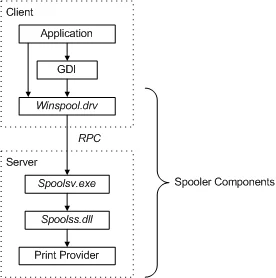
The primary components are:
- Application: creates a print job by calling Graphics Device Interface (GDI) functions or directly into
winspool.drv. - GDI: includes both user-mode and kernel-mode components for graphics support.
- winspool.drv: the client interface into the Spooler. It exports the functions that make up the Spooler's Win32 API and provides RPC stubs for accessing the server.
- spoolsv.exe: the Spooler's API server, implemented as a service started when the operating system starts. It exports an RPC interface to the server side of the Spooler's Win32 API. Clients include
winspool.drv(locally) andwin32spl.dll(remotely). It implements some API functions, but most calls are passed to a print provider by means of the router (spoolss.dll). - Router:
spoolss.dlldetermines which print provider to call, based on a printer name or handle supplied with each function call, and passes the call to the correct provider. - Print Provider: supports the specified print device.
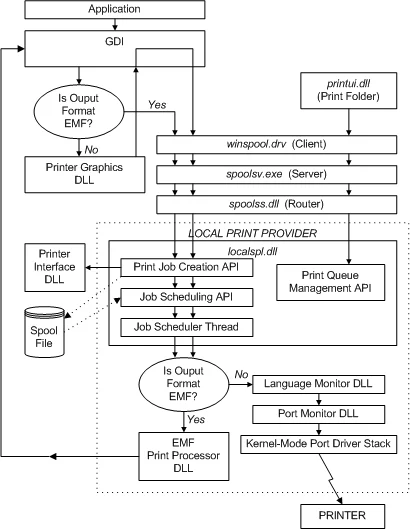
The local print provider provides job control and printer management capabilities for all printers accessed through its port monitors. The control flow among its components when an application creates a print job is large; the relevant piece here is localspl.dll.
When a user prints a document, the print job is spooled to a predefined location called the spool directory. The spool directory is configurable per printer and must allow the FILE_ADD_FILE permission to all users.
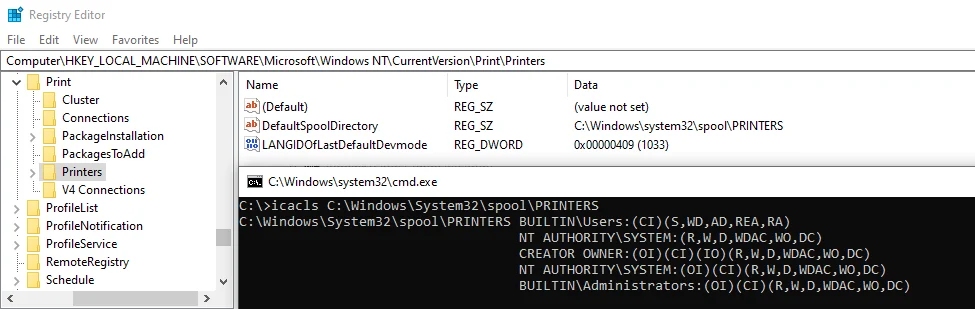
Individual spool directories are supported by defining the SpoolDirectory value in a printer's registry key:
HKLM\SOFTWARE\Microsoft\Windows NT\CurrentVersion\Print\Printers\<printer>
The Spooler provides APIs for managing configuration data such as EnumPrinterData, GetPrinterData, SetPrinterData and DeletePrinterData. Underneath, these functions perform registry operations relative to the printer's key. A printer's configuration can be modified with SetPrinterDataEx, which requires the printer to be opened with the PRINTER_ACCESS_ADMINISTER access right.
Setup
The vulnerability was found and reported in November 2021 and patched as part of Microsoft's Patch Tuesday in February 2022. The researcher tested on Windows servers, where the Manage Server permission was not present. No special tooling is described beyond Process Monitor, used for the patch analysis, and the exploit itself, published at https://github.com/ly4k/SpoolFool together with the DLL.
The precondition is a low-privileged local user who can obtain a printer handle with PRINTER_ACCESS_ADMINISTER. If the current user cannot open an existing printer with that right, there are two options:
- The user can create a new local printer.
- The user can add a remote printer.
By default, users in the INTERACTIVE group have the "Manage Server" permission and can therefore create new local printers.
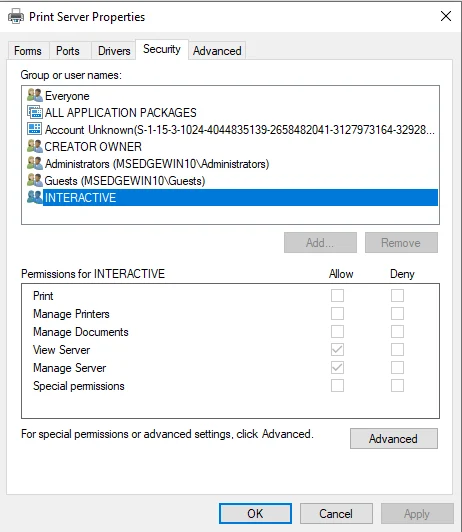
That permission appears to be granted only on Windows desktops such as Windows 10 and Windows 11; during testing on Windows servers it was not present. Even without "Manage Server", users could still add remote printers. When a user adds a remote printer, the printer inherits the security properties of the shared printer from the print server. If the remote print server allows Everyone to manage the printer, it is possible to obtain a handle with PRINTER_ACCESS_ADMINISTER, and SetPrinterDataEx would update the local registry as usual. A user could create a shared printer on a different server or workstation and grant Everyone the right to manage it, then add the remote printer on the victim server, where it would now be manageable by Everyone. The researcher notes this was not fully tested on remote printers and hedges that it could be viable where the user cannot create or manage a local printer, because some operations are handled by the local print provider and others by the remote print provider.
Finding it
The vulnerability consists of two bypasses for CVE-2020-1030. The background matters:
- CVE-2020-1048 (patched May 2020, credited to Peleg Hadar and Tomer Bar of SafeBreach Labs): a user could write to an arbitrary file by creating a printer port that pointed to a file on disk. After the patch, the Spooler checked whether the user had permissions to create or write to the file before adding the port.
- CVE-2020-1337 (a bypass of CVE-2020-1048, privately disclosed by Paolo Stagno aka VoidSec a week after the patch and write-up, patched August 2020, eight independent entities acknowledged): the bypass used a directory junction (symbolic link). A user creates
C:\MyFolder\and configures a printer port pointing toC:\MyFolder\Port; this is granted because the user may create that file. The user then turnsC:\MyFolder\into a directory junction pointing toC:\Windows\System32\, and the Spooler writes toC:\Windows\System32\Port. - CVE-2020-1030 (patched September 2020): allowed users to create arbitrary and writable directories by configuring the
SpoolDirectoryattribute on a printer. After the patch, the Spooler checked whether the user had permissions to create the directory before setting theSpoolDirectoryproperty.
With a printer handle carrying PRINTER_ACCESS_ADMINISTER, the SpoolDirectory can be configured.
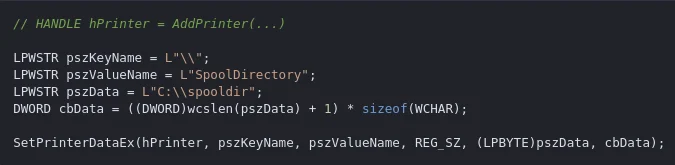
Calling SetPrinterDataEx sends an RPC request to spoolsv.exe, which routes it to localspl.dll!SplSetPrinterDataEx. The control flow is:
spoolsv.exe!SetPrinterDataExroutes toSplSetPrinterDataExinlocalspl.dll.localspl.dll!SplSetPrinterDataExvalidates permissions before restoringSYSTEMcontext and modifying the registry vialocalspl.dll!SplRegSetValue.
For the SpoolDirectory value, SplSetPrinterDataEx verifies that the provided directory is valid before updating the registry key. This check was not present before CVE-2020-1030.

Given a path, localspl.dll!IsValidSpoolDirectory calls localspl.dll!AdjustFileName to convert it into a canonical path. The canonical path for C:\spooldir\ is \\?\C:\spooldir\; if C:\spooldir\ is a symbolic link to C:\Windows\System32\, the canonical path is \\?\C:\Windows\System32\. IsValidSpoolDirectory then checks whether the current user may open or create the directory with GENERIC_WRITE access. If the directory was successfully created or opened, a final check ensures the number of links to the directory is not greater than 1, as returned by GetFileInformationByHandle.
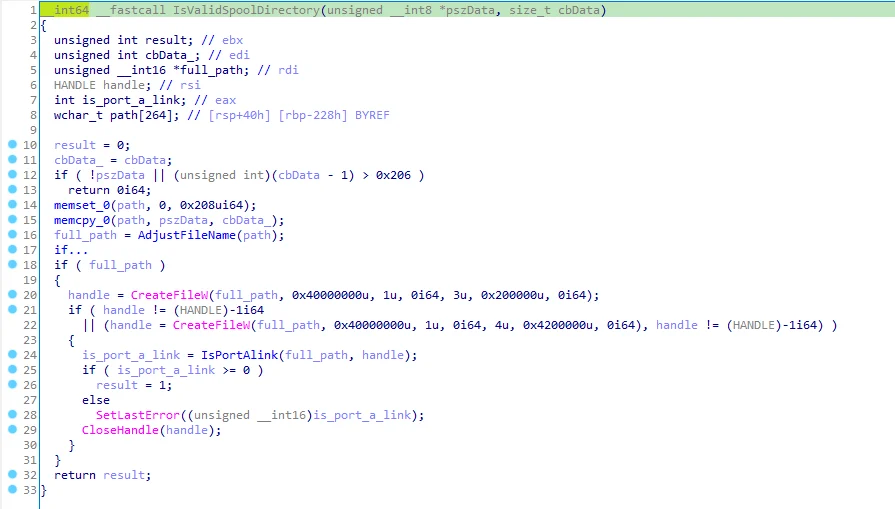
So to set SpoolDirectory, the user must be able to create or open the directory with writable permissions. If validation succeeds, the print provider updates the registry key. Crucially, the spool directory is not created by the Spooler until it is reinitialised. The user therefore only needs to be able to create the directory during validation, not when the directory is actually created.
Exploitation
Step 1: Bypass the validation with a reparse point
Use reparse points (directory junctions). Create C:\spooldir\ and set SpoolDirectory to C:\spooldir\printers\. The Spooler checks that the user can create printers inside C:\spooldir\; validation passes and the value is set. Then convert C:\spooldir\ into a reparse point pointing to C:\Windows\System32\. When the Spooler initialises, C:\Windows\System32\printers\ is created with writable permissions for everyone. If the directory already exists, the Spooler does not set writable permissions on it.
Step 2: Target the printer driver directory
An interesting place to create a directory is C:\Windows\System32\spool\drivers\x64\, the printer driver directory (on other architectures it is not x64). It is interesting because calling SetPrinterDataEx with the CopyFiles registry key makes the Spooler automatically load the DLL assigned in the Module value, if the Module file path is allowed.

This is triggered when pszKeyName begins with the CopyFiles\ string, and initiates a sequence of functions leading to LoadLibrary.
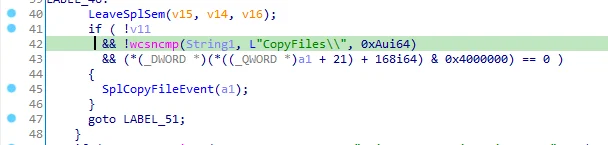
The control flow is:
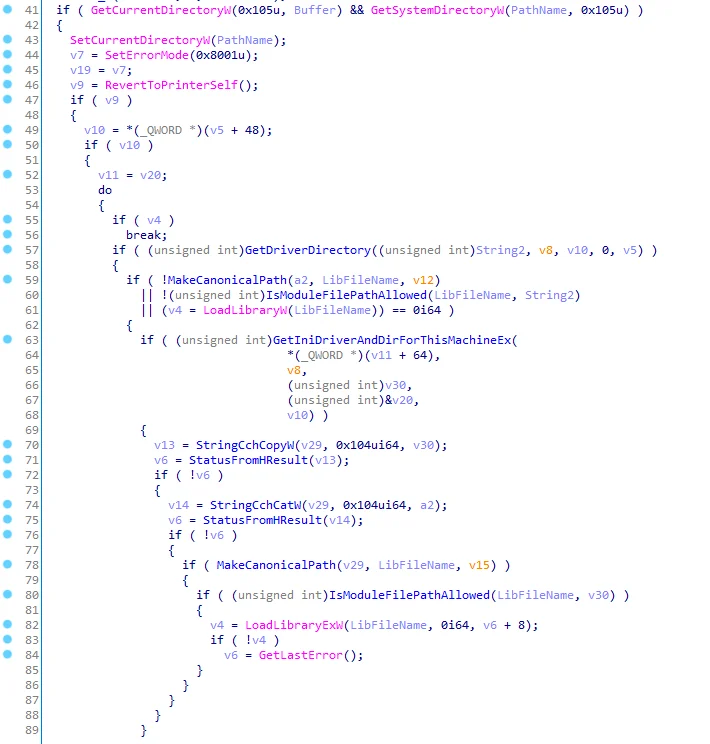
localspl.dll!SplCopyFileEventis called if thepszKeyNameargument begins withCopyFiles\.localspl.dll!SplCopyFileEventreads theModulevalue from the printer'sCopyFilesregistry key and passes the string tolocalspl.dll!SplLoadLibraryTheCopyFileModule.localspl.dll!SplLoadLibraryTheCopyFileModuleperforms validation on theModulefile path.- If validation passes, it attempts to load the module with
LoadLibrary.
Validation consists of localspl.dll!MakeCanonicalPath and localspl.dll!IsModuleFilePathAllowed. MakeCanonicalPath converts a path into a canonical path as described earlier.
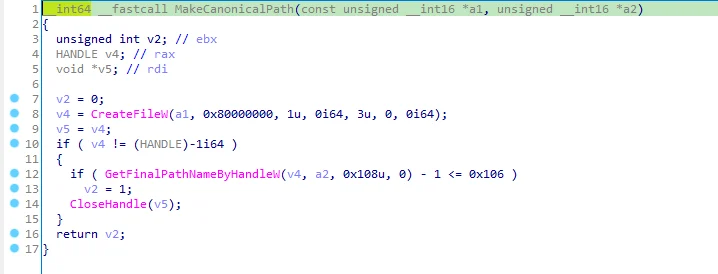
IsModuleFilePathAllowed validates that the canonical path either resides directly inside C:\Windows\System32\ or within the printer driver directory. For instance, C:\Windows\System32\payload.dll is allowed, whereas C:\Windows\System32\Tasks\payload.dll is not. Any path inside the printer driver directory is allowed, e.g. C:\Windows\System32\spool\drivers\x64\my\path\to\payload.dll. If a DLL can be created in C:\Windows\System32\ or anywhere in the printer driver directory, it can be loaded into the Spooler service.
Step 3: The conflicting check during initialisation
The spool directory is created when localspl.dll!SplCreateSpooler calls localspl.dll!BuildPrinterInfo. Before BuildPrinterInfo allows Everybody the FILE_ADD_FILE permission, a final check ensures the directory path does not reside within the printer driver directory.
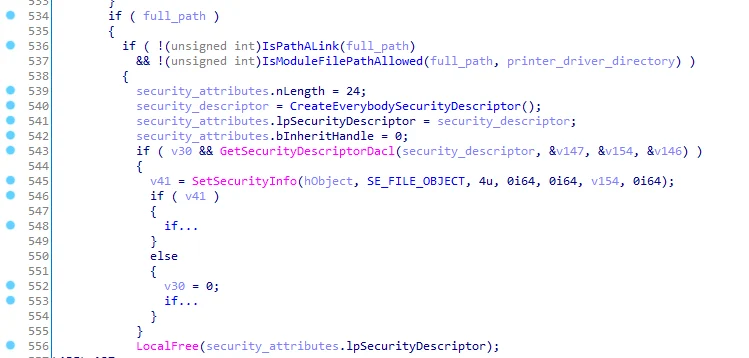
If it does, the Spooler does not create the spool directory and falls back to the default spool directory. This check was also part of the CVE-2020-1030 patch.
So the two checks conflict: to load the DLL, the DLL must reside inside the printer driver directory or directly inside C:\Windows\System32\; to create the writable directory at initialisation, the directory must not reside inside the printer driver directory. In the first case the DLL path must begin with C:\Windows\System32\spool\drivers\x64\; in the second the directory path must not begin with it.
Step 4: Bypass the driver-directory check with a UNC path
Both checks convert SpoolDirectory to a canonical path. Even if SpoolDirectory is set to C:\spooldir\printers\ and C:\spooldir\ is then made a reparse point to C:\Windows\System32\spool\drivers\x64\, the canonical path still becomes \\?\C:\Windows\System32\spool\drivers\x64\printers\. The check strips the first four bytes of the canonical path, so \\?\C:\Windows\System32\spool\drivers\x64\printers\ becomes C:\Windows\System32\spool\drivers\x64\printers\, and then checks whether it begins with C:\Windows\System32\spool\drivers\x64\.
The second bug: set the spool directory to a UNC path such as \\localhost\C$\spooldir\printers\ (with C:\spooldir\ a reparse point to C:\Windows\System32\spool\drivers\x64\). The canonical path becomes \\?\UNC\localhost\C$\Windows\System32\spool\drivers\x64\printers\. During comparison the first four bytes are stripped, so UNC\localhost\C$\Windows\System32\spool\drivers\x64\printers\ is compared to C:\Windows\System32\spool\drivers\x64\ and no longer matches. When the Spooler initialises, \\?\UNC\localhost\C$\Windows\System32\spool\drivers\x64\printers\ is created with writable permissions. The DLL can then be written to C:\Windows\System32\spool\drivers\x64\printers\payload.dll, and SplLoadLibraryTheCopyFileModule triggered with the path specified normally as C:\Windows\System32\spool\drivers\x64\printers\payload.dll.
Step 5: Restart the Spooler
The directory is only created when the Spooler initialises. Rather than waiting for a server restart, terminate the service and rely on recovery. By default the Spooler restarts on the first two "crashes" but not on subsequent failures. Load C:\Windows\System32\AppVTerminator.dll via SplLoadLibraryTheCopyFileModule; when loaded into the Spooler it calls TerminateProcess, killing spoolsv.exe. The Service Control Manager recovery mechanism then starts a new Spooler process. This technique was explained for CVE-2020-1030 by Victor Mata from Accenture.
Step 6: Full exploit
The DLL used in the example creates a new local administrator named "admin" and can be found in the exploit repository.
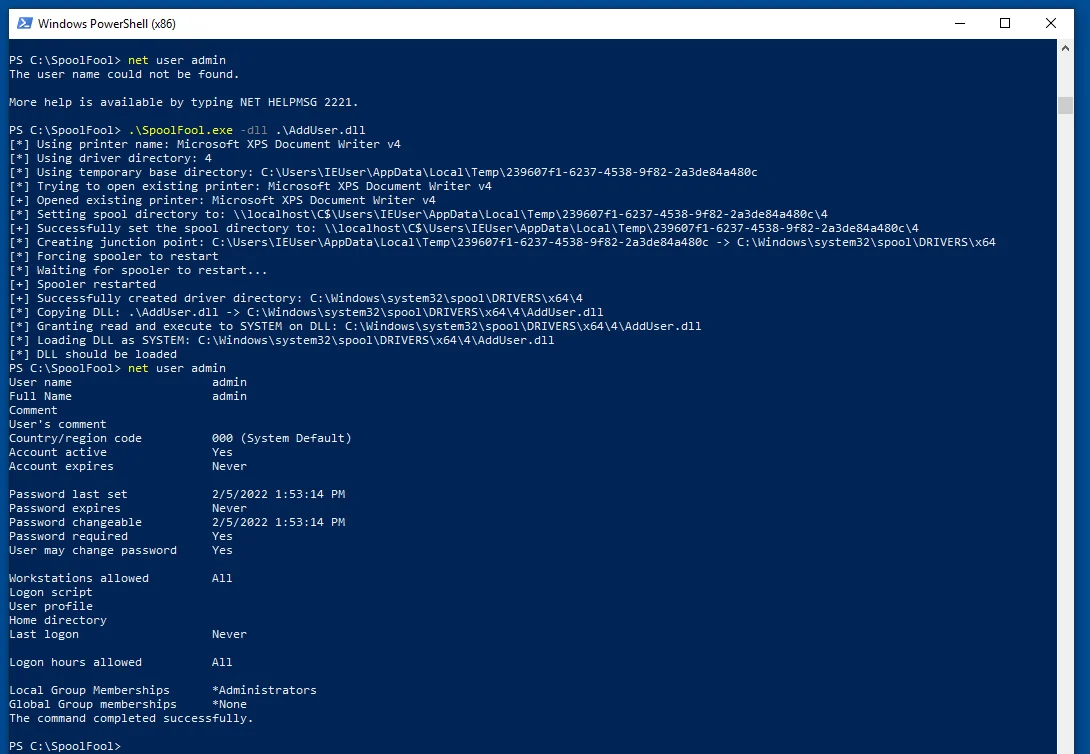
The exploit steps are:
- Create a temporary base directory to be used as the spool directory, later turned into a reparse point.
- Create a new local printer named "Microsoft XPS Document Writer v4".
- Set the spool directory of the new printer to the temporary base directory.
- Create a reparse point on the temporary base directory pointing to the printer driver directory.
- Force the Spooler to restart to create the directory by loading
AppVTerminator.dllinto it. - Write the DLL into the new directory inside the printer driver directory.
- Load the DLL into the Spooler.
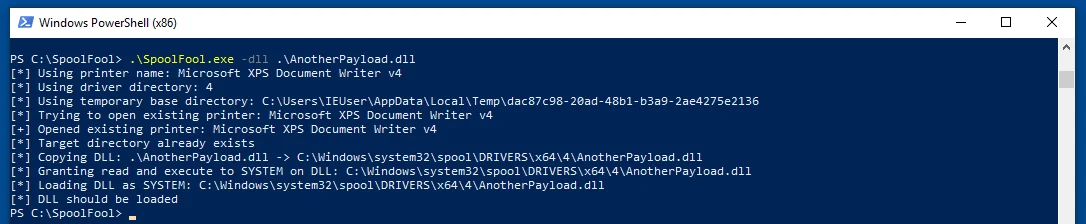
Creating the driver directory once is sufficient to load as many DLLs as desired. Triggering the exploit repeatedly will most likely kill the Spooler service indefinitely until a reboot brings it back. Once the directory exists, DLLs can be written and loaded without restarting the Spooler. The published exploit checks whether the driver directory already exists and, if so, skips its creation and jumps straight to writing and loading the DLL.
Root cause
The design flaw is the combination of two path checks: the driver-directory check in BuildPrinterInfo strips the first four bytes before comparing, and a UNC canonical path does not match. The SpoolDirectory check in BuildPrinterInfo and the module path check in IsModuleFilePathAllowed both rely on that prefix comparison, and a UNC canonical path (\\?\UNC\...) does not begin with the driver directory after the four-byte strip. The earlier CVE-2020-1030 defence (refusing to create a spool directory inside the driver directory) is therefore bypassed with the UNC trick. while the reparse point defeats the permission check in IsValidSpoolDirectory because validation happens before the junction is created.
Impact
A local user can load an arbitrary DLL into the Spooler service, and the example DLL creates a local administrator. The example DLL creates a local administrator. The precondition is the ability to manage a printer with PRINTER_ACCESS_ADMINISTER, which by default holds for INTERACTIVE users on Windows desktops; on servers that permission was not present, and the remote printer route is described as untested and only possibly viable.
Fix
Microsoft released a patch on 8 February 2022. A quick check with Process Monitor shows that the SpoolDirectory is no longer created when the Spooler initialises; if the directory does not exist, the Spooler falls back to the default spool directory. The write-up's patch analysis section ends with "To be continued...".
Disclosure timeline:
- Nov 12, 2021: reported to MSRC
- Nov 15, 2021: case opened and assigned
- Nov 19, 2021: review and reproduction
- Nov 22, 2021: Microsoft starts developing a patch
- Jan 21, 2022: patch ready for release
- Feb 08, 2022: patch silently released, no acknowledgement or information received
- Feb 09, 2022: Microsoft acknowledges the researcher and Institut For Cyber Risk for CVE-2022-21999
Initially, because the patch came without acknowledgement, the researcher thought the vulnerability was CVE-2022-22718, the only Print Spooler vulnerability in that release without acknowledgement; after contacting Microsoft, the day after release, the acknowledgement for CVE-2022-21999 followed.
Variants to test
- Other canonicalisation prefixes: try paths whose canonical form does not start with the expected drive prefix (UNC, device paths) against any check that strips a fixed number of bytes before a prefix comparison. A positive result is a path that passes validation but resolves inside a protected directory.
- Reparse points created after validation: anywhere a service validates a directory and creates it later, swap the parent for a junction in between. A positive result is a directory created with writable permissions in a privileged location.
- Other
CopyFiles-style registry keys: look for other keys that causeLoadLibraryfrom a user-influenced value. A positive result is a DLL loaded into a privileged process from a path the user can write. - Remote printer inheritance: add a remote printer shared with
Everyonemanage rights on a server where local printer creation is denied. A positive result is aPRINTER_ACCESS_ADMINISTERhandle and a registry update on the victim. - Service recovery abuse: load a library that terminates a privileged service to force recovery restarts. A positive result is the service restarting and applying the pending configuration.
What happened, in plain words
In November 2021 I found a way for an ordinary user on a Windows computer to load a DLL into the Print Spooler service, which runs with high privileges. I reported it to Microsoft, and it was fixed in February 2022 as CVE-2022-21999. The bug lives in the Windows Print Spooler, the part of Windows that handles printing. The trick is to make the printing service create a folder in a place it should not, put a small program file there, and then ask the service to load that file. The loaded program then runs inside the Spooler service.
This post walks through how the Spooler works, the earlier bugs that led here, the two mistakes that make this one possible, and a working exploit. It is written for someone who has never looked at Windows internals before, so every term is explained as it appears.
Background: three earlier bugs
Before the main story, three older vulnerabilities matter, because this one is built on top of them. A vulnerability is a mistake in software that lets someone do something the software's author did not intend. A CVE is a public catalogue number given to a vulnerability so people can talk about it unambiguously; CVE-2020-1048 is just an identifier, like a case number.
- CVE-2020-1048 (patched May 2020, credited to Peleg Hadar and Tomer Bar of SafeBreach Labs). A printer port is the destination the Spooler sends a print job to; normally it is a physical port or a network address, but it can also be a file on disk. The bug: a user could create a printer port that pointed to any file, and the Spooler would write to it. After the patch, the Spooler checked whether the user had permission to create or write that file before adding the port.
- CVE-2020-1337 (a bypass of the previous fix, privately disclosed by Paolo Stagno, aka VoidSec, a week after the patch and write-up, patched August 2020, with eight independent entities acknowledged). A bypass is a new trick that gets around a fix without removing the original weakness. The bypass used a directory junction, which is a kind of symbolic link: a folder that is really a signpost pointing at another folder. A user creates
C:\MyFolder\and configures a printer port pointing toC:\MyFolder\Port. That is allowed, because the user really can create that file. Then the user turnsC:\MyFolder\into a junction pointing atC:\Windows\System32\, a protected system folder. The Spooler, still believing it is writing to the user's own folder, writes toC:\Windows\System32\Portinstead. - CVE-2020-1030 (patched September 2020). This one let users create arbitrary folders with write permission by setting the
SpoolDirectoryattribute on a printer. After the patch, the Spooler checked whether the user had permission to create the folder before settingSpoolDirectory.
If you can already see the pattern, you are following the story correctly: each fix checks something at one moment, and the next bug makes the situation change after the check.
Introduction to Spooler components
The Windows Print Spooler is a built-in component on all Windows workstations and servers, and it is the primary component of the printing interface. It is an executable file that manages the printing process: retrieving the location of the correct printer driver, loading that driver, spooling high-level function calls into a print job, scheduling the print job for printing, and so on. The Spooler is loaded at system startup and continues to run until the operating system is shut down. The primary components of the Print Spooler are illustrated in the following diagram.
A driver is a piece of software that lets the operating system talk to a specific piece of hardware or a specific format; a printer driver knows how to turn a document into whatever a particular printer understands. Spooling means putting a job in a queue on disk so it can be processed in order, like putting letters in an out-tray. The diagram shows the pieces below.
Application
The print application creates a print job by calling Graphics Device Interface (GDI) functions or directly into winspool.drv.
An API (Application Programming Interface) is the set of commands one program offers to another. Think of a restaurant menu: you do not walk into the kitchen, you order from the menu and the kitchen does the work. Here the application orders "print this" and the Spooler does the work.
GDI
The Graphics Device Interface (GDI) includes both user-mode and kernel-mode components for graphics support.
User mode is where ordinary programs run, with limited power. Kernel mode is where the core of the operating system runs, with full power over the machine. A bug in kernel mode is far more dangerous than one in user mode.
winspool.drv
winspool.drv is the client interface into the Spooler. It exports the functions that make up the Spooler's Win32 API, and provides RPC stubs for accessing the server.
RPC (Remote Procedure Call) is a way for one program to call a function in another program, possibly on another machine, as if it were local. A stub is a small piece of code that stands in for the real function and forwards the call over the network. Think of a receptionist who takes your request and passes it to the right department.
spoolsv.exe
spoolsv.exe is the Spooler's API server. It is implemented as a service that is started when the operating system is started. This module exports an RPC interface to the server side of the Spooler's Win32 API. Clients of spoolsv.exe include winspool.drv (locally) and win32spl.dll (remotely). The module implements some API functions, but most function calls are passed to a print provider by means of the router (spoolss.dll).
A service is a program that runs in the background, usually from boot, without a visible window. spoolsv.exe is the actual worker process that does the printing work.
Router
The router, spoolss.dll, determines which print provider to call, based on a printer name or handle supplied with each function call, and passes the function call to the correct provider.
A handle is a reference the system gives you when you open something, like a claim ticket at a cloakroom. You do not carry the printer around; you carry a ticket that identifies it.
Print Provider
The print provider that supports the specified print device.
Local print provider
The local print provider provides job control and printer management capabilities for all printers that are accessed through the local print provider's port monitors.
The following diagram provides a view of control flow among the local printer provider's components, when an application creates a print job.
While this control flow is rather large, we will mostly focus on the local print provider localspl.dll.
A DLL (Dynamic Link Library) is a file full of code that other programs can load and run, rather like a plug-in module. Windows itself is built from many DLLs. The name localspl.dll!SplSetPrinterDataEx is a convention: the part before the exclamation mark is the file, the part after is the function inside it.
The vulnerability
The vulnerability consists of two bypasses for CVE-2020-1030. I highly recommend reading Victor Mata's blog post on CVE-2020-1030, but I'll try to cover the important parts as well.
When a user prints a document, a print job is spooled to a predefined location referred to as the "spool directory". The spool directory is configurable on each printer and it must allow the FILE_ADD_FILE permission to all users.
A permission is a rule about who may do what to a file or folder. FILE_ADD_FILE is the specific permission to create a file inside a folder. The spool directory must grant it to everyone because any user may print.
Individual spool directories are supported by defining the SpoolDirectory value in a printer's registry key HKLM\SOFTWARE\Microsoft\Windows NT\CurrentVersion\Print\Printers\<printer>.
The registry is Windows' central settings database, a big tree of keys and values. HKLM stands for HKEY_LOCAL_MACHINE, the part of the tree that holds settings for the whole machine. So each printer has its own key, and SpoolDirectory is one value inside it.
The Print Spooler provides APIs for managing configuration data such as EnumPrinterData, GetPrinterData, SetPrinterData, and DeletePrinterData. Underneath, these functions perform registry operations relative to the printer's key.
We can modify a printer's configuration with SetPrinterDataEx. This function requires a printer to be opened with the PRINTER_ACCESS_ADMINISTER access right. If the current user doesn't have permission to open an existing printer with the PRINTER_ACCESS_ADMINISTER access right, there are two options:
- The user can create a new local printer
- The user can add a remote printer
An access right is a named permission attached to an object. PRINTER_ACCESS_ADMINISTER means "may administer this printer", that is, change its settings. The whole bug depends on an ordinary user being able to get that right somehow.
By default, users in the INTERACTIVE group have the "Manage Server" permission and can therefore create new local printers, as shown below.
A group is a named collection of user accounts; INTERACTIVE means users who are logged on locally at the machine, as opposed to arriving over the network.
However, it seems that this permission is only granted on Windows desktops, such as Windows 10 and Windows 11. During my testing on Windows servers, this permission was not present. Nonetheless, it was still possible for users without the "Manage Server" permission to add remote printers.
If a user adds a remote printer, the printer will inherit the security properties of the shared printer from the printer server. As such, if the remote printer server allows Everyone to manage the printer, then it's possible to obtain a handle to the printer with the PRINTER_ACCESS_ADMINISTER access right, and SetPrinterDataEx would update the local registry as usual. A user could therefore create a shared printer on a different server or workstation, and grant Everyone the right to manage the printer. On the victim server, the user could then add the remote printer, which would now be manageable by Everyone. While I haven't fully tested how this vulnerability behaves on remote printers, it could be a viable option for situations, where the user cannot create or mange a local printer. But please note that while some operations are handled by the local print provider, others are handled by the remote print provider.
A shared printer is one published on the network so other machines can use it. Everyone is a built-in group that literally means every account. The idea here is that permissions travel with the shared printer, so a permissive printer on a machine you control can hand you administrative rights over the copy of it on the victim machine.
When we have opened or created a printer with the PRINTER_ACCESS_ADMINISTER access right, we can configure the SpoolDirectory on it.
When calling SetPrinterDataEx, an RPC request will be sent to the local Print Spooler spoolsv.exe, which will route the request to the local print provider's implementation in localspl.dll!SplSetPrinterDataEx. The control flow consists of the following events:
-
spoolsv.exe!SetPrinterDataExroutes toSplSetPrinterDataExin the local print providerlocalspl.dll
-
localspl.dll!SplSetPrinterDataExvalidates permissions before restoringSYSTEMcontext and modifying the registry vialocalspl.dll!SplRegSetValue
Control flow simply means the order in which functions call each other. Context here means the identity a thread is running under; SYSTEM is the highly privileged account the Spooler uses when it writes settings. The Spooler temporarily acts as SYSTEM to write settings, which is exactly why a mistake in it is so serious.
In the case of setting the SpoolDirectory value, localspl.dll!SplSetPrinterDataEx will verify that the provided directory is valid before updating the registry key. This check was not present before CVE-2020-1030.
Given a path to a directory, localspl.dll!IsValidSpoolDirectory will call localspl.dll!AdjustFileName to convert the path into a canonical path. For instance, the canonical path for C:\spooldir\ would be \\?\C:\spooldir\, and if C:\spooldir\ is a symbolic link to C:\Windows\System32\, the canonical path would be \\?\C:\Windows\System32\. Then, localspl.dll!IsValidSpoolDirectory will check if the current user is allowed to open or create the directory with GENERIC_WRITE access right. If the directory was successfully created or opened, the function will make a final check that the number of links to the directory is not greater than 1, as returned by GetFileInformationByHandle.
A canonical path is the one true, fully resolved form of a path, with every shortcut and link expanded. It is like a postal address versus "the shop next to the station": the canonical form is the one the postman uses. The \\?\ prefix is a Windows marker meaning "this is a long, already-resolved path, do not interpret it further". GENERIC_WRITE is the permission to write. The link count is how many names point at the same folder; a junction adds a link, so a count above 1 hints that something is linked.
So in order to set the SpoolDirectory, the user must be able to create or open the directory with writable permissions. If the validation succeeds, the print provider will update the printer's SpoolDirectory registry key. However, the spool directory will not be created by the Print Spooler until it has been reinitialized. This means that we will need to figure out how to restart the Spooler service (we will come back to this part), but it also means that the user only needs to be able to create the directory during the validation when setting the SpoolDirectory registry key, and not when the directory is actually created.
That gap in time is the heart of the first bug. The check happens now; the folder is created later. Anything that changes in between is invisible to the check.
In order to bypass the validation, we can use reparse points (directory junctions in this case). Suppose we create a directory named C:\spooldir\, and we set the SpoolDirectory to C:\spooldir\printers\. The Spooler will check that the user can create the directory printers inside of C:\spooldir\. The validation passes, and the SpoolDirectory gets set to C:\spooldir\printers\. After we have configured the SpoolDirectory, we can convert C:\spooldir\ into a reparse point that points to C:\Windows\System32\. When the Spooler initializes, the directory C:\Windows\System32\printers\ will be created with writable permissions for everyone. If the directory already exists, the Spooler will not set writable permissions on the folder.
A reparse point is a Windows feature where a file or folder carries a note saying "actually, look over there instead". A directory junction is one kind of reparse point. The exploit uses it as a bait-and-switch: show the checker your own harmless folder, then swap the signpost before the Spooler acts on it.
As such, we need to find an interesting place to create a directory. One such place is C:\Windows\System32\spool\drivers\x64\, also known as the printer driver directory (on other architectures, it's not x64). The printer driver directory is particularly interesting, because if we call SetPrinterDataEx with the CopyFiles registry key, the Spooler will automatically load the DLL assigned in the Module value, if the Module file path is allowed.
x64 refers to the 64-bit Intel/AMD processor architecture; on other architectures the folder name differs. The key point: this folder is where the Spooler looks for driver code, and it will load code from there on request.
This event is triggered when pszKeyName begins with the CopyFiles\ string. It initiates a sequence of functions leading to LoadLibrary.
pszKeyName is just the name of the registry key being set. LoadLibrary is the Windows function that loads a DLL into the current process and runs its startup code. That is the moment code of our choosing starts running inside the Spooler.
-
-
-
localspl.dll!SplCopyFileEventis called ifpszKeyNameargument begins withCopyFiles\string
-
localspl.dll!SplCopyFileEventreads theModulevalue from printer'sCopyFilesregistry key and passes the string tolocalspl.dll!SplLoadLibraryTheCopyFileModule
-
localspl.dll!SplLoadLibraryTheCopyFileModuleperforms validation on theModulefile path
-
- If validation passes,
localspl.dll!SplLoadLibraryTheCopyFileModuleattempts to load the module withLoadLibrary
- If validation passes,
Read it as a chain of errands: the request arrives, permissions are checked, a special key name triggers a side task, that task reads a filename from the registry, checks the filename, and then loads it. Each link in the chain is a place where a check can be too weak.
The validation steps consist of localspl.dll!MakeCanonicalPath and localspl.dll!IsModuleFilePathAllowed. The function localspl.dll!MakeCanonicalPath will take a path and convert it into a canonical path, as described earlier.
localspl.dll!IsModuleFilePathAllowed will validate that the canonical path either resides directly inside of C:\Windows\System32\ or within the printer driver directory. For instance, C:\Windows\System32\payload.dll would be allowed, whereas C:\Windows\System32\Tasks\payload.dll would not. Any path inside of the printer driver directory is allowed, e.g. C:\Windows\System32\spool\drivers\x64\my\path\to\payload.dll is allowed. If we are able to create a DLL in C:\Windows\System32\ or anywhere in the printer driver directory, we can load the DLL into the Spooler service.
So the rule is: code may only be loaded from two trusted places. The attack therefore needs to get a file of our own into one of those places. payload.dll is just a placeholder name for the file we want loaded.
Now, we know that we can use the SpoolDirectory to create an arbitrary directory with writable permissions for all users, and that we can load any DLL into the Spooler service that resides in either C:\Windows\System32\ or the printer driver directory. There is only one issue though. As mentioned earlier, the spool directory is created during the Spooler initialization. The spool directory is created when localspl.dll!SplCreateSpooler calls localspl.dll!BuildPrinterInfo. Before localspl.dll!BuildPrinterInfo allows Everybody the FILE_ADD_FILE permission, a final check is made to make sure that the directory path does not reside within the printer driver directory.
This means that a security check during the Spooler initialization verifies that the SpoolDirectory value does not point inside of the printer driver directory. If it does, the Spooler will not create the spool directory and simply fallback to the default spool directory. This security check was also implemented in the patch for CVE-2020-1030.
Here is the conflict in one sentence: to load our DLL, the file must be inside the driver directory; to create a writable folder, the folder must not be inside the driver directory. The two checks pull in opposite directions, so a naive attack fails one or the other.
To summarise, in order to load the DLL with localspl.dll!SplLoadLibraryTheCopyFileModule, the DLL must reside inside of the printer driver directory or directly inside of C:\Windows\System32\. To create the writable directory during Spooler initialization, the directory must not reside inside of the printer driver directory. Both localspl.dll!SplLoadLibraryTheCopyFileModule and localspl.dll!BuildPrinterInfo check if the path points inside the printer driver directory. In the first case, we must make sure that the DLL path begins with C:\Windows\System32\spool\drivers\x64\, and in the second case, we must make sure that the directory path does not begin with C:\Windows\System32\spool\drivers\x64\.
During the both checks, the SpoolDirectory is converted to a canonical path, so even if we set the SpoolDirectory to C:\spooldir\printers\ and then convert C:\spooldir\ into a reparse point that points to C:\Windows\System32\spool\drivers\x64\, the canonical path will still become \\?\C:\Windows\System32\spool\drivers\x64\printers\. The check is done by stripping of the first four bytes of the canonical path, i.e. \\?\C:\Windows\System32\spool\drivers\x64\ printers\ becomes C:\Windows\System32\spool\drivers\x64\ printers\, and then checking if the path begins with the printer driver directory C:\Windows\System32\spool\drivers\x64\. And so, here comes the second bug to pass both checks.
A byte is a single unit of data, roughly one character. Stripping four bytes removes the four characters \\?\. The check is therefore a simple text comparison: does the remaining text start with the driver directory? Text comparisons are easy to fool if the text can take an unexpected shape.
If we set the spooler directory to a UNC path, such as \\localhost\C$\spooldir\printers\ (and C:\spooldir\ is a reparse point to C:\Windows\System32\spool\drivers\x64\), the canonical path will become \\?\UNC\localhost\C$\Windows\System32\spool\drivers\x64\printers\, and during comparison, the first four bytes are stripped, so UNC\localhost\C$\Windows\System32\spool\drivers\x64\printers\ is compared to C:\Windows\System32\spool\drivers\x64\ and will no longer match. When the Spooler initializes, the directory \\?\UNC\localhost\C$\Windows\System32\spool\drivers\x64\printers\ will be created with writable permissions. We can now write our DLL into C:\Windows\System32\spool\drivers\x64\printers\payload.dll. We can then trigger the localspl.dll!SplLoadLibraryTheCopyFileModule, but this time, we can just specify the path normally as C:\Windows\System32\spool\drivers\x64\printers\payload.dll.
A UNC path is a network path of the form \\server\share\.... localhost means this same machine, and C$ is the administrative share of drive C. So the path still points at the same disk, but it is written in network form. After the four-byte strip, the text begins with UNC\ instead of C:\, so the prefix comparison fails to recognise the driver directory. The check says "not the driver directory", while the path really is the driver directory. That is the second bug.
We now have the primitives to create a writable directory inside of the printer driver directory and to load a DLL within the driver directory into the Spooler service. The only thing left is to restart the Spooler service such that the directory will be created. We could wait for the server to be restarted, but there is a technique to terminate the service and rely on the recovery to restart it. By default, the Spooler service will restart on the first two "crashes", but not on subsequent failures.
A primitive in security means a small, reliable capability you can build with, like a single Lego brick. Here we have two: create a writable folder in a protected place, and load a DLL from it.
To terminate the service, we can use localspl.dll!SplLoadLibraryTheCopyFileModule to load C:\Windows\System32\AppVTerminator.dll. When loaded into Spooler, the library calls TerminateProcess which subsequently kills the spoolsv.exe process. This event triggers the recovery mechanism in the Service Control Manager which in turn starts a new Spooler process. This technique was explained for CVE-2020-1030 by Victor Mata from Accenture.
TerminateProcess is the Windows function that ends a process immediately. The Service Control Manager is the part of Windows that starts and watches services; its recovery mechanism restarts a service that has failed. So we use the Spooler's own DLL-loading feature to make it kill itself, and Windows politely brings it back, this time creating the folder we configured.
Here's a full exploit in action. The DLL used in this example will create a new local administrator named "admin". The DLL can also be found in the exploit repository.
The steps for the exploit are the following:
- Create a temporary base directory that will be used for our spool directory, which we'll later turn into a reparse point
- Create a new local printer named "Microsoft XPS Document Writer v4"
- Set the spool directory of our new printer to be our temporary base directory
- Create a reparse point on our temporary base directory to point to the printer driver directory
- Force the Spooler to restart to create the directory by loading
AppVTerminator.dllinto the Spooler - Write DLL into the new directory inside of the printer driver directory
- Load the DLL into the Spooler
Each step exists for a reason. The temporary folder is the harmless-looking bait. The new printer gives us a printer we control, so we may set its settings. Setting the spool directory records the bait path. The reparse point swaps the bait for the real target after the check. The forced restart makes the Spooler act on the recorded path. Writing the DLL puts our code where the loader will accept it. The final load runs our code inside the Spooler service.
Remember that it is sufficient to create the driver directory only once in order to load as many DLLs as desired. There's no need to trigger the exploit multiple times, doing so will most likely end up killing the Spooler service indefinitely until a reboot brings it back up. When the driver directory has been created, it is possible to keep writing and loading DLLs from the directory without restarting the Spooler service. The exploit that can be found at the end of this post will check if the driver directory already exists, and if so, the exploit will skip the creation of the directory and jump straight to writing and loading the DLL. The second run of the exploit can be seen below.
The functional exploit and DLL can be found here: https://github.com/ly4k/SpoolFool.
Conclusion
That's it. Microsoft has officially released a patch. When I initially found out that there was a check during the actual creation of the directory as well, I started looking into other interesting places to create a directory. I found this post by Jonas L from Secret Club, where the Windows Error Reporting Service (WER) is abused to exploit an arbitrary directory creation primitive. However, the technique didn't seem to work reliably on my Windows 10 machine. The SplLoadLibraryTheCopyFileModule is very reliable however, but assumes that the user can manage a printer, which is already the case for this vulnerability.
Patch analysis
[Feb 08, 2022]
A quick check with Process Monitor reveals that the SpoolDirectory is no longer created when the Spooler initializes. If the directory does not exist, the Print Spooler falls back to the default spool directory.
Process Monitor is a free Microsoft tool that records file, registry and process activity in real time, like a security camera for the operating system. Watching the Spooler start after the patch shows it no longer creates the configured folder, which closes the attack.
To be continued...
Disclosure timeline
- Nov 12, 2021: Reported to Microsoft Security Response Center (MSRC)
- Nov 15, 2021: Case opened and assigned
- Nov 19, 2021: Review and reproduction
- Nov 22, 2021: Microsoft starts developing a patch for the vulnerability
- Jan 21, 2022: The patch is ready for release
- Feb 08, 2022: Patch is silently released. No acknowledgement or information received from Microsoft
- Feb 09, 2022: Microsoft gives acknowledgement to me and Institut For Cyber Risk for CVE-2022-21999
Responsible disclosure is the practice of telling the vendor privately first and giving them time to fix the problem before publishing details. The MSRC is Microsoft's team for receiving such reports.
Glossary
- API: the set of commands one program offers to another, like a menu you order from.
- Access right: a named permission attached to an object, such as
PRINTER_ACCESS_ADMINISTER(may administer a printer). - Byte: a single unit of data, roughly one character.
- Bypass: a new technique that gets around a fix without removing the original weakness.
- Canonical path: the fully resolved, one true form of a path, with links and shortcuts expanded.
- Control flow: the order in which functions call one another.
- CVE: a public catalogue number for a vulnerability, so people can refer to it unambiguously.
- DLL: a file of code that other programs can load and run, like a plug-in module.
- Driver: software that lets the operating system talk to specific hardware or a specific format.
- GDI: the Windows graphics interface used by applications to draw and print.
- Group: a named collection of user accounts, such as
INTERACTIVEorEveryone. - Handle: a reference the system gives you when you open something, like a cloakroom ticket.
- Junction (directory junction): a folder that is really a signpost pointing at another folder; a kind of reparse point.
- Kernel mode: the privileged mode where the core of the operating system runs.
- Link count: how many names point at the same folder; a junction raises it.
- LoadLibrary: the Windows function that loads a DLL into a process and runs its startup code.
- MSRC: the Microsoft Security Response Center, which receives vulnerability reports.
- Permission: a rule about who may do what to a file, folder or object.
- Primitive: a small, reliable capability you can build an attack from.
- Print provider: the component that supports a particular print device.
- Printer port: the destination a print job is sent to, which can be a file on disk.
- Process Monitor: a Microsoft tool that records file, registry and process activity in real time.
- Registry: Windows' central settings database, a tree of keys and values.
- Reparse point: a file or folder carrying a note saying "look over there instead"; junctions and symbolic links are kinds.
- Responsible disclosure: telling the vendor privately first and allowing time to fix before publishing.
- RPC: a way for one program to call a function in another program, possibly on another machine, as if local.
- Service: a program that runs in the background, usually from boot, without a visible window.
- Service Control Manager: the part of Windows that starts and watches services, including restarting failed ones.
- Shared printer: a printer published on the network for other machines to use.
- Spool directory: the folder where print jobs are queued on disk.
- Spooling: putting a job in a queue on disk so it can be processed in order.
- Stub: a small piece of code that stands in for a real function and forwards the call.
- Symbolic link: a file or folder that points at another file or folder.
- SYSTEM: the highest-privileged local Windows account, more powerful than any administrator.
- TerminateProcess: the Windows function that ends a process immediately.
- UNC path: a network path of the form
\\server\share\.... - User mode: the limited mode where ordinary programs run.
- Vulnerability: a mistake in software that lets someone do something the author did not intend.
- WER: the Windows Error Reporting Service, which handles crash reports.


