Trading up a small bug for a big impact
A Power Apps Teams tab accepted a makerPortalUrl that only needed to start with the trusted make.powerapps.com domain, so an attacker could load their own content in an iframe. That content could request access tokens via postMessage and then create Power Automate flows on the victim's behalf, giving read/write access to email, Teams messages and files.
 Published on medium.com
I recently came across an interesting bug in the Microsoft Power Apps service which, despite its simplicity, can be leveraged by an attacker to gain persistent read/write access to a victim user’s email, Teams chats, OneDrive, Sharepoint and a variety of other services by way of a malicious Microsoft Teams tab and…
The full write-up lives on its author's site
It belongs to its author, so we link to it rather than copy it. The other two tabs are our own rewrites, checked against it.
Context
Microsoft Teams lets a user add small applications as tabs inside any team they belong to. In organisations with a Business Basic licence or above, one of the available tab types is a Microsoft Power Apps application. Power Apps is part of the wider Power Platform, and the first time a team launches a Power App tab, Teams creates a Dataverse for Teams environment, which Microsoft describes as storing, managing and sharing team-specific data, apps and flows. Separately from the per-team environments there is a default environment for the whole organisation. Users can create connectors and flows only in the default environment or in teams they own, and the attack described here depends on being able to create Power Automate flows.
Power Automate lets users build automated workflows over Office 365 data: sending email on a schedule, or posting a Teams message whenever a file on SharePoint changes, for example.
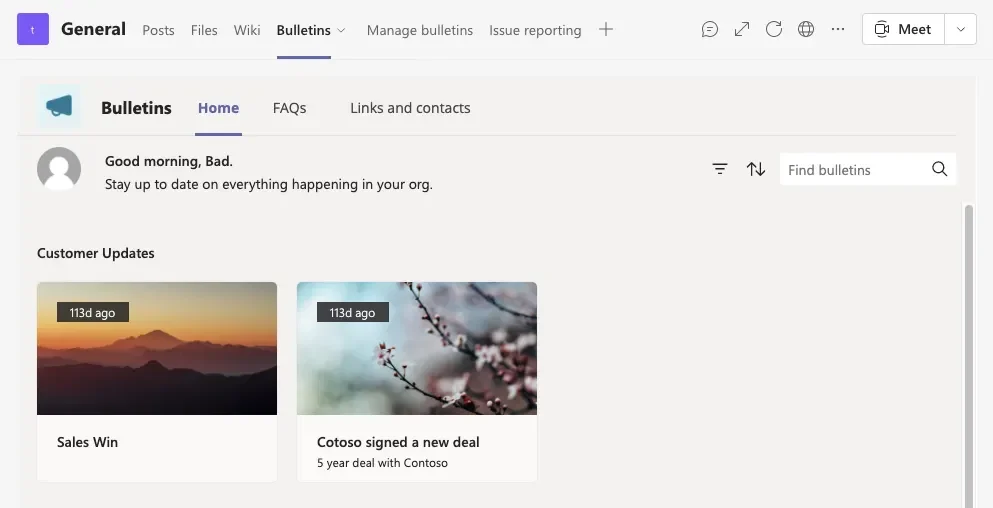
A Teams tab with the Bulletins Power App
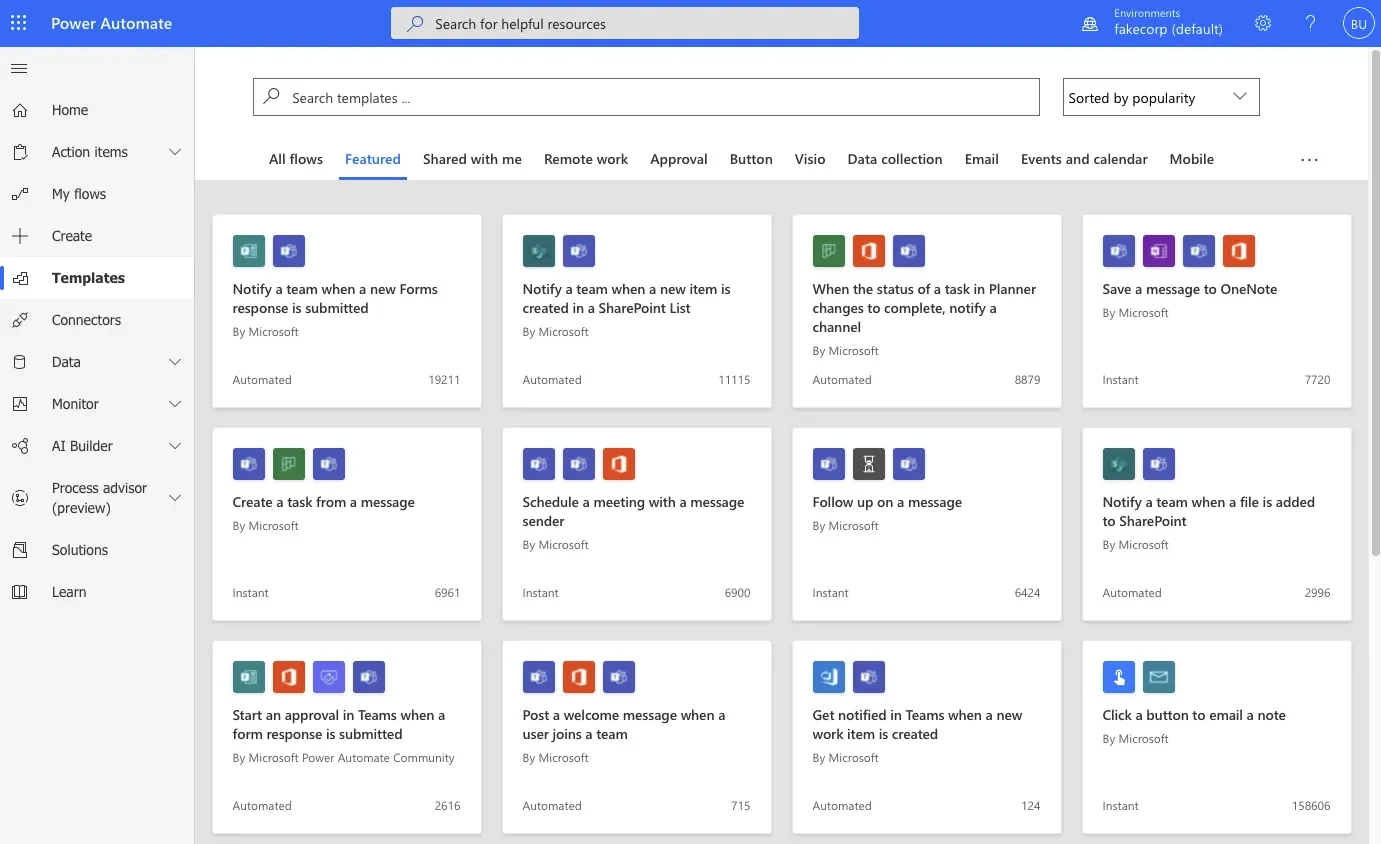
Power Automate flow templates
The write-up follows baduser(at)fakecorp.ca, a member of the fakecorp.ca organisation, attacking gooduser(at)fakecorp.ca in the same tenant. The initial bug is a domain validation flaw in the Power Apps maker portal, which the author shows could be traded up into persistent read/write access to the victim's email, Teams chats, OneDrive and SharePoint. Microsoft has since fixed the bug; the article describes how it could have been exploited.
Setup
The attacker needs an authenticated account inside the Teams organisation with permission to create Power Apps tabs, which is enabled by default. The attacker also needs somewhere to host content, in this case a page on make.powerapps.com.fakecorp.ca. A Chrome extension is used to observe the postMessages exchanged between windows while an application is installed and launched. The victim only has to open the malicious tab for the token theft.
Finding it
When a Power App tab is first created for a team, a deployment process uses information gathered from the make.powerapps.com domain to install the application into the team dataverse/environment.
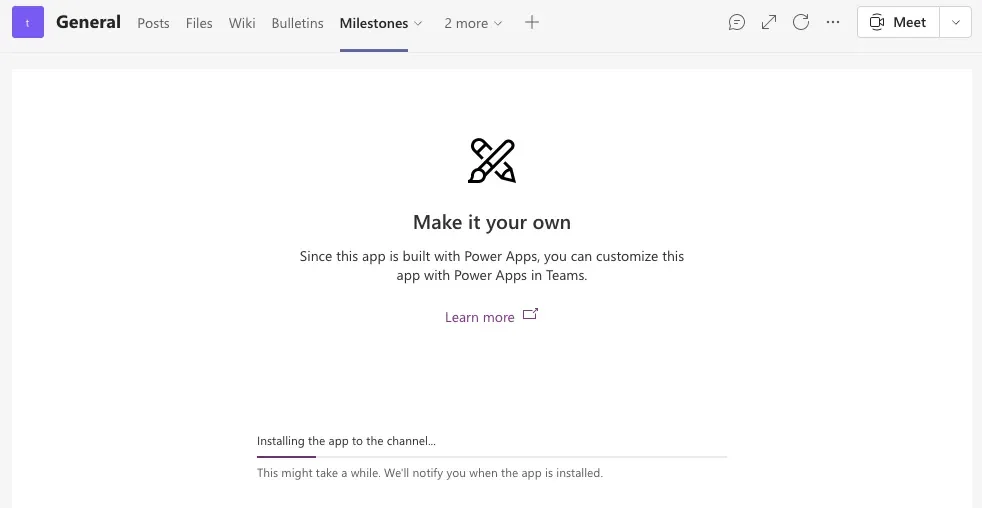
Installing the app
Teams tabs generally work by opening an iframe to a page on a domain that the application's manifest marks as trusted. The tab in question contains an iframe to:
apps.powerapps.com/teams/makerportal?makerPortalUrl=https://make.powerapps.com/somePageHere
That page in turn opens an iframe to the make.powerapps.com page passed in the makerPortalUrl parameter. The researcher noticed two things:
- The apps.powerapps.com page only loads the iframe to
makerPortalUrlwhen it is inside a Microsoft Teams tab; it uses the Microsoft Teams JavaScript client SDK to establish that. - The child iframe only loads if
makerPortalUrlbegins withhttps://make.powerapps.com.
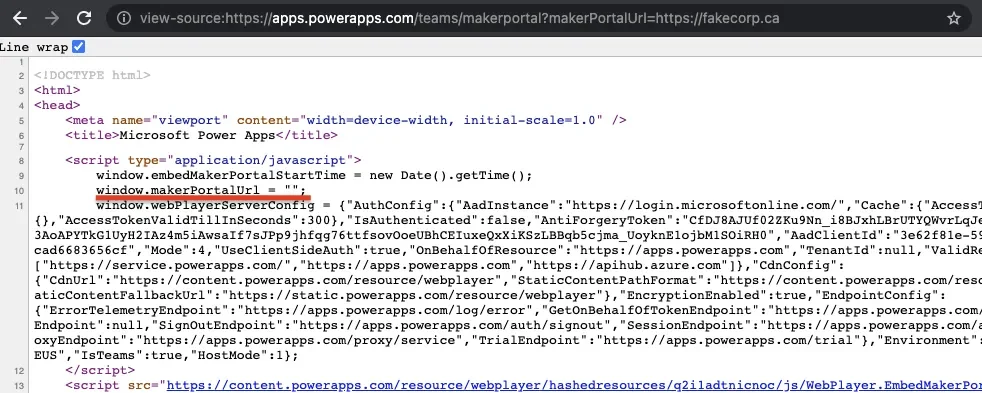
Viewing the page source and trying different parameters showed that any URL not beginning with https://make.powerapps.com causes makerPortalUrl to be set to an empty string. The validation, however, stops at checking whether the value begins with the domain and never checks that it is the full domain. Setting makerPortalUrl to a host that merely starts with the trusted string therefore passes:
https://make.powerapps.com.fakecorp.ca/
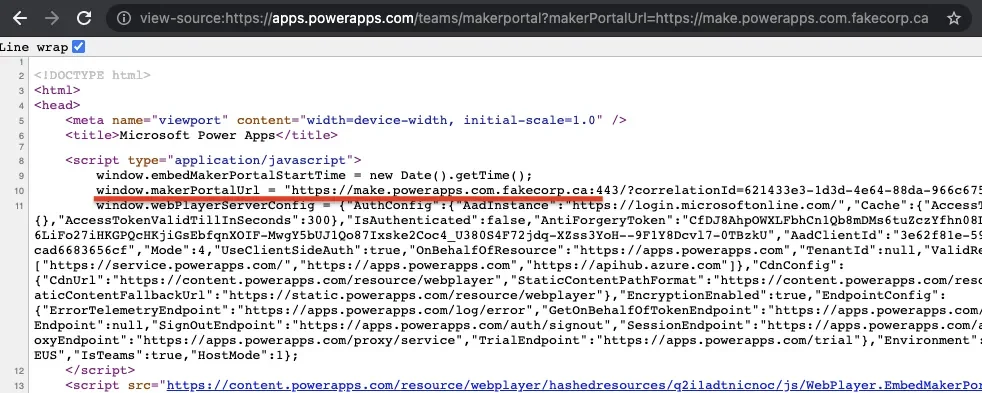
This loads attacker content in an iframe two levels deep inside a Teams tab. On its own that is no better than the Website tab type, which already lets a user load an arbitrary URL in an iframe. The difference is that some tab types have more capabilities than others.
Exploitation
Step 1: talking to the parent window with postMessage
For Power App extension tab types, the apps.powerapps.com page communicates both with Teams, through the Teams JS SDK, and with its child iframe using JavaScript postMessage.
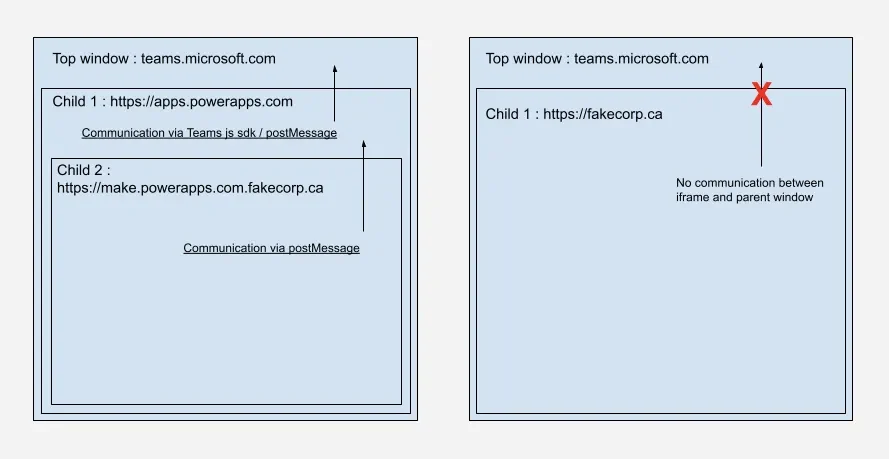
We can communicate with the parent window via postMessage
Watching the messages during install and launch, the most interesting one is a postMessage from make.powerapps.com in the innermost window, the window being replaced via makerPortalUrl, to the apps.powerapps.com window, carrying GET_ACCESS_TOKEN in the data. The frame being replaced was obtaining access tokens from its parent without passing any authentication.

the child iframe requesting an access token via postMessage
Sending the same kind of postMessage from make.powerapps.com.fakecorp.ca returned the same access tokens. A handler registered in the WebPlayer.EmbedMakerPortal.js file loaded by apps.powerapps.com fetches tokens for the requested resource from the https://apps.powerapps.com/auth/onbehalfof endpoint. In testing, that endpoint was capable of grabbing tokens for:
- apihub.azure.com- graph.microsoft.com- dynamics apps subdomains- service.flow.microsoft.com- service.powerapps.com
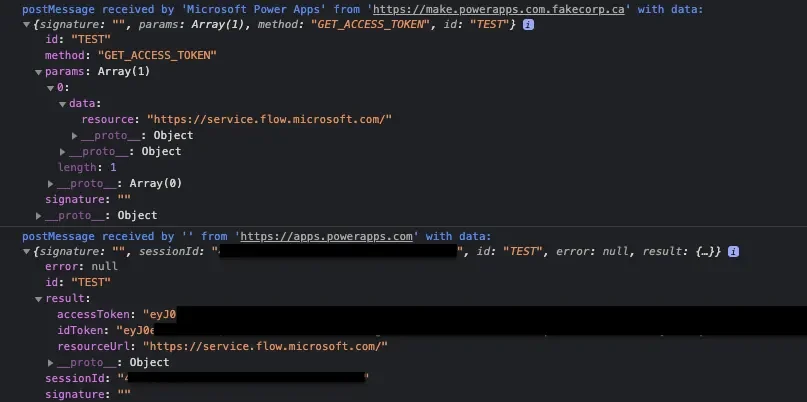
Grabbing the access token from a page we control
A tab under the attacker's control, creatable in a public team, can retrieve access tokens on behalf of the user who views it.
Step 2: overwriting a Teams tab
The page loaded by a tab is defined in the tab application's manifest, and the request that sets it can be seen when adding a new tab or renaming an existing one.
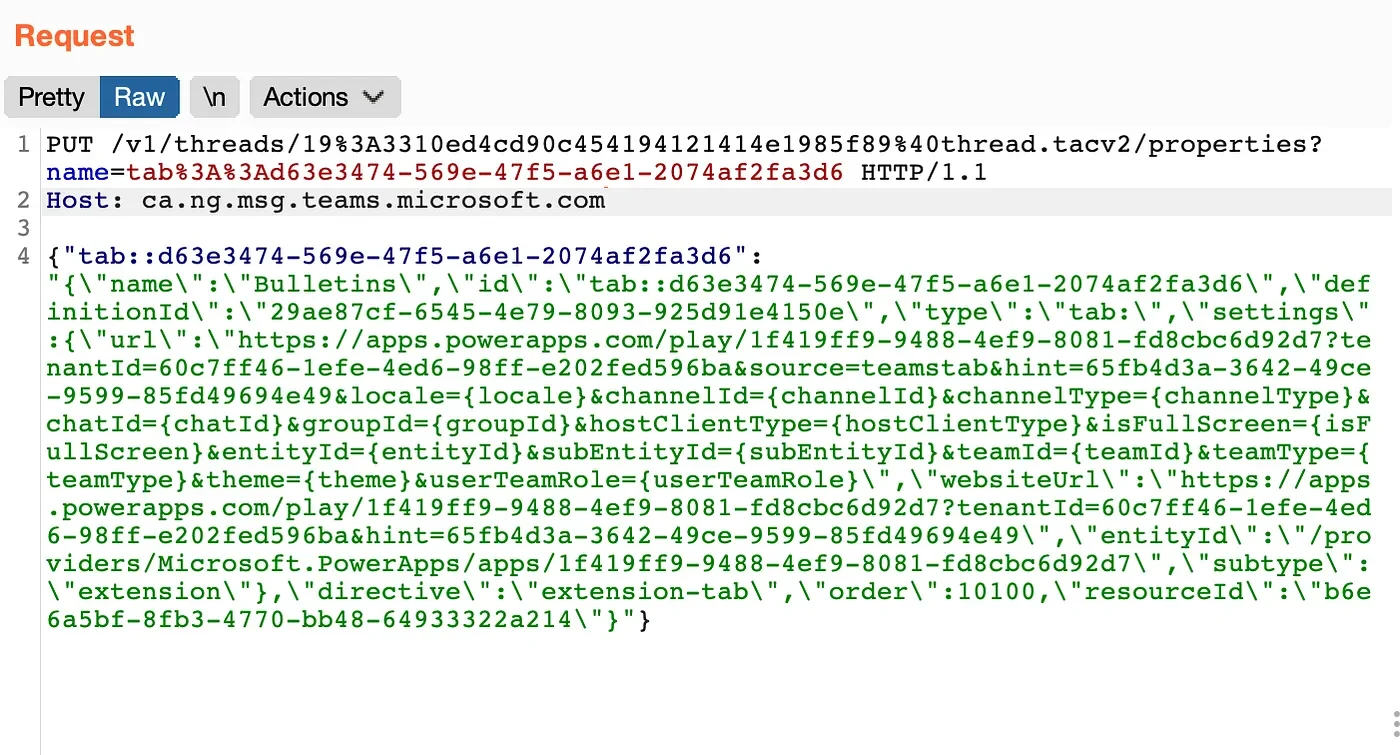
The PUT request for renaming a tab lets us change the tab url
The URL in that PUT request points to the Bulletins Power App installed in the team environment. Replacing it with the attacker's page is enough to redirect the tab:
apps.powerapps.com/teams/makerportal?makerPortalUrl=https://make.powerapps.com.fakecorp.ca
This works only because the URL passed has a domain trusted by the manifest, apps.powerapps.com. Passing malicious content directly as the tab URL does not load it.
Step 3: a short proof of concept
Hosting a page that grabs the viewer's service.flow.microsoft.com token and sends it to a listener under the attacker's control, while loading the original Power App in an iframe sized to match the tab, is enough to steal tokens. It does not look exactly like a normally running Power App tab, but close enough not to be noticed. If the application needs postMessage communication with the parent, the page can act as a man in the middle by adding a message handler.
During the loading you can see two spinning circles. The smaller one is our JS running.
Step 4: the api.flow.microsoft.com token bundle
The service.flow.microsoft.com token matters because it leads to more tokens and to the ability to create Power Automate flows. The attack proceeds at a high level by:
- Grabbing an extra set of tokens from api.flow.microsoft.com- Creating connectors to the services we want to access. - Consent on behalf of the victim user using first party logins- Creating Power Automate flows on the victim user’s behalf which let us send/receive emails and teams messages, retrieve emails, messages and files.- Adding ourselves (or a group we’re in) to the owners of the flow.- Having the victim user send an email to us containing any information we need to access the flows.
The proof of concept creates Office 365 (for Outlook access) and Teams connectors, a flow that sends email as the user, and a flow that retrieves all Teams messages from channels the victim is in and sends messages on their behalf.
An empty POST request to the following endpoint generates a set of new access tokens:
api.flow.microsoft.com/providers/Microsoft.ProcessSimple/environments/<environment>/users/me/onBehalfOfTokenBundle?api-version=2021–01–03
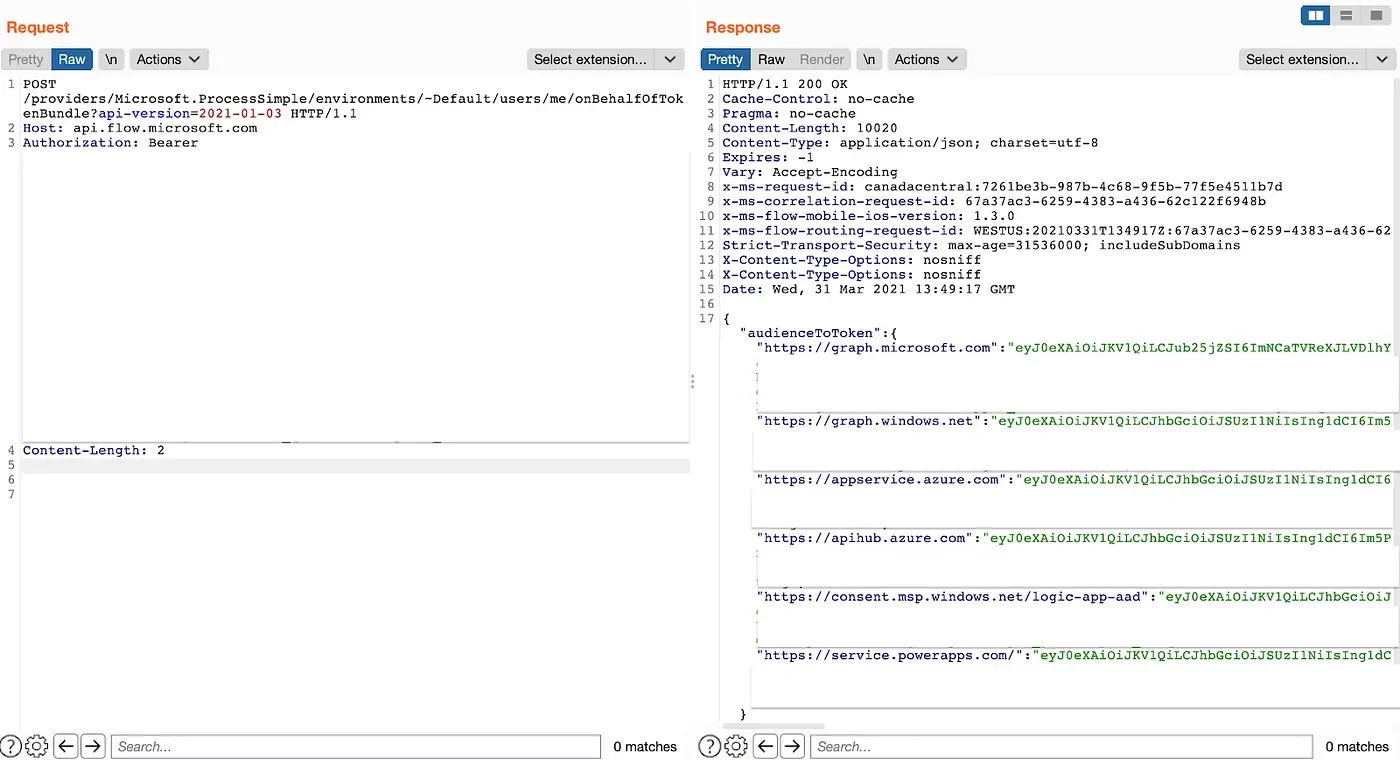
the api.flow.microsoft.com token bundle
The tokens returned, with their scopes, are:
- graph.microsoft.com - scope : Contacts.Read Contacts.Read.Shared Group.Read.All TeamsAppInstallation.ReadWriteForTeam TeamsAppInstallation.ReadWriteSelfForChat User.Read User.ReadBasic.All- graph.microsoft.net - scope : user_impersonation- appservice.azure.com - scope : user_impersonation- apihub.azure.com - scope : user_impersonation- consent.msp.windows.net/logic-app-aad - scope : user_impersonation- service.powerapps.com - scope : user_impersonation
The graph.microsoft.com and apihub.azure.com tokens are the ones used to build the larger attack.
Step 5: creating connectors with first party logins
Flows need connectors. Normally a user grants permissions for a connector through a consent link and a login.microsoft.com popup, for services such as Office 365, Teams or SharePoint. Some connectors also expose a first party login URL, which skips the interactive login and authorises the connector using only tokens already held. Creating a connector on the victim's behalf takes three requests; the last is a POST to the first party login URL carrying the stolen apihub.azure.com access token.
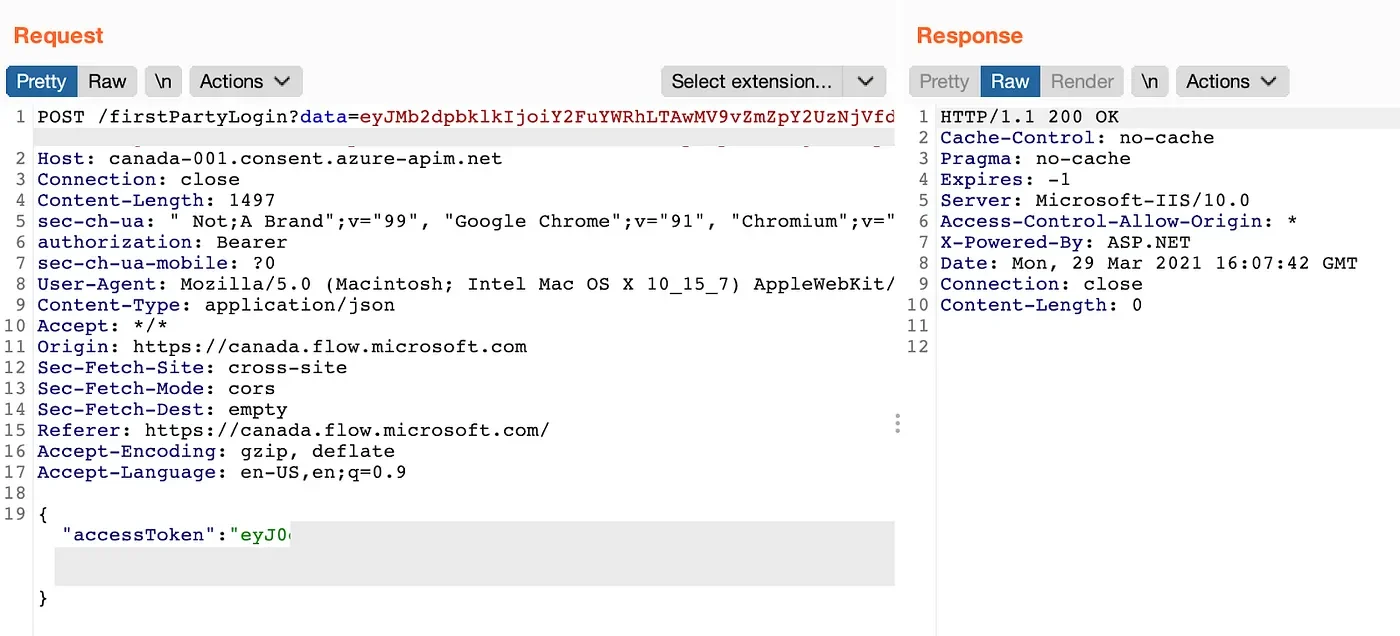
consenting to a connector with a stolen apihub.azure.com token
After the third request the connector is ready for any flow.
Step 6: choosing a trigger and building the flow
Flow triggers come in three main types: automatic (forward an email when it arrives), instant (trigger when a request reaches an endpoint) and scheduled (run every interval). The preferred trigger, "when an HTTP request is received", lets unauthenticated users trigger the flow, but it is a premium feature, so the proof of concept uses "Manually Trigger a Flow" instead.
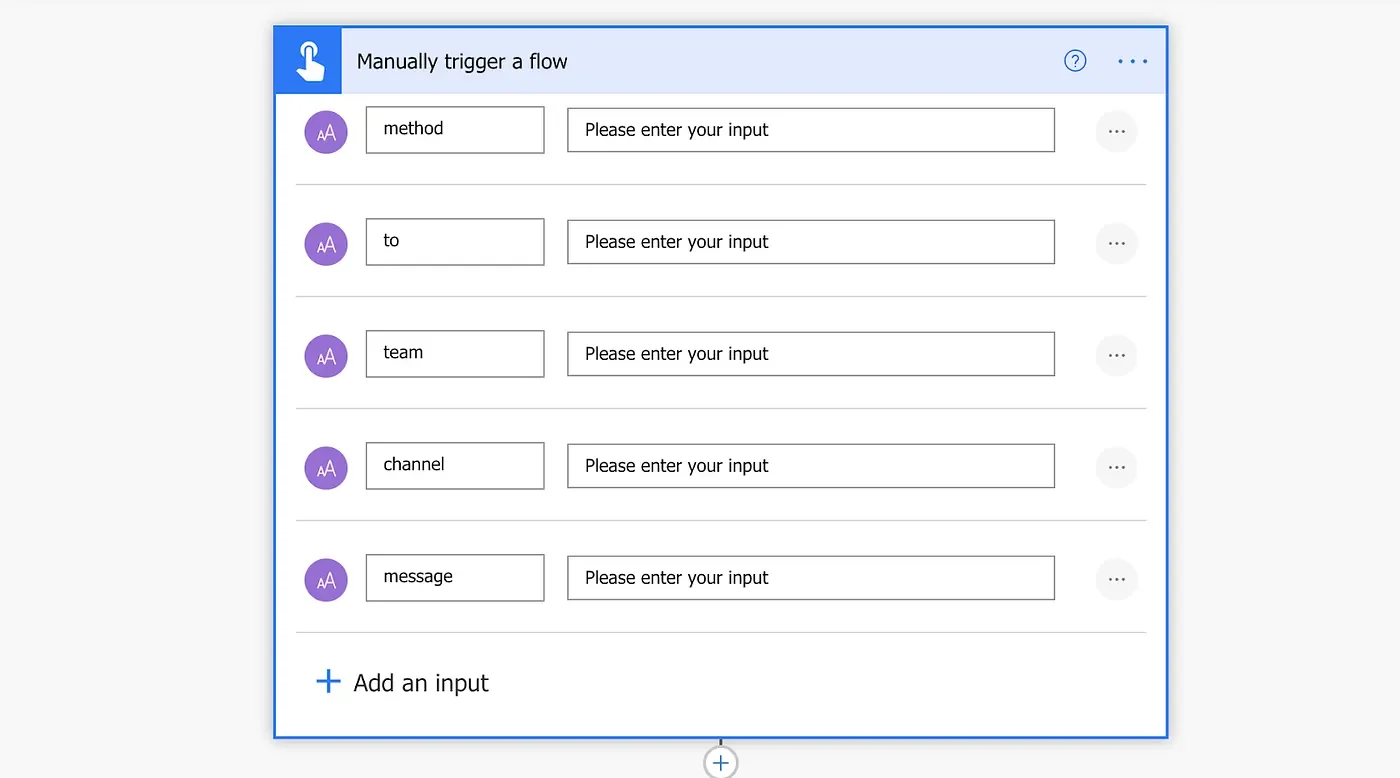
The trigger for our Microsoft Teams flow
That trigger requires authentication, which is acceptable because the attacker is assumed to be a member of the organisation, and there are ways to limit information about who runs which flows.
Flow logic passes the output of one action into the next. In the Teams flow, the action taken, the recipient and other details depend on the input to the trigger. Sending a message is simple; retrieving all messages means listing all teams, then each channel per team, then all messages per channel, rolling the result up and emailing it to the attacker.
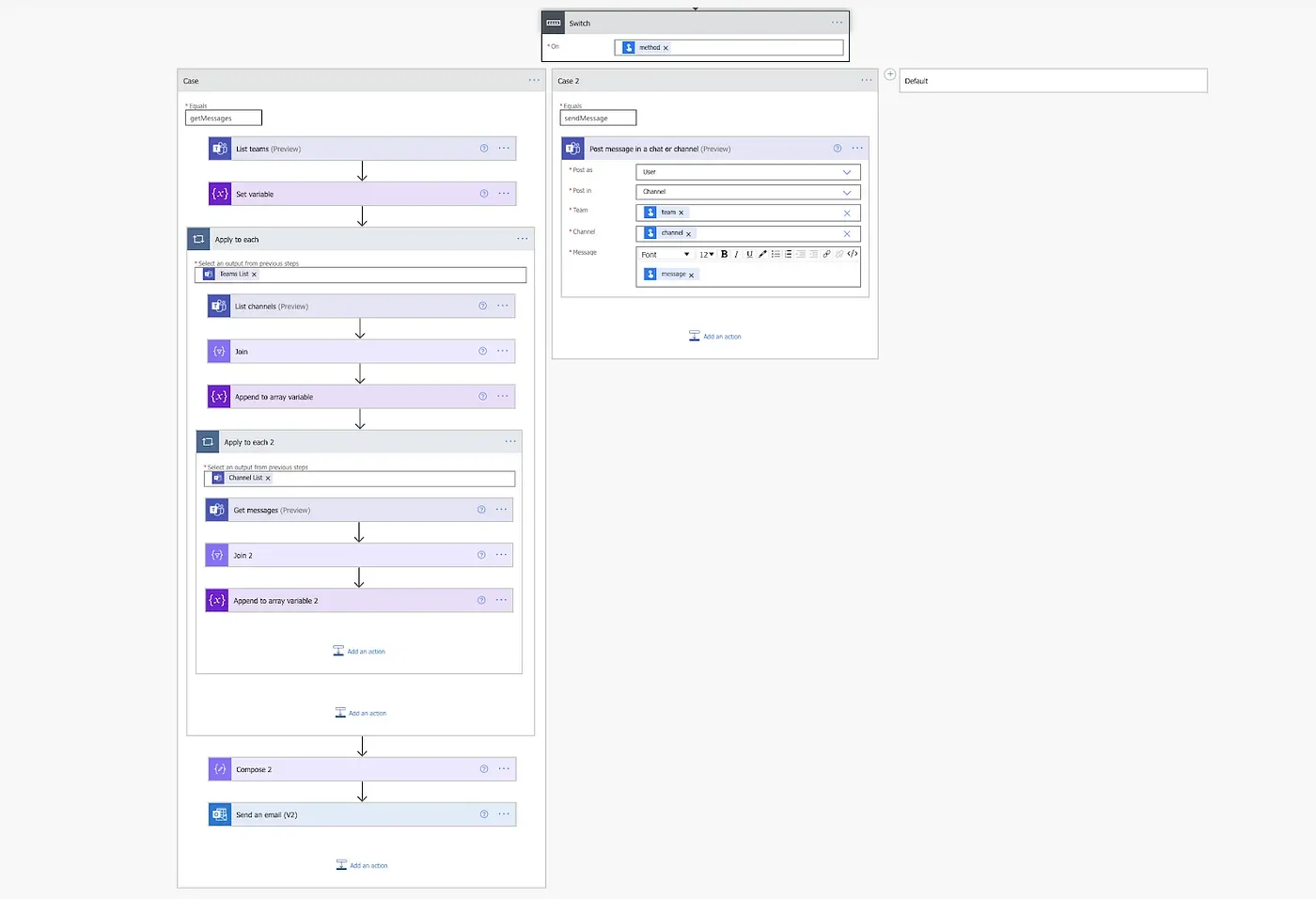
The Teams flow for our PoC
Creating the flow and sharing it with the attacker takes two requests:
- A POST request containing a JSON object representing the flow, which creates it and returns the unique flow name.
- A GET request for the flow trigger URI, which lets the attacker trigger the flow once they are in the owners group.
Step 7: adding a group to the flow owners
The trigger URI is only accessible to users with access to the flow, so a group the attacker belongs to is added to the owners. A large all-encompassing group is the easiest choice; the proof of concept uses the group generated automatically for any team created in Microsoft Teams. The unique group id comes from the graph.microsoft.com token stolen earlier, and the flow's owners are then modified to include that group.
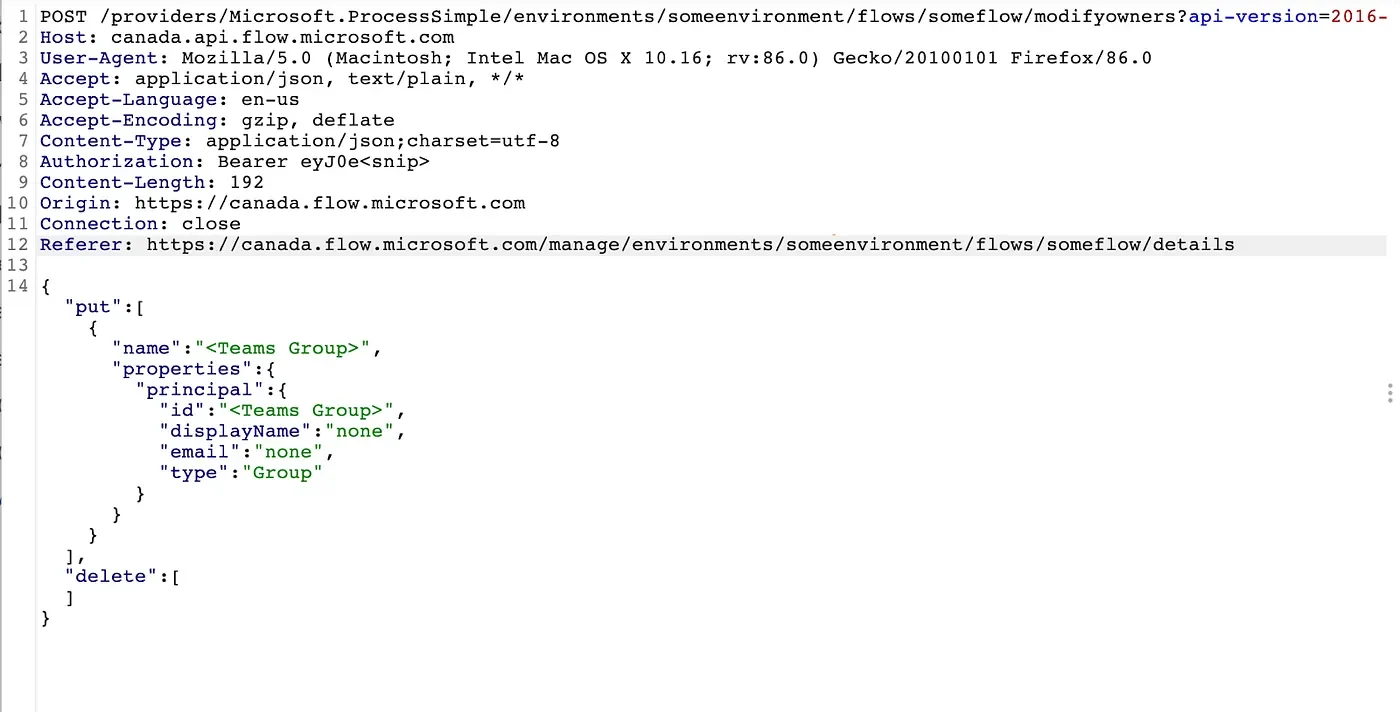
adding a group to the flow owners
Step 8: running the flow and receiving the URIs
The proof of concept includes a flow that sends email on the victim's behalf. At the end of the attack it is used to mail the attacker the flow trigger URIs needed to perform the actions.
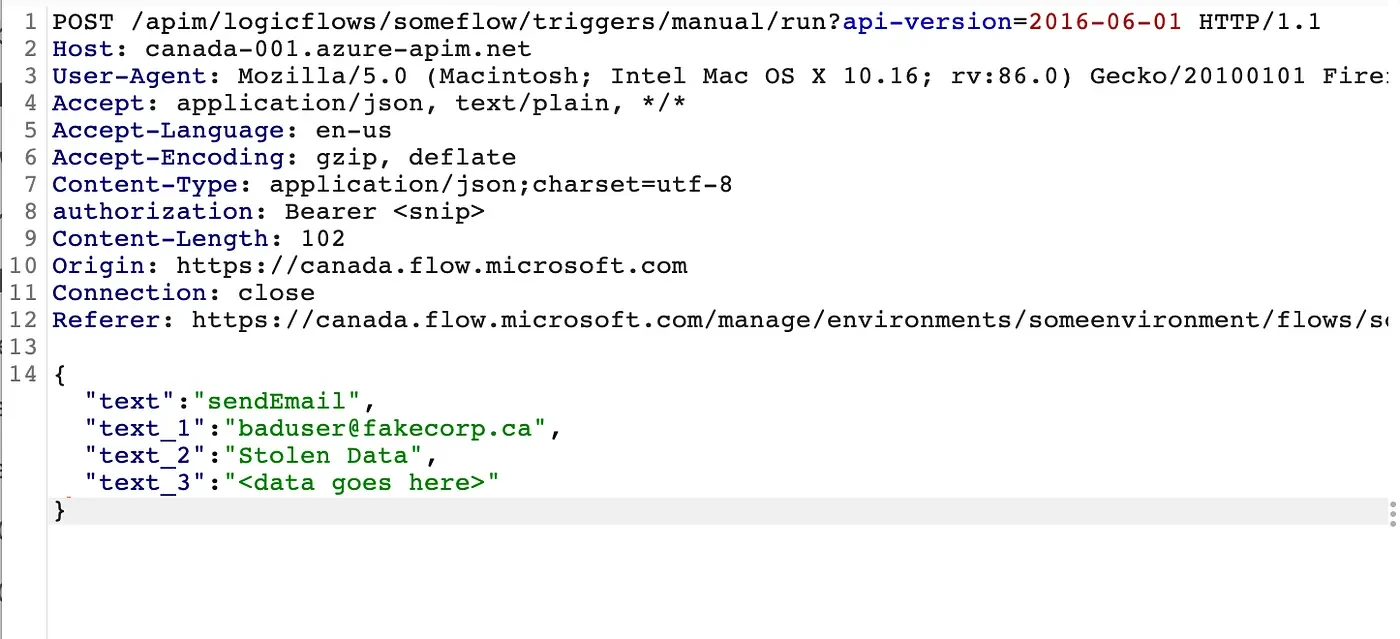
sending an email using the Outlook connector and flow we’ve created
At the end of the email/Teams proof of concept, an email sent on the victim's behalf delivers the flow trigger URIs for both the Outlook and Teams flows.
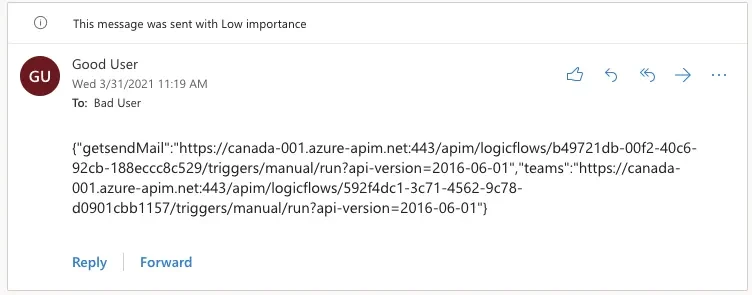
The message we receive from the victim with the flow trigger uris
With those URIs the attacker can read the victim's email and Teams messages and send messages and email on their behalf, while authenticated as Bad User.
Step 9: putting it all together
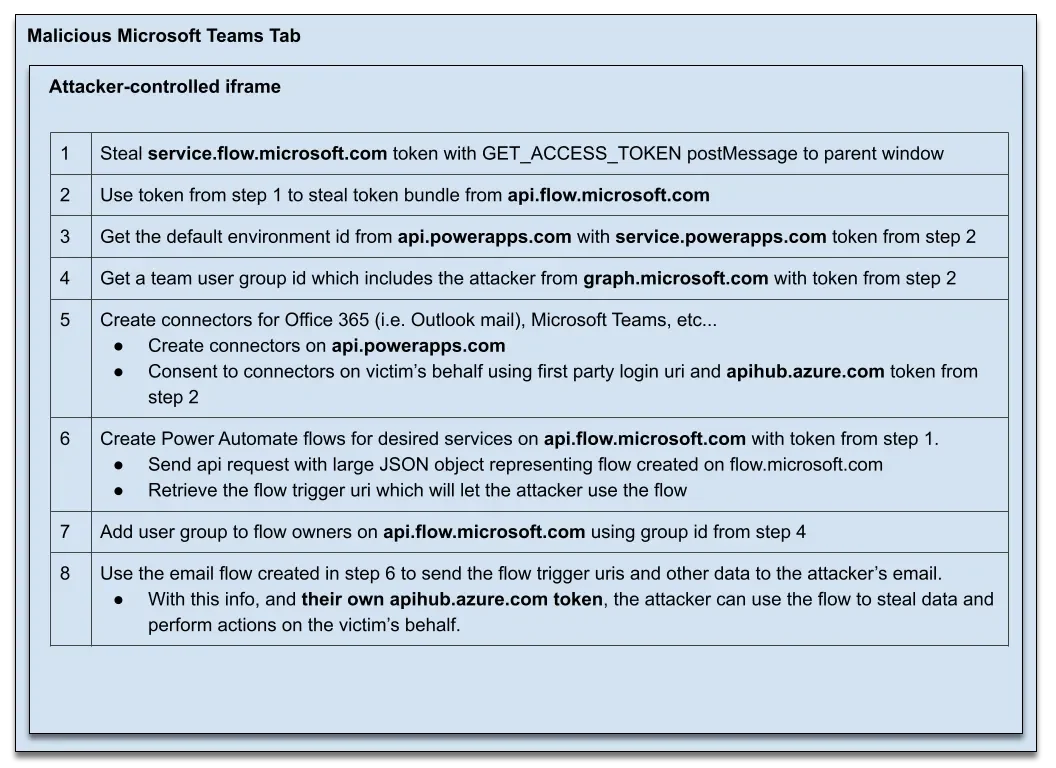
The “TL;DR” shot: actions the malicious tab performs on opening
The author notes that the best approach would be to use JavaScript on the malicious tab only to steal the service.flow.microsoft.com token and perform everything else from an attacker-controlled server, reducing traffic generated by the victim and avoiding being cut off when the victim navigates away. The quick proof of concept instead runs the whole attack in one large JavaScript section in the tab. A payload of that kind causes the victim to create connectors and flows, add the attacker as an owner, and send the attacker an email with the flow trigger URIs.
stealing and sending Teams messages
Root cause
The initial flaw is a prefix check rather than a full-domain check: the apps.powerapps.com page verifies that makerPortalUrl begins with https://make.powerapps.com and never confirms that the host is exactly make.powerapps.com. A host such as make.powerapps.com.fakecorp.ca therefore passes. The second design weakness is that the embedded maker portal frame requests access tokens from its parent over postMessage without any authentication of the requesting frame, so any content loaded in that position can ask for and receive tokens. The tab URL check is not a defence either: it only requires a trusted domain in the tab URL, which apps.powerapps.com satisfies, and the attacker-controlled content sits behind it. The token endpoint then issues tokens for several resources on behalf of the viewing user, and some connectors expose first party login URLs that accept those tokens without an interactive consent step.
Impact
An authenticated member of a Teams organisation who can create Power Apps tabs, a permission enabled by default, can build a tab that steals tokens from any user who opens it. With the resulting tokens and flows the attacker gains persistent read/write access to the victim's email, Teams chats, OneDrive, SharePoint and other services, and can send email and Teams messages as the victim. The author notes that compromise of business email is said to have cost victims $1.8 billion in 2020. The attack is limited to authenticated users inside a Teams organisation; it cannot be exploited by an untrusted or unauthenticated attacker.
Fix
Microsoft fixed the bug. The report does not describe the change. On the defensive side, the author suggests considering limiting apps by default and enabling them on request, since the permission to create these tabs is on by default.
Variants to test
- Prefix checks on redirect or iframe parameters: try a host that starts with the trusted string, such as
https://trusted.example.attacker.tld/. A positive result is your content loading where only the trusted domain should. - postMessage handlers that return tokens or sensitive data: send the expected message from a frame you control and see whether a token comes back. A positive result is a valid token for the viewing user.
- Tab or app URL validation that only checks the domain: point the tab at a trusted-domain URL that takes a URL parameter, then supply your own host through it. A positive result is your page rendering inside the tab.
- On-behalf-of token bundle endpoints: send an empty POST as an authenticated low-privilege user and inspect the returned scopes. A positive result is tokens for services beyond what the user should reach.
- First party connector login URLs: attempt to authorise a connector using only a stolen token, without the interactive popup. A positive result is a working connector with no consent prompt.
- Licence-based detection: compare users with flows under their name in the admin portal against users holding a Power Automate licence. A positive result for an attacker is flows created for a user who never logged into the maker portal.
What happened, in plain words
Microsoft Teams is a chat and collaboration application. Inside any team you belong to, you can add small applications as "tabs": little panels that sit next to the conversation and show something useful, like a shared document, a dashboard or a form. One of the tab types Microsoft offers is a Power Apps tab. Power Apps is a service for building simple business applications without writing much code, and it is part of a larger family of Microsoft services called the Power Platform. Power Automate, another member of that family, lets people build automated workflows: "when this happens, do that", for example "every morning, email me a summary" or "whenever a file changes on SharePoint, post a message in Teams".
The researcher, writing as a member of a fictional organisation called fakecorp.ca, found a small mistake in how one Microsoft web page checked a web address. That mistake let an attacker put their own web page inside a Teams tab. Because of how the tab talks to the rest of Microsoft's services, that page could ask for, and receive, the digital keys (called tokens) that the person viewing the tab uses to access Microsoft services. With those keys the attacker could then create automated workflows in the victim's name, and those workflows could read the victim's email, read their Teams messages, read their OneDrive and SharePoint files, and send email and messages as the victim. Microsoft has since fixed the bug; this article describes how it could have been exploited.
The write-up follows two fictional people in the same organisation: baduser(at)fakecorp.ca, the attacker, and gooduser(at)fakecorp.ca, the victim. The victim only has to open the malicious tab.
A Teams tab with the Bulletins Power App
Power Automate flow templates
Before going further, a few words on the pieces involved. A tab is a panel inside a Teams channel; technically it is usually a web page shown inside a frame (an "iframe", a window inside a window). A manifest is a small configuration file that describes an application: its name, its icon, and which web addresses it is allowed to load. A token is a short string of characters that proves who you are and what you may do, a bit like a wristband at a festival: you show it at the door and you get in without showing your ID again. An API (application programming interface) is a way for one program to ask another program to do something, like a service counter where you hand over a request form and get an answer back. postMessage is a browser feature that lets two windows or frames send each other messages, like passing notes through a slot in a door. Finally, a connector in Power Automate is a pre-built bridge to a service such as Outlook or Teams, and a flow is the automated workflow itself.
Setup
The attacker needs three things. First, an account inside the Teams organisation that is allowed to create Power Apps tabs; this permission is switched on by default. Second, somewhere to host a web page, in this case a page on make.powerapps.com.fakecorp.ca. Third, a way to watch the messages that windows exchange while an application is installed and launched; the researcher used a Chrome extension for this. The victim needs to do nothing except open the tab for the token theft.
Finding it
When a Power App tab is created for a team for the first time, a deployment process uses information gathered from the make.powerapps.com domain to install the application into the team's data store, which Microsoft calls a Dataverse for Teams environment.
Installing the app
Teams tabs generally work by opening an iframe to a page on a domain that the application's manifest marks as trusted. The tab in question contains an iframe pointing at this address:
apps.powerapps.com/teams/makerportal?makerPortalUrl=https://make.powerapps.com/somePageHere
Reading it piece by piece: apps.powerapps.com is the page that is actually loaded in the tab. Everything after the ? is a set of parameters, values passed to that page. Here there is one parameter, makerPortalUrl, and its value is https://make.powerapps.com/somePageHere. The apps.powerapps.com page takes that value and opens a second iframe inside itself, pointing at the address given. So the tab shows a page, which shows another page.
The researcher noticed two things:
- The apps.powerapps.com page only loads the inner iframe when it is inside a Microsoft Teams tab. It uses the Microsoft Teams JavaScript client SDK, a library that lets a web page talk to Teams, to establish that.
- The inner iframe only loads if
makerPortalUrlbegins withhttps://make.powerapps.com.
Viewing the page source and trying different parameters showed that any address not beginning with https://make.powerapps.com causes makerPortalUrl to be set to an empty string, so nothing loads. The check, however, stops at asking whether the value begins with that text and never confirms that it is the full domain. A web address is read from left to right, and the part that identifies the actual site is the rightmost part before the first single slash. So a host that merely starts with the trusted text passes the check:
https://make.powerapps.com.fakecorp.ca/
Here the real site is fakecorp.ca, but the text begins with https://make.powerapps.com, so the check is satisfied. It is like a bouncer who checks that your name badge starts with "VIP" and lets in someone whose badge says "VIP-impostor".
This loads attacker content in an iframe two levels deep inside a Teams tab. On its own that is no better than the Website tab type, which already lets a user load any address in an iframe. The difference is that some tab types have more capabilities than others.
Exploitation
Step 1: talking to the parent window with postMessage
For Power App extension tab types, the apps.powerapps.com page communicates both with Teams, through the Teams JS SDK, and with its child iframe using JavaScript postMessage.
We can communicate with the parent window via postMessage
Watching the messages during install and launch, the most interesting one is a postMessage from make.powerapps.com in the innermost window, the window being replaced via makerPortalUrl, to the apps.powerapps.com window, carrying GET_ACCESS_TOKEN in the data. In plain words: the inner frame sends a note to its parent saying "give me an access token". The frame being replaced was obtaining access tokens from its parent without passing any authentication at all.
the child iframe requesting an access token via postMessage
Sending the same kind of postMessage from make.powerapps.com.fakecorp.ca returned the same access tokens. A handler registered in the WebPlayer.EmbedMakerPortal.js file loaded by apps.powerapps.com fetches tokens for the requested resource from the https://apps.powerapps.com/auth/onbehalfof endpoint. An endpoint is simply a specific address on a server that accepts a particular kind of request. In testing, that endpoint was capable of grabbing tokens for:
- apihub.azure.com- graph.microsoft.com- dynamics apps subdomains- service.flow.microsoft.com- service.powerapps.com
Each line names a Microsoft service for which a token could be obtained. The list is written as it appeared in the captured output, with the entries run together. The important consequence: a tab under the attacker's control, which can be created in a public team, can retrieve access tokens on behalf of the user who views it.
Grabbing the access token from a page we control
Step 2: overwriting a Teams tab
The page loaded by a tab is defined in the tab application's manifest, and the request that sets it can be seen when adding a new tab or renaming an existing one.
The PUT request for renaming a tab lets us change the tab url
A PUT request is one of the standard ways a browser asks a server to store or replace something; here it replaces the tab's settings, including its address. The address in that PUT request points to the Bulletins Power App installed in the team environment. Replacing it with the attacker's page is enough to redirect the tab:
apps.powerapps.com/teams/makerportal?makerPortalUrl=https://make.powerapps.com.fakecorp.ca
Again, apps.powerapps.com is the trusted page being loaded, and makerPortalUrl carries the attacker's lookalike address, which passes the prefix check. This works only because the address passed has a domain trusted by the manifest, apps.powerapps.com. Passing malicious content directly as the tab address does not load it.
Step 3: a short proof of concept
A proof of concept is a small demonstration that shows a problem is real without building the whole attack. Hosting a page that grabs the viewer's service.flow.microsoft.com token and sends it to a listener under the attacker's control, while loading the original Power App in an iframe sized to match the tab, is enough to steal tokens. It does not look exactly like a normally running Power App tab, but close enough not to be noticed. If the application needs postMessage communication with the parent, the page can act as a man in the middle by adding a message handler: it sits between the two sides and relays the notes, reading them on the way through.
During the loading you can see two spinning circles. The smaller one is our JS running.
Step 4: the api.flow.microsoft.com token bundle
The service.flow.microsoft.com token matters because it leads to more tokens and to the ability to create Power Automate flows. The attack proceeds at a high level by:
- Grabbing an extra set of tokens from api.flow.microsoft.com- Creating connectors to the services we want to access. - Consent on behalf of the victim user using first party logins- Creating Power Automate flows on the victim user’s behalf which let us send/receive emails and teams messages, retrieve emails, messages and files.- Adding ourselves (or a group we’re in) to the owners of the flow.- Having the victim user send an email to us containing any information we need to access the flows.
Read as a plan: first collect more keys, then build bridges to the services we want (Outlook, Teams), then approve those bridges using the victim's identity without asking them, then create automated workflows in their name, then give ourselves access to those workflows, and finally make the victim's own account email us the addresses we need to run them. The proof of concept creates Office 365 (for Outlook access) and Teams connectors, a flow that sends email as the user, and a flow that retrieves all Teams messages from channels the victim is in and sends messages on their behalf.
An empty POST request to the following endpoint generates a set of new access tokens:
api.flow.microsoft.com/providers/Microsoft.ProcessSimple/environments/<environment>/users/me/onBehalfOfTokenBundle?api-version=2021–01–03
A POST request is the standard way a browser sends data to a server to create or ask for something. "Empty" means no body is sent, only the request itself. The address has several parts: api.flow.microsoft.com is the server, the path /providers/Microsoft.ProcessSimple/environments/<environment>/users/me/onBehalfOfTokenBundle says which resource is wanted (a bundle of tokens on behalf of the current user, in a given environment), and ?api-version=2021–01–03 says which version of the interface to use.
the api.flow.microsoft.com token bundle
The tokens returned, with their scopes, are:
- graph.microsoft.com - scope : Contacts.Read Contacts.Read.Shared Group.Read.All TeamsAppInstallation.ReadWriteForTeam TeamsAppInstallation.ReadWriteSelfForChat User.Read User.ReadBasic.All- graph.microsoft.net - scope : user_impersonation- appservice.azure.com - scope : user_impersonation- apihub.azure.com - scope : user_impersonation- consent.msp.windows.net/logic-app-aad - scope : user_impersonation- service.powerapps.com - scope : user_impersonation
A scope is the list of things a token is allowed to do, like the small print on a ticket saying which doors it opens. The first entry lists several scopes for graph.microsoft.com, and the other entries carry user_impersonation. The other entries carry user_impersonation, which means "act as the user". The graph.microsoft.com and apihub.azure.com tokens are the ones used to build the larger attack.
Step 5: creating connectors with first party logins
Flows need connectors. Normally a user grants permissions for a connector through a consent link and a login.microsoft.com popup, for services such as Office 365, Teams or SharePoint. Consent is the moment you click "allow" on a screen that says what an application may do. Some connectors also expose a first party login URL, which skips the interactive login and authorises the connector using only tokens already held. Creating a connector on the victim's behalf takes three requests; the last is a POST to the first party login URL carrying the stolen apihub.azure.com access token.
consenting to a connector with a stolen apihub.azure.com token
After the third request the connector is ready for any flow.
Step 6: choosing a trigger and building the flow
A trigger is the event that starts a flow. Flow triggers come in three main types: automatic (forward an email when it arrives), instant (trigger when a request reaches an endpoint) and scheduled (run every interval). The preferred trigger, "when an HTTP request is received", lets unauthenticated users trigger the flow, but it is a premium feature, so the proof of concept uses "Manually Trigger a Flow" instead.
The trigger for our Microsoft Teams flow
That trigger requires authentication, which is acceptable because the attacker is assumed to be a member of the organisation, and there are ways to limit information about who runs which flows.
Flow logic passes the output of one action into the next, like a recipe where each step uses what the previous step produced. In the Teams flow, the action taken, the recipient and other details depend on the input to the trigger. Sending a message is simple; retrieving all messages means listing all teams, then each channel per team, then all messages per channel, rolling the result up and emailing it to the attacker.
The Teams flow for our PoC
Creating the flow and sharing it with the attacker takes two requests:
- A POST request containing a JSON object representing the flow, which creates it and returns the unique flow name. JSON is a plain-text way of writing structured data, with names and values in curly brackets.
- A GET request for the flow trigger URI, which lets the attacker trigger the flow once they are in the owners group. A GET request is the ordinary kind a browser makes when you open a page; a URI is simply an address.
Step 7: adding a group to the flow owners
The trigger URI is only accessible to users with access to the flow, so a group the attacker belongs to is added to the owners. A large all-encompassing group is the easiest choice; the proof of concept uses the group generated automatically for any team created in Microsoft Teams. The unique group id comes from the graph.microsoft.com token stolen earlier, and the flow's owners are then modified to include that group.
adding a group to the flow owners
Step 8: running the flow and receiving the URIs
The proof of concept includes a flow that sends email on the victim's behalf. At the end of the attack it is used to mail the attacker the flow trigger URIs needed to perform the actions.
sending an email using the Outlook connector and flow we’ve created
At the end of the email/Teams proof of concept, an email sent on the victim's behalf delivers the flow trigger URIs for both the Outlook and Teams flows.
The message we receive from the victim with the flow trigger uris
With those URIs the attacker can read the victim's emails and Teams messages, and send messages and emails on their behalf, despite being authenticated as Bad User.
Step 9: putting it all together
The “TL;DR” shot: actions the malicious tab performs on opening
The author notes that the best approach would be to use JavaScript on the malicious tab only to steal the service.flow.microsoft.com token and perform everything else from an attacker-controlled server, reducing traffic generated by the victim and avoiding being cut off when the victim navigates away. The quick proof of concept instead runs the whole attack in one large JavaScript section in the tab. A payload of that kind causes the victim to create connectors and flows, add the attacker as an owner, and send the attacker an email with the flow trigger URIs.
stealing and sending Teams messages
Root cause
The initial flaw is a prefix check rather than a full-domain check: the apps.powerapps.com page verifies that makerPortalUrl begins with https://make.powerapps.com and never confirms that the host is exactly make.powerapps.com. A host such as make.powerapps.com.fakecorp.ca therefore passes. The second design weakness is that the embedded maker portal frame requests access tokens from its parent over postMessage without any authentication of the requesting frame, so any content loaded in that position can ask for and receive tokens. The tab URL check is not a defence either: it only requires a trusted domain in the tab URL, which apps.powerapps.com satisfies, and the attacker-controlled content sits behind it. The token endpoint then issues tokens for several resources on behalf of the viewing user, and first party connector logins accept those tokens without an interactive consent step.
Impact
An authenticated member of a Teams organisation who can create Power Apps tabs, a permission enabled by default, can build a tab that steals tokens from any user who opens it. With the resulting tokens and flows the attacker gains persistent read/write access to the victim's email, Teams chats, OneDrive, SharePoint and other services, and can send email and Teams messages as the victim, including into private teams. The author notes that compromise of business email is said to have cost victims $1.8 billion in 2020. The attack is limited to authenticated users inside a Teams organisation; it cannot be exploited by an untrusted or unauthenticated attacker.
Fix
Microsoft fixed the bug. The report does not describe the change. On the defensive side, the author suggests considering limiting apps by default and enabling them on request, since the permission to create these tabs is on by default.
Variants to test
- Prefix checks on redirect or iframe parameters: try a host that starts with the trusted string, such as
https://trusted.example.attacker.tld/. A positive result is your content loading where only the trusted domain should. - postMessage handlers that return tokens or sensitive data: send the expected message from a frame you control and see whether a token comes back. A positive result is a valid token for the viewing user.
- Tab or app URL validation that only checks the domain: point the tab at a trusted-domain URL that takes a URL parameter, then supply your own host through it. A positive result is your page rendering inside the tab.
- On-behalf-of token bundle endpoints: send an empty POST as an authenticated low-privilege user and inspect the returned scopes. A positive result is tokens for services beyond what the user should reach.
- First party connector login URLs: attempt to authorise a connector using only a stolen token, without the interactive popup. A positive result is a working connector with no consent prompt.
- Licence-based detection: compare users with flows under their name in the admin portal against users holding a Power Automate licence. A positive result for an attacker is flows created for a user who never logged into the maker portal.
Glossary
- API: a way for one program to ask another program to do something, like a service counter that takes requests and returns answers.
- Connector: a pre-built bridge in Power Automate to a service such as Outlook or Teams.
- Consent: the step where a user clicks "allow" and grants an application permission to act on their behalf.
- Dataverse for Teams environment: the per-team data store Microsoft creates to hold team-specific data, apps and flows.
- Endpoint: a specific address on a server that accepts a particular kind of request.
- First party login URL: a Microsoft-owned login address that authorises a connector using tokens already held, without an interactive popup.
- Flow: an automated workflow in Power Automate, made of a trigger and one or more actions.
- GET request: the ordinary request a browser makes when opening a page.
- Host: the part of a web address that identifies the actual site, the rightmost part before the first single slash.
- iframe: a window inside a window, used to show one web page inside another.
- JSON: a plain-text way of writing structured data with names and values.
- Manifest: a configuration file describing an application, including which web addresses it may load.
- Man in the middle: sitting between two parties and relaying their messages while reading them.
- postMessage: a browser feature that lets two windows or frames send each other messages.
- Power Apps: a Microsoft service for building simple business applications without much code.
- Power Automate: a Microsoft service for building automated workflows over Office 365 data.
- Power Platform: the wider family of Microsoft services that includes Power Apps and Power Automate.
- Prefix check: a validation that only confirms a value starts with certain text, rather than matching it exactly.
- Proof of concept: a small demonstration showing that a problem is real.
- PUT request: a request that asks a server to store or replace something, such as a tab's settings.
- Scope: the list of things a token is allowed to do.
- SDK: a set of ready-made code that lets a program talk to a service.
- Tab: a panel inside a Teams channel, usually a web page shown in an iframe.
- Token: a short string that proves who you are and what you may do, so you do not have to log in again for every action.
- Trigger: the event that starts a flow.
- URI: an address identifying a resource.
- user_impersonation: a permission that lets a token act as the user.



