The Outlook Winner is Dash
A custom Office 365 group with the single-character name '-' became the first entry in the Outlook Global Address List, causing users to accidentally select it as a recipient and leak internal emails to the group owner. An attacker could create such a group and receive misdirected emails containing sensitive information.
 Published on blog.ettic.ca
The full write-up lives on its author's site
It belongs to its author, so we link to it rather than copy it. The other two tabs are our own rewrites, checked against it.
Context
Office 365 lets users create groups with a custom name and email address. When a group is created, a new entry is added to the Global Address List (GAL), and these groups are the modern way to build a distribution list. By default Microsoft blocked some reserved group names, such as:
- [redacted]
- [redacted]
- [redacted]
The block mainly mitigates the risk of requesting SSL certificates, since those addresses are frequently used in the verification process. Other names remain available, and several of them are useful in phishing scenarios, for example:
- [redacted]
- [redacted]
- [redacted]
The only limitation is that the email address has to be available to register. Because these groups are distribution lists, you cannot send mail directly from them, but you can still spoof the sender address when sending a mail. The real advantage is that when a victim replies to such a mail, the answer arrives directly in the group owner's inbox.
Setup
The researcher worked against Office 365 with the group creation feature, and the observations concern users of the Outlook Desktop Application. The observations concern users of the Outlook Desktop Application.
Finding it
While trying to abuse Office groups, the researcher registered a single character group: a dash, -. The address reserved was [redacted], since a single special character in a mail address is somewhat uncommon.
The next morning, after the creation of the group, five mails had already arrived. After a few attempts to accidentally send a mail to the dash group, the researcher realised that the group was the first entry of the Outlook Global Address List.
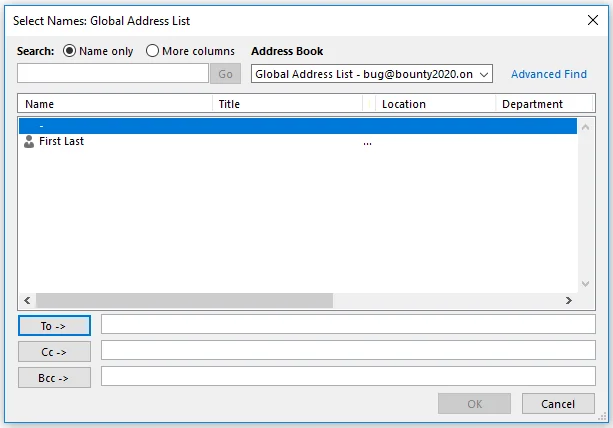
Whenever a user of the Outlook Desktop Application adds a new recipient through the Global Address List, the first address is automatically selected, which is now the dash group. Pressing Enter in that form adds the group to the recipients and leaks the mail. The team is also almost invisible in the recipients list, so some people do not notice it while sending a mail.
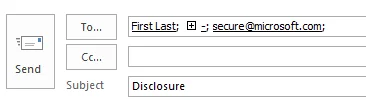
These two effects explain the unexpected mails: many employees accidentally added the group as a recipient without noticing, which resulted in data leaks.
Exploitation
Step 1: create a new group
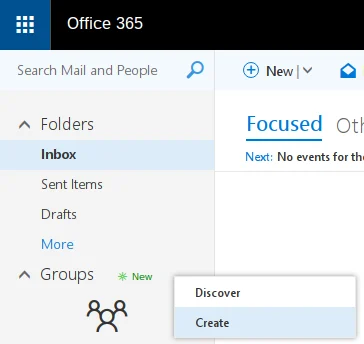
Create a new group in Outlook.
Step 2: choose the name and email
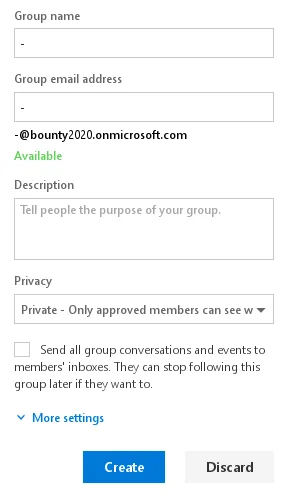
Select the desired name and email. If you compromise an O365 account, disable the notifications to be stealthier.
Step 3: wait for mail
Wait for interesting mails to be sent to [redacted]. If many users in the targeted organisation use the Outlook Desktop Application, it should not take long before mails start arriving.
Root cause
The design flaw is the interaction between two behaviours. The dash group was the first entry of the Global Address List, and the Outlook Desktop Application preselects the first entry when a user adds a recipient through the GAL. A user who presses Enter accepts that preselection, and the dash group is added to the recipients. The group is also hard to spot in the recipients list, so the mistake goes unnoticed. Microsoft's reserved-name block did not help here, because it covers names such as admin, postmaster and webmaster, not a single special character.
Impact
An attacker who can create a group can receive mail that employees of the targeted organisation send by mistake, resulting in data leaks. The attack works best when many users rely on the Outlook Desktop Application. The attacker cannot send mail directly from the group address, but can spoof the sender address, and replies from victims arrive in the inbox.
Fix
The easiest fix is to add a prefix to all created groups through Office 365. This prevents someone from taking the first address of the address book, and it reduces the effectiveness of groups created for phishing, since the group support would become [redacted]. Independently of Office groups, an organisation should own or keep an eye on the first address of the global address book.
The issue was disclosed to Microsoft, which replied that the
reporting appears to be a product suggestion, but would not meet the bar for security servicing.
Variants to test
- A positive result is the group being preselected when a recipient is added through the GAL.
- A positive result is mail from employees who did not intend to include the group.
What happened, in plain words
A security researcher found a simple but effective trick in Microsoft's Office 365 email service. Office 365 lets people create their own email groups, which are like shared mailboxes that many people can send to at once. The researcher created a group whose address was just a single dash character: [redacted].
That dash group ended up as the first entry of the company's shared address book, the list of everyone you can email. When colleagues using the Outlook desktop program started typing a name to add a recipient, Outlook automatically highlighted the first entry in that list, which was now the dash group. If they pressed Enter without looking carefully, the dash group was quietly added to their email. The message then went to the researcher's group as well as to the intended person. The researcher received five such emails the very next morning. Many employees accidentally added the group as a recipient without noticing, which resulted in data leaks.
Microsoft looked at the report and said it did not consider it a security problem, calling it a product suggestion. This article walks through how the trick works, step by step, for someone who has never done security work before.
Background: what Office 365 groups are
Office 365 is Microsoft's cloud service for email, calendars, documents and more. One of its features lets any user create a group: a named collection of people with its own email address. Think of it like a shared pigeonhole in an office mailroom. Anyone can drop a letter into it, and everyone who belongs to the group can read what arrives.
When you create a group, Office 365 adds it to the Global Address List (GAL). The GAL is the company-wide phone book that Outlook uses. When you click "To" in a new email and start typing a name, Outlook searches this phone book and shows you matching entries. Groups are the modern replacement for what used to be called a distribution list: one address that reaches many people.
Microsoft knows that some addresses are sensitive, so by default it blocks a few reserved group names, such as:
- [redacted]
- [redacted]
- [redacted]
Why block these? Because attackers often try to register addresses like admin@ or webmaster@ to obtain SSL certificates. An SSL certificate is the padlock icon in your browser that proves a website is genuine. Certificate authorities (the companies that issue these padlocks) sometimes verify that you own a domain by sending an email to one of these standard addresses. If an attacker controls that address, they could fraudulently obtain a certificate for a domain they do not own. Blocking these names reduces that risk.
But many other names remain available, and some are useful in phishing. Phishing is when an attacker pretends to be someone trustworthy to trick people into revealing information or clicking something harmful. Names like these are attractive to an attacker:
- [redacted]
- [redacted]
- [redacted]
A message from "the security team" or "HR" looks official, so people are more likely to trust it.
The only limitation is that the email address must not already be taken. You cannot create a group if someone else already owns that address.
There is one important restriction: because these groups are distribution lists, you cannot send mail from them directly. A distribution list is a receiving address, not a sending identity. However, you can still spoof the sender address. Spoofing means putting a false return address on an envelope, like writing someone else's name on the back of a letter. The recipient sees the fake sender, even though the message did not really come from there.
The real advantage, though, is what happens when a victim replies. If someone replies to a message that appears to come from the group, the reply goes straight into the group owner's inbox. The attacker gets a genuine conversation, not just a one-way message.
Finding it
While exploring how to abuse Office groups, the researcher registered a group with a single character: a dash, -. The address reserved was [redacted]. A single special character in an email address is unusual, which is exactly why it was worth trying.
The next morning, after creating the group, five emails had already arrived. The researcher had not expected this. To understand why, the researcher tried to accidentally send a mail to the dash group, and discovered that the group was the first entry of the Outlook Global Address List.
This matters because of how the Outlook Desktop Application behaves. The Outlook Desktop Application is the installed program on a Windows or Mac computer, as opposed to the web version you open in a browser. When a user adds a new recipient through the Global Address List, the first address in the list is automatically selected. That first address was now the dash group. If the user accidentally presses Enter in that form, the group is added to the recipients, and the email is sent to it as well. The user's mail has leaked.
There is a second problem. The team is almost invisible in the recipients list. When you address an email to several people, Outlook shows the names in a small box. A single dash is easy to miss, so some people do not notice it while sending a mail.
These two effects together explain the unexpected emails: many employees accidentally added the group as a recipient without noticing, which resulted in data leaks. Data leaks here means internal messages, possibly containing sensitive information, being delivered to someone outside the intended conversation.
Creating an Office Group
The steps below reproduce what the researcher did.
- Create a new group in Outlook. Microsoft's own help page describes the normal way to do this.
- Select the desired name and email. If you compromise an O365 account, you should disable the notifications to be stealthier. "Compromise" means you have gained access to someone else's account, for example by guessing their password. Notifications are the automatic emails Office 365 sends when a group is created or changed. Turning them off makes the activity less visible to the account's real owner, which is what "stealthier" means.
- Wait for interesting mails to be sent to
[redacted]. If a lot of users in the targeted organisation are using the Outlook Desktop Application, it should not take long before you start receiving mails.
That is the whole attack. The researcher simply created a group with an unusual name and waited.
Why it works
The flaw is not a bug in the traditional sense, like a crash or a broken password check. It is a design flaw: two normal behaviours combine badly.
First, the dash group was the first entry of the Global Address List.
Second, the Outlook Desktop Application preselects the first entry when a user adds a recipient through the GAL. Preselecting means highlighting an option before the user has chosen anything. A user who presses Enter accepts that preselection, and the dash group is added to the recipients.
Third, the group is hard to spot in the recipients list, so the mistake goes unnoticed. The email is sent, and a copy goes to the attacker.
Microsoft's reserved-name block did not help here, because it covers names such as admin, postmaster and webmaster, not a single special character.
Impact
An attacker who can create a group can receive mail that employees of the targeted organisation send by mistake. That mail can include internal content that was never meant to leave the organisation. The attack works best when many users rely on the Outlook Desktop Application, because that is the program with the preselection behaviour.
The attacker cannot send mail directly from the group address, but can spoof the sender address. Replies from victims land in the attacker's inbox.
Fix
The easiest fix is to add a prefix to all created groups through Office 365. A prefix is a fixed piece of text added to the front of every name. This prevents someone from taking the first address of the address book. It also reduces the effectiveness of groups created for phishing, since the group support would become [redacted]. That address looks far less convincing in a phishing email.
Independently of Office groups, an organisation should own or keep an eye on the first address of the global address book. In other words, make sure the top entry is something you control and recognise, not something a stranger registered.
The issue was disclosed to Microsoft, which replied that the
reporting appears to be a product suggestion, but would not meet the bar for security servicing.
In plain words, Microsoft said this is a product suggestion rather than something it would service as a security issue.
Variants to test
If you want to check whether an organisation is exposed, here are three things to try. These are tests, not attacks: they check whether the behaviour exists.
- Register other single-character or low-sorting group names, for example other punctuation, and check whether the new group appears at the top of the GAL. A positive result is the group being preselected when a recipient is added through the GAL.
- Test organisations that use the Outlook Desktop Application heavily and observe whether unexpected mail arrives at the group address. A positive result is mail from employees who did not intend to include the group.
- Check whether a naming policy with a prefix or suffix is in place. A suffix is text added to the end of a name. If groups appear as
[redacted]rather than[redacted], the mitigation is active and the first-entry trick is much harder to pull off.
Glossary
- Office 365: Microsoft's cloud service for email, calendars and documents, accessed through a browser or installed programs.
- Group: A named collection of people with its own email address, used to reach several people at once.
- Distribution list: The older name for a single email address that delivers to many recipients.
- Global Address List (GAL): The company-wide address book that Outlook searches when you add a recipient.
- Outlook Desktop Application: The installed Outlook program on a computer, as opposed to the web version.
- Reserved name: An address that the service refuses to hand out because it is sensitive, such as admin or postmaster.
- SSL certificate: The digital padlock that proves a website is genuine; issued by certificate authorities after verification.
- Certificate authority: A company that issues SSL certificates and verifies ownership before doing so.
- Phishing: Pretending to be a trusted person or team to trick someone into revealing information or taking an action.
- Spoofing: Faking the sender address on a message so it appears to come from someone else.
- Compromise: Gaining access to an account or system you are not authorised to use.
- Preselection: An option that is highlighted automatically before the user chooses anything.
- Prefix: Text added to the front of a name.
- Suffix: Text added to the end of a name.
- Mitigation: A change that reduces the risk or makes an attack harder, without necessarily removing the underlying behaviour.
- Data leak: Information reaching someone who was not meant to see it.




