Bypass of Restricted Keyword "Mozilla" in Display Name Field via Unicode Homoglyphs on addons.allizom.org
The Firefox Add-ons platform blocks the display name 'Mozilla' as a restricted keyword, but an attacker can bypass this by substituting a visually similar Unicode character. This allows impersonation of official accounts and potential phishing.
 Originally disclosed on HackerOne
- Disclosed after 9 months
Summary:
A restricted keyword bypass vulnerability exists on the Firefox Add-ons platform (addons.allizom.org) that allows an attacker to register a display name visually identical to “Mozilla” by using a Unicode homoglyph character. This circumvents the intended restriction and can be used to impersonate official accounts, mislead users, or perform social engineering attacks.
Steps To Reproduce:
-
Log in to your account at: https://addons.allizom.org
-
Navigate to the Edit Profile page:
https://addons.allizom.org/en-GB/firefox/users/edit
- In the Display Name field, enter the keyword:
Mozilla You will receive the error: "This display name cannot be used".
- Instead, enter the following homoglyph-modified string:
Ꮇozilla (The “M” is replaced with U+13B7: Cherokee Letter Mo)
-
Submit the form — the bypassed name is accepted successfully.
-
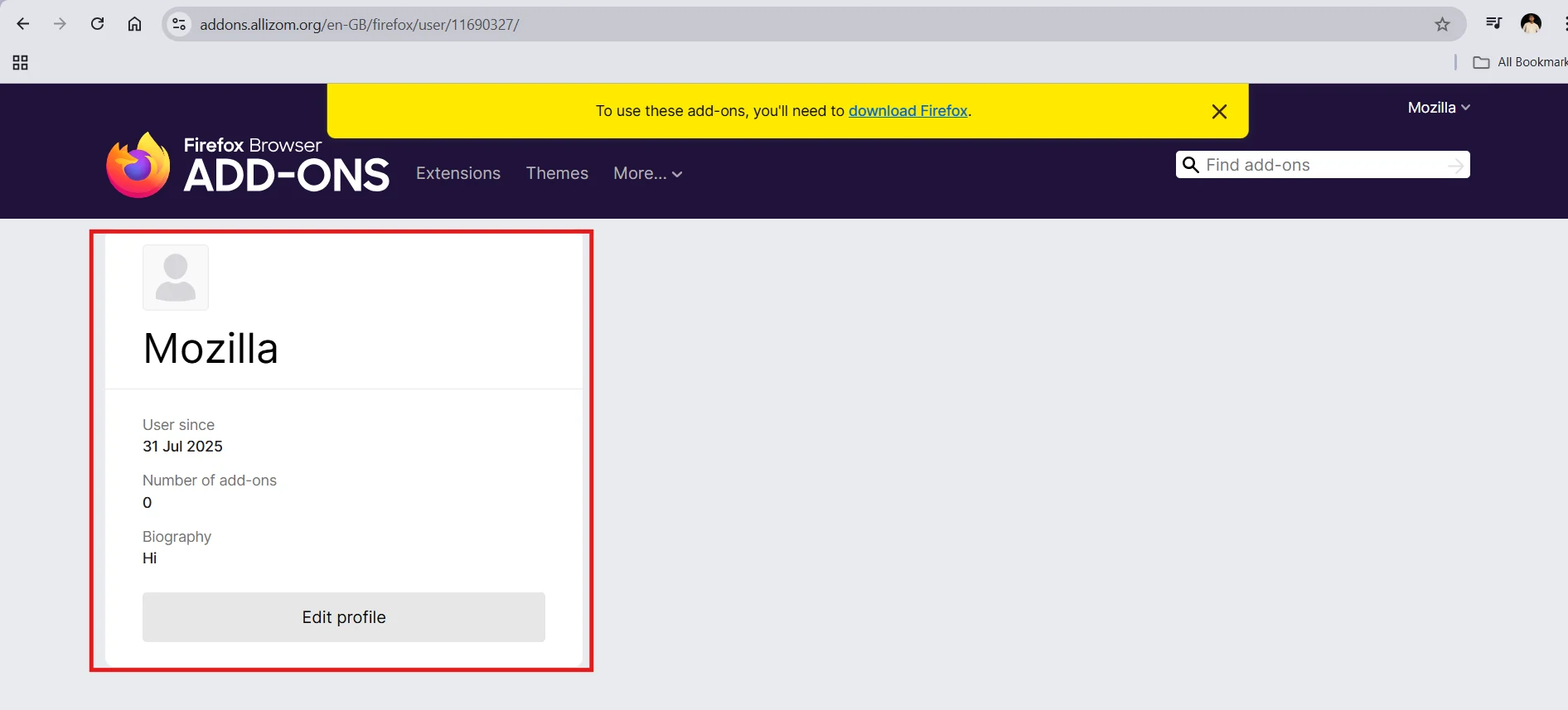
Visit your profile and confirm that the display name appears as: Mozilla
Supporting Material/References:
PoC01.png: The original name "Mozilla" being blocked as restricted. ██████████
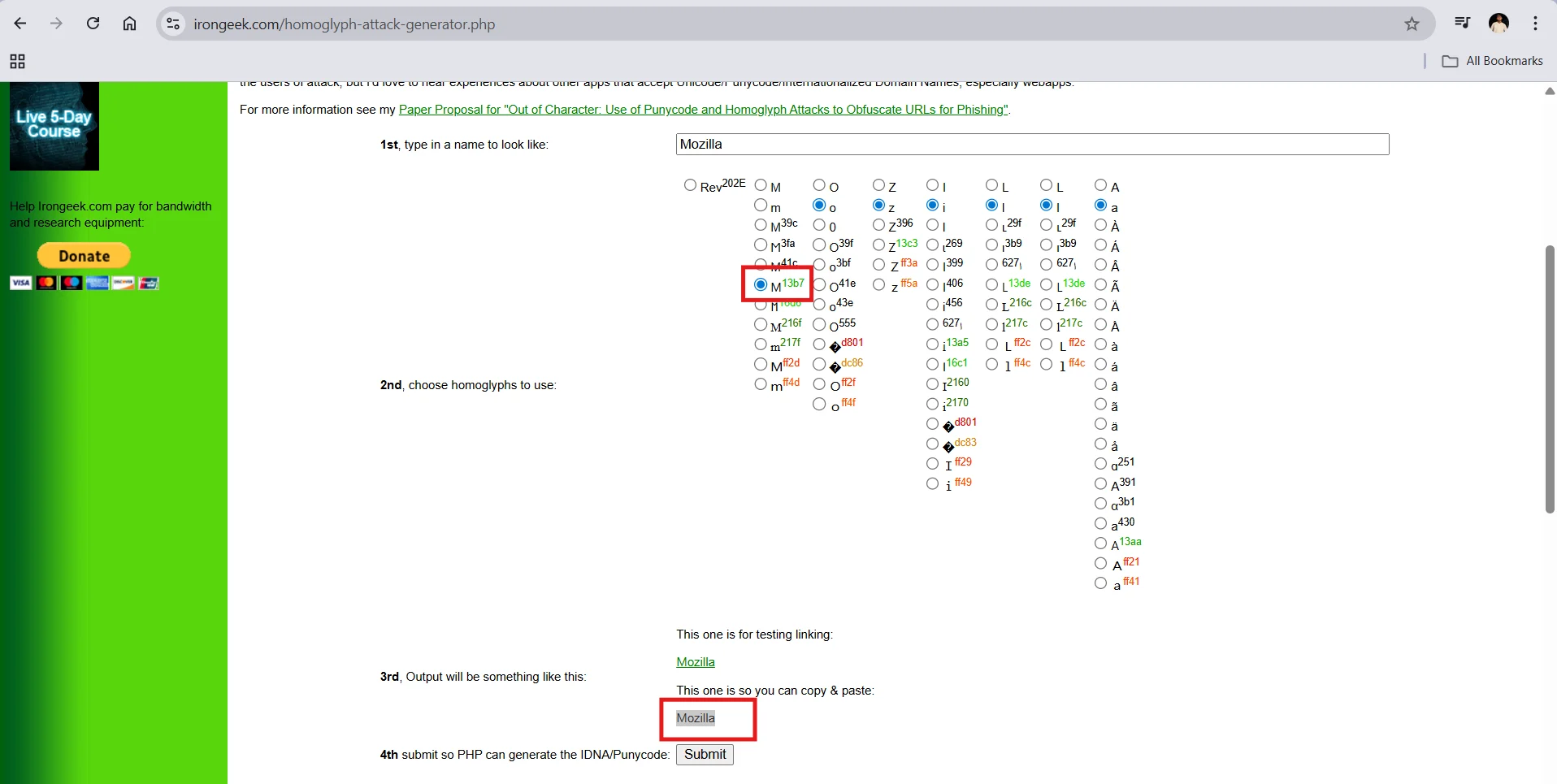
PoC02.png: Homoglyph generation tool showing the use of Unicode character Ꮇ.
PoC03.png: Profile shows display name “Mozilla” using homoglyph payload
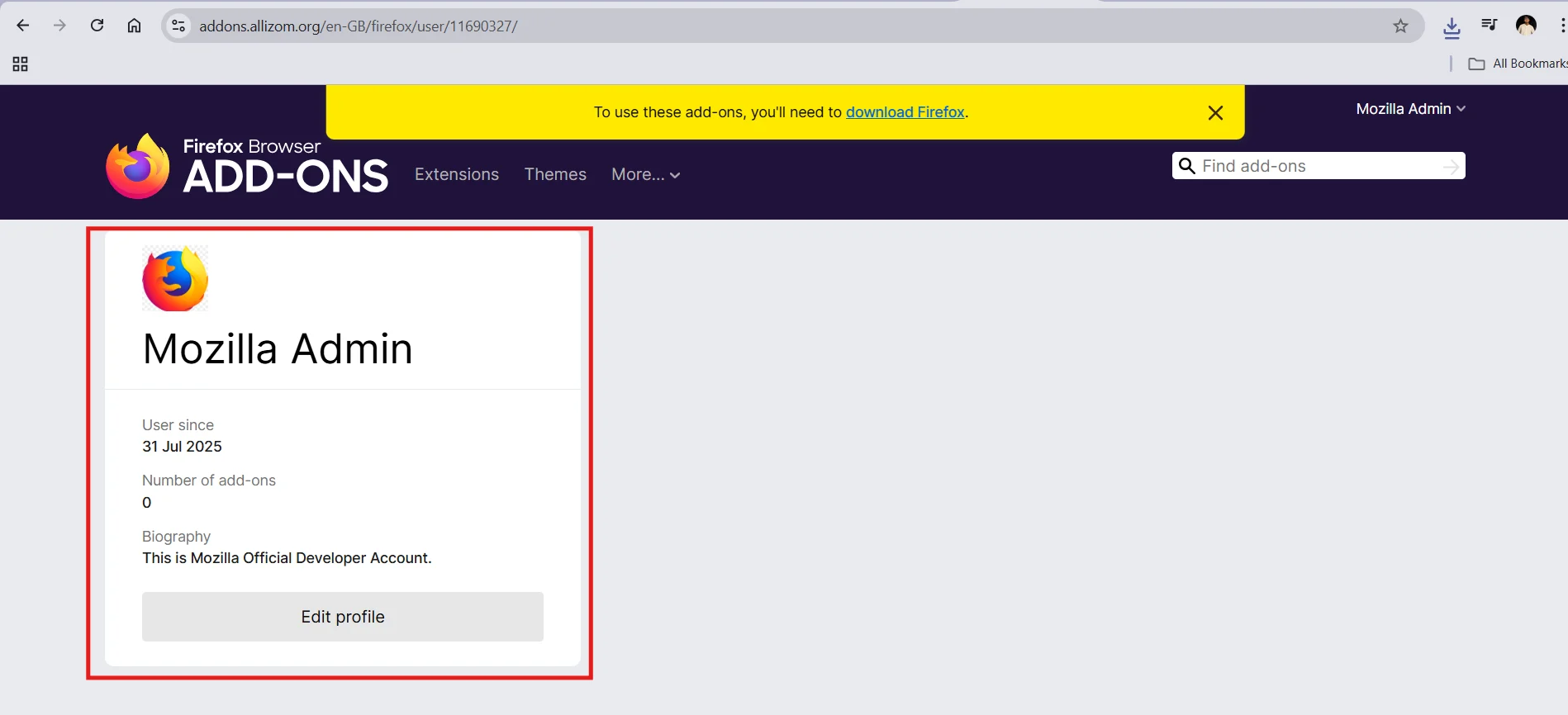
PoC04.png: This shows how a phishing account look like using Homoglyph Attack
Impact
Summary:
This vulnerability allows an attacker to impersonate trusted, official accounts like “Mozilla,” leading to:
-
Brand impersonation
-
Trust exploitation
-
Potential phishing attacks
-
User manipulation or confusion in developer communities
It undermines the platform’s existing keyword blacklist meant to protect trusted identities
Context
addons.allizom.org is the Firefox Add-ons platform. User accounts have a profile with a Display Name field, and the platform keeps a blacklist of restricted keywords so that ordinary users cannot present themselves under a trusted identity. The report focuses on one such keyword, Mozilla, and on the validation that is supposed to reject it.
The researcher found that a display name using a Unicode homoglyph is accepted where the plain keyword is rejected. By substituting a single character with a Unicode homoglyph, a display name that renders as Mozilla to a human reader is accepted by the server.
Setup
No special tooling or privileged role is needed. The precondition is simply an account on the platform, which the researcher logs in to at https://addons.allizom.org. The profile editing page is reachable by any logged-in user. The only other tool referenced is a homoglyph generation tool, shown in the supporting material.
Finding it
The starting observation is that the Display Name field rejects the exact keyword Mozilla with the message "This display name cannot be used". That is the intended behaviour of the keyword blacklist. Replacing the leading M with a visually similar character from another script should therefore pass the string comparison while still reading as Mozilla on the profile page.
Exploitation
Step 1: Log in
Log in to an account at:
https://addons.allizom.org
Step 2: Open the profile editor
Navigate to the Edit Profile page:
https://addons.allizom.org/en-GB/firefox/users/edit
This is the form that contains the Display Name field.
Step 3: Confirm the restriction
Enter the keyword in the Display Name field:
Mozilla
The form returns the error: "This display name cannot be used". This establishes the baseline: the plain ASCII string is on the restricted list and is rejected.
Step 4: Submit the homoglyph variant
Instead of the plain keyword, enter the following string:
Ꮇozilla
Here the M is replaced with U+13B7, Cherokee Letter Mo. The character is a different code point from Latin capital M, so a blacklist that matches on the literal string does not see Mozilla in the input, but the glyph is close enough that the rendered name reads as Mozilla.
The image shows the homoglyph generation tool with the Unicode character Ꮇ in use.
Step 5: Submit the form
The bypassed name is accepted successfully. No error is returned for the homoglyph string, in contrast to step 3.
Step 6: Verify on the profile
Visit the profile and confirm that the display name appears as:
Mozilla
The profile page shows the display name Mozilla rendered from the homoglyph payload.
The last image shows what a phishing account looks like when set up with this homoglyph technique.
Root cause
The validation is a keyword blacklist that compares the submitted display name against restricted strings. The homoglyph is a distinct character from the Latin letter, so the input does not equal the restricted keyword and the check passes. U+13B7 renders like an M but is a distinct character, so the input never equals the restricted keyword and the check passes.
The defence fails because it is a deny-list of literal strings rather than a normalisation step. The report does not describe the server-side implementation beyond the observed behaviour.
Impact
The researcher frames the impact as impersonation of trusted, official accounts such as Mozilla. The listed consequences are:
- Brand impersonation
- Trust exploitation
- Potential phishing attacks
- User manipulation or confusion in developer communities
The core issue is that the platform's keyword blacklist, which exists to protect trusted identities, can be circumvented. The report presents the phishing account in the supporting material as an illustration of how such an account would look. The severity recorded for the report is low, with a bounty of 500.00 USD.
Fix
The report does not state what was changed.
Variants to test
- Substitute other letters of the restricted keyword with homoglyphs from other scripts, not just the first character. A positive result is the form accepting the name while the profile renders it as the restricted keyword.
- Try other restricted keywords on the same field with the same substitution technique. A positive result is any other blacklisted term being accepted in homoglyph form.
- Try other Unicode tricks on the same field: combining characters, zero-width characters, or mixed-script strings. A positive result is acceptance of a name that renders as a restricted keyword or that is visually indistinguishable from one.
- Apply the same homoglyph substitution to other free-text identity fields, such as usernames or profile titles, where a similar blacklist may exist. A positive result is acceptance of a confusable value in a field that rejects the plain keyword.
Hunting notes
This class of bug hides wherever a product enforces a name policy with a literal string comparison: display names, usernames, organisation names, page titles and any field where impersonation matters. The signal during recon is a field that returns a specific rejection message for a well-known brand or reserved word; that message tells you a blacklist exists and gives you a target to bypass.
The report shows the plain keyword rejected, the homoglyph accepted, and the profile rendering as the restricted name, plus an illustration of a phishing account. That end-to-end evidence, rather than the bypass alone, is what makes the impersonation risk concrete for the program.
What happened, in plain words
Websites often let you pick a name that other people see, like a nickname on a forum. Some names are reserved because they belong to the company itself. On the Firefox Add-ons site, you are not allowed to call yourself Mozilla, because that would make it look as though you work for Mozilla. The site keeps a list of these forbidden words and checks your chosen name against it.
The researcher found that a lookalike character lets the name through where the plain word is refused. Computers store text as numbers, and each letter has its own number, called a code point. There are many characters in the world's writing systems that look almost identical to the ordinary Latin letter M but have a different number. If you swap the M in Mozilla for one of those lookalikes, the check no longer recognises the word, so it lets the name through. But when the name is drawn on the screen, it still looks like Mozilla to a human being.
That is the whole bug: a filter that compares exact characters can be fooled by a character that looks the same but is not the same. The researcher showed the plain word being rejected, the lookalike version being accepted, and the profile then displaying what appears to be Mozilla. The report was rated low severity and paid a bounty of 500.00 USD.
Context
addons.allizom.org is the Firefox Add-ons platform, the website where people publish and install extensions for the Firefox browser. Every user there has an account, and every account has a profile page with a field called the Display Name. That is simply the name shown to other people, separate from your login details.
Because the Display Name is what visitors see, the platform keeps a blacklist of restricted keywords. A blacklist (also called a deny-list) is a list of things that are not allowed: if your input matches an entry, it is refused. Here the purpose is to stop an ordinary user from presenting themselves under a trusted identity, such as the company's own name. The report focuses on one entry on that list, the word Mozilla, and on the validation that is meant to reject it.
Validation means checking input before accepting it. The researcher found that this particular check is applied to the literal string only. A literal string means the exact sequence of characters, character for character. By substituting a single character with a Unicode homoglyph, a display name that renders as Mozilla to a human reader is accepted by the server.
A homoglyph is a character that looks the same as, or very similar to, another character but is a different character underneath. Unicode is the giant catalogue that assigns a number to every character in every writing system, so that computers can store and exchange text consistently. Because Unicode covers many scripts, it contains several characters that resemble the Latin letter M.
Setup
No special tooling or privileged role is needed. You do not have to be an administrator, and you do not need any hacking software. The precondition is simply an account on the platform, which the researcher logs in to at https://addons.allizom.org. The profile editing page is reachable by any logged-in user, so anyone who can sign up can try this.
The only other tool referenced is a homoglyph generation tool, shown in the supporting material. Such a tool takes an ordinary word and suggests lookalike characters from other scripts that you could use in its place.
Finding it
The starting observation is that the Display Name field rejects the exact keyword Mozilla with the message "This display name cannot be used". That is the intended behaviour of the keyword blacklist: type the reserved word, and the form refuses it.
The blacklist compares characters, while users read glyphs. A glyph is the shape you see on screen; a character is the underlying unit stored by the computer. One character can be drawn with a particular glyph, and two completely different characters can be drawn with glyphs that look the same.
Unicode contains characters that look like Latin letters but are not them. Replacing the leading M with a visually similar character from another script should therefore pass the string comparison, because the stored text is no longer the forbidden sequence, while still reading as Mozilla on the profile page, because the shape is close enough.
Exploitation
Step 1: Log in
Log in to an account at:
https://addons.allizom.org
This is the address of the platform. Logging in gives you a session, meaning the site remembers who you are as you move between pages, so that it will let you edit your own profile. Without an account there is no profile to edit, which is why this is the first step.
Step 2: Open the profile editor
Navigate to the Edit Profile page:
https://addons.allizom.org/en-GB/firefox/users/edit
This is the form that contains the Display Name field. The /en-GB/ part of the address selects the English (United Kingdom) version of the site, and users/edit is the page for changing your own user details.
Step 3: Confirm the restriction
Enter the keyword in the Display Name field:
Mozilla
The form returns the error: "This display name cannot be used". This establishes the baseline. A baseline is the normal, expected result that you record first, so that any later difference is clearly caused by your change and not by something else. Here the plain word is rejected with the message "This display name cannot be used".
Step 4: Submit the homoglyph variant
Instead of the plain keyword, enter the following string:
Ꮇozilla
Here the M is replaced with U+13B7, Cherokee Letter Mo. The notation U+13B7 is how Unicode identifies a character: U+ followed by its number in hexadecimal, which is just a counting system based on sixteen. Cherokee Letter Mo belongs to the Cherokee writing system, and its shape happens to resemble a capital M.
The character is a different code point from Latin capital M, so a blacklist that matches on the literal string does not see Mozilla in the input. The stored text is a different sequence of characters. But the glyph is close enough that the rendered name reads as Mozilla to a person looking at the page.
The image shows the homoglyph generation tool with the Unicode character Ꮇ in use. In other words, it shows where the lookalike character came from before it was pasted into the form.
Step 5: Submit the form
The bypassed name is accepted successfully. No error is returned for the homoglyph string, in contrast to step 3. The same form, the same field and the same submit button produce two different outcomes purely because one character was swapped. That difference is the bypass: the same form accepts the homoglyph string.
Step 6: Verify on the profile
Visit the profile and confirm that the display name appears as:
Mozilla
This last check matters because acceptance alone is not enough. The point of the bug is that other people will see the trusted name, so the researcher looks at the profile as any visitor would and confirms the rendered result.
The profile page shows the display name Mozilla rendered from the homoglyph payload.
The last image shows what a phishing account looks like when set up with this homoglyph technique. Phishing is the practice of pretending to be someone trustworthy so that people hand over information or trust something they should not.
Root cause
The validation is a keyword blacklist that compares the submitted display name against restricted strings. The homoglyph is a distinct character from the Latin letter, so the input does not equal the restricted keyword and the check passes. U+13B7 renders like an M but is a distinct character, so the input never equals the restricted keyword and the check passes.
The defence fails because it is a deny-list of literal strings rather than a normalisation step. Normalisation means converting text into a standard form before comparing it, so that different ways of writing the same thing become identical. A familiar comparison is sorting a list of names: if one entry is written with an accent and another without, a careless sort treats them as different, while a normalising sort treats them as the same word.
NFKC is a standard Unicode normalisation form, and a confusables mapping is a table that records which characters look alike and what they should be treated as. The rendering layer then displays the homoglyph indistinguishably from the Latin letter. The report does not describe the server-side implementation beyond the observed behaviour.
Impact
The researcher frames the impact as impersonation of trusted, official accounts such as Mozilla. Impersonation means presenting yourself as someone else so that people treat you as that person. The listed consequences are:
- Brand impersonation
- Trust exploitation
- Potential phishing attacks
- User manipulation or confusion in developer communities
Brand impersonation is using a company's name and appearance without permission. Trust exploitation means leaning on the confidence people place in that name. Potential phishing attacks means the account could be used to trick people into believing messages or requests that appear to come from the official source. User manipulation or confusion in developer communities means people who build and discuss add-ons could be misled about who they are talking to.
The core issue is that the platform's keyword blacklist, which exists to protect trusted identities, can be circumvented. The report presents the phishing account in the supporting material as an illustration of how such an account would look. The severity recorded for the report is low, with a bounty of 500.00 USD.
Fix
The report does not state what was changed. Canonical form means the single standard version of a piece of text, so that all the lookalike spellings collapse into one.
The first option means normalising again when the name is displayed, so what is shown matches what was checked. The second means refusing characters from other writing systems when they could be mistaken for letters in the reserved word.
Variants to test
A variant is a small change to the same idea, tried to see whether the problem is wider than the one case that was reported. Each item below states what to try and what a positive result looks like.
- Substitute other letters of the restricted keyword with homoglyphs from other scripts, not just the first character. A positive result is the form accepting the name while the profile renders it as the restricted keyword.
- Try other restricted keywords on the same field with the same substitution technique. A positive result is any other blacklisted term being accepted in homoglyph form.
- Try other Unicode tricks on the same field: combining characters, zero-width characters, or mixed-script strings. Combining characters are extra marks that attach to a letter, zero-width characters are invisible characters that take up no space, and mixed-script strings mix letters from different writing systems in one word. A positive result is acceptance of a name that renders as a restricted keyword or that is visually indistinguishable from one.
- Apply the same homoglyph substitution to other free-text identity fields, such as usernames or profile titles, where a similar blacklist may exist. A positive result is acceptance of a confusable value in a field that rejects the plain keyword.
Hunting notes
This class of bug hides wherever a product enforces a name policy with a literal string comparison: display names, usernames, organisation names, page titles and any field where impersonation matters. A name policy is simply a rule about what names are allowed.
The signal during recon is a field that returns a specific rejection message for a well-known brand or reserved word. Recon, short for reconnaissance, means looking around a product before attacking it, to understand how it behaves. That rejection message tells you a blacklist exists and gives you a target to bypass. Without the message you would not know a filter was there at all.
The report shows the plain keyword rejected, the homoglyph accepted, and the profile rendering as the restricted name, plus an illustration of a phishing account. That end-to-end evidence, rather than the bypass alone, is what makes the impersonation risk concrete for the program. End-to-end evidence means showing every stage from the first blocked attempt to the final visible result, so that nobody has to take the conclusion on trust.
Glossary
- Account: a set of login details that identifies you on a website and gives you a profile.
- ASCII: the basic set of characters, including the plain Latin letters, that older systems use for text.
- Baseline: the normal result recorded before a change, used for comparison afterwards.
- Blacklist (deny-list): a list of values that are refused when submitted.
- Bounty: a payment made by a company to someone who reports a security problem to it.
- Brand impersonation: using a company's name or appearance to pass yourself off as that company.
- Canonical form: the single standard version of a piece of text, so that lookalike spellings become identical.
- Character: the underlying unit of text that a computer stores, as opposed to the shape you see.
- Code point: the number Unicode assigns to a character, written like U+13B7.
- Combining character: an extra mark that attaches to a letter and changes how it is drawn.
- Confusables mapping: a table recording which characters look alike and what they should be treated as.
- Display Name: the name shown to other people on your profile, separate from your login details.
- End-to-end evidence: proof that shows every stage of a problem, from the first blocked attempt to the final visible result.
- Glyph: the shape a character is drawn with on screen.
- Hexadecimal: a counting system based on sixteen, used to write code point numbers.
- Homoglyph: a character that looks the same as, or very similar to, another character but is a different character underneath.
- Impersonation: presenting yourself as someone else so that people treat you as that person.
- Literal string: the exact sequence of characters, character for character.
- Mixed-script string: a word that mixes letters from different writing systems.
- NFKC: a standard Unicode normalisation form that converts text into a standard shape for comparison.
- Normalisation: converting text into a standard form so that different ways of writing the same thing become identical.
- Phishing: pretending to be someone trustworthy so that people hand over information or trust something they should not.
- Recon (reconnaissance): looking around a product before attacking it, to understand how it behaves.
- Rendering: drawing text on the screen in a particular shape.
- Restricted keyword: a word that ordinary users are not allowed to use as a name.
- Session: the site's memory of who you are while you move between pages after logging in.
- Severity: a rating of how serious a security problem is.
- Unicode: the catalogue that assigns a number to every character in every writing system.
- Validation: checking input before accepting it.
- Variant: a small change to the same idea, tried to see whether a problem is wider than the reported case.
- Zero-width character: an invisible character that takes up no space in the text.