Information disclosure via enabled Django Debug Mode
A Django application was left running with debug mode enabled, so error pages and API endpoints were exposed to unauthenticated visitors. The reporter also found that the registration endpoint accepted arbitrary accounts and that email addresses could be enumerated, and suspected a DNS-records endpoint could leak origin IPs.

- Triaged in 3 months
- Fixed in 8 months
- Disclosed after 14 months
Summary:
Vulnerable URL: ██████████
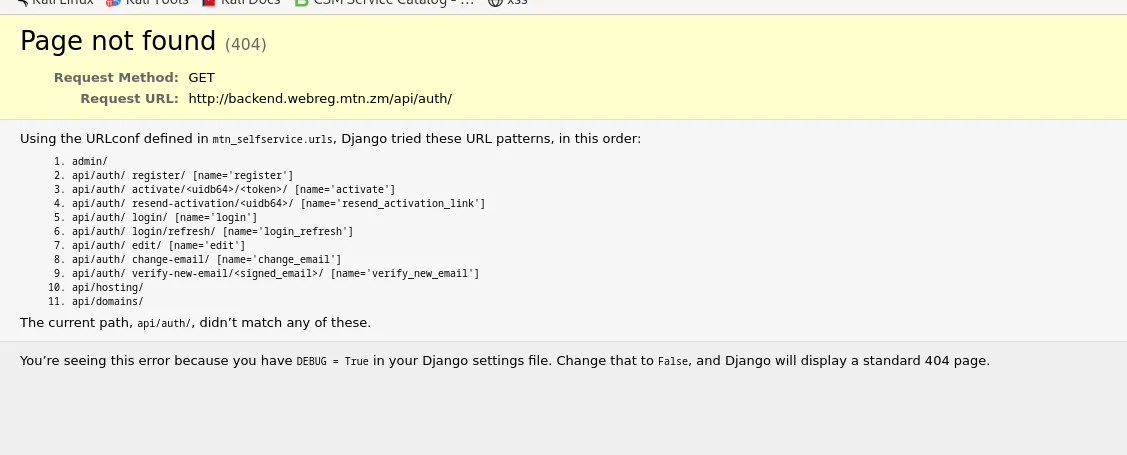
I observed that Django Debug Mode was enabled. It was leaking error messages and API endpoints so I decided to exploit it further to see what I could do. Here's a list of things I was able to do:
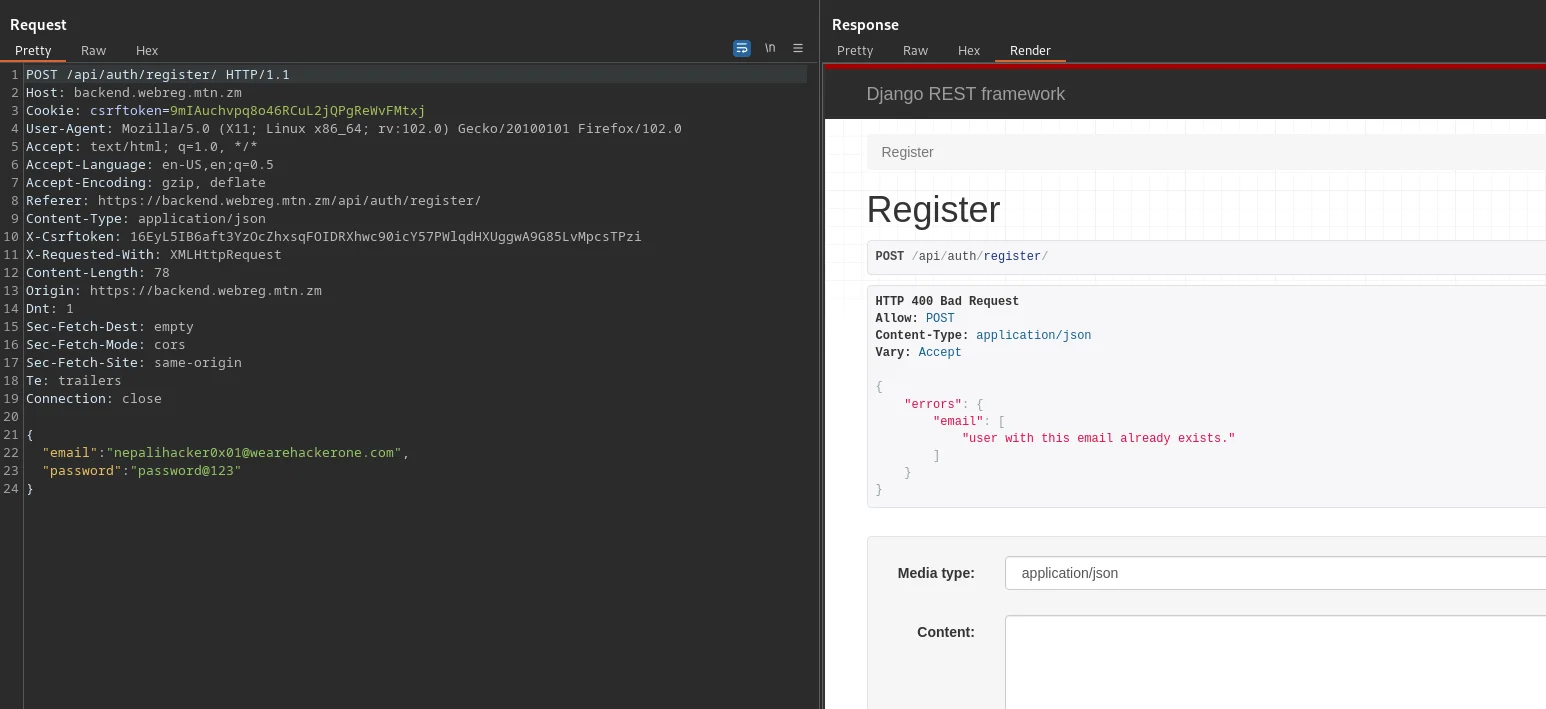
- ** Register arbitrary user accounts **
- ** Enumerate email addresses of registered user accounts **
- View all debug information such as API endpoints
- Looks like it's also possible to fetch DNS records of registered domains from the endpoint
/api/domains/dns-records, these records leak Origin IPs which might be highly confidential in nature I haven't tested this from my end since I don't want to access any sensitive information. :)
API Information
Registering arbitrary user accounts
Email enumeration
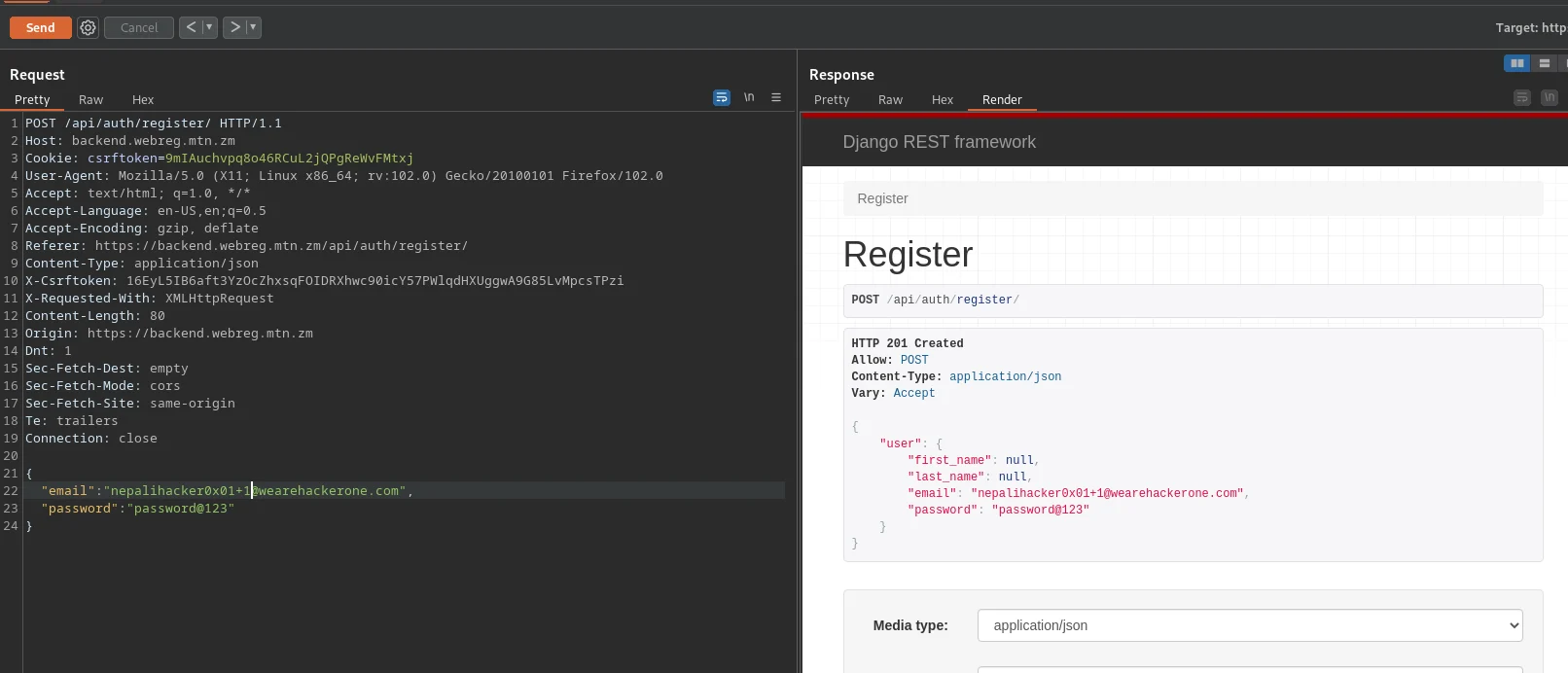
I stopped at this point so that you could review it from your end...
The email I used to registered was ██████
Steps To Reproduce:
[add details for how we can reproduce the issue]
Request to register arbitrary user accounts and enumerate email addresses
POST /api/auth/register/ HTTP/1.1
Host: backend.webreg.mtn.zm
Cookie: ███████
User-Agent: Mozilla/5.0 (X11; Linux x86_64; rv:102.0) Gecko/20100101 Firefox/102.0
Accept: text/html; q=1.0, */*
Accept-Language: en-US,en;q=0.5
Accept-Encoding: gzip, deflate
Referer: ████████
X-Csrftoken: ██████████
X-Requested-With: XMLHttpRequest
Content-Length: 80
Origin: ██████████: 1
Sec-Fetch-Dest: empty
Sec-Fetch-Mode: cors
Sec-Fetch-Site: same-origin
Te: trailers
Connection: close

{
"email": "██████████",
"password": "password██████████"
}
Supporting Material/References:
[list any additional material (e.g. screenshots, logs, etc.)]
- [attachment / reference]
Impact
An actor could get access to information he/she is not supposed to get.
Context
The target is www.mtn.zm, a web property of MTN Group. The researcher found that Django Debug Mode was enabled on the application and that it was leaking error messages and API endpoints. The report is filed under Information Disclosure with a medium severity (CVSS 6.1) and was disclosed on 25 December 2024.
The report does not describe what the site normally does beyond the presence of a registration API and a domains API. What it does show is that the backend exposes a Django REST style API with at least two relevant routes: /api/auth/register/ and /api/domains/dns-records.
Setup
No special accounts or tooling are described. The researcher interacted with the application through a browser (the captured request carries a Firefox 102.0 user agent on Linux x86_64) and used the site's own registration flow. The precondition for everything that follows is simply that debug mode is on and that the API is reachable.
The vulnerable URL itself is redacted in the report as ██████████, and the request shows the API host as backend.webreg.mtn.zm.
Finding it
The researcher noticed that Django Debug Mode was enabled. Debug pages were leaking error messages and API endpoints, which is the classic sign that DEBUG = True is set in a deployed Django settings file: instead of a generic 500 page, the application returns tracebacks, settings fragments and URL configuration.
Rather than stopping at the disclosure, the researcher used the exposed API surface to see what could be done with it. The report lists four things that were possible:
- Register arbitrary user accounts.
- Enumerate email addresses of registered user accounts.
- View all debug information such as API endpoints.
- Fetch DNS records of registered domains from the endpoint
/api/domains/dns-records, which the researcher notes leak origin IPs that might be highly confidential. The researcher explicitly says this last item was not tested, to avoid accessing sensitive information.
Exploitation
Step 1: Reading the exposed API information
The debug output exposed the API structure. The report includes a screenshot alongside its API information section:
This is the reconnaissance step: the debug pages tell the attacker which endpoints exist, and the rest of the report works through the ones that turned out to be abusable.
Step 2: Registering arbitrary user accounts
The report lists registering arbitrary user accounts as one of the things that was possible, and includes a screenshot under that heading:
The request that performs the registration is the same one used for the email enumeration step below, so it is shown once there.
Step 3: Enumerating email addresses
The report lists enumerating email addresses of registered user accounts as possible, and includes a screenshot under that heading:
The full request, as recorded in the report, is:
POST /api/auth/register/ HTTP/1.1
Host: backend.webreg.mtn.zm
Cookie: ███████
User-Agent: Mozilla/5.0 (X11; Linux x86_64; rv:102.0) Gecko/20100101 Firefox/102.0
Accept: text/html, q=1.0, */*
Accept-Language: en-US,en;q=0.5
Accept-Encoding: gzip, deflate
Referer: ████████
X-Csrftoken: ██████████
X-Requested-With: XMLHttpRequest
Content-Length: 80
Origin: ██████████: 1
Sec-Fetch-Dest: empty
Sec-Fetch-Mode: cors
Sec-Fetch-Site: same-origin
Te: trailers
Connection: close

{
"email": "██████████",
"password": "password██████████"
}
The important parts:
POST /api/auth/register/onbackend.webreg.mtn.zmis the account creation route.X-Csrftokenand the sessionCookieare sent, so the request is made in the context of an existing browser session with the CSRF token that Django expects.X-Requested-With: XMLHttpRequestandOrigin/Refererheaders match a same-origin AJAX call from the site.- The JSON body carries
emailandpassword; both values are redacted in the report.
The researcher notes that the email used to register was redacted as ██████. The report does not show the response body that distinguishes a new address from an existing one.
Step 4: DNS records endpoint (not tested)
The report points at /api/domains/dns-records as an endpoint that appears, from the debug information, to return DNS records for registered domains. The researcher states that these records leak origin IPs, which could be highly confidential, and that this was not tested because they did not want to access sensitive information. No request or response for this endpoint is included.
Root cause
The underlying mistake is that Django Debug Mode is enabled in a deployed environment. With DEBUG = True, Django returns detailed technical error pages and exposes configuration and URL information that should never reach an end user. That is what gave the researcher the API map in the first place.
On top of that, the registration endpoint lets a caller create accounts and learn whether an email is already registered. The report does not include the server-side code, so the exact mechanism behind the enumeration (for example, a different response for an existing address) is not shown; likely the endpoint returns distinguishable responses or status codes for new versus existing emails.
Impact
As the report puts it, an actor could get access to information they are not supposed to get. Concretely, the researcher demonstrated account creation and enumeration of registered email addresses, and observed that debug information exposes API endpoints. The DNS records endpoint is flagged as a potential source of origin IP disclosure, but the researcher did not verify it, so that part remains an untested observation rather than a demonstrated result.
Fix
Turning off Django Debug Mode in production is the direct fix for the information disclosure: DEBUG must be false in the deployed settings, and debug pages must not be reachable. Beyond that, the registration endpoint should not reveal whether an email address is already registered, and the DNS records endpoint should be reviewed so that it does not return origin IPs to callers who should not see them.
Variants to test
- Request a URL that triggers a server error and look for a Django traceback page. A positive result is a yellow debug page with a traceback, settings and URL patterns.
- Probe common API prefixes such as
/api/and look for a browsable API or schema listing. A positive result is a machine-readable list of endpoints that the site does not otherwise advertise. - Submit a registration request with an email that is likely already registered and compare it with a fresh address. A positive result is a response that differs in status, message or timing.
- Request
/api/domains/dns-records(or the equivalent route on the target) and inspect the response for A, MX or TXT records that point at infrastructure behind a proxy. A positive result is an origin IP that is not the CDN or WAF address.
Hunting notes
This kind of bug tends to hide wherever a Django project has been deployed with its development settings: staging hosts that were promoted to production, container images built without an environment-specific settings module, and subdomains such as backend. that sit outside the main site's review process. During recon, a 500 response with a verbose HTML body, a DEBUG banner, or a browsable API at a predictable path are the signals worth following. The researcher moved from the debug disclosure to account creation and email enumeration, and flagged the DNS records endpoint as a further risk without testing it.
What happened, in plain words
A security researcher was looking at www.mtn.zm, a website belonging to MTN Group. They noticed that Django Debug Mode was enabled, and that it was leaking error messages and API endpoints. That behaviour is a well-known sign that a web framework called Django has been left in its development, or "debug", mode on a live website.
Think of it like a shop that normally keeps its stockroom door closed, but one day the door is propped open and customers can see the shelves, the labels and the delivery schedule. Nothing is stolen yet, but everything about how the shop works is on display.
The researcher did not stop at noticing the open door. They used the information the debug pages revealed to find the site's API (the set of addresses the site's own pages use to talk to its server) and then tried a few things with it. The report lists four things that were possible:
- Register arbitrary user accounts.
- Enumerate email addresses of registered user accounts.
- View all debug information such as API endpoints.
- Fetch DNS records of registered domains from the endpoint
/api/domains/dns-records, which the researcher says leak origin IPs that might be highly confidential. The researcher explicitly says this last item was not tested, to avoid accessing sensitive information.
The report was filed under Information Disclosure, with a medium severity (CVSS 6.1), and was disclosed on 25 December 2024. The vulnerable URL itself is redacted in the report as ██████████, and the captured request shows the API host as backend.webreg.mtn.zm.
Context
The target is www.mtn.zm, a web property of MTN Group. The researcher found that Django Debug Mode was enabled on the application and that it was leaking error messages and API endpoints.
The report does not describe what the site normally does beyond the presence of a registration API and a domains API. What it does show is that the backend exposes a Django REST style API with at least two relevant routes: /api/auth/register/ and /api/domains/dns-records.
Two terms are worth unpacking before going further.
Django is a toolkit that programmers use to build websites in the Python language. It comes with a switch called DEBUG. When DEBUG is on, Django is helpful to the developer: if a page crashes, it shows the full error, the code that failed, some of the site's settings and the list of addresses the site responds to. That is exactly what you want while building a site on your own laptop. It is exactly what you do not want on a public website, because visitors can read all of it.
An API (Application Programming Interface) is the set of addresses a website's own pages use to talk to its server behind the scenes. When you fill in a form and press a button, your browser often sends a small message to an address like /api/auth/register/ and the server replies with a result. You never see these addresses in the normal page, but they exist, and anyone who learns them can send messages to them directly.
Setup
No special accounts or tooling are described. The researcher interacted with the application through a browser (the captured request carries a Firefox 102.0 user agent on Linux x86_64) and used the site's own registration flow. The precondition for everything that follows is simply that debug mode is on and that the API is reachable.
The vulnerable URL itself is redacted in the report as ██████████, and the request shows the API host as backend.webreg.mtn.zm.
A user agent is a short line of text that your browser sends with every request to say which browser and operating system it is. It is like a name badge at a conference: it tells the server who is knocking, and it is easy to copy or change.
Finding it
The researcher noticed that Django Debug Mode was enabled. Debug pages were leaking error messages and API endpoints, which is the classic sign that DEBUG = True is set in a deployed Django settings file: instead of a generic 500 page, the application returns tracebacks, settings fragments and URL configuration.
A traceback is the list of steps the server was executing when it crashed, from the first line of code to the exact line that failed. It is like the receipt from a till that shows every item scanned before the error. A 500 page is the generic "internal server error" page a well-behaved site shows when something breaks, deliberately saying nothing about what went wrong.
Rather than stopping at the disclosure, the researcher used the exposed API surface to see what could be done with it.
- Register arbitrary user accounts.
- Fetch DNS records of registered domains from the endpoint
/api/domains/dns-records, which the researcher notes leak origin IPs that might be highly confidential.
To enumerate means to work through a list one item at a time and learn which items exist. If a site tells you "this email is already registered" for some addresses and "account created" for others, you can feed it a list of addresses and learn which ones have accounts. That is enumeration.
A DNS record is an entry in the internet's address book. When you type a domain name, a DNS lookup translates it into the numeric address of a server. Some records are public on purpose; others can reveal the real address of a machine that is supposed to be hidden behind a protective layer.
Exploitation
Step 1: Reading the exposed API information
The debug output exposed the API structure. The report includes a screenshot alongside its API information section:
This is the reconnaissance step: the debug pages tell the attacker which endpoints exist, and the rest of the report works through the ones that turned out to be abusable.
Reconnaissance simply means looking around before acting, the way you might walk around a building to see which doors are open before deciding where to go. Once you know those addresses, you can send requests to them yourself, without going through the site's pages at all.
Step 2: Registering arbitrary user accounts
The report lists registering arbitrary user accounts as one of the things that was possible, and includes a screenshot under that heading:
JSON is a way of writing data as text, using curly brackets and quoted labels, so that a server and a browser can agree on what a message means. It looks like a form filled in with labels: "email" is the label, and the value after the colon is what goes in the box.
The request that performs the registration is the same one used for the email enumeration step below, so it is shown once there.
Step 3: Enumerating email addresses
The report lists enumerating email addresses of registered user accounts as possible, and includes a screenshot under that heading:
The full request, as recorded in the report, is:
POST /api/auth/register/ HTTP/1.1
Host: backend.webreg.mtn.zm
Cookie: ███████
User-Agent: Mozilla/5.0 (X11; Linux x86_64; rv:102.0) Gecko/20100101 Firefox/102.0
Accept: text/html, q=1.0, */*
Accept-Language: en-US,en;q=0.5
Accept-Encoding: gzip, deflate
Referer: ████████
X-Csrftoken: ██████████
X-Requested-With: XMLHttpRequest
Content-Length: 80
Origin: ██████████: 1
Sec-Fetch-Dest: empty
Sec-Fetch-Mode: cors
Sec-Fetch-Site: same-origin
Te: trailers
Connection: close

{
"email": "██████████",
"password": "password██████████"
}
This block is a raw HTTP request, the actual message a browser sends to a server. Reading it line by line:
POST /api/auth/register/ HTTP/1.1is the first line.POSTis the type of request used when you are sending data to the server (as opposed toGET, which just asks for a page)./api/auth/register/is the address being called, andHTTP/1.1is the version of the language being spoken.Host: backend.webreg.mtn.zmsays which server the request is for. One server can host many sites, so this line tells it which one you want.Cookie: ███████carries the browser's stored session cookie. A cookie is a small piece of text a site asks your browser to keep and send back with every request, so the server can recognise you between page loads. It is like a wristband at an event: you show it once at the door and then it identifies you everywhere inside. The value here is redacted.User-Agent: Mozilla/5.0 (X11; Linux x86_64; rv:102.0) Gecko/20100101 Firefox/102.0identifies the browser and system, as described above.Accept: text/html, q=1.0, */*says which kinds of response the browser is willing to receive.*/*means "anything".Accept-Language: en-US,en;q=0.5says the browser prefers English (US).Accept-Encoding: gzip, deflatesays the browser can accept compressed responses, which saves bandwidth.Referer: ████████normally says which page the request came from. It is redacted here.X-Csrftoken: ██████████is a CSRF token. CSRF stands for Cross-Site Request Forgery, an attack where a different website tries to make your browser send a request to this site without your knowledge. To prevent it, the site gives your browser a secret value and expects it back on every state-changing request. It is like a cloakroom ticket that must match the coat. The value is redacted.X-Requested-With: XMLHttpRequestis a marker that says "this request was made by the page's own JavaScript", not by typing an address into the bar. JavaScript is the programming language that runs inside web pages and makes them interactive.Content-Length: 80says how many bytes long the body of the request is, so the server knows when it has received all of it.Origin: ██████████: 1says which site the request originates from. It is redacted.Sec-Fetch-Dest: empty,Sec-Fetch-Mode: cors,Sec-Fetch-Site: same-originare modern browser hints about the context of the request.same-originmeans the request is going to the same site that made it.Te: trailersandConnection: closeare low-level transport details: the first says the client can handle trailing headers, the second asks to close the connection after this exchange.- The blank line separates the headers from the body.
- The body is the JSON shown: an
emailand apassword. Both values are redacted in the report.
The important parts:
POST /api/auth/register/onbackend.webreg.mtn.zmis the account creation route.X-Csrftokenand the sessionCookieare sent, so the request is made in the context of an existing browser session with the CSRF token that Django expects.X-Requested-With: XMLHttpRequestandOrigin/Refererheaders match a same-origin AJAX call from the site. AJAX is just a request made by a page in the background, without reloading the whole page.- The JSON body carries
emailandpassword; both values are redacted in the report.
The researcher notes that the email used to register was redacted as ██████. The report does not show the response body that distinguishes a new address from an existing one.
Why do this at all? Because the registration form is meant to be used by a person filling it in on the site. Sending the same request directly, with a chosen email, lets you test what the server does when the email is already taken. If the reply differs, you have learned something about the site's users without ever logging in as them.
Step 4: DNS records endpoint (not tested)
The report points at /api/domains/dns-records as an endpoint that appears, from the debug information, to return DNS records for registered domains. The researcher states that these records leak origin IPs, which could be highly confidential, and that this was not tested because they did not want to access sensitive information. No request or response for this endpoint is included.
An origin IP is the real numeric address of the server that actually runs a site, as opposed to the address of the protective layer in front of it. Many sites sit behind a service that filters and speeds up traffic, and the public only ever sees that service's address. If the real address leaks, an attacker can try to reach the server directly and skip the protection. It is like finding the home address of someone who only gives out a PO box.
Root cause
The underlying mistake is that Django Debug Mode is enabled in a deployed environment. With DEBUG = True, Django returns detailed technical error pages and exposes configuration and URL information that should never reach an end user. That is what gave the researcher the API map in the first place.
On top of that, the registration endpoint lets a caller create accounts and learn whether an email is already registered. The report does not include the server-side code, so the exact mechanism behind the enumeration (for example, a different response for an existing address) is not shown; likely the endpoint returns distinguishable responses or status codes for new versus existing emails.
A status code is the three-digit number a server sends back with every response. 200 means fine, 400 means the request was bad, 500 means the server broke. If a site returns one code for a new email and another for an existing one, that difference is enough to enumerate.
Impact
As the report puts it, an actor could get access to information they are not supposed to get. Concretely, the researcher demonstrated account creation and enumeration of registered email addresses, and observed that debug information exposes API endpoints. The DNS records endpoint is flagged as a potential source of origin IP disclosure, but the researcher did not verify it, so that part remains an untested observation rather than a demonstrated result.
Fix
Turning off Django Debug Mode in production is the direct fix for the information disclosure: DEBUG must be false in the deployed settings, and debug pages must not be reachable. Beyond that, the registration endpoint should not reveal whether an email address is already registered, and the DNS records endpoint should be reviewed so that it does not return origin IPs to callers who should not see them.
Variants to test
- Request a URL that triggers a server error and look for a Django traceback page. A positive result is a yellow debug page with a traceback, settings and URL patterns.
- Probe common API prefixes such as
/api/and look for a browsable API or schema listing. A positive result is a machine-readable list of endpoints that the site does not otherwise advertise. - Submit a registration request with an email that is likely already registered and compare it with a fresh address. A positive result is a response that differs in status, message or timing.
- Request
/api/domains/dns-records(or the equivalent route on the target) and inspect the response for A, MX or TXT records that point at infrastructure behind a proxy. A positive result is an origin IP that is not the CDN or WAF address.
A CDN (content delivery network) is a network of servers spread around the world that serves copies of a site's files from somewhere near the visitor, and also hides the real server. A WAF (web application firewall) is a filter that sits in front of a site and blocks suspicious requests. Both are protective layers whose address is not the origin IP.
Hunting notes
This kind of bug tends to hide wherever a Django project has been deployed with its development settings: staging hosts that were promoted to production, container images built without an environment-specific settings module, and subdomains such as backend. that sit outside the main site's review process. During recon, a 500 response with a verbose HTML body, a DEBUG banner, or a browsable API at a predictable path are the signals worth following. The researcher moved from the debug disclosure to account creation and email enumeration, and flagged the DNS records endpoint as a further risk without testing it.
Glossary
- API: the set of addresses a website's own pages use to talk to its server behind the scenes.
- AJAX: a request a web page makes in the background, without reloading the whole page.
- CDN: a network of servers that delivers copies of a site's files from near the visitor and hides the real server.
- Cookie: a small piece of text a site asks your browser to store and send back with each request, so the server can recognise you.
- CSRF token: a secret value the site expects back on state-changing requests, to stop other sites from making those requests for you.
- CVSS: a standard scoring system for the severity of a security issue, from 0 to 10.
- Debug mode: a development setting in Django (
DEBUG = True) that shows detailed error pages and internal information instead of a generic error. - Django: a toolkit for building websites in the Python programming language.
- DNS record: an entry in the internet's address book that maps a domain name to a server address or other information.
- Endpoint: a specific address on a server that accepts requests, such as
/api/auth/register/. - Enumerate: to work through a list and learn which items exist, for example which email addresses have accounts.
- HTTP: the language browsers and servers use to exchange requests and responses.
- Information disclosure: a vulnerability where a system reveals data to someone who should not have it.
- JSON: a text format for structured data, using curly brackets and quoted labels.
- Origin IP: the real numeric address of the server that runs a site, as opposed to the address of a protective layer in front of it.
- Reconnaissance: looking around a target to learn its structure before acting.
- Status code: the three-digit number a server returns with each response, such as 200, 400 or 500.
- Traceback: the list of code steps a server was executing when it crashed, ending at the line that failed.
- User agent: a line of text a browser sends to say which browser and operating system it is.
- WAF: a filter in front of a site that blocks suspicious requests.