Insecure direct Object Reference(Horizontal Escalation)
A logged-in user can modify SMS offer text via browser tools and send it to the number they provided, appearing from MYMTN.

- Triaged in 6 days
- Fixed in 3 months
- Disclosed after 13 months
Summary:
Goto https://mtn.ng/offers/ login with your credential, on the dashboard navigate mouse cursor to the button below click on any of the bar. Scroll down on the text, then right click and in the option click on "inspect" do a modification on card title and card body, close the inspect and click on "SMS offer"
Steps To Reproduce:
STEP 1: Go to https://mtn.ng/offers/
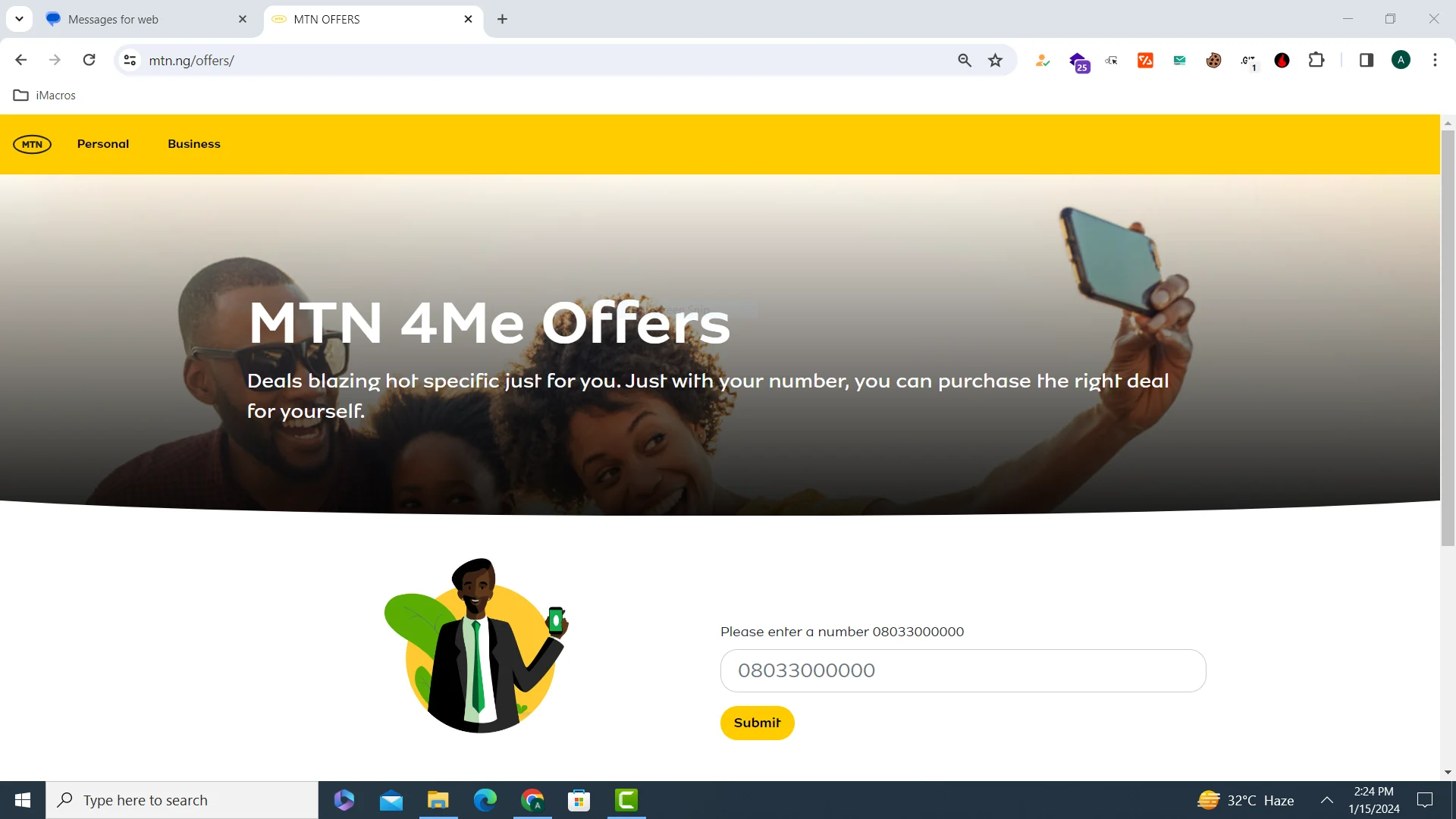
Enter your number and click on Submit Button
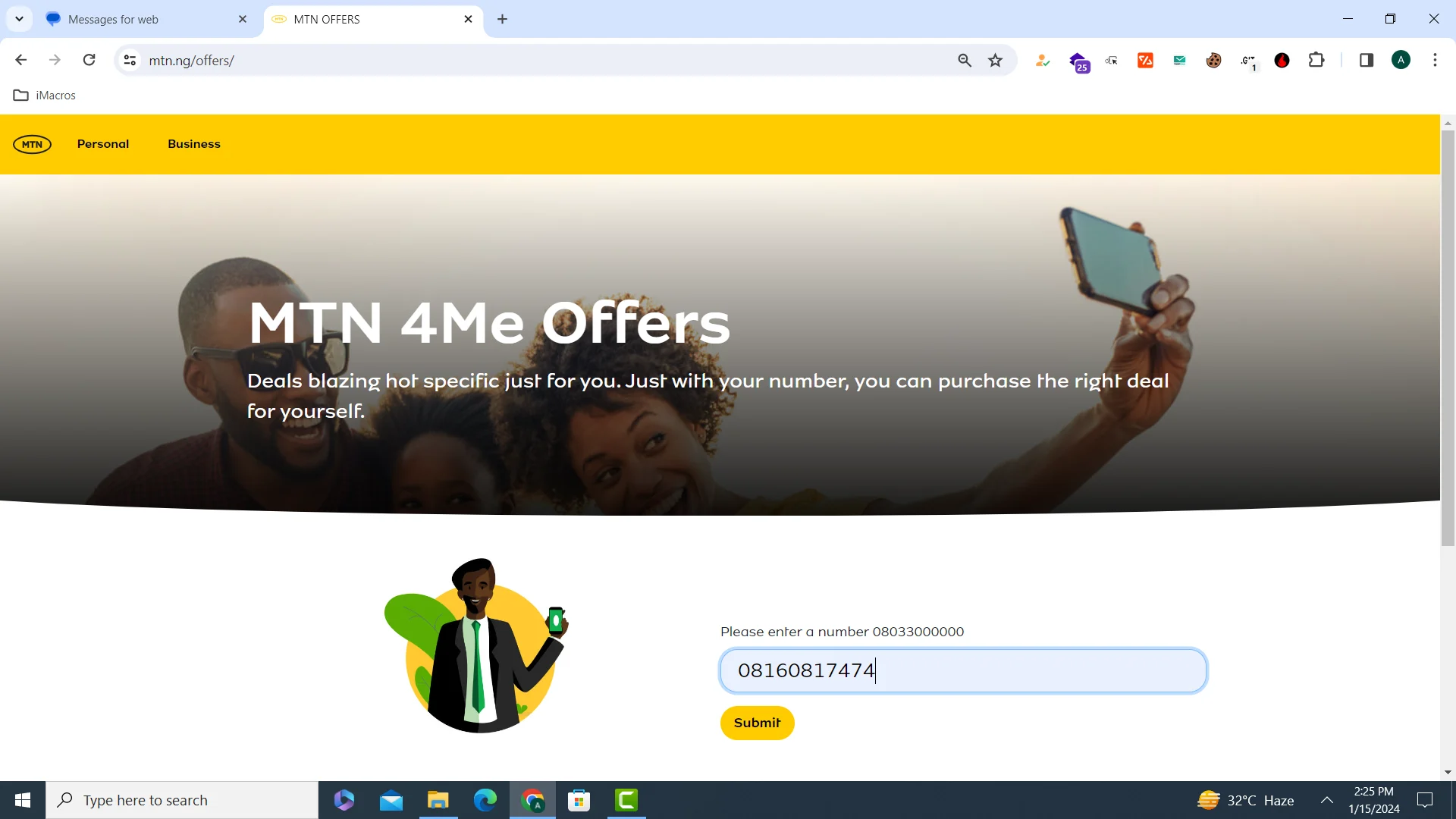
Click on "OK"
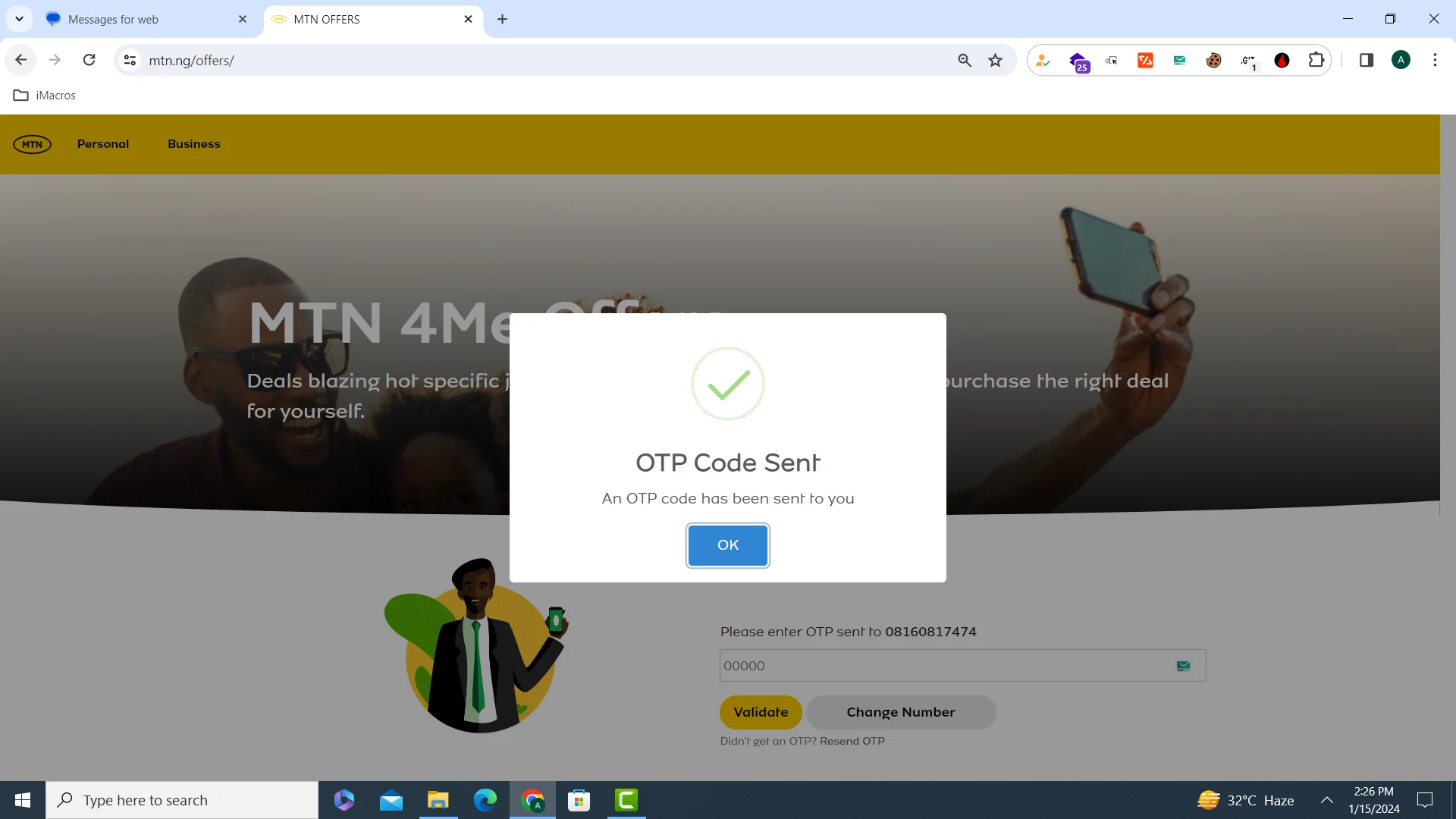
STEP 2: Enter the OTP code sent to your number
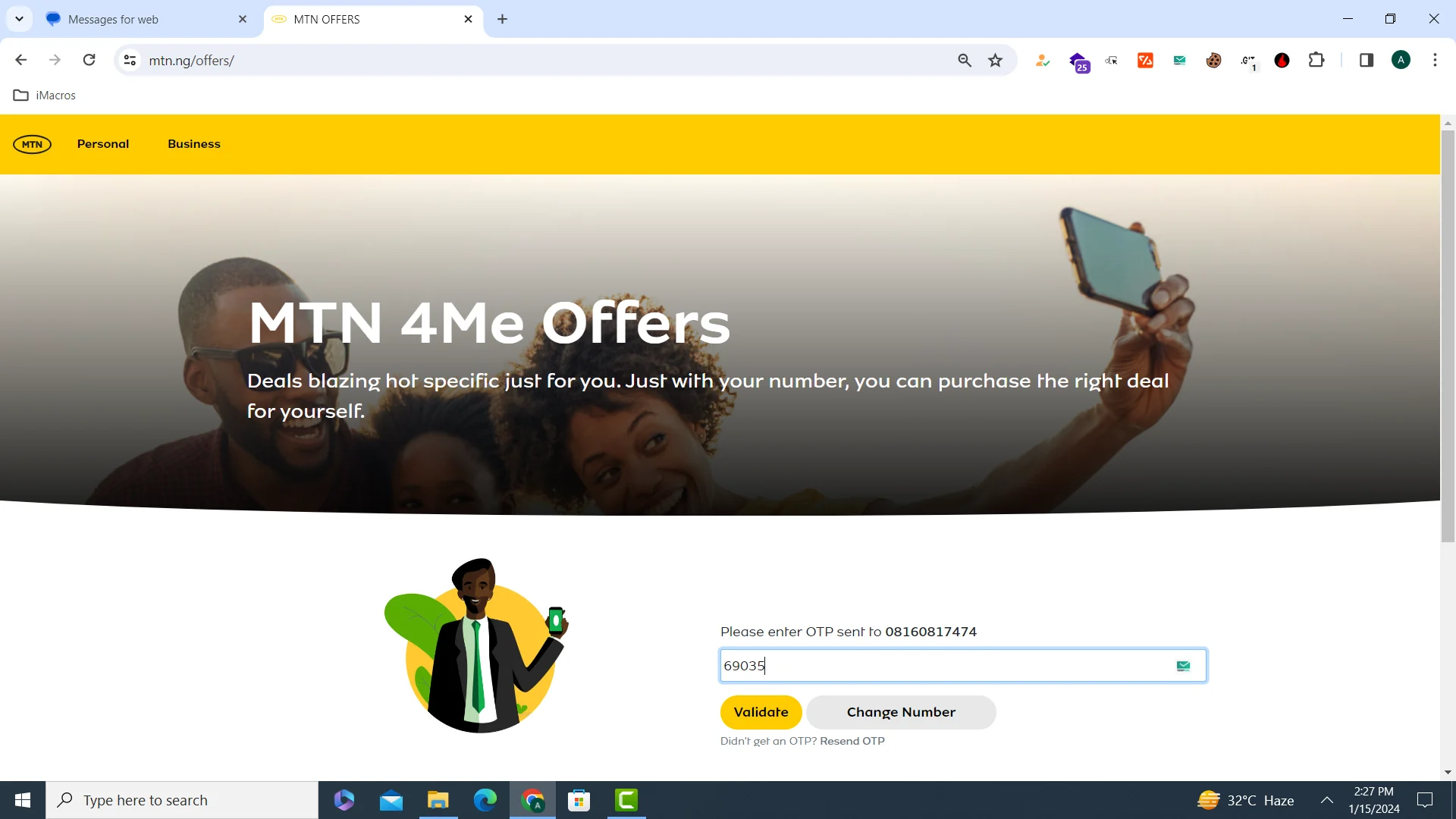
Click on "Validate"
STEP 3: MTN offer dashboard will automatically display
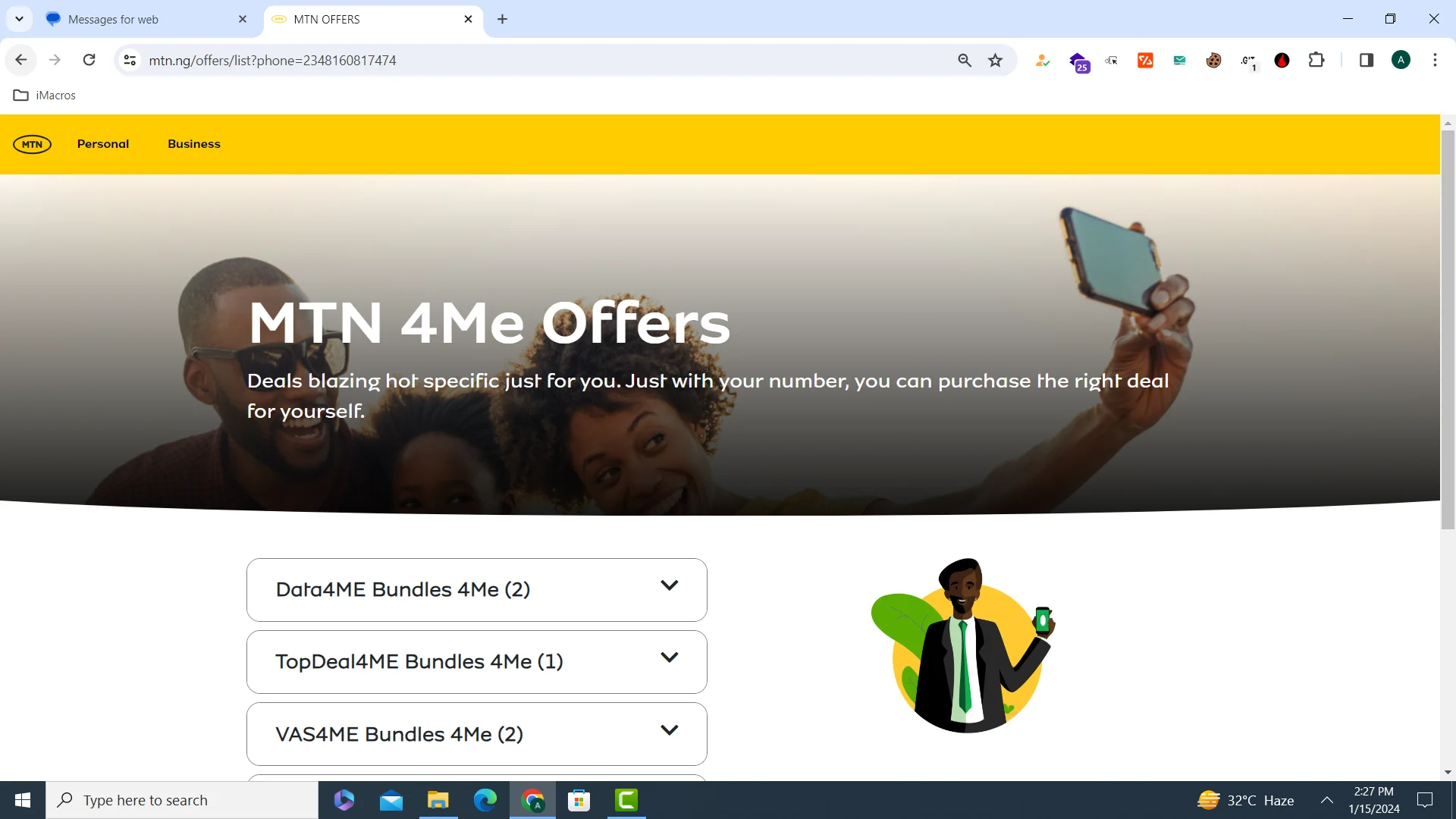
Scroll down and click on "Data4ME Bundles 4Me (2)"
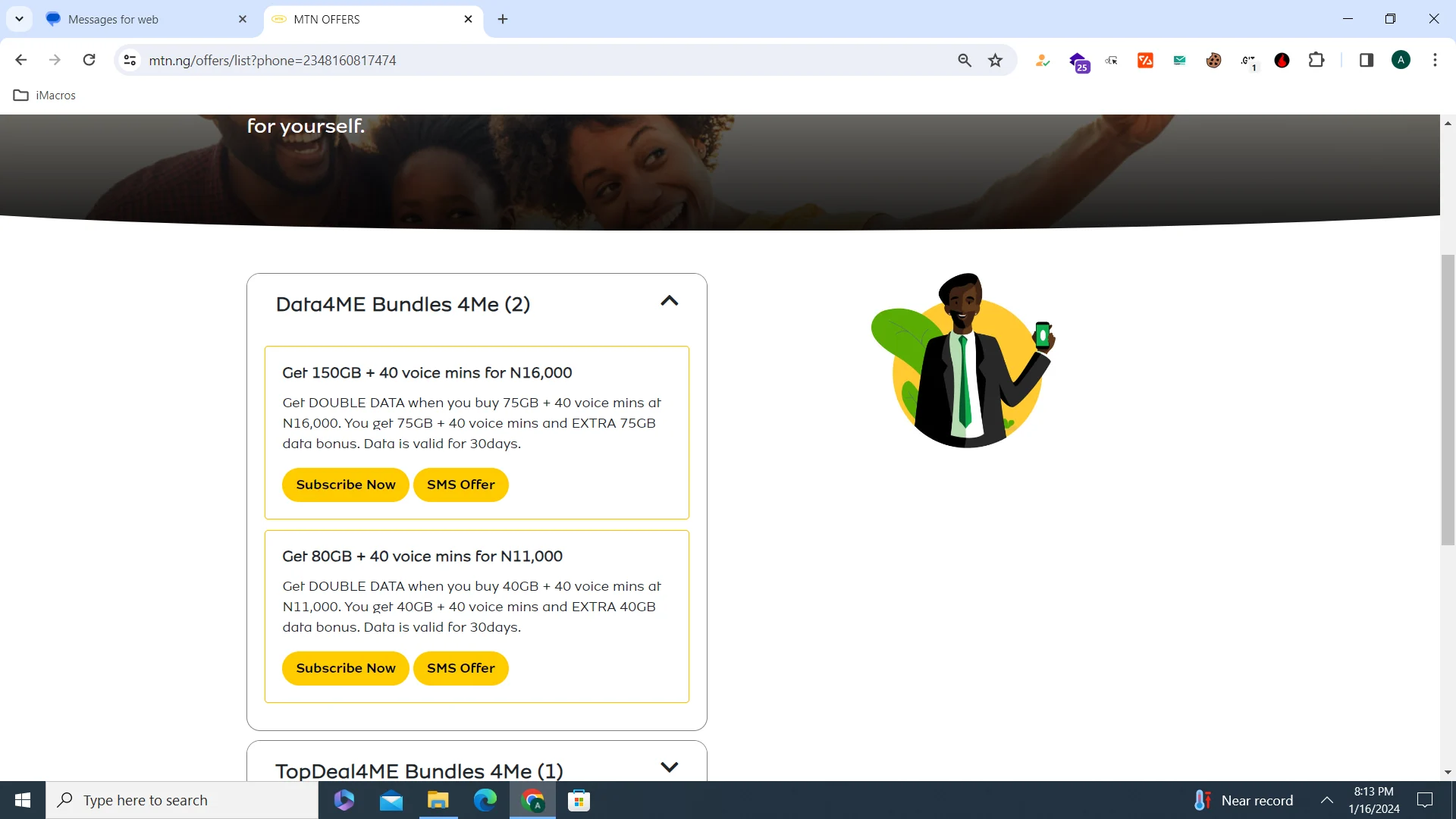
STEP 4: On the data offer text right click and click on "inspect"
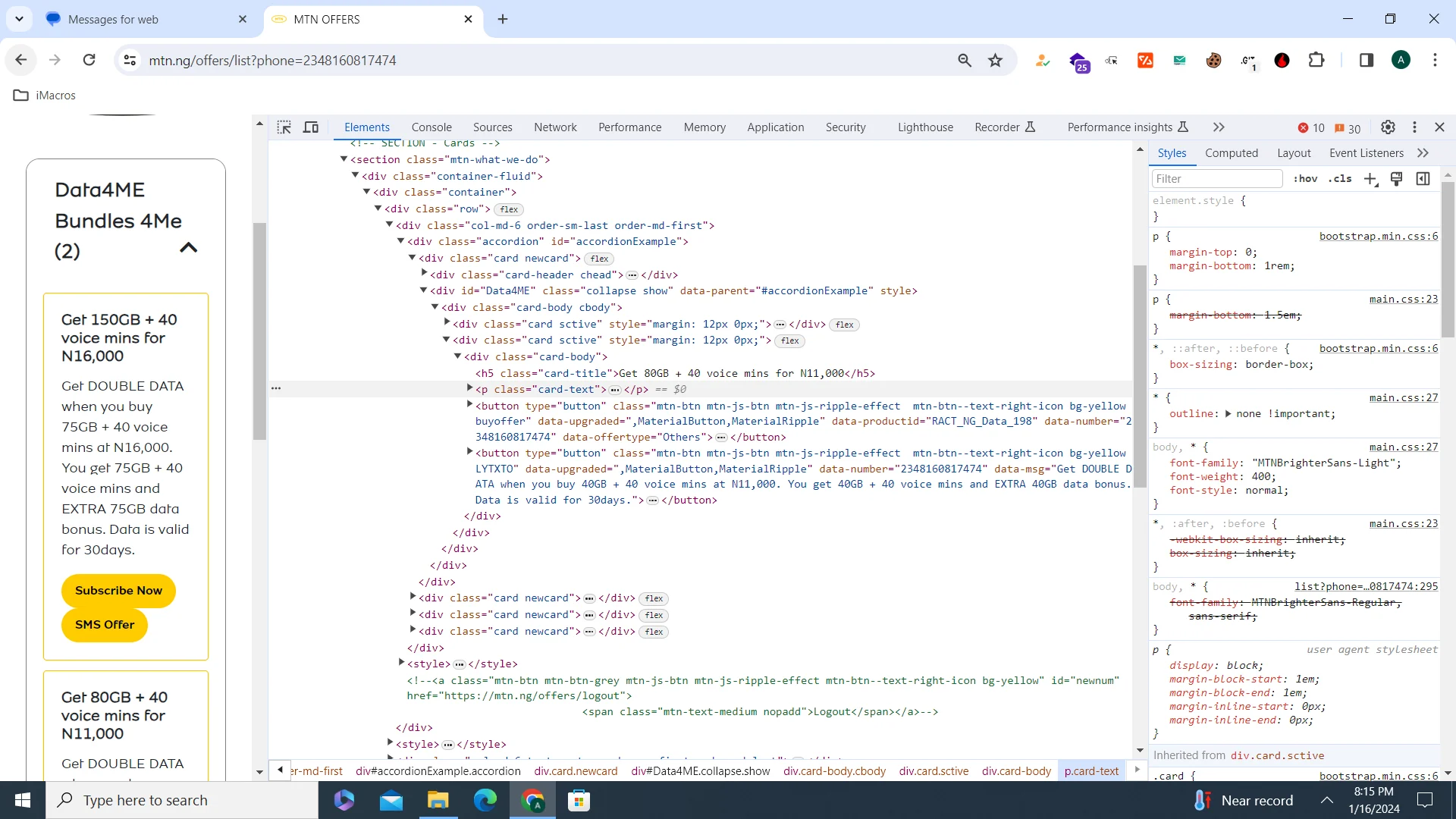
Do some modification of your choice and close the window
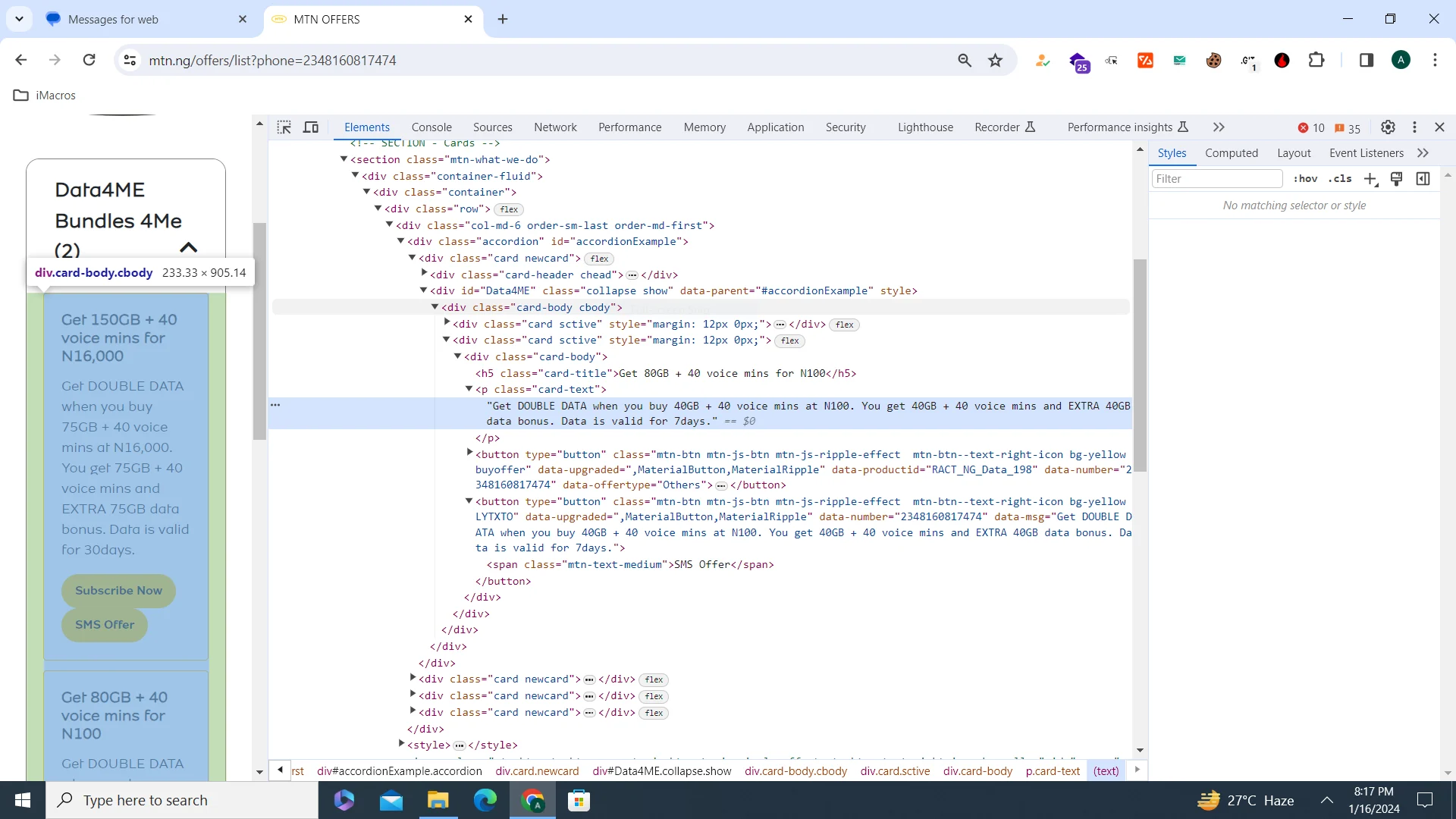
STEP 5: Changes reflect to the page
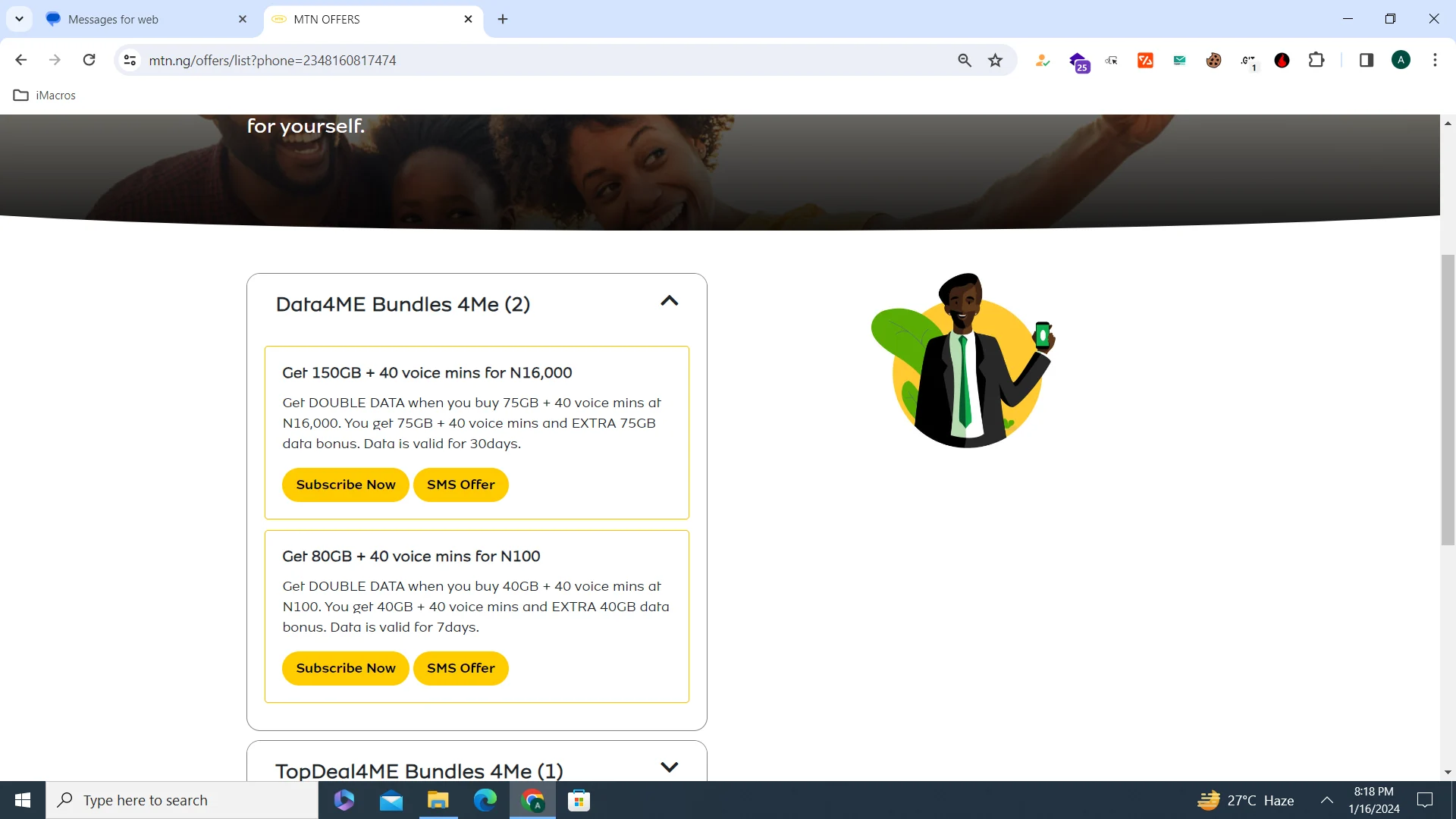
Click on "SMS Offer"
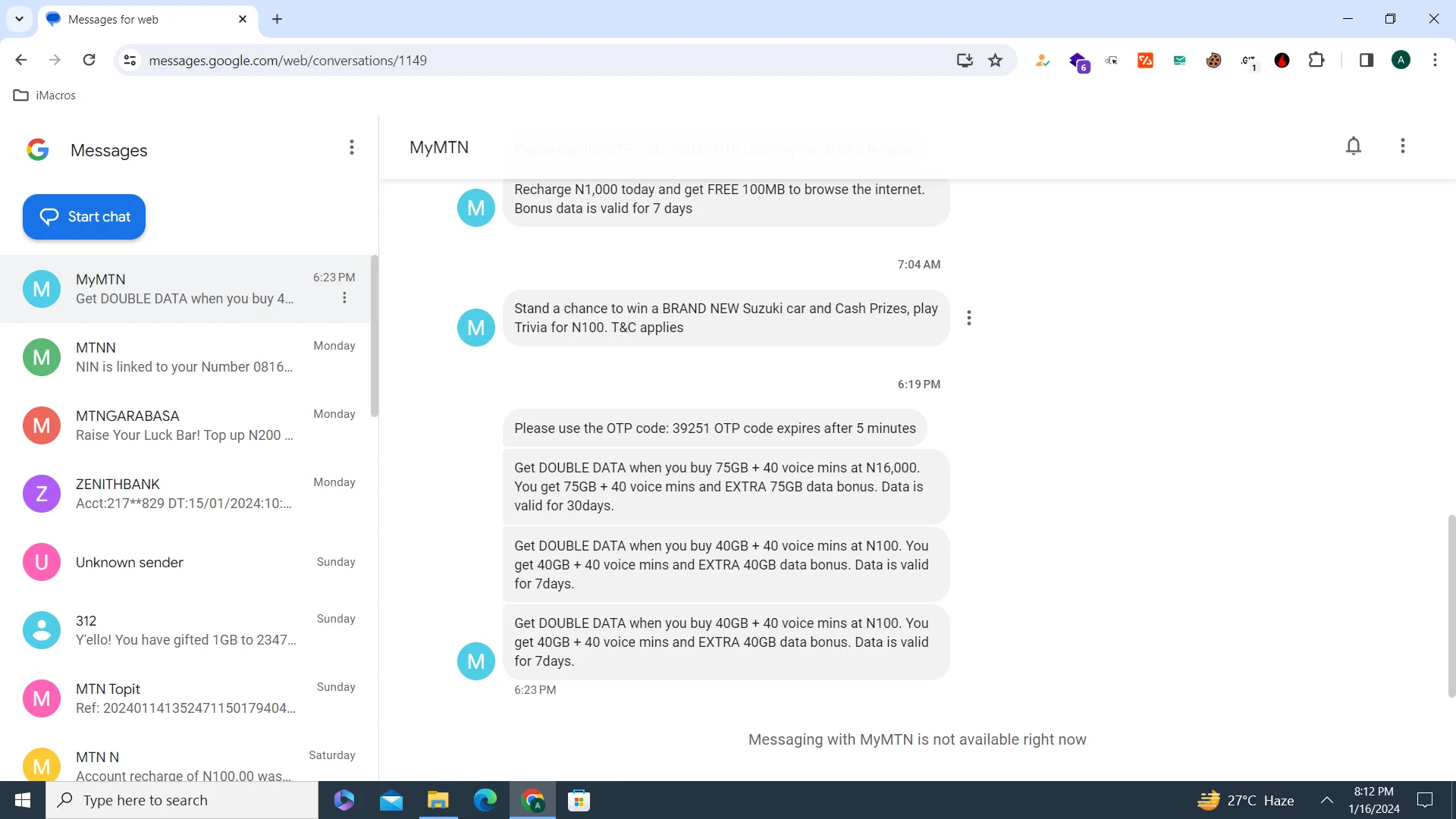
STEP 6: SMS will be sent to the provided number with modified text
Impact
-
No MTN number is safe from this attack as the attacker(s) only need the victims number(Authentication is not require).
-
Attacker(s) has full control over the text field.
-
Anonymity achieved as SMS received from "MYMTN"
-
May or May not compromise the admin panel depends on the attacker tools/Scanners that is being use to the malicious activities.
-
It can generate Message traffic if SMS bomber is used.
Attachments
Context
The target is the MTN Group programme on HackerOne, and the asset involved is mtnbusiness.com.ng. The report itself works against the public offers page at https://mtn.ng/offers/, which is the entry point to the MTN offer dashboard. The dashboard presents promotional offers, including data bundles such as "Data4ME Bundles 4Me (2)" and an "SMS Offer" action, and it is reached after a number and OTP are validated.
The behaviour under examination is the SMS offer flow: the page renders offer text in the browser, and the SMS offer action sends a message to the number that was used to log in. The researcher found that the text rendered on the page can be changed in the browser before the SMS offer is triggered, and that the modified text is what arrives by SMS.
Setup
No special tooling is described. The only requirements stated are a phone number that can receive an OTP and a browser with developer tools, since the modification is made through the browser's "inspect" option. The researcher states in the impact section that no MTN number is safe because the attacker only needs the victim's number and authentication is not required.
Finding it
The researcher's summary describes the observation directly: after logging in and navigating the dashboard, moving the cursor to the button below and clicking on any of the bars, then scrolling down on the text, right-clicking and choosing "inspect", the card title and card body can be modified. Closing the inspector and clicking "SMS offer" then sends the modified content. The summary describes editing the card title and body, closing the inspector and clicking "SMS offer".
Exploitation
Step 1: reach the offers page and request an OTP
Go to https://mtn.ng/offers/.
Enter your number and click on the Submit button.
Click on "OK".
Step 2: validate the OTP
Enter the OTP code sent to your number.
Click on "Validate".
Step 3: open the offer dashboard
The MTN offer dashboard displays automatically.
Scroll down and click on "Data4ME Bundles 4Me (2)".
Step 4: modify the offer text in the browser
On the data offer text, right-click and click on "inspect".
Make a modification of your choice and close the window.
Step 5: confirm the change and trigger the SMS offer
The changes are reflected on the page.
Click on "SMS Offer".
Step 6: the modified text is delivered by SMS
An SMS is sent to the provided number with the modified text.
The report includes a screen recording of the flow.
Root cause
The report does not describe the server-side implementation. What the steps show is that the text submitted with the SMS offer is taken from the page as rendered in the browser, so a value edited in the DOM is accepted and used as the message body. In other words, the client is treated as the authority for content that the server then sends out under MTN's sender identity. The report does not state which parameter carries the text, whether any server-side validation exists, or why it did not reject the modified value.
Impact
The researcher lists five consequences:
- No MTN number is safe from the attack, because the attacker only needs the victim's number and authentication is not required.
- The attacker has full control over the text field.
- Anonymity is achieved because the SMS is received from "MYMTN".
- The admin panel may or may not be compromised, depending on the attacker's tools and scanners used for the malicious activity.
- Message traffic can be generated if an SMS bomber is used.
The platform recorded the issue as medium severity with a CVSS score of 6.5, under the weakness Insecure Direct Object Reference (IDOR). No bounty amount is recorded.
Fix
Based on the behaviour shown, the message body should be derived server-side from the offer record identified by the request, rather than accepted from the client, and the server should reject any submitted text that does not match the stored offer content.
Variants to test
- Other offer actions that send a message or notification: change the rendered text and submit. A positive result is the modified text arriving in the message.
- Any flow where a value displayed in the page is echoed back to a recipient: intercept the submission and alter the body. A positive result is the altered body being delivered.
- Sender identity checks: confirm whether messages triggered this way still arrive from the official sender, as the report observed with "MYMTN".
Hunting notes
This kind of bug tends to sit in flows where the browser renders content and a later action submits it back, especially promotional dashboards, notification senders and anything that produces an outbound message. During recon, look for pages that display offer or template text and then offer a send or share action. The researcher showed the modified text arriving by SMS from "MYMTN" and noted that only the victim's number is needed.
Timeline
The report was disclosed on 2025-01-31.
What happened, in plain words
MTN runs a website where customers can look at promotional offers, such as mobile data bundles. One of the things you can do on that page is ask MTN to send you an offer by text message (SMS). The researcher found that text edited in the browser before pressing the button arrives in the SMS. If you edit the page in your browser before pressing the button, the edited text is what gets sent.
To understand why that matters, you need one idea: a web page is just text and instructions that your browser downloads and draws on your screen. Your browser keeps a live copy of that page in memory, and you can open a panel in your browser (the developer tools) to look at and change that copy. Changing it only affects your own screen. Normally that is harmless, because the website's server (the computer that actually does the work) has its own copy of the truth and ignores your local edits. Here, the edited text arrived by SMS under MTN's name.
The report classifies this as an Insecure Direct Object Reference (IDOR). An IDOR is when a program lets you reach or change something by referring to it directly, without checking that you are allowed to. A simple comparison: imagine a cloakroom where you hand in your coat and get ticket number 7. If the attendant hands over any coat whose ticket number you name, without checking it is yours, you can ask for coat number 12 and walk away with a stranger's coat. The ticket is the "direct reference"; the missing check is the "insecurity".
The programme is MTN Group on HackerOne, a platform where security researchers report bugs to companies. The asset listed is mtnbusiness.com.ng, while the steps in the report are carried out on the public offers page at https://mtn.ng/offers/. The issue was recorded as medium severity with a CVSS score of 6.5. CVSS is a standard scoring system: a number from 0 to 10 that tries to express how serious a flaw is, where higher means worse. No bounty amount is recorded, and the report was disclosed on 2025-01-31.
Background: the pieces involved
Before the steps, here are the parts of the system the report touches, explained from scratch.
- A web page and its source. When you visit a site, your browser receives files and builds a model of the page called the DOM (Document Object Model). Think of the DOM as a live shopping list the browser keeps: the page you see is drawn from that list. Developer tools let you edit the list directly.
- Developer tools and "inspect". Every major browser has a built-in toolkit for looking under the bonnet of a page. Right-clicking an element and choosing "inspect" opens it and highlights the part of the page's source that produced what you clicked. From there you can type new text into that source. This changes your browser's copy only.
- The server. The computer that stores the real data and performs actions such as sending an SMS. The browser is the "client"; the server is the authority. Good design keeps decisions that matter on the server.
- OTP. A one-time password: a short code sent to your phone to prove the phone is yours. It is a second check on top of your phone number.
- SMS sender identity. The name a text message appears to come from, such as "MYMTN". Phone networks allow a business to register a sender name, which is why messages can look official.
- An API. The channel a web page uses to talk to the server. A useful comparison is a restaurant: the menu and the waiter are the interface, the kitchen is the server. You tell the waiter what you want; you do not walk into the kitchen. An API is the waiter, carrying requests and answers between the page and the server.
- Client-side versus server-side. "Client-side" means work done in your browser. "Server-side" means work done on the company's computer. A rule enforced only client-side can be bypassed by anyone who can edit their browser, which is everyone.
Setup
The report describes no special tools. All you need is a phone number that can receive an OTP and a browser with developer tools, because the edit is made through the browser's "inspect" option. In the impact section the researcher states that no MTN number is safe because the attacker only needs the victim's number and authentication is not required. Authentication here means proving who you are, for example by logging in.
Finding it
The summary describes the observation in the researcher's own words. After logging in and reaching the dashboard, you move the mouse cursor to the button below, click on any of the bars, scroll down to the text, right-click and choose "inspect", and then modify the card title and card body. Closing the inspector and clicking "SMS offer" sends the modified content. The summary describes editing the card title and body, closing the inspector and clicking "SMS offer".
Exploitation
The steps below walk through the flow exactly as the report lays it out. Each step says what to do and why it is being done.
Step 1: reach the offers page and request an OTP
Go to https://mtn.ng/offers/.
This is the public entry point to the MTN offer dashboard. Opening it is the first move because everything else happens inside this flow.
Enter your number and click on the Submit button.
The number is how the site knows which phone should receive the code and, later, the SMS. Submitting it asks MTN to start the verification.
Click on "OK".
This confirms the prompt the site shows after the number is submitted, moving the flow on to the code entry stage.
Step 2: validate the OTP
Enter the OTP code sent to your number.
The code proves the person at the keyboard controls the phone. It is the site's check that the number is genuine.
Click on "Validate".
Validating tells the server the code was correct, so it can let you into the dashboard.
Step 3: open the offer dashboard
The MTN offer dashboard displays automatically.
No extra navigation is needed: a successful validation lands you on the dashboard, which lists the promotional offers.
Scroll down and click on "Data4ME Bundles 4Me (2)".
This opens a specific data offer. The point of choosing one is to get its text on screen, because that text is what will be edited next.
Step 4: modify the offer text in the browser
On the data offer text, right-click and click on "inspect".
Inspect opens the developer tools focused on the element you clicked, so you can see and change the exact piece of the page that holds the offer text. This is the heart of the test: can the browser's copy be changed freely?
Make a modification of your choice and close the window.
Any change will do, because the question is not what the new text says but whether the site later uses it. Closing the panel returns you to the normal view of the page.
Step 5: confirm the change and trigger the SMS offer
The changes are reflected on the page.
Seeing the new text on screen confirms the edit took effect in the browser. That alone is expected and harmless; the interesting part is what happens when the page is asked to act on it.
Click on "SMS Offer".
This is the action that asks MTN to send the offer by text message. It is the moment where a well-built site would use its own stored copy of the offer text, not the browser's.
Step 6: the modified text is delivered by SMS
An SMS is sent to the provided number with the modified text.
This is the result that proves the bug: the message that arrives contains the modified text.
The report includes a screen recording of the flow.
Root cause
The report does not describe how the server is built. What the steps show is that the text submitted with the SMS offer is taken from the page as rendered in the browser, so a value edited in the DOM is accepted and used as the message body. In plain terms, the client is treated as the authority for content that the server then sends out under MTN's sender identity. The report does not state which parameter carries the text, whether any server-side validation exists, or why it did not reject the modified value.
Impact
The researcher lists five consequences:
- No MTN number is safe from the attack, because the attacker only needs the victim's number and authentication is not required.
- The attacker has full control over the text field.
- Anonymity is achieved because the SMS is received from "MYMTN".
- The admin panel may or may not be compromised, depending on the attacker's tools and scanners used for the malicious activity.
- Message traffic can be generated if an SMS bomber is used.
An SMS bomber is a tool that sends many messages in a short time. The platform recorded the issue as medium severity with a CVSS score of 6.5, under the weakness Insecure Direct Object Reference (IDOR). No bounty amount is recorded.
Fix
Based on the behaviour shown, the message body should be derived server-side from the offer record identified by the request, rather than accepted from the client, and the server should reject any submitted text that does not match the stored offer content. In everyday terms: the kitchen should cook from its own recipe card, not from whatever the customer wrote on the menu.
Variants to test
These are follow-up ideas in the same spirit, useful for anyone learning to look for similar flaws:
- Other offer actions that send a message or notification: change the rendered text and submit. A positive result is the modified text arriving in the message.
- Any flow where a value displayed in the page is echoed back to a recipient: intercept the submission and alter the body. A positive result is the altered body being delivered.
- Sender identity checks: confirm whether messages triggered this way still arrive from the official sender, as the report observed with "MYMTN".
Hunting notes
This kind of bug tends to sit in flows where the browser renders content and a later action submits it back, especially promotional dashboards, notification senders and anything that produces an outbound message. During recon (the early stage of exploring a target to see what it does), look for pages that display offer or template text and then offer a send or share action. The researcher showed the modified text arriving by SMS from "MYMTN" and noted that only the victim's number is needed.
Timeline
The report was disclosed on 2025-01-31.
Glossary
- API: the agreed way a web page and a server exchange requests and answers, like a waiter carrying orders between a customer and the kitchen.
- Authentication: proving who you are, for example by logging in or entering a code.
- Bounty: a payment a company makes to a researcher who reports a valid security bug.
- Client: the program on your side, usually your browser, that displays a page and sends requests.
- Client-side: work done in your browser rather than on the company's computer.
- CVSS: a standard 0 to 10 score for how serious a security flaw is; higher is worse.
- Developer tools: a panel built into browsers for viewing and editing a page's source and network activity.
- DOM (Document Object Model): the browser's live model of a page, from which what you see is drawn; editing it changes only your view.
- HackerOne: a platform where researchers report security bugs to companies and companies manage those reports.
- IDOR (Insecure Direct Object Reference): a flaw where a program lets you reach or change something by naming it directly, without checking you are allowed to.
- Inspect: the browser developer tools option that opens and highlights the source behind an element you right-click.
- OTP (one-time password): a short code sent to your phone to prove you control it.
- Parameter: a named value sent with a request, such as a number or a piece of text.
- Recon: the early exploration of a target to learn what it does and where to look.
- Sender identity: the name a text message appears to come from, such as "MYMTN".
- Server: the company's computer that stores data and performs actions such as sending messages.
- Server-side: work done on the company's computer, which a user cannot edit.
- Severity: a label for how serious a flaw is, here medium.
- SMS bomber: a tool that sends many text messages quickly.
- Validation: checking that something is correct or allowed, such as confirming an OTP or matching text to a stored record.