Remote code execution via crafted pentaho report uploaded using default credentials for pentaho business server
A Pentaho business server was reachable with default administrator credentials, and the report upload feature accepted report files that could run server-side code. An attacker could use this to execute arbitrary code and take full control of the server.

- Triaged in 13 hours
- Fixed in 5 months
- Disclosed after 16 months
Summary:
Good day, While I do recon for mtn.ci domain I found Pentaho business server at https://sm.mtn.ci:8888/pentaho with default credentials admin/password ,then I figured that I can upload prpt reports to server which could use some beanshell,js and java to achieve RCE
Steps To Reproduce:
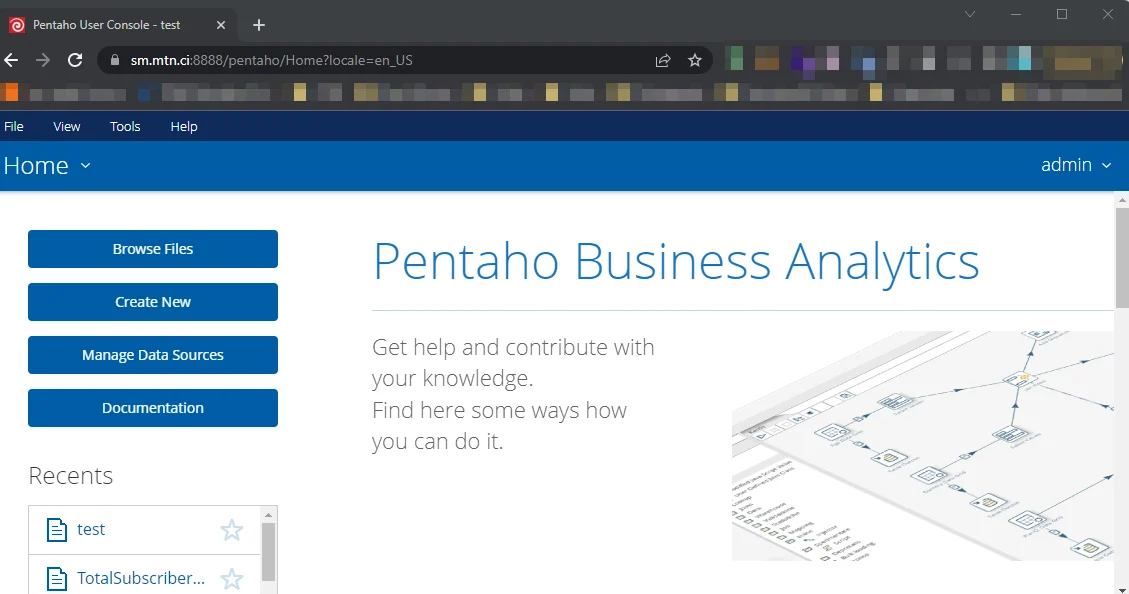
- Login to https://sm.mtn.ci:8888/pentaho admin/password
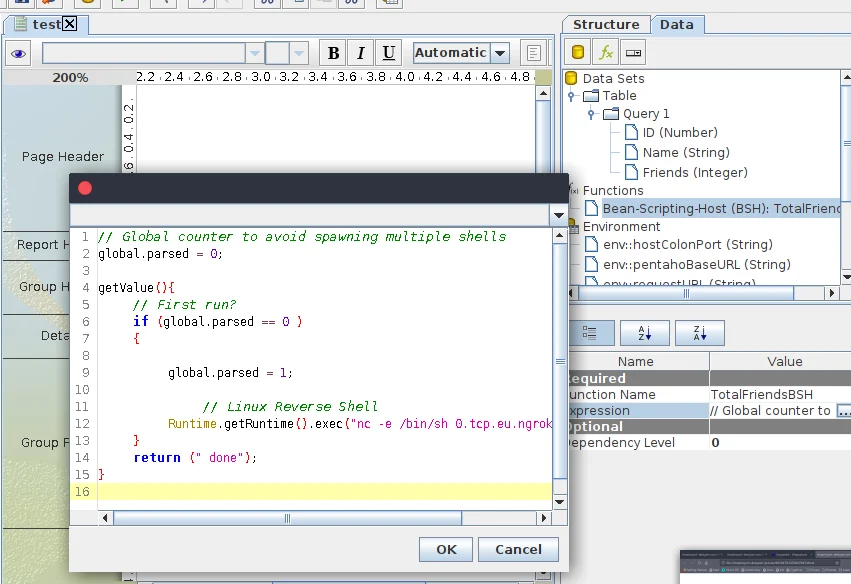
- Use Pentaho report designer to create malicious report file
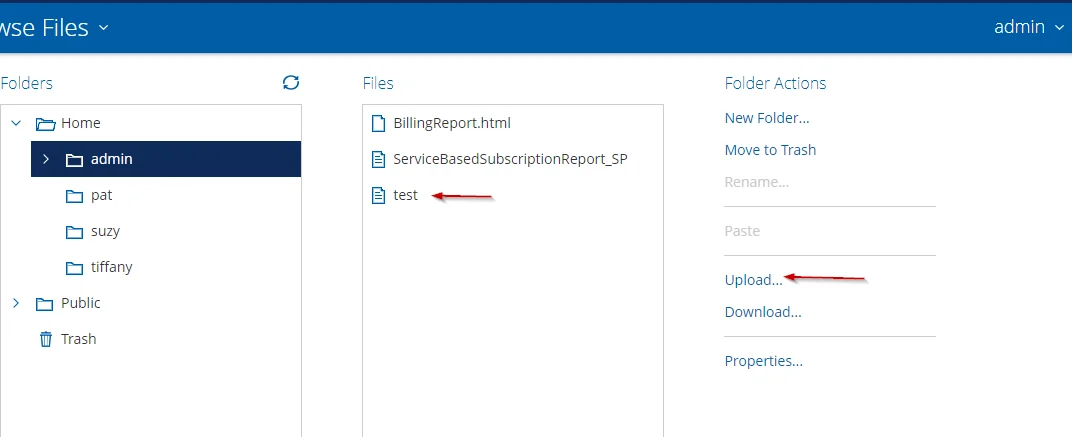
- Upload and run the report
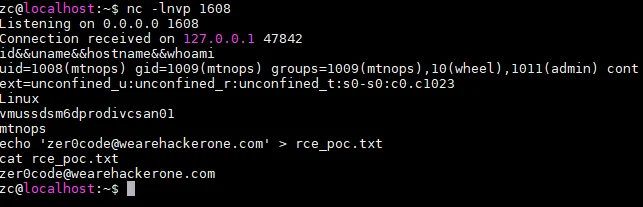
Impact
The impact of an RCE vulnerability can range from malware execution to an attacker gaining full control over a compromised server.
What the report shows
The researcher was doing reconnaissance against the mtn.ci domain and found a Pentaho Business Server exposed at https://sm.mtn.ci:8888/pentaho. The login page accepted the default credentials admin/password. Once inside, the researcher found that report files could be uploaded to the server, and that a report can embed BeanShell, JavaScript or Java, which gives a path to remote code execution.
The reproduction steps are short and are reproduced here as given:
- Log in to the Pentaho instance with the default credentials.
https://sm.mtn.ci:8888/pentaho
admin/password
- Build a malicious report file with the Pentaho Report Designer.
- Upload the report and run it.
The report records the outcome as a critical severity Code Injection finding on the mtn.ci asset, disclosed on 31 December 2023. It does not state a bounty amount or describe a fix.
Root cause
The report shows that the Pentaho instance accepted the default administrator credentials, so authentication gave no real protection. The second is that the report upload feature lets an authenticated user supply a report definition that the server later evaluates, and that definition can contain BeanShell, JavaScript or Java. The researcher states that uploaded reports could use BeanShell, JavaScript or Java to achieve RCE.
Impact
As the report puts it, the impact of an RCE vulnerability can range from malware execution to an attacker gaining full control over a compromised server. Here the entry point is a default credential on the Pentaho server, so an attacker who finds the host needs no exploit development to get in.
How this kind of bug works
Many enterprise reporting and business intelligence products let users define reports as files that are uploaded and then rendered server-side. To make reports flexible, these products often embed a scripting layer: a small interpreter for a general-purpose language that can call into the host platform. That is convenient for report authors and dangerous for everyone else, because the interpreter usually has the same privileges as the application process. If a user can upload a report definition containing script, and the server evaluates it when rendering, the upload is effectively arbitrary code execution.
The bug class is code injection through a file format that is treated as data but is actually executable. It appears wherever an application accepts a document, template, spreadsheet, report or configuration file and processes it with a powerful engine. The usual contributing factors are a feature that is more capable than its users need, no separation between the parsing of the file and the execution of embedded logic, and weak authorisation on who may upload and run such files. Default credentials make all of this reachable without any other weakness.
How to test for it
- Identify the product and version behind a login page or an exposed administrative interface. Login pages, static assets, error pages and response headers often name the product, and the product documentation then tells you which file formats it accepts and whether those formats support scripting.
- Try the documented default credentials for the product, and only on systems you are authorised to test. A successful login with a vendor default is itself a finding, and it opens the features behind it.
- Look for upload or import features that accept report, template or document files. Note whether the interface lets you run, preview or schedule the uploaded artefact, because execution is what turns an upload into code execution.
- Build a benign proof: a file in the accepted format that contains a script which performs a harmless, observable action, such as a DNS lookup or an HTTP request to a host you control. Upload it, trigger rendering, and watch for the callback. A callback from the server is a positive result; a file that is merely stored without being processed is not.
- Confirm the execution context: which user the process runs as, and whether the callback originates from the target host rather than from your own browser or a proxy.
Common false positives are uploads that are accepted but never rendered, script that runs client-side in the browser rather than on the server, and previews generated by a separate sandboxed service. Check the source address and timing of the callback before claiming execution.
How it is fixed
- Remove or change default credentials, and enforce a strong password policy on administrative accounts.
- Restrict administrative and reporting interfaces to trusted networks, or place them behind a VPN or an authenticating reverse proxy.
- Disable scripting engines in report definitions where the business does not need them, or run report rendering in a sandbox with no access to the host.
- Apply allowlists to uploaded file types and validate the content of uploaded reports before they are stored.
- Keep the product patched, since vendors of reporting platforms regularly harden these rendering paths.
Hunting notes
This class of bug hides in administrative and reporting interfaces that are meant for internal use but end up internet-facing: business intelligence servers, report schedulers, template engines, document converters and import features in content management systems. Recon signals include product-specific paths, login pages with vendor branding, version strings in responses, and hosts on non-standard ports. Certificate transparency and subdomain enumeration are good ways to find them, since internal tools often sit on their own hostnames.
To get a report accepted, show execution rather than access: a callback from the server, the identity of the process, and a clear statement of what an attacker could do next. Keep the proof minimal and avoid touching data you do not need. If default credentials are the entry point, say so plainly and show the login, because that is the part a defender must fix first.
What happened, in plain words
A security researcher was mapping out the mtn.ci domain, meaning they were looking at the different servers and addresses that belong to it, the way you might walk around a building trying every door to see which ones are open. During that walk they found a Pentaho Business Server reachable at https://sm.mtn.ci:8888/pentaho.
Pentaho is a business intelligence product: companies use it to build reports from their data and view them in a browser. Its login page accepted the vendor's default administrator credentials, admin with the password password. Default credentials are the username and password a product ships with so that the first person to install it can log in; they are meant to be changed immediately, and when they are not, anyone who knows the product can walk straight in.
Once logged in, the researcher found that report files could be uploaded to the server. A report file is a document that describes what a report should contain and how it should be laid out. Pentaho reports can also contain small pieces of program code, written in languages called BeanShell, JavaScript or Java, which the server runs when it renders the report. That combination, an upload feature plus a server that executes code found inside the uploaded file, is what turns a harmless-looking report into remote code execution: the ability to make the server run commands of your choosing.
The report records this as a critical severity Code Injection finding on the mtn.ci asset, disclosed on 31 December 2023. It does not state a bounty amount or describe a fix.
The steps, one by one
The researcher's reproduction steps are short. Here they are as given, with an explanation of why each one matters.
- Log in to the Pentaho instance with the default credentials.
https://sm.mtn.ci:8888/pentaho
admin/password
The first line is the address of the login page: https is the encrypted version of the web protocol, sm.mtn.ci is the host name, 8888 is the port (a numbered door on the server, where the usual web port is 443), and /pentaho is the path to the application. The second line is the username and password pair that was accepted. This step matters because it is the whole entry point: no clever exploit was needed to get past the front door, only knowledge of what the product ships with.
- Build a malicious report file with the Pentaho Report Designer.
Pentaho Report Designer is a desktop program for authoring reports. The researcher used it to create a report file that, besides its normal layout, carries script in BeanShell, JavaScript or Java. This step matters because the attack is not a broken web form; it is a legitimate file in the product's own format, which is why the server is willing to accept it.
- Upload the report and run it.
This is the step where the crafted report is uploaded and run. Uploading alone would only store a file; running the report is what makes the server evaluate the embedded script.
Impact
As the report puts it, the impact of an RCE vulnerability can range from malware execution to an attacker gaining full control over a compromised server. Put simply: once someone can run their own code on a machine, they are no longer limited to reading reports. They can install other software, reach data the application can reach, and use the server as a starting point for further movement. Here the way in was a default password on a reporting server, so an attacker who found the host needed no exploit development at all.
In general, how this kind of bug works
Many enterprise reporting and business intelligence products let users define reports as files that are uploaded and then rendered on the server. To make reports flexible, these products often embed a scripting layer: a small interpreter for a general-purpose language that can call into the host platform. That is convenient for report authors and dangerous for everyone else, because the interpreter usually has the same privileges as the application process. If a user can upload a report definition containing script, and the server evaluates it when rendering, the upload is effectively arbitrary code execution.
The bug class is code injection through a file format that is treated as data but is actually executable. It appears wherever an application accepts a document, template, spreadsheet, report or configuration file and processes it with a powerful engine. The usual contributing factors are a feature that is more capable than its users need, no separation between the parsing of the file and the execution of embedded logic, and weak authorisation on who may upload and run such files. Default credentials make all of this reachable without any other weakness.
How to test for it
- Identify the product and version behind a login page or an exposed administrative interface. Login pages, static assets, error pages and response headers often name the product, and the product documentation then tells you which file formats it accepts and whether those formats support scripting.
- Try the documented default credentials for the product, and only on systems you are authorised to test. A successful login with a vendor default is itself a finding, and it opens the features behind it.
- Look for upload or import features that accept report, template or document files. Note whether the interface lets you run, preview or schedule the uploaded artefact, because execution is what turns an upload into code execution.
- Build a benign proof: a file in the accepted format that contains a script which performs a harmless, observable action, such as a DNS lookup or an HTTP request to a host you control. Upload it, trigger rendering, and watch for the callback. A callback from the server is a positive result; a file that is merely stored without being processed is not.
- Confirm the execution context: which user the process runs as, and whether the callback originates from the target host rather than from your own browser or a proxy.
Common false positives are uploads that are accepted but never rendered, script that runs in the browser rather than on the server, and previews generated by a separate sandboxed service. Check the source address and timing of the callback before claiming execution.
How it is fixed
- Remove or change default credentials, and enforce a strong password policy on administrative accounts.
- Restrict administrative and reporting interfaces to trusted networks, or place them behind a VPN or an authenticating reverse proxy.
- Disable scripting engines in report definitions where the business does not need them, or run report rendering in a sandbox with no access to the host.
- Apply allowlists to uploaded file types and validate the content of uploaded reports before they are stored.
- Keep the product patched, since vendors of reporting platforms regularly harden these rendering paths.
Hunting notes
This class of bug hides in administrative and reporting interfaces that are meant for internal use but end up internet-facing: business intelligence servers, report schedulers, template engines, document converters and import features in content management systems. Recon signals include product-specific paths, login pages with vendor branding, version strings in responses, and hosts on non-standard ports. Certificate transparency and subdomain enumeration are good ways to find them, since internal tools often sit on their own hostnames.
To get a report accepted, show execution rather than access: a callback from the server, the identity of the process, and a clear statement of what an attacker could do next. Keep the proof minimal and avoid touching data you do not need. If default credentials are the entry point, say so plainly and show the login, because that is the part a defender must fix first.
Glossary
- Reconnaissance: the early phase of a security test where you gather information about a target, such as which servers and addresses exist.
- Domain: a named part of the internet, like
mtn.ci, under which hosts and services are grouped. - Host name: the name of a single machine on the internet, such as
sm.mtn.ci. - Port: a numbered channel on a server; web traffic normally uses 443, and here the service was on 8888.
- HTTPS: the encrypted version of the web protocol, so that traffic between browser and server cannot be read in transit.
- Pentaho Business Server: a business intelligence product for building and viewing reports from company data.
- Default credentials: the username and password a product ships with, meant to be changed at installation.
- Report file: a document describing the content and layout of a report, which the server renders.
- BeanShell, JavaScript, Java: programming languages; here they are embedded in a report so the server runs them when rendering.
- Remote code execution (RCE): the ability to make a remote server run commands or code of your choosing.
- Code injection: a bug where an attacker's code is placed inside data the application processes, and the application executes it.
- Scripting layer: a small interpreter built into a product so that files can contain logic, not just static content.
- Privileges: the rights a running program has, which determine what it can read, write and execute.
- Authorisation: the check of whether a user is allowed to perform an action, as opposed to authentication, which checks who they are.
- Sandbox: an isolated environment where code can run without access to the rest of the system.
- Allowlist: a list of permitted items, such as file types, with everything else rejected.
- Callback: an outgoing connection from the target server to a host you control, used as proof that your code ran there.
- False positive: a result that looks like a vulnerability but is not one.
- Certificate transparency: public logs of issued website certificates, useful for discovering host names.
- Subdomain enumeration: systematically finding the subdomains that belong to a domain.