Wordpress users Disclosure [ /wp-json/wp/v2/users/ ] Not Resolved ()
The WordPress REST API endpoint for users is publicly accessible, exposing usernames and some personal information of employees or authors. An attacker could collect these usernames to facilitate brute-force attacks.

- Triaged in 24 hours
- Fixed in 24 hours
- Disclosed after 31 days
On this report's #735586 You closed the report and changed the status to Resolved. But it's Not Resolved The Bug It's Still there
##url: https://www.mtn.com/wp-json/wp/v2/users/
Sorry to say this still i can reproduce this issue please remove [ /wp-json/wp/v2/users/ ] file if your domain dont use that file i will send the proof below still this issue is present on the domain
##Summary:
Using REST API, we can see all the WordPress users/author with some of their information. Which can even be Personal information of employees/author. The file v2/users at: https://www.mtn.com/wp-json/wp/v2/users/ is enabled and this give the attacker many users names like: Amogelang Maluleka Greg Davies karenbyamugisha Marc Ilunga mitchprinsloo
Steps To Reproduce:
- Go to https://www.mtn.com/wp-json/wp/v2/users/ [ Allows anyone to view active usernames ]
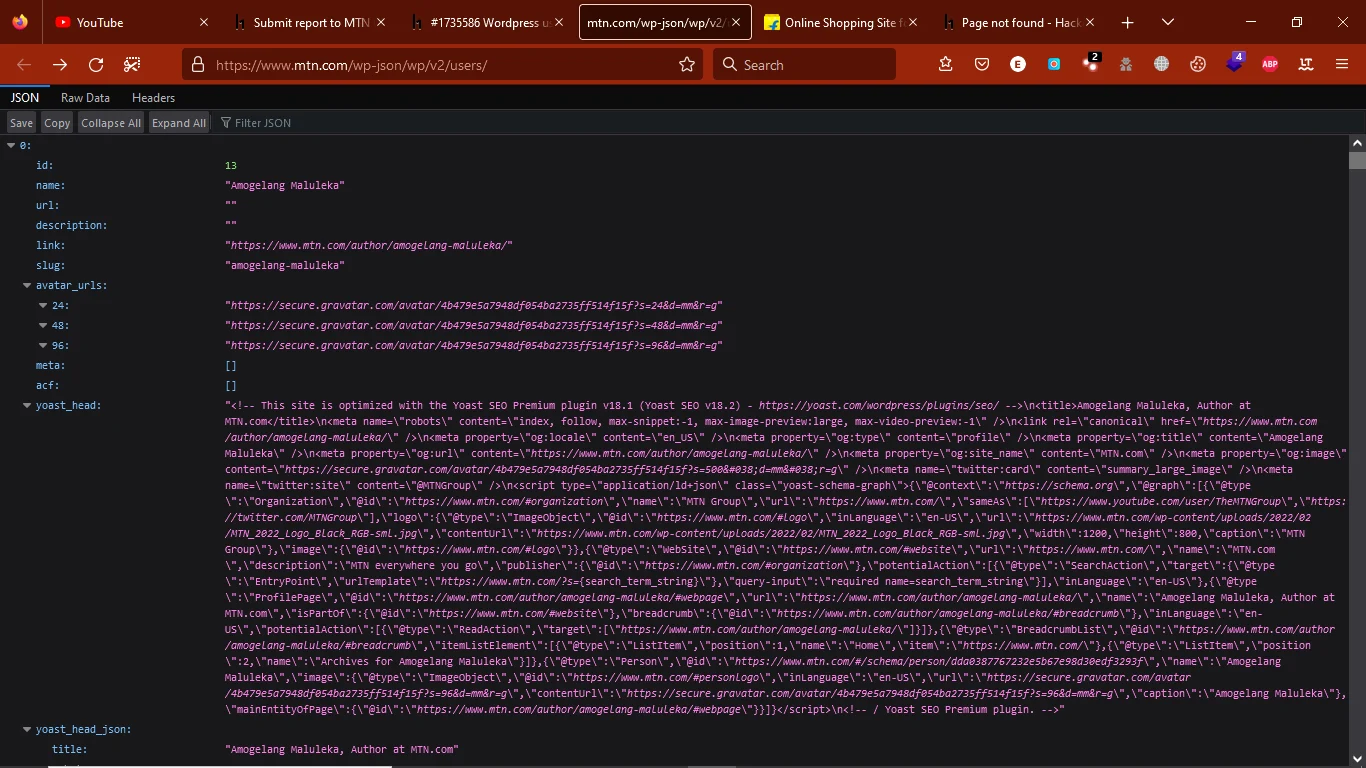
Supporting Material/References:
https://hackerone.com/reports/356047 https://hackerone.com/reports/370777
##Fix:
Use this code will hide the users list and give 404 as the result, while rest of the api calls keep running as they were.
add_filter( 'rest_endpoints', function( $endpoints ){
   if ( isset( $endpoints['/wp/v2/users'] ) ) {
       unset( $endpoints['/wp/v2/users'] );
   }
   if ( isset( $endpoints['/wp/v2/users/(?P<id>[\d]+)'] ) ) {
       unset( $endpoints['/wp/v2/users/(?P<id>[\d]+)'] );
   }
   return $endpoints;
});
Impact
Malicious counterpart could collect the usernames disclosed (and the admin user) and be focused throughout BF attack (as the usernames are now known), making it less harder to penetrate the data.gov systems.
Context
The target is the main MTN Group website, https://www.mtn.com, which runs on WordPress. WordPress ships a REST API under /wp-json/ that exposes content and metadata in JSON form. One of its built-in endpoints, /wp-json/wp/v2/users/, is designed to return the list of users who have published content, so that themes and plugins can render author archives and author bylines without extra server-side code.
Because that endpoint is part of core, it is enabled by default on any site that has not explicitly removed it. On a corporate site it returns the display names and slugs of the people who author posts, which in practice means employees. The researcher had already reported this on the same program as report #735586, which was closed and marked Resolved. This report is the follow-up showing that the endpoint was still live.
Setup
No accounts, roles or special tooling are involved. The only precondition is that the WordPress REST API is reachable on the target domain and that the users route has not been disabled. The researcher's evidence is a single unauthenticated request to the endpoint, so the finding is reproducible by anyone with a URL bar.
Finding it
The researcher returned to the previously reported URL and found the same behaviour: the endpoint still answered with a list of users. The report opens by pointing out that report #735586 had been closed as Resolved, and states plainly that the bug is not resolved and is still present at:
https://www.mtn.com/wp-json/wp/v2/users/
The researcher asks that the /wp-json/wp/v2/users/ route be removed if the domain does not use it, and offers the proof below.
Exploitation
Step 1: request the users collection
The only step in the reproduction is to browse to the endpoint. The report gives it as a plain URL, with the note that it allows anyone to view active usernames:
https://www.mtn.com/wp-json/wp/v2/users/
The screenshot is the proof the researcher attached for the still-present issue. The response is what makes the issue concrete: the endpoint is answering rather than returning an error, so the route is still registered.
Step 2: read the disclosed identities
The report lists the names that came back from the endpoint as examples of what an attacker obtains:
Amogelang Maluleka Greg Davies karenbyamugisha Marc Ilunga mitchprinsloo
These are the WordPress user names exposed by the response. The researcher's summary describes the exposure as the full set of WordPress users and authors together with some of their information, which can include personal information about employees or authors.
Root cause
The WordPress REST API registers the /wp/v2/users route by default, and the site had not removed it. The researcher's framing is that the file v2/users is enabled on the domain, and the fix section treats the route as something that should be unregistered when the site does not need it. In other words, the exposure is a default-on core feature rather than a coding mistake in a custom plugin: the site owner has to opt out, and this site had not.
The earlier report on the same endpoint was marked Resolved, but the route was still reachable, so whatever remediation was applied either did not cover this route or was reverted. The report does not describe what was done the first time.
Impact
The researcher's impact statement is about credential attacks. A malicious counterpart could collect the disclosed usernames, including the admin user, and focus a brute-force attack on them, since the usernames are now known, which makes penetrating the systems less hard. The report's wording refers to "data.gov systems", which appears to be carried over from another report; the asset actually demonstrated here is www.mtn.com.
The practical value to an attacker is enumeration: valid account names, including privileged ones, remove the guesswork from brute forcing. The report does not claim that any password was actually guessed or that any account was accessed.
Fix
The report proposes unregistering the two user routes through the rest_endpoints filter, so that the users list returns 404 while the rest of the API keeps working as before:
add_filter( 'rest_endpoints', function( $endpoints ){
    if ( isset( $endpoints['/wp/v2/users'] ) ) {
        unset( $endpoints['/wp/v2/users'] );
    }
    if ( isset( $endpoints['/wp/v2/users/(?P<id>[\d]+)'] ) ) {
        unset( $endpoints['/wp/v2/users/(?P<id>[\d]+)'] );
    }
    return $endpoints;
});
The first unset removes the collection route, so the listing can no longer be fetched. The second removes the single-user route as well. The report does not say whether this code was applied by the site owner; it presents it as the fix.
Variants to test
- Single-user route: request
/wp-json/wp/v2/users/1and increment the ID. A positive result is a JSON object for each ID with a name and slug, which reconstructs the list even when the collection route is blocked. - Alternate REST paths: try the same route under a different permalink base, for example
/index.php?rest_route=/wp/v2/users/. A positive result is the same JSON array served through the query-string form of the API. - Author archives: request
/?author=1and increment. A positive result is a redirect to an author archive whose slug matches a username, which leaks the same identities outside the REST API. - OEmbed and sitemaps: check
/wp-json/oembed/1.0/embed?url=...and the author sitemap for author names. A positive result is author metadata exposed through a route that was not considered when the users endpoint was disabled.
Hunting notes
This class of bug hides wherever WordPress is used for a corporate or marketing site, because the REST API is on by default and nobody thinks of it as an attack surface. During recon, the signals are a /wp-json/ root that responds with a JSON index, a Link header advertising the REST API, and ?author= redirects that resolve to named archives. The quickest confirmation is a single unauthenticated GET to /wp-json/wp/v2/users/; if it returns an array of users rather than an error, the route is live.
The report is a follow-up: the researcher shows that a previously closed report had not been fixed, with a screenshot and the names returned.
What happened, in plain words
A security researcher found that the main MTN Group website, https://www.mtn.com, was handing out a list of the people who write content on it. Anyone with a web browser could open one web address and see those names, without logging in, without a password, without any special tool.
The researcher had already reported this same problem earlier, as report #735586. That report was closed and marked Resolved, which normally means "fixed". This new report is the follow-up: the researcher went back, tried the same address again, and the list was still there. So the report opens by saying, in effect, "you marked it resolved, but it is not resolved".
To understand why this matters, you need two ideas.
WordPress is a very popular software for building websites. Many companies, including large ones, run their public site on it. It comes with a lot of features switched on out of the box, and one of those features is what caused this.
An API is a way for one piece of software to talk to another. Think of a restaurant: you do not walk into the kitchen and cook; you order from a menu, and a waiter brings you a plate. An API is that waiter. You ask for something in a fixed format, and the server brings back the answer in a fixed format. On the web, that format is usually JSON, which is just structured text: labels and values in curly brackets, readable by both people and machines.
WordPress has a built-in API called the REST API, and it lives under a web address that starts with /wp-json/. One of its built-in "routes" (think of a route as one item on the menu) is /wp-json/wp/v2/users/. Its job is to return the list of users who have published content, so that website themes can show "written by ..." next to an article without the site owner writing any extra code.
Because this route is part of WordPress itself, it is switched on by default on any site that has not deliberately removed it. On a company website, the people who publish posts are employees, so the list contains employees' names. That is the whole bug: a default feature that reveals staff identities to the public.
The setup
There is no setup. No account, no login, no special software, no hacking tool. The only thing needed is that the WordPress REST API is reachable on the domain and that the users route has not been switched off. The researcher's evidence is a single unauthenticated request, so anyone who can type a web address can reproduce it.
Finding it
The researcher went back to the address from the earlier report and saw the same behaviour: it still answered with a list of users. The report points out that report #735586 had been closed as Resolved, and states plainly that the bug is not resolved and is still present at:
https://www.mtn.com/wp-json/wp/v2/users/
Line by line, this is just a web address:
https://means the connection is encrypted, the same padlock you see in your browser bar on any secure site.www.mtn.comis the domain, the company's public website./wp-json/is the fixed starting point of the WordPress REST API. Seeing this in a URL tells you the site runs WordPress and has its API switched on./wp/v2/users/is the specific route being asked for: version 2 of the API, theuserscollection. "Collection" means a list of things, here a list of user accounts.
So the whole address is a polite request to the website: "please give me the list of users". The researcher also asks that the /wp-json/wp/v2/users/ route be removed if the domain does not use it, and says the proof is below.
Exploitation
Step 1: ask for the list of users
The only step in the reproduction is to open the address in a browser. The report gives it as a plain URL, with the note that it allows anyone to view active usernames:
https://www.mtn.com/wp-json/wp/v2/users/
The screenshot is the proof the researcher attached for the still-present issue. This is the moment the issue becomes concrete. If the route had been properly removed, the server would have replied with an error, specifically a 404, which means "there is nothing at this address". Instead it replied with data. That tells you the route is still registered and still working.
Step 2: read the names that came back
The report lists the names returned by the endpoint as examples of what an attacker gets:
Amogelang Maluleka Greg Davies karenbyamugisha Marc Ilunga mitchprinsloo
These are the WordPress user names exposed by the response. Notice that they are a mix: some look like a first and last name with a space, some look like a single run-together handle. That is normal, because a WordPress "username" is whatever the account was created with, and it is not necessarily the same as the name shown on the page.
The researcher's summary describes the exposure as the full set of WordPress users and authors together with some of their information, which can include personal information about employees or authors. In other words, it is not only a list of names: each entry can carry extra details about that person.
Why it happens
WordPress registers the /wp/v2/users route by default, and this site had not removed it. The researcher's framing is that the file v2/users is enabled on the domain, and the fix section treats the route as something that should be unregistered when the site does not need it. Put simply, this is not a mistake in some custom plugin written badly for this site. It is a feature that ships switched on, and the site owner has to actively opt out. This site had not.
The earlier report about the same endpoint was marked Resolved, but the route was still reachable. So whatever was done the first time either did not cover this route or was undone later. The report does not describe what was done the first time.
Impact
The researcher's impact statement is about guessing passwords. A malicious counterpart could collect the disclosed usernames, including the admin user, and focus a brute-force attack on them. A brute-force attack is exactly what it sounds like: trying password after password, automatically, until one works. It is far easier when you already know the exact username, because you only have to guess one half of the login pair instead of two. The report says this makes penetrating the systems less hard.
One detail: the report's wording refers to "data.gov systems", which looks like text carried over from a different report. The site actually demonstrated here is www.mtn.com.
The practical value to an attacker is enumeration, which means building a reliable list of valid account names. Knowing real account names, especially privileged ones like the administrator, removes the guesswork from password spraying (trying one common password against many accounts) and brute forcing. The report does not claim that any password was actually guessed or that any account was accessed.
The fix
The report proposes unregistering the two user routes through something called the rest_endpoints filter, so that the users list returns 404 while the rest of the API keeps working as before:
add_filter( 'rest_endpoints', function( $endpoints ){
    if ( isset( $endpoints['/wp/v2/users'] ) ) {
        unset( $endpoints['/wp/v2/users'] );
    }
    if ( isset( $endpoints['/wp/v2/users/(?P<id>[\d]+)'] ) ) {
        unset( $endpoints['/wp/v2/users/(?P<id>[\d]+)'] );
    }
    return $endpoints;
});
This is a small piece of PHP, the programming language WordPress is written in. Line by line:
add_filter( 'rest_endpoints', function( $endpoints ){hooks into WordPress at the moment it builds its list of API routes.$endpointsis that list, handed to your code so you can change it before WordPress uses it.if ( isset( $endpoints['/wp/v2/users'] ) ) {checks whether the route that returns the whole list of users is present in that list.unset( $endpoints['/wp/v2/users'] );removes it.unsetmeans "delete this entry".if ( isset( $endpoints['/wp/v2/users/(?P<id>[\d]+)'] ) ) {checks for the second route, the one that returns a single user by number. The(?P<id>[\d]+)part is a pattern meaning "one or more digits", so this route answers addresses like/wp/v2/users/1or/wp/v2/users/42.unset( $endpoints['/wp/v2/users/(?P<id>[\d]+)'] );removes that one too.return $endpoints;hands the edited list back to WordPress, which then carries on with everything else as normal.
The first unset removes the collection route, so the listing can no longer be fetched. The second removes the single-user route as well. The report does not say whether this code was applied by the site owner; it presents it as the fix.
Other places to check
Even after the users route is removed, the same names can leak through other doors. These are worth testing:
- Single-user route: request
/wp-json/wp/v2/users/1and increment the ID. A positive result is a JSON object for each ID with a name and slug, which reconstructs the list even when the collection route is blocked. - Alternate REST paths: try the same route under a different permalink base, for example
/index.php?rest_route=/wp/v2/users/. A positive result is the same JSON array served through the query-string form of the API. - Author archives: request
/?author=1and increment. A positive result is a redirect to an author archive whose slug matches a username, which leaks the same identities outside the REST API. - OEmbed and sitemaps: check
/wp-json/oembed/1.0/embed?url=...and the author sitemap for author names. A positive result is author metadata exposed through a route that was not considered when the users endpoint was disabled.
Notes for anyone hunting this
This class of bug hides wherever WordPress is used for a corporate or marketing site, because the REST API is on by default and nobody thinks of it as an attack surface. During recon, the signals are a /wp-json/ root that responds with a JSON index, a Link header advertising the REST API, and ?author= redirects that resolve to named archives. The quickest confirmation is a single unauthenticated GET to /wp-json/wp/v2/users/; if it returns an array of users rather than an error, the route is live.
The report is a follow-up: the researcher shows that a previously closed report had not been fixed, with a screenshot and the names returned.
Glossary
- API: a fixed way for one piece of software to ask another for data or actions, like ordering from a menu instead of walking into the kitchen.
- Brute-force attack: trying many passwords automatically, one after another, until one is accepted.
- Collection route: an API address that returns a whole list of items rather than a single item.
- Endpoint: one specific address on a server that answers a particular kind of request.
- Enumeration: systematically collecting valid names or identifiers, such as account names, by asking a system and reading its answers.
- Filter: in WordPress, a hook that lets your own code modify data before WordPress uses it.
- GET request: the ordinary kind of request a browser makes when you open a web address, asking the server to send something back.
- JSON: a plain-text format for structured data, using labels and values in curly brackets, readable by people and machines.
- OEmbed: a standard that lets a site ask another site for embeddable details about a URL, such as its title and author.
- PHP: the programming language WordPress is written in.
- REST API: a style of web API where each address represents a thing or a list of things, and standard requests read or change them.
- Route: one entry in an API's list of addresses it knows how to answer.
- Slug: the short, URL-friendly version of a name, usually lowercase with hyphens.
- Social engineering: manipulating people, using real names and details, to get them to reveal information or take an action.
- Username: the account name used to log in, which is not always the same as the name displayed on the page.
- 404: the standard web error meaning "there is nothing at this address".
- WordPress: a widely used software for building and running websites, which ships with many features switched on by default.




