Mama Always Told Me Not to Trust Strangers without Certificates
The Circle parental control update daemon on many Netgear routers downloads database updates over HTTP without a signature, so an attacker who can intercept the router's traffic can serve a malicious tarball that overwrites executable scripts. Because those scripts run as root, the attacker gains remote code execution as root on the router.

By Anonymous - September 21, 2021
The full write-up lives on its author's site
It belongs to its author, so we link to it rather than copy it. The other two tabs are our own rewrites, checked against it.
Context
This write-up covers CVE-2021-40847, a remote code execution vulnerability in the Circle Parental Control Service that ships in the firmware of many Netgear Small Office/Home Office (SOHO) routers. The vulnerable component is not Netgear's own code: it is the Circle update daemon, /bin/circled, a third-party component that adds parental control features. Because that daemon runs as root on the affected routers, exploiting it is as damaging as finding RCE in the core Netgear firmware.
The daemon connects to Circle and Netgear to obtain version information and updates for itself and for its filtering database. The database updates from Netgear are unsigned and are downloaded over plain HTTP. An attacker who can perform a Man-in-the-Middle (MitM) attack on the device can answer the daemon's update requests with a crafted, compressed database file whose extraction overwrites executable files with attacker-controlled code.
The daemon is enabled by default even when the router has never been configured to use parental controls. Disabling the vulnerable code when Circle is not in use would not fix the underlying issue, but it would have prevented exploitation on most devices.
Setup
The research was performed against a Netgear R7000, and the PoC was developed for and tested against that model. The following devices and firmware versions were determined to be vulnerable:
| Device | Version |
|---|---|
| R6400v2 | [redacted] |
| R6700 | [redacted] |
| R6700v3 | [redacted] |
| R6900 | [redacted] |
| R6900P | [redacted] |
| R7000 | [redacted] |
| R7000P | [redacted] |
| R7850 | [redacted] |
| R7900 | [redacted] |
| R8000 | [redacted] |
| RS400 | [redacted] |
GRIMM also analysed the first firmware image for the R7000 with Circle support, version 1.0.9.10 released in 2017, and found the same vulnerability, so older versions of the listed devices are likely vulnerable too.
The attacker needs network access to the device: either to be on the same network as the router, or to be able to intercept and modify the router's traffic. The PoC uses DNS spoofing, but any type of MitM attack works. The tooling is the published PoC in the NotQuite0DayFriday repository, which includes create.sh to build the malicious database tarball and circleinfo.txt, and upgrade_attack.py to run the MitM server.
Finding it
The update process is the problem. circled polls a plain HTTP URL to learn the current versions of the Circle components:
http://http.updates1.netgear.com/sw-apps/parental-control/circle/r7000/circleinfo.txt
The file contains versions, checksums and sizes for the firmware, database and platform components:
firmware_ver [redacted]
database_ver 3.2.1
platforms_ver 2.15.2
db_checksum [redacted]
firmware_size 1982549
database_size 8648492
circled compares the current firmware, database and platform versions with the ones in the downloaded circleinfo.txt. If a component is out of date, it requests the update from one of three URLs:
- database:
http://http.updates1.netgear.com/sw-apps/parental-control/circle/r7000/database.tar.gz - firmware:
http://http.updates1.netgear.com/sw-apps/parental-control/circle/r7000/firmware.bin - platform:
http://http.updates1.netgear.com/sw-apps/parental-control/circle/r7000/platforms.bin
The firmware and platform binaries are encrypted and signed blobs. The database is simply a tarball. Presumably the database was not protected in a similar manner because it was not expected to contain executables, only the Circle filtering database. That assumption is what breaks the design.
After downloading the updates to /tmp, circled unpacks them:
## database - The database update is extracted with the command:
cd /mnt/ && tar xzf /tmp/database.tar.gz

## firmware - First firmware.bin is decrypted, signature validated, and copied
## to /tmp/sdfiles.tar.gz. Then it's extracted with:
cd /mnt/ && tar zxf /tmp/sdfiles.tar.gz

## platform - First platforms.bin is decrypted, signature validated, and copied
## to /tmp/platforms.tgz. Then it's extracted with:
cd /tmp/ && tar zxf /tmp/platforms.tgz
[ -s /tmp/platforms/circle-customized.txt ]
mv -f /tmp/platforms/circle-customized.txt /mnt/shares/usr/bin/
[ -s /tmp/platforms/platforms.xml ]
mv -f /tmp/platforms/platforms.xml /tmp/platforms/platforms.ver /mnt/shares/usr/bin/
The database tarball is extracted into /mnt/, the same tree that holds the Circle executables. Once extraction is done, circled restarts Circle if it is enabled and running, using the stopcircle and startcircle scripts from /mnt/shares/usr/bin/. Because the database lands in the same folder as those scripts, a malicious database can overwrite startcircle and stopcircle with arbitrary code. The same directory also holds ping_circle.sh and check_update.sh, which run once an hour to ping the Circle servers and decide whether enough time has passed since the last update check. Those two run regardless of whether Circle is enabled, so they give code execution whatever the parental control setting is.
Exploitation
Step 1: craft the malicious database update
GRIMM downloaded a legitimate Netgear database update and modified it. For the PoC, the database file was modified to overwrite the executable scripts with code that starts telnet on the device on ports 5500-5003. The included create.sh automates the process.
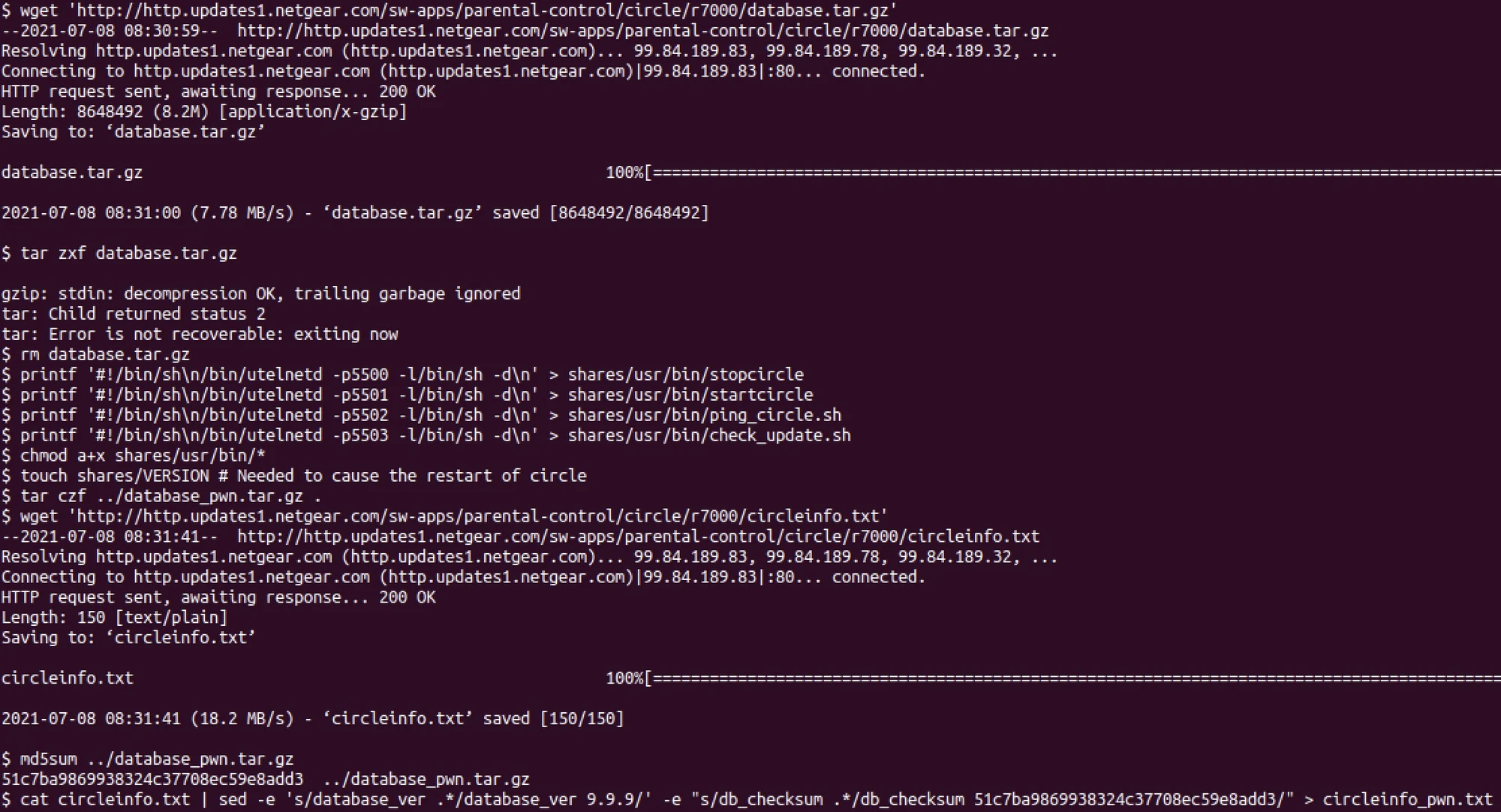
Step 2: stand up the MitM server
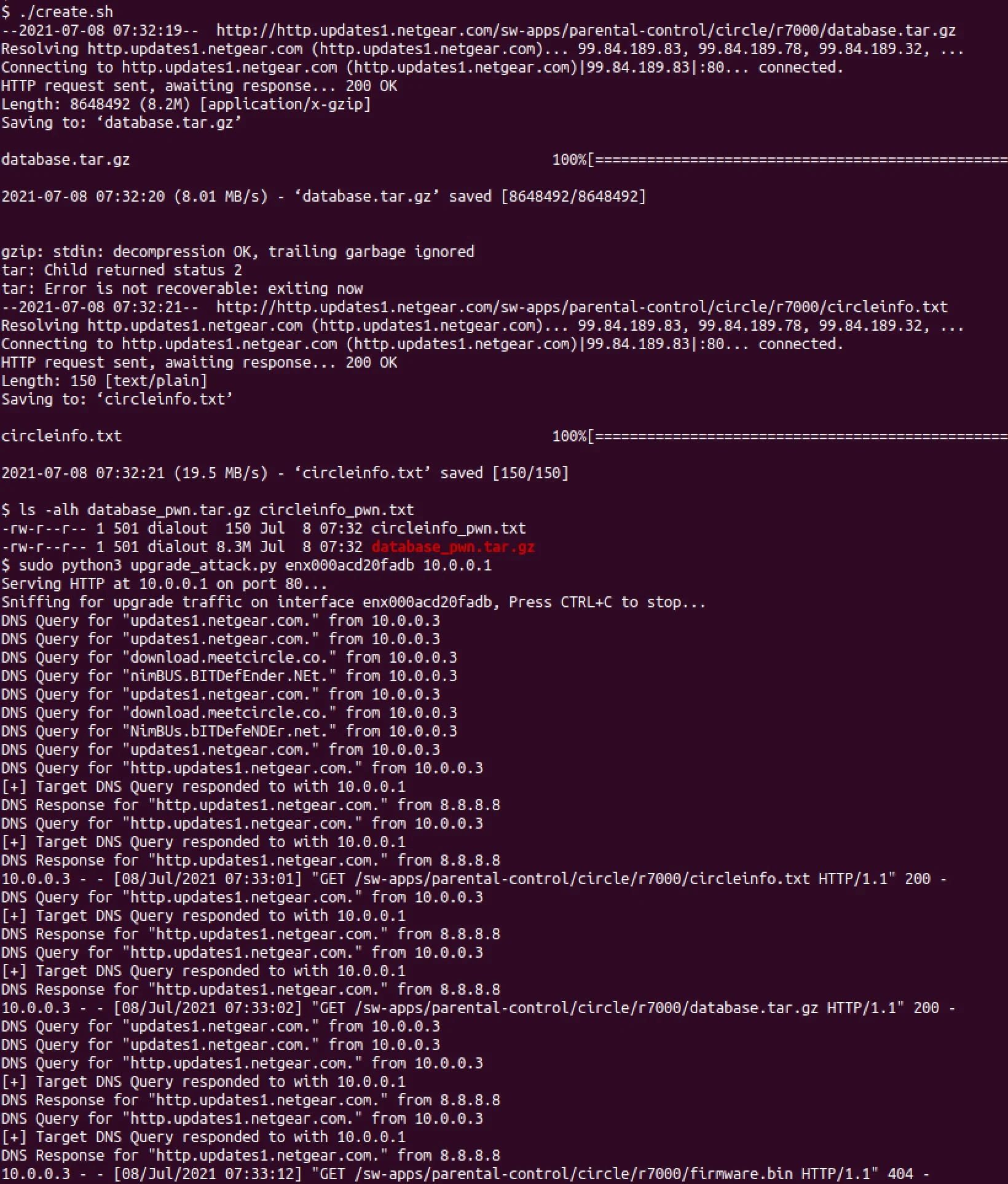
The MitM server is started with the included upgrade_attack.py. It listens for DNS requests for http.updates1.netgear.com and answers with the local computer's IP address, and it hosts an HTTP server that answers the device's requests for the database tarball and the circleinfo.txt file. If the router receives the malicious DNS response before the legitimate one, it connects to the MitM server instead of Netgear's update server.
Step 3: wait for the next update and get code execution
On the next Circle update, the PoC serves the malicious update. The router extracts it, which overwrites ping_circle.sh with code that starts telnet on port 5502. An hour later, ping_circle.sh runs as root, executes the injected code and creates the telnet connections needed for a bi-directional remote shell. If Circle is enabled on the router, stopcircle or startcircle can be overwritten instead of ping_circle.sh, and the injected code runs immediately.
Step 4: test end to end
create.sh produces the malicious database tarball and the matching circleinfo.txt for the R7000. Those files then have to be served through a MitM attack. The easiest way to test is DNS spoofing: from a computer on the WAN side of the device, run upgrade_attack.py, providing the IP address of the host as visible to the device and the name of the interface between the host and the device. When the next Circle update happens, the script spoofs the response for http.updates1.netgear.com so it returns the local computer's IP address, then serves the malicious tarball and circleinfo.txt created by create.sh. The device then starts a telnet instance on ports 5500-5503 immediately if Circle is enabled, or within the hour if it is disabled.
Root cause
The update channel for the Circle database is unauthenticated: the version file and the database tarball are fetched over HTTP, and the database is not signed, unlike the firmware and platform blobs. Anyone who can answer the daemon's requests can therefore supply both the version information and the payload.
The second half of the problem is where the payload is unpacked. The database is extracted with cd /mnt/ && tar xzf /tmp/database.tar.gz, into the same directory tree that holds the scripts circled later executes as root. Nothing separates data from executables.
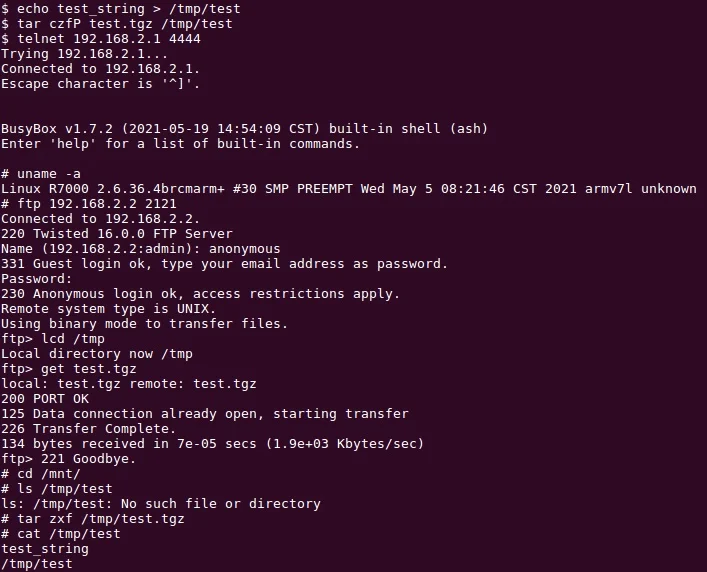
The R7000's tar makes this worse. It comes from busybox version 1.7.2, originally released in September 2007. Old versions of tar do not safely handle files in tarballs that carry absolute paths: a tarball containing a file at /tmp/test is extracted to /tmp/ regardless of the current directory, whereas modern tar strips the leading / unless -P is given. So the database update can write a file to any directory, not just under /mnt/. Even if extraction had been confined to a directory separate from the Circle executables, the device could still be compromised.
Figure 2 shows this: a tarball with an absolute path is created on a computer with a modern version of tar, copied to the R7000, and extracted from within the /mnt/ directory.
Impact
An attacker on the same network as a vulnerable router, or otherwise able to redirect its traffic, can run a MitM attack that results in RCE as root on the router. Because the daemon is enabled by default, devices that were never configured to use Circle are still vulnerable.
The attacker must be able to intercept and modify the router's traffic. For the DNS-based attack used here, the attacker must race the DNS queries from the Circle update daemon; winning one of those races is enough, and the PoC does it reliably. MitM attacks that do not rely on DNS manipulation work as well.
The overwritten executables run as root, the highest privileged user in Linux environments, so the attacker's code runs as root too. With root on a router, an attacker can read and modify all traffic passing through it. If an employee connects to a corporate network through a compromised router, the router can MitM the connection and read any unencrypted data sent between the user's device and devices on the corporate network.
A compromised router can also be one link in a larger chain. One possible attack chain against a corporation:
- The attacker performs initial reconnaissance to determine which ISP the target corporation's employees use.
- The attacker compromises that ISP by some other means (phishing, exploit, etc).
- From inside the ISP, the attacker compromises routers vulnerable to the Circle Parental Control Service issue.
- From the compromised routers, the attacker communicates directly with corporate computers connected to the router and, using a separate vulnerability such as PrintNightmare, compromises those computers.
- Once the corporate computers are compromised, the attacker pivots to the corporate network and exfiltrates data or launches further attacks.
That chain needs separate exploits, which may be blocked or detected, but it is an alternative to attacking the corporate network directly, which is much harder and more likely to be detected.
Fix
Patches were made available by Netgear for all affected devices, and a security advisory was published. The report does not describe the code changes in the patch. GRIMM recommends provisioning and using VPN clients configured to handle all traffic, so that an attacker cannot read or modify network traffic in a way that cannot be detected by the VPN endpoints. It also notes that disabling the vulnerable code when Circle is not in use would have prevented exploitation on most devices, while not fixing the underlying issue.
Variants to test
- Other unsigned update channels. Look for daemons that fetch version metadata and payloads over HTTP and treat only some component types as needing signatures. A positive result is a version file and a payload you can serve yourself, with the device acting on them.
- Extraction into an executable directory. Check where update archives are unpacked relative to scripts the daemon later runs. A positive result is an archive member whose name matches a script that is executed afterwards.
- Absolute paths in archives. On devices with old tar or busybox builds, build a tarball containing an absolute path and extract it from a different directory. A positive result is the file appearing at the absolute location rather than under the current directory.
- Always-on update scripts. Identify scripts run on a timer regardless of whether the related feature is enabled. A positive result is code execution on schedule with the feature switched off.
- DNS race conditions. Where a daemon resolves an update hostname without transport security, test whether a spoofed answer arriving before the legitimate one is accepted. A positive result is the device connecting to your host instead of the vendor's.
Timeline
- 07/23/2021: first attempt to notify vendor
- 07/29/2021: second attempt to notify vendor
- 07/30/2021: third attempt to notify vendor
- 08/09/2021: notified CISA
- 08/18/2021: met with vendor's product security team
- 08/18/2021: granted two-week extension to release deadline
- 09/09/2021: assigned CVE-2021-40847
- 09/20/2021: security advisory released by vendor
- 09/21/2021: patches made available by vendor
- 09/21/2021: NotQuite0DayFriday release
- 09/21/2021: blog post release
What happened, in plain words
A group of security researchers found a way to take full control of a large number of Netgear home and small-office routers. The trick is not in Netgear's own code. It is in a piece of software made by another company, Circle, which adds parental controls to the router. That software runs with the highest level of permission on the device, so breaking it is just as serious as breaking the router's own firmware.
The vulnerable part is a small program called a daemon, named circled, that lives at /bin/circled on the router. A daemon is a program that runs in the background all the time, without anyone clicking on it. This one wakes up regularly and asks a server on the internet whether there is a newer version of itself or of its filtering database, and if so, downloads it. The filtering database is the list of rules that decides which websites a child is allowed to visit.
The problem is how that conversation happens. The router asks over plain HTTP, which is the unencrypted version of the web, and the database it downloads is not signed. Signing is like a wax seal on an envelope: it lets the receiver check that the contents really came from the expected sender and were not swapped on the way. The firmware and platform downloads are encrypted and signed, but the database is not. So anyone who can sit between the router and the update server, and answer in the server's place, can hand the router a fake database. That position is called a Man-in-the-Middle, or MitM.
When the router unpacks that fake database, it writes files into the same folder where the scripts that Circle runs live. Those scripts are executed as root, the all-powerful administrator account on Linux. So the attacker's files get run as root, and the attacker ends up with a remote shell on the router: a way to type commands into the device from far away.
One more detail makes it worse. The router is old enough that its unpacking tool, tar, does not protect against file paths that start with a slash. That means a malicious archive can drop a file almost anywhere on the device, not only in the folder it was meant for.
The daemon is switched on by default, even on routers where nobody ever set up parental controls. Turning it off when Circle is not used would not repair the flaw, but it would have stopped the attack on most devices.
Why this matters beyond one router
Many people now work from home and connect to their employer's network through whatever router their internet provider gave them or they bought themselves. Corporate security teams watch the company's own servers closely, but rarely look at the router in an employee's living room. If that router is taken over, everything passing through it can be watched or altered. The researchers use this to explain why home routers deserve attention from companies, not just from individuals.
The affected devices
The research was done on a Netgear R7000, and the proof of concept was built and tested on that model. The following devices and firmware versions were confirmed to contain the vulnerable update code:
| Device | Version |
|---|---|
| R6400v2 | [redacted] |
| R6700 | [redacted] |
| R6700v3 | [redacted] |
| R6900 | [redacted] |
| R6900P | [redacted] |
| R7000 | [redacted] |
| R7000P | [redacted] |
| R7850 | [redacted] |
| R7900 | [redacted] |
| R8000 | [redacted] |
| RS400 | [redacted] |
The researchers also looked at the very first firmware for the R7000 that included Circle, version 1.0.9.10 from 2017, and found the same flaw there. Older versions of the listed devices are therefore probably vulnerable too.
What the attacker needs
The attacker has to be able to see and change the traffic going to and from the router. That can mean being on the same network, for example the same Wi-Fi, or being somewhere along the path the traffic takes. The proof of concept uses a technique called DNS spoofing, explained below, but any kind of MitM position would do.
The published proof of concept lives in a repository called NotQuite0DayFriday. It contains two helper scripts: create.sh, which builds the malicious database archive and the matching version file, and upgrade_attack.py, which runs the fake update server.
How the update process works, and where it breaks
Step 1: the router asks for version information
The daemon regularly fetches a small text file over plain HTTP:
http://http.updates1.netgear.com/sw-apps/parental-control/circle/r7000/circleinfo.txt
Reading this line: http:// means the request is unencrypted, so anyone in the path can read it and answer it. http.updates1.netgear.com is the server name the router contacts. The rest of the path points to a file called circleinfo.txt inside a folder structure that identifies the product (parental-control), the service (circle) and the router model (r7000).
Step 2: the router reads the version file
The file lists versions, checksums and sizes for three components: the firmware, the database and the platform.
firmware_ver [redacted]
database_ver 3.2.1
platforms_ver 2.15.2
db_checksum [redacted]
firmware_size 1982549
database_size 8648492
Line by line: firmware_ver [redacted] is the version number of the firmware component. database_ver 3.2.1 is the version of the filtering database. platforms_ver 2.15.2 is the version of the platform component. db_checksum [redacted] is a checksum, a short fingerprint computed from the database file so the receiver can tell whether the file arrived intact. firmware_size 1982549 and database_size 8648492 are the expected sizes in bytes. A checksum catches accidental corruption, but it does not prove who made the file: an attacker who supplies a fake file can also supply a matching checksum.
Step 3: the router compares and downloads what is out of date
The daemon compares the versions it is running with the ones in the downloaded file. If a component is older, it fetches the update from one of three addresses:
- database:
http://http.updates1.netgear.com/sw-apps/parental-control/circle/r7000/database.tar.gz - firmware:
http://http.updates1.netgear.com/sw-apps/parental-control/circle/r7000/firmware.bin - platform:
http://http.updates1.netgear.com/sw-apps/parental-control/circle/r7000/platforms.bin
The firmware and platform files are encrypted and signed. The database is just a tarball, which is a single file that bundles other files together, like a cardboard box holding several items. Presumably the database was left unprotected because it was not expected to contain programs, only filtering rules. That assumption is exactly what the attack breaks.
Step 4: the router unpacks the downloads
After saving the downloads in /tmp, a temporary folder, the daemon unpacks them:
## database - The database update is extracted with the command:
cd /mnt/ && tar xzf /tmp/database.tar.gz

## firmware - First firmware.bin is decrypted, signature validated, and copied
## to /tmp/sdfiles.tar.gz. Then it's extracted with:
cd /mnt/ && tar zxf /tmp/sdfiles.tar.gz

## platform - First platforms.bin is decrypted, signature validated, and copied
## to /tmp/platforms.tgz. Then it's extracted with:
cd /tmp/ && tar zxf /tmp/platforms.tgz
[ -s /tmp/platforms/circle-customized.txt ]
mv -f /tmp/platforms/circle-customized.txt /mnt/shares/usr/bin/
[ -s /tmp/platforms/platforms.xml ]
mv -f /tmp/platforms/platforms.xml /tmp/platforms/platforms.ver /mnt/shares/usr/bin/
Line by line. cd /mnt/ && tar xzf /tmp/database.tar.gz moves into the /mnt/ folder and then unpacks the database archive there. cd means change directory, && means do the second command only if the first succeeded, and tar xzf means extract (x) a gzip-compressed (z) archive from a file (f). The two comment lines describe the firmware step: the file is first decrypted, its signature is checked, and it is copied to /tmp/sdfiles.tar.gz, then unpacked into /mnt/ the same way. The platform step unpacks into /tmp/ instead. [ -s /tmp/platforms/circle-customized.txt ] is a test that succeeds only if that file exists and is not empty. mv -f then moves the file, overwriting any existing one, into /mnt/shares/usr/bin/. The same pattern is repeated for platforms.xml and platforms.ver.
The key point is the first line: the database is unpacked into /mnt/, the same tree that holds the Circle programs. Data and programs share one folder, and nothing checks that the archive only contains data.
Step 5: the router runs scripts from that folder
When unpacking is finished, the daemon restarts Circle if the feature is enabled and running. It does that by running two scripts, stopcircle and startcircle, from /mnt/shares/usr/bin/. Since the database was unpacked into that same area, a malicious database can replace those two scripts with any code it likes.
The same folder also holds ping_circle.sh and check_update.sh. These run once an hour to contact the Circle servers and to work out whether enough time has passed since the last update check. They run whether or not Circle is enabled, so they give an attacker code execution regardless of the parental control setting.
Carrying out the attack
Step 1: build the malicious database
The researchers downloaded a genuine Netgear database update and modified it. In the proof of concept, the database was changed so that unpacking it overwrites the executable scripts with code that starts telnet on the device on ports 5500-5003. Telnet is an old protocol for opening a text-based session on a remote machine; starting it on the router is what gives the attacker a way in. The included create.sh automates the whole process.
Step 2: run the fake update server
The MitM server is started with the included upgrade_attack.py. It does two jobs. First, it listens for DNS requests for http.updates1.netgear.com and answers them with the local computer's IP address. DNS is the internet's address book: it turns a name like http.updates1.netgear.com into a numeric address. If the router believes the attacker's answer instead of the real one, it will connect to the attacker's computer. Second, the script hosts an HTTP server that answers the router's requests for the database archive and for circleinfo.txt. The race matters: if the router receives the malicious DNS answer before the legitimate one, it goes to the attacker's server instead of Netgear's.
Step 3: wait for the next update and get code execution
On the next Circle update, the proof of concept serves the malicious archive. The router unpacks it, which overwrites ping_circle.sh with code that starts telnet on port 5502. An hour later, ping_circle.sh runs as root, executes the injected code and opens the telnet connections needed for a two-way remote shell. If Circle is enabled on the router, stopcircle or startcircle can be overwritten instead, and then the injected code runs straight away rather than waiting for the hourly job.
Step 4: test the whole chain
create.sh produces the malicious database archive and the matching circleinfo.txt for the R7000. Those files then have to be served through a MitM attack. The simplest way to test is DNS spoofing: from a computer on the WAN side of the device, run upgrade_attack.py, giving it the IP address of the host as the device sees it and the name of the network interface between the host and the device. WAN means the wide-area side, the connection towards the internet, as opposed to the LAN, the local network inside the home. When the next Circle update happens, the script spoofs the answer for http.updates1.netgear.com so that it returns the local computer's address, then serves the malicious archive and circleinfo.txt made by create.sh. The device then starts a telnet instance on ports 5500-5503 immediately if Circle is enabled, or within the hour if it is disabled.
Figure 3 illustrates this process.
The root cause
The update channel for the Circle database has no authentication. The version file and the database archive are both fetched over HTTP, and the database is not signed, unlike the firmware and platform files. Anyone who can answer the daemon's requests can therefore supply both the version information and the payload. There is no way for the router to tell the real server from an impostor.
The second half of the problem is where the payload is unpacked. The database is extracted with cd /mnt/ && tar xzf /tmp/database.tar.gz, into the same directory tree that holds the scripts the daemon later runs as root. Nothing separates data from programs.
The R7000's tar makes this worse. It comes from busybox version 1.7.2, originally released in September 2007. Busybox is a compact collection of standard Unix tools used on small devices. Old versions of tar do not safely handle files in archives that carry absolute paths. An absolute path is one that starts at the top of the filesystem, like /tmp/test, rather than being relative to the current folder. A tarball containing a file at /tmp/test is extracted to /tmp/ regardless of the current directory, whereas modern tar strips the leading / unless the -P option is given. So the database update can write a file to any directory, not just under /mnt/. Even if extraction had been confined to a folder separate from the Circle programs, the device could still be compromised.
Figure 2 shows this: a tarball with an absolute path is created on a computer with a modern version of tar, copied to the R7000, and extracted from within the /mnt/ directory.
What an attacker gains
An attacker on the same network as a vulnerable router, or otherwise able to redirect its traffic, can run a MitM attack that ends in remote code execution as root on the router. Because the daemon is on by default, devices that were never set up to use Circle are still vulnerable.
The attacker must be able to intercept and modify the router's traffic. For the DNS-based attack used here, the attacker must race the DNS queries from the Circle update daemon. Winning one of those races is enough, and the proof of concept does it reliably. MitM attacks that do not rely on DNS manipulation work as well.
The overwritten programs run as root, the most powerful account in a Linux system, so the attacker's code runs as root too. With root on a router, an attacker can read and modify all traffic passing through it. If an employee connects to a corporate network through a compromised router, the router can sit in the middle of that connection and read any unencrypted data sent between the user's device and devices on the corporate network.
A compromised router can also be one link in a longer chain. One possible attack chain against a company:
- The attacker does initial reconnaissance to work out which internet provider the target company's employees use.
- The attacker compromises that provider by some other means, such as phishing or another exploit.
- From inside the provider, the attacker compromises routers vulnerable to the Circle Parental Control Service issue.
- From the compromised routers, the attacker communicates directly with company computers connected to the router and, using a separate vulnerability such as PrintNightmare, compromises those computers.
- Once the company computers are compromised, the attacker moves on to the corporate network and steals data or launches further attacks.
That chain needs separate exploits, which may be blocked or detected, but it is an alternative to attacking the corporate network directly, which is much harder and more likely to be noticed.
The fix and what to do
Netgear made patches available for all affected devices and published a security advisory. The report does not describe what the patch changes in the code. GRIMM recommends providing and using VPN clients configured to carry all traffic, so that an attacker cannot read or modify network traffic in a way that cannot be detected by the VPN endpoints. A VPN is an encrypted tunnel between a device and a company network, so traffic inside it cannot be read or altered by anyone in between. The report also notes that disabling the vulnerable code when Circle is not in use would have prevented exploitation on most devices, while not fixing the underlying issue.
Where else to look
These are the patterns worth testing on other devices, as the researchers frame them:
- Other unsigned update channels. Look for background programs that fetch version information and payloads over HTTP and treat only some component types as needing signatures. A positive result is a version file and a payload you can serve yourself, with the device acting on them.
- Extraction into a program folder. Check where update archives are unpacked relative to the scripts the daemon later runs. A positive result is an archive member whose name matches a script that is executed afterwards.
- Absolute paths in archives. On devices with old tar or busybox builds, build an archive containing an absolute path and extract it from a different directory. A positive result is the file appearing at the absolute location rather than under the current directory.
- Always-on update scripts. Identify scripts that run on a timer regardless of whether the related feature is enabled. A positive result is code execution on schedule with the feature switched off.
- DNS race conditions. Where a background program looks up an update hostname without transport security, test whether a spoofed answer arriving before the legitimate one is accepted. A positive result is the device connecting to your host instead of the vendor's.
Timeline
- 07/23/2021: first attempt to notify vendor
- 07/29/2021: second attempt to notify vendor
- 07/30/2021: third attempt to notify vendor
- 08/09/2021: notified CISA
- 08/18/2021: met with vendor's product security team
- 08/18/2021: granted two-week extension to release deadline
- 09/09/2021: assigned CVE-2021-40847
- 09/20/2021: security advisory released by vendor
- 09/21/2021: patches made available by vendor
- 09/21/2021: NotQuite0DayFriday release
- 09/21/2021: blog post release
Glossary
- Absolute path: A file location written from the very top of the filesystem, starting with
/, such as/tmp/test, instead of being relative to the current folder. - Archive: A single file that bundles several files together, like a box holding several items.
- Busybox: A compact collection of standard Unix command-line tools used on small devices such as routers.
- Checksum: A short fingerprint computed from a file's contents, used to detect accidental corruption. It does not prove who created the file.
- CISA: The US Cybersecurity and Infrastructure Security Agency, a government body that can be notified about vulnerabilities.
- Code execution: Getting a device to run instructions chosen by an attacker.
- CVE: A public identifier for a known vulnerability, here CVE-2021-40847.
- Daemon: A program that runs in the background without anyone starting it by hand.
- DNS: The internet's address book, which turns a name such as
http.updates1.netgear.cominto a numeric address. - DNS spoofing: Sending a fake DNS answer so that a device connects to the attacker's computer instead of the real server.
- Firmware: The software built into a device such as a router.
- HTTP: The unencrypted version of the protocol browsers use to fetch web pages; anyone in the path can read and change it.
- HTTPS: The encrypted version of HTTP, which prevents others in the path from reading or altering the traffic.
- Interface: A named network connection on a computer, such as a Wi-Fi or Ethernet adapter.
- IP address: The numeric address of a device on a network.
- LAN: Local area network, the network inside a home or office.
- Man-in-the-Middle (MitM): A position where an attacker can see and change traffic between two parties without either noticing.
- Patch: An update that fixes a flaw.
- Phishing: Tricking someone into giving up access, for example through a fake login page or email.
- PoC (proof of concept): Working code that demonstrates a vulnerability.
- Port: A numbered channel on a device that a network service listens on.
- Remote code execution (RCE): Running an attacker's code on a machine over a network.
- Root: The most powerful account on a Linux system, allowed to do anything.
- SOHO: Small Office/Home Office, a category of consumer and small-business network equipment.
- Tar / tarball: A tool for bundling files into one archive, and the archive it produces.
- Telnet: An old protocol for opening a text-based session on a remote machine.
- VPN: An encrypted tunnel between a device and a network, so traffic inside cannot be read or altered by anyone in between.
- WAN: Wide area network, the connection from a router towards the internet, as opposed to the LAN inside the home.


