Arbitrary code execution in desktop client via OpenSSL config
The Nextcloud Windows desktop client loads an OpenSSL configuration file from a path under C:\ that low-privileged users can create. An attacker can place a malicious configuration and DLL there, leading to arbitrary code execution when any user, including an administrator, launches the application.

- Triaged in 16 hours
- Fixed in 13 months
- Paid in 14 months
- Disclosed after 14 months
Summary: The nextcloud windows desktop application utilizes a precompiled OpenSSL library called libeay32.dll. This OpenSSL library attempts to load c:\usr\local\ssl\openssl.cnf when the nextcloud windows application is launched. The c:\usr\local\ssl\openssl.cnf file does not exist. By default, on windows systems, authenticated users can create under the c: drive. A user with low privileges can create the file c:\usr\local\ssl\openssl.cnf configuration file to load a nefarious .dll library, resulting in arbitrary code execution when the nextcloud windows application is launched (by any user including an administrator).
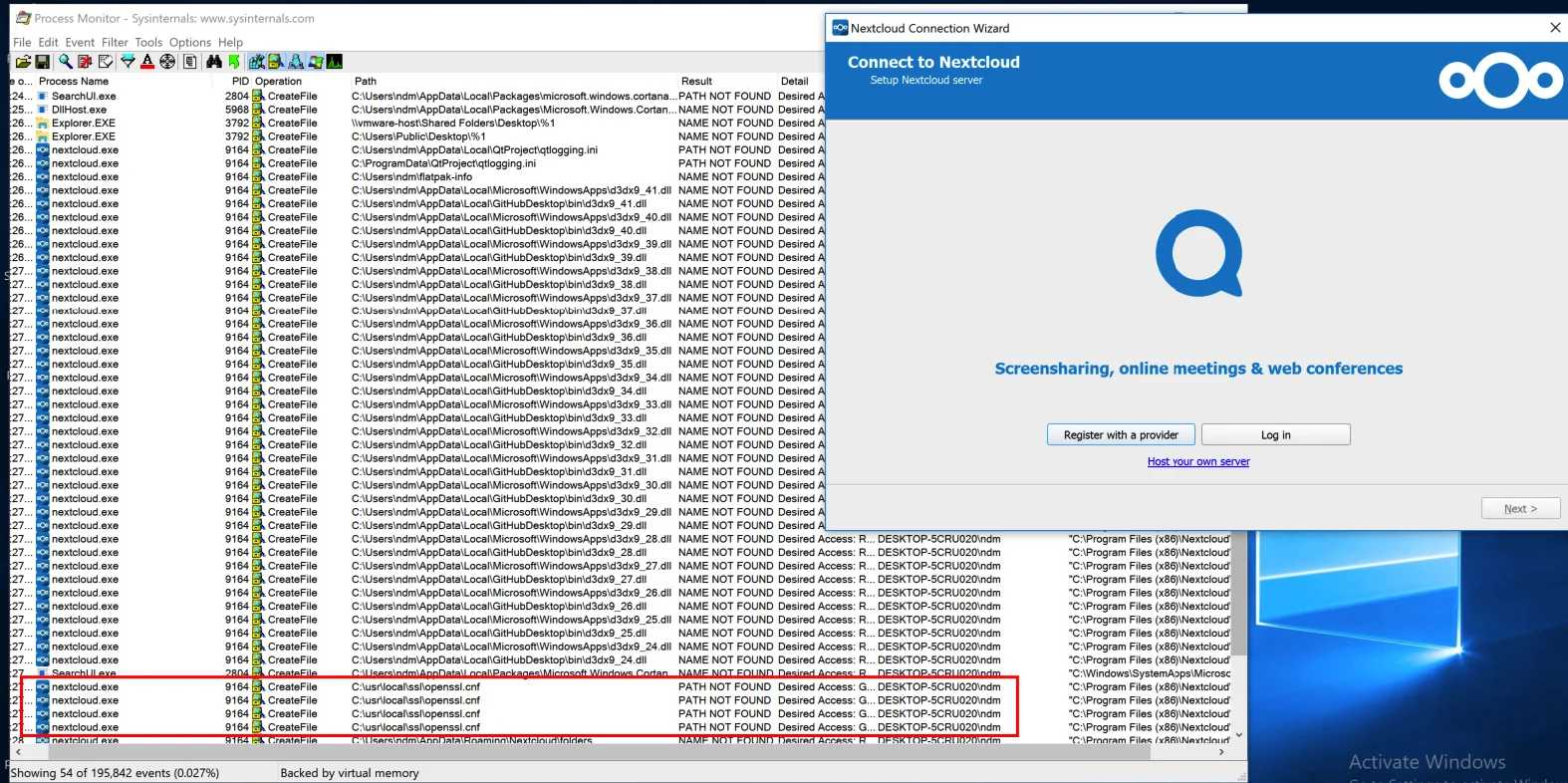
Description: If you download sys internals process monitor, you can see the “nextcloud.exe” binary trying to read the files “c:\usr\local\ssl\openssl.cnf” and getting a result of “PATH NOT FOUND”. See attached openssl-not-found.png screenshot.
The root cause of the issue is when the OpenSSL library (libeay32.dll) was compiled, the parameter “--openssldir” was not specified. If this parameter is not specified, a default of “/usr/local/ssl” is used. This is a real directory in linux, but in windows it translates to c:\usr\local\ssl.
If a low privilege user creates the directory structure c:\usr\local\ssl, copies an openssl.cnf file and malicious .dll library inside it will result is arbitrary code execution when the nextcloud application is executed. If the nextcloud application is executed by an administrator, it will result in privilege escalation.
I’ve included two example exploits;
Exploit example 1 calc.c – source code of my .dll file to execute calc.exe calc.dll – compiled version of the calc.exe library openssl-calc.cnf – openssl configuration file that calls the calc.dll
Exploit example 2 backdoor.c – source code my .dll file to create a local administrator, this uses a known uac bypass backdoor.dll – compiled version of the local admin backdoor library openssl-backdoor.cnf – openssl configuration file that calls the backdoor.dll
Platform(s) Affected: All supported windows platforms that support Nextcloud Desktop 2.5.2
Steps To Reproduce: Download and Install Nextcloud desktop 2.5.2 (https://nextcloud.com/install/#install-clients)
Exploit 1 – calc.exe – See attached video calc.mp4
- Login with a low privileged user (part of Users group)
- Open a cmd.exe and issue command: mkdir c:\usr\local\ssl
- Copy calc.dll and openssl-calc.cnf to c:\usr\local\ssl directory
- Rename c:\usr\local\ssl\openssl-calc.cnf to c:\usr\local\ssl\openssl.cnf
- Logout of low privledged user.
- Login with local administrator.
- Launch Nextcloud application.
- Calc.exe with execute.
Exploit 2 – create a local admin user (uac bypass) – See attached video backdoor.mp4
- Login with a low privileged user (part of Users group)
- Open a cmd.exe and issue command: mkdir c:\usr\local\ssl
- Copy calc.dll and openssl-backdoor.cnf to c:\usr\local\ssl directory
- Rename c:\usr\local\ssl\openssl-backdoor.cnf to c:\usr\local\ssl\openssl.cnf
- Logout of low privledged user.
- Login with local administrator.
- Launch Nextcloud application.
- Open “Computer Management”
- Navigate to “System Tools” -> “Local Users and Groups” -> “Users”
- A new user of “backdoor” with a password of “backdoor” was added.
- Right click on “backdoor” and click “Properties”, then click “Member Of”.
- The “backdoor” user is part of the local administrator group.
Supporting Material/References: https://wiki.openssl.org/index.php/Compilation_and_Installation#PREFIX_and_OPENSSLDIR
How can the system be exploited with this bug? DLL Hi-jacking can be used for many nefarious purposes. It can be used by malware to propagate and establish persistence on a workstation. It can be used to privilege escalation in the post exploitation phases of an attack.
How did you come across this bug ? I can across this while looking for programs that utilize the windows openssl (libeay32.dll) library. Recommendations for fix Recompile the openssl library (libeay32.dll), and specify the parameter “—openssldir”. Set the directory to something a low privledge user can’t edit for example “C:\Program Files (x86)\Nextcloud”. Use the link in the support material / references part of this report.
Impact
Impact The impact is high. Successful exploitation leads to arbitrary code execution on the windows system. There are many actions a nefarious individual could accomplish with this vulnerability. In addition to post-exploitation privilege escalation, another example could be ransomware, or other malware.
Attachments
Context
The target is the Nextcloud Windows desktop client, version 2.5.2, on all supported Windows platforms that support that release. The client ships with a precompiled OpenSSL library, libeay32.dll. When the client starts, that library looks for an OpenSSL configuration file at a fixed path, c:\usr\local\ssl\openssl.cnf. The report is about what happens when that file does not exist and a low privileged user is able to create it.
Setup
- Nextcloud Desktop 2.5.2, installed from the official client installer.
- A Windows host with at least two accounts: a low privileged user who is a member of the
Usersgroup, and a local administrator. - Sysinternals Process Monitor, used to observe file access by
nextcloud.exe. - Two prepared exploit sets, each consisting of C source, a compiled DLL and an OpenSSL configuration file:
calc.c,calc.dll,openssl-calc.cnfbackdoor.c,backdoor.dll,openssl-backdoor.cnf
The precondition that makes the whole thing work is the default Windows permission model: authenticated users can create directories and files under the c: drive.
Finding it
The researcher was looking for programs that use the Windows OpenSSL library libeay32.dll. Running Process Monitor against nextcloud.exe shows the binary trying to read c:\usr\local\ssl\openssl.cnf and receiving PATH NOT FOUND.
The screenshot shows that lookup failing. A missing configuration file at a path a normal user can write to is the signal: whoever controls the file controls what the OpenSSL library loads next.
Exploitation
Step 1: create the directory
Log in as the low privileged user (member of Users) and create the directory tree the library expects:
mkdir c:\usr\local\ssl
Step 2: plant the configuration and the DLL
Copy the compiled DLL and the matching OpenSSL configuration file into that directory. For the calculator example these are calc.dll and openssl-calc.cnf; for the backdoor example they are backdoor.dll and openssl-backdoor.cnf. The configuration file is what makes OpenSSL load the attacker's DLL.
Step 3: rename the configuration into place
OpenSSL only reads the fixed name, so the planted file has to be renamed:
For the second exploit the source name is c:\usr\local\ssl\openssl-backdoor.cnf.
Step 4: switch users
Log out of the low privileged account and log in as the local administrator. Nothing the attacker planted is touched during this step; it just sits in the directory waiting for the client to start.
Step 5: launch the client
Start the Nextcloud application. On launch, libeay32.dll reads c:\usr\local\ssl\openssl.cnf, which now exists and points at the attacker's DLL, and that DLL is loaded into the client process.
Exploit 1: calculator
With calc.dll and openssl-calc.cnf in place, the calculator starts when the client is launched. The video calc.mp4 shows this run.
Exploit 2: local administrator via UAC bypass
With backdoor.dll and openssl-backdoor.cnf in place, the payload creates a local administrator account, using a known UAC bypass. After launching the client as the administrator:
- Open
Computer Management. - Navigate to
System Tools->Local Users and Groups->Users. - A new user named
backdoorwith the passwordbackdoorhas been added. - Right click
backdoor, chooseProperties, thenMember Of. - The
backdooruser is a member of the local administrator group.
The video backdoor.mp4 shows this sequence.
Root cause
When the OpenSSL library libeay32.dll was compiled, the --openssldir parameter was not specified. Without it, OpenSSL falls back to a default of /usr/local/ssl. On Linux that is a real directory; on Windows it translates to c:\usr\local\ssl\. Because authenticated users can create content under c: by default, a low privileged user can own that path before any administrator ever runs the client. The client then reads configuration from a location the attacker controls, and that configuration can load the attacker's DLL. The report does not describe any signature check or other control that would have stopped the load.
Impact
The report rates the impact as high. Successful exploitation gives arbitrary code execution on the Windows system. When the client is launched by an administrator, the code runs with administrator rights, so a low privileged user escalates to local administrator. Beyond privilege escalation in the post exploitation phase, the researcher notes that DLL hijacking of this kind can be used by malware to propagate and establish persistence on a workstation, and gives ransomware or other malware as further examples. The platform recorded the issue as medium severity with a CVSS score of 4.8 and a bounty of 100.00 USD.
Fix
The recommendation is to recompile the OpenSSL library libeay32.dll and specify the --openssldir parameter, pointing it at a directory a low privileged user cannot edit, for example C:\Program Files (x86)\Nextcloud. The report points to the OpenSSL compilation and installation documentation for the parameter.
Variants to test
- Other Windows applications that bundle
libeay32.dllorlibsslwithout--openssldir: run Process Monitor on startup and look for reads ofc:\usr\local\ssl\openssl.cnfreturningPATH NOT FOUND. A positive result is a writable path that the process later reads successfully. - Any application that reads a configuration file from a user writable location at startup: create the file and see whether the process picks it up on the next launch.
- The same pattern with other OpenSSL default paths, where the compiled-in directory resolves under a drive or folder ordinary users can create.
- Launching the affected client as an administrator after planting the file, to confirm the privilege boundary is crossed and not just code execution at the user's own level.
Hunting notes
This kind of bug hides in desktop and client software that ships third party native libraries, especially on Windows where compiled-in Unix style paths map onto writable locations. During recon, Process Monitor on application startup is the direct signal: a PATH NOT FOUND for a configuration file under a directory the current user can create is worth following up. The researcher provided two example payloads, one intended to run the calculator and one to create a local administrator through a UAC bypass, with videos attached.
What happened, in plain words
Nextcloud is a service for storing and sharing files, a bit like a private version of Google Drive or Dropbox. Besides the web interface, it offers a desktop program you install on your computer so your files stay in sync. That desktop program is the subject of this report.
When the Nextcloud desktop program starts on Windows, it uses a helper library called OpenSSL. A library is a bundle of ready-made code that a program borrows instead of writing everything itself; OpenSSL is the widely used bundle for encryption and secure connections. This particular copy of OpenSSL was built in a way that makes it look for a settings file at a fixed location on the disk: c:\usr\local\ssl\openssl.cnf. That file is not there.
On Windows, ordinary logged-in users are allowed by default to create folders and files directly under the c: drive. So a user with few rights can create that missing path themselves and put their own settings file there. When OpenSSL reads that file, the file can tell it to load another file, a program library written by the attacker. The Nextcloud program then loads that library and runs its code. If an administrator is the one who starts Nextcloud, the attacker's code runs with administrator rights.
The researcher showed this with two demonstrations: one that opens the Windows calculator, and one that quietly creates a new administrator account. The report was rated medium severity, with a CVSS score of 4.8 and a bounty of 100.00 USD.
The pieces involved
Before the steps make sense, here are the parts of the puzzle.
- Nextcloud Desktop 2.5.2: the version of the Windows desktop program that was tested. It is installed from the official Nextcloud client installer.
libeay32.dll: a file whose name ends in.dll, which stands for dynamic link library. On Windows, a DLL is a file full of code that programs load and use while they run. This one is a precompiled copy of OpenSSL that ships inside the Nextcloud client.openssl.cnf: a configuration file, meaning a plain text file of settings that a program reads at startup. OpenSSL reads this one to learn how it should behave.c:\usr\local\ssl\: the folder where OpenSSL expects that settings file. The path looks like a Linux path, because OpenSSL is normally built for Linux, where/usr/local/sslis a real folder. On Windows the same text turns into a folder on thec:drive.- A low privileged user: an account that is only a member of the
Usersgroup, the ordinary, non-administrator group on Windows. Such an account cannot change system settings, but it can create files in places Windows leaves open to everyone. - A local administrator: an account with full control over the machine.
- Sysinternals Process Monitor: a free Microsoft tool that records what files and folders a program touches while it runs. It is like a security camera for file access.
- UAC bypass: UAC, User Account Control, is the Windows prompt that asks an administrator to confirm elevated actions. A bypass is a technique that gets around that prompt. The report says the second demonstration uses a known UAC bypass but does not explain how it works.
Setting up the test
To reproduce the finding, the researcher used:
- Nextcloud Desktop 2.5.2, installed from the official installer.
- A Windows machine with at least two accounts: the low privileged user in the
Usersgroup, and a local administrator. - Process Monitor, to watch what
nextcloud.exe(the main program file) does with files. - Two prepared sets of files, each with three parts: C source code (human-readable programming instructions), the compiled DLL built from that source, and an OpenSSL configuration file that points at the DLL.
calc.c,calc.dll,openssl-calc.cnfbackdoor.c,backdoor.dll,openssl-backdoor.cnf
The whole attack depends on one default Windows behaviour: logged-in users may create folders and files under the c: drive.
Finding it
The researcher was deliberately looking for programs that use the Windows OpenSSL library libeay32.dll. The idea is that any program using this library might inherit the same fixed-path habit.
Running Process Monitor while nextcloud.exe starts shows the program trying to read c:\usr\local\ssl\openssl.cnf and getting the answer PATH NOT FOUND, meaning the file is not there.
The screenshot shows that failed lookup. A missing settings file is normally harmless. What makes it interesting is the location: it sits in a folder that an ordinary user is allowed to create. Whoever can create the file controls what OpenSSL reads next, and therefore what code the Nextcloud program loads.
Carrying out the attack
Step 1: create the folder
Log in as the low privileged user, open a command prompt (cmd.exe, the black text window where you type commands), and create the folder tree OpenSSL expects:
mkdir c:\usr\local\ssl
mkdir means make directory. This single command creates usr under c:, then local inside it, then ssl inside that. The step is taken first because the attacker needs a place to put files where OpenSSL will look, and this is the exact place it looks.
Step 2: plant the settings file and the DLL
Copy the compiled DLL and the matching configuration file into that folder. For the calculator demonstration these are calc.dll and openssl-calc.cnf; for the backdoor demonstration they are backdoor.dll and openssl-backdoor.cnf. The configuration file is the instruction sheet that makes OpenSSL load the attacker's DLL, so both files have to be in place.
Step 3: rename the settings file into place
OpenSSL only reads the fixed name openssl.cnf, so the planted file has to be renamed:
For the second demonstration the source name is c:\usr\local\ssl\openssl-backdoor.cnf. The rename matters because a file called openssl-calc.cnf would simply be ignored; the program is not looking for that name.
Step 4: switch users
Log out of the low privileged account and log in as the local administrator. Nothing planted in the previous steps is touched here. The files just sit in the folder, waiting for the Nextcloud program to start. This step exists to show that the attacker does not need to be present when the victim launches the program.
Step 5: launch the client
Start the Nextcloud application. On launch, libeay32.dll reads c:\usr\local\ssl\openssl.cnf. The file now exists, it points at the attacker's DLL, and that DLL is loaded into the Nextcloud program. Loading a DLL means running its code inside the program that loaded it, which is why this is called code execution.
Demonstration 1: the calculator
With calc.dll and openssl-calc.cnf in place, the Windows calculator starts when the client is launched. The video calc.mp4 shows this happening.
The calculator is a harmless stand-in. It proves that code chosen by the low privileged user ran inside a program started by the administrator.
Demonstration 2: a new administrator account
With backdoor.dll and openssl-backdoor.cnf in place, the payload creates a local administrator account, using a known UAC bypass. After launching the client as the administrator:
- Open
Computer Management, a Windows tool for managing the machine. - Navigate to
System Tools->Local Users and Groups->Users. - A new user named
backdoorwith the passwordbackdoorhas been added. - Right click
backdoor, chooseProperties, thenMember Of. - The
backdooruser is a member of the local administrator group.
The video backdoor.mp4 shows this sequence.
This second demonstration matters because the new account is added to the local administrator group.
Why it works
The root cause is in how the OpenSSL library libeay32.dll was built. When a library is compiled, meaning turned from source code into a runnable file, the build can be given a setting called --openssldir that says where its configuration lives. That setting was not specified. Without it, OpenSSL falls back to a default of /usr/local/ssl.
On Linux that is a real folder. On Windows the same text becomes c:\usr\local\ssl\. Because ordinary users can create content under c: by default, a low privileged user can claim that path before any administrator ever starts the client. The client then reads settings from a place the attacker controls, and those settings can load the attacker's DLL. The report does not describe any signature check or other control that would have stopped the load.
Impact
The report rates the impact as high. Successful exploitation gives arbitrary code execution on the Windows system, meaning the attacker's code runs on the machine. When the client is launched by an administrator, that code runs with administrator rights, so a low privileged user escalates to local administrator.
Beyond privilege escalation after an attack, the researcher notes that this kind of DLL hijacking can be used by malware to spread and to establish persistence on a workstation, meaning it keeps coming back after reboots. Ransomware or other malware are given as further examples. The platform recorded the issue as medium severity with a CVSS score of 4.8 and a bounty of 100.00 USD.
The fix
The recommendation is to recompile the OpenSSL library libeay32.dll and specify the --openssldir parameter, pointing it at a folder a low privileged user cannot edit, for example C:\Program Files (x86)\Nextcloud. The report points to the OpenSSL compilation and installation documentation for that parameter. In plain terms: tell the library exactly where its settings live, and put that place somewhere only administrators can write.
Other places to look
- Other Windows programs that bundle
libeay32.dllorlibsslwithout--openssldir: run Process Monitor at startup and look for reads ofc:\usr\local\ssl\openssl.cnfreturningPATH NOT FOUND. A hit is a writable path that the program later reads successfully. - Any program that reads a settings file from a location ordinary users can write to at startup: create the file and see whether the program picks it up on the next launch.
- The same pattern with other OpenSSL default paths, where the built-in folder lands somewhere ordinary users can create.
- Launching the affected client as an administrator after planting the file, to confirm the privilege boundary is crossed and not just code execution at the user's own level.
Notes for hunting
This kind of bug hides in desktop and client software that ships third party native libraries, especially on Windows, where paths written for Linux map onto folders ordinary users can write to. During recon, Process Monitor at application startup is the direct signal: a PATH NOT FOUND for a settings file under a folder the current user can create is worth following up. The researcher provided two example payloads, one intended to run the calculator and one to create a local administrator through a UAC bypass, with videos attached. That is what makes the step from a missing file to a serious finding convincing.
Glossary
- API: a defined way for one piece of software to ask another to do something, like a menu of allowed requests.
- Arbitrary code execution: the ability to make a computer run code of your choosing.
- Bounty: a reward paid by a company for a valid security report.
- Command prompt (
cmd.exe): the Windows text window where you type commands instead of clicking. - Compile: turn human-readable source code into a runnable file.
- Configuration file: a plain text file of settings that a program reads at startup.
- CVSS: a standard scoring system for the severity of a security issue, from 0 to 10.
- DLL: dynamic link library, a Windows file full of code that programs load and use while running.
- DLL hijacking: tricking a program into loading a DLL from a place an attacker controls instead of the intended place.
- Escalation (privilege escalation): gaining more rights on a system than you started with.
- Library: a bundle of ready-made code that programs reuse.
- Local administrator: an account with full control over a single Windows machine.
- Low privileged user: an account with only ordinary rights, here a member of the
Usersgroup. - OpenSSL: a widely used library for encryption and secure connections.
--openssldir: a build setting that tells OpenSSL where its configuration lives.- Persistence: keeping access to a machine across reboots or logins.
- Process Monitor: a Microsoft Sysinternals tool that records what files and folders a program touches.
- Ransomware: malware that encrypts files and demands payment to unlock them.
- Severity: how serious an issue is judged to be.
- UAC (User Account Control): the Windows prompt that asks an administrator to confirm elevated actions.
- UAC bypass: a technique that gets around that prompt.
Usersgroup: the standard Windows group for ordinary, non-administrator accounts.




