Formula Injection vulnerability in CSV export feature
The CSV export feature of the Forms app did not sanitise answers that begin with formula characters, so a submitted formula was written into the exported file as a live formula. An attacker could use this to exfiltrate other participants' answers, read local files, or execute code if the person opening the file trusts it and dismisses the warning.

- Triaged in 7 days
- Fixed in 6 months
- Disclosed after 7 months
Dear Nextcloud Team –
I have identified a formula injection vulnerability [1][2] in the CSV export feature of the Forms App. I am aware that the Forms app is not part of this bug bounty program but was advised to disclose it via hackerone anyway.
Description. When a (n Excel-/Calc-) formula is sent as the answer for a question that uses one of the two Response answer types which support text input, the formula get reflected in the .csv export file without any type of sanitation.
When the content of a cell starts with one of the following characters, the content will be treated as formula.
- Equals to ("=")
- Plus ("+")
- Minus ("-")
- At ("@")
Risk. A malicious actor who is in possession of a link to a Nextcloud Form can abuse this vulnerability to exfiltrate the other participants answers from the same sheet, read local files or even execute code (in case the user who opens the document trusts the csv file and dismisses the warning).
The following steps are required to reproduce the vulnerability:
- Create a new form that has either Short Response or Long Response field and save it.
- Visit the link and insert
=1+1as answer - Download the CSV and open it either in Excel or LibreOfficeWriter
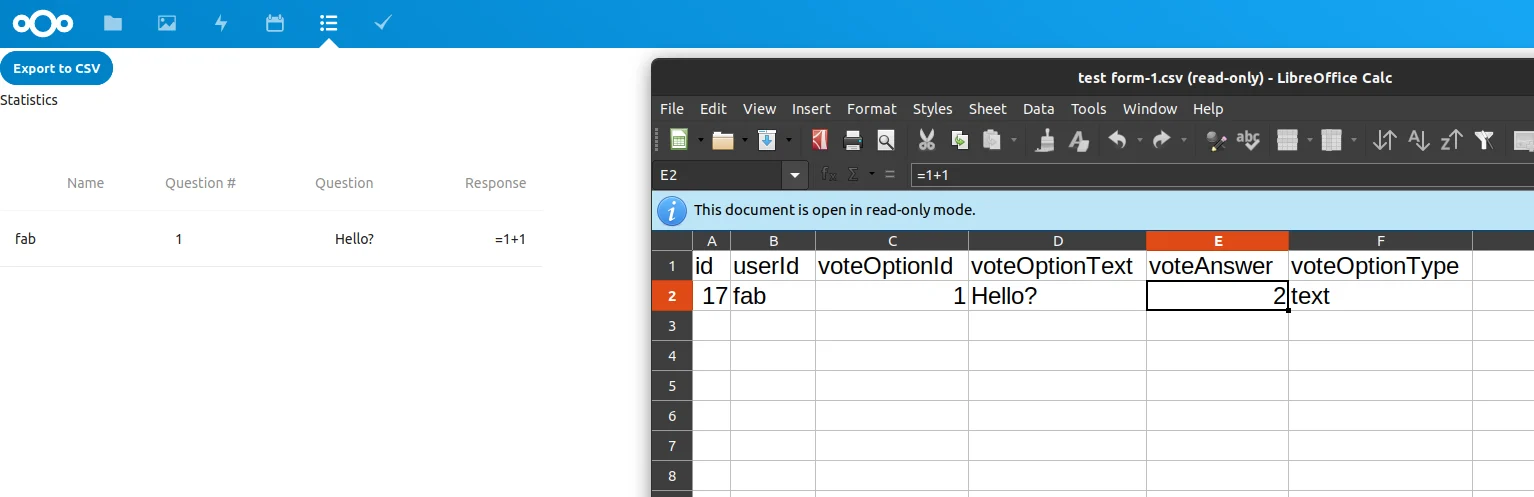
Remediation. To remediate it, ensure that no cells start with either of the previously mentioned operators (+,-,@,=) which initiate the formula parsing. If one of those characters is required to be the first in a cell, e.g. for a bullet points list inside an answer, it can be escaped by prepending a single quote. The single quote won't be shown in Excel or Calc but will prohibit the content from getting parsed as a formula.
Cheers, Fabian
References
[1] https://owasp.org/www-community/attacks/CSV_Injection [2] https://cwe.mitre.org/data/definitions/1236.html
Impact
A malicious actor who is in possession of a link to a Nextcloud Form can abuse this vulnerability to
- exfiltrate the other participants answers from the same sheet [1]
- read local files or execute code (in case the user who opens the document trusts the csv file and dismisses the warning). [2]
[1] https://www.notsosecure.com/data-exfiltration-formula-injection/ [2] https://www.contextis.com/en/blog/comma-separated-vulnerabilities
Not written yet. The AI write-up for this report has not been written yet. The Original tab links to the source.
How it worked
Impact
An attacker with a link to a form could exfiltrate other participants' answers, read local files, or execute code if the user opens the CSV and dismisses the warning.
What the attacker needed
Access to a form link; victim downloads and opens the CSV; victim dismisses the spreadsheet warning
The fix
The export should escape any cell starting with +, -, @, or = by prepending a single quote so the content is not parsed as a formula.
How it was found
- Create a new form with a Short Response or Long Response field and save it.
- Visit the form link and submit a formula as the answer.
- Download the CSV and open it in Excel or LibreOffice Writer.
Explained by bugbounty.wiki with AI from the original and checked against quotes from it; it can still be wrong. Read the original before relying on a detail.
Not written yet. The AI write-up for this report has not been written yet. The Original tab links to the source.
A CSV file is a simple spreadsheet format. Spreadsheet programs like Excel treat any cell starting with =, +, -, or @ as a formula and run it. Because the app saved user answers without escaping those characters, a malicious answer became a formula that could run when someone opened the exported file.
What is RCE?
Running the attacker's code on the target's servers: through command or code injection, unsafe deserialisation or template injection.


