Mail contact autocomplete bypasses administrator-configured user enumeration restrictions and expose member information outside the intended scope
The Mail app's contact autocomplete endpoint did not enforce the administrator's group-based user enumeration restriction, only a broader sharing setting. An authenticated user could therefore enumerate users outside their allowed groups, obtaining identifiers, display names, and email addresses.

- Triaged in 4 hours
- Fixed in 3 months
- Paid in 6 months
- Disclosed after 6 months
Summary by the program
https://github.com/nextcloud/security-advisories/security/advisories/GHSA-vq3v-jv6f-6xp2
The report
Summary:
An authenticated user can enumerate other users' directory entries, including ID, display name, and email address, even when the instance is configured to restrict user enumeration to same-group or exact-match scenarios.
The attacker-controlled entry point is the partial search term sent to ContactIntegrationController::autoComplete() on the email composition page. That handler forwards the term into ContactsIntegration::getContactsWithName(), which calls doSearch(). doSearch() only checks core.shareapi_allow_share_dialog_user_enumeration; it does not apply the stricter share-enumeration controls that the product uses elsewhere, such as shareapi_restrict_user_enumeration_to_group and the related full-match restrictions.
Steps To Reproduce (including PoC):
I used "github.com/juliusknorr/nextcloud-docker-dev" as test environment.
- Nextcloud version: Nextcloud Hub 26 Winter (34.0.0 dev)
- Nextcloud Mail version: 5.7.4
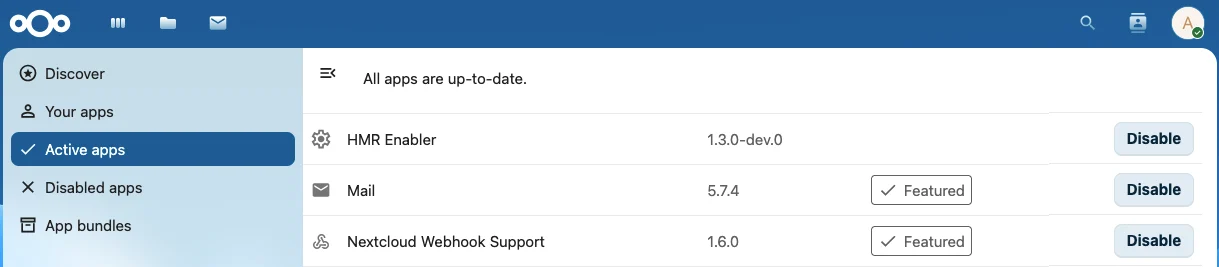
- Login as admin and add Mail app.
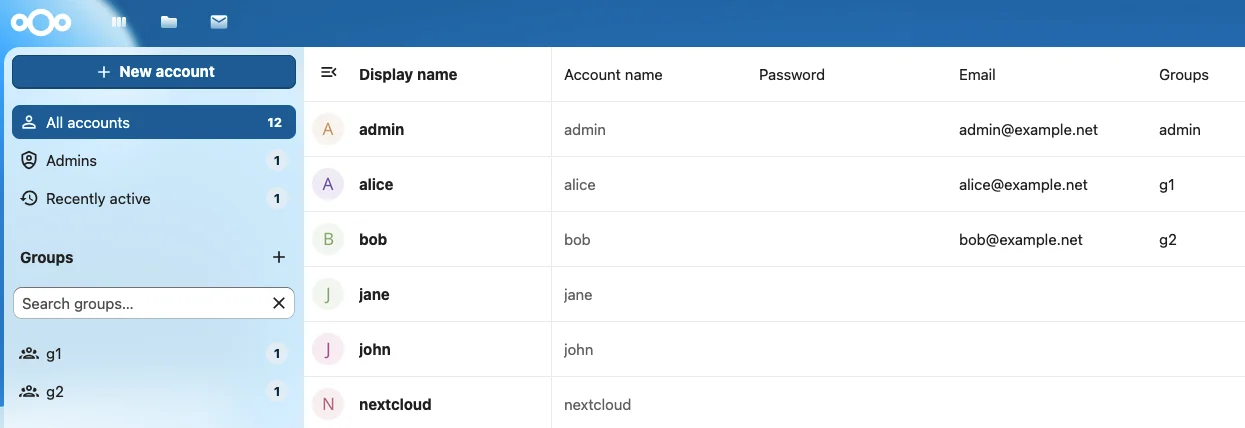
- Create two groups (e.g., g1, g2) and assign one user to each group (e.g., Alice to g1 and Bob to g2).
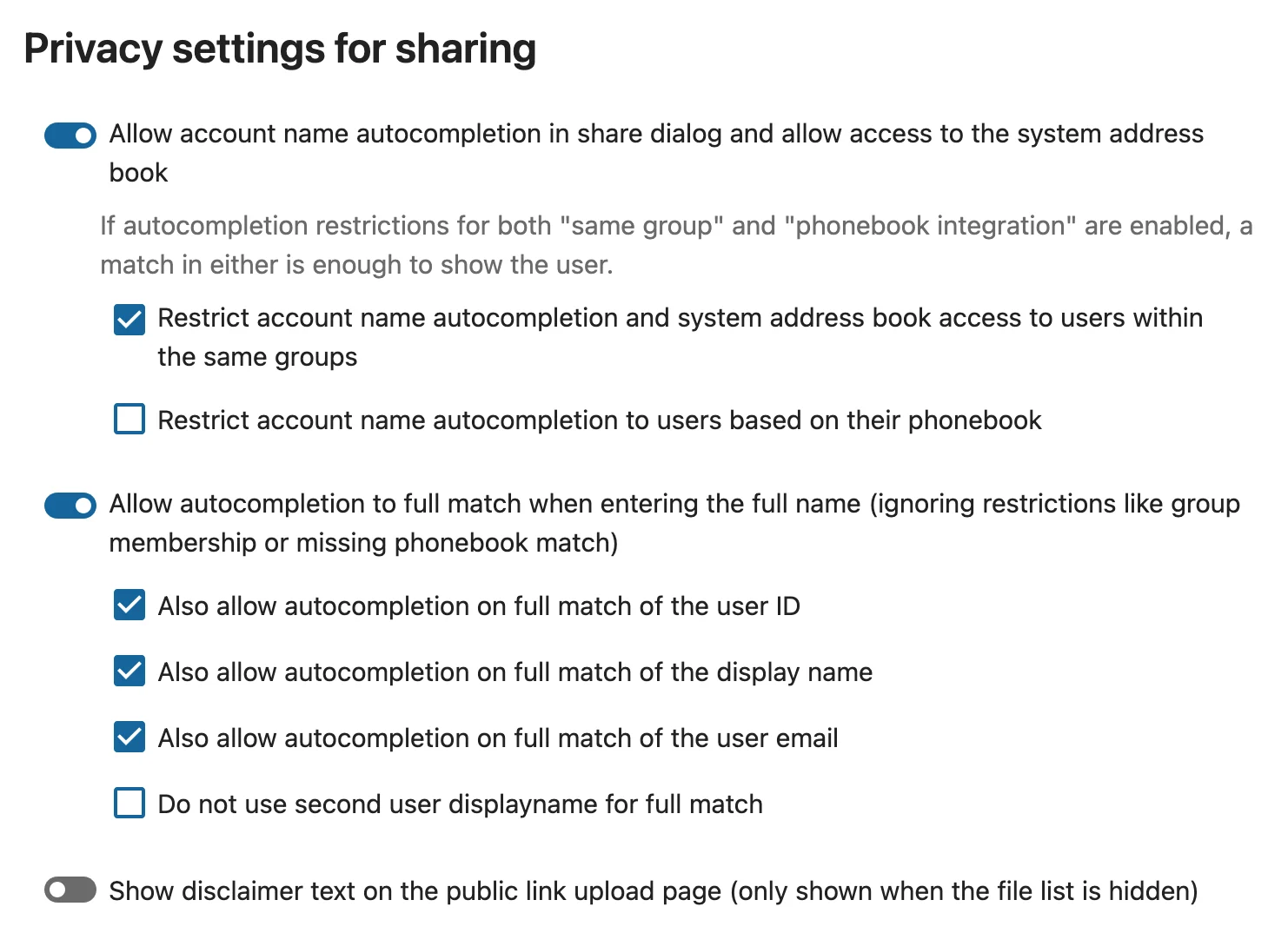
- Set "Restrict account name autocompletion and system address book access to users within the same groups" as checked at
Administration Settings > Sharing > Privacy settings for sharing. This should make it so that Alice can’t find Bob.
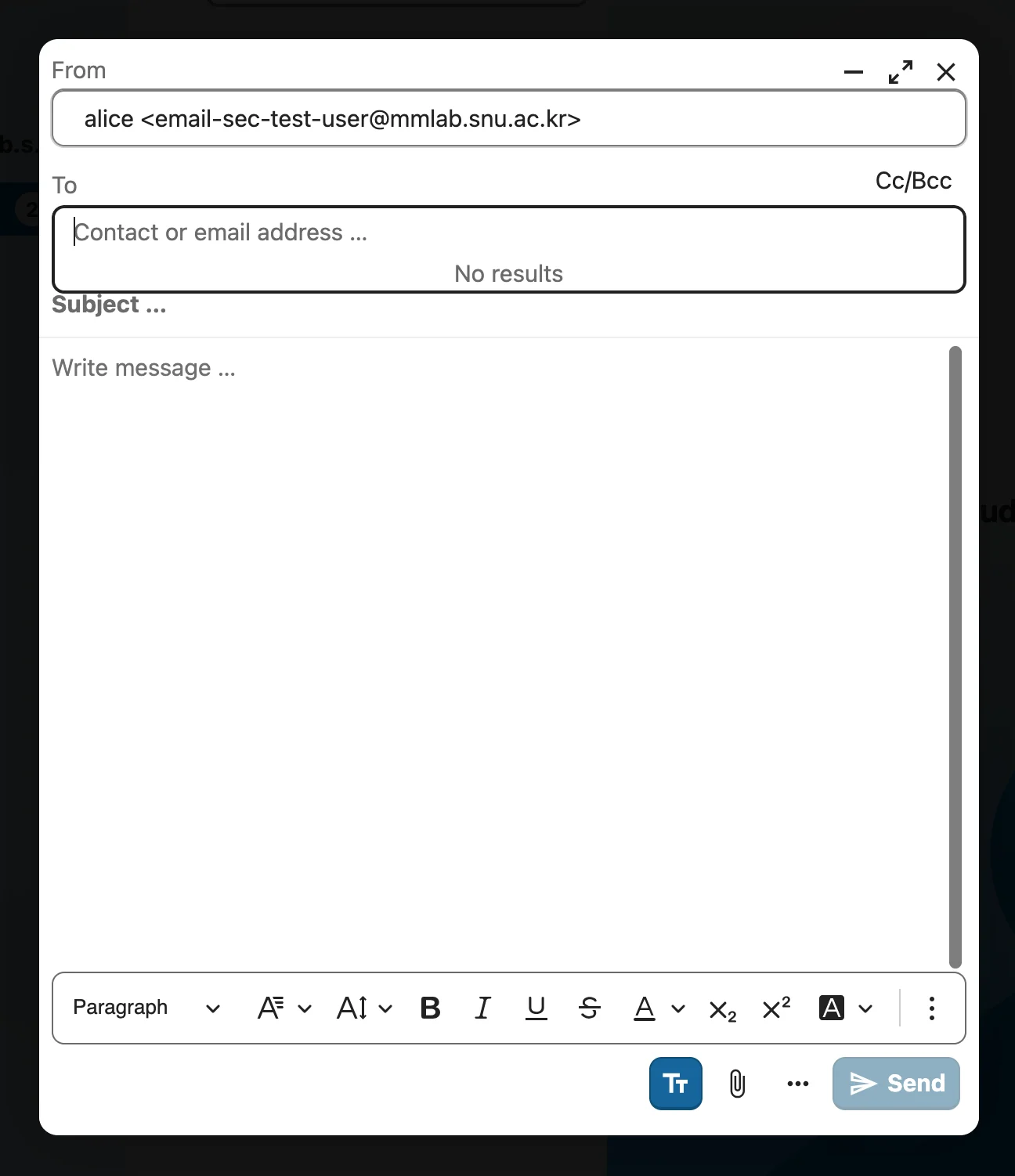
- Logout and login as Alice. Go to the Mail tab and link any email service. Click
New message.
- Open Devtools offered by browser (I used Firefox). Type
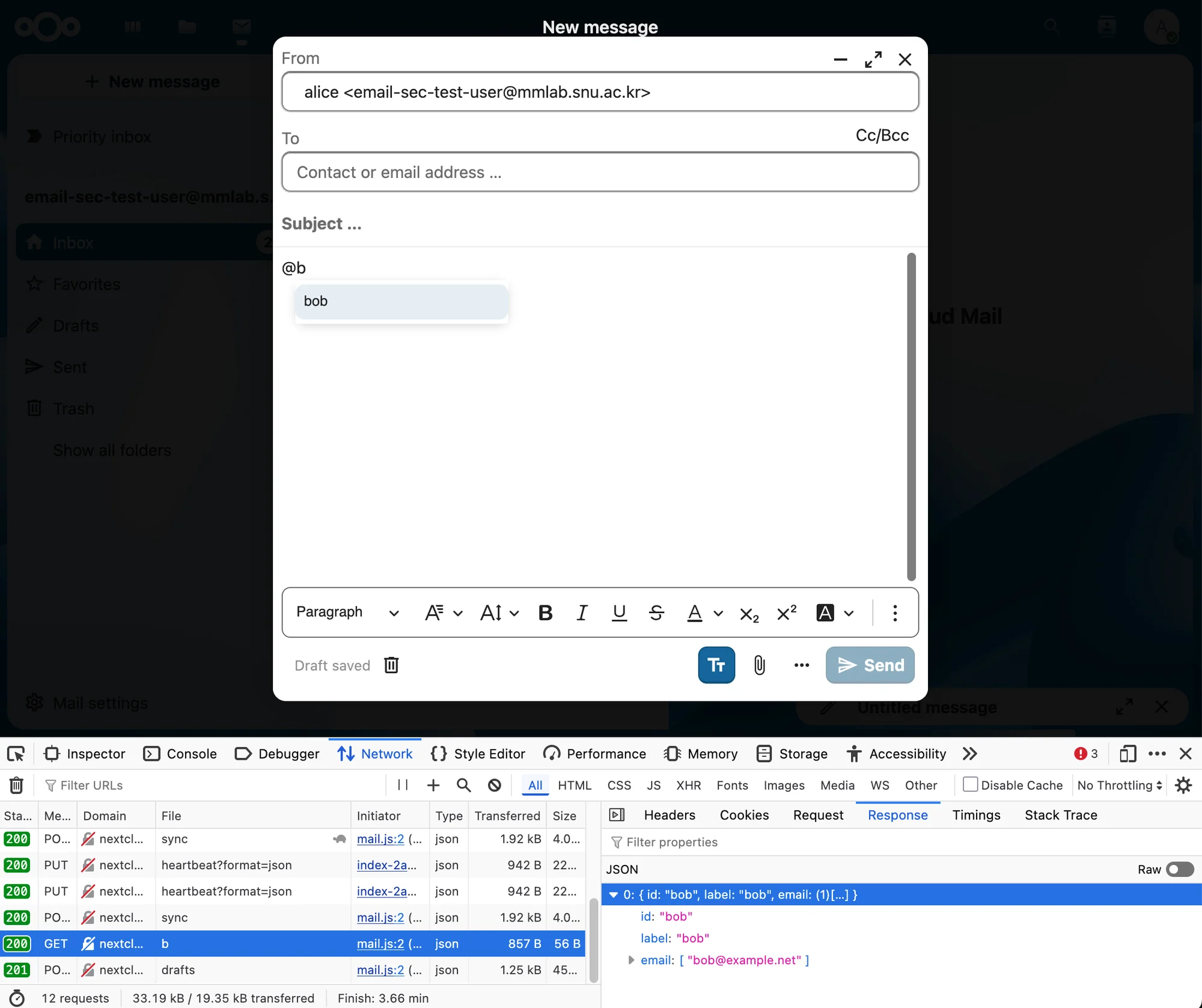
@bor something like@{keyword}inWrite message ...textarea block. The members of unauthorized group will be enumerated in the Response from HTTPGET http://nextcloud.local/index.php/apps/mail/api/contactIntegration/autoComplete/{keyword}query.
Impact
An authenticated user can bypass an administrator-configured user-enumeration restriction and enumerate users outside their allowed group scope, disclosing other groups' user identifiers, display names, and email addresses.
Context
Nextcloud Mail is the mail client app for Nextcloud, and one of its features is contact autocompletion while composing a message. When a user types a partial name or address into the message body, the client asks the server for matching contacts so it can offer suggestions. In the Mail app this request is handled by ContactIntegrationController::autoComplete(), which forwards the search term to ContactsIntegration::getContactsWithName(), which in turn calls doSearch().
Nextcloud administrators have sharing privacy settings that are meant to limit who can be found through user enumeration. One of these, "Restrict account name autocompletion and system address book access to users within the same groups", is supposed to stop a user in one group from discovering users in another group. The report shows that the Mail autocomplete path does not honour that restriction.
Setup
The researcher used the github.com/juliusknorr/nextcloud-docker-dev environment as the test bed, with these versions:
| Component | Version |
|---|---|
| Nextcloud | Hub 26 Winter (34.0.0 dev) |
| Nextcloud Mail | 5.7.4 |
Two accounts and two groups are needed: Alice in group g1 and Bob in group g2. The administrator must enable the Mail app and turn on the same-group enumeration restriction. The attacker account (Alice) logs in to the Mail app and links any email service before opening the compose view.
Finding it
The entry point is the partial search term sent to ContactIntegrationController::autoComplete() on the email composition page. That handler passes the term into ContactsIntegration::getContactsWithName(), which calls doSearch(). The problem is in what doSearch() checks: it only consults core.shareapi_allow_share_dialog_user_enumeration. It does not apply the stricter share-enumeration controls used elsewhere in the product, such as shareapi_restrict_user_enumeration_to_group and the related full-match restrictions.
So even with the same-group restriction enabled, the Mail autocomplete endpoint still returns directory entries for users outside the caller's group, including ID, display name and email address. That is a privacy violation: the administrator's configured scope is bypassed by a different code path that reads the same directory data.
Exploitation
Step 1: Enable the Mail app
Log in as admin and add the Mail app.
Step 2: Create two groups with one user each
Create two groups (for example g1 and g2) and assign one user to each: Alice to g1 and Bob to g2.
Step 3: Turn on the same-group restriction
At Administration Settings > Sharing > Privacy settings for sharing, check "Restrict account name autocompletion and system address book access to users within the same groups". With this in place, Alice should not be able to find Bob.
Step 4: Log in as Alice and open the compose view
Log out and log in as Alice. Go to the Mail tab, link any email service, and click New message.
Step 5: Trigger autocomplete and read the response
Open the browser developer tools (the researcher used Firefox). In the Write message ... textarea, type @b or something like @{keyword}. The members of the unauthorised group are enumerated in the response to the HTTP request:
GET http://[redacted]/index.php/apps/mail/api/contactIntegration/autoComplete/{keyword}
The members of the unauthorised group are enumerated in the response, which the same-group setting was supposed to hide.
Root cause
The Mail app's contact search path applies only the broad core.shareapi_allow_share_dialog_user_enumeration check. It does not consult shareapi_restrict_user_enumeration_to_group or the related full-match restrictions that the rest of the product uses to enforce the administrator's enumeration policy. Because the Mail autocomplete endpoint is a separate code path into the same user directory, the stricter policy is never applied there, and the endpoint returns entries the administrator intended to hide.
Impact
An authenticated user can bypass an administrator-configured user-enumeration restriction and enumerate users outside their allowed group scope. The disclosed data includes other groups' user identifiers, display names and email addresses. The attacker is an authenticated user of the Mail app, and the instance has the same-group restriction enabled.
Fix
The report does not describe the fix. The program's summary links to the Nextcloud security advisory GHSA-vq3v-jv6f-6xp2, which is where the remediation is recorded.
Variants to test
- Other Mail app endpoints that take a search term, such as contact or recipient lookups outside the compose autocomplete, and check whether they apply the same-group and full-match settings.
- Other Nextcloud apps that read the system address book or user directory (calendar attendee search, talk participant search, file sharing dialogs) and compare their enumeration checks against the sharing privacy settings.
- Instances with only the full-match restriction enabled rather than the same-group restriction, to see whether the Mail path honours that variant.
- Different keyword lengths and prefixes, including single characters and full names, to see whether any length or format triggers a stricter check.
A positive result is a response from the endpoint that contains user identifiers, display names or email addresses for accounts the caller should not be able to see under the configured policy.
Hunting notes
This kind of bug tends to hide in secondary features that query the same user directory as the main sharing dialog but were written against an older or narrower policy check. During recon, look for apps that offer autocomplete or search over users and contacts, then compare the settings they consult with the administrator-facing privacy controls. The signal is a settings page that promises a restriction while a different feature still returns results outside it. The researcher configured the restriction as an administrator, logged in as a user in a separate group, and showed the out-of-scope entries in the autocomplete response.
Difficulty
beginner
The bug requires only a configured instance, two accounts and a browser, and the proof is a single autocomplete request whose response shows out-of-scope users.
What happened, in plain words
Nextcloud is a piece of software that lets an organisation run its own file storage, calendars, contacts and email on a server it controls. Nextcloud Mail is an add-on app that turns Nextcloud into a webmail client, so people can read and send email from inside Nextcloud.
One convenience feature of Nextcloud Mail is contact autocompletion. When you write an email and type part of a name or an email address, the app suggests matching people from the organisation's user directory, so you do not have to remember full addresses. The user directory is the list of all accounts on the Nextcloud server, with details such as each person's account ID, display name and email address.
Administrators can restrict who is allowed to find whom. There is a setting called "Restrict account name autocompletion and system address book access to users within the same groups". When it is switched on, a user in one group should not be able to discover users in another group through autocompletion or the shared address book. A group here is simply a collection of user accounts, like a team or a department.
The researcher found that the autocompletion in Nextcloud Mail ignores that restriction. A logged-in user in one group can type a partial name in the email composer and receive suggestions for people in other groups, including their account ID, display name and email address. The administrator's privacy setting is bypassed by a different part of the product that reads the same user directory but checks a weaker rule.
This kind of issue is a privacy violation: information that the administrator intended to keep out of reach is exposed to users who should not see it. The researcher demonstrated it with two accounts, two groups and a browser.
Background you need
What Nextcloud and Nextcloud Mail are
Nextcloud is a self-hosted collaboration platform: an organisation installs it on its own server and its members use it through a web browser. Nextcloud Mail is an app inside Nextcloud that provides an email client in the browser. It can connect to an email service so that the user can read and send messages.
What an API is
An API (application programming interface) is a way for one piece of software to ask another for data or actions. A useful everyday comparison is a restaurant menu: you do not walk into the kitchen, you choose an item from the menu and the kitchen prepares it. In a web application, the browser (the page you see) sends requests to the server behind the scenes, and the server answers with data. Those requests often go to URLs that contain /api/, which is a common sign that the browser is talking to the server's API rather than loading a normal web page.
What autocompletion is
Autocompletion is the suggestion list that appears while you type. In an email composer, typing @ followed by a few letters asks the server: "which contacts match these letters?" The server replies with a list, and the browser shows it as a dropdown. The feature is convenient, but it means the server must search the user directory on demand, and that search is exactly where privacy rules need to be enforced.
What user enumeration is
Enumeration means listing things one by one. User enumeration means finding out which user accounts exist on a system, and often extra details about them. On its own, knowing that an account exists can seem harmless, but it helps attackers: they can build a list of valid usernames for password guessing, or learn the names and email addresses of staff. That is why administrators are given settings to limit it.
What the privacy settings do
Nextcloud has sharing privacy settings that control user enumeration. Two of the settings named in the report are:
core.shareapi_allow_share_dialog_user_enumeration: a broad switch that allows or disallows searching for users in the sharing dialog.shareapi_restrict_user_enumeration_to_group: a stricter switch that limits user search to people in the same groups as the person searching.
There are also related full-match restrictions, which only reveal a user when the search term matches exactly rather than partially. The report says the Mail autocompletion path checks only the first, broad setting and does not apply the stricter ones.
What the vulnerable code path is
When a user types a partial term in the Mail composer, the browser sends it to a handler called ContactIntegrationController::autoComplete(). That handler passes the term to ContactsIntegration::getContactsWithName(), which calls doSearch(). The problem is inside doSearch(): it consults only core.shareapi_allow_share_dialog_user_enumeration, not shareapi_restrict_user_enumeration_to_group or the full-match restrictions. So the administrator's same-group policy is never applied on this path, and the endpoint returns directory entries for users outside the caller's group.
Setting up the test
The researcher used the github.com/juliusknorr/nextcloud-docker-dev environment as the test bed. Docker is a tool for running pre-packaged software in isolated containers, and this project provides a ready-made Nextcloud setup, which saves the researcher from installing everything by hand.
The versions in use were:
| Component | Version |
|---|---|
| Nextcloud | Hub 26 Winter (34.0.0 dev) |
| Nextcloud Mail | 5.7.4 |
Two accounts and two groups are needed: Alice in group g1 and Bob in group g2. The administrator must enable the Mail app and turn on the same-group enumeration restriction. The attacker account (Alice) needs to be able to use the Mail app and link a mail service so that the compose view is reachable.
Reproducing it step by step
Step 1: Enable the Mail app
Log in as admin and add the Mail app.
This step installs the Mail app, which contains the autocompletion feature.
Step 2: Create two groups with one user each
Create two groups (for example g1 and g2) and assign one user to each: Alice to g1 and Bob to g2.
Two separate groups are used so that the same-group restriction has something to enforce.
Step 3: Turn on the same-group restriction
At Administration Settings > Sharing > Privacy settings for sharing, check "Restrict account name autocompletion and system address book access to users within the same groups". With this in place, Alice should not be able to find Bob.
This is the control the researcher is testing: the administrator has explicitly said that users should only find people in their own groups.
Step 4: Log in as Alice and open the compose view
Log out and log in as Alice. Go to the Mail tab, link any email service, and click New message.
Logging in as Alice puts the researcher in the position of an ordinary user in g1, which is the attacker's viewpoint.
Step 5: Trigger autocomplete and read the response
Open the browser developer tools (the researcher used Firefox). In the Write message ... textarea, type @b or something like @{keyword}. The members of the unauthorised group are enumerated in the response to the HTTP request:
GET http://[redacted]/index.php/apps/mail/api/contactIntegration/autoComplete/{keyword}
This line is an HTTP request, the format a browser uses to ask a server for something. GET is the method used to retrieve data. The URL points at the Nextcloud server ([redacted] is the local test hostname), into the Mail app's API (/index.php/apps/mail/api/), to the contact integration autocomplete endpoint (contactIntegration/autoComplete/), and finally the search term ({keyword}). The {keyword} part is a placeholder: it is replaced by whatever partial term the user typed after @, such as b.
Developer tools are the built-in panel in browsers that shows the requests a page makes and the responses it receives. Opening them lets the researcher see the raw answer from the server, rather than only the suggestion dropdown. The dropdown might look normal, but the response behind it is what proves which users were returned.
The members of the unauthorised group are enumerated in the response, which the same-group setting was supposed to hide.
Why it works
The Mail app's contact search path applies only the broad core.shareapi_allow_share_dialog_user_enumeration check. It does not consult shareapi_restrict_user_enumeration_to_group or the related full-match restrictions that the rest of the product uses to enforce the administrator's enumeration policy. Because the Mail autocomplete endpoint is a separate code path into the same user directory, the stricter policy is never applied there, and the endpoint returns entries the administrator intended to hide.
A useful comparison is a building with a main reception desk that checks visitors against a list, and a side door that only checks whether the visitor has any badge at all. The administrator configured the main desk's rules, but the side door was built separately and never learned about them. Both doors lead to the same rooms, so the weaker door defeats the stronger rule.
Impact
An authenticated user can bypass an administrator-configured user-enumeration restriction and enumerate users outside their allowed group scope. The disclosed data includes other groups' user identifiers, display names and email addresses. The attacker is an authenticated user of the Mail app, and the instance has the same-group restriction enabled.
Fix
The report does not describe the fix. The program's summary links to the Nextcloud security advisory GHSA-vq3v-jv6f-6xp2, which is where the remediation is recorded.
Variants to test
- Other Mail app endpoints that take a search term, such as contact or recipient lookups outside the compose autocomplete, and check whether they apply the same-group and full-match settings.
- Other Nextcloud apps that read the system address book or user directory (calendar attendee search, talk participant search, file sharing dialogs) and compare their enumeration checks against the sharing privacy settings.
- Instances with only the full-match restriction enabled rather than the same-group restriction, to see whether the Mail path honours that variant.
- Different keyword lengths and prefixes, including single characters and full names, to see whether any length or format triggers a stricter check.
A positive result is a response from the endpoint that contains user identifiers, display names or email addresses for accounts the caller should not be able to see under the configured policy.
Hunting notes
This kind of bug tends to hide in secondary features that query the same user directory as the main sharing dialog but were written against an older or narrower policy check. During recon, look for apps that offer autocomplete or search over users and contacts, then compare the settings they consult with the administrator-facing privacy controls. The signal is a settings page that promises a restriction while a different feature still returns results outside it. The researcher configured the restriction as an administrator, logged in as a user in a separate group, and showed the out-of-scope entries in the autocomplete response.
Difficulty
beginner
The bug requires only a configured instance, two accounts and a browser, and the proof is a single autocomplete request whose response shows out-of-scope users.
Glossary
- API: a defined way for one piece of software to ask another for data or actions, often over URLs containing
/api/. - Authentication: proving who you are, usually by logging in with a username and password.
- Autocompletion: a suggestion list shown while typing, produced by asking the server for matching entries.
- Bounty: a payment made by a bug bounty program to a researcher who reports a valid vulnerability.
- Browser developer tools: a built-in panel in browsers that shows network requests, responses and other technical details of a page.
- Code path: a particular route through a program's code that handles a specific request or action.
- Contact autocompletion: the feature in an email composer that suggests contacts matching a partial name or address.
- CVSS: a standard scoring system for the severity of a vulnerability, producing a number such as 4.3.
- Directory entry: a record in the user directory describing an account, such as its ID, display name and email address.
- Docker: a tool for running software in isolated, pre-packaged containers.
- Endpoint: a specific URL on a server that accepts requests and returns data or performs an action.
- Enumeration: listing items one by one; user enumeration means discovering which user accounts exist and their details.
- Full-match restriction: a privacy rule that only reveals a user when the search term matches exactly, rather than partially.
- GET: the HTTP method used to retrieve data from a server.
- Group: a collection of user accounts, such as a team or department, used to organise permissions.
- HTTP: the protocol browsers and servers use to exchange requests and responses.
- HTTP request: a message from a browser or client to a server asking for data or an action, such as a
GETrequest to a URL. - HTTP response: the server's answer to a request, containing status information and often data.
- Nextcloud: a self-hosted collaboration platform for files, calendars, contacts and more.
- Nextcloud Mail: an app inside Nextcloud that provides a webmail client.
- Privacy violation: exposure of information that should have been kept private or out of scope.
- Same-group restriction: a privacy rule that limits user search to people in the same groups as the person searching.
- Severity: a rating of how serious a vulnerability is, often expressed with CVSS.
- System address book: the shared directory of user accounts and their details that Nextcloud features can search.
- User directory: the list of all accounts on a server, with details such as IDs, display names and email addresses.
- Vulnerability: a weakness in software that allows someone to do something the designers did not intend, such as seeing data they should not see.



