Memory Leak in OCUtil.dll library in Desktop client can lead to DoS
The IsChildFile function in OCUtil.dll allocates memory but does not always free it, causing a memory leak. An attacker could repeatedly trigger this function to exhaust memory and potentially crash the process, leading to denial of service.

- Triaged in 4 days
- Fixed in 14 months
- Paid in 15 months
- Disclosed after 14 months
The function IsChildFile(const wchar_t* rootFolder, const wchar_t* file) in FileUtil.cpp allocates memory on line 42 and fails to free it.
The following PoC code can provide evidence. The code and the PoC executable is attached to this report. Also OCUtils.dll and OCUtils_x64.dll library which is delivered with Nextclound Windows installer was included in the attachment.
Steps to reproduce:
- Launch tests.exe (see attachment) or compile the attached VS2017 solution and launch the resulted executable
- Make sure OCUtil_x64 library is in the System library path
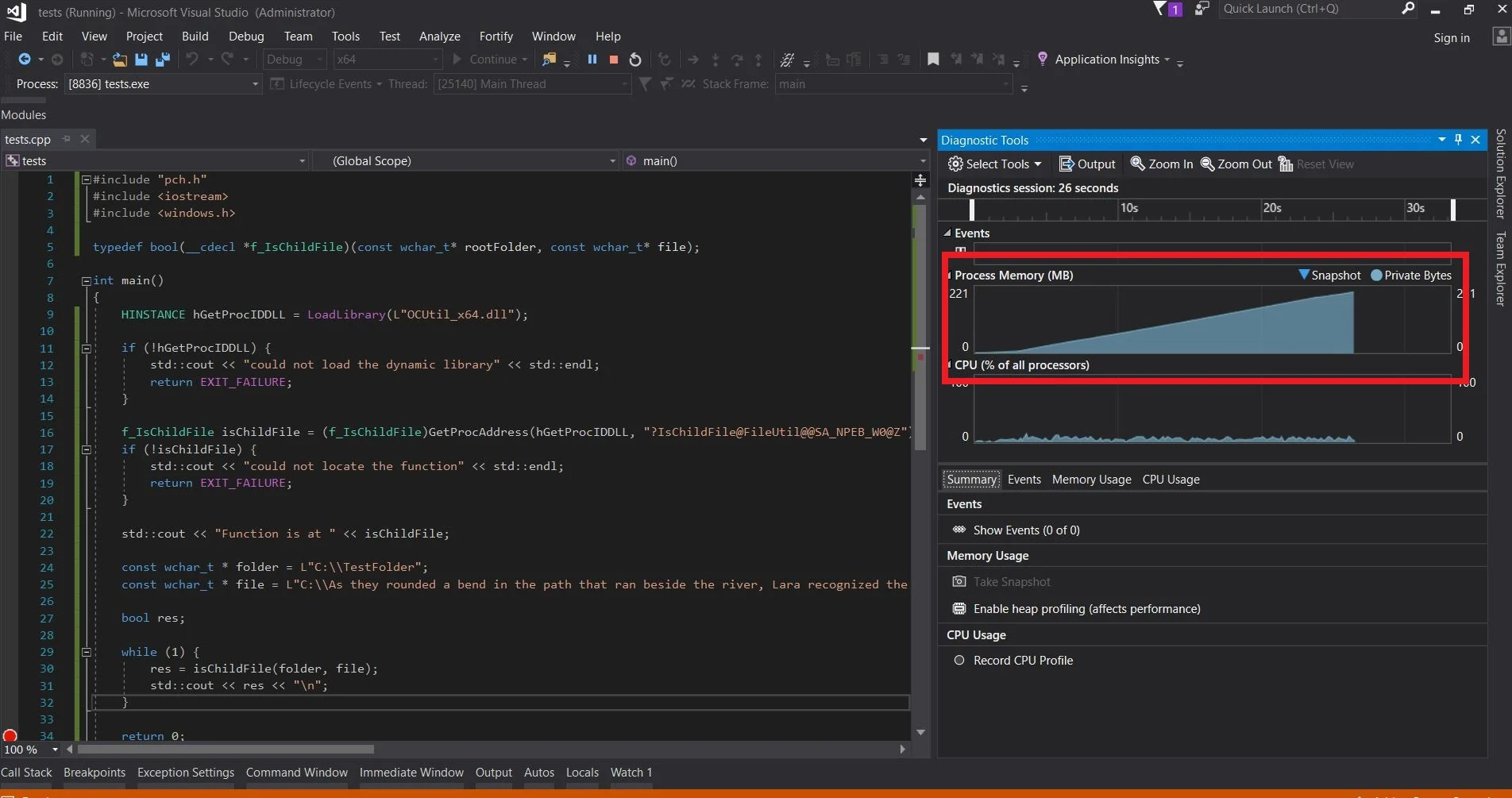
- Open Windows Task Manager and watch how the amount of memory for tests.exe process is increasing.
A Visual Studio debugging session screenshot is also attached whre you can see the memory in use.
#include "pch.h" #include <iostream> #include <windows.h>
typedef bool(__cdecl f_IsChildFile)(const wchar_t rootFolder, const wchar_t* file);
int main() { HINSTANCE hGetProcIDDLL = LoadLibrary(L"OCUtil_x64.dll");
if (!hGetProcIDDLL) {
	std::cout << "could not load the dynamic library" << std::endl;
	return EXIT_FAILURE;
}

f_IsChildFile isChildFile = (f_IsChildFile)GetProcAddress(hGetProcIDDLL, "?IsChildFile@FileUtil@@SA_NPEB_W0@Z");
if (!isChildFile) {
	std::cout << "could not locate the function" << std::endl;
	return EXIT_FAILURE;
}

std::cout << "Function is at " << isChildFile;

const wchar_t * folder = L"C:\\TestFolder";
const wchar_t * file = L"C:\\As they rounded a bend in the path that ran beside the river, Lara recognized the silhouette of a fig tree atop a nearby hill. The weather was hot and the days were long. The fig tree was in full leaf, but not yet bearing fruit. Soon Lara spotted other";

bool res;

while (1) {
	res = isChildFile(folder, file);
	std::cout << res << "\n";
}

return 0;
}
Impact
Memory leaks have two common and sometimes overlapping causes:
-
Error conditions and other exceptional circumstances.
-
Confusion over which part of the program is responsible for freeing the memory.
In this case, the memory allocated in FileUtil.cpp at line 42 is not always freed or returned by the function.
Most memory leaks result in general software reliability problems, but if an attacker can intentionally trigger a memory leak, the attacker may be able to launch a denial of service attack (by crashing the program) or take advantage of other unexpected program behavior resulting from a low memory condition
The function IsChildFile(const wchar_t* rootFolder, const wchar_t* file) is part of OCUtil.dll library which is delivered with Nextcloud Windows installer and it is loaded in explorer.exe process in order to provide context menu functionalities. By using the context menu functionality multiple times, explorer.exe could pottentialy run out of memory.
Attachments
Not written yet. The AI write-up for this report has not been written yet. The Original tab links to the source.
How it worked
Root cause
Likely, the function allocates memory on line 42 but does not always free it before returning.
Impact
An attacker could repeatedly trigger the leak through the context menu, potentially causing explorer.exe to run out of memory and leading to denial of service.
What the attacker needed
Nextcloud Windows client installed; Ability to call IsChildFile repeatedly
How it was found
- Launch the provided test executable or compile the attached Visual Studio solution and run it.
- Ensure the OCUtil_x64 library is in the system library path.
- Open Windows Task Manager and observe the memory usage of the test process increasing.
Explained by bugbounty.wiki with AI from the original and checked against quotes from it; it can still be wrong. Read the original before relying on a detail.
Not written yet. The AI write-up for this report has not been written yet. The Original tab links to the source.
A memory leak happens when a program asks the computer for memory but forgets to give it back. If this happens over and over, the program uses more and more memory until it runs out and crashes. Here, a function in a library used by the Windows file explorer leaks memory each time it is called.
What is DoS?
A request that exhausts resources or crashes a component. Many programs forbid testing it; reports usually show it from code, not by attacking.



